seats Lexus ES350 2016 s / Owner's Guide
[x] Cancel search | Manufacturer: LEXUS, Model Year: 2016, Model line: ES350, Model: Lexus ES350 2016Pages: 576, PDF Size: 8.3 MB
Page 117 of 576
ES350_OM_OM33B64U_(U)
1173-3. Adjusting the seats
3
Operation of each component
■To stop the position recall operation part-way through
Perform any of the following:
●Press the “SET” button.
●Press button “1”, “2” or “3”.
●Operate any of the seat adjustment switches (only cancels seat position recall).
●Operate the tilt and telescopic steering co ntrol switch (only cancels steering wheel
position recall).
■Seat positions that can be memorized ( P. 114)
The adjusted positions other than the position adjusted by lumbar support switch can be
recorded.
■Operating the driving position memory after turning the engine switch off
Driver’s seat:
Recorded seat positions can be activated up to 180 seconds after the driver’s door is
opened and another 60 seconds after it is closed again.
Front passenger’s seat:
Recorded seat positions can be activated up to 180 seconds after the front passenger’s
door is opened.
■In order to correctly use the dr iving position memory function
If a seat position is already in the furthest po ssible position and the seat is operated in the
same direction, the recorded position may be slightly different when it is recalled.
Each electronic key can be registered to recall your preferred driving position.
■Registering procedure
Record your driving position to button “1”, “2” or “3” before performing the
following:
Carry only the key you want to regist er, and then close the driver’s door.
If 2 or more keys are in the vehicle, the driving position cannot be recorded
properly.
Check that the shift lever is in P.
Turn the engine switch to IGNITION ON mode.
Recall the driving position that you want to record.
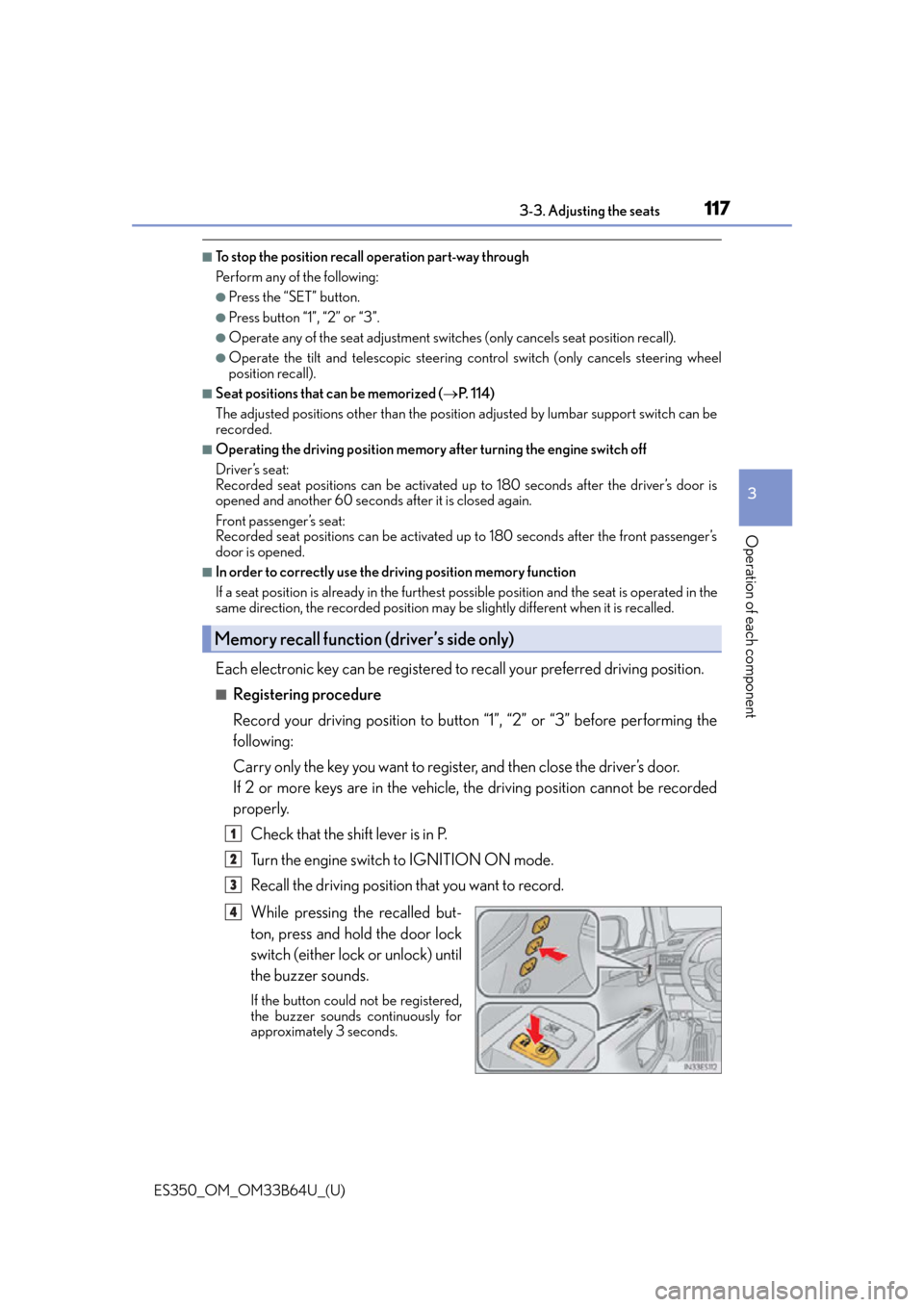
While pressing the recalled but-
ton, press and hold the door lock
switch (either lock or unlock) until
the buzzer sounds.
If the button could not be registered,
the buzzer sounds continuously for
approximately 3 seconds.
Memory recall function (driver’s side only)
1
2
3
4
Page 118 of 576
118
ES350_OM_OM33B64U_(U)3-3. Adjusting the seats
■Recall procedure
Carry the electronic key that has been registered to the driving position,
and then unlock and open the driver’s door using the smart access system
with push-button start or wireless remote control.
The driving position will move to the reco rded position (not including the steering
wheel). However, the seat will move to a po sition slightly behind the recorded posi-
tion in order to make entering the vehicle easier.
If the driving position is in a position th at has already been recorded, the seat and
outside rear view mirrors will not move.
Turn the engine switch to ACCESSORY mode or IGNITION ON mode,
or fasten a seat belt.
The seat and steering wheel will move to the recorded position.
■Cancelation procedure
Carry only the key you want to cancel and then close the driver’s door.
If 2 or more keys are in the vehicle, the driving position cannot be canceled
properly.
Turn the engine switch to IGNITION ON mode.
While pressing the “SET” button, press and hold the door lock switch
(either lock or unlock) unt il the buzzer sounds twice.
If the button could not be canceled, the buzzer sounds continuously for approxi-
mately 3 seconds.
■Recalling the driving position using the memory recall function
●Different driving positions can be registered for each electronic key. Therefore, the
driving position that is recalled may be different depending on the key being carried.
●If a door other than the driver’s door is unlocked with the smart access system with
push-button start, the driving position cannot be recalled. In this case, press the driving
position button which has been set.
■Customization
The unlock door settings of the memory re call function can be customized. (Customiz-
able features: P. 5 3 3 )
WA R N I N G
■Seat adjustment caution
Take care during seat adjustment so that th e seat does not strike the rear passenger or
squeeze your body against the steering wheel.
1
2
1
2
Page 119 of 576
119
ES350_OM_OM33B64U_(U)3-3. Adjusting the seats
3
Operation of each component
Head restraints
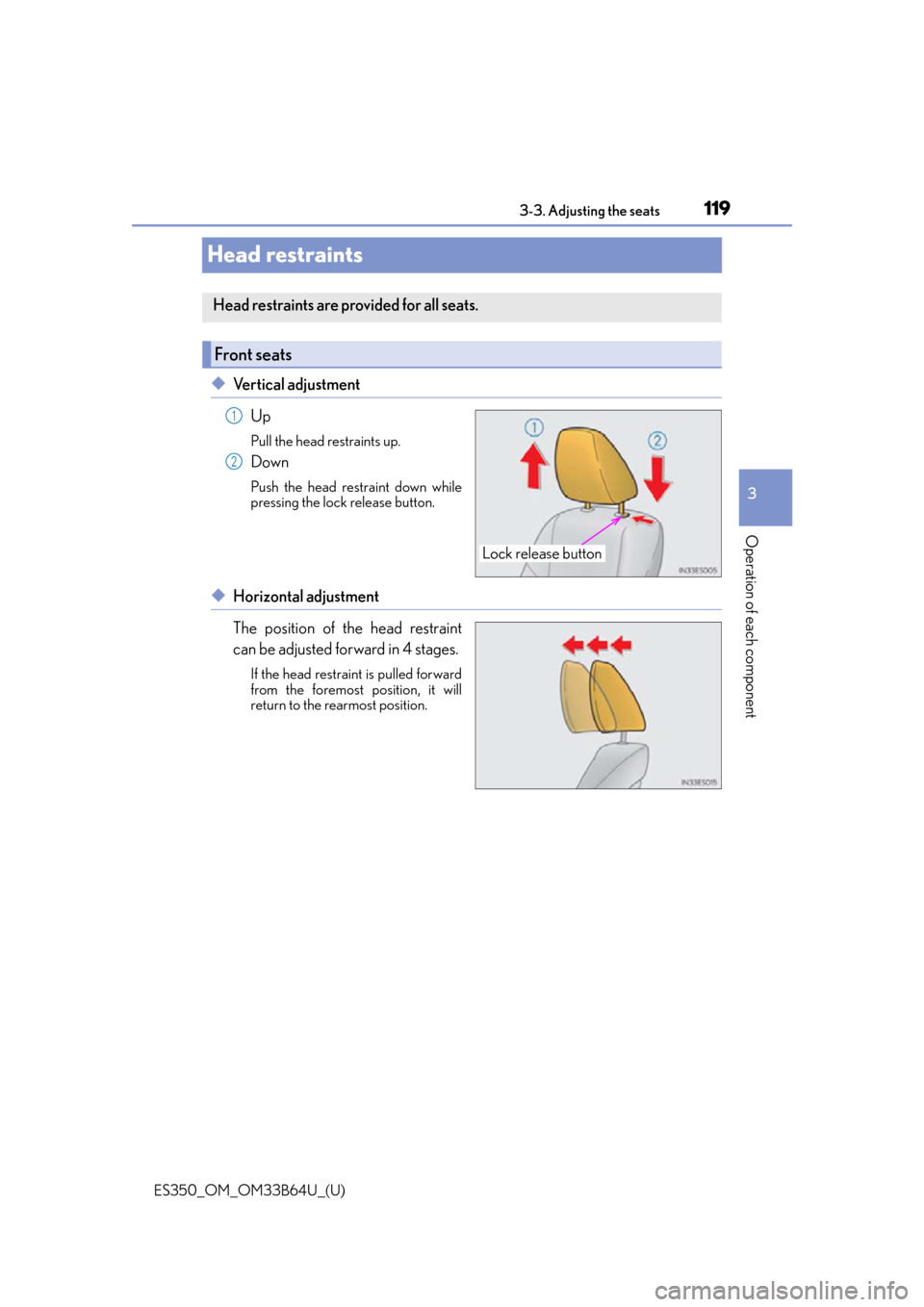
◆Vertical adjustment
Up
Pull the head restraints up.
Down
Push the head restraint down while
pressing the lock release button.
◆Horizontal adjustment
The position of the head restraint
can be adjusted forward in 4 stages.
If the head restraint is pulled forward
from the foremost position, it will
return to the rearmost position.
Head restraints are provided for all seats.
Front seats
Lock release button
1
2
Page 120 of 576
120
ES350_OM_OM33B64U_(U)3-3. Adjusting the seats
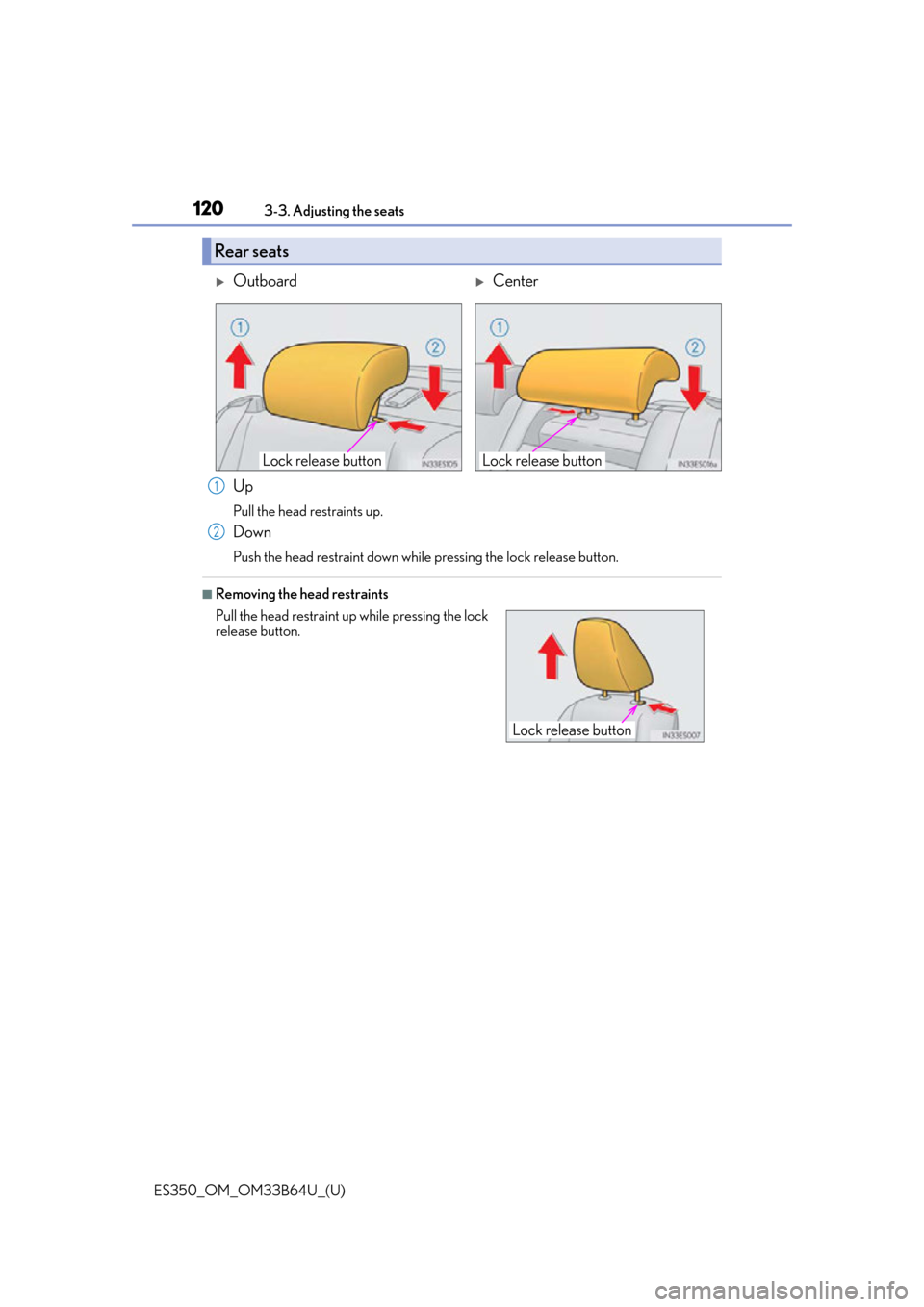
Up
Pull the head restraints up.
Down
Push the head restraint down while
pressing the lock release button.
■Removing the head restraints
Rear seats
OutboardCenter
Lock release buttonLock release button
Pull the head restraint up while pressing the lock
release button.
1
2
Lock release button
Page 121 of 576
ES350_OM_OM33B64U_(U)
1213-3. Adjusting the seats
3
Operation of each component
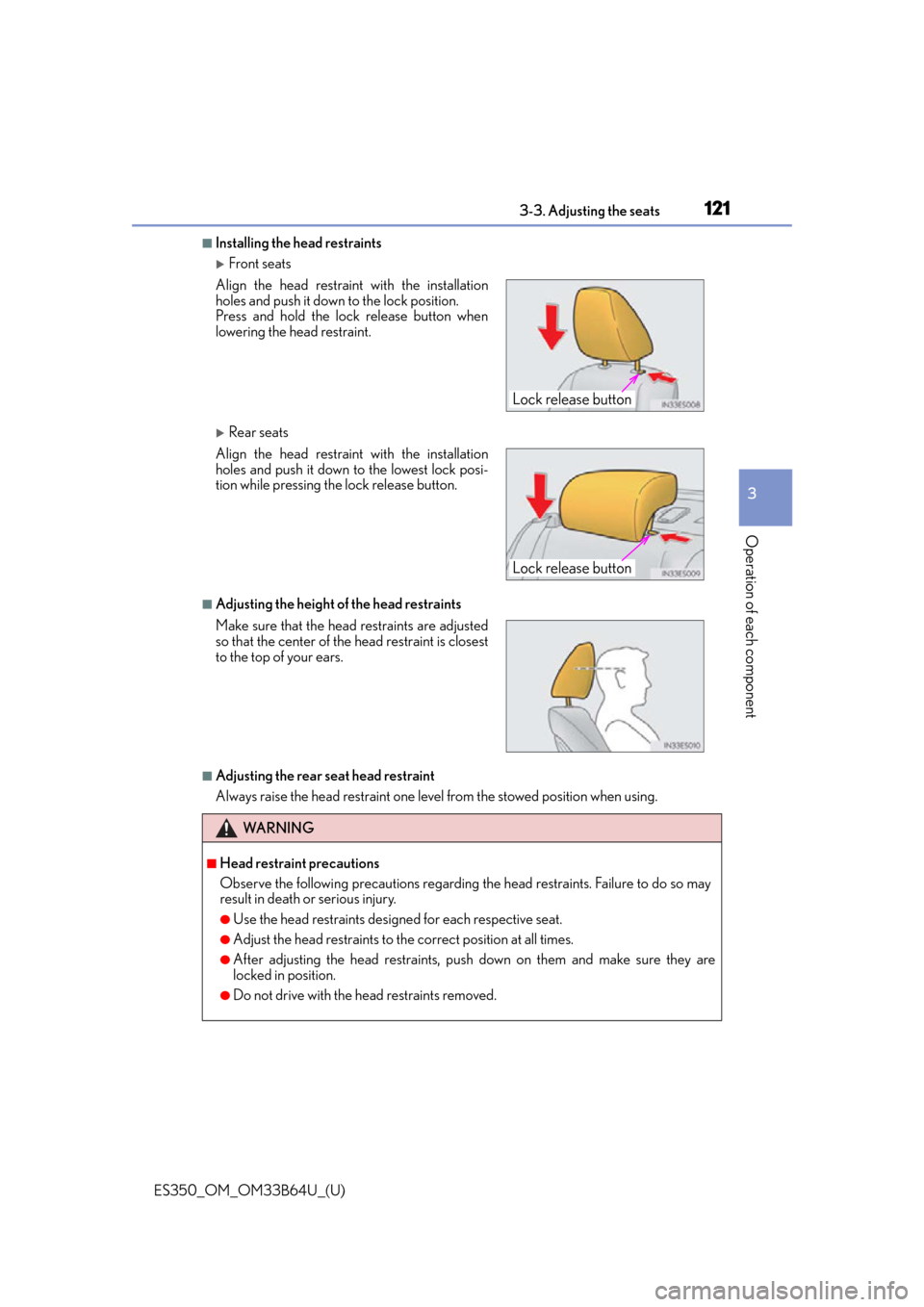
■Installing the head restraints
Front seats
Rear seats
■Adjusting the height of the head restraints
■Adjusting the rear seat head restraint
Always raise the head restraint one level from the stowed position when using. Align the head restrain t with the installation
holes and push it down to the lock position.
Press and hold the lock release button when
lowering the head restraint.
Align the head restrain t with the installation
holes and push it down to the lowest lock posi-
tion while pressing the lock release button.
Make sure that the head restraints are adjusted
so that the center of the head restraint is closest
to the top of your ears.
WA R N I N G
■Head restraint precautions
Observe the following precautions regarding the head restraints. Failure to do so may
result in death or serious injury.
●Use the head restraints designed for each respective seat.
●Adjust the head restraints to the correct position at all times.
●After adjusting the head restraints, push down on them and make sure they are
locked in position.
●Do not drive with the head restraints removed.
Lock release button
Lock release button
Page 147 of 576
ES350_OM_OM33B64U_(U)
1474-1. Before driving
4
Driving
WA R N I N G
■Things that must not be carried in the trunk
The following things may cause a fire if loaded in the trunk:
●Receptacles containing gasoline
●Aerosol cans
■Storage precautions
Observe the following precautions.
Failure to do so may prevent the pedals from being depressed properly, may block the
driver’s vision, or may result in items hittin g the driver or passengers, possibly causing
an accident.
●Stow cargo and luggage in the trunk whenever possible.
●Do not place cargo or luggage in or on the following locations.
• At the feet of the driver
• On the front passenger or rear seats (when stacking items)
• On the package tray
• On the instrument panel
•On the dashboard
• In front of the navigation system screen or Lexus Display Audio system screen
●Secure all items in th e occupant compartment.
■Capacity and distribution
●Do not exceed the maximum axle weight ra ting or the total vehicle weight rating.
●Even if the total load of occupant’s weight and the cargo load is less than the total load
capacity, do not apply the load unevenly. Improper loading may cause deterioration
of steering or braking control which may cause death or serious injury.
Page 367 of 576
ES350_OM_OM33B64U_(U)
3676-1. Using the air conditioning system and defogger
6
Interior features
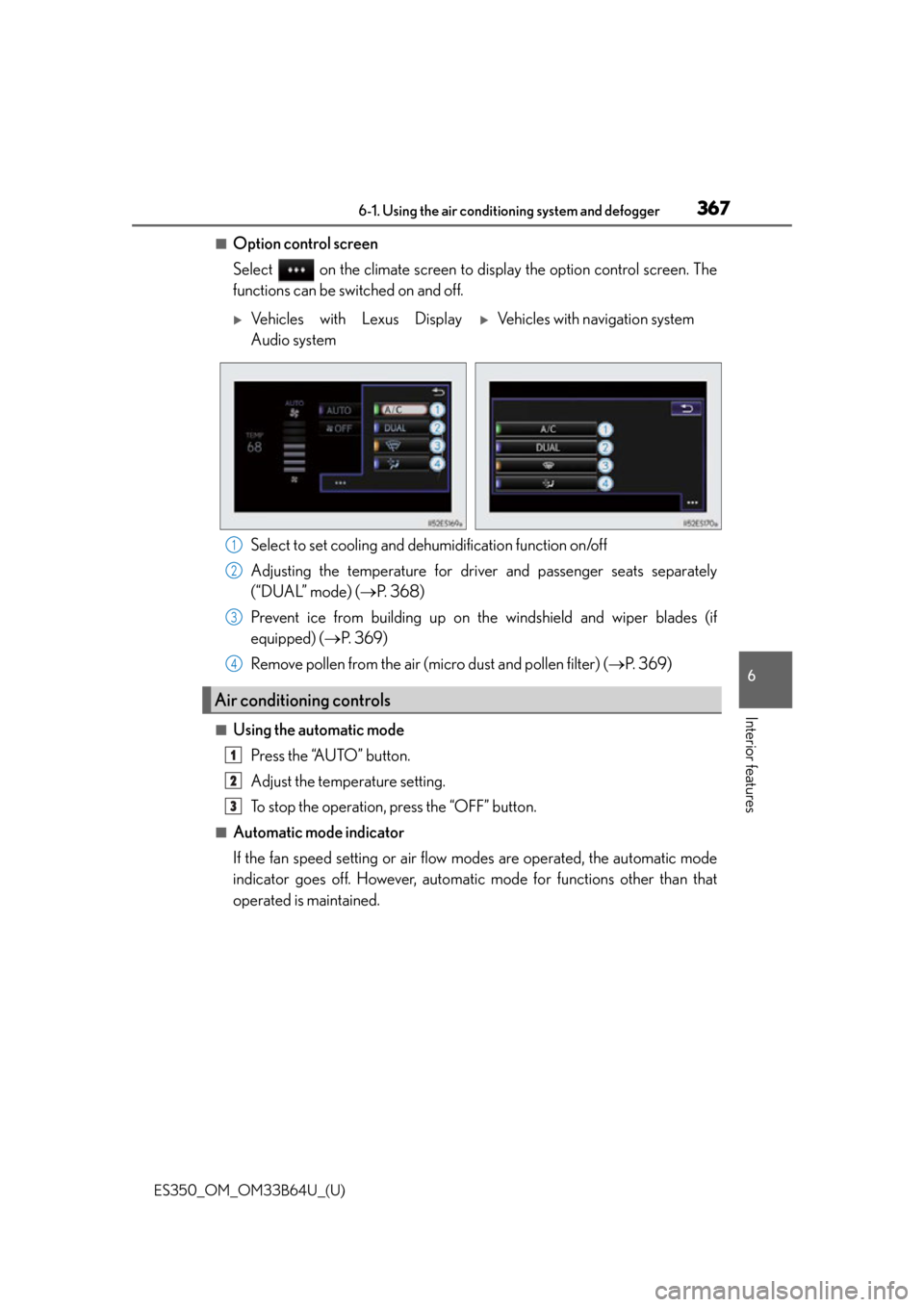
■Option control screen
Select on the climate screen to display the option control screen. The
functions can be switched on and off.
Select to set cooling and dehumidification function on/off
Adjusting the temperature for driver and passenger seats separately
(“DUAL” mode) ( P. 3 6 8 )
Prevent ice from building up on th e windshield and wiper blades (if
equipped) ( P. 3 6 9 )
Remove pollen from the air (micro dust and pollen filter) ( P. 3 6 9 )
■Using the automatic mode
Press the “AUTO” button.
Adjust the temperature setting.
To stop the operation, press the “OFF” button.
■Automatic mode indicator
If the fan speed setting or air flow modes are operated, the automatic mode
indicator goes off. However, automati c mode for functions other than that
operated is maintained.
Vehicles with Lexus Display
Audio systemVehicles with navigation system
Air conditioning controls
1
2
3
4
1
2
3
Page 368 of 576
3686-1. Using the air conditioning system and defogger
ES350_OM_OM33B64U_(U)
■Adjusting the temperature for driver and passenger seats separately
(“DUAL” mode)
To turn on the “DUAL” mode, perform any of the following procedures:
●Press the “DUAL” button.
●Select “DUAL” on the option control screen.
●Adjust the passenger’s side temperature setting.
The indicator comes on when the “DUAL” mode is on.
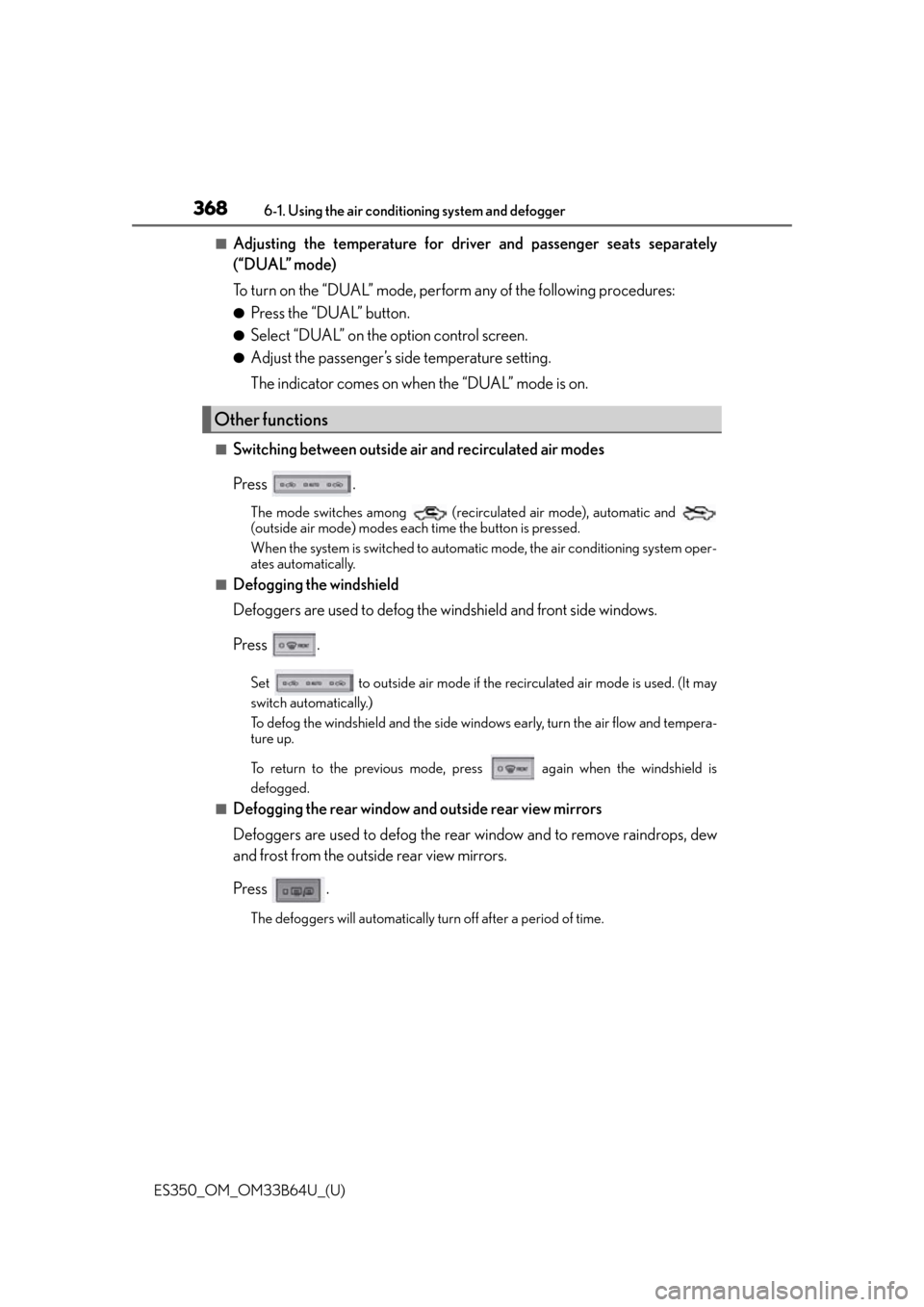
■Switching between outside air and recirculated air modes
Press .
The mode switches among (recir culated air mode), automatic and
(outside air mode) modes each time the button is pressed.
When the system is switched to automatic mode, the air conditioning system oper-
ates automatically.
■Defogging the windshield
Defoggers are used to defog the windshield and front side windows.
Press .
Set to outside air mode if the recirculated air mode is used. (It may
switch automatically.)
To defog the windshield and the side windows early, turn the air flow and tempera-
ture up.
To return to the previous mode, press again when the windshield is
defogged.
■Defogging the rear window and outside rear view mirrors
Defoggers are used to defog the rear window and to remove raindrops, dew
and frost from the outside rear view mirrors.
Press .
The defoggers will automatically turn off after a period of time.
Other functions
Page 373 of 576
373
ES350_OM_OM33B64U_(U)6-1. Using the air conditio
ning system and defogger
6
Interior features
Heated steering wheel/seat heaters/
seat ventilators
: If equipped
Heated steering wheel and seat heaters heat the side grips of the steering
wheel and seats, respectively. Seat ventilators maintain good airflow by blow-
ing air from the seats.
WA R N I N G
●Care should be taken to prevent injury if anyone in the following categories comes in
contact with the steering wheel an d seats when the heater is on:
• Babies, small children, the elderly, the sick and the physically challenged
• Persons with sensitive skin
• Persons who are fatigued
• Persons who have taken alcohol or drugs that induce sleep (s leeping drugs, cold
remedies, etc.)
●Observe the following precautions to prevent minor burns or overheating:
• Do not cover the seat with a blanket or cushion when using the seat heater.
• Do not use the seat heater more than necessary.
NOTICE
●Do not put heavy objects that have an uneven surface on the seat and do not stick
sharp objects (needles, nails, etc.) into the seat.
●To prevent battery discharge, do not use th e functions when the engine is not running.
Page 413 of 576
ES350_OM_OM33B64U_(U)
4137-1. Maintenance and care
7
Maintenance and care
NOTICE
■Cleaning detergents
●Do not use the following types of detergent, as they may discolor the vehicle interior
or cause streaks or damage to painted surfaces:
• Non-seat portions: Organic substances such as benzene or gasoline, alkaline or
acidic solutions, dye, and bleach
• Seats: Alkaline or acidic solutions, such as thinner, benzene, and alcohol
●Do not use polish wax or polish cleaner. The instrument panel’s or other interior part’s
painted surface may be damaged.
■Preventing damage to leather surfaces
Observe the following precautions to avoid damage to and deterioration of leather
surfaces:
●Remove any dust or dirt from leather surfaces immediately.
●Do not expose the vehicle to direct sunlight for extended periods of time. Park the
vehicle in the shade, especially during summer.
●Do not place items made of vinyl, plastic, or containing wax on the upholstery, as they
may stick to the leather su rface if the vehicle interior heats up significantly.
■Water on the floor
Do not wash the vehicle floor with water.
Vehicle systems such as the audio system may be damaged if water comes into contact
with electrical components such as the au dio system above or under the floor of the
vehicle. Water may also cause the body to rust.
■When cleaning the inside of the windshie ld (vehicles with Lexus Safety System+)
Do not allow glass cleaner to contact the lens. Also, do not touch the lens. ( P. 1 7 8 )
■Cleaning the inside of the rear window
●Do not use glass cleaner to clean the rear window, as this may cause damage to the
rear window defogger heater wires or antenna. Use a cloth dampened with luke-
warm water to gently wipe the window clean. Wipe the window in strokes running
parallel to the heater wires or antenna.
●Be careful not to scratch or damage the heater wires or antenna.