display Lexus ES350 2016 s / Manual PDF
[x] Cancel search | Manufacturer: LEXUS, Model Year: 2016, Model line: ES350, Model: Lexus ES350 2016Pages: 576, PDF Size: 8.3 MB
Page 242 of 576
242
ES350_OM_OM33B64U_(U)4-5. Using the driving support systems
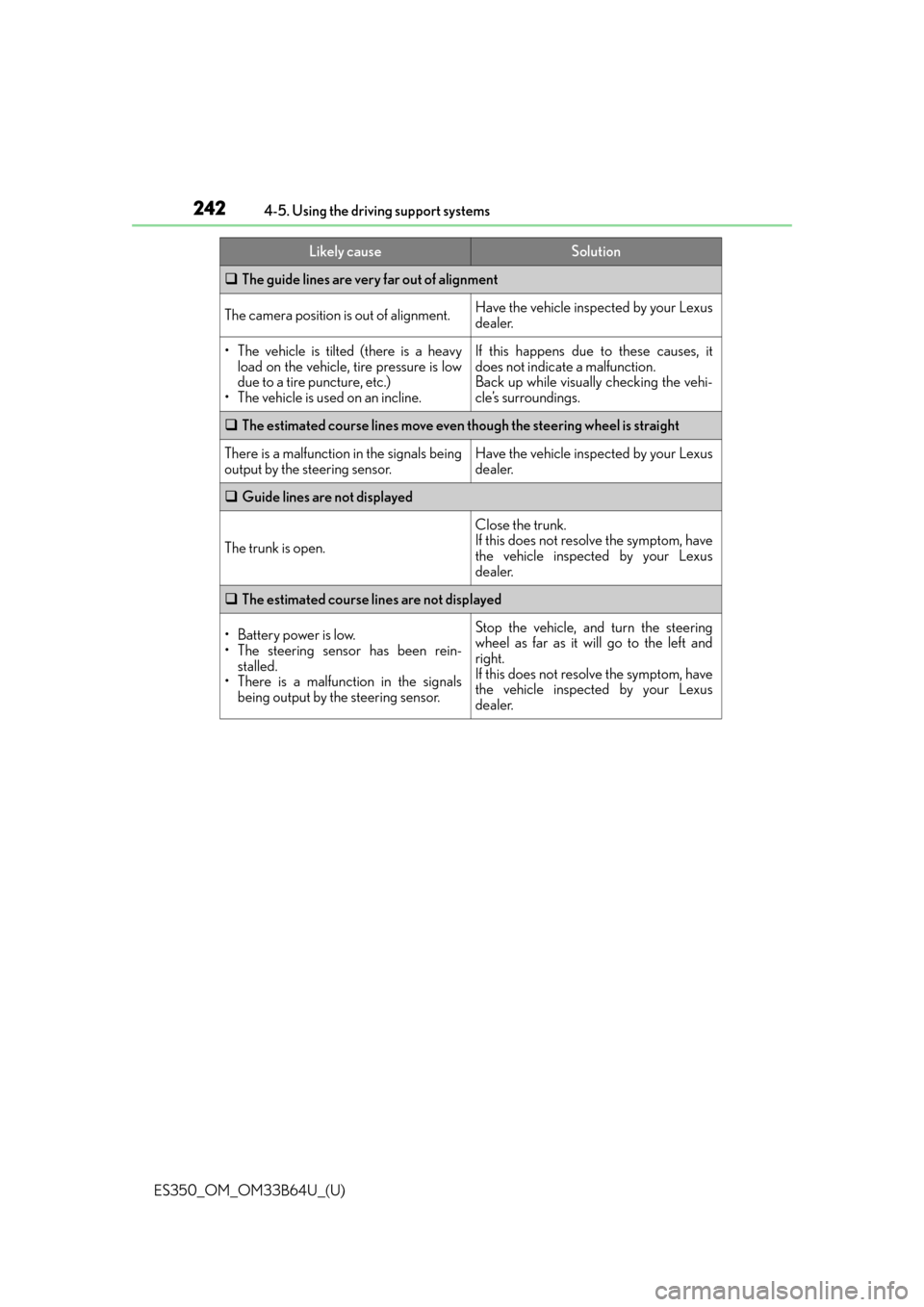
The guide lines are very far out of alignment
The camera position is out of alignment.Have the vehicle inspected by your Lexus
dealer.
• The vehicle is tilted (there is a heavy
load on the vehicle, tire pressure is low
due to a tire puncture, etc.)
• The vehicle is used on an incline.If this happens due to these causes, it
does not indicate a malfunction.
Back up while visually checking the vehi-
cle’s surroundings.
The estimated course lines move even though the steering wheel is straight
There is a malfunction in the signals being
output by the steering sensor.Have the vehicle inspected by your Lexus
dealer.
Guide lines are not displayed
The trunk is open.
Close the trunk.
If this does not resolve the symptom, have
the vehicle inspected by your Lexus
dealer.
The estimated course lines are not displayed
• Battery power is low.
• The steering sensor has been rein-
stalled.
• There is a malfunction in the signals
being output by the steering sensor.Stop the vehicle, and turn the steering
wheel as far as it will go to the left and
right.
If this does not resolve the symptom, have
the vehicle inspected by your Lexus
dealer.
Likely causeSolution
Page 243 of 576

ES350_OM_OM33B64U_(U)
2434-5. Using the driving support systems
4
Driving
WA R N I N G
■When using the Lexus parking assist monitor system
The parking assist monitor is a supplemental device intended to assist the driver when
backing up. When backing up, be sure to chec k visually behind and all around the vehi-
cle before proceeding.
Observe the following precautions to avoid an accident that could result in death or
serious injuries.
●Never depend on the parking assist monitor entirely when backing up. The image
and the position of the guide lines displaye d on the screen may differ from the actual
state.
Use caution, just as you would when backing up any vehicle.
●Be sure to back up slowly, depressing the brake pedal to control vehicle speed.
●If you seem likely to hit nearby vehicles, obstacles, people or mount the shoulder,
depress the brake pedal to stop the vehicle.
●The instructions given are only guidelines.
When and how much to turn the steering wheel will vary according to traffic condi-
tions, road surface conditions, vehicle condit ion, etc. when parking. It is necessary to
be fully aware of this before using the parking assist system.
●When parking, be sure to check that the par king space will accommodate your vehi-
cle before maneuvering into it.
●Do not use the parking assist monitor in the following cases:
• On icy or slick road surfaces, or in snow
• When using tire chains or emergency tires
• When the trunk is not closed completely
• On roads that are not flat or straight, such as curves or slopes.
●In low temperatures, the screen may darken or the image may become faint. The
image could distort when the vehicle is moving, or you may become unable to see the
image on the screen. Be sure to check dire ct visually and with the mirrors all around
the vehicle before proceeding.
●If the tire sizes are changed, the position of the guide lines displayed on the screen
may change.
●The camera uses a special lens. The dist ances between objects and pedestrians that
appear in the image displayed on the screen will differ from the actual distances.
( P. 2 3 7 )
●Estimated course line display mode: If the st eering wheel is straight and the vehicle
width guide lines and the estimated course li nes are not in alignment, have the vehicle
inspected by your Lexus dealer.
Page 245 of 576
245
ES350_OM_OM33B64U_(U)4-5. Using the driving support systems
4
Driving
Driving mode select switch
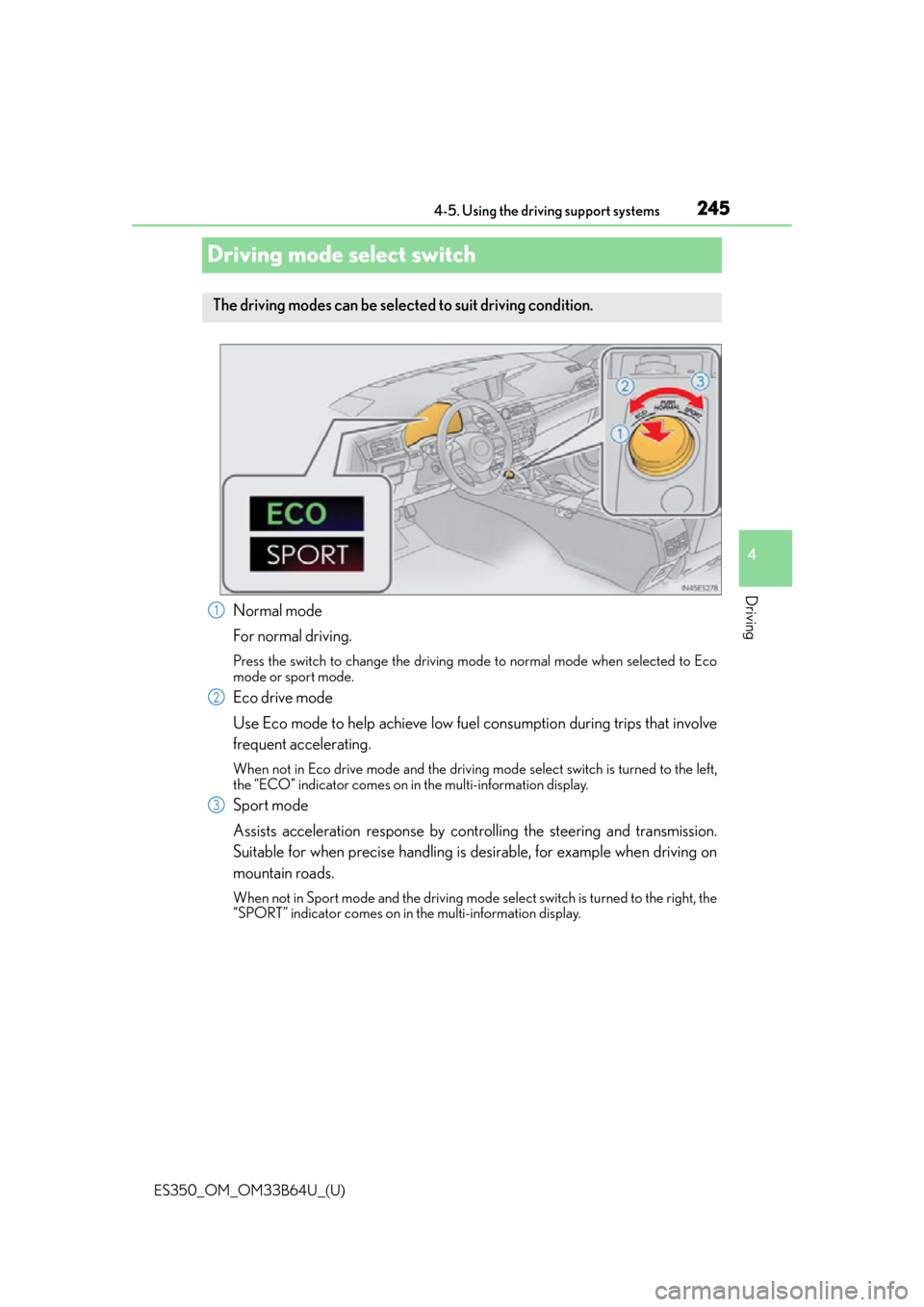
Normal mode
For normal driving.
Press the switch to change the driving mode to normal mode when selected to Eco
mode or sport mode.
Eco drive mode
Use Eco mode to help achieve low fuel
consumption during trips that involve
frequent accelerating.
When not in Eco drive mode and the driving mo de select switch is turned to the left,
the “ECO” indicator comes on in the multi-information display.
Sport mode
Assists acceleration response by cont rolling the steering and transmission.
Suitable for when precise handling is desirable, for example when driving on
mountain roads.
When not in Sport mode and the driving mode select switch is turned to the right, the
“SPORT” indicator comes on in the multi-information display.
The driving modes can be selected to suit driving condition.
1
2
3
Page 248 of 576

248
ES350_OM_OM33B64U_(U)4-5. Using the driving support systems
■The outside rear view mirror indicators visibility
When under strong sunlight, the outside rear
view mirror indicator may be difficult to
see.
■Rear Cross Traffic Alert buzzer hearing
Rear Cross Traffic Alert function may be difficult to hear over loud noises such as high
audio volume.
■When “Blind Spot Monitor Unavailable” is shown on the multi-information display
Water, snow mud, etc., may be built up in t he vicinity of the sensor area of bumper.
( P. 249) Removing the water, snow, mud, et c., from the vicinity of the sensor area
bumper should return it to normal. Also, the sensor may not function normally when
used in extremely hot or cold weather.
■When “Blind Spot Monitor System Malfunction Visit Your Dealer” is shown on the
multi-information display
There may be a sensor malfunction or voltag e abnormality. Have the vehicle inspected at
a Lexus dealer.
■Certification for the Blind Spot Monitor system
For vehicles sold in the U.S.A.
FCC ID: OAYSRR2A
This device complies with part 15 of the FC C Rules. Operation is subject to the following
two conditions:
(1) This device may not cause harmful interference, and
(2) this device must accept any interference received, including interference that may
cause undesired operation.
FCC Warning
Changes or modifications not expressly approved by the party responsible for compli-
ance could void the user’s authority to operate the equipment.
For vehicles sold in Canada
Applicable law: Canada 310
This device complies with Industry Canada licence-exempt RSS standard(s). Operation
is subject to the following two conditions: (1) this device may not cause interference, and
(2) this device must accept any interference, including interference that may cause
undesired operation of the device.
Frequency bands: 24.05-24.25 GHz
Output power: less than 20 milliwatts
Page 257 of 576

ES350_OM_OM33B64U_(U)
2574-5. Using the driving support systems
4
Driving
■Turning off both TRAC and VSC systems
To turn the TRAC and VSC systems off, press and hold for more than 3 seconds
while the vehicle is stopped.
The VSC OFF indicator light will come on an d the “Traction Control Turned Off” will be
shown on the multi- information display.
*
Press again to turn the systems back on.
*: On vehicles with pre-collision system, pre-collision brake assist and pre-collision brak-
ing will also be disabled. The PCS warning light will come on and the message will be
shown on the multi-information display. ( P. 1 8 3 )
■When the message is displayed on the mu lti-information display showing that TRAC
has been disabled even if the VSC OFF switch has not been pressed
TRAC cannot be operated. Contact your Lexus dealer.
■When the battery is disconnected
The steering wheel may move fr om its straight forward position, but this will be corrected
automatically when driving.
■Sounds and vibrations caused by the ABS, brake assist, TRAC, VSC and hill-start assist
control systems
●A sound may be heard from the engine compartment when the brake pedal is
depressed repeatedly, when the engine is started or just after the vehicle begins to
move. This sound does not indicate that a malfunction has occurred in any of these sys-
tems.
●Any of the following condit ions may occur when the above systems are operating.
None of these indicates that a malfunction has occurred.
• Vibrations may be felt through the vehicle body and steering.
• A motor sound may be heard after the vehicle comes to a stop.
• The brake pedal may pulsate slig htly after the ABS is activated.
• The brake pedal may move down s lightly after the ABS is activated.
■EPS operation sound
When the steering wheel is operated, a motor sound (whirring sound) may be heard.
This does not indicate a malfunction.
■Automatic reactivation of TRAC and VSC systems
After turing the TRAC and VSC systems of f, the systems will be automatically re-
enabled in the following situations:
●When the engine switch is turned off
●If only the TRAC system is turned off, the TRAC will turn on when vehicle speed
increases.
If both the TRAC and VSC systems are turned off, automatic re-enabling will not occur
when vehicle speed increases.
Page 264 of 576

264
ES350_OM_OM33B64U_(U)
5-1. Basic OperationsLexus Display Audio System ......................................... 266
Steering wheel audio switches........................................273
USB/AUX ports .......................... 274
5-2. Setup Setup menu ................................... 276
General settings ..........................277
Voice settings ............................... 281
Display settings ........................... 282
Lexus Display Audio system
5
Page 265 of 576

265
ES350_OM_OM33B64U_(U)
Lexus Display Audiosystem
5
5-3. Using the audio system
Selecting the audio source ..........................................284
Optimal use of the audio system ......................................... 285
Audio settings ..............................286
Audio menu screen operation ....................................289
5-4. Using the radio Radio operation .......................... 292
5-5. Playing an audio CD and MP3/WMA/AAC discs
CD player operation.................299
5-6. Using an external device Listening to an iPod .................. 306
Using USB memory device ............................................ 310
Using the AUX port................... 314
5-7. Connecting Bluetooth
®
Steps for using Bluetooth®
devices .......................................... 315
Registering a Bluetooth
®
device ............................................ 317
Selecting a Bluetooth
®
device ............................................ 318
Connecting a Bluetooth
®
audio player ................................ 319
Connecting a Bluetooth
®
phone .......................................... 320
Displaying a Bluetooth
®
device details ............................. 321
Detailed Bluetooth
®
settings.........................................322 5-8. Bluetooth
® Audio
Listening to Bluetooth
®
Audio ........................................... 323
5-9. Bluetooth
® Phone
Using a Bluetooth
®
Phone ........................................... 325
Making a call ................................ 327
Receiving a call ...........................330
Speaking on the phone............. 331
Using a Bluetooth
®
phone message........................ 334
Using the steering wheel switches....................................... 336
Bluetooth
® phone
settings ........................................ 337
5-10. Phonebook Contact settings ......................... 339
Messaging setting...................... 342
5-11. Bluetooth
®
What to do if... (Troubleshooting)....................343
Bluetooth
®................................... 346
5-12. Other function “Information” screen .................. 351
USB photo .................................... 353
Weather information ................ 355
Voice command system .......... 356
Mobile Assistant.........................360
LEXUS Enform Remote ......... 362
Page 266 of 576
266
ES350_OM_OM33B64U_(U)5-1. Basic Operations
Lexus Display Audio System
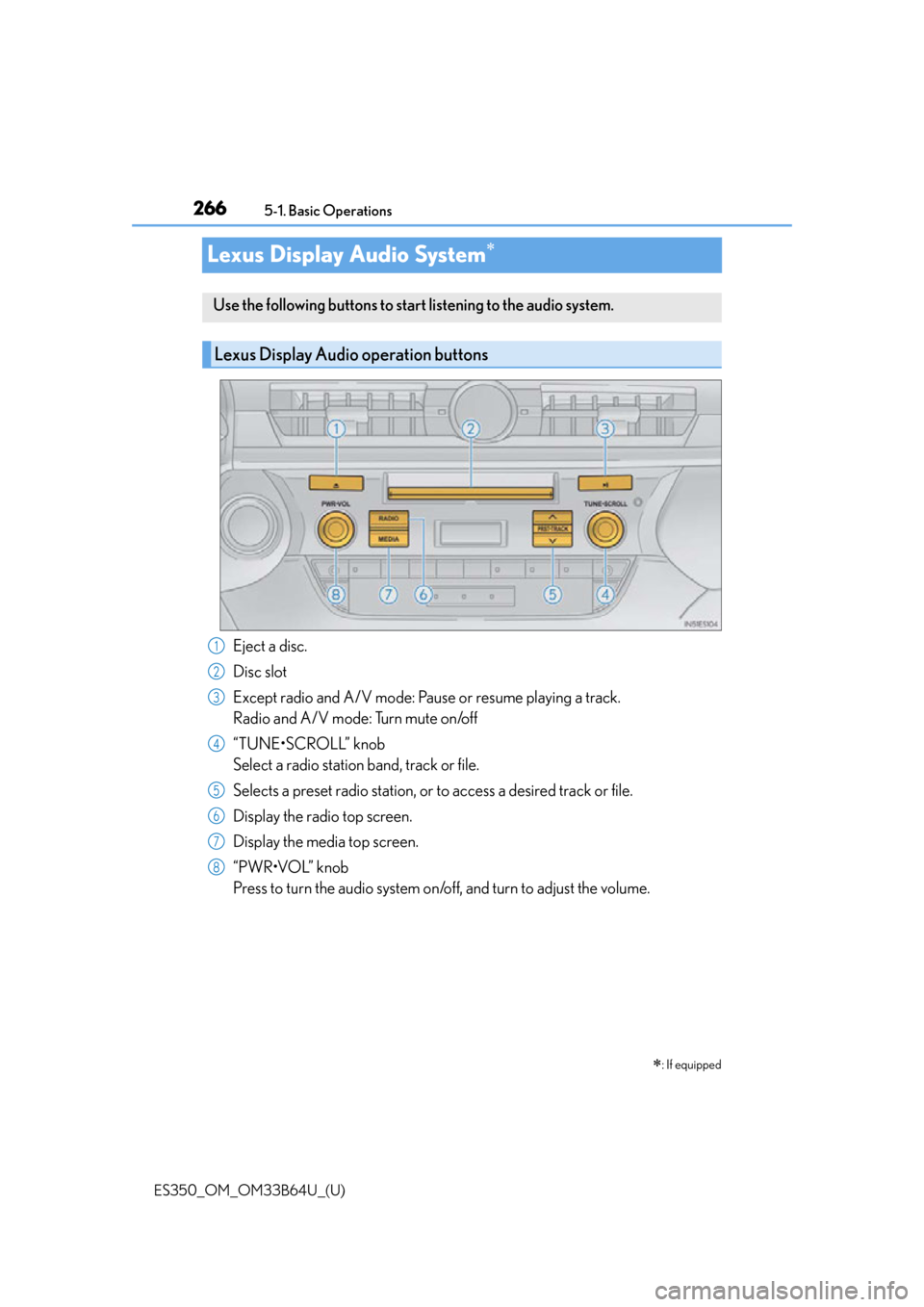
Eject a disc.
Disc slot
Except radio and A/V mode: Pause or resume playing a track.
Radio and A/V mode: Turn mute on/off
“TUNE•SCROLL” knob
Select a radio station band, track or file.
Selects a preset radio st
ation, or to access a desired track or file.
Display the radio top screen.
Display the media top screen.
“PWR•VOL” knob
Press to turn the audio system on/o ff, and turn to adjust the volume.
: If equipped
Use the following buttons to start listening to the audio system.
Lexus Display Audio operation buttons
1
2
3
4
5
6
7
8
Page 267 of 576
ES350_OM_OM33B64U_(U)
2675-1. Basic Operations
5
Lexus Display Audio system
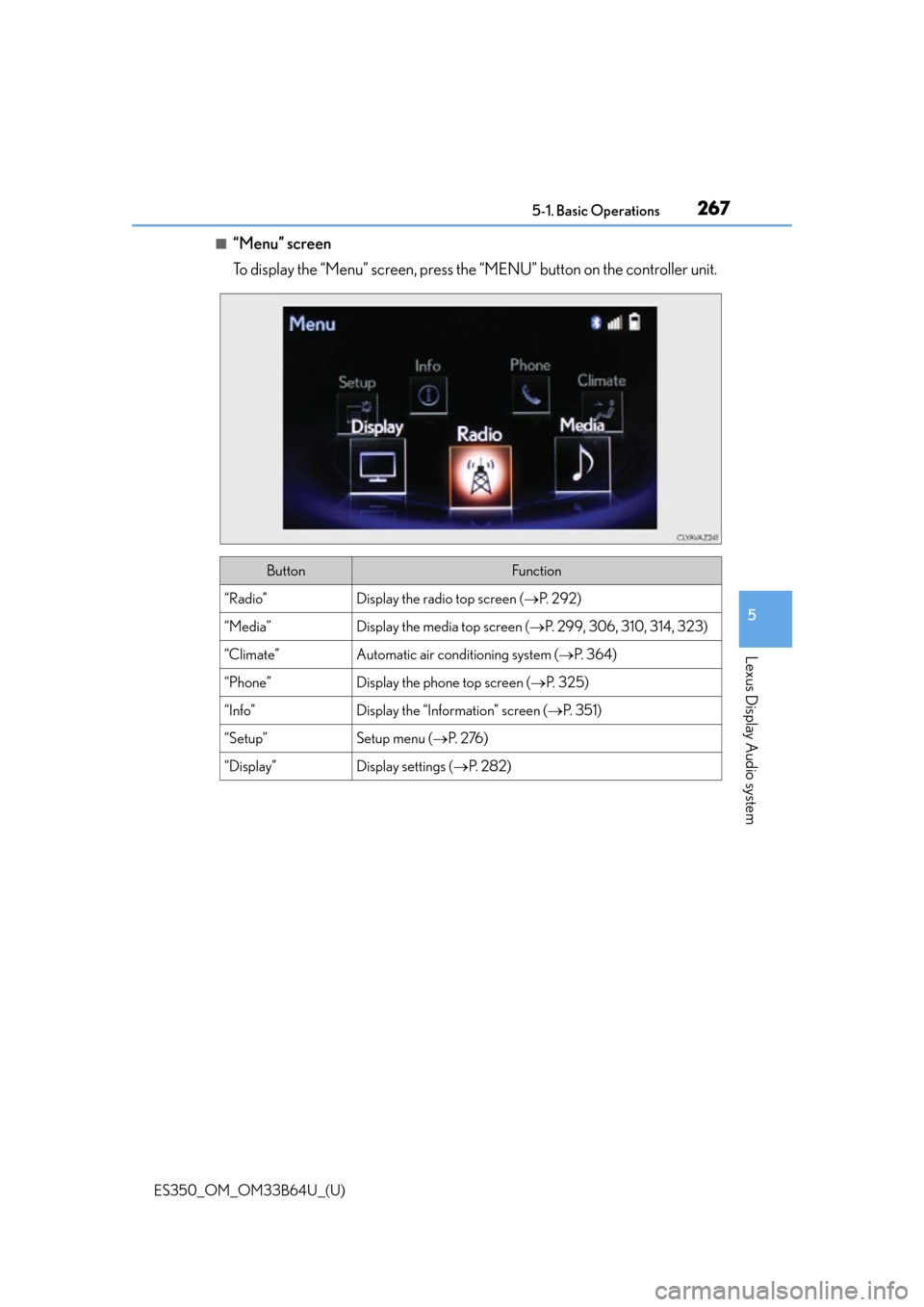
■“Menu” screen
To display the “Menu” screen, press the “MENU” button on the controller unit.
ButtonFunction
“Radio”Display the radio top screen (P. 2 9 2 )
“Media”Display the media top screen ( P. 299, 306, 310, 314, 323)
“Climate”Automatic air conditioning system ( P. 3 6 4 )
“Phone”Display the phone top screen ( P. 3 2 5 )
“Info”Display the “Information” screen ( P. 3 5 1 )
“Setup”Setup menu ( P. 2 76 )
“Display”Display settings ( P. 2 8 2 )
Page 268 of 576
2685-1. Basic Operations
ES350_OM_OM33B64U_(U)
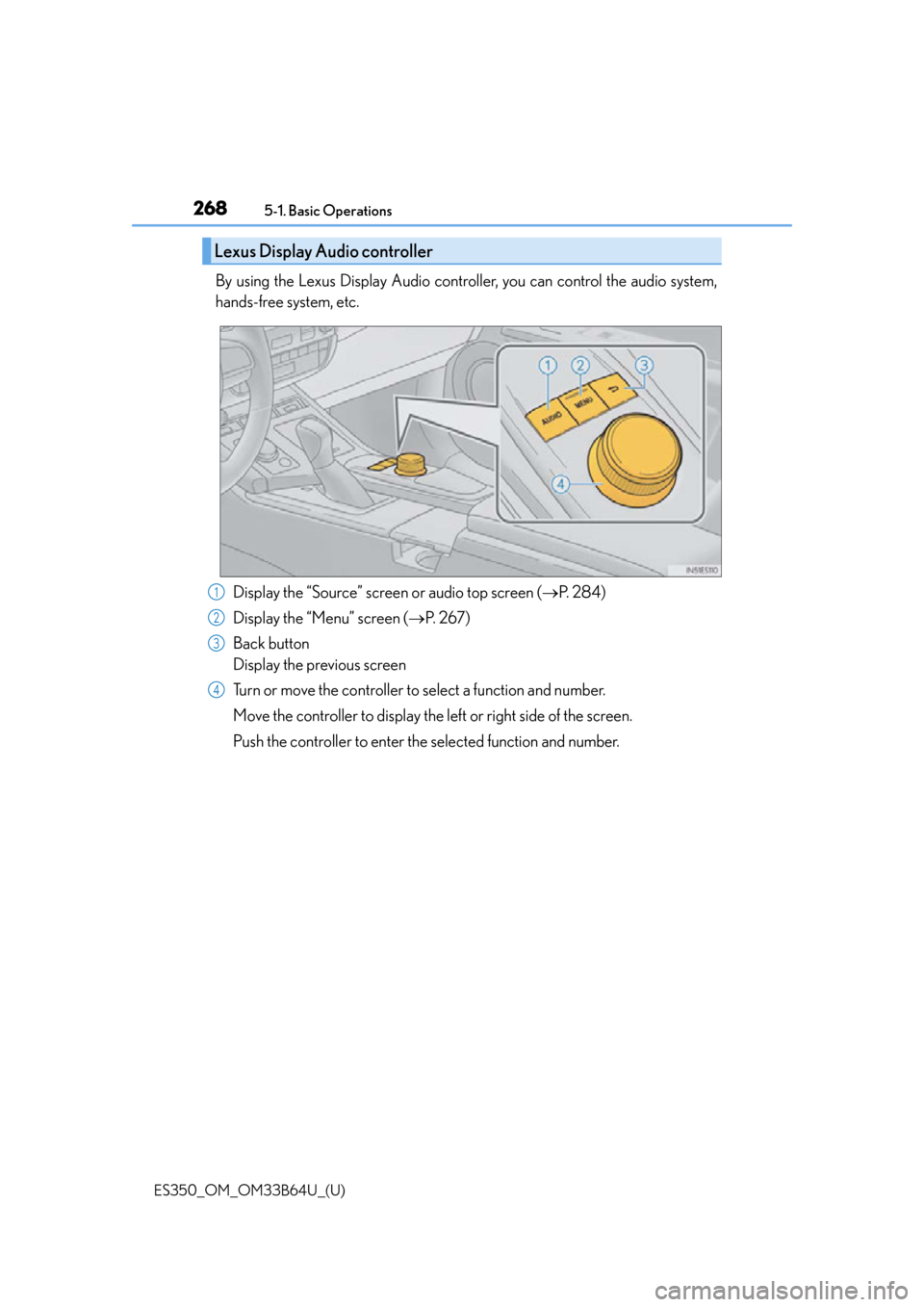
By using the Lexus Display Audio controller, you can control the audio system,
hands-free system, etc. Display the “Source” screen or audio top screen ( P. 2 8 4 )
Display the “Menu” screen ( P. 2 6 7 )
Back button
Display the previous screen
Turn or move the controller to select a function and number.
Move the controller to display the left or right side of the screen.
Push the controller to enter the selected function and number.
Lexus Display Audio controller
1
2
3
4