audio Lexus ES350 2016 Quick Guide / LEXUS 2016 ES350 (OM33B64U) Owner's Manual
[x] Cancel search | Manufacturer: LEXUS, Model Year: 2016, Model line: ES350, Model: Lexus ES350 2016Pages: 576, PDF Size: 8.3 MB
Page 225 of 576
ES350_OM_OM33B64U_(U)
2254-5. Using the driving support systems
4
Driving
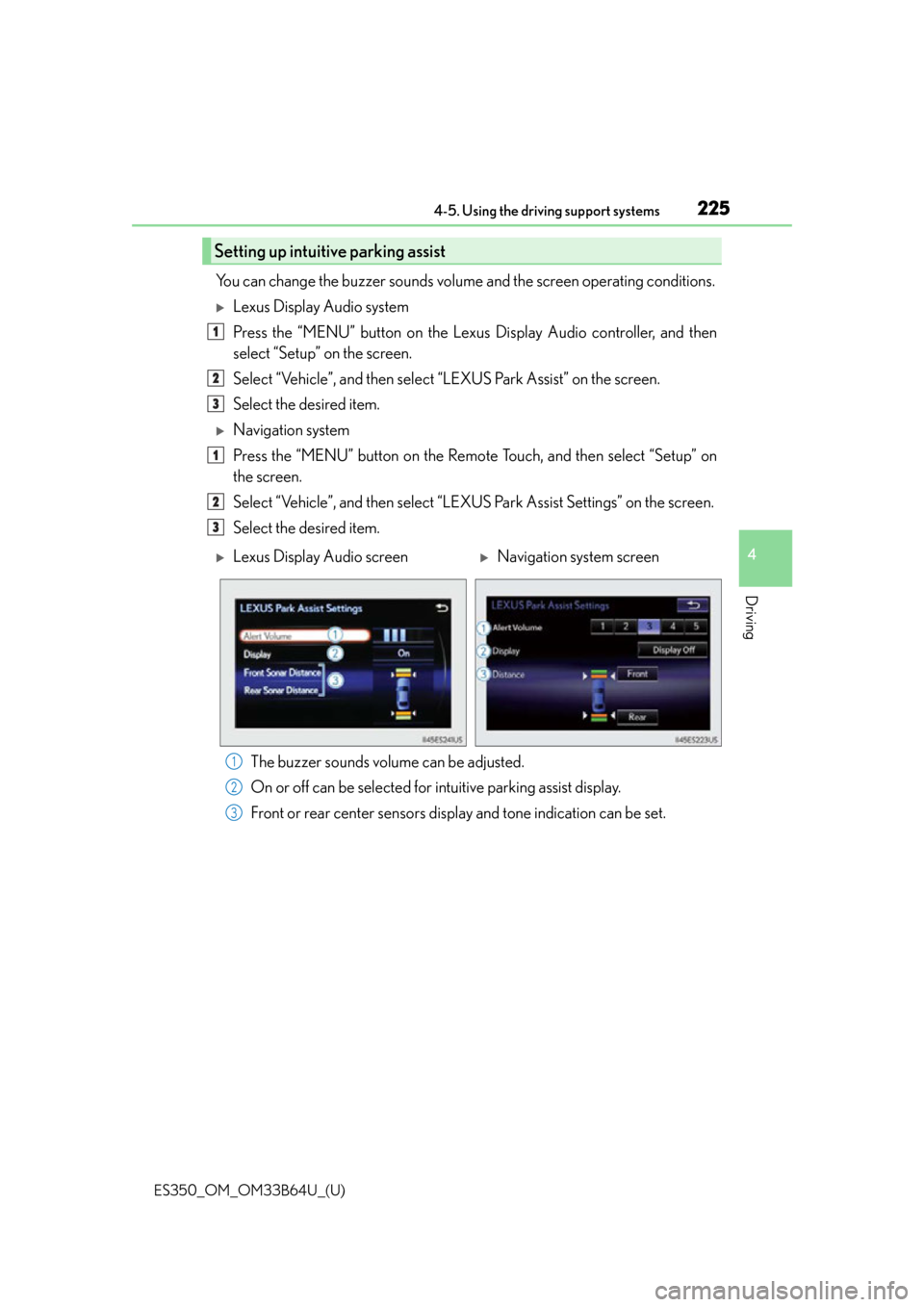
You can change the buzzer sounds volume and the screen operating conditions.
Lexus Display Audio system
Press the “MENU” button on the Lexus Display Audio controller, and then
select “Setup” on the screen.
Select “Vehicle”, and then select “LEXUS Park Assist” on the screen.
Select the desired item.
Navigation system
Press the “MENU” button on the Remote Touch, and then select “Setup” on
the screen.
Select “Vehicle”, and then select “LEXUS Park Assist Settings” on the screen.
Select the desired item.
The buzzer sounds volume can be adjusted.
On or off can be selected for intuitive parking assist display.
Front or rear center sensors disp lay and tone indication can be set.
Setting up intuitive parking assist
1
2
3
1
2
3
Lexus Display Audio screenNavigation system screen
1
2
3
Page 227 of 576

ES350_OM_OM33B64U_(U)
2274-5. Using the driving support systems
4
Driving
●The shape of the obstacle may prevent the sensor from detecting it. Pay particular
attention to the following obstacles:
• Wires, fences, ropes, etc.
• Cotton, snow and other materials that absorb sound waves
• Sharply-angled objects
•Low obstacles
• Tall obstacles with upper sections projecting outwards in the direction of your vehi-
cle
●The following situations may occur during use.
• Depending on the shape of the obstacle and other factors, the detection distance may shorten, or detect ion may be impossible.
• Obstacles may not be detected if they are too close to the sensor.
• There will be a short delay between obst acle detection and display. Even at slow
speeds, there is a possibility that the obstacle will come within the sensor’s detection
areas before the display is shown and the warning beep sounds.
• Thin posts or objects lower than the sensor may not be detected for collision when
approached, even if they have been detected once.
• It might be difficult to hear beeps due to th e volume of audio system or air flow noise
of air conditioning system.
■If “Clean Parking Assist Sensor” is di splayed on the multi-information display
A sensor may be dirty or covered with snow or ice. In such cases, if it is removed from the
sensor, the system should retu rn to normal. Also, due to the sensor being frozen at low
temperatures, a malfunction display may appear or an obstacle may not be detected. If
the sensor thaws out, the system should return to normal.
■If “Parking Assist Malfunction” is di splayed on the multi-information display
Depending on the malfunction of the sensor, the device may not be working normally.
Have the vehicle inspected by your Lexus dealer.
■Certification
For vehicles sold in the U.S.A.
This device complies with Part 15 of the FC C Rules. Operation is subject to the following
two conditions; (1) This device may not caus e harmful interference, and (2) this device
must accept any interference received, incl uding interference that may cause undesired
operation.
For vehicles sold in Canada
This ISM device complies with Canadian ICES-001.
Cet appareil ISM est conforme à la norme NMB-001 du Canada.
WA R N I N G
■When using the intuitive parking assist
Observe the following precautions.
Failing to do so may result in the vehicle being unable to be driven safely and possibly
cause an accident, resulting in death or serious injury.
●Do not use the sensor at speeds in excess of 6 mph (10 km/h).
●The sensors’ detection areas and reaction times are limited. When moving forward or
reversing, check the areas surrounding the vehicle (especially the sides of the vehi-
cle) for safety, and drive slowly, using the brake to control the vehicle’s speed.
●Do not install accessories within the sensors’ detection areas.
Page 231 of 576
ES350_OM_OM33B64U_(U)
2314-5. Using the driving support systems
4
Driving
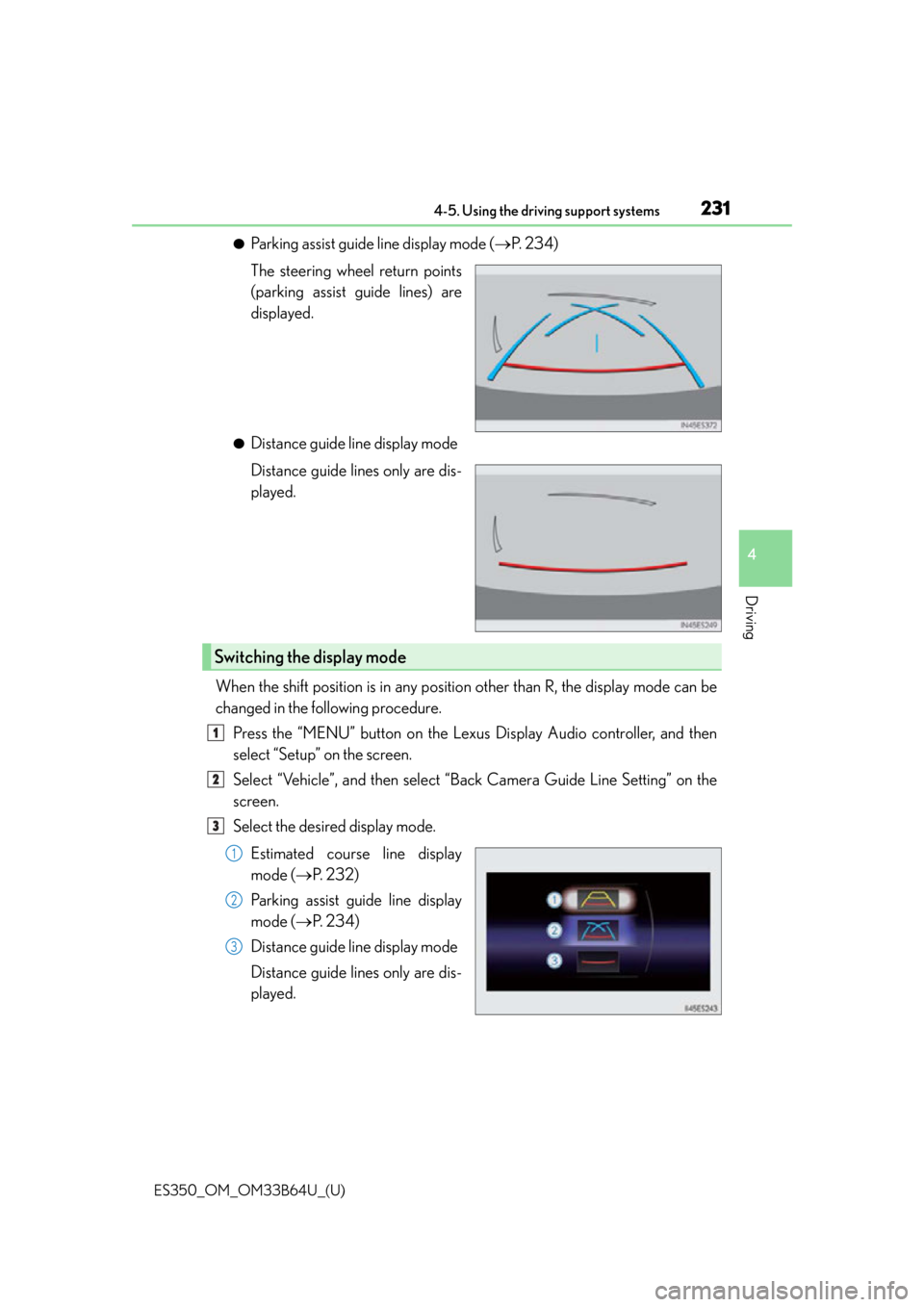
●Parking assist guide line display mode (P. 2 3 4 )
The steering wheel return points
(parking assist guide lines) are
displayed.
●Distance guide line display mode
Distance guide lines only are dis-
played.
When the shift position is in any position other than R, the display mode can be
changed in the following procedure. Press the “MENU” button on the Lexus Display Audio controller, and then
select “Setup” on the screen.
Select “Vehicle”, and then select “B ack Camera Guide Line Setting” on the
screen.
Select the desired display mode.
Estimated course line display
mode ( P. 232)
Parking assist guide line display
mode ( P. 2 3 4 )
Distance guide line display mode
Distance guide lines only are dis-
played.
Switching the display mode
1
2
3
1
2
3
Page 248 of 576

248
ES350_OM_OM33B64U_(U)4-5. Using the driving support systems
■The outside rear view mirror indicators visibility
When under strong sunlight, the outside rear
view mirror indicator may be difficult to
see.
■Rear Cross Traffic Alert buzzer hearing
Rear Cross Traffic Alert function may be difficult to hear over loud noises such as high
audio volume.
■When “Blind Spot Monitor Unavailable” is shown on the multi-information display
Water, snow mud, etc., may be built up in t he vicinity of the sensor area of bumper.
( P. 249) Removing the water, snow, mud, et c., from the vicinity of the sensor area
bumper should return it to normal. Also, the sensor may not function normally when
used in extremely hot or cold weather.
■When “Blind Spot Monitor System Malfunction Visit Your Dealer” is shown on the
multi-information display
There may be a sensor malfunction or voltag e abnormality. Have the vehicle inspected at
a Lexus dealer.
■Certification for the Blind Spot Monitor system
For vehicles sold in the U.S.A.
FCC ID: OAYSRR2A
This device complies with part 15 of the FC C Rules. Operation is subject to the following
two conditions:
(1) This device may not cause harmful interference, and
(2) this device must accept any interference received, including interference that may
cause undesired operation.
FCC Warning
Changes or modifications not expressly approved by the party responsible for compli-
ance could void the user’s authority to operate the equipment.
For vehicles sold in Canada
Applicable law: Canada 310
This device complies with Industry Canada licence-exempt RSS standard(s). Operation
is subject to the following two conditions: (1) this device may not cause interference, and
(2) this device must accept any interference, including interference that may cause
undesired operation of the device.
Frequency bands: 24.05-24.25 GHz
Output power: less than 20 milliwatts
Page 264 of 576

264
ES350_OM_OM33B64U_(U)
5-1. Basic OperationsLexus Display Audio System ......................................... 266
Steering wheel audio switches........................................273
USB/AUX ports .......................... 274
5-2. Setup Setup menu ................................... 276
General settings ..........................277
Voice settings ............................... 281
Display settings ........................... 282
Lexus Display Audio system
5
Page 265 of 576

265
ES350_OM_OM33B64U_(U)
Lexus Display Audiosystem
5
5-3. Using the audio system
Selecting the audio source ..........................................284
Optimal use of the audio system ......................................... 285
Audio settings ..............................286
Audio menu screen operation ....................................289
5-4. Using the radio Radio operation .......................... 292
5-5. Playing an audio CD and MP3/WMA/AAC discs
CD player operation.................299
5-6. Using an external device Listening to an iPod .................. 306
Using USB memory device ............................................ 310
Using the AUX port................... 314
5-7. Connecting Bluetooth
®
Steps for using Bluetooth®
devices .......................................... 315
Registering a Bluetooth
®
device ............................................ 317
Selecting a Bluetooth
®
device ............................................ 318
Connecting a Bluetooth
®
audio player ................................ 319
Connecting a Bluetooth
®
phone .......................................... 320
Displaying a Bluetooth
®
device details ............................. 321
Detailed Bluetooth
®
settings.........................................322 5-8. Bluetooth
® Audio
Listening to Bluetooth
®
Audio ........................................... 323
5-9. Bluetooth
® Phone
Using a Bluetooth
®
Phone ........................................... 325
Making a call ................................ 327
Receiving a call ...........................330
Speaking on the phone............. 331
Using a Bluetooth
®
phone message........................ 334
Using the steering wheel switches....................................... 336
Bluetooth
® phone
settings ........................................ 337
5-10. Phonebook Contact settings ......................... 339
Messaging setting...................... 342
5-11. Bluetooth
®
What to do if... (Troubleshooting)....................343
Bluetooth
®................................... 346
5-12. Other function “Information” screen .................. 351
USB photo .................................... 353
Weather information ................ 355
Voice command system .......... 356
Mobile Assistant.........................360
LEXUS Enform Remote ......... 362
Page 266 of 576
266
ES350_OM_OM33B64U_(U)5-1. Basic Operations
Lexus Display Audio System
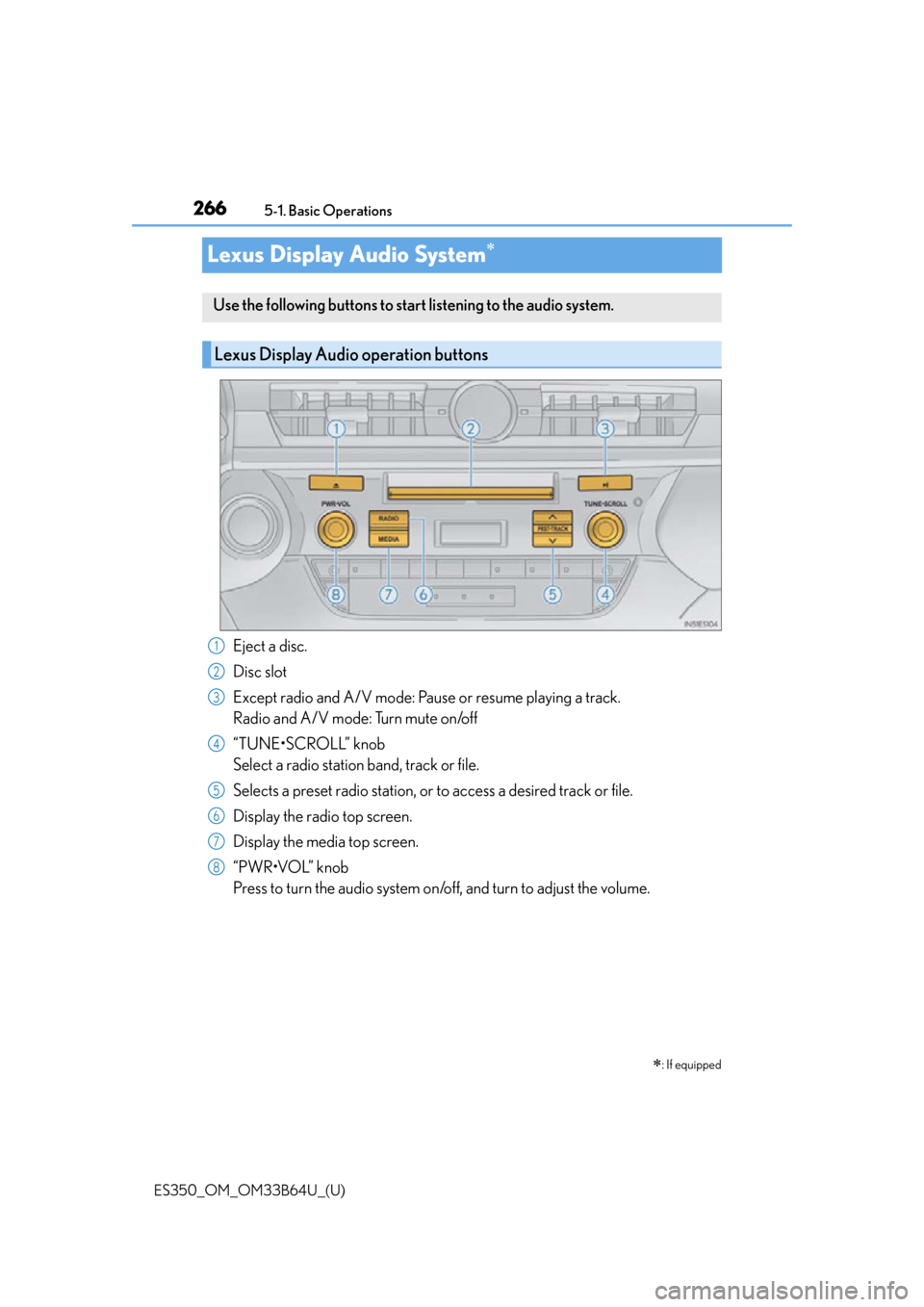
Eject a disc.
Disc slot
Except radio and A/V mode: Pause or resume playing a track.
Radio and A/V mode: Turn mute on/off
“TUNE•SCROLL” knob
Select a radio station band, track or file.
Selects a preset radio st
ation, or to access a desired track or file.
Display the radio top screen.
Display the media top screen.
“PWR•VOL” knob
Press to turn the audio system on/o ff, and turn to adjust the volume.
: If equipped
Use the following buttons to start listening to the audio system.
Lexus Display Audio operation buttons
1
2
3
4
5
6
7
8
Page 267 of 576
ES350_OM_OM33B64U_(U)
2675-1. Basic Operations
5
Lexus Display Audio system
■“Menu” screen
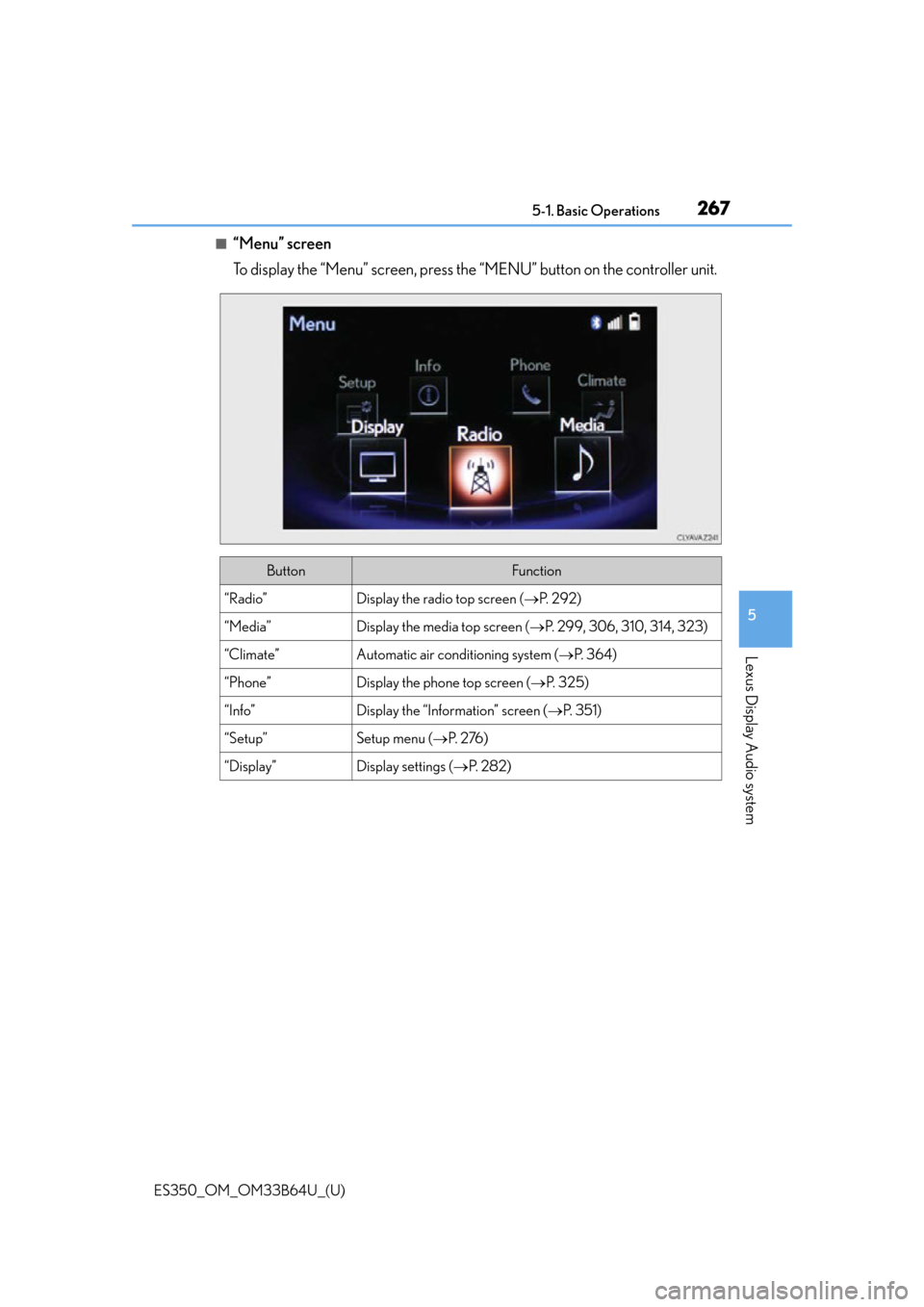
To display the “Menu” screen, press the “MENU” button on the controller unit.
ButtonFunction
“Radio”Display the radio top screen (P. 2 9 2 )
“Media”Display the media top screen ( P. 299, 306, 310, 314, 323)
“Climate”Automatic air conditioning system ( P. 3 6 4 )
“Phone”Display the phone top screen ( P. 3 2 5 )
“Info”Display the “Information” screen ( P. 3 5 1 )
“Setup”Setup menu ( P. 2 76 )
“Display”Display settings ( P. 2 8 2 )
Page 268 of 576
2685-1. Basic Operations
ES350_OM_OM33B64U_(U)
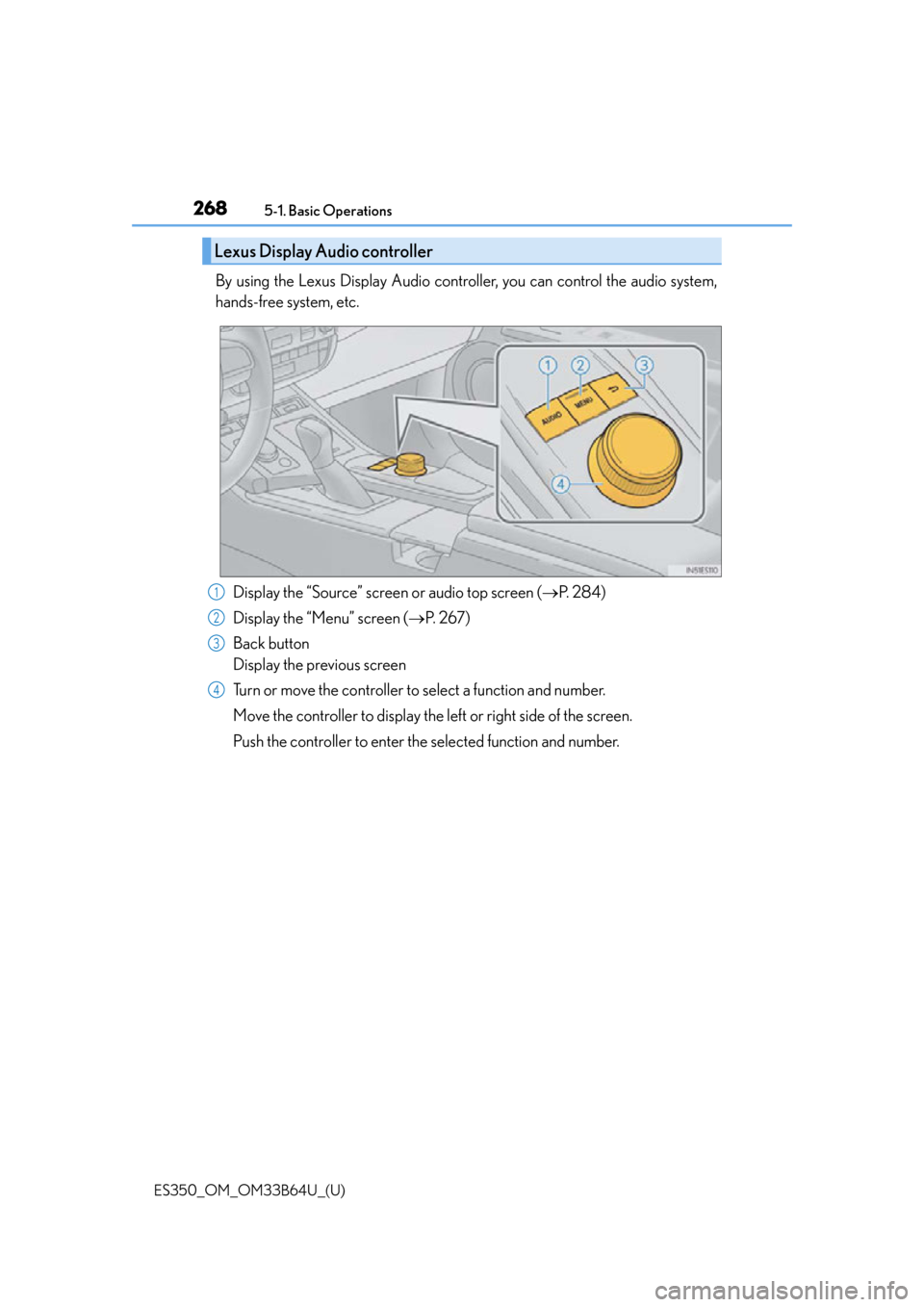
By using the Lexus Display Audio controller, you can control the audio system,
hands-free system, etc. Display the “Source” screen or audio top screen ( P. 2 8 4 )
Display the “Menu” screen ( P. 2 6 7 )
Back button
Display the previous screen
Turn or move the controller to select a function and number.
Move the controller to display the left or right side of the screen.
Push the controller to enter the selected function and number.
Lexus Display Audio controller
1
2
3
4
Page 269 of 576
ES350_OM_OM33B64U_(U)
2695-1. Basic Operations
5
Lexus Display Audio system
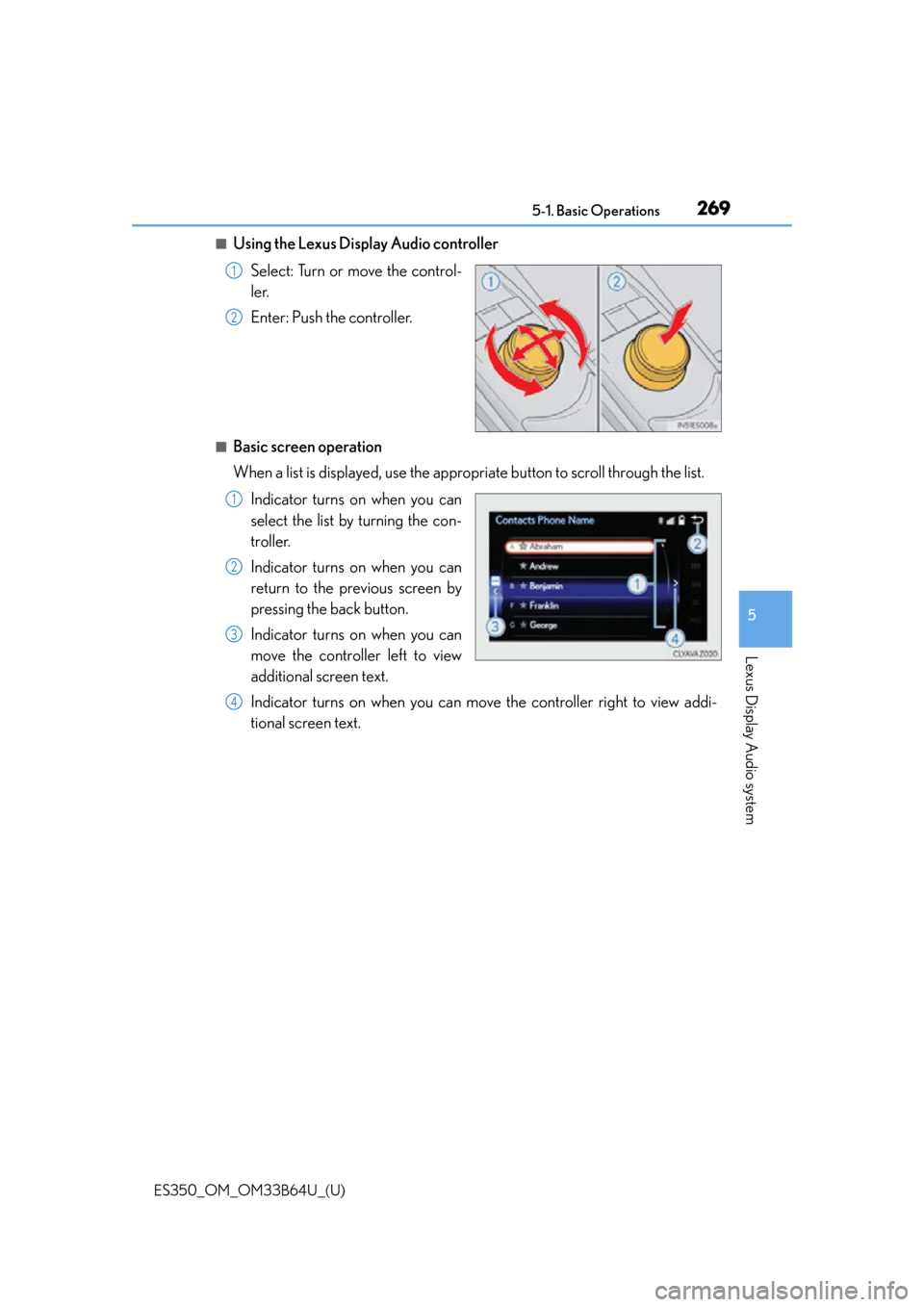
■Using the Lexus Display Audio controllerSelect: Turn or move the control-
ler.
Enter: Push the controller.
■Basic screen operation
When a list is displayed, use the appropriate button to scroll through the list.Indicator turns on when you can
select the list by turning the con-
troller.
Indicator turns on when you can
return to the previous screen by
pressing the back button.
Indicator turns on when you can
move the controller left to view
additional screen text.
Indicator turns on when you can move the controller right to view addi-
tional screen text.
1
2
1
2
3
4