ad blue Lexus ES350 2016 Quick Guide / LEXUS 2016 ES350 (OM33B64U) Owner's Guide
[x] Cancel search | Manufacturer: LEXUS, Model Year: 2016, Model line: ES350, Model: Lexus ES350 2016Pages: 576, PDF Size: 8.3 MB
Page 335 of 576
ES350_OM_OM33B64U_(U)
3355-9. Bluetooth® Phone
5
Lexus Display Audio system
Move the controller to the left while on the message screen.
Select “Quick Message” to display the “Quick Message” screen.
Select the desired message and then select “Send”.
■Editing a quick messageMove the controller to the left while on the message screen.
Select “Quick Message” and move the cursor to the desired message.
Move the controller to the left and select “Edit”.
To return to the default message after editing, select “Default”.
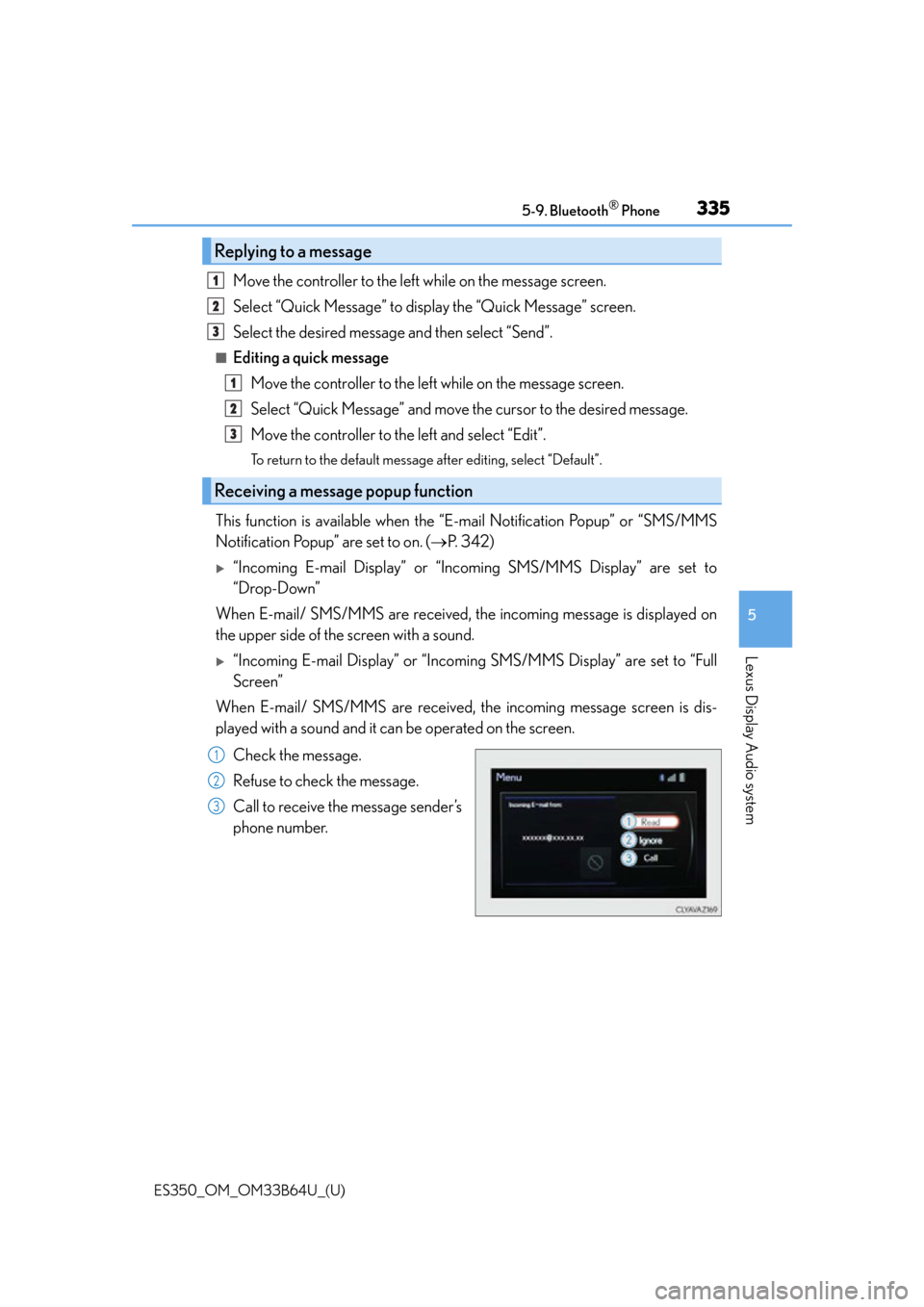
This function is available when the “E-mail Notification Popup” or “SMS/MMS
Notification Popup” are set to on. ( P. 3 4 2 )
“Incoming E-mail Display” or “Inco ming SMS/MMS Display” are set to
“Drop-Down”
When E-mail/ SMS/MMS are received, the incoming message is displayed on
the upper side of the screen with a sound.
“Incoming E-mail Display” or “Incoming SMS/MMS Display” are set to “Full
Screen”
When E-mail/ SMS/MMS are received, the incoming message screen is dis-
played with a sound and it can be operated on the screen.
Check the message.
Refuse to check the message.
Call to receive the message sender’s
phone number.
Replying to a message
Receiving a message popup function
1
2
3
1
2
3
1
2
3
Page 336 of 576
336
ES350_OM_OM33B64U_(U)5-9. Bluetooth
® Phone
Using the steering wheel switches
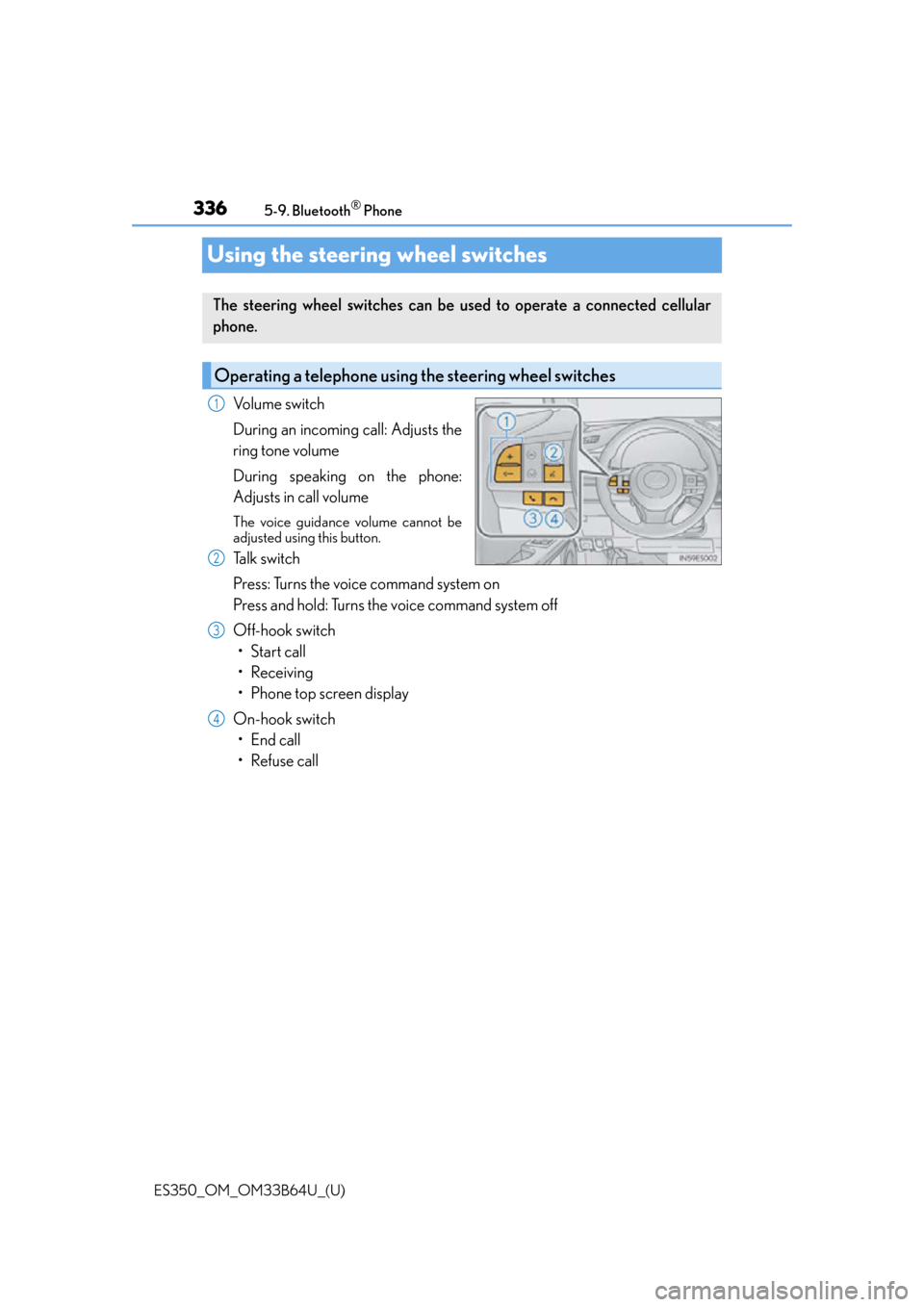
Volume switch
During an incoming call: Adjusts the
ring tone volume
During speaking on the phone:
Adjusts in call volume
The voice guidance volume cannot be
adjusted using this button.
Talk switch
Press: Turns the voice command system on
Press and hold: Turns the voice command system off
Off-hook switch
• Start call
• Receiving
• Phone top screen display
On-hook switch • End call
• Refuse call
The steering wheel switches can be used to operate a connected cellular
phone.
Operating a telephone usin g the steering wheel switches
1
2
3
4
Page 337 of 576
337
ES350_OM_OM33B64U_(U)5-9. Bluetooth
® Phone
5
Lexus Display Audio system
Bluetooth® phone settings
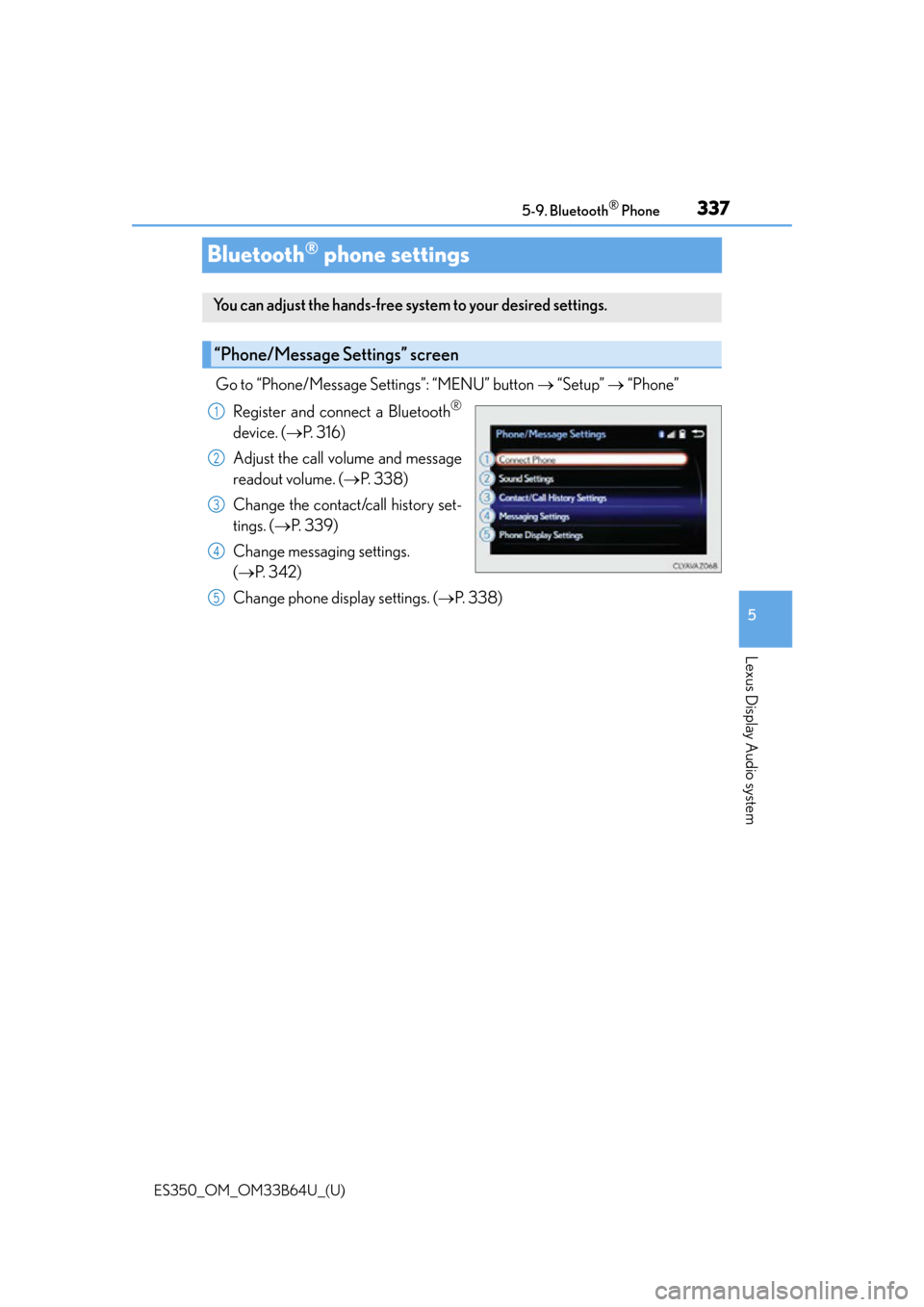
Go to “Phone/Message Settings”: “MENU” button
“Setup” “Phone”
Register and connect a Bluetooth
®
device. ( P. 3 1 6 )
Adjust the call volume and message
readout volume. ( P. 3 3 8 )
Change the contact/call history set-
tings. ( P. 3 3 9 )
Change messaging settings.
( P. 3 4 2 )
Change phone display settings. ( P. 3 3 8 )
You can adjust the hands-free system to your desired settings.
“Phone/Message Settings” screen
1
2
3
4
5
Page 338 of 576
3385-9. Bluetooth® Phone
ES350_OM_OM33B64U_(U)
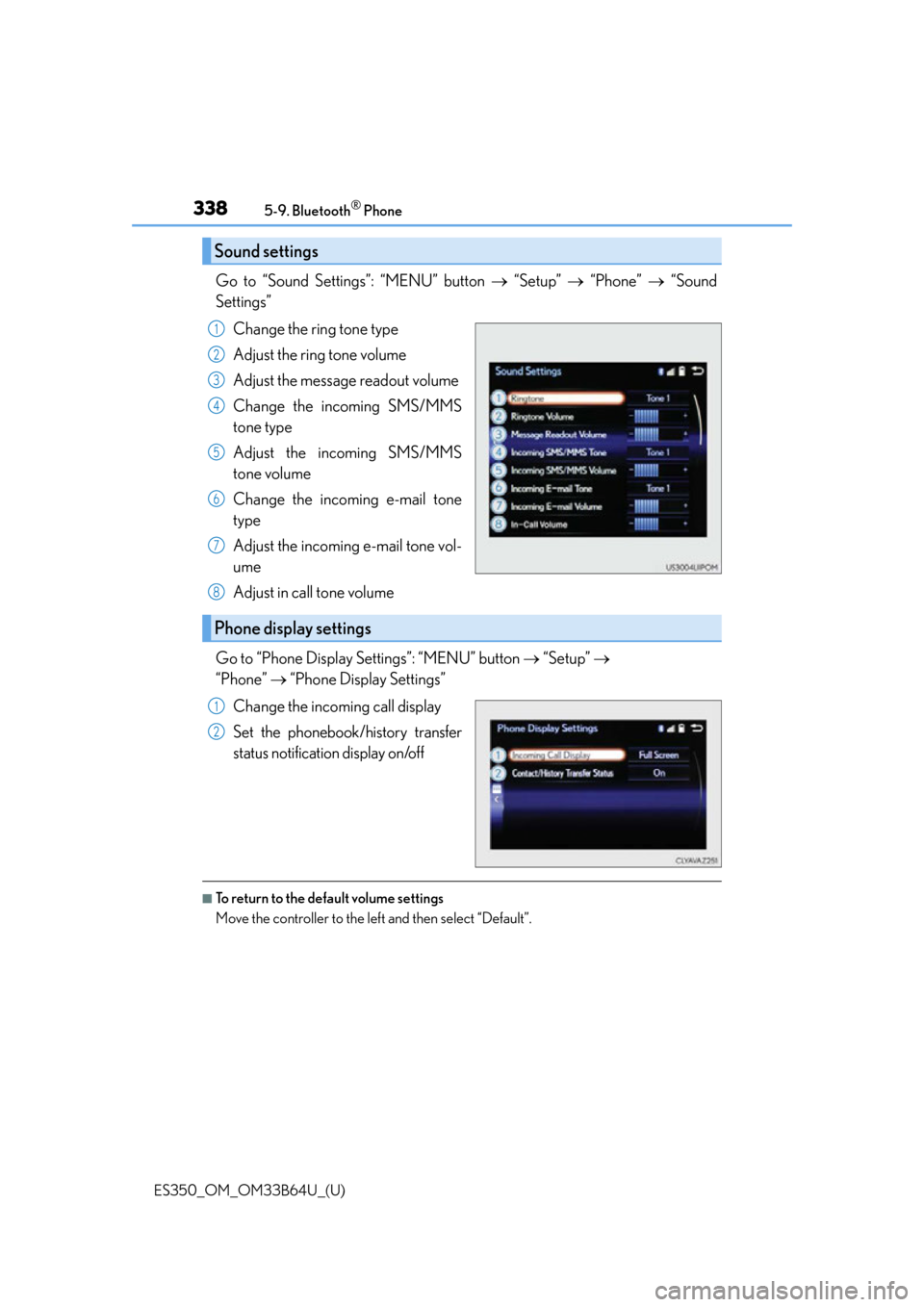
Go to “Sound Settings”: “MENU” button “Setup” “Phone” “Sound
Settings”
Change the ring tone type
Adjust the ring tone volume
Adjust the message readout volume
Change the incoming SMS/MMS
tone type
Adjust the incoming SMS/MMS
tone volume
Change the incoming e-mail tone
type
Adjust the incoming e-mail tone vol-
ume
Adjust in call tone volume
Go to “Phone Display Settings”: “MENU” button “Setup”
“Phone” “Phone Display Settings”
Change the incoming call display
Set the phonebook/history transfer
status notification display on/off
■To return to the default volume settings
Move the controller to the left and then select “Default”.
Sound settings
1
2
3
4
5
6
7
Phone display settings
8
1
2
Page 339 of 576
339
ES350_OM_OM33B64U_(U)5-10. Phonebook
5
Lexus Display Audio system
Contact settings
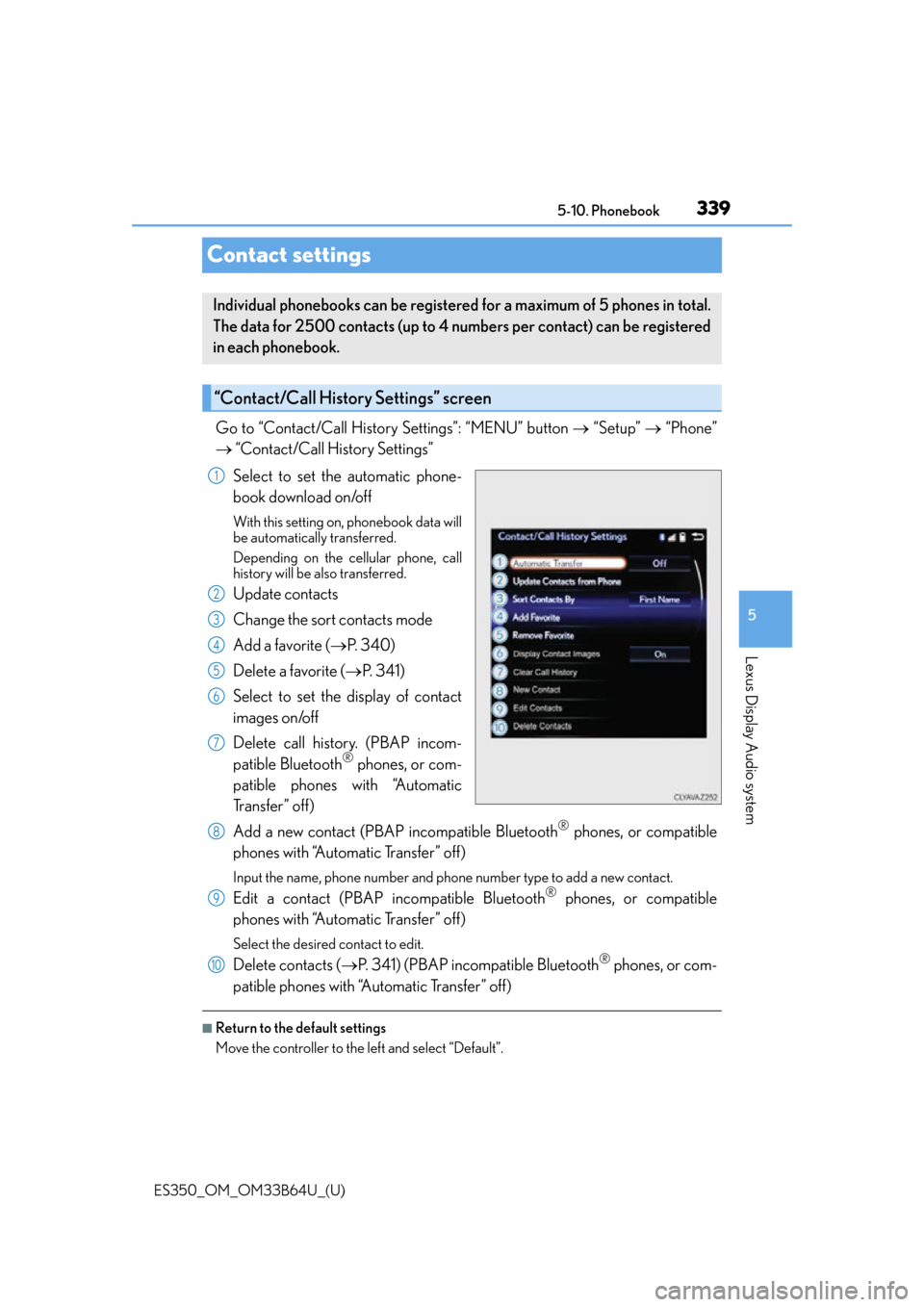
Go to “Contact/Call History Settings”: “MENU” button
“Setup” “Phone”
“Contact/Call History Settings”
Select to set the automatic phone-
book download on/off
With this setting on , phonebook data will
be automatically transferred.
Depending on the ce llular phone, call
history will be also transferred.
Update contacts
Change the sort contacts mode
Add a favorite ( P. 3 4 0 )
Delete a favorite ( P. 3 4 1 )
Select to set the display of contact
images on/off
Delete call history. (PBAP incom-
patible Bluetooth
® phones, or com-
patible phones with “Automatic
Tr a n s f e r ” o f f )
Add a new contact (PBAP incompatible Bluetooth
® phones, or compatible
phones with “Automatic Transfer” off)
Input the name, phone number and phon e number type to add a new contact.
Edit a contact (PBAP incompatible Bluetooth® phones, or compatible
phones with “Automatic Transfer” off)
Select the desired contact to edit.
Delete contacts ( P. 341) (PBAP incompatible Bluetooth® phones, or com-
patible phones with “Automatic Transfer” off)
■Return to the default settings
Move the controller to the left and select “Default”.
Individual phonebooks can be registered for a maximum of 5 phones in total.
The data for 2500 contacts (up to 4 nu mbers per contact) can be registered
in each phonebook.
“Contact/Call History Settings” screen
1
2
3
4
5
6
7
8
9
10
Page 340 of 576
3405-10. Phonebook
ES350_OM_OM33B64U_(U)
You can transfer the phone numbers in your Bluetooth® phone to the system.
Operation methods differ between PBAP compatible and PBAP incompatible
Bluetooth
® phones. If your cellular phone does not support either PBAP or
OPP services, you cannot transfer contacts.
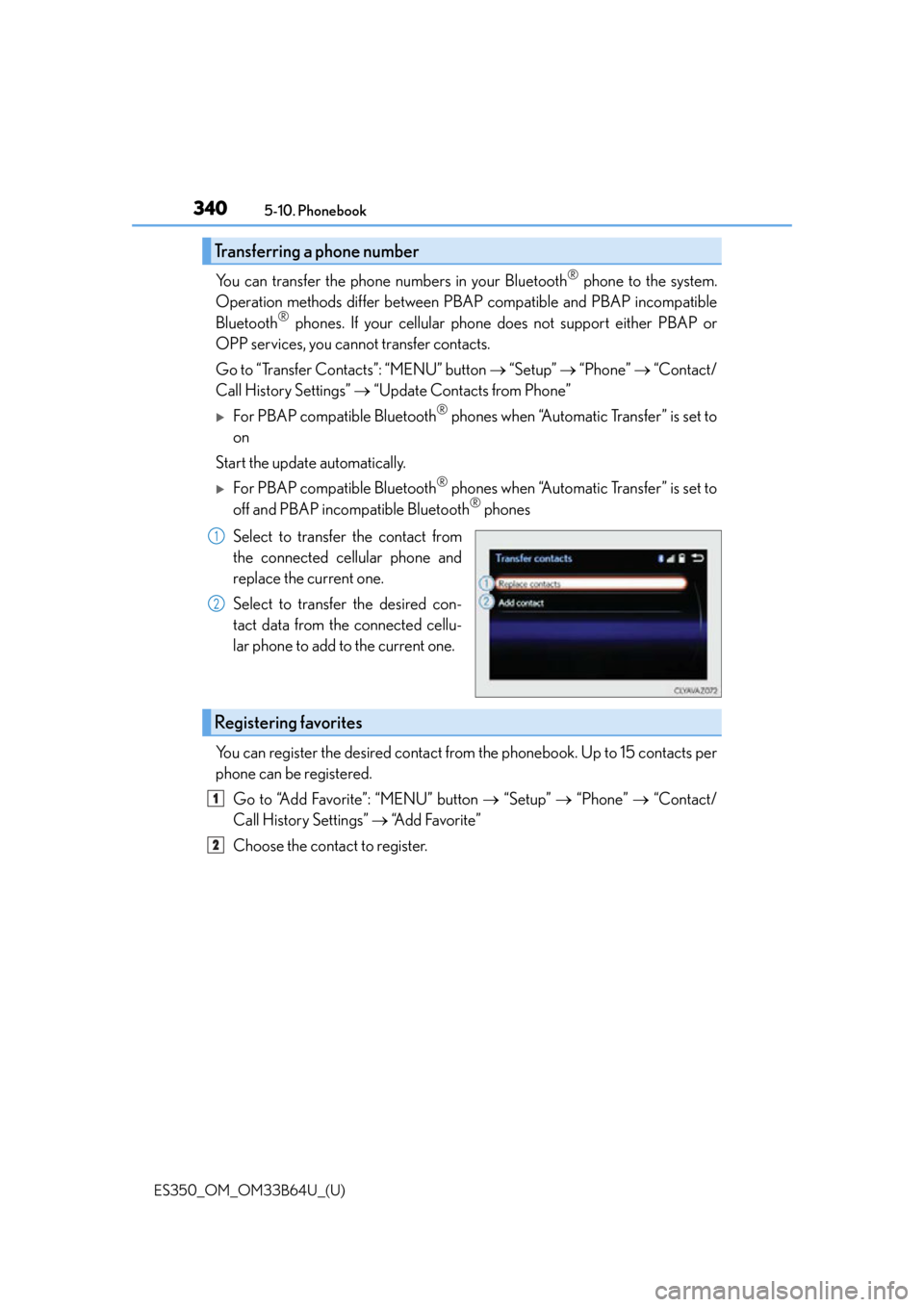
Go to “Transfer Contacts”: “MENU” button “Setup” “Phone” “Contact/
Call History Settings” “Update Contacts from Phone”
For PBAP compatible Bluetooth® phones when “Automatic Transfer” is set to
on
Start the update automatically.
For PBAP compatible Bluetooth® phones when “Automatic Transfer” is set to
off and PBAP incompatible Bluetooth® phones
Select to transfer the contact from
the connected cellular phone and
replace the current one.
Select to transfer the desired con-
tact data from the connected cellu-
lar phone to add to the current one.
You can register the desired contact from the phonebook. Up to 15 contacts per
phone can be registered.
Go to “Add Favorite”: “MENU” button “Setup” “Phone” “Contact/
Call History Settings” “A d d F a v o r i t e ”
Choose the contact to register.
Transferring a phone number
1
2
Registering favorites
1
2
Page 341 of 576
ES350_OM_OM33B64U_(U)
3415-10. Phonebook
5
Lexus Display Audio system
Go to “Remove Favorite”: “MENU” button “Setup” “Phone” “Con-
tact/Call History Settings” “Remove Favorite”
Select the desired contacts.
You can select all contacts by selecting “Select All”.
Move the controller to the left and select “Remove”.
Go to “Delete Contacts”: “MENU” button “Setup” “Phone” “Con-
tact/Call History Settings” “Delete Contacts”
Select the desired contacts.
You can select all contacts by selecting “Select All”.
Move the controller to the left and select “Delete”.
■Phonebook data
Phonebook data is managed separately for every registered phone. When another
phone is connected, you cannot read the registered data.
■When transferring contacts
Transfer contacts while the engine is running.
If the cellular phone is OPP or PBAP compatible, you may need to input “1234” on the
cellular phone for OBEX certification.
■When you have selected “Replace contacts ” or “Add contact” to transfer contacts
If the cellular phone does not support OPP service, you cannot use these functions. You
can transfer the phonebook data only by operating your phone.
■Transferring contacts while Bluetooth® audio is playing
Bluetooth® audio will disconnect. It will reconnect automatically when data transfer fin-
ishes. It may not reconnect dependin g on the phone which is connected.
Removing favorites
Deleting the contacts data
1
2
3
1
2
3
Page 343 of 576
343
ES350_OM_OM33B64U_(U)5-11. Bluetooth
®
5
Lexus Display Audio system
What to do if... (Troubleshooting)
If there is a problem with the hands-free system or a Bluetooth® device, first
check the table below.
When using the hands-free system with a Bluetooth® device
When registering/connecting a cellular phone
When making/receiving a call
The hands-free system or Bluetooth® device does not work.
The connected device may not be a compatible Bluetooth® cellular phone.
For a list of specific devices which operat ion has been confirmed on this system,
check with your Lexus dealer or the following website:
http://www.lexus.com/MobileLink
The Bluetooth® version of the connected cellular phone may be older than the speci-
fied version.
Use a cellular phone with Bluetooth
® version 2.0 or higher (recommended: Ver.
3.0 with EDR or higher). ( P. 3 4 8 )
A cellular phone cannot be registered.
An incorrect passcode was en tered on the cellular phone.
Enter the correct passcode on the cellular phone.
The registration operation has not been completed on the cellular phone side.
Complete the registration operation on the cellular phone (approve registration
on the phone).
Old registration information remains on ei ther this system or the cellular phone.
Delete the existing registration informat ion from both this system and the cellu-
lar phone, then register the cellular phon e you wish to connect to this system.
( P. 3 1 7 )
A Bluetooth® connection cannot be made.
Another Bluetooth® device is already connected.
Manually connect the cellular phone you wish to use to this system. (P. 3 2 0 )
Bluetooth® function is not enabled on the cellular phone.
Enable the Bluetooth® function on the cellular phone.
A call cannot be made/received.
Your vehicle is in a “No Service” area.
Move to where “No Service” no longer appears on the display.
Page 344 of 576
3445-11. Bluetooth®
ES350_OM_OM33B64U_(U)
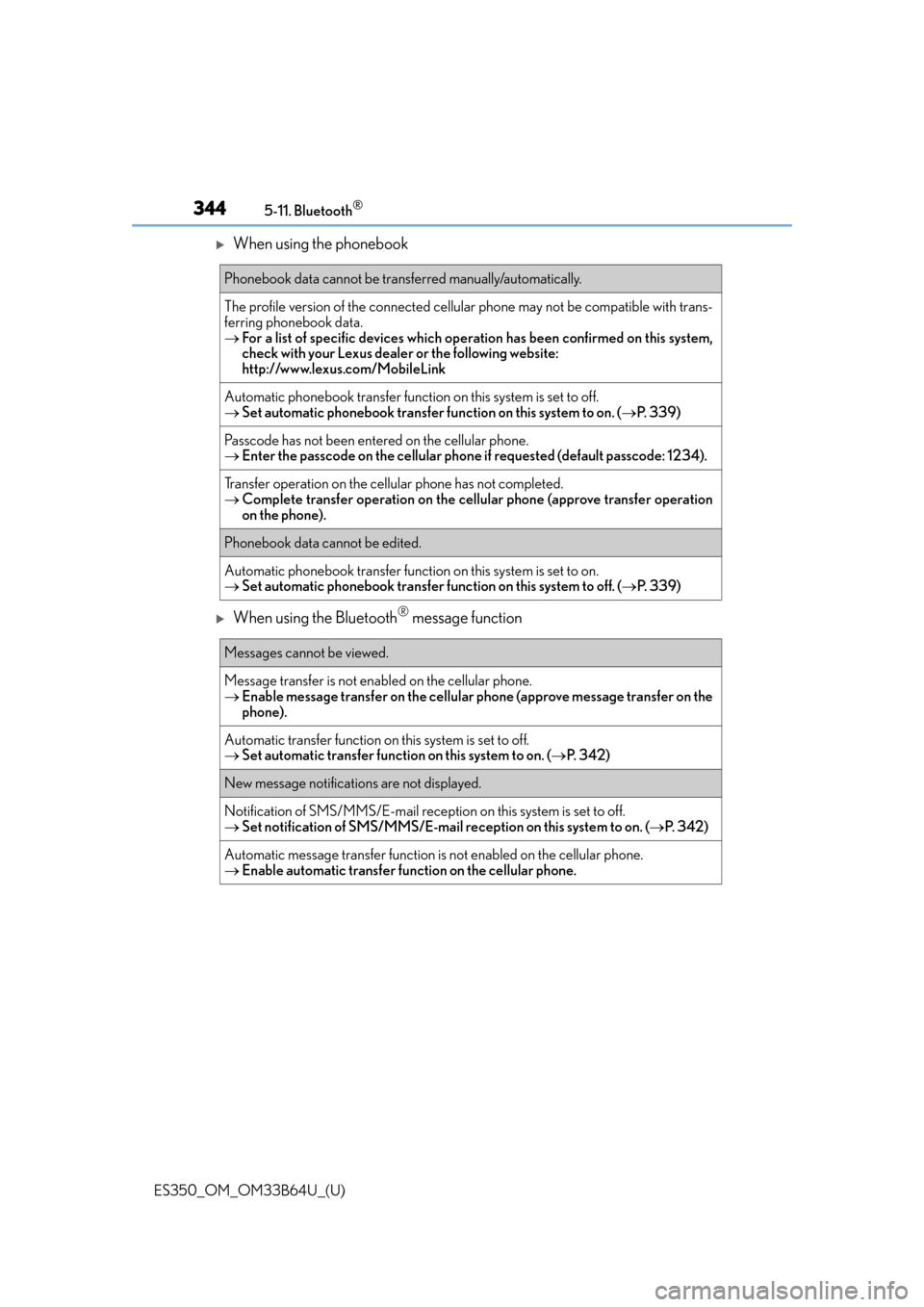
When using the phonebook
When using the Bluetooth® message function
Phonebook data cannot be transferred manually/automatically.
The profile version of the connected cellular phone may not be compatible with trans-
ferring phonebook data.
For a list of specific devices which operat ion has been confirmed on this system,
check with your Lexus dealer or the following website:
http://www.lexus.com/MobileLink
Automatic phonebook transfer function on this system is set to off.
Set automatic phonebook transfer fu nction on this system to on. (P. 3 3 9 )
Passcode has not been entered on the cellular phone.
Enter the passcode on the cellular phon e if requested (default passcode: 1234).
Transfer operation on the cellular phone has not completed.
Complete transfer operation on the cell ular phone (approve transfer operation
on the phone).
Phonebook data cannot be edited.
Automatic phonebook transfer function on this system is set to on.
Set automatic phonebook transfer func tion on this system to off. (P. 3 3 9 )
Messages cannot be viewed.
Message transfer is not enabled on the cellular phone.
Enable message transfer on the cellular phone (approve message transfer on the
phone).
Automatic transfer function on this system is set to off.
Set automatic transfer function on this system to on. ( P. 3 4 2 )
New message notifications are not displayed.
Notification of SMS/MMS/E-mail reception on this system is set to off.
Set notification of SMS/MMS/E-mail re ception on this system to on. (P. 3 4 2 )
Automatic message transfer function is not enabled on the cellular phone.
Enable automatic transfer function on the cellular phone.
Page 345 of 576
ES350_OM_OM33B64U_(U)
3455-11. Bluetooth®
5
Lexus Display Audio system
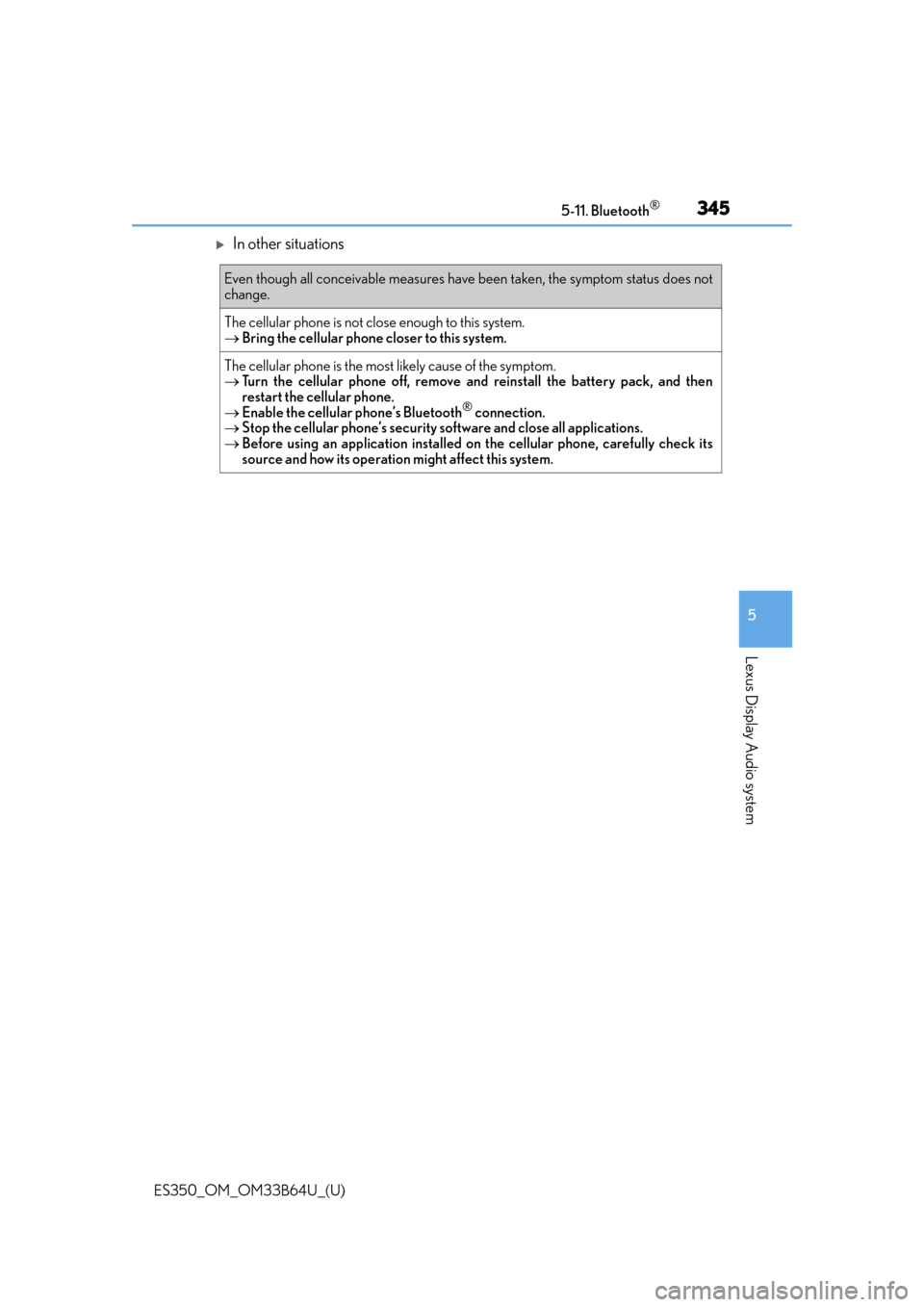
In other situations
Even though all conceivable measures have been taken, the symptom status does not
change.
The cellular phone is not close enough to this system.
Bring the cellular phone closer to this system.
The cellular phone is the most likely cause of the symptom.
Turn the cellular phone off, remove an d reinstall the battery pack, and then
restart the cellular phone.
Enable the cellular phone’s Bluetooth
® connection.
Stop the cellular phone’s security so ftware and close all applications.
Before using an application installed on the cellular phone, carefully check its
source and how its operation might affect this system.