set Lexus ES350 2016 Quick Guide / LEXUS 2016 ES350 OWNERS MANUAL (OM33B64U)
[x] Cancel search | Manufacturer: LEXUS, Model Year: 2016, Model line: ES350, Model: Lexus ES350 2016Pages: 576, PDF Size: 8.3 MB
Page 4 of 576

TABLE OF CONTENTS4
ES350_OM_OM33B64U_(U)
5-1. Basic OperationsLexus Display Audio System ......................................... 266
Steering wheel audio switches .......................................273
USB/AUX ports .......................... 274
5-2. Setup Setup menu ................................... 276
General settings.......................... 277
Voice settings ................................281
Display settings ........................... 282
5-3. Using the audio system Selecting the audio source .......................................... 284
Optimal use of the audio system .......................................... 285
Audio settings ............................. 286
Audio menu screen operation .................................... 289
5-4. Using the radio Radio operation.......................... 292
5-5. Playing an audio CD and MP3/WMA/AAC discs
CD player operation ................ 299
5-6. Using an external device Listening to an iPod ................... 306
Using USB memory device ........................................... 310
Using the AUX port ...................314 5-7. Connecting Bluetooth
®
Steps for using Bluetooth®
devices ..........................................315
Registering a Bluetooth
®
device ............................................ 317
Selecting a Bluetooth
®
device ........................................... 318
Connecting a Bluetooth
®
audio player ................................319
Connecting a Bluetooth
®
phone ........................................... 320
Displaying a Bluetooth
®
device details ..............................321
Detailed Bluetooth
®
settings ........................................ 322
5-8. Bluetooth
® Audio
Listening to Bluetooth
®
Audio ........................................... 323
5-9. Bluetooth
® Phone
Using a Bluetooth
®
Phone........................................... 325
Making a call.................................327
Receiving a call ........................... 330
Speaking on the phone .............331
Using a Bluetooth
®
phone message ....................... 334
Using the steering wheel switches ...................................... 336
Bluetooth
® phone
settings .........................................337
5Lexus Display Audio system
Page 5 of 576

5
ES350_OM_OM33B64U_(U)
1
9 8
7 4 3
2
10
5
6
5-10. PhonebookContact settings ......................... 339
Messaging setting ..................... 342
5-11. Bluetooth
®
What to do if... (Troubleshooting) ................... 343
Bluetooth
®................................... 346
5-12. Other function “Information” screen...................351
USB photo .................................... 353
Weather information ................ 355
Voice command system .......... 356
Mobile Assistant......................... 360
LEXUS Enform Remote ......... 362
6-1. Using the air conditioning system and defogger
Automatic air conditioning system .......................................... 364
Heated steering wheel/ seat heaters/seat
ventilators....................................373
6-2. Using the interior lights Interior lights list ..........................375• Interior lights ........................... 376
• Personal lights ........................ 376 6-3. Using the storage features
List of storage features .............378• Glove box ................................379
• Console box ...........................379
• Cup holders ...........................380
• Auxiliary box........................... 381
Trunk features .............................. 382
6-4. Using the other interior features
Other interior features ............ 384 • Sun visors ................................ 384
• Vanity mirrors ........................ 384
• Clock ........................................385
• Power outlets .........................385
• Armrest.................................... 386
•Rear sunshade/rear door sunshades ............................... 387
•Trunk storage extension ................................. 389
• Coat hooks............................. 390
• Assist grips ............................. 390
Garage door opener ................ 391
Compass ....................................... 398
LEXUS Enform Safety Connect...................................... 402
6Interior features
Page 18 of 576
18Pictorial index
ES350_OM_OM33B64U_(U)
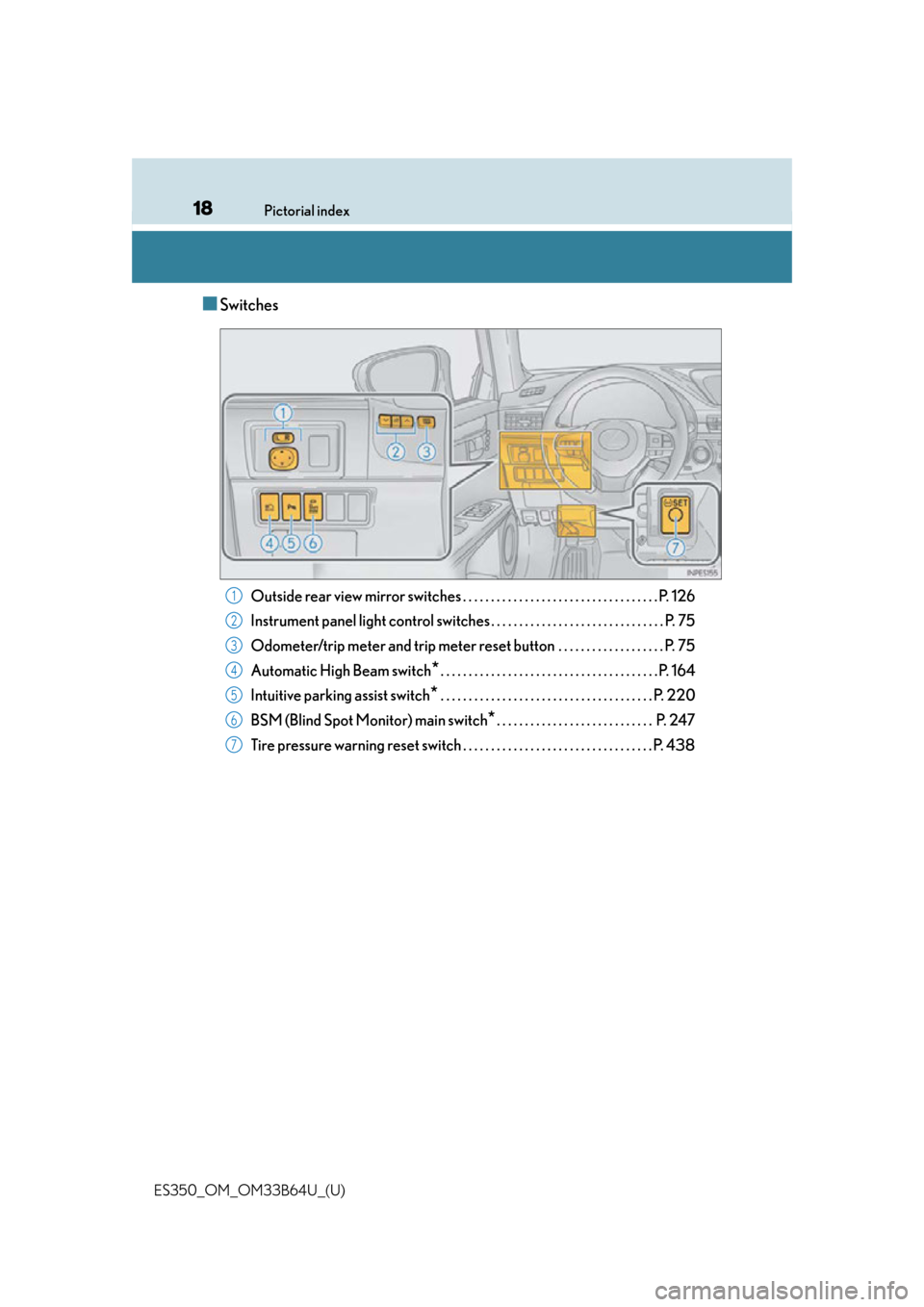
■Switches
Outside rear view mirror switches . . . . . . . . . . . . . . . . . . . . . . . . . . . . . . . . . . . P. 126
Instrument panel light control swit ches . . . . . . . . . . . . . . . . . . . . . . . . . . . . . . . P. 75
Odometer/trip meter and trip meter reset button . . . . . . . . . . . . . . . . . . . P. 75
Automatic High Beam switch
*. . . . . . . . . . . . . . . . . . . . . . . . . . . . . . . . . . . . . . . P. 164
Intuitive parking assist switch
* . . . . . . . . . . . . . . . . . . . . . . . . . . . . . . . . . . . . . . P. 220
BSM (Blind Spot Monitor) main switch
*. . . . . . . . . . . . . . . . . . . . . . . . . . . . P. 247
Tire pressure warning reset switch . . . . . . . . . . . . . . . . . . . . . . . . . . . . . . . . . . P. 438
1
2
3
4
5
6
7
Page 41 of 576
411-1. For safe use
ES350_OM_OM33B64U_(U)
1
For safety and security
■SRS airbag deployment conditions (SRS front airbags)
●The SRS front airbags will deploy in the event of an impact that exceeds the set thresh-
old level (the level of force corresponding to an approximately 12 - 18 mph [20 - 30
km/h] frontal collision with a fixed wall that does not move or deform).
However, this threshold velocity will be considerably higher in the following situations:
• If the vehicle strikes an object, such as a parked vehicle or sign pole, which can move
or deform on impact
• If the vehicle is involved in an underride collision, such as a collision in which the
front of the vehicle “underrides”, or goes under, the bed of a truck
●Depending on the type of collision, it is possib le that only the seat belt pretensioners will
activate.
●The SRS front airbags for the front passenger will not activate if there is no passenger
sitting in the front passenger seat. However, the SRS front airbags for the front passen-
ger may deploy if luggage is put in the seat, even if the se at is unoccupied. (P. 44)
■SRS airbag deployment conditions (S RS side and curtain shield airbags)
●The SRS side and curtain shield airbags will deploy in the event of an impact that
exceeds the set threshol d level (the level of force corresponding to the impact force
produced by an approximately 3300 lb. [1500 kg] vehicle colliding with the vehicle
cabin from a direction perpendicular to the vehicle orientation at an approximate
speed of 12 - 18 mph [20 - 30 km/h]).
●The SRS curtain shield airbags will deploy in the event of vehicle rollover.
●The SRS side and curtain shield airbags may al so deploy in the event of a severe frontal
collision.
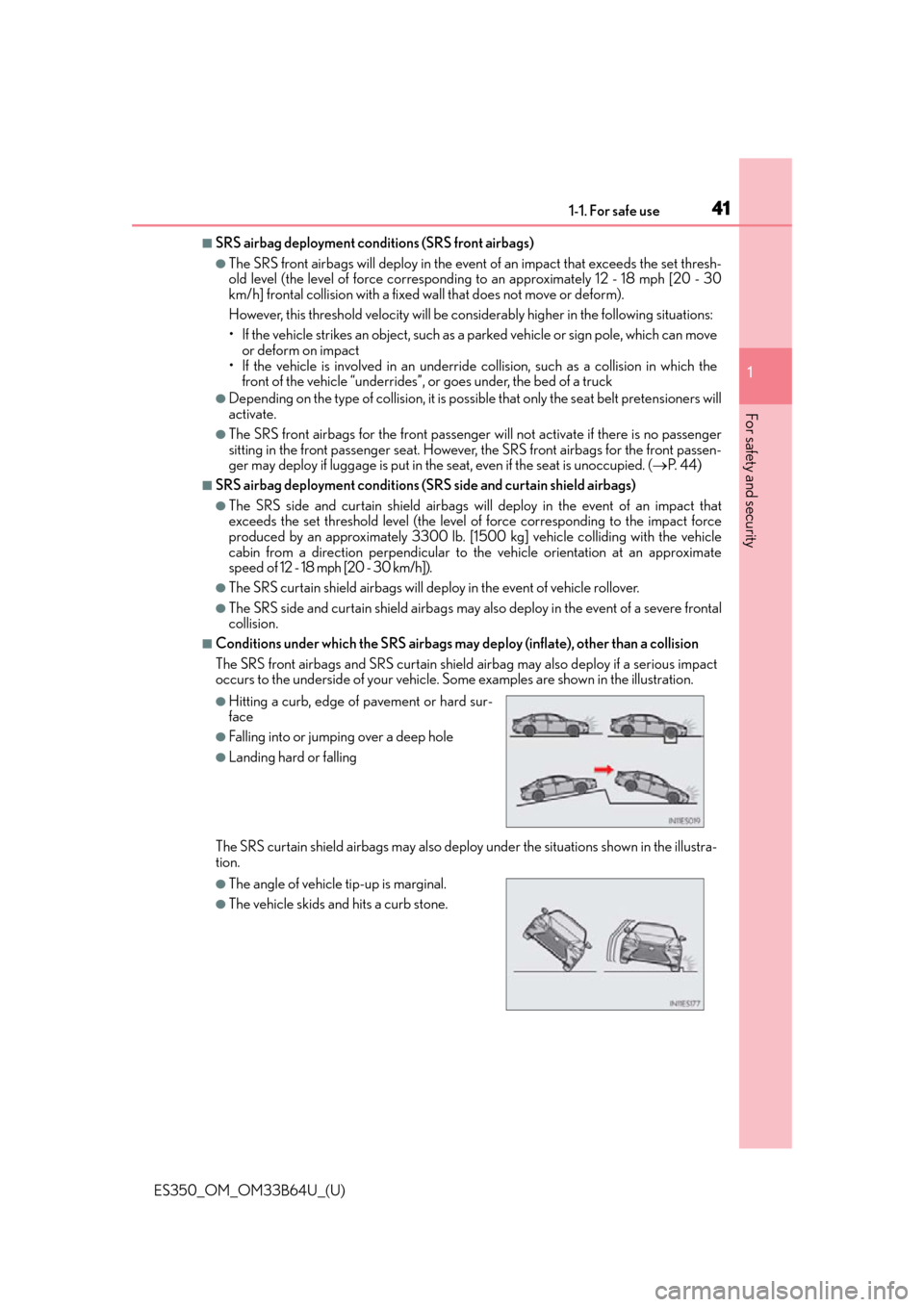
■Conditions under which the SRS airbags may deploy (inflate), other than a collision
The SRS front airbags and SRS curtain shield airbag may also deploy if a serious impact
occurs to the underside of your vehicle. Some examples are shown in the illustration.
The SRS curtain shield airbags may also deploy under the situations shown in the illustra-
tion.
●Hitting a curb, edge of pavement or hard sur-
face
●Falling into or jumping over a deep hole
●Landing hard or falling
●The angle of vehicle tip-up is marginal.
●The vehicle skids and hits a curb stone.
Page 67 of 576
671-2. Theft deterrent system
ES350_OM_OM33B64U_(U)
1
For safety and security
Alarm
The alarm uses light and sound to give an alert when an intrusion is detected.
The alarm is triggered in the following situations when the alarm is set:
●A locked door or trunk is unlocked or opened in any way other than using the
entry function, wireless remote control or mechanical key. (The doors will lock
again automatically.)
●The hood is opened.
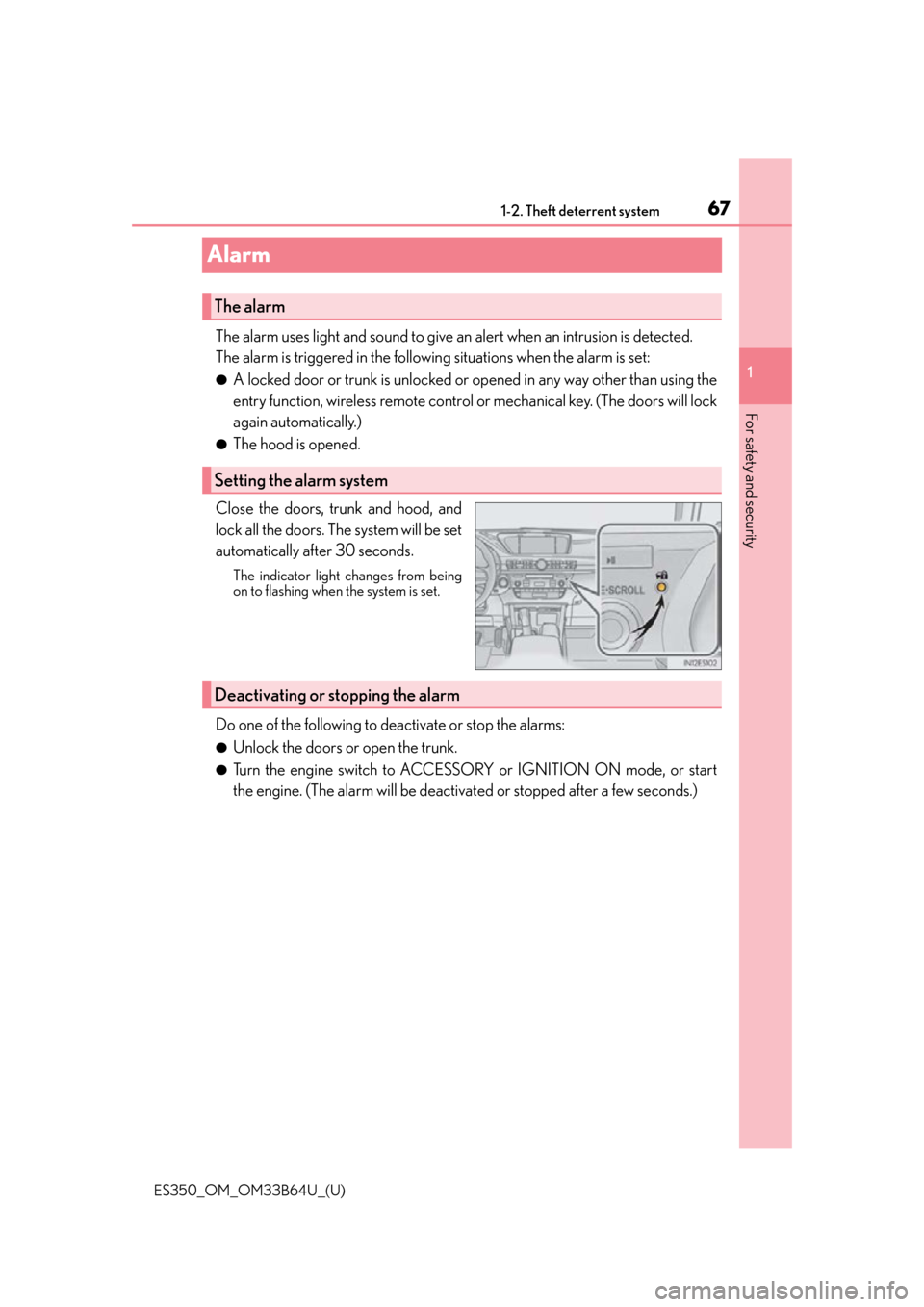
Close the doors, trunk and hood, and
lock all the doors. The system will be set
automatically after 30 seconds.
The indicator light changes from being
on to flashing when the system is set.
Do one of the following to de activate or stop the alarms:
●Unlock the doors or open the trunk.
●Turn the engine switch to ACCESSORY or IGNITION ON mode, or start
the engine. (The alarm will be deactivat ed or stopped after a few seconds.)
The alarm
Setting the alarm system
Deactivating or stopping the alarm
Page 68 of 576
681-2. Theft deterrent system
ES350_OM_OM33B64U_(U)
■System maintenance
The vehicle has a maintenance-free type alarm system.
■Items to check before locking the vehicle
To prevent unexpected triggering of the alarm and vehicle theft, make sure of the follow-
ing:
●Nobody is in the vehicle.
●The windows and moon roof are closed before the alarm is set.
●No valuables or other personal items are left in the vehicle.
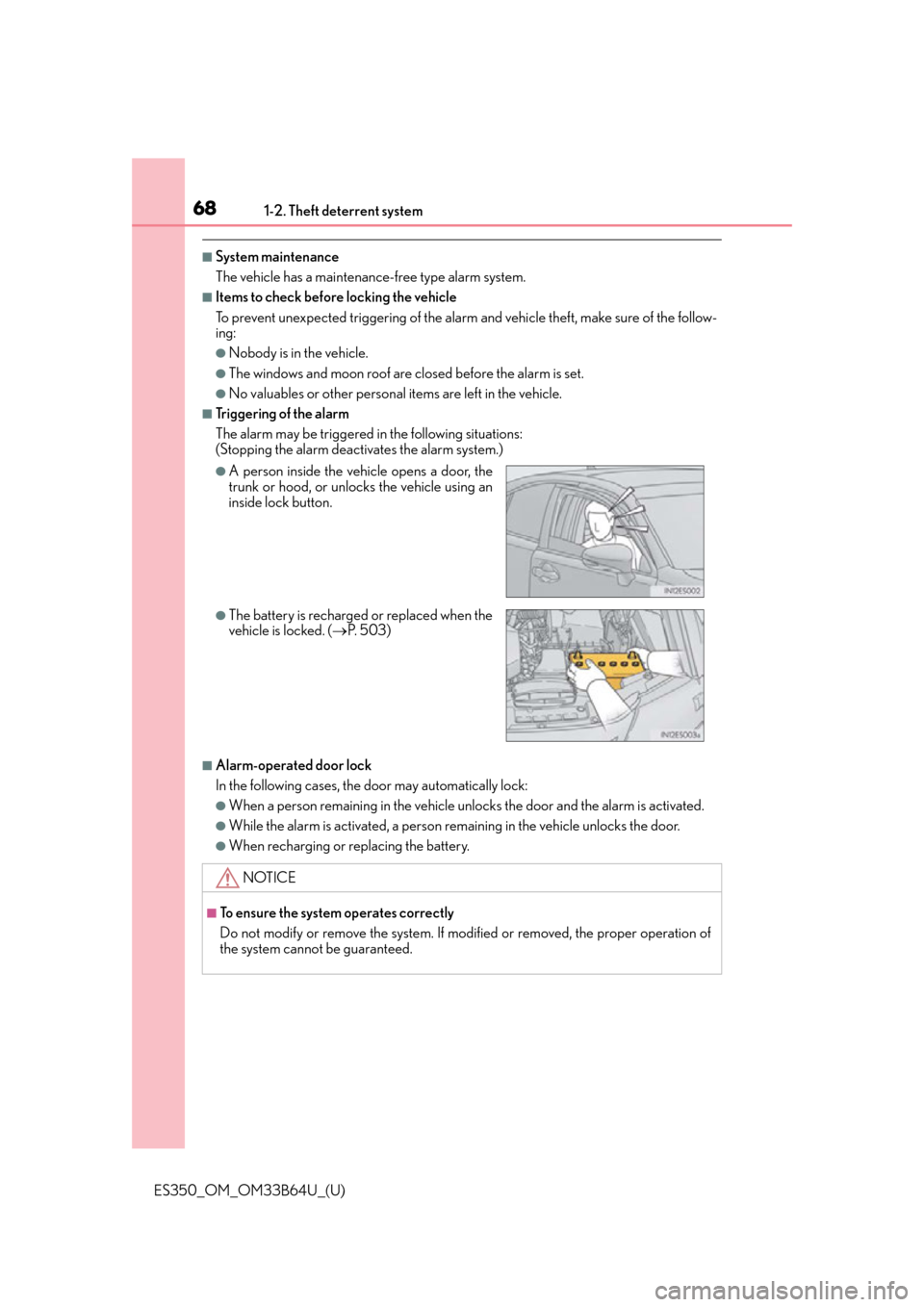
■Triggering of the alarm
The alarm may be triggered in the following situations:
(Stopping the alarm deactivates the alarm system.)
■Alarm-operated door lock
In the following cases, the door may automatically lock:
●When a person remaining in the vehicle unlocks the door and the alarm is activated.
●While the alarm is activated, a person remaining in the vehicle unlocks the door.
●When recharging or replacing the battery.
●A person inside the vehicle opens a door, the
trunk or hood, or unlocks the vehicle using an
inside lock button.
●The battery is recharged or replaced when the
vehicle is locked. (P. 5 0 3 )
NOTICE
■To ensure the system operates correctly
Do not modify or remove the system. If modified or removed, the proper operation of
the system cannot be guaranteed.
Page 72 of 576
72
ES350_OM_OM33B64U_(U)2. Instrument cluster
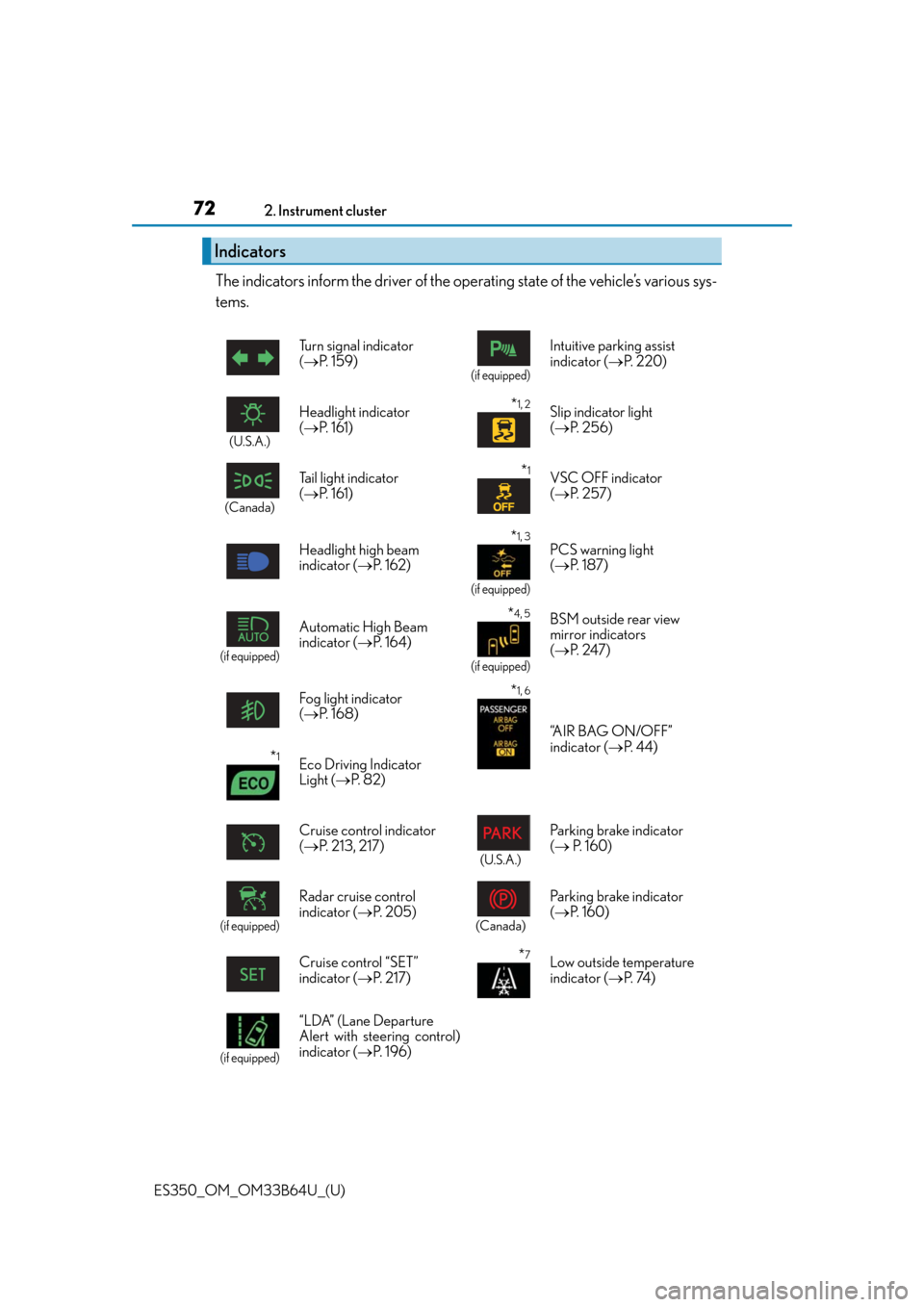
The indicators inform the driver of the operating state of the vehicle’s various sys-
tems.
Indicators
Turn signal indicator
(
P. 1 5 9 )
(if equipped)
Intuitive parking assist
indicator ( P. 220)
(U.S.A.)
Headlight indicator
( P. 161)*1, 2Slip indicator light
( P. 2 5 6 )
(Canada)
Tail light indicator
( P. 161) *1VSC OFF indicator
( P. 2 5 7 )
Headlight high beam
indicator ( P. 1 6 2 )
*1, 3
(if equipped)
PCS warning light
( P. 1 8 7 )
(if equipped)
Automatic High Beam
indicator ( P. 1 6 4 ) *4, 5
(if equipped)
BSM outside rear view
mirror indicators
( P. 2 4 7 )
Fog light indicator
( P. 1 6 8 )
*1, 6
“A I R B A G O N / O F F ”
indicator ( P. 44)
*1Eco Driving Indicator
Light ( P. 8 2 )
Cruise control indicator
( P. 213, 217)
(U.S.A.)
Parking brake indicator
( P. 1 6 0 )
(if equipped)
Radar cruise control
indicator ( P. 2 0 5 )
(Canada)
Parking brake indicator
( P. 1 6 0 )
Cruise control “SET”
indicator ( P. 2 1 7 )
*7Low outside temperature
indicator ( P. 74 )
(if equipped)
“LDA” (Lane Departure
Alert with steering control)
indicator ( P. 1 9 6 )
Page 73 of 576

ES350_OM_OM33B64U_(U)
732. Instrument cluster
2
Instrument cluster
*1: These lights turn on when the engine switch is turned to IGNITION ON mode toindicate that a system check is being perfor med. They will turn off after the engine is
on, or after a few seconds. There may be a malfunction in a system if a light does not
come on, or turn off. Have the vehi cle inspected by your Lexus dealer.
*2: The light flashes to indicate that the system is operating.
*3: The light turns on when the system is turned off.
*4: In order to confirm operation, the BSM ou tside rear view mirror indicators illuminate
in the following situations:
• When the engine switch is turned to IGNITION ON mode while the BSM main
switch is set to ON.
• When the BSM main switch is set to ON while the engine switch is in IGNITION
ON mode.
If the system is functioning correctly, the BSM outside rear view mirror indicators will
turn off after a few seconds.
If the BSM outside rear view mirror indica tors do not illuminate or do not turn off,
there may be a malfunction with the system. If this occurs, have the vehicle inspected
by your Lexus dealer.
*5: This light illuminates on the outside rear view mirrors.
*6: This light illuminates on the center panel.
*7: When the outside temperature is approximately 37 F (3 C) or lower, the indicator
will flash for approximately 10 seconds, then stay on.
WA R N I N G
■If a safety system warning light does not come on
Should a safety system light such as the ABS and SRS warning light not come on when
you start the engine, this could mean that these systems are not available to help pro-
tect you in an accident, which could result in death or serious injury. Have the vehicle
inspected by your Lexus dealer immediately if this occurs.
Page 74 of 576
74
ES350_OM_OM33B64U_(U)2. Instrument cluster
Gauges and meters
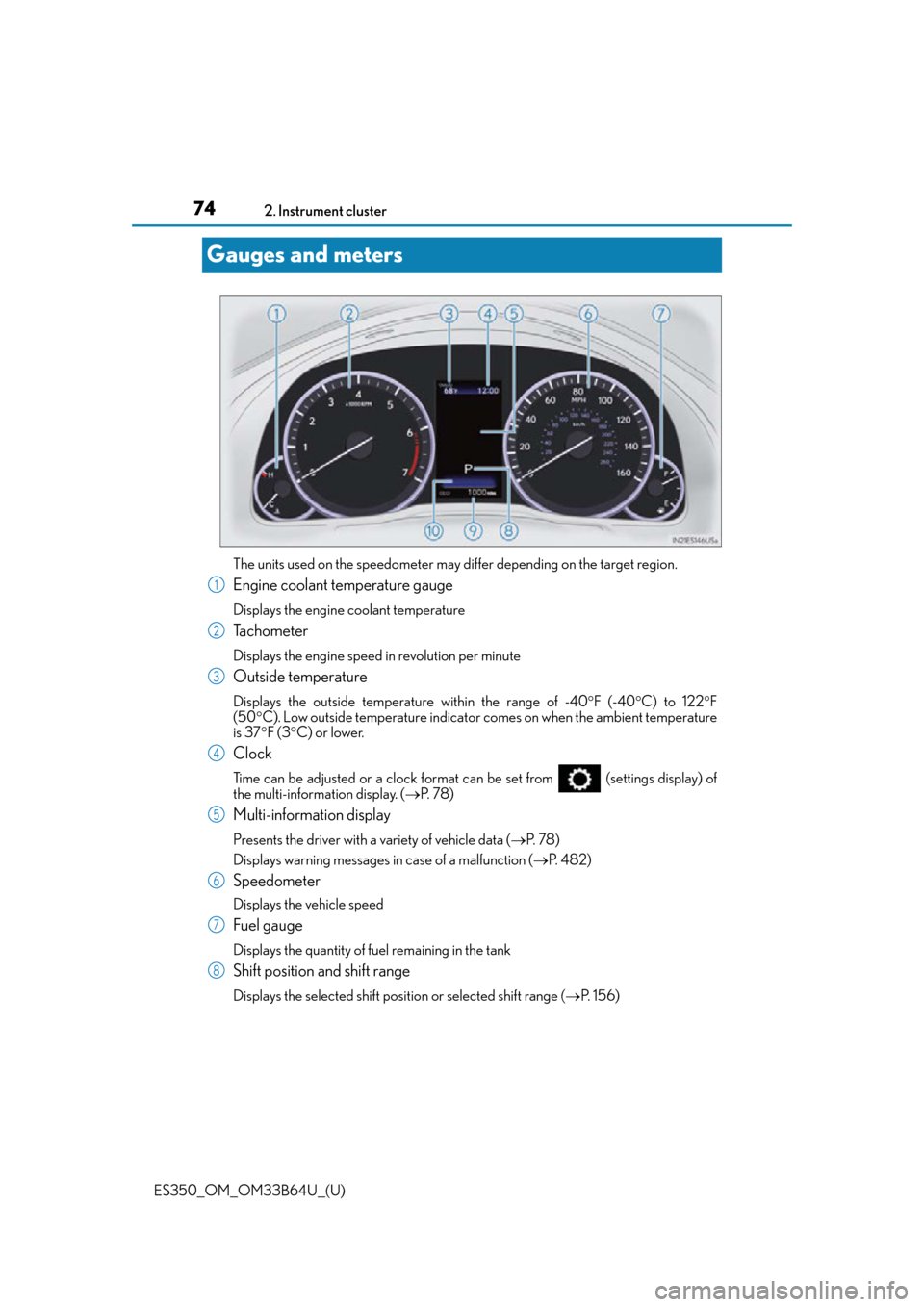
The units used on the speedometer may differ depending on the target region.
Engine coolant temperature gauge
Displays the engine coolant temperature
Tachometer
Displays the engine speed in revolution per minute
Outside temperature
Displays the outside temperature within the range of -40
F (-40 C) to 122 F
(50 C). Low outside temperature indicator comes on when the ambient temperature
is 37 F (3 C) or lower.
Clock
Time can be adjusted or a clock format can be set from (settings display) of
the multi-information display. ( P. 7 8 )
Multi-information display
Presents the driver with a variety of vehicle data ( P. 7 8 )
Displays warning messages in case of a malfunction ( P. 4 8 2 )
Speedometer
Displays the vehicle speed
Fuel gauge
Displays the quantity of fuel remaining in the tank
Shift position and shift range
Displays the selected shift posi tion or selected shift range (P. 1 5 6 )
1
2
3
4
5
6
7
8
Page 75 of 576
ES350_OM_OM33B64U_(U)
752. Instrument cluster
2
Instrument cluster
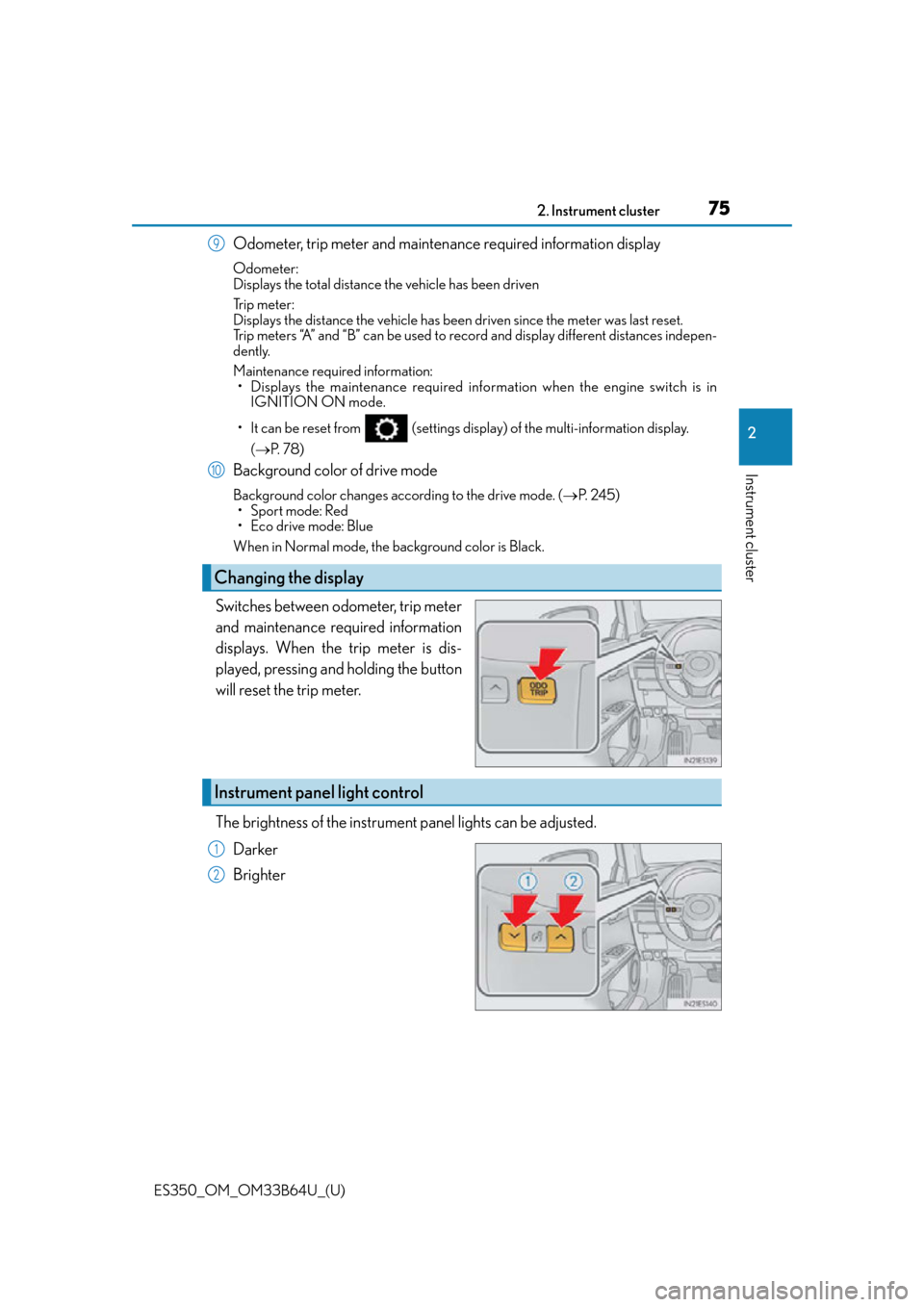
Odometer, trip meter and maintenance required information display
Odometer:
Displays the total distance the vehicle has been driven
Tr i p m e t e r :
Displays the distance the vehicle has been driven since the meter was last reset.
Trip meters “A” and “B” can be used to record and display different distances indepen-
dently.
Maintenance required information:
• Displays the maintenance required info rmation when the engine switch is in
IGNITION ON mode.
• It can be reset from (settings displa y) of the multi-information display.
( P. 7 8 )
Background color of drive mode
Background color changes according to the drive mode. ( P. 2 4 5 )
• Sport mode: Red
• Eco drive mode: Blue
When in Normal mode, the background color is Black.
Switches between odometer, trip meter
and maintenance required information
displays. When the trip meter is dis-
played, pressing and holding the button
will reset the trip meter.
The brightness of the instrument panel lights can be adjusted.
Darker
Brighter
Changing the display
9
10
Instrument panel light control
1
2