navigation system Lexus ES350 2016 Quick Guide / LEXUS 2016 ES350 QUICK GUIDE (OM33B82U) User Guide
[x] Cancel search | Manufacturer: LEXUS, Model Year: 2016, Model line: ES350, Model: Lexus ES350 2016Pages: 112, PDF Size: 2.11 MB
Page 53 of 112

52
ES350_QG_OM33B82U_(U)
Navigation System (if equipped)
nRegister home
Press the “MENU” button on the
Remote Touch.
Please refer to P.48 for the
Remote Touch operation.
Select “Setup”.
Select “Navigation”.
Select “Home”.
Select “Set Home Location”.
Select “Address”.
Select “City”.
Enter a city name and select “OK”.
Select the screen button of the
desired city name from the dis-
played list.
For security reasons, use a point
close to your home instead of your
actual home address.
Enter a street name and select
“OK”.31
2
3
44
55
6
77
8
9
10
Page 59 of 112

58
ES350_QG_OM33B82U_(U)
Hands-free System For Cellular Phone
(with navigation system)
n Bluetooth® phone pairing
Compatible Bluetooth®-equipped phones can be connec ted to the vehicle, enabling
hands-free operation. Please refer to the cel lular phone manufacturer’s user guide for
pairing procedures, or go to “www.lexus.com/MobileLink
” (for U.S.A.) for more
phone information.
To use a Bluetooth
® phone, it is neces-
sary to first register it in the system.
Press on the steering wheel.
Select “Yes”.
When this screen is displayed,
search for the device name dis-
played on this screen on the screen
of your Bluetooth
® device.
Refer to the cellular phone user’s
manual for cellular phone opera-
tion.
Register the Bluetooth
® device
using your Bluetooth
® device.
Check that the following screen is
displayed when registration is com-
plete.
2
1
2
33
4
55
Page 63 of 112

62
ES350_QG_OM33B82U_(U)
nCalling by name
You can call by giving a name registered in the contacts. For details, refer to the
“NAVIGATION SYSTEM OWNER’S MANUAL”.
Press .
Say “Call
nCalling by favorites list
Press on the steering wheel.
Select the “Favorites” tab and
select the desired contact.
Select the desired number.
Check that the “Call” screen is dis-
played.
11
2
: Pressing this switch turns the voice command system on. Say a command
after the beep.
21
2
33
4
Page 65 of 112

64
ES350_QG_OM33B82U_(U)
Audio System (with navigation system)
nAudio control screen
Follow the procedure below to di splay the audio control screen.
Press the “MENU” button on the
Remote Touch.
Please refer to P.48 for the
Remote Touch operation.
The “Menu” screen will be dis-
played.
Using the Remote Touch, select
“Radio” or “Media” and select each
tab.
nRemote control (steer ing wheel switches)
Some audio features can be controlled using the switches on the steering wheel.
Increases/decreases volume
Radio mode: Selects a radio station/
channel
Audio CD mode: Selects a track
MP3/WMA/AAC disc mode:
Selects a file
DVD mode: Selects a chapter
iPod mode: Selects a track/file
Press: Change audio modes
Press and hold: Mute/unmute or
pause/resume the current operation
1
2
1
2
3
Page 82 of 112

81
ES350_QG_OM33B82U_(U)
Vehicles with navigation systemAdjust the left-hand side
temperature setting
Adjust the fan speed setting
Select the air flow mode
: Air flows to the upper body
: Air flows to the upper bodyand feet
: Air flows to the feet
: Air flows to the feet and the windshield defogger oper-
ates
Adjust the right-hand side
temperature setting
Display the option control screen
Turn the fan off
Select to set automatic mode on/off
1
2
3
4
5
6
7
Page 83 of 112
82
ES350_QG_OM33B82U_(U)
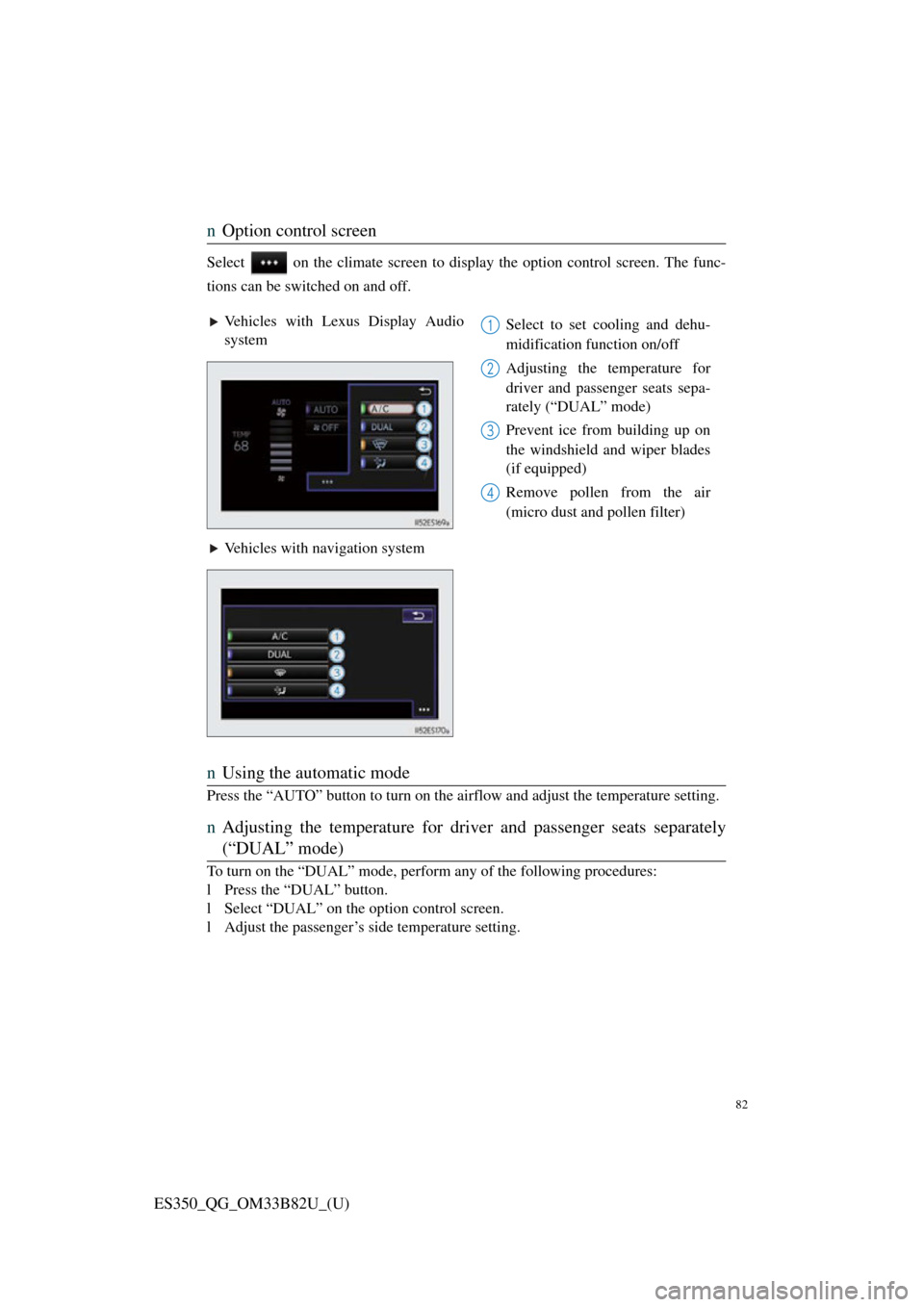
nOption control screen
Select on the climate screen to disp lay the option control screen. The func-
tions can be switched on and off.
n Using the automatic mode
Press the “AUTO” button to turn on the ai rflow and adjust the temperature setting.
nAdjusting the temperature for driv er and passenger seats separately
(“DUAL” mode)
To turn on the “DUAL” mode, perform any of the following procedures:
l Press the “DUAL” button.
l Select “DUAL” on the option control screen.
l Adjust the passenger’s side temperature setting.
Vehicles with Lexus Display Audio
system Select to set cooling and dehu-
midification function on/off
Adjusting the temperature for
driver and passenger seats sepa-
rately (“DUAL” mode)
Prevent ice from building up on
the windshield and wiper blades
(if equipped)
Remove pollen from the air
(micro dust and pollen filter)
Vehicles with navigation system1
2
3
4
Page 84 of 112

83
ES350_QG_OM33B82U_(U)
Voice Command System
nBasic operation
Press the talk switch.
To cancel the voice command sys-
tem, press and hold the talk switch.
After a beep sounds, say the desired
command.
On the list screen, you can select
the desired command.
Continue on to pages 83-86 for a detailed list of Voice Commands for the following
categories: Basic . . . . . . . . . . . . . . . . . . . . . . . . . . . . . . . . . . . . . . P.83
Apps . . . . . . . . . . . . . . . . . . . . . . . . . . . . . . . . . . . . . . P.83
Navi . . . . . . . . . . . . . . . . . . . . . . . . . . . . . . . . . . . . . . . P.83
Phone. . . . . . . . . . . . . . . . . . . . . . . . . . . . . . . . . . . . . . P.84
Audio. . . . . . . . . . . . . . . . . . . . . . . . . . . . . . . . . . . . . . P.85
Info . . . . . . . . . . . . . . . . . . . . . . . . . . . . . . . . . . . . . . . P.85
Other. . . . . . . . . . . . . . . . . . . . . . . . . . . . . . . . . . . . . . P.86
1
2
n Important voice comman ds information and tips
• Voice commands can be used while driving.
• You must wait until after the beep to say a command.
• In vehicles with navigation system, a large (TALK icon) will appear on
the navigation screen to prompt you to say a command.
• If you know what command to use, you can press at any time to inter-
rupt the voice guidance.
NOTE: When inputting voice commands you must wait until after the beep to
Page 85 of 112

84
ES350_QG_OM33B82U_(U)
nCommand list
Basic (vehicles with Lexus Display Audio System)
Basic (Vehicles with navigation system)
Apps (vehicles with navigation system) (for U.S.A., if equipped)
Navi (vehicles with navigation system)
*1: For example; “Gas stati ons”, “Restaurants”, etc.
*2: Depending on the search results, a POI list may be provided by a relevant POI
application of the LEXUS App suite.
CommandAction
“Help”Prompts voice guidance to offer examples of
commands or operation methods
“Go Back”Returns to the previous screen
“Go to
CommandAction
“Help”Prompts voice guidance to offer examples of
commands or operation methods
“Go Back”Returns to the previous screen
“Go to
“More Hints”Displays more commonly used commands
“Cancel”Cancels the voice command system
CommandAction
“Launch
CommandAction
“Find
current position
*2
“Enter an Address”Enables setting a destination by saying the
address
“Go Home”Displays the route to home
“Pause Guidance”Stops the route guidance
“Resume Guidance”Resumes the route guidance
“Show
“Delete Destination”Deletes the destination
“Previous Destination”Displays previous destinations
Page 86 of 112

85
ES350_QG_OM33B82U_(U)
PhoneRadio (vehicles with navigation system)
Audio (vehicles with Lexus Display Audio System)
CommandAction
“Redial”Places a call to the phone number of the latest
outgoing call
“Call Back”Places a call to the phone number of latest
incoming call
“Show Recent Calls”Displays the call history screen
“Dial
“Call
from the phone book
CommandAction
“Tune to
quency
“Tune to
“Play
fied genre
“Tune to FM
HD
tion
“Tune to preset
station
“Tune to
with the specified name
“Tune to channel
channel number
“Play
tion”Changes the radio to a satellite radio channel of
the specified genre
CommandAction
“Play Playlist
“Play Artist
“Play Song
“Play Album
“Turn Music On/Off”Turns the audio system on/off
Audio source nameSelects audio source
Page 87 of 112

86
ES350_QG_OM33B82U_(U)
Audio (vehicles with navigation system)
Info (vehicles with navigation system) (for U.S.A., if equipped)
Info (vehicles with Lexus Display Audio System)
CommandAction
“Play Playlist
“Play Artist
“Play Song
“Play Album
CommandAction
“Destination Assist”Connects the system to the Lexus response cen-
ter
“Show Forecast”Displays weather information
“Show Traffic”Displays traffic information
“Lexus Insider”Displays the Lexus insider list
CommandAction
“Show Forecast”Displays weather information
“Show Traffic”Displays traffic information