low Lexus ES350 2017 Quick Guide
[x] Cancel search | Manufacturer: LEXUS, Model Year: 2017, Model line: ES350, Model: Lexus ES350 2017Pages: 104, PDF Size: 3.83 MB
Page 73 of 104
72
ES350_QG_OM33C84U_(U)
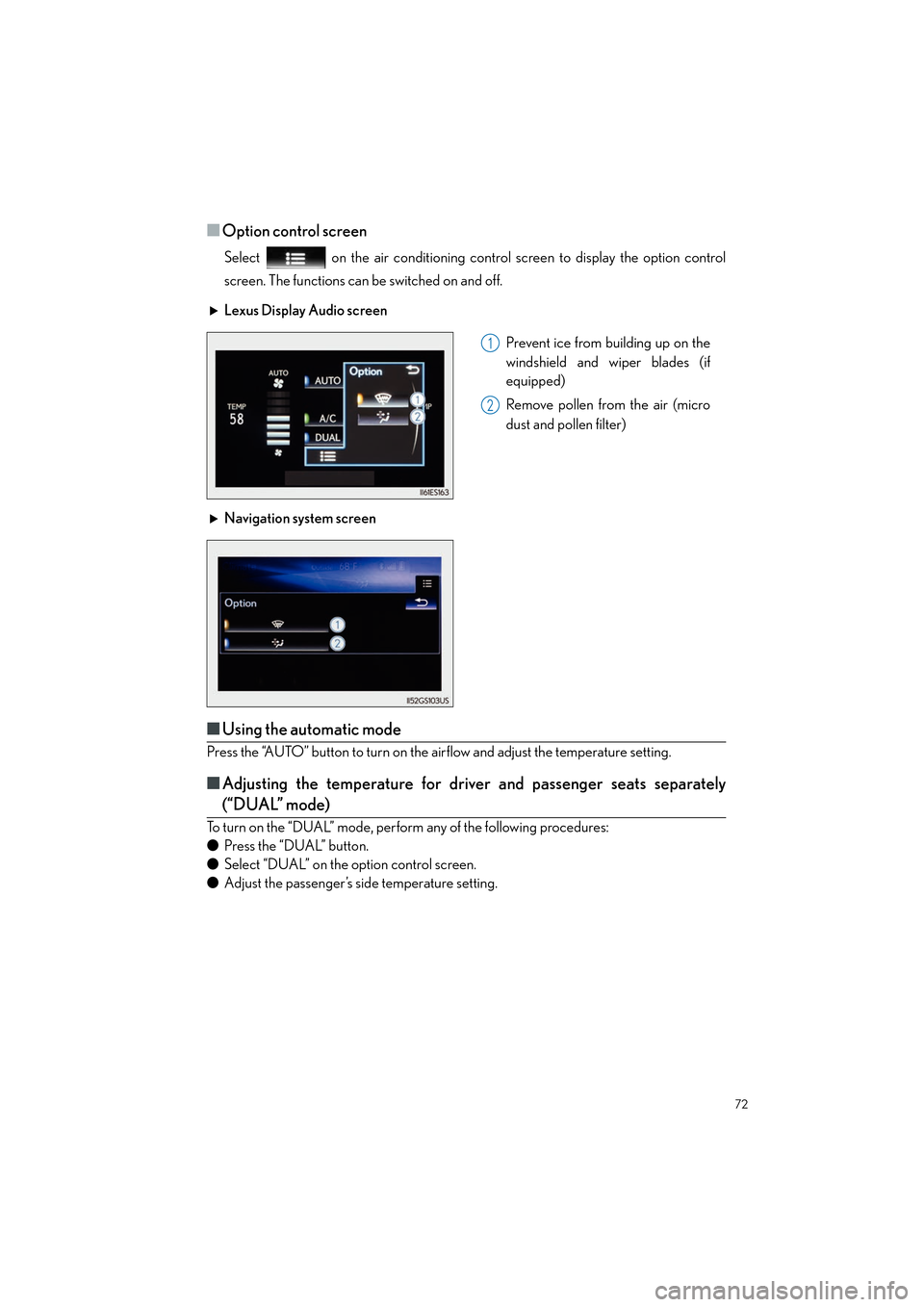
■Option control screen
Select on the air conditioning control screen to display the option control
screen. The functions can be switched on and off.
■Using the automatic mode
Press the “AUTO” button to turn on the airflow and adjust the temperature setting.
■Adjusting the temperature for driver and passenger seats separately
(“DUAL” mode)
To turn on the “DUAL” mode, perform any of the following procedures:
● Press the “DUAL” button.
● Select “DUAL” on the option control screen.
● Adjust the passenger’s side temperature setting. Lexus Display Audio screen
Prevent ice from building up on the
windshield and wiper blades (if
equipped)
Remove pollen from the air (micro
dust and pollen filter)
Navigation system screen
1
2
Page 74 of 104
73
ES350_QG_OM33C84U_(U)
Voice Command System
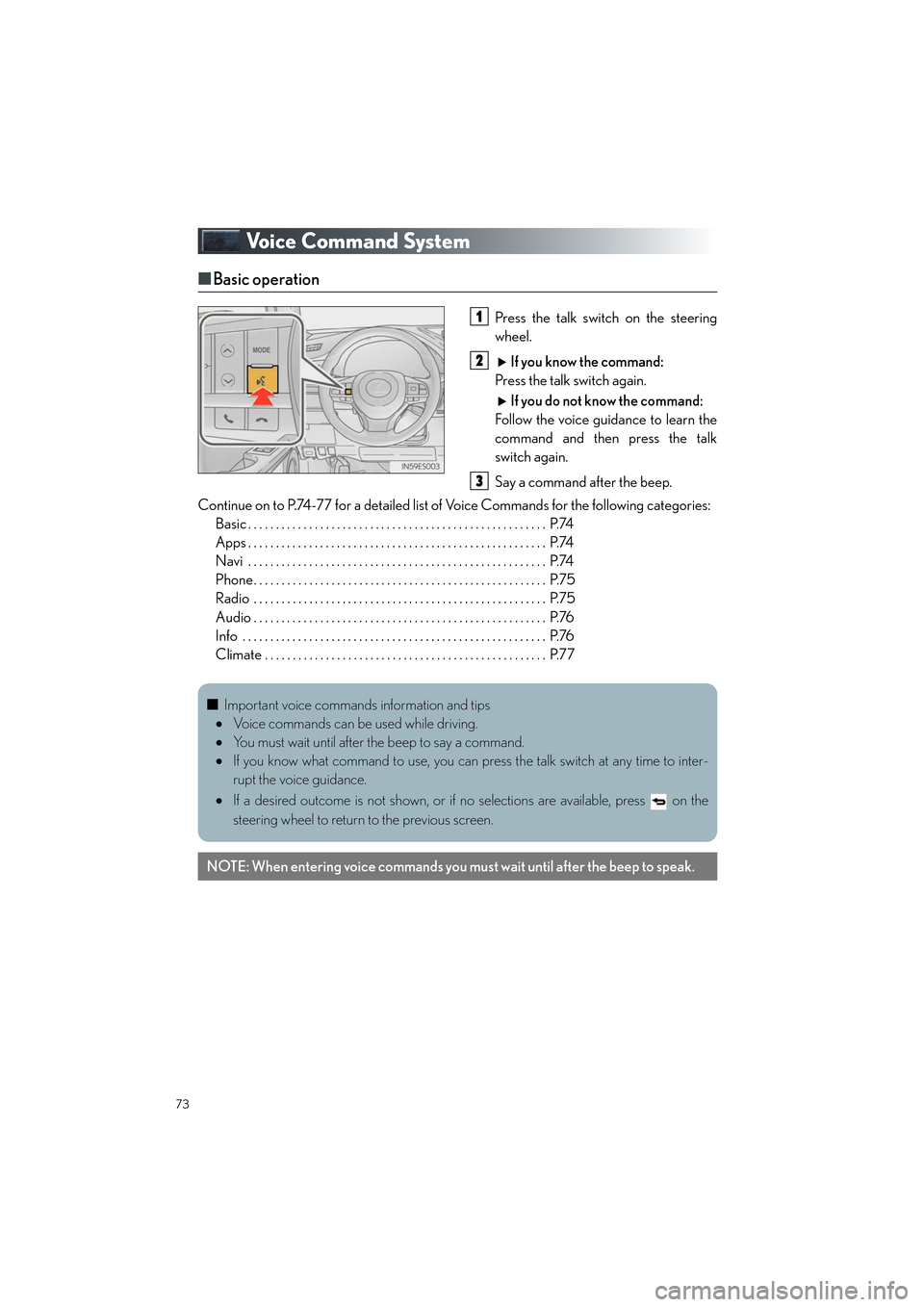
■Basic operation
Press the talk switch on the steering
wheel.
If you know the command:
Press the talk switch again.
If you do not know the command:
Follow the voice guidance to learn the
command and then press the talk
switch again.
Say a command after the beep.
Continue on to P.74-77 for a detailed list of Voice Commands for the following categories: Basic . . . . . . . . . . . . . . . . . . . . . . . . . . . . . . . . . . . . . . . . . . . . . . . . . . . . . . P.74
Apps . . . . . . . . . . . . . . . . . . . . . . . . . . . . . . . . . . . . . . . . . . . . . . . . . . . . . . P.74
Navi . . . . . . . . . . . . . . . . . . . . . . . . . . . . . . . . . . . . . . . . . . . . . . . . . . . . . . P.74
Phone. . . . . . . . . . . . . . . . . . . . . . . . . . . . . . . . . . . . . . . . . . . . . . . . . . . . . P.75
Radio . . . . . . . . . . . . . . . . . . . . . . . . . . . . . . . . . . . . . . . . . . . . . . . . . . . . . P.75
Audio . . . . . . . . . . . . . . . . . . . . . . . . . . . . . . . . . . . . . . . . . . . . . . . . . . . . . P.76
Info . . . . . . . . . . . . . . . . . . . . . . . . . . . . . . . . . . . . . . . . . . . . . . . . . . . . . . . P.76
Climate . . . . . . . . . . . . . . . . . . . . . . . . . . . . . . . . . . . . . . . . . . . . . . . . . . . P.771
2
3
■Important voice commands information and tips
• Voice commands can be used while driving.
• You must wait until after the beep to say a command.
• If you know what command to use, you can press the talk switch at any time to inter-
rupt the voice guidance.
• If a desired outcome is not shown, or if no selections are available, press on the
steering wheel to return to the previous screen.
NOTE: When entering voice commands you mu st wait until after the beep to speak.
Page 79 of 104

78
ES350_QG_OM33C84U_(U)
Portable Audio Device Ports
Open the console box, open the cover and
connect the portable audio device.
Seat Heaters and Ventilators (if equipped)
Heats the seat
The indicator light comes on.
The higher the number of dots, the
warmer the seat becomes.
Blows air from the seat
The indicator light comes on.
The higher the number of dots, the
stronger the airflow becomes.
These ports can be used to connect a portable audio device and listen to it through the
vehicle’s speakers.
1
2
Page 80 of 104

79
ES350_QG_OM33C84U_(U)
Rear Sunshade/Rear Door Sunshades
(if equipped)
■Rear sunshade
The rear sunshade can be raised and lowered by operating the button shown below.
Raise/lower
■Rear door sunshades
Pull the tab of the rear door sunshade and
hook the sunshade on the anchors.
To retract the rear door sunshade,
unhook the sunshade and retract it
slowly.
Page 82 of 104
81
ES350_QG_OM33C84U_(U)
Garage Door Opener
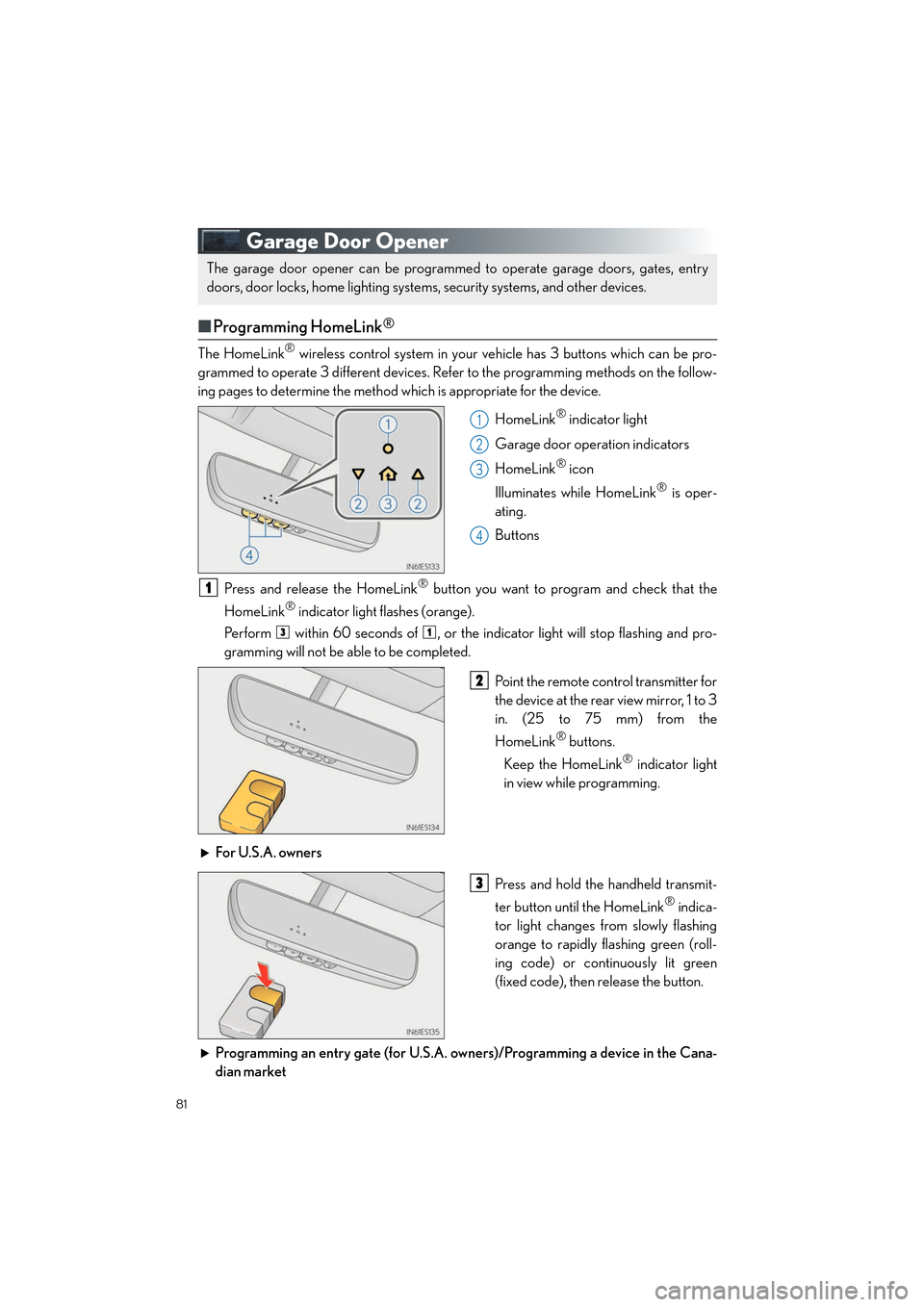
■Programming HomeLink®
The HomeLink® wireless control system in your vehicle has 3 buttons which can be pro-
grammed to operate 3 different devices. Refer to the programming methods on the follow-
ing pages to determine the method which is appropriate for the device.
HomeLink
® indicator light
Garage door operation indicators
HomeLink
® icon
Illuminates while HomeLink
® is oper-
ating.
Buttons
Press and release the HomeLink
® button you want to program and check that the
HomeLink
® indicator light flashes (orange).
Perform within 60 seconds of , or the indicator light will stop flashing and pro-
gramming will not be able to be completed.
Point the remote control transmitter for
the device at the rear view mirror, 1 to 3
in. (25 to 75 mm) from the
HomeLink
® buttons.
Keep the HomeLink
® indicator light
in view while programming.
For U.S.A. owners Press and hold the handheld transmit-
ter button until the HomeLink
® indica-
tor light changes from slowly flashing
orange to rapidly flashing green (roll-
ing code) or continuously lit green
(fixed code), then release the button.
Programming an entry gate (for U.S.A. owners)/Programming a device in the Cana-
dian market
The garage door opener can be programmed to operate garage doors, gates, entry
doors, door locks, home lighting system s, security systems, and other devices.
1
2
3
4
1
31
2
3
Page 83 of 104

82
ES350_QG_OM33C84U_(U)
Press and release the remote control transmitter button at 2 second intervals, repeat-
edly, until the HomeLink
® indicator light changes from slowly flashing (orange) to rap-
idly flashing (green) (rolling code) or continuously lit (green) (fixed code).
Test the HomeLink
® operation by pressing the newly programmed button and observ-
ing the indi cator light:
● Device with fixed code: If the indicator light is solid/continuous, programming has
been completed and your garage door or other device should operate when the
HomeLink
® button is pressed and released.
● Device with rolling code: If the indicator light flashes rapidly, your garage door
opener motor (or other device) is equipped with a rolling code. Complete the pro-
gramming process by firmly pressing and holding the programmed HomeLink
®
button for 2 seconds and then release the button.
● If the garage door or other device does not operate, proceed to “Programming a
rolling code system”.
Repeat the steps above to program another device for any of the remaining
HomeLink
® buttons.
■ Programming other devices
For U.S.A. owners:
To program an entry gate, see the OWNER’S MANUAL.
To program other devices, contact your Lexus dealer.
For Canadian owners: To program all other devices, follow the same procedure as for garage door programming.
■Operating HomeLink®
Press the appropriate HomeLink® button. The HomeLink® indicator light should turn on.
3
4
5
Page 85 of 104

84
ES350_QG_OM33C84U_(U)
■Services
Subscribers have the following Safety Connect services available:
● Automatic Collision Notification
*
In case of either airbag deployment or severe rear-end collision, the system is designed
to automatically call the response center. The responding agent receives the vehicle’s
location and attempts to speak with the vehicle occupants to assess the level of emer-
gency. If the occupants are unable to communicate, the agent automatically treats the
call as an emergency, contacts the nearest emergency services provider to describe the
situation, and requests that assistance be sent to the location.
*: U.S. Patent No. 7,508,298 B2
● Stolen Vehicle Location
If your vehicle is stolen, Safety Connect can work with local authorities to assist them in
locating and recovering the vehicle. After filing a police report, call the Safety Connect
response center at 1-800-25-LEXUS (1-800-255-3987) and follow the prompts for
Safety Connect to initiate this service.
In addition to assisting law enforcement with recovery of a stolen vehicle, Safety-Con-
nect-equipped vehicle location data may, under certain circumstances, be shared with
third parties to locate your vehicle. Further information is available at Lexus.com.
● Emergency Assistance Button (SOS)
In the event of an emergency on the road, push the “SOS” button to reach the Safety
Connect response center. The answering agent will determine your vehicle’s location,
assess the emergency, and dispatch the necessary assistance required. If you accidentally press the “SOS” button, tell the response-center agent that you are
not experiencing an emergency.
● Enhanced Roadside Assistance
Enhanced Roadside Assistance adds GPS data to the already included warranty-based
Lexus roadside service.
Subscribers can press the “SOS” button to reach a Safety Connect response-center
agent, who can help with a wide range of needs, such as: towing, flat tire, fuel delivery, etc.
For a description of the Roadside Assistance services and their limitations, please see the
Safety Connect Terms and Conditions, which are available at Lexus.com.
■ Subscription
After you have signed the Telematics Subscription Service Agreement and are enrolled,
you can begin receiving services.
A variety of subscription terms are available. Contact your Lexus dealer, call 1-800-25-
LEXUS (1-800-255-3987) or push the “SOS” button in your vehicle for further subscrip-
tion details.
Page 88 of 104

87
ES350_QG_OM33C84U_(U)
■LEXUS Enform Service Connect
■
Services
Lexus Enform Service Connect uses embedded telematics hardware to collect and transmit
vehicle data that allows Lexus to provide:
● Vehicle Health Report (VHR)
Safety Recalls, Service Campaigns, Current Vehicle Alerts, Required Maintenance,
Ve h i c l e C o n d i t i o n S t a t u s
● Maintenance Notifications
● Vehicle Alert Notifications
For details about this service and how to register, refer to
http://www.lexus.com/enform/
.
The Lexus Enform Service Connect function is achieved by using a vehicle Data Communi-
cation Module (DCM).
■Subscription
→ P. 8 6
XM Satellite Radio
■Subscription
For XM Services requiring a subscription (suc h as XM Radio), the following paragraph shall
be included.
Required XM Radio monthly subscriptions sold separately after trial period. Subscription
fee is consumer only. All fees and programming subject to change. Subscriptions are
subject to the Customer Agreement available at www.siriusxm.com.
(U.S.A.) or
www.xmradio.ca
(Canada) XM service only available in the 48 contiguous United States
and 10 Canadian provinces.
For more information, program schedules, and to subscribe or extend subscription after
complimentary trial period; more information is available at:
U.S.A. Customers:
Visit www.siriusxm.com
o r c a l l 1 - 8 7 7- 4 4 7- 0 0 1 1
Canadian Customers:
Visit www.xmradio.ca
or call 1-877-438-9677
An XM Satellite Radio is a tuner designed exclusively to receive broadcasts provided
under a separate subscription.
For details, refer to the “OWNER’S MANUAL” and “NAVIGATION SYSTEM
OWNER’S MANUAL”.
Page 93 of 104

92
ES350_QG_OM33C84U_(U)
Fuel Tank Cap
■Before refueling the vehicle
● Turn the engine switch off and ensure that all the doors and windows are closed.
● Confirm the type of fuel.
■Opening the fuel tank cap
Press the opener switch to open the
fuel filler door.
Turn the fuel tank cap slowly to open
and hang it on the back of the fuel filler
door.1
2
Page 96 of 104

What to do if...
95
ES350_QG_OM33C84U_(U)
List of Warning/Indicator Lights
Immediately stop the vehicle in a safe place and contact your Lexus dealer.
Continuing to drive the vehicle may be dangerous.
(U.S.A.)
Brake system warning light
(Canada)
Have the vehicle inspected by your Lexus dealer immediately.
(U.S.A.)Malfunction
indicator lamp(Flashes)
PCS warning light*1
(Canada)Electric power steering
system warning light
SRS warning lightSlip indicator light
(U.S.A.)
ABS warning light(Blinking and then continu-
ously on)
Tire pressure warning light
(Canada)
Follow the correction procedures.
Low fuel level warning light
(Illuminates without
blinking)
Tire pressure warning light*2
Seat belt reminder light
Master warning light
(Flashes)
“AFS OFF” indicator*1
For further information, refer to the OWNER’S MANUAL.