low Lexus ES350 2017 Quick Guide
[x] Cancel search | Manufacturer: LEXUS, Model Year: 2017, Model line: ES350, Model: Lexus ES350 2017Pages: 104, PDF Size: 3.83 MB
Page 37 of 104

36
ES350_QG_OM33C84U_(U)
■Shifting the windshield wiper position
■
To rest position
Raise the wiper in line with the windshield
until it locks. You can stand the wipers up for the rest
position.
★: More than 3.9 in. (10 cm)
■To retract position
Lower the wipers by pressing on the upper
part of the hook section.
Page 42 of 104

41
ES350_QG_OM33C84U_(U)
■Adjusting the set speed
Increases the speed
Decreases the speed
Fine adjustment: Momentarily move
the lever in the desired direction.
Large adjustment: Hold the lever up or
down to change the speed, and release
when the desired speed is reached.
■Changing the vehicle-to-vehicle distance (vehicle-to-vehicle distance con-
trol mode)
Pressing the button changes the vehicle-to-
vehicle distance as follows:
Long
Medium
Short
The vehicle-to-vehicle distance is set
automatically to long mode when the
engine switch is turned to IGNITION
ON mode.
If a vehicle is running ahead of you, the
preceding vehicle mark will also be dis-
played.
1
2
Preceding
vehicle mark
1
2
3
The vehicle-to-vehicle distance control mode maintains the preset cruising speed as long
as no vehicle is detected ahead.
Page 44 of 104
43
ES350_QG_OM33C84U_(U)
LDA (Lane Departure Alert with
steering control) (if equipped)
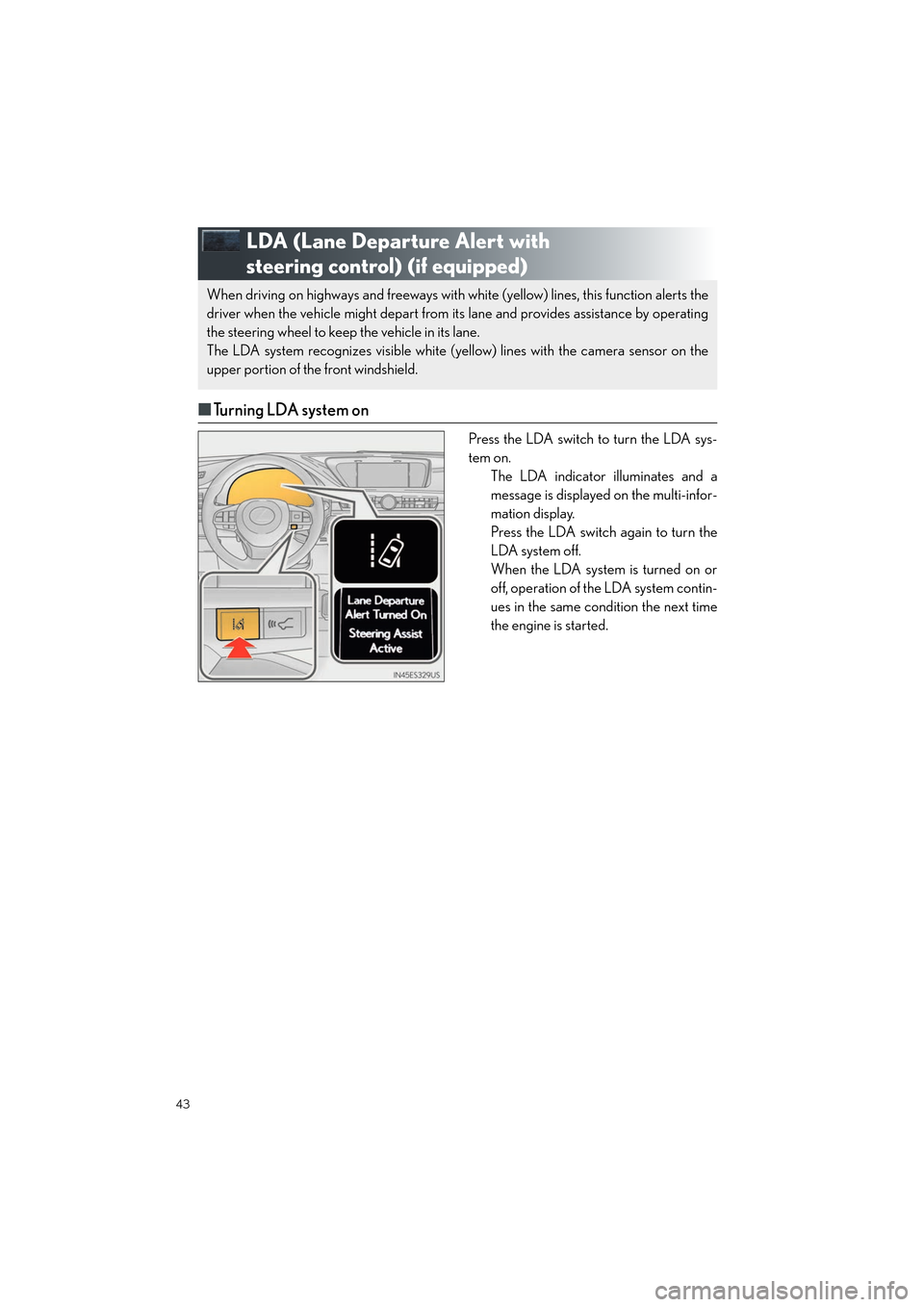
■Turning LDA system on
Press the LDA switch to turn the LDA sys-
tem on.
The LDA indicator illuminates and a
message is displayed on the multi-infor-
mation display.
Press the LDA switch again to turn the
LDA system off.
When the LDA system is turned on or
off, operation of the LDA system contin-
ues in the same condition the next time
the engine is started.
When driving on highways and freeways with wh ite (yellow) lines, this function alerts the
driver when the vehicle might depart from its lane and provides assistance by operating
the steering wheel to keep the vehicle in its lane.
The LDA system recognizes visible white (yellow) lines with the camera sensor on the
upper portion of the front windshield.
Page 47 of 104

46
ES350_QG_OM33C84U_(U)
Driving Mode Select Switch
Normal mode
For normal driving.
Press the switch to change the driving mode to normal mode when selected to Eco
drive mode or sport mode.
Eco drive mode
Use Eco drive mode to help achieve low fuel consumption during trips that involve fre-
quent accelerating.
When not in Eco drive mode and the driving mode select switch is turned to the left, the
“ECO” indicator comes on in the multi-information display.
Sport mode
Assists acceleration response by controlling the steering and transmission. Suitable for
when precise handling is desirable, for example when driving on mountain roads.
When not in Sport mode and the driving mode select switch is turned to the right, the
“SPORT” indicator comes on in the multi-information display.
The driving modes can be select ed to suit driving condition.
1
2
3
Page 48 of 104

47
ES350_QG_OM33C84U_(U)
Tire Pressure Warning System
■The tire inflation pressure display function
The tire pressure detected by the tire pres-
sure warning system can be displayed on
the multi-information display. ( →P. 2 8 )
The illustration used is intended as an exam-
ple, and may differ from the image that is
actually displayed on the multi-information
display.
■ Initializing the tire pressure warning system
Press and hold the tire pressure warning
reset switch until the tire pressure warning
light blinks slowly 3 times.
Your vehicle is equipped with a tire pressure warning system that uses tire pressure warn-
ing valves and transmitters to detect low ti re inflation pressure before serious problems
arise.
Page 52 of 104
51
ES350_QG_OM33C84U_(U)
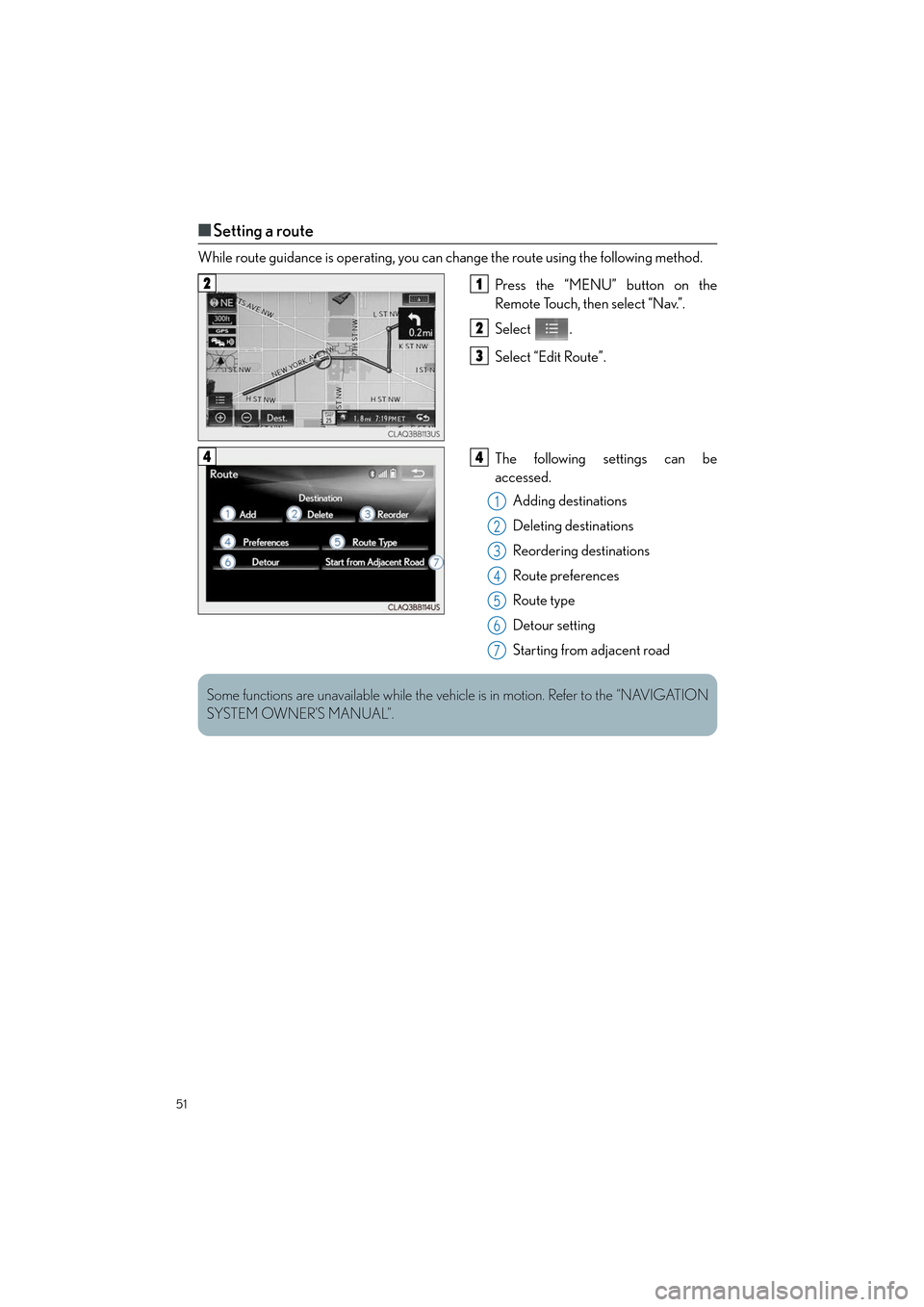
■Setting a route
While route guidance is operating, you can change the route using the following method.
Press the “MENU” button on the
Remote Touch, then select “Nav.”.
Select .
Select “Edit Route”.
The following settings can be
accessed.Adding destinations
Deleting destinations
Reordering destinations
Route preferences
Route type
Detour setting
Starting from adjacent road
21
2
3
44
1
2
3
4
5
6
7
Some functions are unavailable while the vehi cle is in motion. Refer to the “NAVIGATION
SYSTEM OWNER’S MANUAL”.
Page 58 of 104
57
ES350_QG_OM33C84U_(U)
Audio System (with navigation system)
■Audio control screen
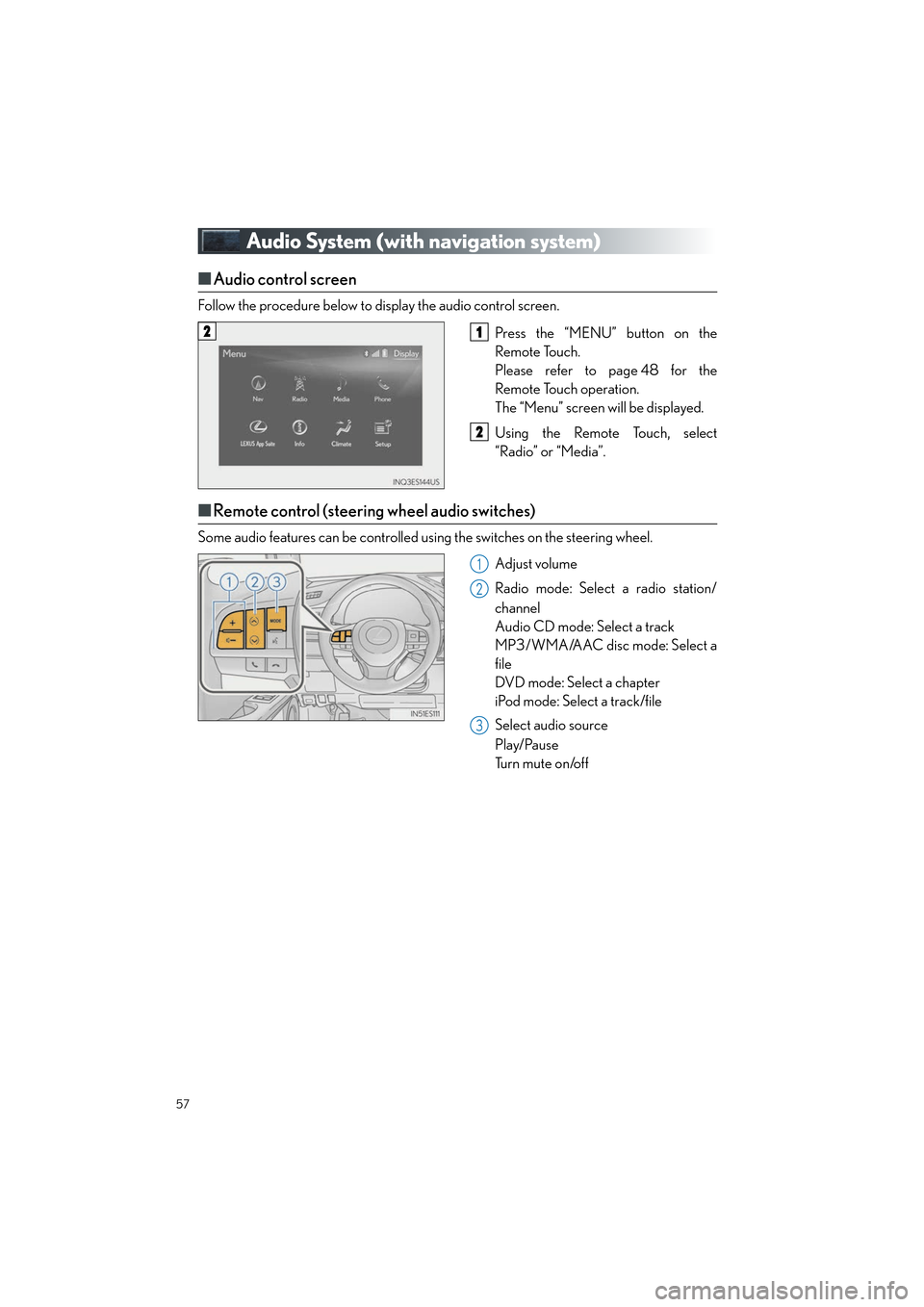
Follow the procedure below to display the audio control screen.
Press the “MENU” button on the
Remote Touch.
Please refer to page 48 for the
Remote Touch operation.
The “Menu” screen will be displayed.
Using the Remote Touch, select
“Radio” or “Media”.
■Remote control (steering wheel audio switches)
Some audio features can be controlled using the switches on the steering wheel.
Adjust volume
Radio mode: Select a radio station/
channel
Audio CD mode: Select a track
MP3/WMA/AAC disc mode: Select a
file
DVD mode: Select a chapter
iPod mode: Select a track/file
Select audio source
Play/Pause
Tu r n m u t e o n /o f f
21
2
1
2
3
Page 61 of 104
60
ES350_QG_OM33C84U_(U)
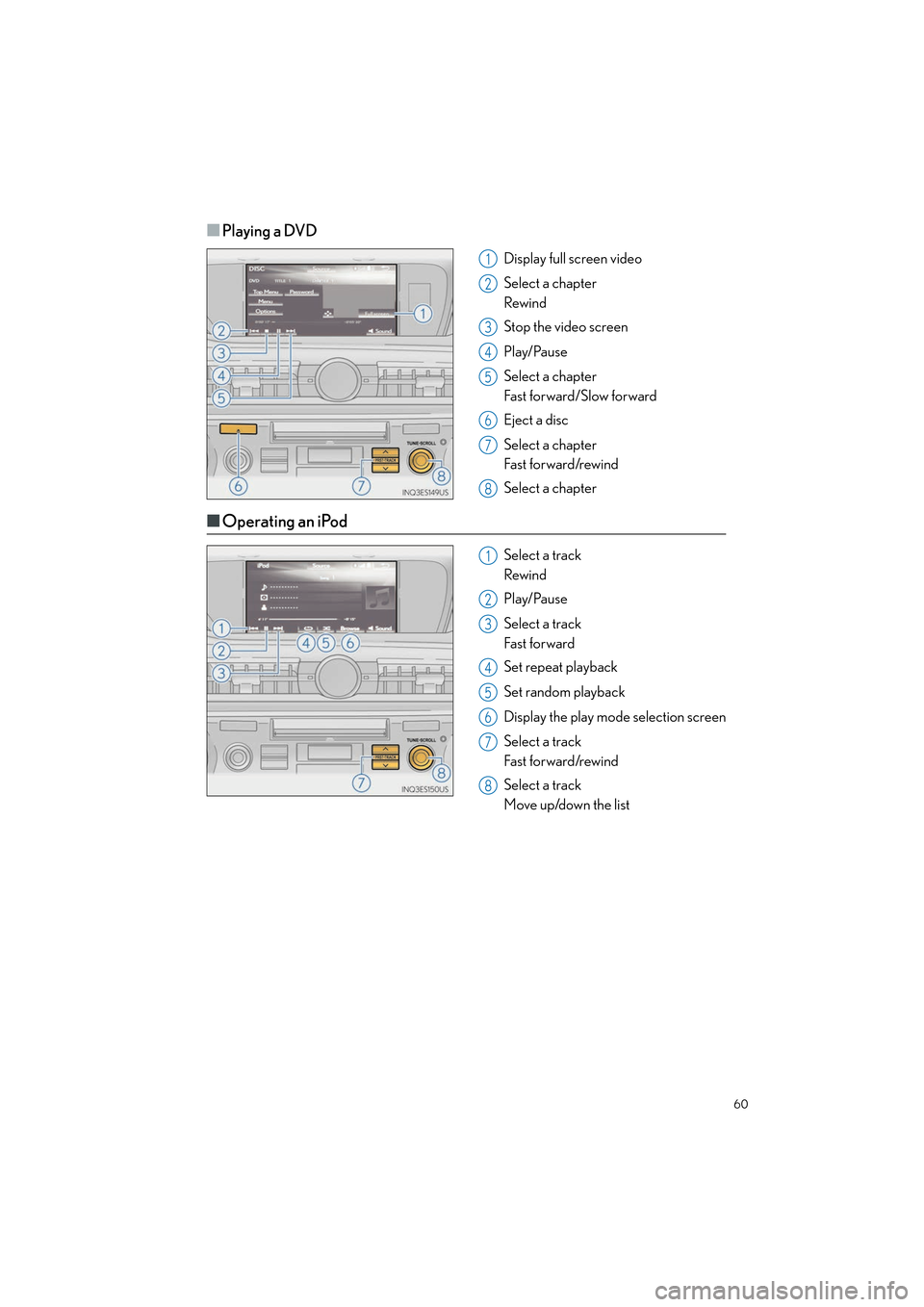
■Playing a DVD
Display full screen video
Select a chapter
Rewind
Stop the video screen
Play/Pause
Select a chapter
Fast forward/Slow forward
Eject a disc
Select a chapter
Fast for ward/rewind
Select a chapter
■Operating an iPod
Select a track
Rewind
Play/Pause
Select a track
Fast for ward
Set repeat playback
Set random playback
Display the play mode selection screen
Select a track
Fast for ward/rewind
Select a track
Move up/down the list
1
2
3
4
5
6
7
8
1
2
3
4
5
6
7
8
Page 71 of 104

70
ES350_QG_OM33C84U_(U)
Air Conditioning System
■Adjusting the temperature setting
Press to increase the temperature and to decrease the temperature.
■Adjusting the fan speed setting
Press to increase the fan speed and to decrease the fan speed.
Press the “OFF” button to turn the fan off.
■Change the airflow mode
To change the air outlets, press .
Lexus Display Audio screenNavigation system screen
The air outlets used are switched each time the button is pressed. Air flows to the upper body.
Air flows to the upper body and feet.
Air flows to the feet.
Air flows to the feet and the windshield defogger operates.
1
2
3
4
Page 72 of 104

71
ES350_QG_OM33C84U_(U)
■Control screen
Lexus Display Audio screen
Adjust the left-hand side temperature
setting
Adjust the fan speed setting
Select to set auto mode on/off
Select to set cooling and dehumidifica-
tion function on/off
Adjust the temperature for driver and
passenger seats separately (“DUAL”
mode) (→P. 7 2 )
Display the option control screen
( → P. 7 2 )
Select the air flow mode
Adjust the right-hand side temperature
setting
Navigation system screen
Adjust the left-hand side temperature
setting
Adjust the fan speed setting
Select the air flow mode
Adjust the right-hand side temperature
setting
Display the option control screen
(→ P. 7 2 )
Select to set automatic mode on/off
Select to set cooling and dehumidifica-
tion function on/off
Adjust the temperature for driver and
passenger seats separately (“DUAL”
mode) ( →P. 7 2 )
1
2
3
4
5
6
7
8
1
2
3
4
5
6
7
8