fuel Lexus ES350 2018 s / LEXUS 2018 ES350 (OM06134U) User Guide
[x] Cancel search | Manufacturer: LEXUS, Model Year: 2018, Model line: ES350, Model: Lexus ES350 2018Pages: 580, PDF Size: 10.39 MB
Page 81 of 580
ES350_OM_OM06134U_(U)
812. Instrument cluster
2
Instrument cluster
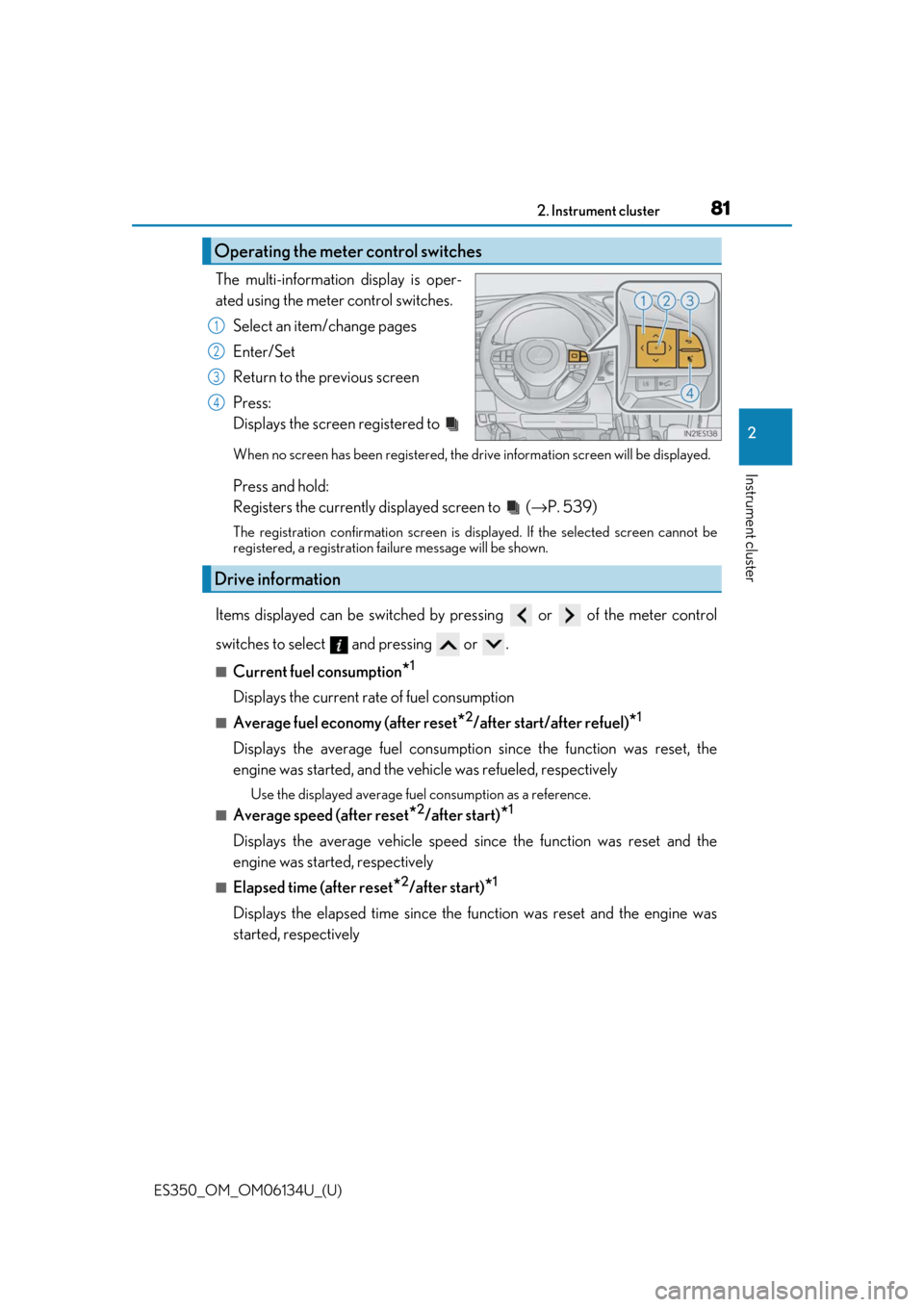
The multi-information display is oper-
ated using the meter control switches.Select an item/change pages
Enter/Set
Return to the previous screen
Press:
Displays the screen registered to
When no screen has been registered, the dr ive information screen will be displayed.
Press and hold:
Registers the currently displayed screen to ( →P. 539)
The registration confirmation screen is displayed. If the selected screen cannot be
registered, a registration fa ilure message will be shown.
Items displayed can be switched by pr essing or of the meter control
switches to select and pressing or .
■Current fuel consumption*1
Displays the current rate of fuel consumption
■Average fuel economy (after reset*2/after start/after refuel)*1
Displays the average fuel consumption since the function was reset, the
engine was started, and the vehicle was refueled, respectively
Use the displayed average fuel consumption as a reference.
■Average speed (after reset*2/after start)*1
Displays the average vehicle speed since the function was reset and the
engine was started, respectively
■Elapsed time (after reset*2/after start)*1
Displays the elapsed time since the function was reset and the engine was
started, respectively
Operating the meter control switches
1
2
3
4
Drive information
Page 82 of 580

82
ES350_OM_OM06134U_(U)2. Instrument cluster
■Distance (range/after start)*1
Displays the estimated maximum distance
that can be driven with the quantity
of fuel remaining and the distance driv en after the engine was started respec-
tively.
• This distance is computed based on your average fuel consumption. As a result, the actual distance that can be driv en may differ from that displayed.
• When only a small amount of fuel is added to the tank, the display may not be
updated.
When refueling, turn the engine switch off. If the vehicle is refueled without turning
the engine switch off, the display may not be updated.
■Eco Driving Indicator Zone Display
→ P. 84
■Tire inflation pressure
Displays inflation pressure of each tire.
The inflation pressure of the spare tire will not be displayed.
■LDA (Lane Departure Alert with steering control) vehicle sway warning (if
equipped)
→ P. 198
■Display off
A blank screen is displayed
*1: Displayed when the item is se t in “Drive Info 1”, “Drive Info 2” or “Drive Info 3”.
( → P. 539)
*2: The function can be reset by pressing th e of the meter control switches for lon-
ger than 1 second when the item to reset is displayed.
If there is more than one item that can be reset, the item selection screen will appear.
Page 86 of 580
86
ES350_OM_OM06134U_(U)2. Instrument cluster
Fuel consumption information
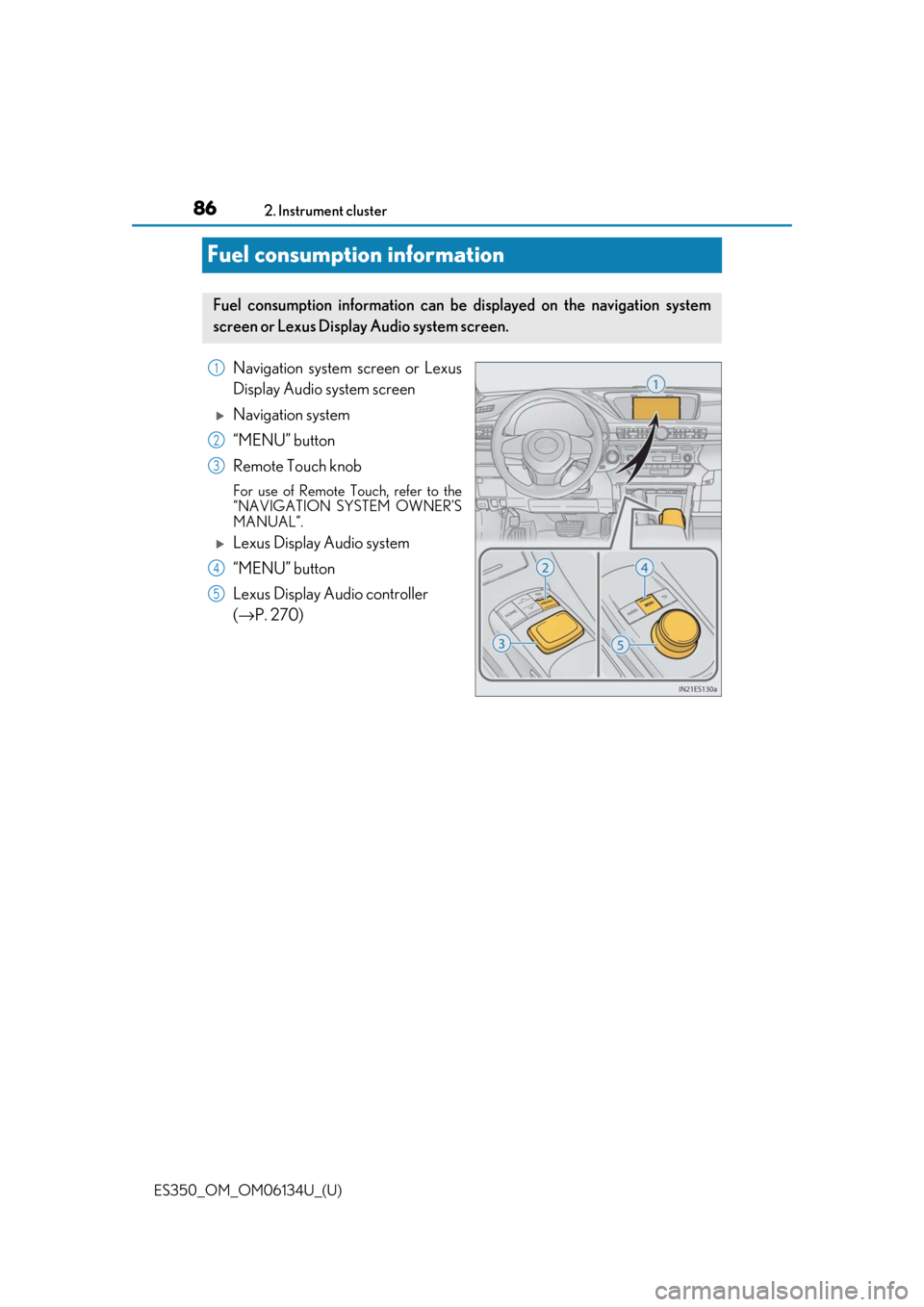
Navigation system screen or Lexus
Display Audio system screen
Navigation system
“MENU” button
Remote Touch knob
For use of Remote Touch, refer to the
“NAVIGATION SYSTEM OWNER’S
MANUAL”.
Lexus Display Audio system
“MENU” button
Lexus Display Au
dio controller
(→ P. 270)
Fuel consumption information can be displayed on the navigation system
screen or Lexus Display Audio system screen.
1
2
3
4
5
Page 87 of 580
ES350_OM_OM06134U_(U)
872. Instrument cluster
2
Instrument cluster
Navigation system screen
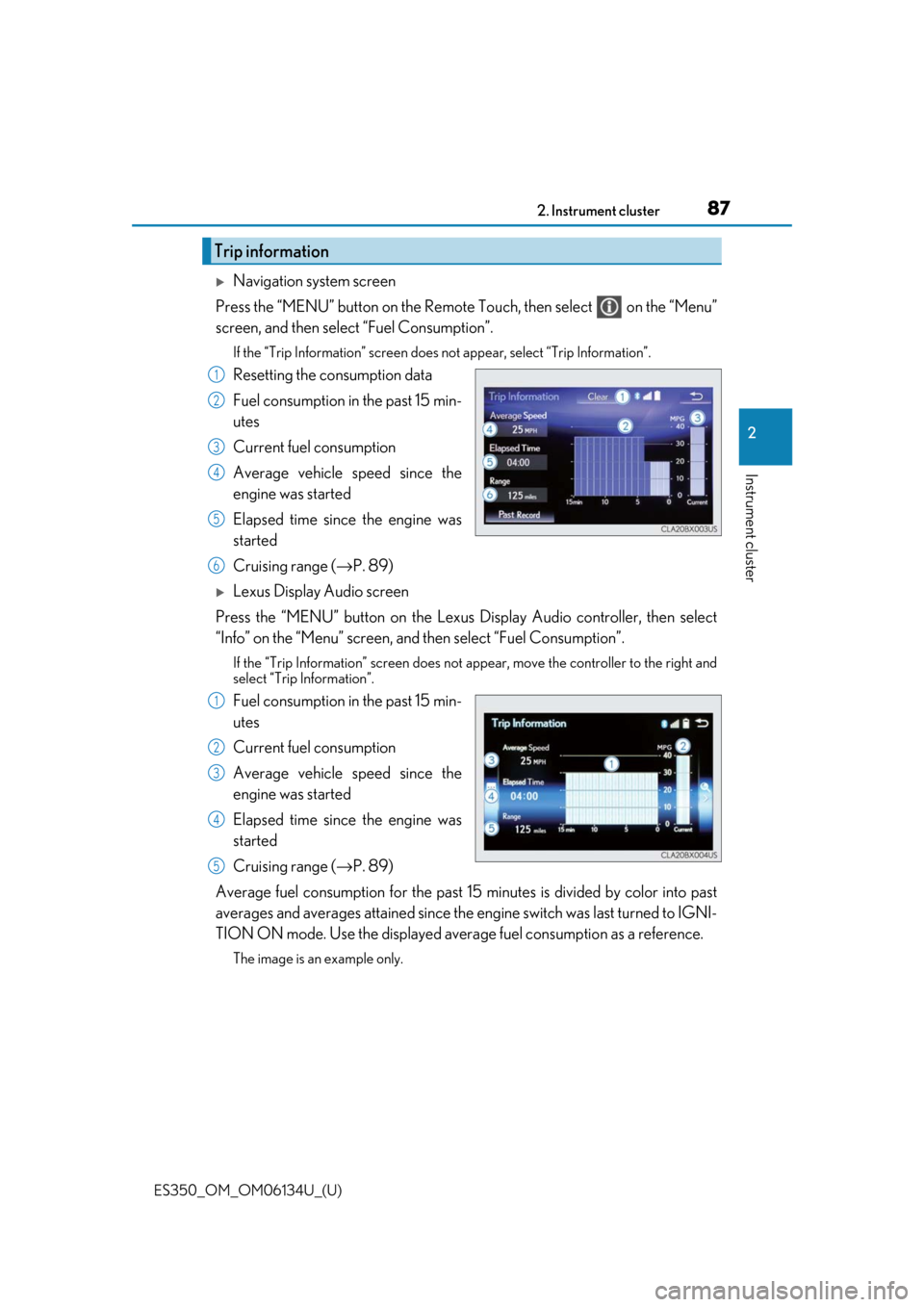
Press the “MENU” button on the Remote Touch, then select on the “Menu”
screen, and then select “Fuel Consumption”.
If the “Trip Information” screen does not appear, select “Trip Information”.
Resetting the consumption data
Fuel consumption in the past 15 min-
utes
Current fuel consumption
Average vehicle speed since the
engine was started
Elapsed time since the engine was
started
Cruising range (→P. 89)
Lexus Display Audio screen
Press the “MENU” button on the Lexus Display Audio controller, then select
“Info” on the “Menu” screen, and then select “Fuel Consumption”.
If the “Trip Information” screen does not appear, move the controller to the right and
select “Trip Information”.
Fuel consumption in the past 15 min-
utes
Current fuel consumption
Average vehicle speed since the
engine was started
Elapsed time since the engine was
started
Cruising range (→P. 89)
Average fuel consumption for the past 15 minutes is divided by color into past
averages and averages attained since the engine switch was last turned to IGNI-
TION ON mode. Use the displayed average fuel consumption as a reference.
The image is an example only.
Trip information
1
2
3
4
5
6
1
2
3
4
5
Page 88 of 580
88
ES350_OM_OM06134U_(U)2. Instrument cluster
Navigation system screen
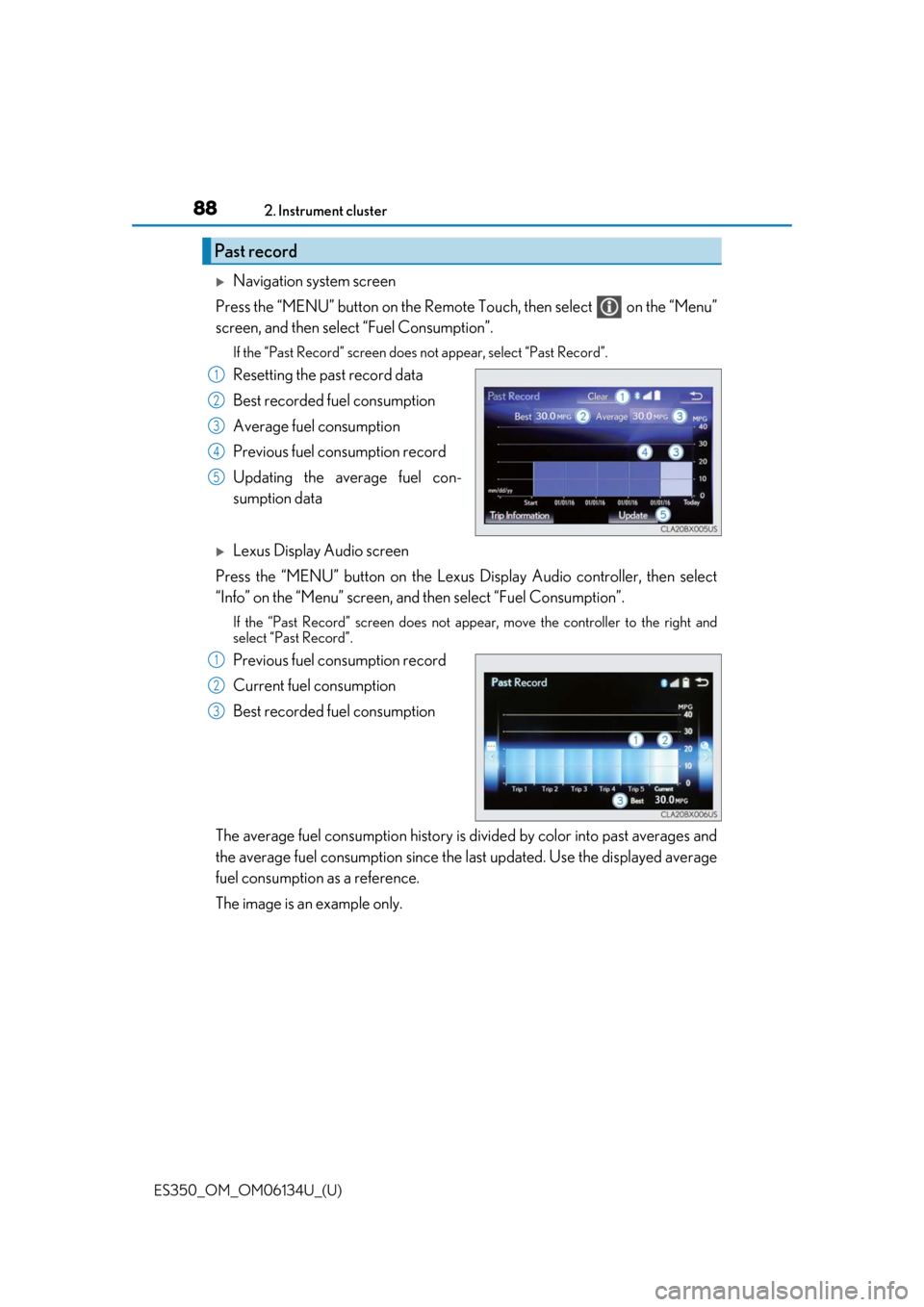
Press the “MENU” button on the Remote Touch, then select on the “Menu”
screen, and then select “Fuel Consumption”.
If the “Past Record” screen does not appear, select “Past Record”.
Resetting the past record data
Best recorded fuel consumption
Average fuel consumption
Previous fuel consumption record
Updating the average fuel con-
sumption data
Lexus Display Audio screen
Press the “MENU” button on the Lexus Display Audio controller, then select
“Info” on the “Menu” screen, and then select “Fuel Consumption”.
If the “Past Record” screen does not appe ar, move the controller to the right and
select “Past Record”.
Previous fuel consumption record
Current fuel consumption
Best recorded fuel consumption
The average fuel consumption history is di vided by color into past averages and
the average fuel consumption since the last updated. Use the displayed average
fuel consumption as a reference.
The image is an example only.
Past record
1
2
3
4
5
1
2
3
Page 89 of 580

ES350_OM_OM06134U_(U)
892. Instrument cluster
2
Instrument cluster
■Updating the past record data
Vehicles with navigation system
Update the average fuel cons umption by selecting “Update” to measure the current fuel
consumption again.
Vehicles with Lexus Display Audio system
Update the average fuel consumption by mo ving the controller to the left and select
“Update” to measure the curre nt fuel consumption again.
■Resetting the data
Vehicles with navigation system
The fuel consumption data can be deleted by selecting “Clear”.
Vehicles with Lexus Display Audio system
The fuel consumption data can be deleted by moving the controller to the left and select
“Clear”.
■Cruising range
Displays the estimated maximum distance that can be driven with the quantity of fuel
remaining.
This distance is computed based on your average fuel consumption.
As a result, the actual distance that can be driven may differ from that displayed.
Page 139 of 580

139
ES350_OM_OM06134U_(U)
4Driving
4-1. Before drivingDriving the vehicle ...................... 140
Cargo and luggage .................... 148
Vehicle load limits .........................151
Trailer towing ................................ 152
Dinghy towing .............................. 153
4-2. Driving procedures Engine (ignition) switch ............ 154
Automatic transmission............ 159
Turn signal lever........................... 163
Parking brake ............................... 164
4-3. Operating the lights and wipers
Headlight switch .......................... 165
Automatic High Beam .............. 168
Fog light switch ............................ 172
Windshield wipers and washer.................................. 173
4-4. Refueling Opening the fuel tank cap........177 4-5. Using the driving support
systems
Lexus Safety System+ ............... 180
PCS (Pre-Collision System) .......... 187
LDA (Lane Departure Alert with steering control) ............. 198
Dynamic radar cruise control............................ 207
Cruise control .............................. 219
Intuitive parking assist .............. 222
Lexus parking assist monitor ......................................... 231
Driving mode select switch ........................................... 247
BSM (Blind Spot Monitor) ..... 249 • Blind Spot Monitor function .................................... 252
• Rear Cross Traffic Alert function .................................... 254
Driving assist systems .............. 257
4-6. Driving tips Winter driving tips ..................... 262
Page 142 of 580

142
ES350_OM_OM06134U_(U)4-1. Before driving
■Breaking in your new Lexus
To extend the life of the vehicle, observin
g the following precautions is recommended:
●For the first 186 miles (300 km):
Avoid sudden stops.
●For the first 621 miles (1000 km):
• Do not drive at extremely high speeds.
• Avoid sudden acceleration.
• Do not drive continuously in low gears.
• Do not drive at a constant speed for extended periods.
■Drum-in-disc type parking brake system
Your vehicle has a drum-in-disc type parking brake system. This type of brake system
needs bedding-down of the brake shoes peri odically or whenever the parking brake
shoes and/or drum are replaced. Have your Lexus dealer perform the bedding down
operation.
■Operating your vehicle in a foreign country
Comply with the relevant vehicle registration laws and confirm the availability of the cor-
rect fuel. ( →P. 525)
■Eco-friendly driving
→ P. 84
■Customization
Setting of Eco Driving Indicator Light can be changed.
(Customizable features: →P. 538)
Page 166 of 580
166
ES350_OM_OM06134U_(U)4-3. Operating the lights and wipers
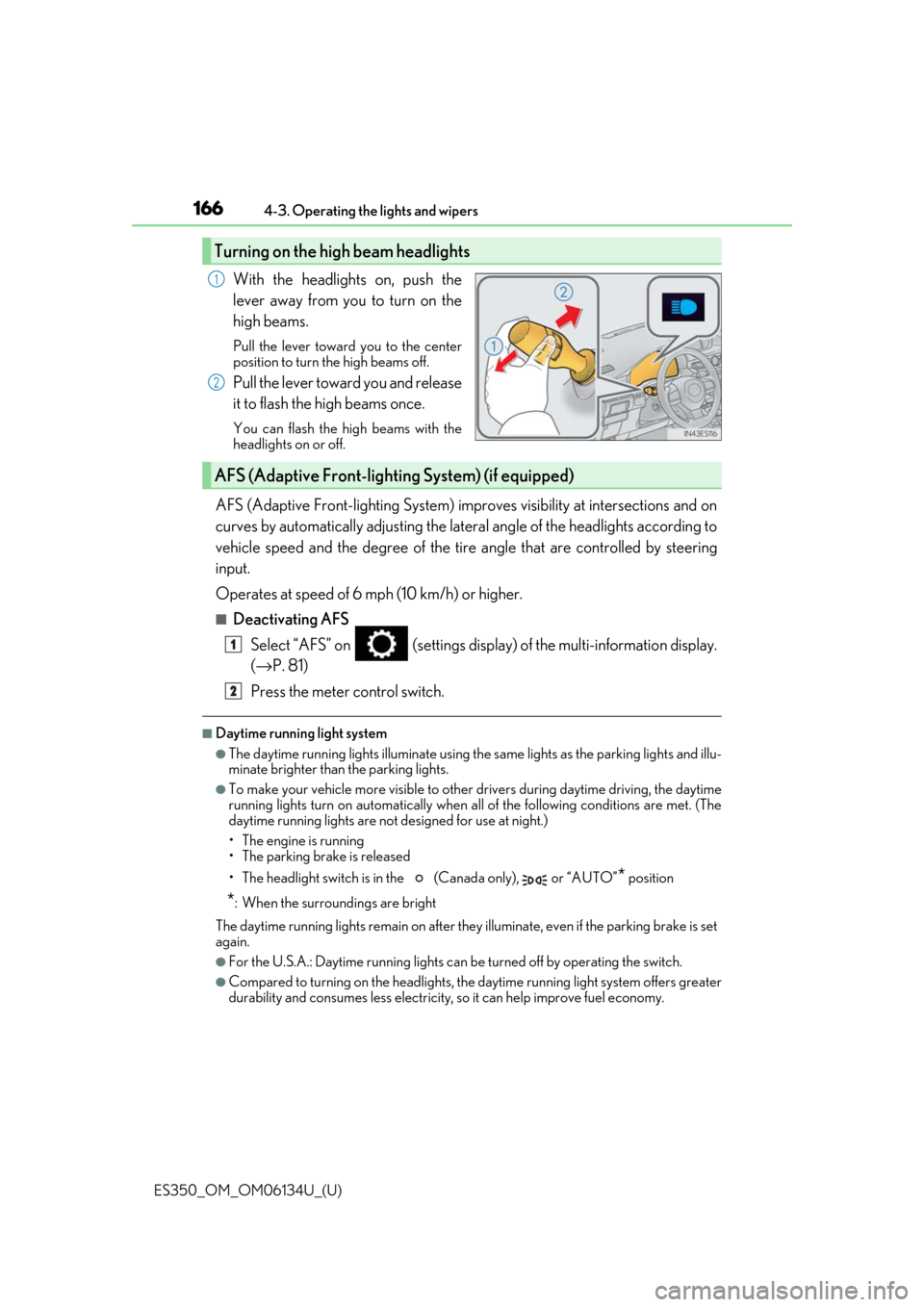
With the headlights on, push the
lever away from you to turn on the
high beams.
Pull the lever toward you to the center
position to turn the high beams off.
Pull the lever toward you and release
it to flash the high beams once.
You can flash the high beams with the
headlights on or off.
AFS (Adaptive Front-lighting System) improves visibility at intersections and on
curves by automatically adjusting the lateral angle of the headlights according to
vehicle speed and the degree of the tire
angle that are controlled by steering
input.
Operates at speed of 6 mph (10 km/h) or higher.
■Deactivating AFS
Select “AFS” on (settings display) of the multi-information display.
(→ P. 81)
Press the meter control switch.
■Daytime running light system
●The daytime running lights illuminate using th e same lights as the parking lights and illu-
minate brighter than the parking lights.
●To make your vehicle more visible to other drivers during daytime driving, the daytime
running lights turn on automatically when a ll of the following conditions are met. (The
daytime running lights are not designed for use at night.)
• The engine is running
• The parking brake is released
• The headlight switch is in the (Canada only), or “AUTO”
* position
*: When the surroundings are bright
The daytime running lights remain on after they illuminate, even if the parking brake is set
again.
●For the U.S.A.: Daytime running lights can be turned off by operating the switch.
●Compared to turning on the headlights, the daytime running light system offers greater
durability and consumes less electricity, so it can help improve fuel economy.
Turning on the high beam headlights
1
2
AFS (Adaptive Front-lighting System) (if equipped)
1
2
Page 177 of 580
177
ES350_OM_OM06134U_(U)4-4. Refueling
4
Driving
Opening the fuel tank cap
●Turn the engine switch off and ensure that all the doors and windows are
closed.
●Confirm the type of fuel.
■Fuel types
→
P. 525
■Fuel tank opening for unleaded gasoline
To help prevent incorrect fueling, your vehi cle has a fuel tank opening that only accom-
modates the specia l nozzle on unleaded fuel pumps.
Perform the following steps to open the fuel tank cap:
Before refueling the vehicle
WARNING
■When refueling the vehicle
Observe the following precautions while refueling the vehicle. Failure to do so may
result in death or serious injury.
●After exiting the vehicle and before opening the fuel door, touch an unpainted metal
surface to discharge any static electricity. It is important to discharge static electricity
before refueling because sparks resulting fr om static electricity can cause fuel vapors
to ignite while refueling.
●Always hold the grips on the fuel tank cap and turn it slowly to remove it.
A whooshing sound may be heard when the fu el tank cap is loosened. Wait until the
sound cannot be heard before fully removing the cap. In hot weather, pressurized fuel
may spray out the filler neck and cause injury.
●Do not allow anyone that has not discharged static electricity from their body to come
close to an open fuel tank.
●Do not inhale vaporized fuel.
Fuel contains substances th at are harmful if inhaled.
●Do not smoke while refueling the vehicle.
Doing so may cause the fuel to ignite and cause a fire.
●Do not return to the vehicle or touch any pe rson or object that is statically charged.
This may cause static electricity to build up, resulting in a possible ignition hazard.
■When refueling
Observe the following precautions to prevent fuel overflowing from the fuel tank:
●Securely insert the fuel nozzle into the fuel filler neck.
●Stop filling the tank after the fuel nozzle automatically clicks off.
●Do not top off the fuel tank.