fuel Lexus ES350 2018 s / LEXUS 2018 ES350 (OM06134U) Owner's Guide
[x] Cancel search | Manufacturer: LEXUS, Model Year: 2018, Model line: ES350, Model: Lexus ES350 2018Pages: 580, PDF Size: 10.39 MB
Page 178 of 580
178
ES350_OM_OM06134U_(U)4-4. Refueling
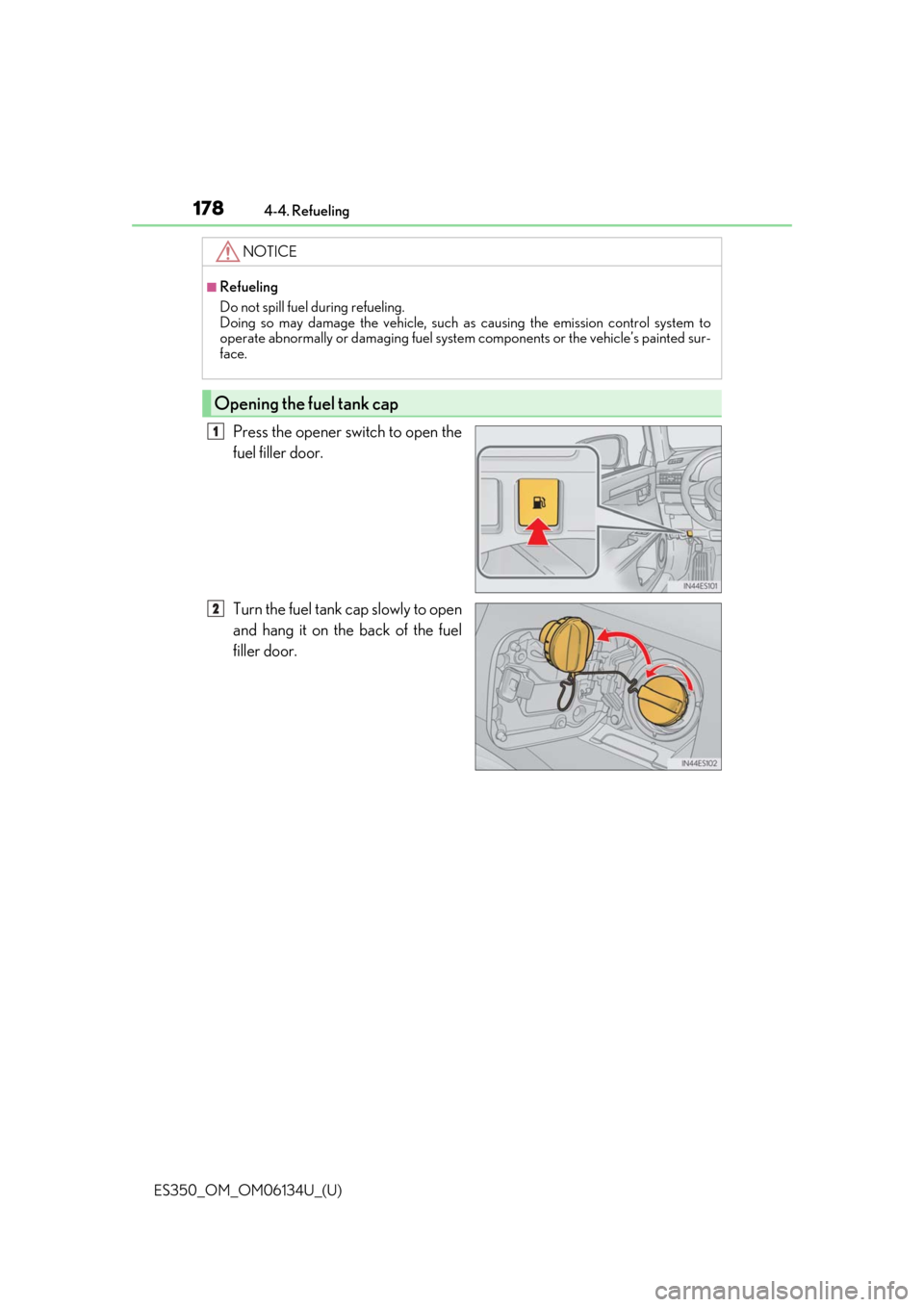
Press the opener switch to open the
fuel filler door.
Turn the fuel tank cap slowly to open
and hang it on the back of the fuel
filler door.
NOTICE
■Refueling
Do not spill fuel during refueling.
Doing so may damage the vehicle, such as
causing the emission control system to
operate abnormally or damaging fuel system components or the vehicle’s painted sur-
face.
Opening the fuel tank cap
1
2
Page 179 of 580
ES350_OM_OM06134U_(U)
1794-4. Refueling
4
Driving
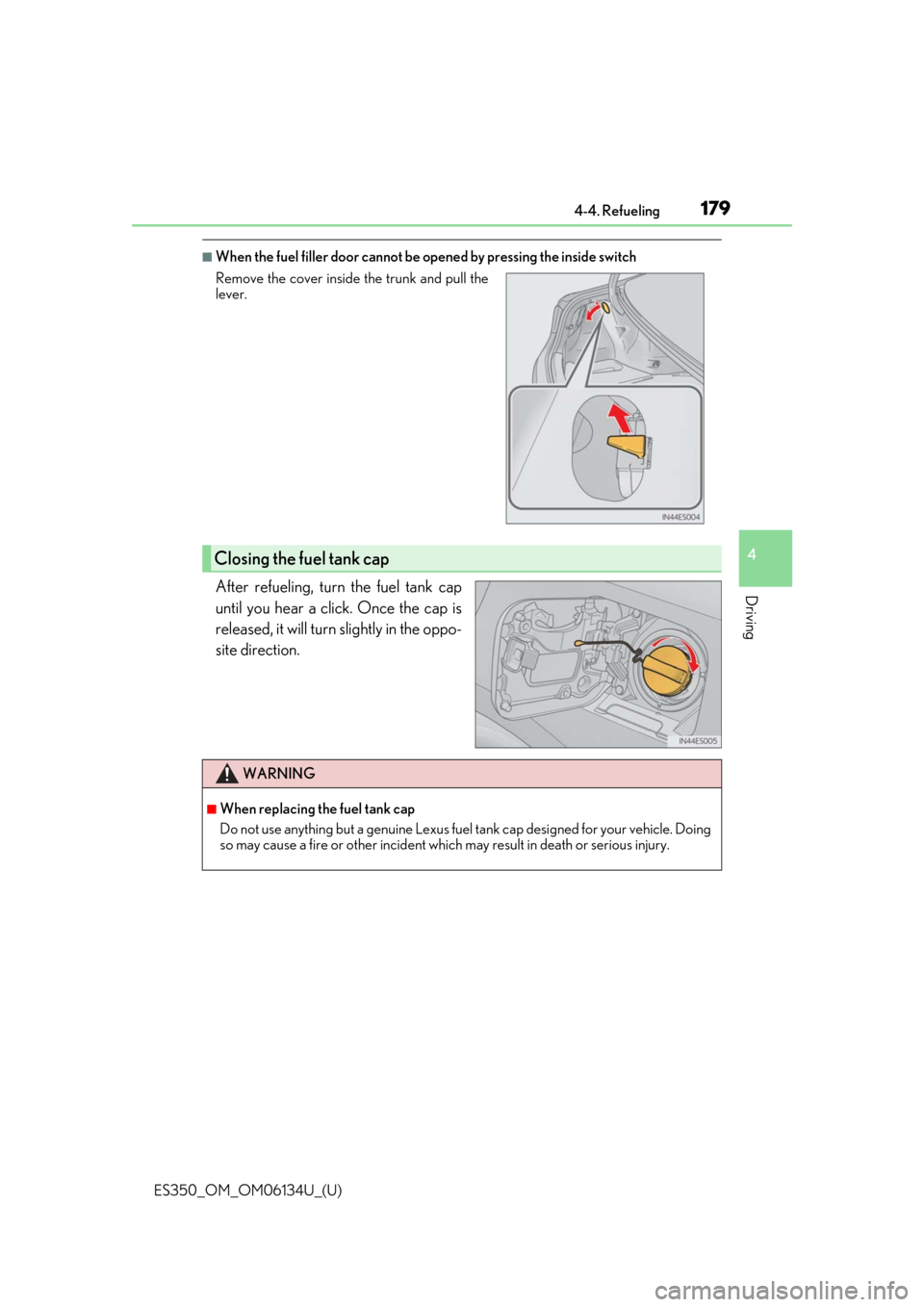
■When the fuel filler door cannot be opened by pressing the inside switch
After refueling, turn the fuel tank cap
until you hear a click. Once the cap is
released, it will turn slightly in the oppo-
site direction.
Remove the cover inside the trunk and pull the
lever.
Closing the fuel tank cap
WARNING
■When replacing the fuel tank cap
Do not use anything but a genuine Lexus fuel tank cap designed for your vehicle. Doing
so may cause a fire or other incident whic h may result in death or serious injury.
Page 247 of 580
247
ES350_OM_OM06134U_(U)4-5. Using the driving support systems
4
Driving
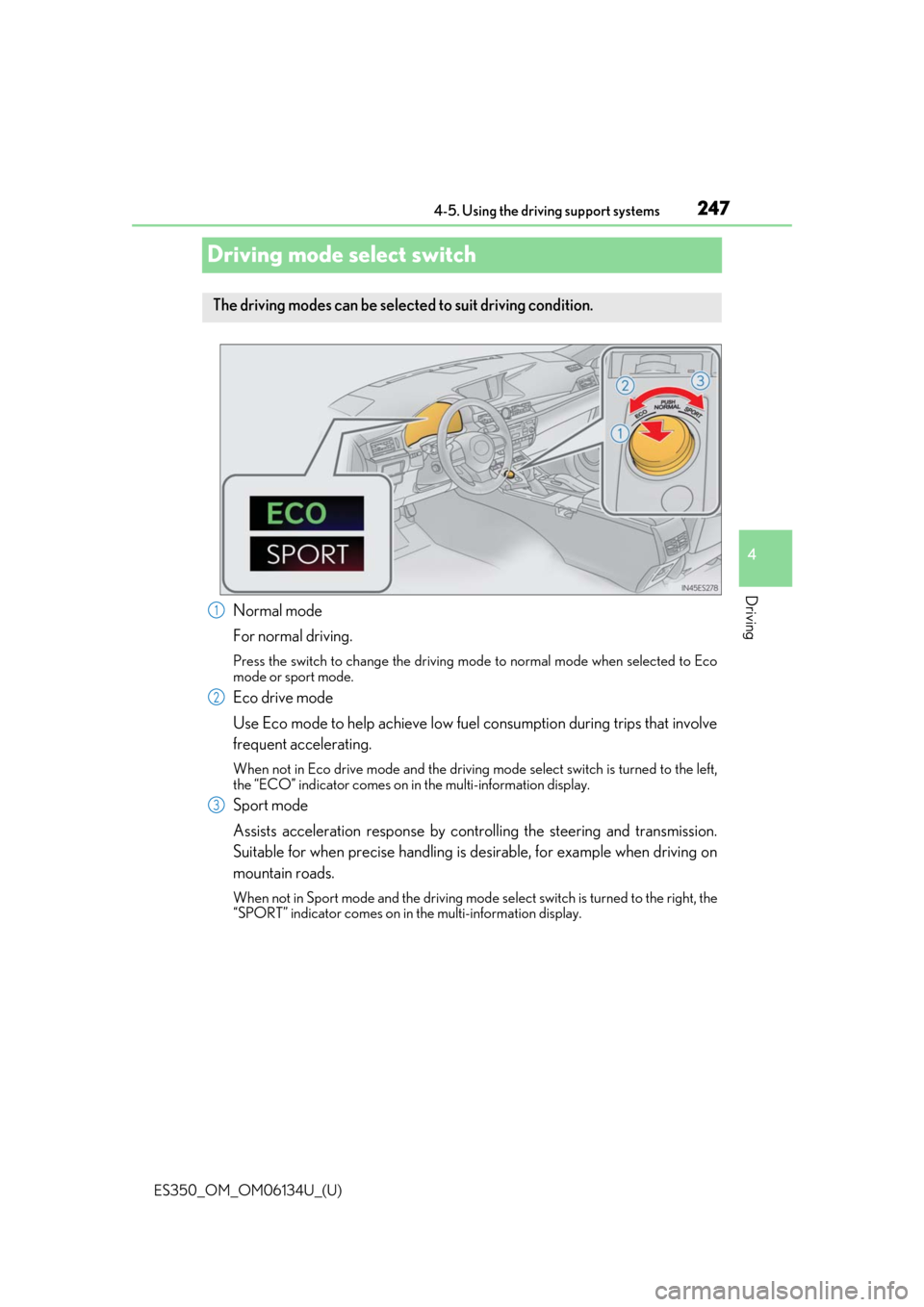
Driving mode select switch
Normal mode
For normal driving.
Press the switch to change the driving mode
to normal mode when selected to Eco
mode or sport mode.
Eco drive mode
Use Eco mode to help achieve low fuel consumption during trips that involve
frequent accelerating.
When not in Eco drive mode and the driving mode select switch is turned to the left,
the “ECO” indicator comes on in the multi-information display.
Sport mode
Assists acceleration response by cont rolling the steering and transmission.
Suitable for when precise handling is desirable, for example when driving on
mountain roads.
When not in Sport mode and the driving mode select switch is turned to the right, the
“SPORT” indicator comes on in the multi-information display.
The driving modes can be selected to suit driving condition.
1
2
3
Page 248 of 580

248
ES350_OM_OM06134U_(U)4-5. Using the driving support systems
■Operation of the air conditioning system in Eco drive mode
Eco drive mode controls the heating/cooling operations and fan speed of the air condi-
tioning system to enhance fuel efficiency (
→P. 373). To improve air conditioning perfor-
mance, adjust the fan speed or turn off Eco drive mode.
■Sport mode automatic deactivation
Sport mode is automatically deactivated if the engine switch is turned off after driving in
sport mode.
Page 354 of 580
354
ES350_OM_OM06134U_(U)5-12. Other function
“Information” screen
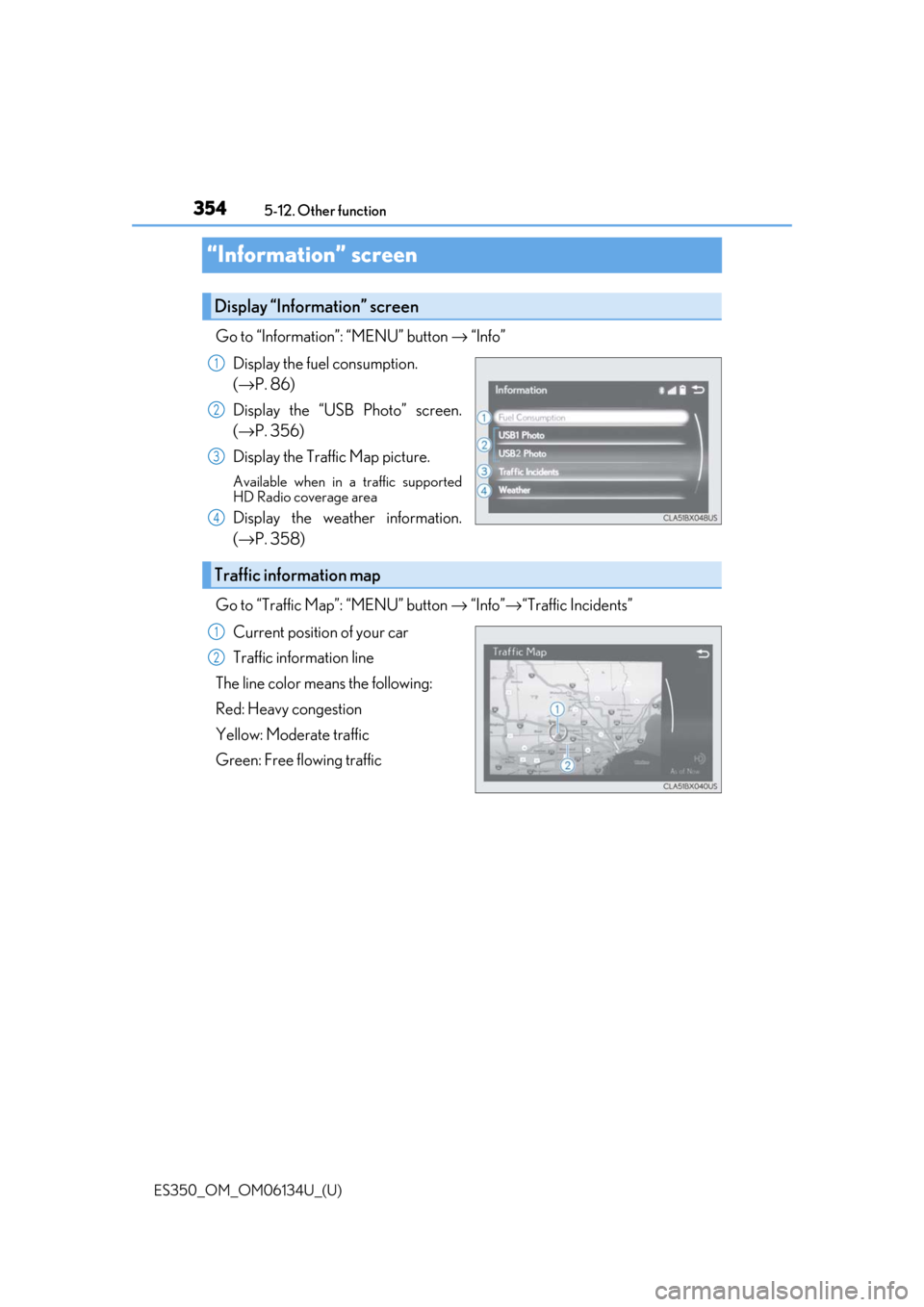
Go to “Information”: “MENU” button →
“Info”
Display the fuel consumption.
(→ P. 86)
Display the “USB Photo” screen.
(→ P. 356)
Display the Traffic Map picture.
Available when in a traffic supported
HD Radio coverage area
Display the weather information.
(→ P. 358)
Go to “Traffic Map”: “MENU” button → “Info” →“Traffic Incidents”
Current position of your car
Traffic information line
The line color means the following:
Red: Heavy congestion
Yellow: Moderate traffic
Green: Free flowing traffic
Display “Information” screen
1
2
3
4
Traffic information map
1
2
Page 372 of 580
3726-1. Using the air conditioning system and defogger
ES350_OM_OM06134U_(U)
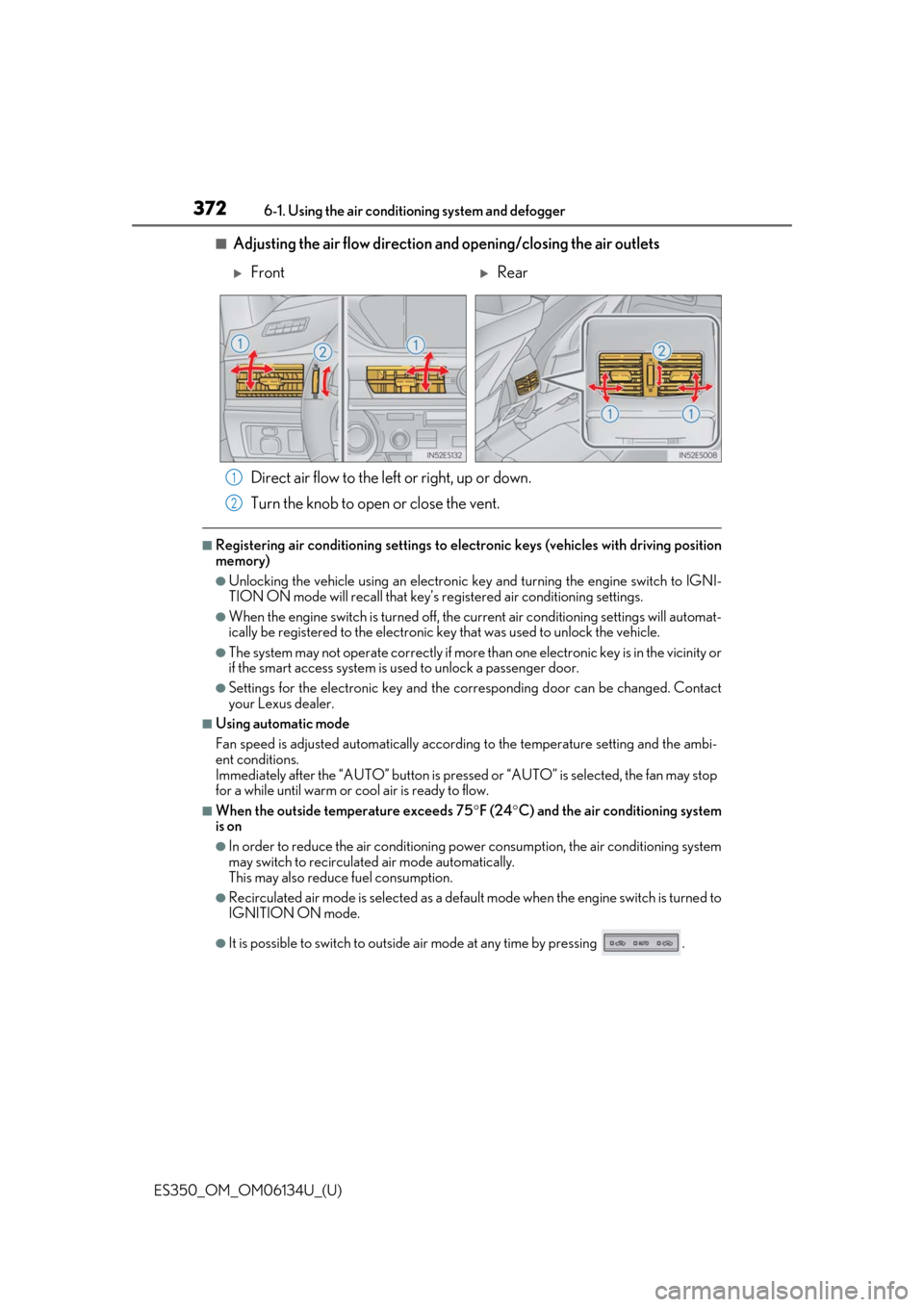
■Adjusting the air flow direction and opening/closing the air outlets Direct air flow to the left or right, up or down.
Turn the knob to open or close the vent.
■Registering air conditioning settings to elec tronic keys (vehicles with driving position
memory)
●Unlocking the vehicle using an electronic ke y and turning the engine switch to IGNI-
TION ON mode will recall that key’s re gistered air conditioning settings.
●When the engine switch is turned off, the current air conditioning settings will automat-
ically be registered to the electronic key that was used to unlock the vehicle.
●The system may not operate correctly if more th an one electronic key is in the vicinity or
if the smart access system is used to unlock a passenger door.
●Settings for the electronic key and the corresponding door can be changed. Contact
your Lexus dealer.
■Using automatic mode
Fan speed is adjusted automatically according to the temperature setting and the ambi-
ent conditions.
Immediately after the “AUTO” button is pre ssed or “AUTO” is selected, the fan may stop
for a while until warm or cool air is ready to flow.
■When the outside temperature exceeds 75 °F (24 °C) and the air conditioning system
is on
●In order to reduce the air co nditioning power consumption, the air conditioning system
may switch to recirculated air mode automatically.
This may also reduce fuel consumption.
●Recirculated air mode is selected as a defaul t mode when the engine switch is turned to
IGNITION ON mode.
●It is possible to switch to outside air mode at any time by pressing .
FrontRear
1
2
Page 373 of 580
ES350_OM_OM06134U_(U)
3736-1. Using the air conditioning system and defogger
6
Interior features
■Fogging up of the windows
●The windows will easily fog up when the humi dity in the vehicle is high. Selecting “A/C”
on the option control screen will dehumidify the air from the outlets and defog the
windshield effectively.
●If you turn “A/C” off, the windows may fog up more easily.
●The windows may fog up if the recirculated air mode is used.
■Outside/recirculated air mode
●When driving on dusty roads, in tunnels, or in heavy traffic, set to the
recirculated air mode. This is effective in preventing outside air from entering the vehi-
cle interior. During cooling operation, settin g the recirculated air mode will also cool
the vehicle interior effectively.
●Outside/recirculated air mode may automa tically switch depending on the tempera-
ture setting or the inside temperature.
■When the outside temperature is low
The dehumidification function may not operate even when “A/C” on the option control
screen is selected.
■Automatic mode for air intake control
In automatic mode, the system detects exhaust gas and other pollutants and automati-
cally switches between outside air and recirculated air modes.
When the dehumidification function is off, and the fan is operating, turning automatic
mode on will activate the dehumidification function.
■Micro dust and pollen filter
●In order to prevent the windshield from fogging up when the outside air is cold, the fol-
lowing may occur:
• Outside air mode does not switch to (recirculated air) mode.
• The dehumidification function operates.
• The operation cancels after approximately 1 minute.
●In rainy weather, the windows may fog up. Press .
●In extremely humid weather, the windows may fog up.
●The pollen is filtered out ev en if the micro dust and pollen filter is turned off.
■Operation of the air conditioning system in Eco drive mode
●In the Eco drive mode, the air conditioning sy stem is controlled as follows to prioritize
fuel efficiency
• Engine speed and compressor operation controlled to restrict heating/cooling
capacity
• Fan speed restricted when automatic mode is selected
●To improve air conditioning performa nce, perform the following operations
• Adjust the fan speed
• Turn off Eco drive mode
Page 407 of 580

ES350_OM_OM06134U_(U)
4076-4. Using the other interior features
6
Interior features
■Enhanced Roadside Assistance
Enhanced Roadside Assistance adds GPS data to the already included war-
ranty-based Lexus roadside service.
Subscribers can press the “SOS” button to reach a Safety Connect response-
center agent, who can help with a wide range of needs, such as: towing, flat
tire, fuel delivery, etc. For a descript ion of the Roadside Assistance services
and their limitations, please see the Safety Connect Terms and Conditions,
which are available at Lexus.com.
Important! Read this informatio n before using Safety Connect.
■Exposure to radio frequency signals
The Safety Connect system installed in your vehicle is a low-power radio\
transmitter and receiver. It receives and also sends out radio frequency (RF)
signals.
In August 1996, the Federal Commu nications Commission (FCC) adopted
RF exposure guidelines with safety levels for mobile wireless phones. Those
guidelines are consistent with the safe ty standards previously set by the fol-
lowing U.S. and internat ional standards bodies.
●ANSI (American National Stan dards Institute) C95.1 [1992]
●NCRP (National Council on Radiation Protection and Measurement)
Report 86 [1986]
●ICNIRP (International Commission on Non-Ionizing Radiation Protection)
[1996]
Those standards were based on comprehensive and periodic evaluations of
the relevant scientific literature. Over 120 scientists, engineers, and physi-
cians from universities, and governme nt health agencies and industries
reviewed the available body of rese arch to develop the ANSI Standard
(C95.1).
The design of Safety Connect complies wi th the FCC guidelines in addition to
those standards.
Safety information for Safety Connect
Page 412 of 580
412
ES350_OM_OM06134U_(U)7-1. Maintenance and care
Cleaning and protecting the vehicle exterior
●Working from top to bott
om, liberally apply water to the vehicle body, wheel
wells and underside of the vehicl e to remove any dirt and dust.
●Wash the vehicle body using a sponge or soft cloth, such as a chamois.
●For hard-to-remove marks, use car wa sh soap and rinse thoroughly with
water.
●Wipe away any water.
●Wax the vehicle when the waterproof coating deteriorates.
If water does not bead on a clean surface, apply wax when the vehicle body is cool.
■Self-restoring coat
The vehicle body has a self-restoring coating that is resistant to small surface scratches
caused in a car wash etc.
●The coating lasts for 5 to 8 years from when the vehicle is delivered from the plant.
●The restoration time differs depending on the depth of the scratch and outside tem-
perature. The restoration ti me may become shorter when the coating is warmed by
applying warm water.
●Deep scratches caused by keys, coins, etc. cannot be restored.
●Do not use wax that contain abrasives.
■Automatic car washes
●Fold the mirrors before washing the vehicle. Start washing from the front of the vehicle.
Make sure to extend the mirrors before driving.
●Brushes used in automatic car washes may scratch the vehicle surface and harm your
vehicle’s paint.
●Rear spoiler (if equipped) may not be washable in some automatic car washes. There
may also be an increased ri sk of damage to vehicle.
■High pressure car washes
●Do not allow the nozzles of the car wash to come within close proximity of the windows.
●Before using the car wash, check that the fuel filler door on your vehicle is closed prop-
erly.
■Notes for a smart access system with push-button start
If the door handle becomes wet while the electronic key is within the effective range, the
door may lock and unlock repeatedly. In that case, follow the following correction proce-
dures to wash the vehicle:
●Place the key in a position 6 ft. (2 m) or more separate from the vehicle while the vehi-
cle is being washed. (Take care to ensure that the key is not stolen.)
●Set the electronic key to battery-saving mode to disable the sm art access system with
push-button start. ( →P. 110)
Perform the following to protect the ve hicle and maintain it in prime condi-
tion:
Page 420 of 580

420
ES350_OM_OM06134U_(U)7-2. Maintenance
WARNING
■If your vehicle is not properly maintained
Improper maintenance could result in se
rious damage to the vehicle and possible
death or serious injury.
■Handling of the battery
●Engine exhaust, some of its constituents, and a wide variety of automobile compo-
nents contain or emit chemicals known to th e State of California to cause cancer and
birth defects and other reproductive ha rm. Work in a well ventilated area.
●Oils, fuels and fluids contained in vehicles as well as waste produced by component
wear contain or emit chemicals known to the State of California to cause cancer and
birth defects or other reproductive harm. Avoid exposure and wash any affected area
immediately.
●Battery posts, terminals and related acce ssories contain lead and lead compounds
which are known to cause brain damage. Wash your hands after handling. ( →P. 437)