high LEXUS ES350 2021 User Guide
[x] Cancel search | Manufacturer: LEXUS, Model Year: 2021, Model line: ES350, Model: LEXUS ES350 2021Pages: 464, PDF Size: 9.61 MB
Page 90 of 464
902-1. Instrument cluster
Use the displayed average fuel consump-
tion as a reference.
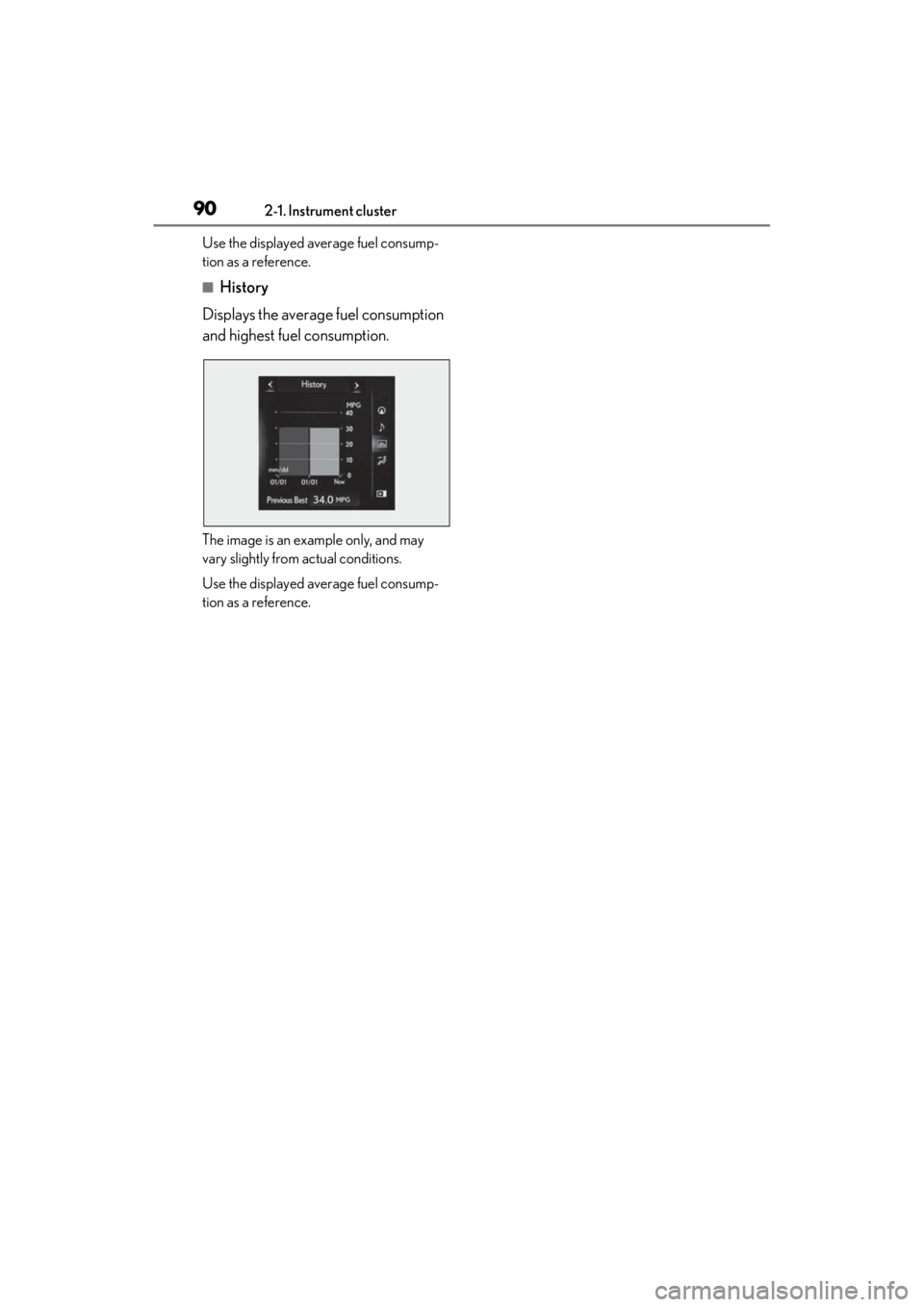
■History
Displays the average fuel consumption
and highest fuel consumption.
The image is an example only, and may
vary slightly from actual conditions.
Use the displayed average fuel consump-
tion as a reference.
Page 93 of 464
933-1. Key information
3
Before driving
possession) has been registered.
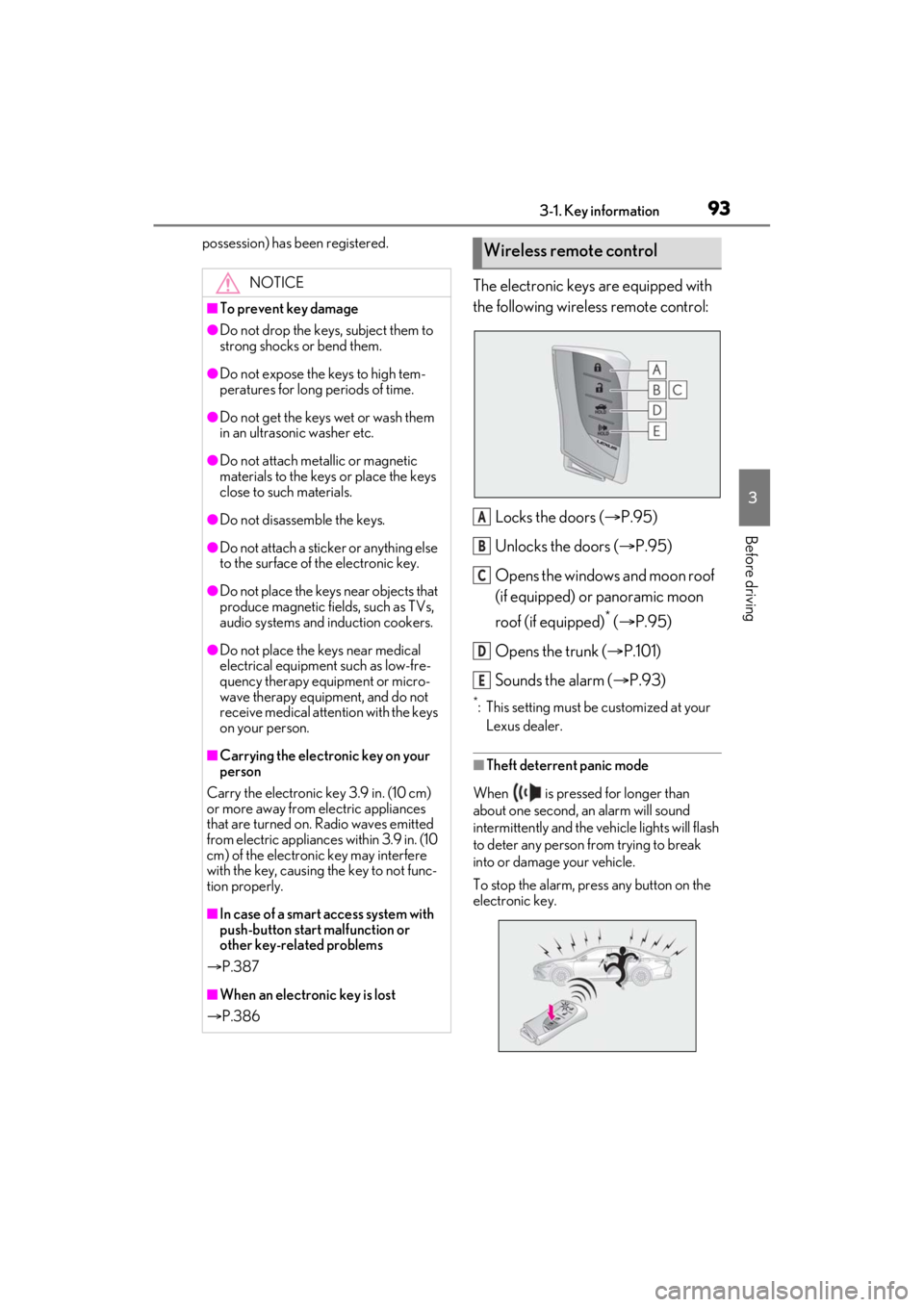
The electronic keys are equipped with
the following wireless remote control:Locks the doors ( P.95)
Unlocks the doors ( P.95)
Opens the windows and moon roof
(if equipped) or panoramic moon
roof (if equipped)
* ( P.95)
Opens the trunk ( P.101)
Sounds the alarm ( P.93)
*: This setting must be customized at your
Lexus dealer.
■Theft deterrent panic mode
When is pressed for longer than
about one second, an alarm will sound
intermittently and the vehicle lights will flash
to deter any person from trying to break
into or damage your vehicle.
To stop the alarm, press any button on the
electronic key.
NOTICE
■To prevent key damage
●Do not drop the keys, subject them to
strong shocks or bend them.
●Do not expose the keys to high tem-
peratures for long periods of time.
●Do not get the keys wet or wash them
in an ultrasonic washer etc.
●Do not attach metallic or magnetic
materials to the keys or place the keys
close to such materials.
●Do not disassemb le the keys.
●Do not attach a sticker or anything else
to the surface of the electronic key.
●Do not place the keys near objects that
produce magnetic fields, such as TVs,
audio systems and induction cookers.
●Do not place the keys near medical
electrical equipment such as low-fre-
quency therapy equipment or micro-
wave therapy equipment, and do not
receive medical attent ion with the keys
on your person.
■Carrying the electronic key on your
person
Carry the electronic key 3.9 in. (10 cm)
or more away from electric appliances
that are turned on. Radio waves emitted
from electric applianc es within 3.9 in. (10
cm) of the electronic key may interfere
with the key, causing the key to not func-
tion properly.
■In case of a smart access system with
push-button start malfunction or
other key-related problems
P.387
■When an electronic key is lost
P.386
Wireless remote control
A
B
C
D
E
Page 98 of 464
983-2. Opening, closing and locking the doors and trunk
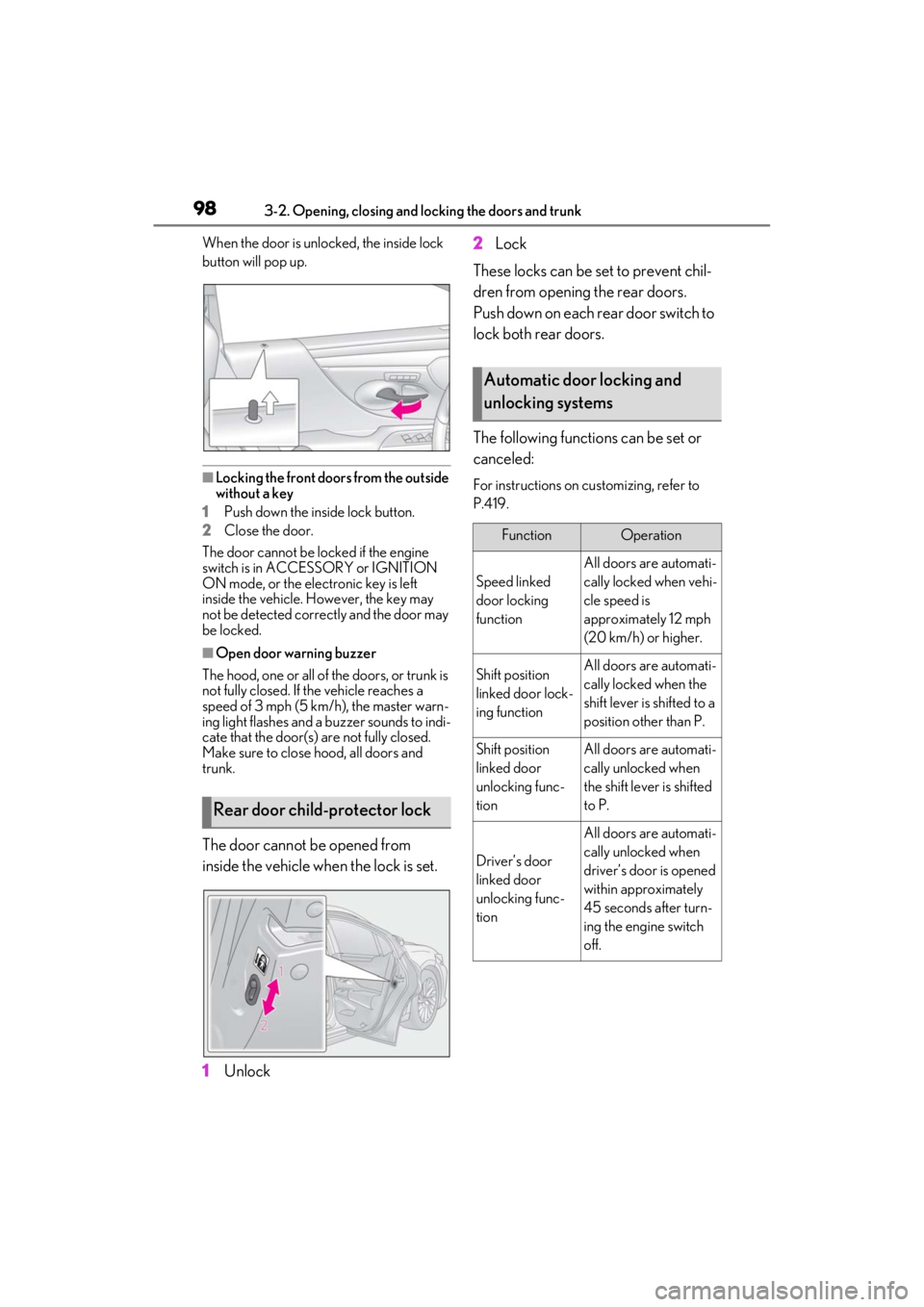
When the door is unlocked, the inside lock
button will pop up.
■Locking the front doors from the outside
without a key
1 Push down the inside lock button.
2 Close the door.
The door cannot be locked if the engine
switch is in ACCESSORY or IGNITION
ON mode, or the electronic key is left
inside the vehicle. However, the key may
not be detected correctly and the door may
be locked.
■Open door warning buzzer
The hood, one or all of the doors, or trunk is
not fully closed. If the vehicle reaches a
speed of 3 mph (5 km/h), the master warn-
ing light flashes and a buzzer sounds to indi-
cate that the door(s) are not fully closed.
Make sure to close hood, all doors and
trunk.
The door cannot be opened from
inside the vehicle when the lock is set.
1 Unlock 2
Lock
These locks can be set to prevent chil-
dren from opening the rear doors.
Push down on each rear door switch to
lock both rear doors.
The following functions can be set or
canceled:
For instructions on customizing, refer to
P.419.
Rear door child-protector lock
Automatic door locking and
unlocking systems
FunctionOperation
Speed linked
door locking
function
All doors are automati-
cally locked when vehi-
cle speed is
approximately 12 mph
(20 km/h) or higher.
Shift position
linked door lock-
ing functionAll doors are automati-
cally locked when the
shift lever is shifted to a
position other than P.
Shift position
linked door
unlocking func-
tionAll doors are automati-
cally unlocked when
the shift leve r is shifted
to P.
Driver’s door
linked door
unlocking func-
tion
All doors are automati-
cally unlocked when
driver’s door is opened
within approximately
45 seconds after turn-
ing the engine switch
off.
Page 108 of 464

1083-2. Opening, closing and locking the doors and trunk
■Conditions affecting operation
The smart access system with push-button
start uses weak radio waves. In the follow-
ing situations, the communication between
the electronic key and the vehicle may be
affected, preventing the smart access sys-
tem with push-button start, wireless remote
control and engine immobilizer system
from operating properly.
(Ways of coping: P.387)
●When the electronic key battery is
depleted
●Near a TV tower, electric power plant,
gas station, radio stat ion, large display,
airport or other faci lity that generates
strong radio waves or electrical noise
●When the electronic key is in contact
with, or is covered by the following metal-
lic objects
• Cards to which aluminum foil is attached
• Cigarette boxes that have aluminum foil
inside
• Metallic wallets or bags
•Coins
• Hand warmers made of metal
• Media such as CDs and DVDs
●When other wireless keys (that emit
radio waves) are being used nearby
●When carrying the electronic key
together with the following devices that
emit radio waves
• Portable radio, cellular phone, cordless phone or other wireless communication
device
• Another electronic ke y or a wireless key
that emits radio waves
• Personal computers or personal digital assistants (PDAs)
• Digital audio players
• Portable game systems
●If window tint with a metallic content or
metallic objects are attached to the rear
window
●When the electronic key is placed near a
battery charger or electronic devices
●When the vehicle is parked in a pay park-
ing spot where radio waves are emitted.
■Notes for the entry function
●Even when the electronic key is within the effective range (detection areas), the sys-
tem may not operate properly in the fol-
lowing cases:
• The electronic key is too close to the win- dow or outside door handle, near the
ground, or in a high place when the doors
are locked or unlocked.
• The electronic key is near the ground or in a high place, or too close to the center
of the rear bumper when the trunk is
opened.
• The electronic key is on the instrument
panel, rear package tray or floor, or in the
door pockets or glove box when the
engine is started or engine switch modes
are changed.
●Do not leave the electronic key on top of
the instrument panel or near the door
pockets when exiting the vehicle.
Depending on the radio wave reception
conditions, it may be detected by the
antenna outside the cabin and the doors
will become lockable from the outside,
possibly trapping the electronic key
inside the vehicle.
●As long as the electronic key is within the
effective range, the doors may be locked
or unlocked by anyone. However, only
the doors detecting the electronic key
can be used to unlock the vehicle.
●Even if the electronic key is not inside the
vehicle, it may be po ssible to start the
engine if the electronic key is near the
window.
●The doors may unlock or lock if a large
amount of water splashes on the door
handle, such as in the rain or in a car
wash, when the electronic key is within
the effective range. (The doors will auto-
matically be locked after approximately
60 seconds if the doors are not opened
and closed.)
●If the wireless remote control is used to
lock the doors when the electronic key is
near the vehicle, there is a possibility that
the door may not be unlocked by the
entry function. (Use the wireless remote
control to unlock the doors.)
●Touching the door lock sensor while
wearing gloves may delay or prevent
lock operation. Remove the gloves and
touch the lock sensor again.
Page 133 of 464
133
4
4
Driving
Driving
4-1. Before drivingDriving the vehicle ..................... 134
Cargo and luggage ................... 139
Vehicle load limits ....................... 141
Trailer towing ............................... 142
Dinghy towing ............................. 142
4-2. Driving procedures Engine (ignition) switch ........... 144
Automatic transmission........... 149
Turn signal lever.......................... 153
Parking brake .............................. 154
Brake Hold.................................... 156
4-3. Operating the lights and wipers Headlight switch ......................... 158
Automatic High Beam .............. 161
Windshield wipers and washer ......................................................... 164
4-4. Refueling Opening the fuel tank cap...... 169
4-5. Using the driving support sys- tems
Lexus Safety System + 2.0 ...... 171
PCS (Pre-Collision System).. 177
LTA (Lane Tracing Assist)...... 184
RSA (Road Sign Assist) ........... 193
Dynamic radar cruise control with full-speed range....................... 195
BSM (Blind Spot Monitor) .... 205
Driving Mode Select switch .. 210PKSA (Parking Support Alert)
......................................................... 212
Intuitive parking assist .............. 213
RCTA (Rear cross traffic alert) function....................................... 220
RCD (Rear Camera Detection) function........................................ 224
PKSB (Parking Support Brake) ........................................................ 227
Parking Support Brake function (static objects) ......................... 233
Parking Support Brake function (rear-crossing vehicles) ...... 239
Parking Support Brake function (rear pedestrians) .................. 243
Driving assist systems.............. 246
4-6. Driving tips Winter driving tips ..................... 251
Page 134 of 464
1344-1. Before driving
4-1.Before driving
■Starting the engine
P.144
■Driving
1 With the brake pedal depressed,
shift the shift lever to D. ( P.150)
2 If the parking brake is in manual
mode, release the parking brake.
(P.154)
3 Gradually release the brake pedal
and gently depress the accelerator
pedal to accelerate the vehicle.
■Stopping
1 With the shift lever in D, depress
the brake pedal.
2 If necessary, set the parking brake.
If the vehicle is to be stopped for an
extended period of time, shift the shift lever
to P or N. ( P.150)
■Parking the vehicle
1 With the shift lever in D, depress
the brake pedal.
2 Set the parking brake ( P.154),
and shift the shift lever to P
( P.150).
3 Press the engine switch to stop the
engine.
4 Lock the door, making sure that
you have the electronic key on your
person.
If parking on a hill, block the wheels as
needed.
■Starting off on a steep uphill
1 Make sure that the parking brake is
set with the brake pedal depressed,
and then shift the shift lever to D.
2 Release the brake pedal and gently
depress the accelerator pedal.
3 Release the parking brake.
■When starting off on a uphill
The hill-start assist control will activate.
( P.246)
■Driving in the rain
●Drive carefully when it is raining, because
visibility will be reduced, the windows
may become fogged-up, and the road
will be slippery.
●Drive carefully when it starts to rain,
because the road surface will be espe-
cially slippery.
●Refrain from high speeds when driving on
an expressway in the rain, because there
may be a layer of wa ter between the tires
and the road surface, preventing the
steering and brakes from operating
properly.
■Engine speed while driving
In the following conditions, the engine
speed may become high while driving. This
is due to automatic up-shifting control or
down-shifting implementation to meet driv-
ing conditions. It does not indicate sudden
acceleration.
●The vehicle is judged to be driving uphill
or downhill
●When the accelerato r pedal is released
●When the brake pedal is firmly or quickly
depressed
■Restraining the engine output (Brake
Override System)
●When the accelerator and brake pedals
are depressed at the same time, the
engine output may be restrained.
Driving the vehicle
The following procedures should be
observed to ensure safe driving:
Driving procedure
Page 135 of 464

1354-1. Before driving
4
Driving
●A warning message is displayed on the
multi-information display while the sys-
tem is operating. ( P.363)
■Restraining sudden start (Drive-Start
Control)
●When the following unusual operation is
performed, the engine output may be
restrained.
• When the shift lever is shifted from R to
D, D to R, N to R, P to D, or P to R (D
includes S) with the accelerator pedal
depressed, a warning message appears
on the multi-information display. If a
warning message is shown on the multi-
information display, read the message
and follow the instructions.
• When the accelerator pedal is depressed
too much while the vehicle is in reverse.
●While Drive-Start Control is being acti-
vated, your vehicle may have trouble
escaping from the mud or fresh snow. In
such case, deactivate TRAC ( P.247)
to cancel Drive-Start Control so that the
vehicle may become able to escape from
the mud or fresh snow.
■Breaking in your new Lexus
To extend the life of the vehicle, observing
the following precautions is recommended:
●For the first 186 miles (300 km):
Avoid sudden stops.
●For the first 621 miles (1000 km):
• Do not drive at extremely high speeds.
• Avoid sudden acceleration.
• Do not drive continuously in low gears.
• Do not drive at a constant speed for extended periods.
■Operating your vehicle in a foreign
country
Comply with the relevant vehicle registra-
tion laws and confirm the availability of the
correct fuel. ( P.400)
WARNING
Observe the following precautions.
Failure to do so may result in death or
serious injury.
■When starting the vehicle
Always keep your foot on the brake
pedal while stopped with the engine run-
ning. This prevents the vehicle from
creeping.
■When driving the vehicle
●Do not drive if you are unfamiliar with
the location of the brake and accelera-
tor pedals to avoid depressing the
wrong pedal.
• Accidentally depressing the accelera- tor pedal instead of the brake pedal
will result in sudden acceleration that
may lead to an accident.
• When backing up, you may twist your body around, leading to a difficulty in
operating the pedals. Make sure to
operate the pedals properly.
• Make sure to keep a correct driving posture even when moving the vehicle
only slightly. This allows you to depress
the brake and accelerator pedals
properly.
• Depress the brake pedal using your right foot. Depressing the brake pedal
using your left foot may delay
response in an emer gency, resulting in
an accident.
●Do not drive the vehicle over or stop
the vehicle near flammable materials.
The exhaust system and exhaust gases
can be extremely hot. These hot parts
may cause a fire if there is any flamma-
ble material nearby.
●During normal driving, do not turn off
the engine. Turning the engine off
while driving will not cause loss of
steering or braking control, but the
power assist to these systems will be
lost. This will make it more difficult to
steer and brake, so you should pull
over and stop the vehicle as soon as it
is safe to do so.
However, in the event of an emer-
gency, such as if it becomes impossible
to stop the vehicle in the normal way:
P.352
Page 136 of 464
1364-1. Before driving
WARNING
●Use engine braking (downshift) to
maintain a safe speed when driving
down a steep hill.
Using the brakes continuously may
cause the brakes to overheat and lose
effectiveness. (P.149)
●Do not adjust the positions of the
steering wheel, the seat, or the inside
or outside rear view mirrors while driv-
ing.
Doing so may result in a loss of vehicle
control.
●Always check that all passengers’
arms, heads or other parts of their
body are not outside the vehicle.
●AWD models: Do not drive the vehicle
off-road. This is not an AWD vehicle
designed for off-road driving. Proceed
with all due caution if it becomes
unavoidable to drive off-road.
●Do not drive across a river or through
other bodies of water. This may cause
electric/electronic components to
short circuit, damage the engine or
cause other serious damage to the
vehicle.
●Do not drive in excess of the speed
limit. Even if the legal speed limit per-
mits it, do not drive over 85 mph (140
km/h) unless your vehicle has high-
speed capability tires. Driving over 85
mph (140 km/h) may result in tire fail-
ure, loss of control and possible injury.
Be sure to consult a tire dealer to
determine whether the tires on your
vehicle are high-speed capability tires
or not before driving at such speeds.
■When driving on slippery road sur-
faces
●Sudden braking, acceleration and
steering may cause tire slippage and
reduce your ability to control the vehi-
cle.
●Sudden acceleration, engine braking
due to shifting, or changes in engine
speed could cause the vehicle to skid,
resulting in an accident.
●After driving through a puddle, lightly
depress the brake pedal to make sure
that the brakes are functioning prop-
erly. Wet brake pads may prevent the
brakes from functioning properly. If
the brakes on only one side are wet
and not functioning properly, steering
control may be affected.
■When shifting the shift lever
●Do not let the vehicle roll backward
while the shift lever is in a driving posi-
tion or roll forward while the shift lever
is in R.
Doing so may cause the engine to stall
or lead to poor brake and steering
performance, resulting in an accident
or damage to the vehicle.
●Do not shift the shif t lever to P while
the vehicle is moving.
Doing so can damage the transmission
and may result in a loss of vehicle con-
trol.
●Do not shift the shift lever to R while
the vehicle is moving forward.
Doing so can damage the transmission
and may result in a loss of vehicle con-
trol.
●Do not shift the shift lever to a driving
position while the vehicle is moving
backward.
Doing so can damage the transmission
and may result in a loss of vehicle con-
trol.
●Shifting the shift lever to N while the
vehicle is moving will disengage the
engine from the transmission. Engine
braking is not available when N is
selected.
Page 137 of 464

1374-1. Before driving
4
Driving
WARNING
●Be careful not to shift the shift lever
with the accelerator pedal depressed.
Shifting the shift lever to a gear other
than P or N may lead to unexpected
rapid acceleration of the vehicle that
may cause an accident and result in
death or serious injury.
■If you hear a squealing or scraping
noise (brake pad wear limit indica-
tors)
Have the brake pads checked and
replaced by your Lexus dealer as soon as
possible. Rotor damage may result if the
pads are not replaced when needed. It is
dangerous to drive the vehicle when the
wear limits of the brake pads and/or
those of the brake discs are exceeded.
■When the vehicle is stopped
●Do not race the engine.
If the vehicle is in any gear other than P
or N, the vehicle may accelerate sud-
denly and unexpectedly, causing an
accident.
●In order to prevent accidents due to
the vehicle rolling away, always keep
depressing the brake pedal while the
engine is running, and apply the park-
ing brake as necessary.
●If the vehicle is stopped on an incline,
in order to prevent accidents caused
by the vehicle rolling forward or back-
ward, always depress the brake pedal
and securely apply the parking brake
as needed.
●Avoid revving or racing the engine.
Running the engine at high speed
while the vehicle is stopped may cause
the exhaust system to overheat, which
could result in a fire if combustible
material is nearby.
■When the vehicle is parked
●Do not leave glasses, cigarette light-
ers, spray cans, or soft drink cans in the
vehicle when it is in the sun.
Doing so may result in the following:
• Gas may leak from a cigarette lighter or spray can, and may lead to a fire.
• The temperature inside the vehicle may cause the plastic lenses and plas-
tic material of glasses to deform or
crack.
• Soft drink cans may fracture, causing the contents to spray over the interior
of the vehicle, and may also cause a
short circuit in the vehicle’s electrical
components.
●Do not leave cigarette lighters in the
vehicle. If a cigare tte lighter is in a
place such as the glove box or on the
floor, it may be lit accidentally when
luggage is loaded or the seat is
adjusted, causing a fire.
●Do not attach adhesive discs to the
windshield or windows. Do not place
containers such as air fresheners on
the instrument panel or dashboard.
Adhesive discs or containers may act
as lenses, causing a fire in the vehicle.
●Do not leave a door or window open if
the curved glass is coated with a met-
allized film such as a silver-colored
one. Reflected sunlight may cause the
glass to act as a lens, causing a fire.
●Always apply the parking brake, shift
the shift lever to P, stop the engine and
lock the vehicle.
Do not leave the vehicle unattended
while the engine is running.
If the vehicle is parked with the shift
lever in P but the parking brake is not
set, the vehicle may start to move, pos-
sibly leading to an accident.
●Do not touch the exhaust pipes while
the engine is running or immediately
after turning the engine off.
Doing so may cause burns.
Page 151 of 464
1514-2. Driving procedures
4
Driving
The following steps may be used as an
emergency measure to ensure that the shift
lever can be shifted.
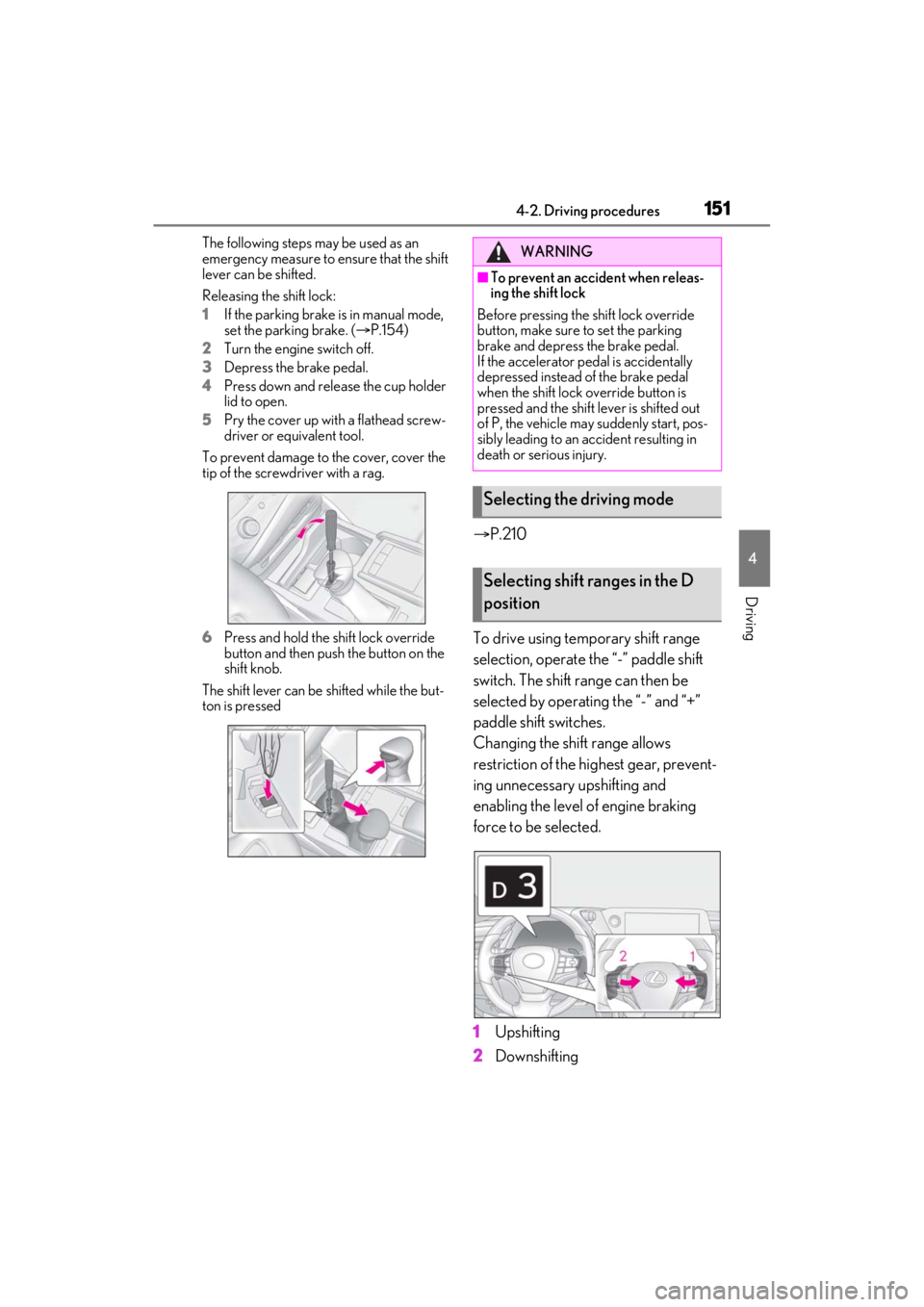
Releasing the shift lock:
1If the parking brake is in manual mode,
set the parking brake. ( P.154)
2 Turn the engine switch off.
3 Depress the brake pedal.
4 Press down and release the cup holder
lid to open.
5 Pry the cover up with a flathead screw-
driver or equivalent tool.
To prevent damage to the cover, cover the
tip of the screwd river with a rag.
6 Press and hold the shift lock override
button and then push the button on the
shift knob.
The shift lever can be shifted while the but-
ton is pressed
P.210
To drive using temporary shift range
selection, operate the “-” paddle shift
switch. The shift range can then be
selected by operating the “-” and “+”
paddle shift switches.
Changing the shift range allows
restriction of the highest gear, prevent-
ing unnecessary upshifting and
enabling the level of engine braking
force to be selected.
1 Upshifting
2 Downshifting
WARNING
■To prevent an accident when releas-
ing the shift lock
Before pressing the shift lock override
button, make sure to set the parking
brake and depress the brake pedal.
If the accelerator pe dal is accidentally
depressed instead of the brake pedal
when the shift lock override button is
pressed and the shift lever is shifted out
of P, the vehicle may suddenly start, pos-
sibly leading to an accident resulting in
death or serious injury.
Selecting the driving mode
Selecting shift ranges in the D
position