sport mode LEXUS ES350 2021 User Guide
[x] Cancel search | Manufacturer: LEXUS, Model Year: 2021, Model line: ES350, Model: LEXUS ES350 2021Pages: 464, PDF Size: 9.61 MB
Page 81 of 464

812-1. Instrument cluster
2
Vehicle status information and indicators
■Boost gauge
Displays the boost pressure. The dis-
play will change color if the specified
pressure is exceeded.
This display is intended for use as a guide-
line. Depending on factors such as the
road surface condition, temperature and
vehicle speed, the display may not show
the actual condition of the vehicle.
■G-force (F SPORT models)
Displays lateral G-forces on the vehi-
cle.
Acceleration G-force on the vehi-
cle
Current G-force value (analyzed
value of front/rear and left/right G-
forces)
Record of the maximum G-forces
This display is intended for use as a guide-
line. Depending on factors such as the
road surface condition, temperature and
vehicle speed, the display may not show
the actual condition of the vehicle.
Resetting the record of maximum
G-forces
Press and hold “OK” of the meter control
switches to reset the record.
Peak hold function
If lateral G-forces of 0.5 G or greater are generated, the G-forc
e value display will
turn amber and be held for 2 seconds.
■Gear Position (F SPORT models)
Displays the current shift range or gear
position when the shift lever is in D or S.
■Units (F SPORT models)
The units of measure used can be
changed while driving.
Unlike the units sett ing performed on the
settings display, th e units setting per-
formed on the drive information display
can be changed while driving.
■Eco Driving Indicator
Eco Driving Indicator will not operate
under the following conditions:
●The shift lever is in an y position other than
D.
●A paddle shift swit ch is operated.
●The driving mode is se t to other than nor-
mal mode or eco drive mode.
●The vehicle speed is approximately 80
mph (130 km/h) or higher.
Select to display the following naviga-
tion system-linked information.
Route guidance to destination
Compass display (heading-up dis-
play)
■Route guidance to destination display
When the route guidance to destination
display is enabled on th e head-up display, it
will not be displayed on the multi-informa-
tion display. ( P.85)
A
B
C
Navigation system-linked dis-
play (if equipped)
Page 82 of 464
822-1. Instrument cluster
Select to enable selection of an audio
source or track on the meter using the
meter control switches.
Select to display the operational status
of the following systems:
LTA (Lane Tracing Assist)
( P.184)
Dynamic radar cruise control with
full-speed range ( P.195)
RSA (Road Sign Assist) (if
equipped) ( P.193)
■Meter display settings that can be
changed
Language
Select to change th e language displayed.
Units
Select to change the units of measure dis-
played.
Speedometer display (except F
SPORT models)
Select to set the display of the speedome-
ter to digital or analog.
Drive information 1/Drive informa-
tion 2
Select to select up to 2 items ( P.79) that
will be displayed on ea ch Drive information
screen (Drive information 1 screen and
Drive information 2 sc reen) respectively.
Clock
Select to switch between 12-hour display
and 24-hour display.
Pop-up display
Select to enable/disab le some pop-up dis-
plays for each relevant system.
Accent color
Select to change the accent color on the
screen, such as the cursor color.
Rev indicator (F SPORT models)
• Select to enable/disable the rev indica-
tor.
• Select to set the engine speed at which the rev indicator (amber) will begin to be
displayed.
Rev peak (F SPORT models)
Select to enable/disable the rev peak.
Eco Driving Indicator Light
Select to enable/disable the Eco Driving
Indicator Light.
Default setting
Select to reset the meter display settings to
the default setting.
■Vehicle functions and settings that
can be changed
P.419
■Suspension of the settings display
●Some settings cannot be changed while
driving. When changing settings, park
the vehicle in a safe place.
●If a warning message is displayed, opera-
tion of the settings display will be sus-
pended.
Audio system-linked display
Driving support system informa-
tion display
Settings display
Page 149 of 464
1494-2. Driving procedures
4
Driving
*1: Shifting to the D position allows the sys-tem to select a gear suitable for the
driving conditions. Setting the shift lever
to the D position is recommended for
normal driving. You can choose shift
range suitable for your driving situation
by operating the paddle shift switches.
*2: Selecting shift ranges using S mode restricts the upper li mit of the possible
gear ranges, controls engine braking
force, and prevents unnecessary
upshifting.
■When driving with dynamic radar cruise
control with full-speed range activated
Even when performing the following
actions with the intent of enabling engine
braking, engine braking will not be acti-
vated because dynamic radar cruise con-
trol with full-speed range will not be
canceled.
●While driving in the D position or S mode,
downshifting to 7, 6, 5 or 4. ( P.195)
●When switching the driving mode to
sport mode while driving in D position.
( P.210)
■Restraining sudden start (Drive-Start
Control)
P.135
■AI-SHIFT
The AI-SHIFT automatica lly selects the suit-
able gear according to driver performance
and driving conditions.
The AI-SHIFT automatically operates when
the shift lever is in D. (Shifting the shift lever
to the S position or using the paddle shift
cancels the function.)
Automatic transmission
Select the shift position depending
on your purpose and situation.
Shift position purpose and func-
tions
Shift posi-
tionObjective or function
PParking the vehicle/starting the engine
RReversing
NNeutral
DNormal driving*1
SS mode driving*2 ( P.152)
WARNING
■When driving on slippery road sur-
faces
Do not accelerate or shift gears sud-
denly.
Sudden changes in engine braking may
cause the vehicle to sp in or skid, resulting
in an accident.
Page 179 of 464
1794-5. Using the driving support systems
4
Driving
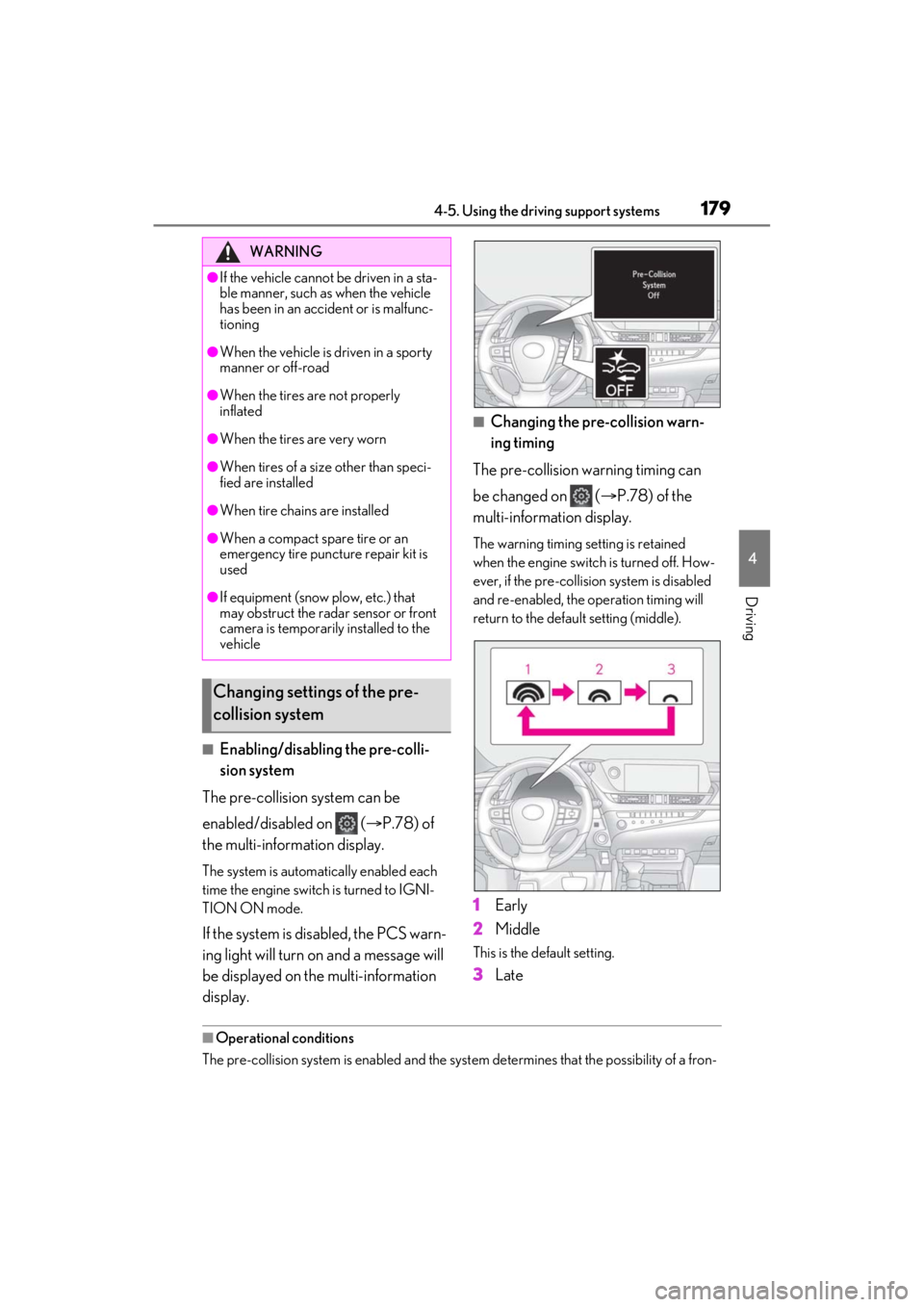
■Enabling/disabling the pre-colli-
sion system
The pre-collision system can be
enabled/disabled on ( P.78) of
the multi-information display.
The system is automatically enabled each
time the engine switch is turned to IGNI-
TION ON mode.
If the system is disabled, the PCS warn-
ing light will turn on and a message will
be displayed on the multi-information
display.
■Changing the pre-collision warn-
ing timing
The pre-collision warning timing can
be changed on ( P.78) of the
multi-information display.
The warning timing setting is retained
when the engine switch is turned off. How-
ever, if the pre-collision system is disabled
and re-enabled, the operation timing will
return to the default setting (middle).
1 Early
2 Middle
This is the default setting.
3Late
■Operational conditions
The pre-collision system is enabled and the syst em determines that the possibility of a fron-
WARNING
●If the vehicle cannot be driven in a sta-
ble manner, such as when the vehicle
has been in an accident or is malfunc-
tioning
●When the vehicle is driven in a sporty
manner or off-road
●When the tires are not properly
inflated
●When the tires are very worn
●When tires of a size other than speci-
fied are installed
●When tire chains are installed
●When a compact spare tire or an
emergency tire puncture repair kit is
used
●If equipment (snow plow, etc.) that
may obstruct the radar sensor or front
camera is temporarily installed to the
vehicle
Changing settings of the pre-
collision system
Page 210 of 464
2104-5. Using the driving support systems
object may increase in the following situ-
ations:
• When the sensor is misaligned due to a
strong impact to the sensor or its sur-
rounding area
• When the distance between your vehicle
and a guardrail, wall, etc. that enters the
detection area is short
• When driving up an d down consecutive
steep inclines, such as hills, dips in the
road, etc.
• When vehicle lanes are narrow, or when
driving on the edge of a lane, and a vehi-
cle traveling in a lane other than the adja-
cent lanes enters the detection area
• When driving on roads with sharp bends, consecutive curves, or uneven surfaces
• When the tires are slipping or spinning
• When the distance between your vehicle
and a following vehicle is short
• When an accessory (such as a bicycle
carrier) or towing eyel et is installed to the
rear of the vehicle
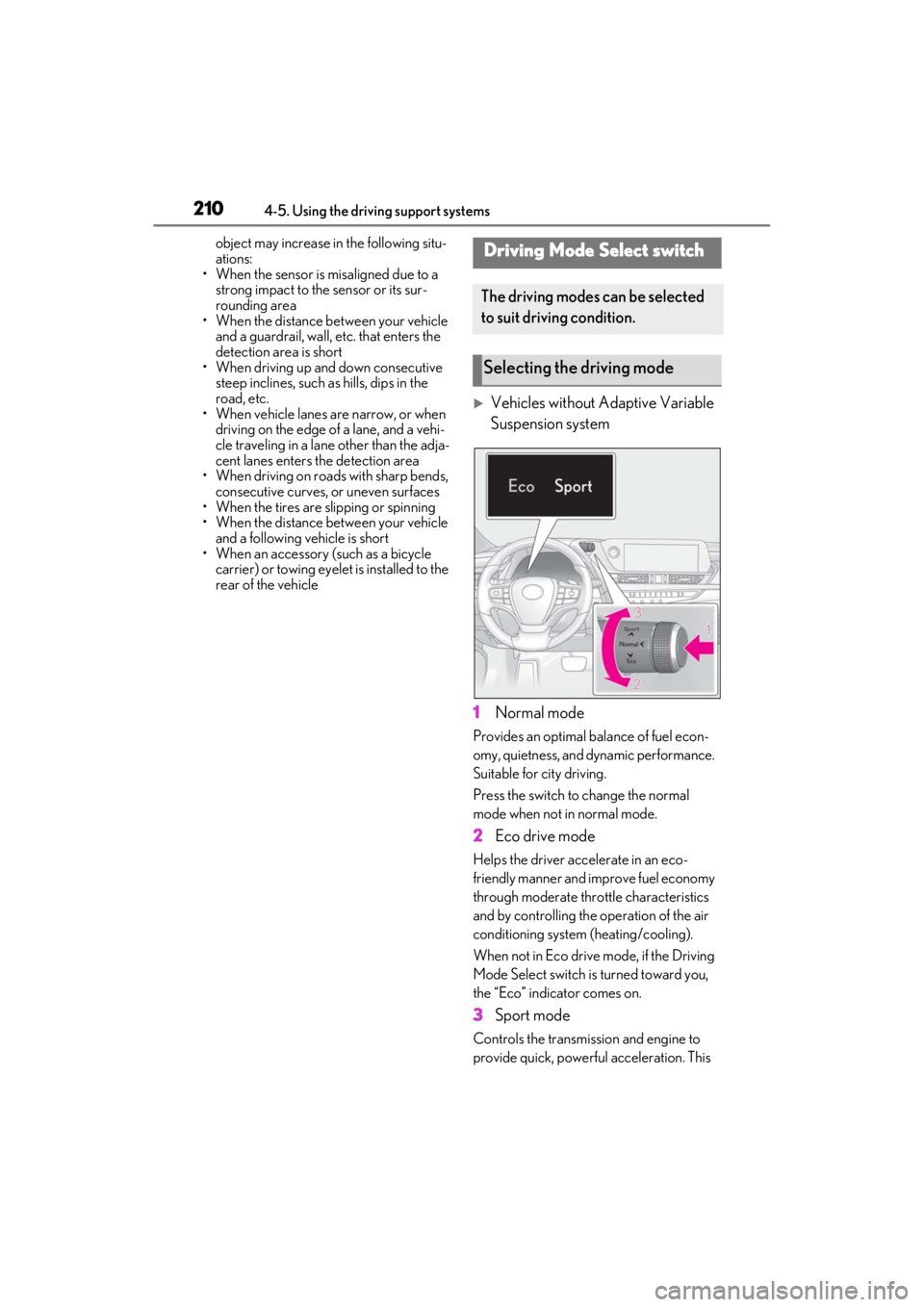
Vehicles without Adaptive Variable
Suspension system
1 Normal mode
Provides an optimal ba lance of fuel econ-
omy, quietness, and dynamic performance.
Suitable for city driving.
Press the switch to change the normal
mode when not in normal mode.
2 Eco drive mode
Helps the driver acce lerate in an eco-
friendly manner and improve fuel economy
through moderate thro ttle characteristics
and by controlling the operation of the air
conditioning system (heating/cooling).
When not in Eco drive mode, if the Driving
Mode Select switch is turned toward you,
the “Eco” indicator comes on.
3 Sport mode
Controls the transmission and engine to
provide quick, powerful acceleration. This
Driving Mode Select switch
The driving modes can be selected
to suit driving condition.
Selecting the driving mode
Page 211 of 464
2114-5. Using the driving support systems
4
Driving
mode is suitable for when agile driving
response is desired, such as when driving
on roads with many curves.
When not in SPORT mode, if the Driving
Mode Select switch is turned away from
you, the “Sport” indicator comes on.
Vehicles with Adaptive Variable
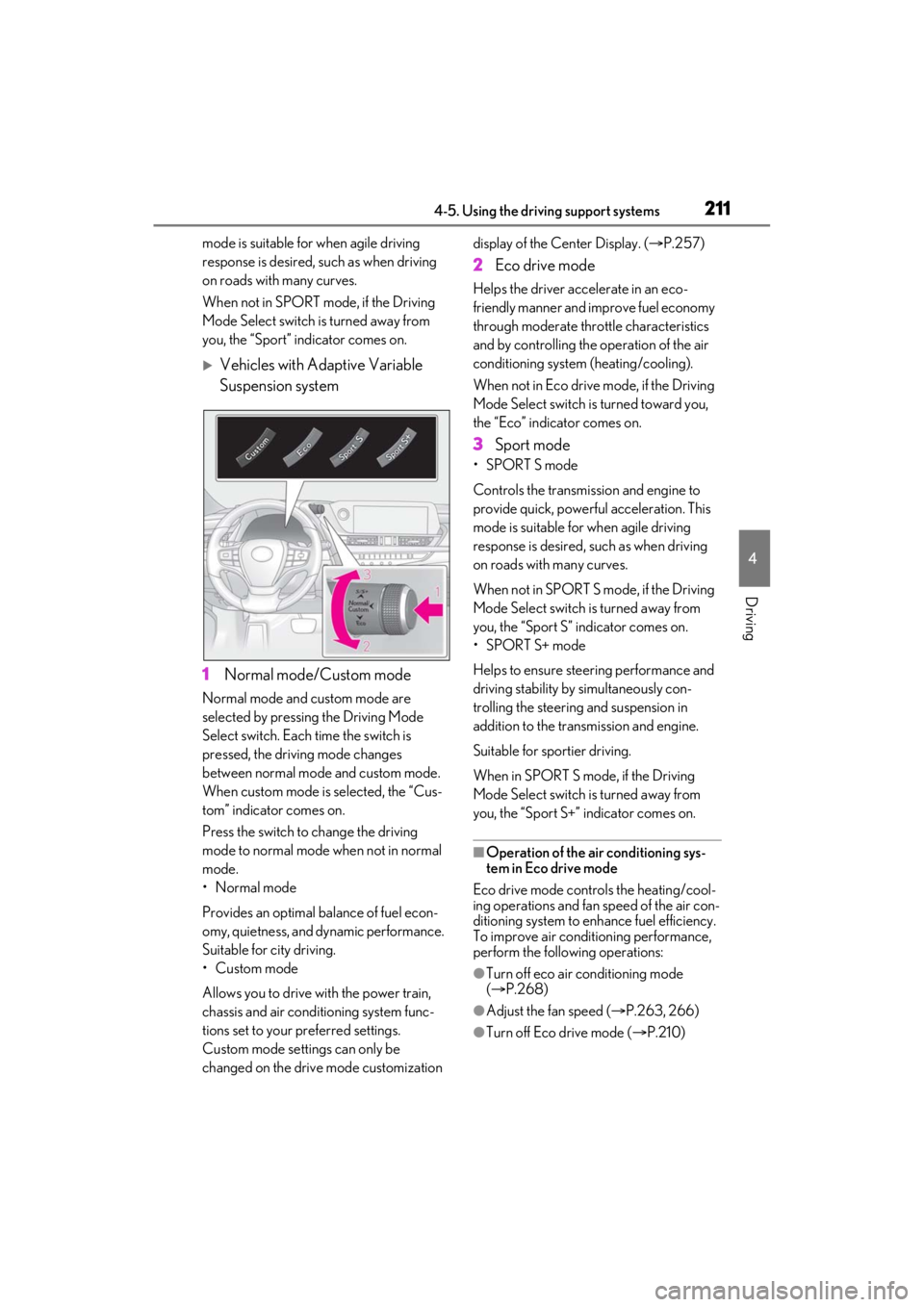
Suspension system
1 Normal mode/Custom mode
Normal mode and custom mode are
selected by pressing the Driving Mode
Select switch. Each time the switch is
pressed, the driving mode changes
between normal mode and custom mode.
When custom mode is selected, the “Cus-
tom” indicator comes on.
Press the switch to change the driving
mode to normal mode when not in normal
mode.
•Normal mode
Provides an optimal ba lance of fuel econ-
omy, quietness, and dynamic performance.
Suitable for city driving.
•Custom mode
Allows you to drive with the power train,
chassis and air conditioning system func-
tions set to your preferred settings.
Custom mode settings can only be
changed on the drive mode customization display of the Center Display. (
P.257)
2 Eco drive mode
Helps the driver acce lerate in an eco-
friendly manner and improve fuel economy
through moderate thro ttle characteristics
and by controlling the operation of the air
conditioning system (heating/cooling).
When not in Eco drive mode, if the Driving
Mode Select switch is turned toward you,
the “Eco” indicator comes on.
3 Sport mode
•SPORT S mode
Controls the transmission and engine to
provide quick, powerful acceleration. This
mode is suitable for when agile driving
response is desired, such as when driving
on roads with many curves.
When not in SPORT S mode, if the Driving
Mode Select switch is turned away from
you, the “Sport S” indicator comes on.
•SPORT S+ mode
Helps to ensure stee ring performance and
driving stability by simultaneously con-
trolling the steering and suspension in
addition to the transmission and engine.
Suitable for sportier driving.
When in SPORT S mode, if the Driving
Mode Select switch is turned away from
you, the “Sport S+” indicator comes on.
■Operation of the air conditioning sys-
tem in Eco drive mode
Eco drive mode controls the heating/cool-
ing operations and fan speed of the air con-
ditioning system to enhance fuel efficiency.
To improve air condit ioning performance,
perform the following operations:
●Turn off eco air conditioning mode
( P.268)
●Adjust the fan speed ( P.263, 266)
●Turn off Eco drive mode ( P.210)
Page 212 of 464
2124-5. Using the driving support systems
■Automatic deactivation of sport mode
and custom mode (if equipped)
If the engine switch is turned off after driv-
ing in sport mode or custom mode, the
drive mode will be changed to normal
mode.
■Driving mode pop-up display (12.3-inch
display model)
When the driving mode is changed, the
selected driving mode will be temporarily
displayed on the side display. ( P.259)
■Customization (vehicles with Adaptive
Variable Suspension system)
Settings (e.g. cust om mode) can be
changed.
(Customizable features: P.419)
*: If equipped
■Intuitive parking assist
Ultrasonic sensors are used to detect
static objects in the detection area
when driving at a low speed or backing
up. ( P.213)
■RCTA (Rear Cross Traffic Alert)
function (if equipped)
Rear side radar sensors are used to
detect approaching vehicles in the
detection areas behind the vehicle
when backing up. ( P.220)
■RCD (Rear Camera Detection)
function (if equipped)
A rear camera sensor is used to detect
pedestrians in the detection area
behind the vehicle when backing up.
( P.224)
PKSA (Parking Support
Alert)*
The Parking Support Alert system
consists of the following functions
that operate when driving at a low
speed or backing up, such as when
parking. When the system deter-
mines that the possibility of a colli-
sion with a detected object, such as
a wall, or pedestrian is high, a warn-
ing operates to urge the driver to
take evasive action.
PKSA (Parking Support Alert)
system
Page 355 of 464
3557-2. Steps to take in an emergency
7
When trouble arises
7-2.Steps to take in an emergency
If your vehicle needs to be
towed
If towing is necessary, we recom-
mend having your vehicle towed by
your Lexus dealer or commercial
towing service, using a wheel-lift
type truck or flatbed truck.
Use a safety chain system for all
towing, and abide by all state/pro-
vincial and local laws.
2WD models: If towing your vehi-
cle with a wheel-lif t type truck from
the front, the vehicle’s rear wheels
and axles must be in good condi-
tions. ( P.355, 357)
If they are damaged, use a towing
dolly or flatbed truck.
AWD models: If towing your vehi-
cle with a wheel-lift type truck, use
a towing dolly. ( P.355, 357)
WARNING
Observe the following precautions.
Failure to do so may result in death or
serious injury.
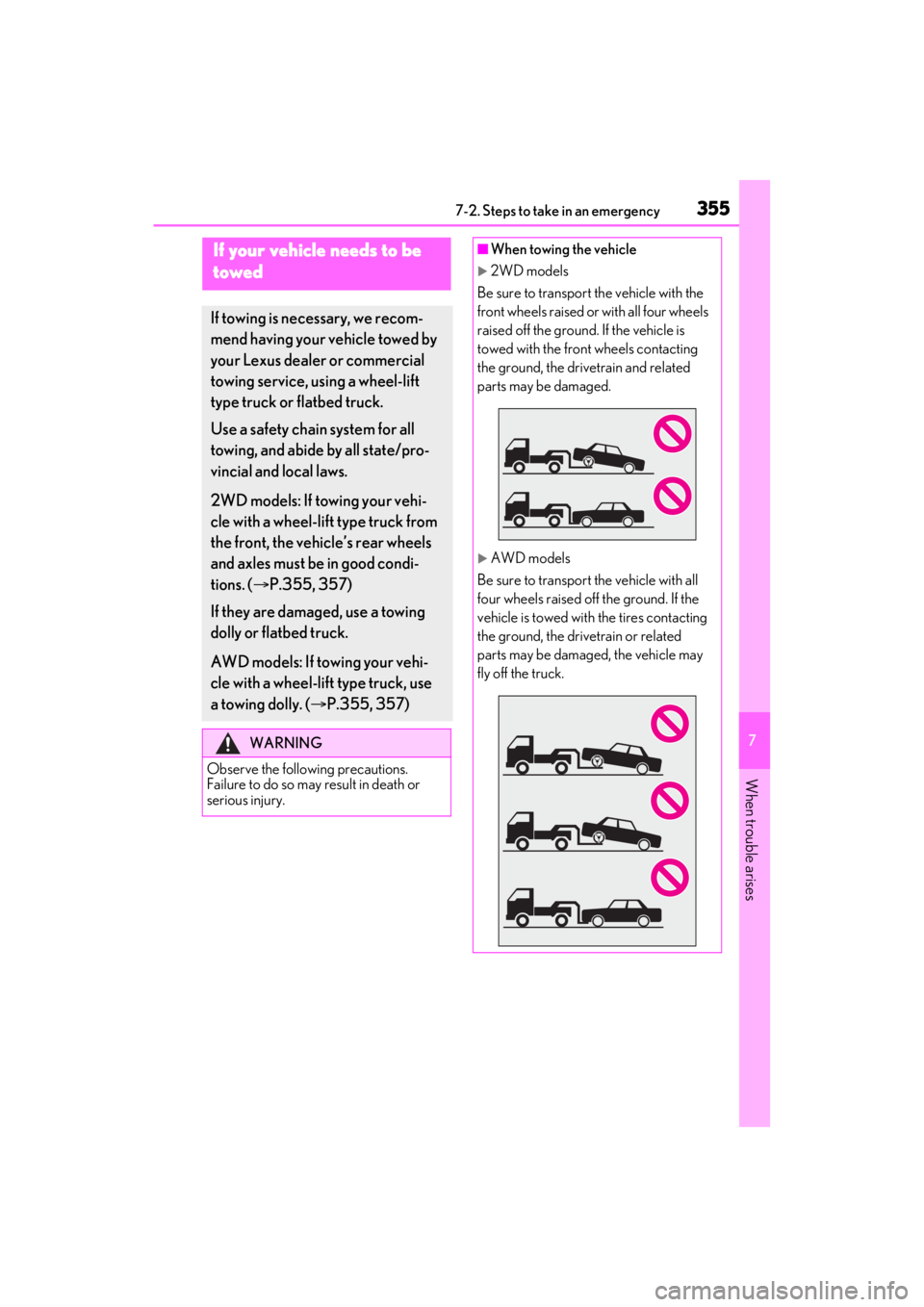
■When towing the vehicle
2WD models
Be sure to transport the vehicle with the
front wheels raised or with all four wheels
raised off the ground. If the vehicle is
towed with the front wheels contacting
the ground, the drivetrain and related
parts may be damaged.
AWD models
Be sure to transport the vehicle with all
four wheels raised off the ground. If the
vehicle is towed with the tires contacting
the ground, the driv etrain or related
parts may be damaged, the vehicle may
fly off the truck.
Page 357 of 464
3577-2. Steps to take in an emergency
7
When trouble arises
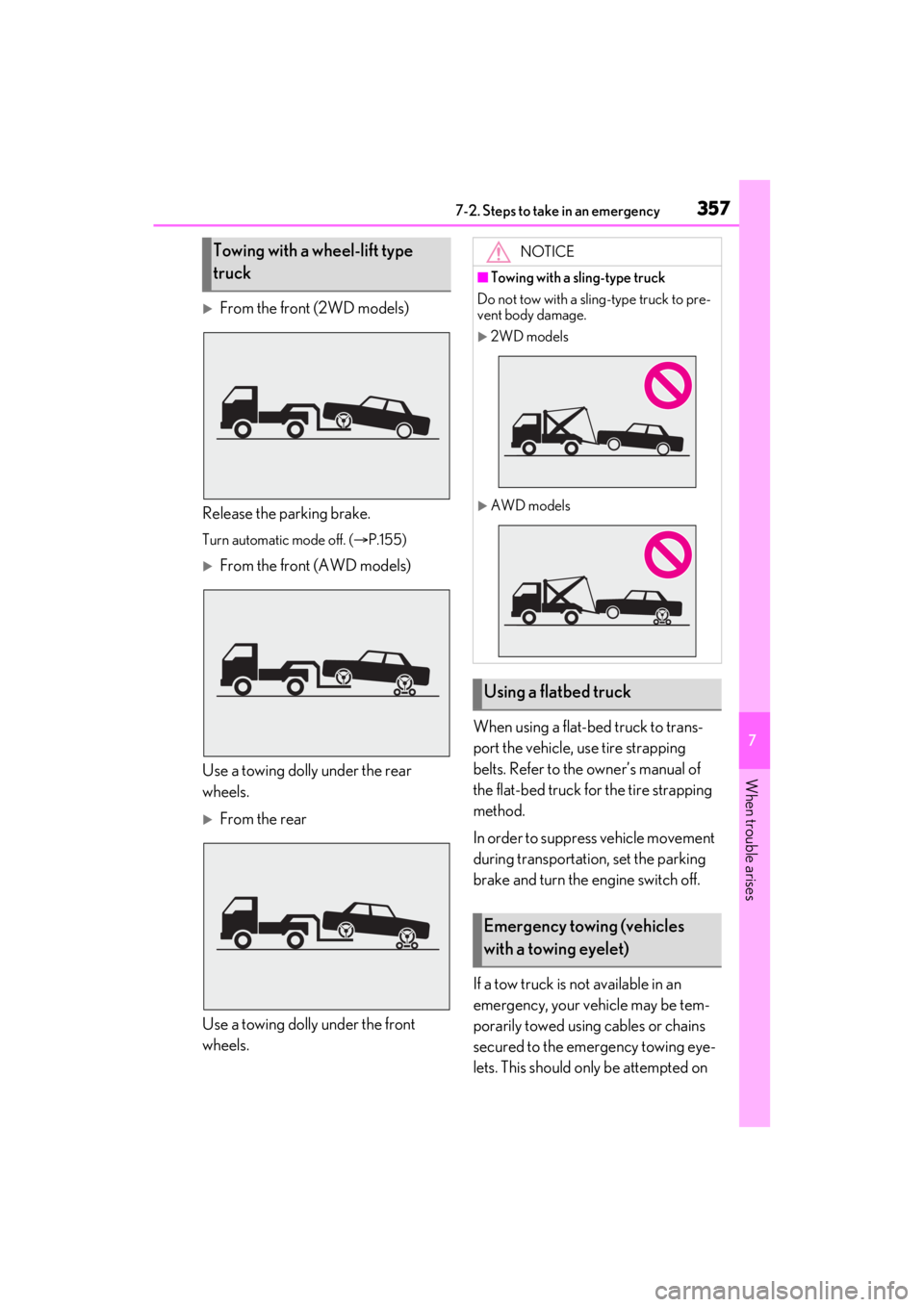
From the front (2WD models)
Release the parking brake.
Turn automatic mode off. ( P.155)
From the front (AWD models)
Use a towing dolly under the rear
wheels.
From the rear
Use a towing dolly under the front
wheels. When using a flat-bed truck to trans-
port the vehicle, use tire strapping
belts. Refer to the owner’s manual of
the flat-bed truck for the tire strapping
method.
In order to suppress vehicle movement
during transportation, set the parking
brake and turn the engine switch off.
If a tow truck is not available in an
emergency, your vehicle may be tem-
porarily towed using cables or chains
secured to the emergency towing eye-
lets. This should only be attempted on
Towing with a wheel-lift type
truckNOTICE
■Towing with a sling-type truck
Do not tow with a sling-type truck to pre-
vent body damage.
2WD models
AWD models
Using a flatbed truck
Emergency towing (vehicles
with a towing eyelet)
Page 371 of 464
3717-2. Steps to take in an emergency
7
When trouble arises
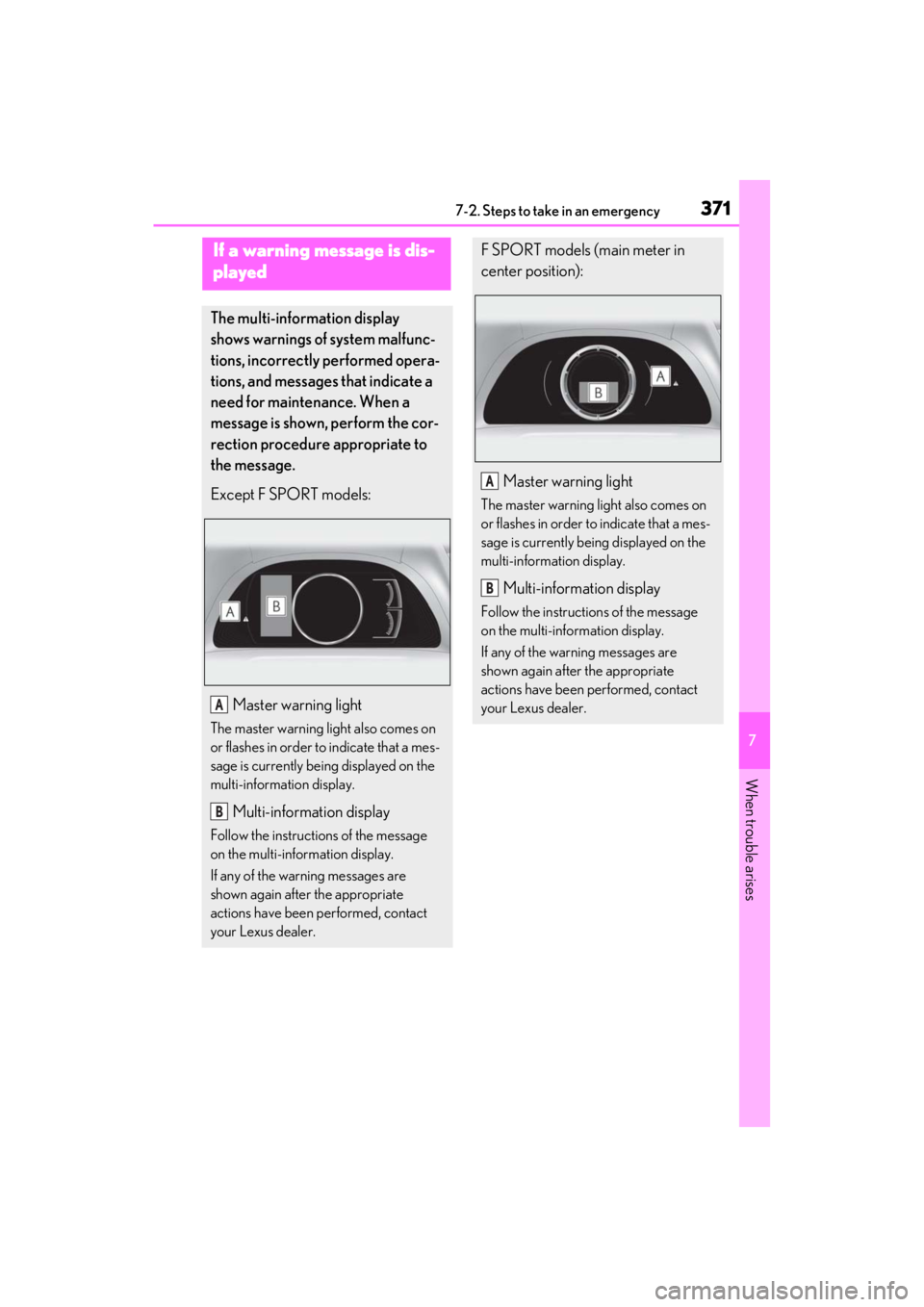
If a warning message is dis-
played
The multi-information display
shows warnings of system malfunc-
tions, incorrectly performed opera-
tions, and messages that indicate a
need for maintenance. When a
message is shown, perform the cor-
rection procedure appropriate to
the message.
Except F SPORT models:Master warning light
The master warning light also comes on
or flashes in order to indicate that a mes-
sage is currently being displayed on the
multi-information display.
Multi-information display
Follow the instructions of the message
on the multi-information display.
If any of the warning messages are
shown again after the appropriate
actions have been performed, contact
your Lexus dealer.
A
B
F SPORT models (main meter in
center position):Master warning light
The master warning light also comes on
or flashes in order to indicate that a mes-
sage is currently be ing displayed on the
multi-information display.
Multi-information display
Follow the instructions of the message
on the multi-information display.
If any of the warning messages are
shown again after the appropriate
actions have been performed, contact
your Lexus dealer.
A
B