fuel LEXUS ES350 2022 User Guide
[x] Cancel search | Manufacturer: LEXUS, Model Year: 2022, Model line: ES350, Model: LEXUS ES350 2022Pages: 468, PDF Size: 26.96 MB
Page 67 of 468
652-1. Instrument cluster
2
Vehicle status information and indicators
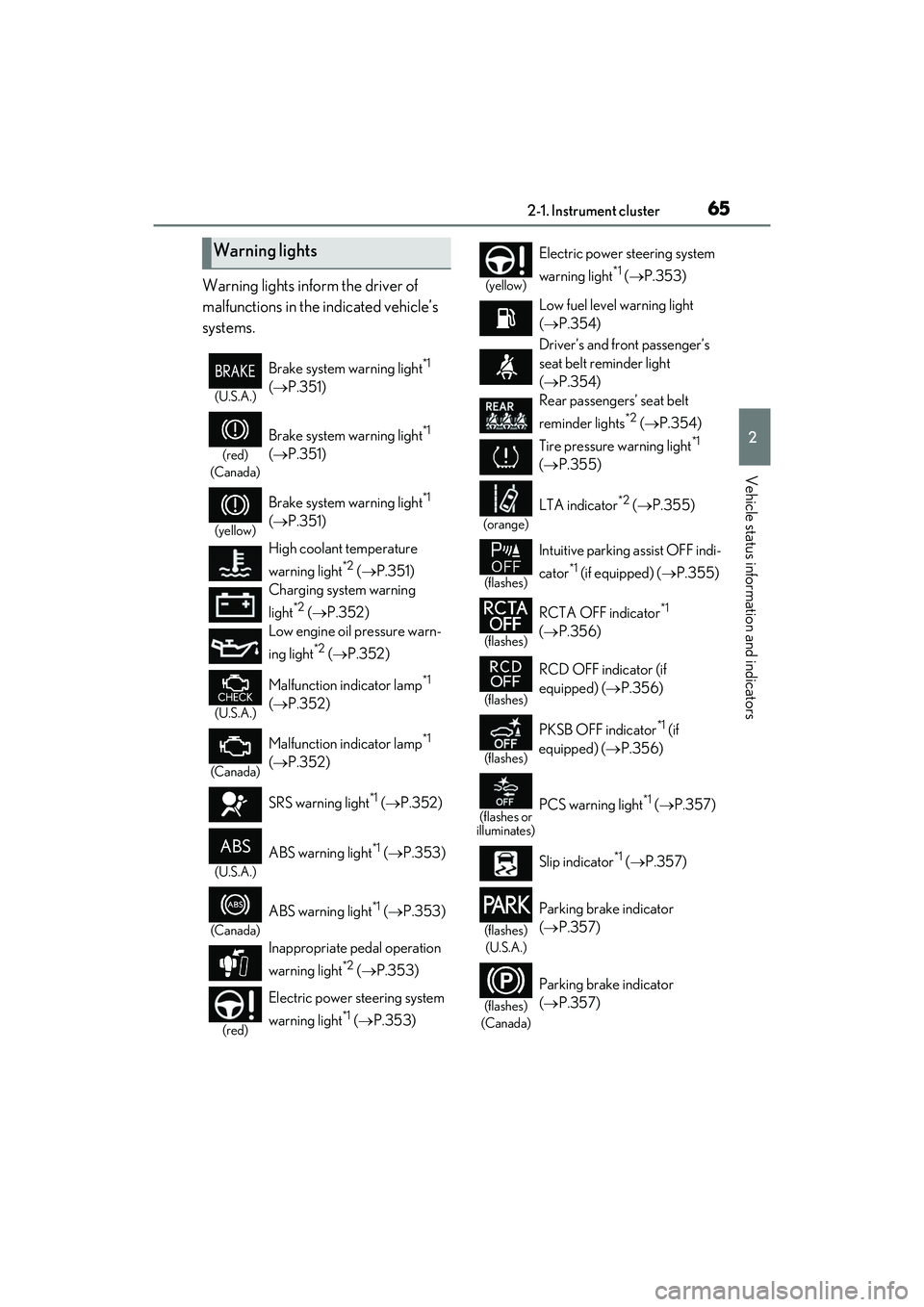
Warning lights inform the driver of
malfunctions in the indicated vehicle’s
systems.
Warning lights
(U.S.A.)
Brake system warning light*1
( P.351)
(red)
(Canada)
Brake system warning light*1
( P.351)
(yellow)
Brake system warning light*1
( P.351)
High coolant temperature
warning light
*2 ( P.351)
Charging system warning
light
*2 ( P.352)
Low engine oil pressure warn-
ing light
*2 ( P.352)
(U.S.A.)
Malfunction indicator lamp*1
( P.352)
(Canada)
Malfunction indicator lamp*1
( P.352)
SRS warning light
*1 ( P.352)
(U.S.A.)
ABS warning light*1 ( P.353)
(Canada)
ABS warning light*1 ( P.353)
Inappropriate pedal operation
warning light
*2 ( P.353)
(red)
Electric power steering system
warning light
*1 ( P.353)
(yellow)
Electric power steering system
warning light
*1 ( P.353)
Low fuel level warning light
( P.354)
Driver’s and front passenger’s
seat belt reminder light
( P.354)
Rear passengers’ seat belt
reminder lights
*2 ( P.354)
Tire pressure warning light
*1
( P.355)
(orange)
LTA indicator*2 ( P.355)
(flashes)
Intuitive parking assist OFF indi-
cator
*1 (if equipped) ( P.355)
(flashes)
RCTA OFF indicator*1
( P.356)
(flashes)
RCD OFF indicator (if
equipped) ( P.356)
(flashes)
PKSB OFF indicator*1 (if
equipped) ( P.356)
(flashes or
illuminates)PCS warning light*1 ( P.357)
Slip indicator
*1 ( P.357)
(flashes)
(U.S.A.)
Parking brake indicator
( P.357)
(flashes)
(Canada)
Parking brake indicator
( P.357)
Page 70 of 468
682-1. Instrument cluster
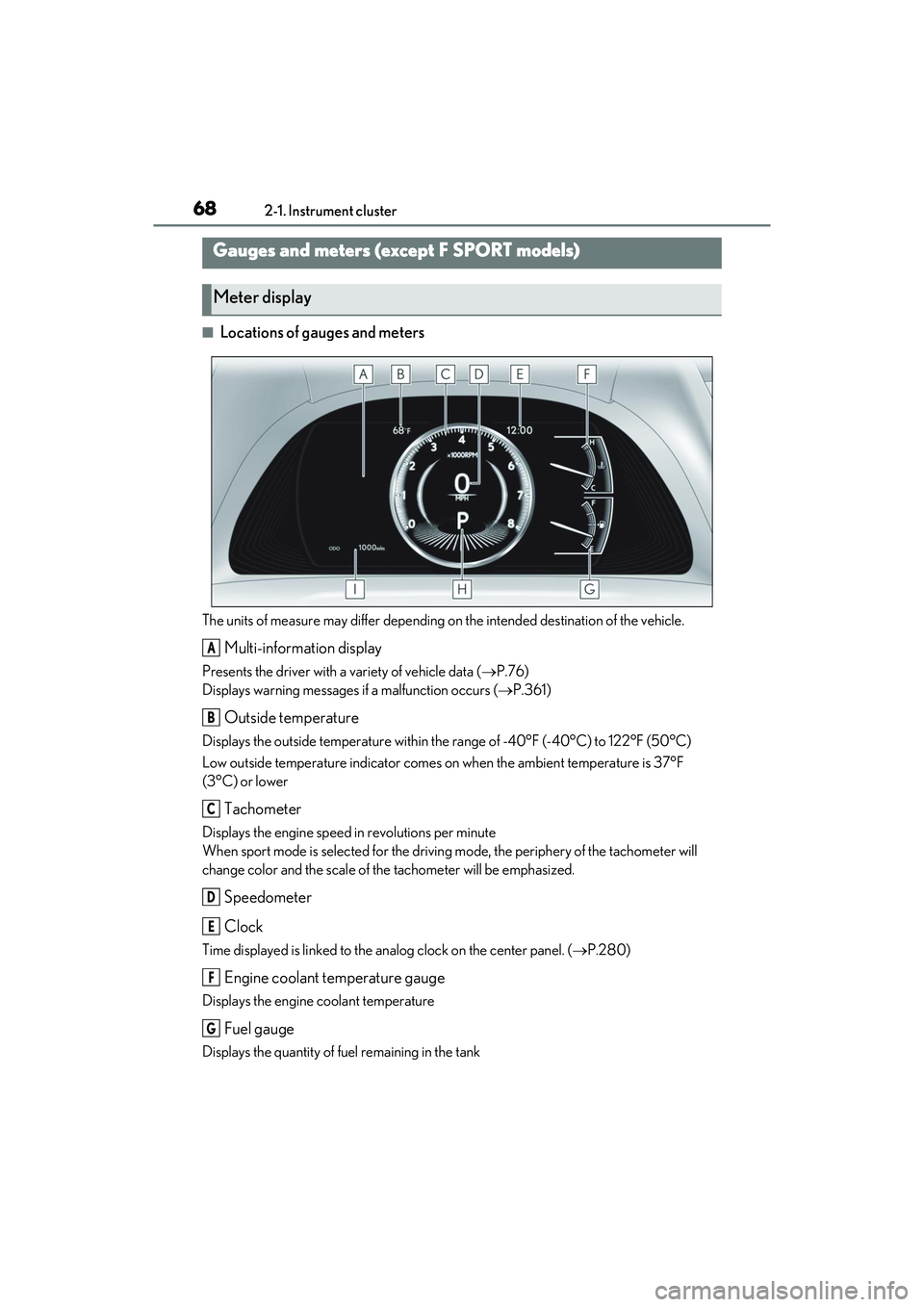
■Locations of gauges and meters
The units of measure may differ depending on the intended destination of the vehicle.
Multi-information display
Presents the driver with a variety of vehicle data (P.76)
Displays warning messages if a malfunction occurs (P.361)
Outside temperature
Displays the outside temperature within the range of -40°F (-40°C) to 122°F (50°C)
Low outside temperature indicator comes on when the ambient temperature is 37°F
(3°C) or lower
Tachometer
Displays the engine speed in revolutions per minute
When sport mode is selected for the drivin g mode, the periphery of the tachometer will
change color and the scale of the tachometer will be emphasized.
Speedometer
Clock
Time displayed is linked to the analog clock on the center panel. ( P.280)
Engine coolant temperature gauge
Displays the engine coolant temperature
Fuel gauge
Displays the quantity of fuel remaining in the tank
Gauges and meters (e xcept F SPORT models)
Meter display
A
B
C
D
E
F
G
Page 71 of 468
692-1. Instrument cluster
2
Vehicle status information and indicators
In the following situations, the actual quantity of fuel remaining in the tank may not be dis-
played correctly. Refer to P.69 if the actual quantity of fuel remaining in the tank is not dis-
played correctly.
• A small amount of fuel is added.
• Fuel is added with the fuel gauge near or at “F”.
• The vehicle is stopped on an uneven surface, such as a slope.
• The vehicle is driven on a slope or around a curve.
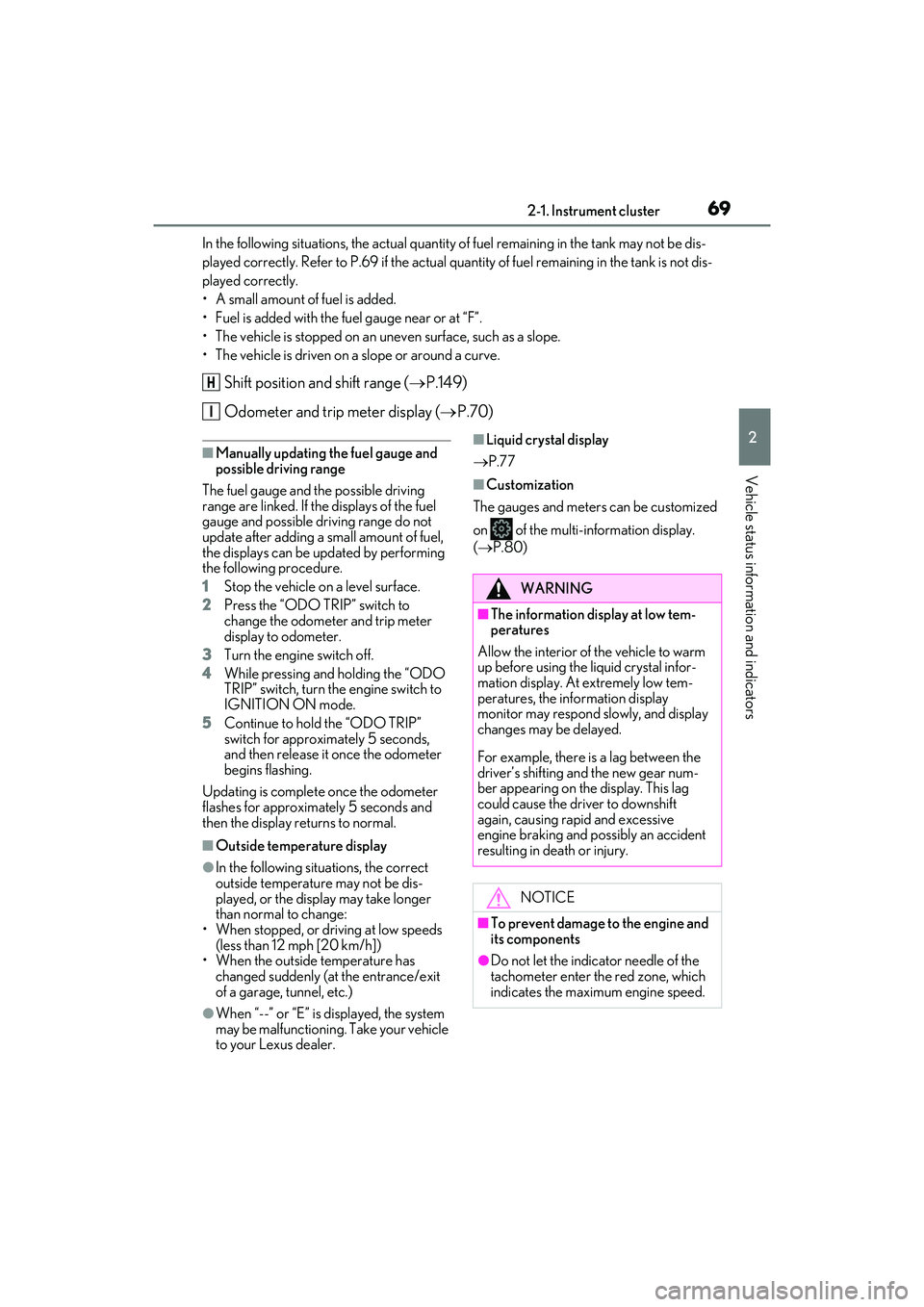
Shift position and shift range (P.149)
Odometer and trip meter display ( P.70)
■Manually updating the fuel gauge and
possible driving range
The fuel gauge and the possible driving
range are linked. If the displays of the fuel
gauge and possible driving range do not
update after adding a small amount of fuel,
the displays can be updated by performing
the following procedure.
1 Stop the vehicle on a level surface.
2 Press the “ODO TRIP” switch to
change the odometer and trip meter
display to odometer.
3 Turn the engine switch off.
4 While pressing and holding the “ODO
TRIP” switch, turn the engine switch to
IGNITION ON mode.
5 Continue to hold the “ODO TRIP”
switch for approximately 5 seconds,
and then release it once the odometer
begins flashing.
Updating is complete once the odometer
flashes for approximately 5 seconds and
then the display returns to normal.
■Outside temperature display
●In the following situations, the correct
outside temperature may not be dis-
played, or the display may take longer
than normal to change:
• When stopped, or driving at low speeds (less than 12 mph [20 km/h])
• When the outside temperature has
changed suddenly (at the entrance/exit
of a garage, tunnel, etc.)
●When “--” or “E” is displayed, the system
may be malfunctioning. Take your vehicle
to your Lexus dealer.
■Liquid crystal display
P.77
■Customization
The gauges and meters can be customized
on of the multi-information display.
( P.80)
H
I
WARNING
■The information display at low tem-
peratures
Allow the interior of the vehicle to warm
up before using the liquid crystal infor-
mation display. At extremely low tem-
peratures, the information display
monitor may respond slowly, and display
changes may be delayed.
For example, there is a lag between the
driver’s shifting and the new gear num-
ber appearing on the display. This lag
could cause the driver to downshift
again, causing rapid and excessive
engine braking and possibly an accident
resulting in death or injury.
NOTICE
■To prevent damage to the engine and
its components
●Do not let the indicator needle of the
tachometer enter the red zone, which
indicates the maximum engine speed.
Page 74 of 468
722-1. Instrument cluster
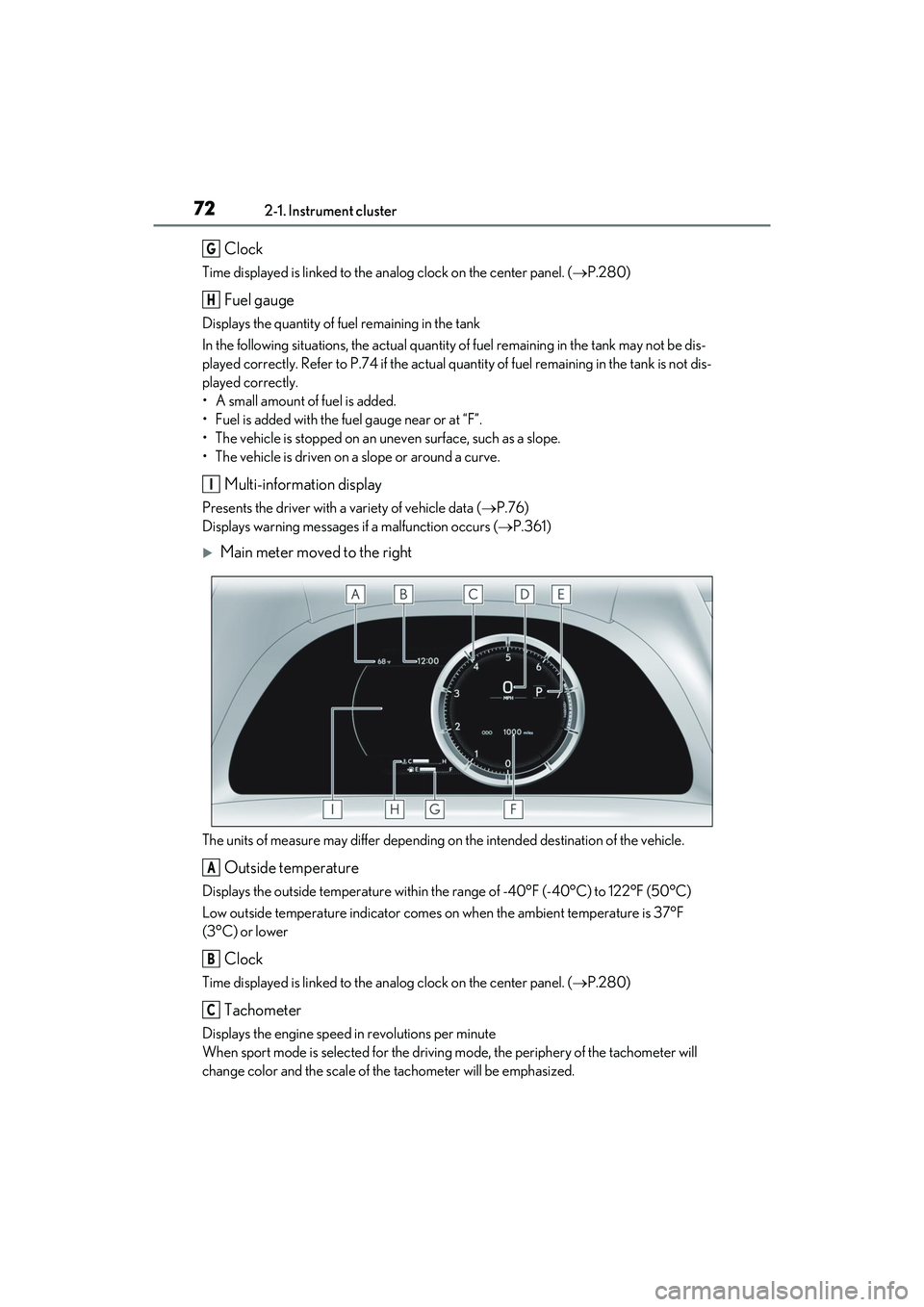
Clock
Time displayed is linked to the analog clock on the center panel. (P.280)
Fuel gauge
Displays the quantity of fuel remaining in the tank
In the following situations, the actual quantity of fuel remaining in the tank may not be dis-
played correctly. Refer to P.74 if the actual quantity of fuel remaining in the tank is not dis-
played correctly.
• A small amount of fuel is added.
• Fuel is added with the fuel gauge near or at “F”.
• The vehicle is stopped on an uneven surface, such as a slope.
• The vehicle is driven on a slope or around a curve.
Multi-information display
Presents the driver with a variety of vehicle data ( P.76)
Displays warning messages if a malfunction occurs (P.361)
Main meter moved to the right
The units of measure may differ depending on the intended destination of the vehicle.
Outside temperature
Displays the outside temperature within the range of -40°F (-40°C) to 122°F (50°C)
Low outside temperature indicator comes on when the ambient temperature is 37°F
(3°C) or lower
Clock
Time displayed is linked to the analog clock on the center panel. ( P.280)
Tachometer
Displays the engine speed in revolutions per minute
When sport mode is selected for the drivin g mode, the periphery of the tachometer will
change color and the scale of the tachometer will be emphasized.
G
H
I
A
B
C
Page 75 of 468
732-1. Instrument cluster
2
Vehicle status information and indicators
• Rev indicator (P.73)
•Rev peak ( P.73)
Speedometer
Shift position and shift range ( P.149)
Odometer and trip meter display ( P.74)
Fuel gauge
Displays the quantity of fuel remaining in the tank
In the following situations, the actual quantity of fuel remaining in the tank may not be dis-
played correctly. Refer to P.74 if the actual quantity of fuel remaining in the tank is not dis-
played correctly.
• A small amount of fuel is added.
• Fuel is added with the fuel gauge near or at “F”.
• The vehicle is stopped on an uneven surface, such as a slope.
• The vehicle is driven on a slope or around a curve.
Engine coolant temperature gauge
Displays the engine coolant temperature
Multi-information display
Presents the driver with a variety of vehicle data ( P.76)
Displays warning messages if a malfunction occurs (P.361)
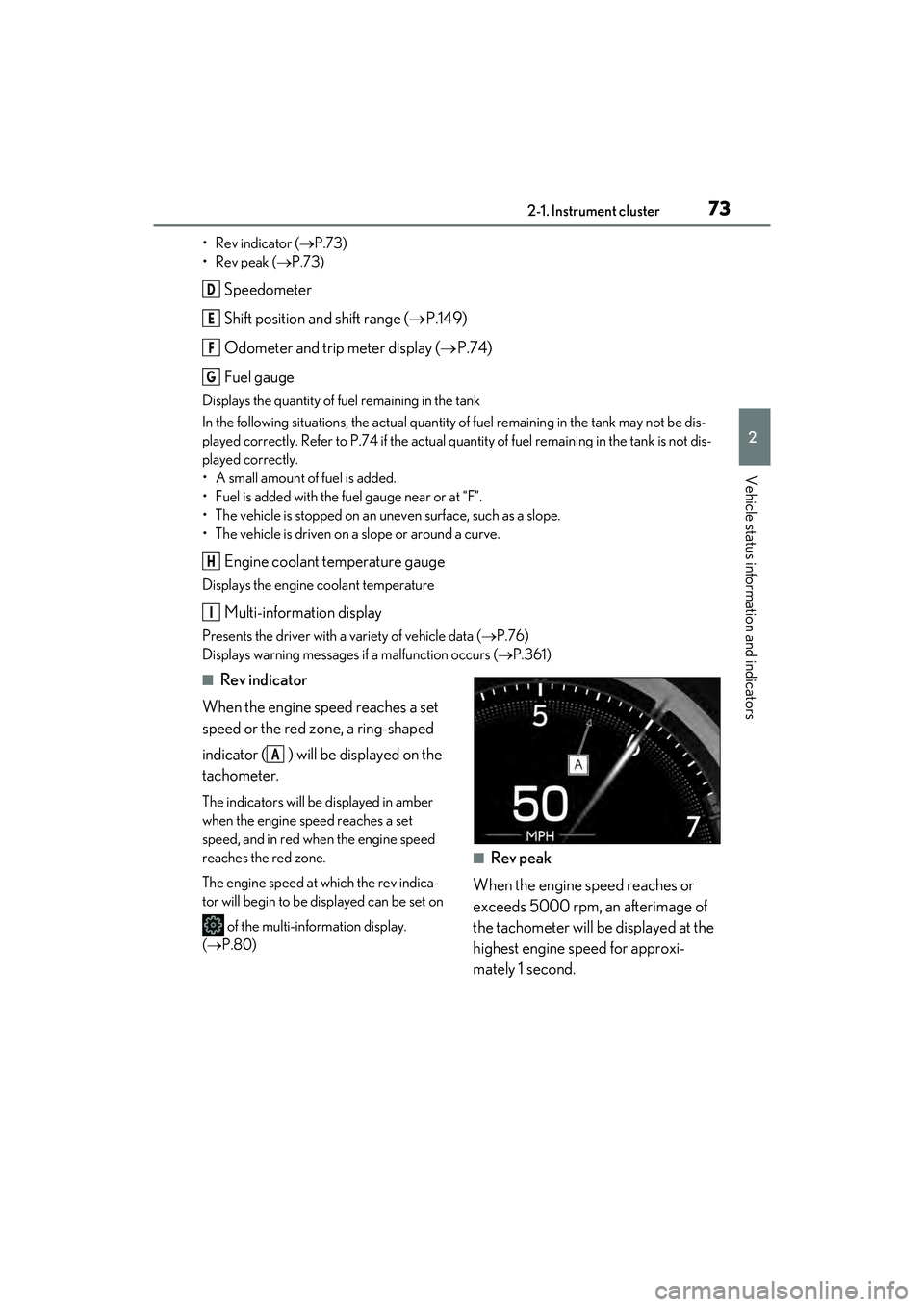
■Rev indicator
When the engine speed reaches a set
speed or the red zone, a ring-shaped
indicator ( ) will be displayed on the
tachometer.
The indicators will be displayed in amber
when the engine speed reaches a set
speed, and in red when the engine speed
reaches the red zone.
The engine speed at which the rev indica-
tor will begin to be displayed can be set on
of the multi-information display.
( P.80)
■Rev peak
When the engine speed reaches or
exceeds 5000 rpm, an afterimage of
the tachometer will be displayed at the
highest engine speed for approxi-
mately 1 second.
D
E
F
G
H
I
A
Page 76 of 468
742-1. Instrument cluster
■Manually updating the fuel gauge and
possible driving range
The fuel gauge and the possible driving
range are linked. If the displays of the fuel
gauge and possible driving range do not
update after adding a small amount of fuel,
the displays can be updated by performing
the following procedure.
1 Stop the vehicle on a level surface.
2 Press the “ODO TRIP” switch to
change the odometer and trip meter
display to odometer.
3 Turn the engine switch off.
4 While pressing and holding the “ODO
TRIP” switch, turn the engine switch to
IGNITION ON mode.
5 Continue to hold the “ODO TRIP”
switch for approximately 5 seconds,
and then release it once the odometer
begins flashing.
Updating is complete once the odometer
flashes for approximately 5 seconds and
then the display returns to normal.
■Outside temperature display
●In the following situations, the correct
outside temperature may not be dis-
played, or the display may take longer
than normal to change:
• When stopped, or driving at low speeds (less than 12 mph [20 km/h])
• When the outside temperature has changed suddenly (at the entrance/exit
of a garage, tunnel, etc.)
●When “--” or “E” is displayed, the system
may be malfunctioning. Take your vehicle
to your Lexus dealer.
■Liquid crystal display
P.77
■Customization
The gauges and meters can be customized
on of the multi-information display.
( P.80)
■Display items
Odometer
Displays the total distance the vehicle has
been driven.
Trip meter A/trip meter B
WARNING
■The information display at low tem-
peratures
Allow the interior of the vehicle to warm
up before using the liquid crystal infor-
mation display. At extremely low tem-
peratures, the information display
monitor may respond slowly, and display
changes may be delayed.
For example, there is a lag between the
driver’s shifting and the new gear num-
ber appearing on the display. This lag
could cause the driver to downshift
again, causing rapid and excessive
engine braking and possibly an accident
resulting in death or injury.
NOTICE
■To prevent damage to the engine and
its components
●Do not let the indicator needle of the
tachometer enter the red zone, which
indicates the maximum engine speed.
●The engine may be overheating if the
engine coolant temperature gauge is
in the red zone (H). In this case, imme-
diately stop the vehicle in a safe place,
and check the engine after it has
cooled completely. ( P.382)
Odometer and trip meter dis-
play
Page 80 of 468
782-1. Instrument cluster
switches to display the following items:
Drive information 1
Drive information 2
Gear position
Tire pressure ( P.322)
Units
Display off
Main meter moved to the right
Press or of the meter control
switches and select . Then press or to display the following
items:
Drive information 1
Drive information 2
Eco Driving Indicator
G-force
Gear Position
Tire pressure ( P.322)
Display off
■Drive information 1/Drive informa-
tion 2
Displays drive information such as the
following:
Use the displayed values as a reference
only.
Drive information 1
• Current fuel consumption
• Average fuel economy (after reset)
Drive information 2
• Distance (driving range)
• Average vehicle speed (after reset)
Displayed items (listed below) can be changed on . (
P.80)
Current fuel consumption
Bar type: Displays instantaneous current
fuel consumption
Average fuel economy
After reset: Displays average fuel con-
sumption since the display was reset
*1
After start: Displays average fuel con-
sumption since engine start
After refuel: Displays average fuel con-
sumption since refuel
Average vehicle speed
After reset: Displays average vehicle
speed since the display was reset
*1
After start: Displays average vehicle speed
since engine start
Elapsed time
After reset: Displays elapsed time since the
display was reset
*1
After start: Displays elapsed time since
engine start
Distance
Driving range: Displays driving range with
remaining fuel
*2, 3
After start: Displays the distance driven
since engine start
Other
Blank: No item
*1: To reset, display the desired item and
press and hold “OK” of the meter con-
trol switches.
*2: This distance is computed based on your average fuel consumption. As a
result, the actual distance that can be
driven may differ from that displayed.
*3: When only a small amount of fuel is
Page 81 of 468
792-1. Instrument cluster
2
Vehicle status information and indicators
added to the tank, the display may not
be updated.
When refueling, turn the engine switch
off. If the vehicle is refueled without
turning the engine switch off, the display
may not be updated.
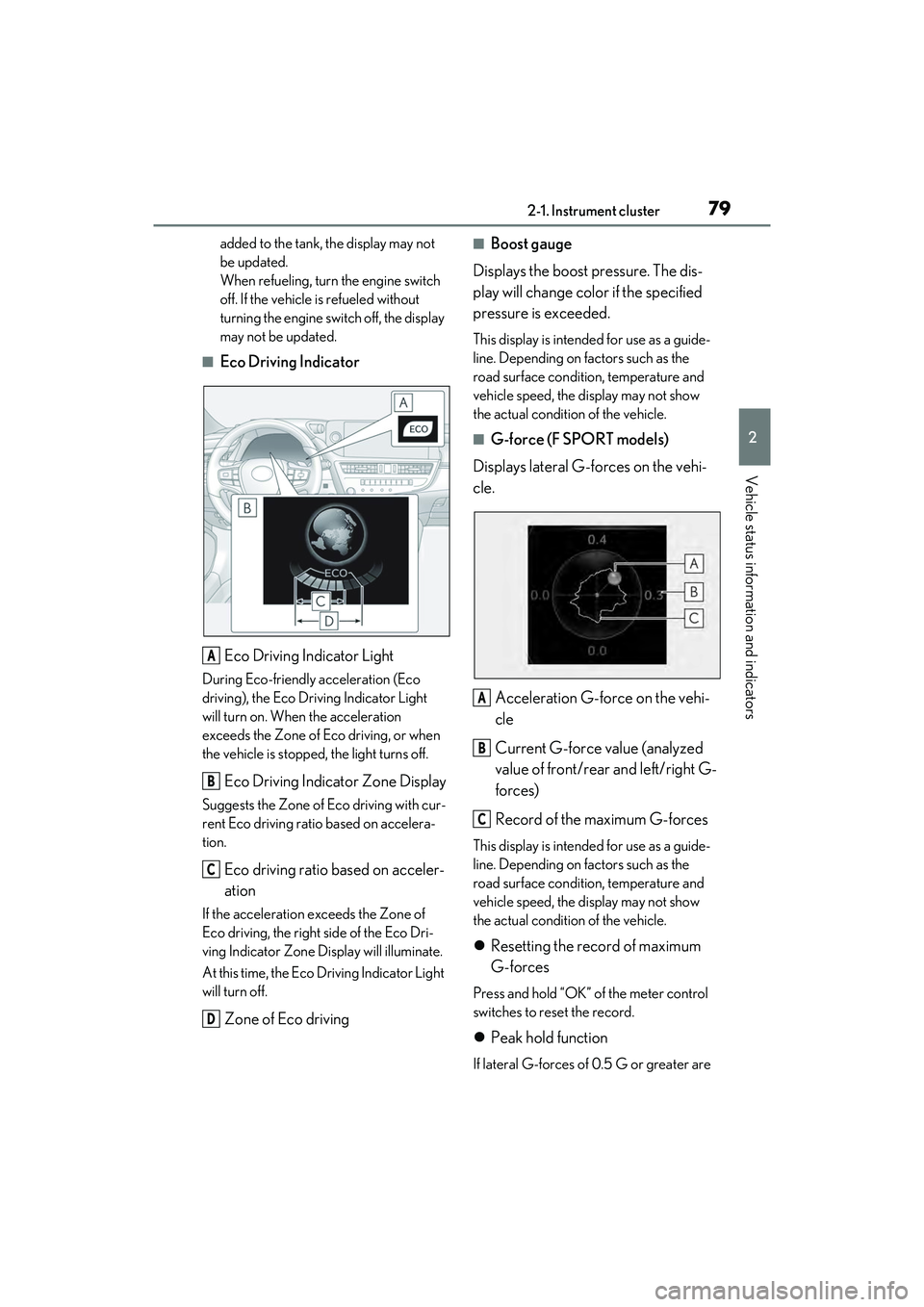
■Eco Driving IndicatorEco Driving Indicator Light
During Eco-friendly acceleration (Eco
driving), the Eco Driving Indicator Light
will turn on. When the acceleration
exceeds the Zone of Eco driving, or when
the vehicle is stopped, the light turns off.
Eco Driving Indicator Zone Display
Suggests the Zone of Eco driving with cur-
rent Eco driving ratio based on accelera-
tion.
Eco driving ratio based on acceler-
ation
If the acceleration exceeds the Zone of
Eco driving, the right side of the Eco Dri-
ving Indicator Zone Display will illuminate.
At this time, the Eco Driving Indicator Light
will turn off.
Zone of Eco driving
■Boost gauge
Displays the boost pressure. The dis-
play will change color if the specified
pressure is exceeded.
This display is intended for use as a guide-
line. Depending on factors such as the
road surface condition, temperature and
vehicle speed, the display may not show
the actual condition of the vehicle.
■G-force (F SPORT models)
Displays lateral G-forces on the vehi-
cle.
Acceleration G-force on the vehi-
cle
Current G-force value (analyzed
value of front/rear and left/right G-
forces)
Record of the maximum G-forces
This display is intended for use as a guide-
line. Depending on factors such as the
road surface condition, temperature and
vehicle speed, the display may not show
the actual condition of the vehicle.
Resetting the record of maximum
G-forces
Press and hold “OK” of the meter control
switches to reset the record.
Peak hold function
If lateral G-forces of 0.5 G or greater are
A
B
C
D
A
B
C
Page 89 of 468
872-1. Instrument cluster
2
Vehicle status information and indicators
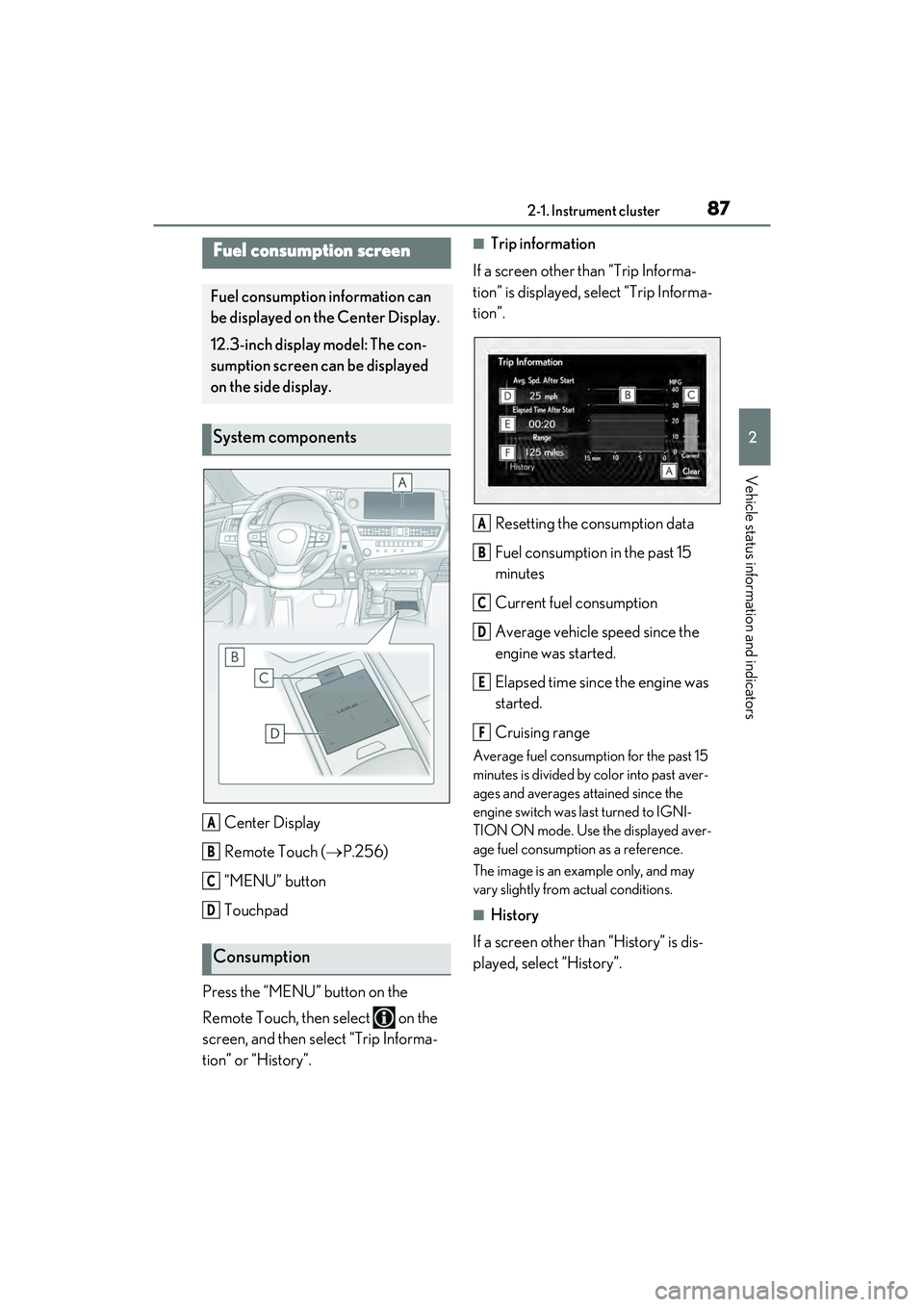
Center Display
Remote Touch (P.256)
“MENU” button
Touchpad
Press the “MENU” button on the
Remote Touch, then select on the
screen, and then select “Trip Informa-
tion” or “History”.
■Trip information
If a screen other than “Trip Informa-
tion” is displayed, select “Trip Informa-
tion”.
Resetting the consumption data
Fuel consumption in the past 15
minutes
Current fuel consumption
Average vehicle speed since the
engine was started.
Elapsed time since the engine was
started.
Cruising range
Average fuel consumption for the past 15
minutes is divided by color into past aver-
ages and averages attained since the
engine switch was last turned to IGNI-
TION ON mode. Use the displayed aver-
age fuel consumption as a reference.
The image is an example only, and may
vary slightly from actual conditions.
■History
If a screen other than “History” is dis-
played, select “History”.
Fuel consumption screen
Fuel consumption information can
be displayed on the Center Display.
12.3-inch display model: The con-
sumption screen can be displayed
on the side display.
System components
Consumption
A
B
C
D
A
B
C
D
E
F
Page 90 of 468
882-1. Instrument cluster
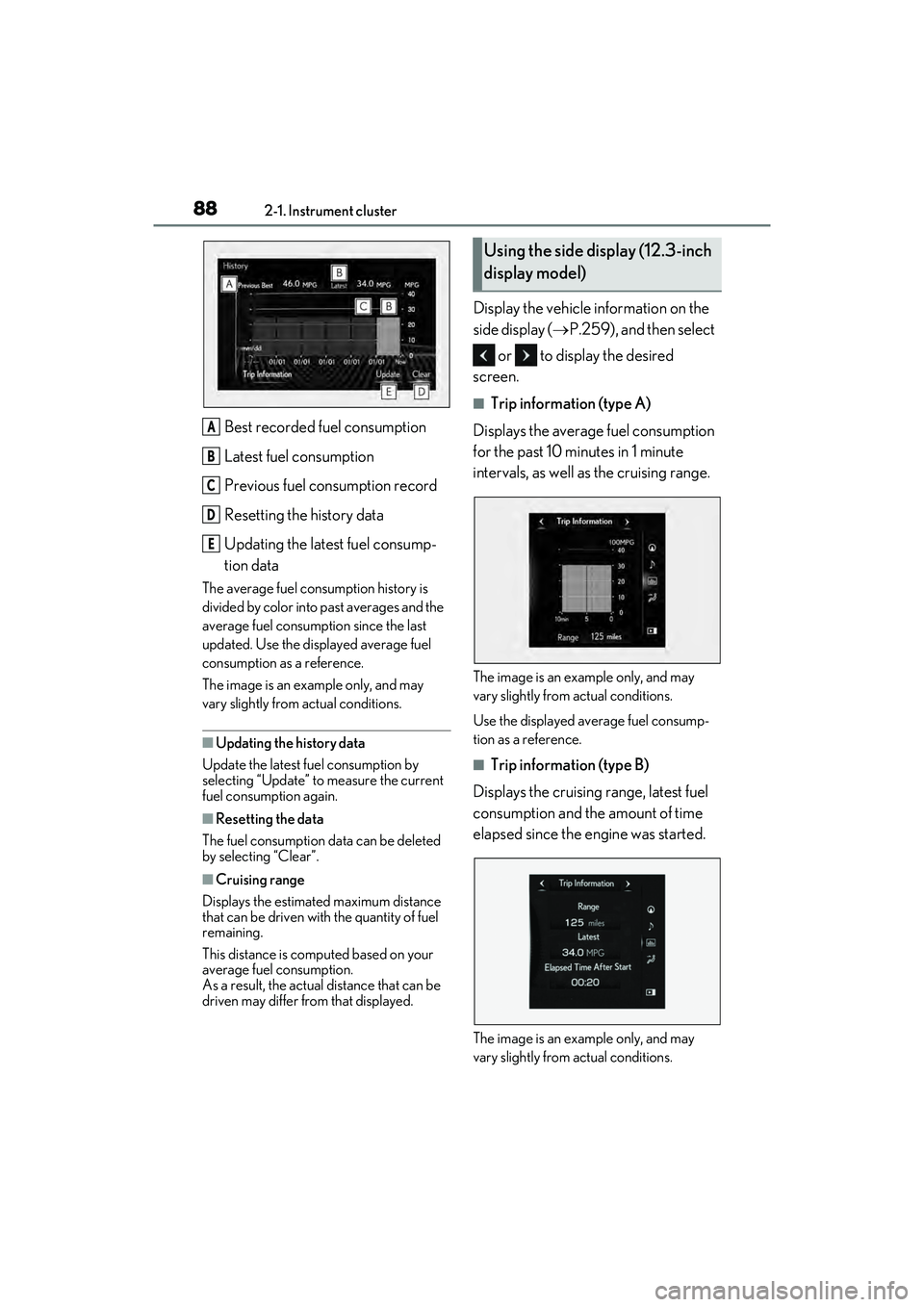
Best recorded fuel consumption
Latest fuel consumption
Previous fuel consumption record
Resetting the history data
Updating the latest fuel consump-
tion data
The average fuel consumption history is
divided by color into past averages and the
average fuel consumption since the last
updated. Use the displayed average fuel
consumption as a reference.
The image is an example only, and may
vary slightly from actual conditions.
■Updating the history data
Update the latest fuel consumption by
selecting “Update” to measure the current
fuel consumption again.
■Resetting the data
The fuel consumption data can be deleted
by selecting “Clear”.
■Cruising range
Displays the estimated maximum distance
that can be driven with the quantity of fuel
remaining.
This distance is computed based on your
average fuel consumption.
As a result, the actual distance that can be
driven may differ from that displayed.
Display the vehicle information on the
side display ( P.259), and then select
or to display the desired
screen.
■Trip information (type A)
Displays the average fuel consumption
for the past 10 minutes in 1 minute
intervals, as well as the cruising range.
The image is an example only, and may
vary slightly from actual conditions.
Use the displayed average fuel consump-
tion as a reference.
■Trip information (type B)
Displays the cruising range, latest fuel
consumption and the amount of time
elapsed since the engine was started.
The image is an example only, and may
vary slightly from actual conditions.
A
B
C
D
E
Using the side display (12.3-inch
display model)