air conditioning LEXUS ES350 2022 Owner's Manual
[x] Cancel search | Manufacturer: LEXUS, Model Year: 2022, Model line: ES350, Model: LEXUS ES350 2022Pages: 468, PDF Size: 26.96 MB
Page 273 of 468
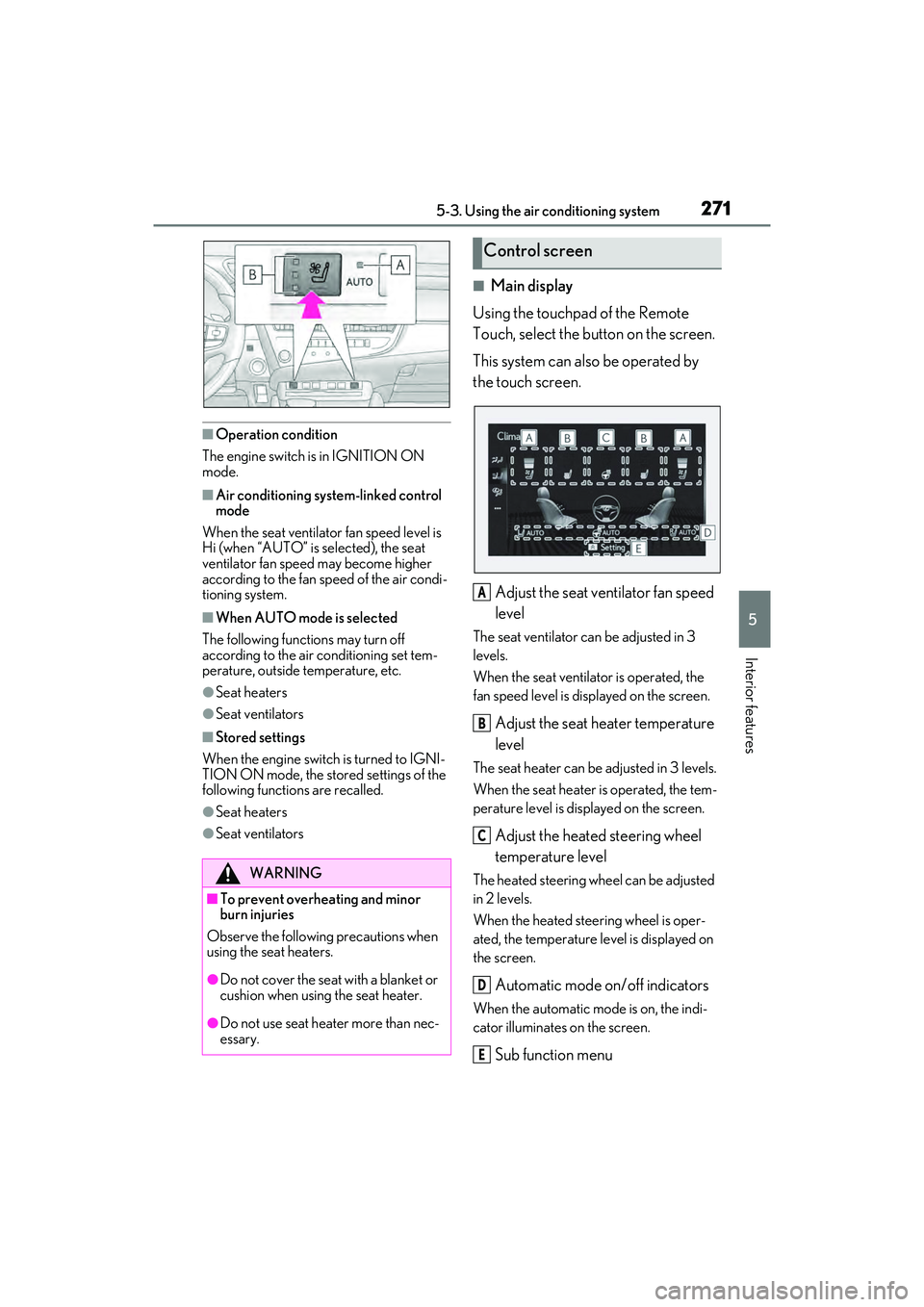
2715-3. Using the air conditioning system
5
Interior features
■Operation condition
The engine switch is in IGNITION ON
mode.
■Air conditioning system-linked control
mode
When the seat ventilator fan speed level is
Hi (when “AUTO” is selected), the seat
ventilator fan speed may become higher
according to the fan speed of the air condi-
tioning system.
■When AUTO mode is selected
The following functions may turn off
according to the air conditioning set tem-
perature, outside temperature, etc.
●Seat heaters
●Seat ventilators
■Stored settings
When the engine switch is turned to IGNI-
TION ON mode, the stored settings of the
following functions are recalled.
●Seat heaters
●Seat ventilators
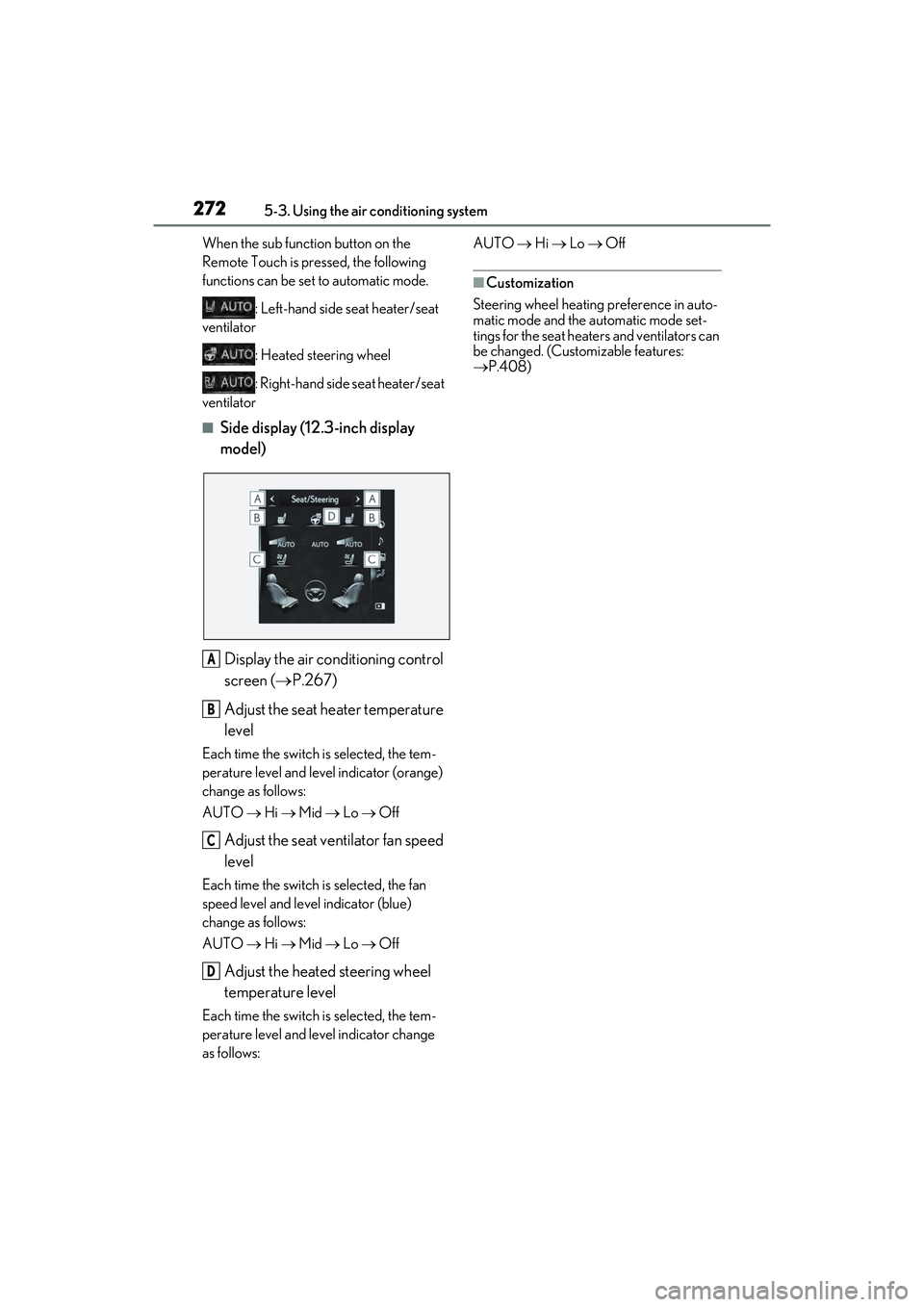
■Main display
Using the touchpad of the Remote
Touch, select the button on the screen.
This system can also be operated by
the touch screen.
Adjust the seat ventilator fan speed
level
The seat ventilator can be adjusted in 3
levels.
When the seat ventilator is operated, the
fan speed level is displayed on the screen.
Adjust the seat heater temperature
level
The seat heater can be adjusted in 3 levels.
When the seat heater is operated, the tem-
perature level is displayed on the screen.
Adjust the heated steering wheel
temperature level
The heated steering wheel can be adjusted
in 2 levels.
When the heated steering wheel is oper-
ated, the temperature level is displayed on
the screen.
Automatic mode on/off indicators
When the automatic mode is on, the indi-
cator illuminates on the screen.
Sub function menu
WARNING
■To prevent overheating and minor
burn injuries
Observe the following precautions when
using the seat heaters.
●Do not cover the seat with a blanket or
cushion when using the seat heater.
●Do not use seat heater more than nec-
essary.
Control screen
A
B
C
D
E
Page 274 of 468
2725-3. Using the air conditioning system
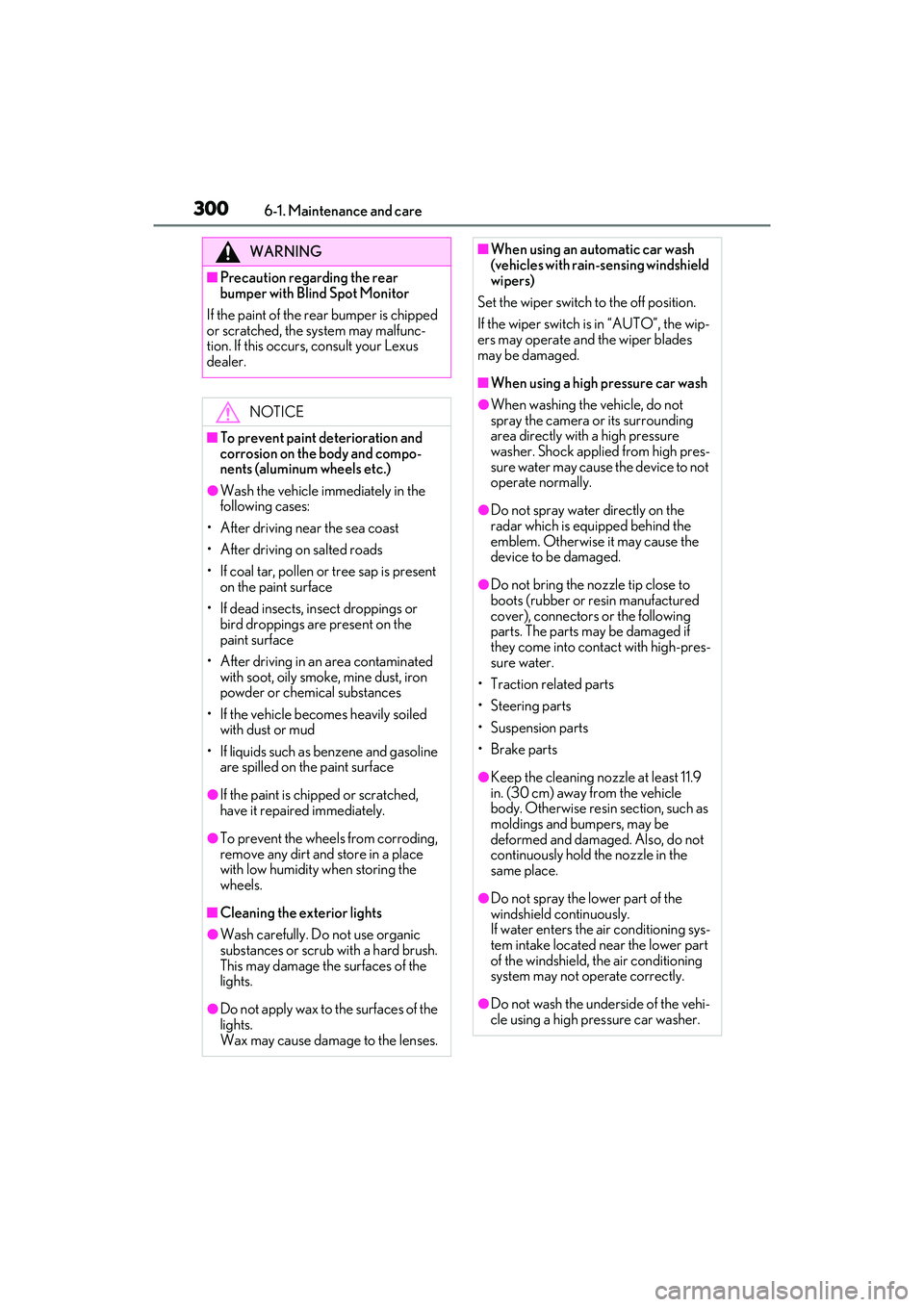
When the sub function button on the
Remote Touch is pressed, the following
functions can be set to automatic mode.: Left-hand side seat heater/seat
ventilator
: Heated steering wheel
: Right-hand side seat heater/seat
ventilator
■Side display (12.3-inch display
model)
Display the air conditioning control
screen ( P.267)
Adjust the seat heater temperature
level
Each time the switch is selected, the tem-
perature level and level indicator (orange)
change as follows:
AUTO Hi Mid Lo Off
Adjust the seat ventilator fan speed
level
Each time the switch is selected, the fan
speed level and level indicator (blue)
change as follows:
AUTO Hi Mid Lo Off
Adjust the heated steering wheel
temperature level
Each time the switch is selected, the tem-
perature level and level indicator change
as follows: AUTO
Hi Lo Off
■Customization
Steering wheel heating preference in auto-
matic mode and the automatic mode set-
tings for the seat heaters and ventilators can
be changed. (Customizable features:
P.408)
A
B
C
D
Page 299 of 468

297
6
6
Maintenance and care
Maintenance and care
6-1. Maintenance and careCleaning and protecting the vehi-cle exterior ................................ 298
Cleaning and protecting the vehi- cle interior .................................. 301
6-2. Maintenance Maintenance requirements .. 303
General maintenance ............. 304
Emission inspection and mainte- nance (I/M) programs ......... 307
6-3. Do-it-yourself maintenance Do-it-yourself service precautions ............................... 308
Hood................................................ 310
Positioning a floor jack ............. 310
Engine compartment................ 312
Tires ................................................ 320
Tire inflation pressure .............. 328
Wheels........................................... 330
Air conditioning filter................ 331
Electronic key battery ............. 333
Checking and replacing fuses ........................................................ 335
Headlight aim.............................. 337
Light bulbs .................................... 338
Page 302 of 468
3006-1. Maintenance and care
WARNING
■Precaution regarding the rear
bumper with Blind Spot Monitor
If the paint of the rear bumper is chipped
or scratched, the system may malfunc-
tion. If this occurs, consult your Lexus
dealer.
NOTICE
■To prevent paint deterioration and
corrosion on the body and compo-
nents (aluminum wheels etc.)
●Wash the vehicle immediately in the
following cases:
• After driving near the sea coast
• After driving on salted roads
• If coal tar, pollen or tree sap is present on the paint surface
• If dead insects, insect droppings or bird droppings are present on the
paint surface
• After driving in an area contaminated with soot, oily smoke, mine dust, iron
powder or chemical substances
• If the vehicle becomes heavily soiled with dust or mud
• If liquids such as benzene and gasoline are spilled on the paint surface
●If the paint is chipped or scratched,
have it repaired immediately.
●To prevent the wheels from corroding,
remove any dirt and store in a place
with low humidity when storing the
wheels.
■Cleaning the exterior lights
●Wash carefully. Do not use organic
substances or scrub with a hard brush.
This may damage the surfaces of the
lights.
●Do not apply wax to the surfaces of the
lights.
Wax may cause damage to the lenses.
■When using an automatic car wash
(vehicles with rain-s ensing windshield
wipers)
Set the wiper switch to the off position.
If the wiper switch is in “AUTO”, the wip-
ers may operate and the wiper blades
may be damaged.
■When using a high pressure car wash
●When washing the vehicle, do not
spray the camera or its surrounding
area directly with a high pressure
washer. Shock applied from high pres-
sure water may cause the device to not
operate normally.
●Do not spray water directly on the
radar which is equipped behind the
emblem. Otherwise it may cause the
device to be damaged.
●Do not bring the nozzle tip close to
boots (rubber or resin manufactured
cover), connectors or the following
parts. The parts may be damaged if
they come into contact with high-pres-
sure water.
• Traction related parts
•Steering parts
• Suspension parts
• Brake parts
●Keep the cleaning nozzle at least 11.9
in. (30 cm) away from the vehicle
body. Otherwise resin section, such as
moldings and bumpers, may be
deformed and damaged. Also, do not
continuously hold the nozzle in the
same place.
●Do not spray the lower part of the
windshield continuously.
If water enters the air conditioning sys-
tem intake located near the lower part
of the windshield, the air conditioning
system may not operate correctly.
●Do not wash the underside of the vehi-
cle using a high pressure car washer.
Page 333 of 468
3316-3. Do-it-yourself maintenance
6
Maintenance and care
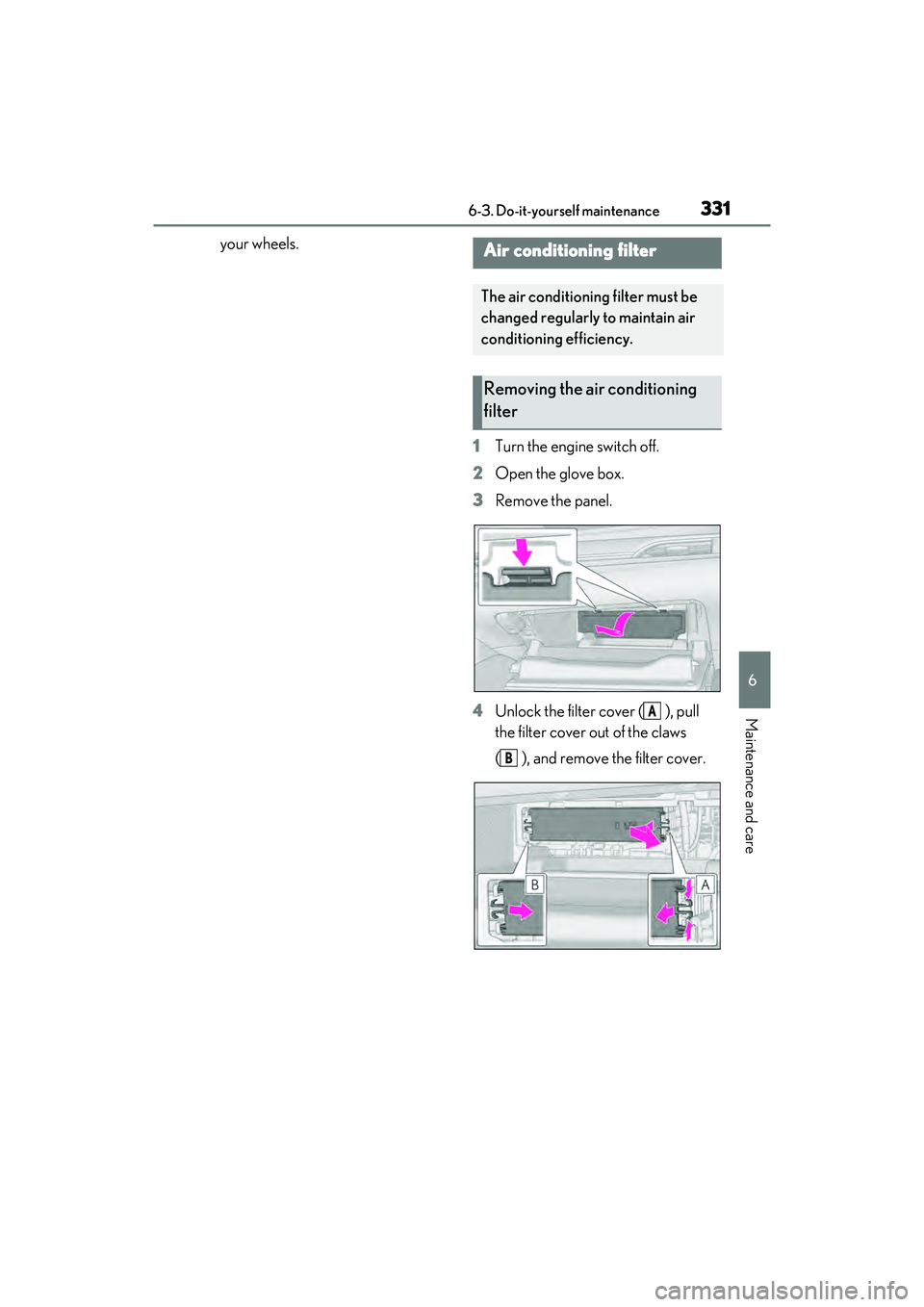
your wheels.1Turn the engine switch off.
2 Open the glove box.
3 Remove the panel.
4 Unlock the filter cover ( ), pull
the filter cover out of the claws
( ), and remove the filter cover.Air conditioning filter
The air conditioning filter must be
changed regularly to maintain air
conditioning efficiency.
Removing the air conditioning
filter
A
B
Page 334 of 468
3326-3. Do-it-yourself maintenance
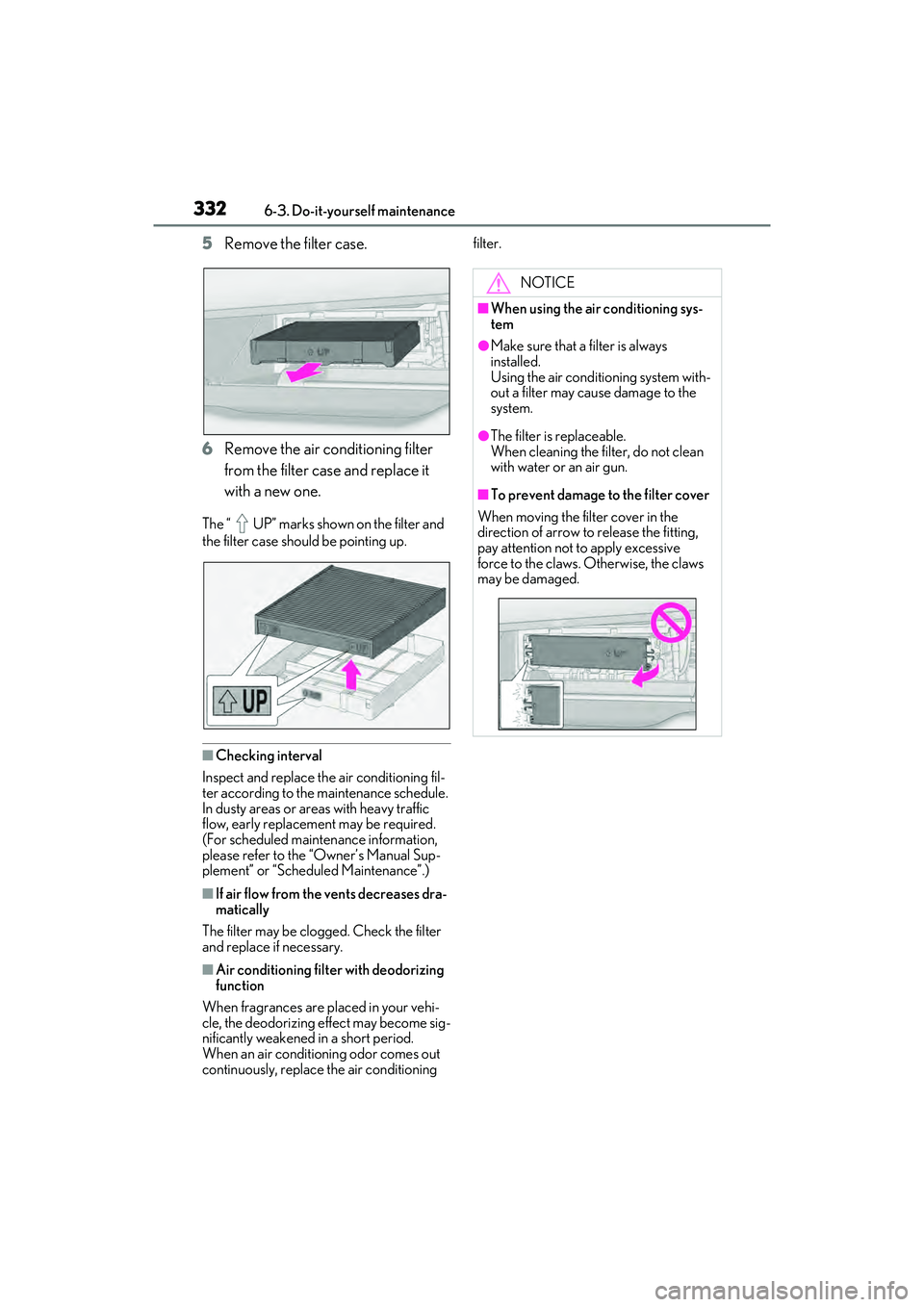
5Remove the filter case.
6 Remove the air conditioning filter
from the filter case and replace it
with a new one.
The “ UP” marks shown on the filter and
the filter case should be pointing up.
■Checking interval
Inspect and replace the air conditioning fil-
ter according to the maintenance schedule.
In dusty areas or areas with heavy traffic
flow, early replacement may be required.
(For scheduled maintenance information,
please refer to the “Owner’s Manual Sup-
plement” or “Scheduled Maintenance”.)
■If air flow from the vents decreases dra-
matically
The filter may be clogged. Check the filter
and replace if necessary.
■Air conditioning filter with deodorizing
function
When fragrances are placed in your vehi-
cle, the deodorizing effect may become sig-
nificantly weakened in a short period.
When an air conditioning odor comes out
continuously, replace the air conditioning filter.
NOTICE
■When using the air conditioning sys-
tem
●Make sure that a filter is always
installed.
Using the air conditioning system with-
out a filter may cause damage to the
system.
●The filter is replaceable.
When cleaning the filter, do not clean
with water or an air gun.
■To prevent damage to the filter cover
When moving the filter cover in the
direction of arrow to release the fitting,
pay attention not to apply excessive
force to the claws. Otherwise, the claws
may be damaged.
Page 384 of 468
3827-2. Steps to take in an emergency
1Stop the vehicle in a safe place and
turn off the air conditioning system,
and then stop the engine.
2 If you see steam:
Carefully lift the hood after the
steam subsides.
If you do not see steam:
Carefully lift the hood.
3 After the engine has cooled down
sufficiently, inspect the hoses and
WARNING
●When working with the battery, always
wear safety glasses and take care not
to allow any battery fluids (acid) to
come into contact with skin, clothing
or the vehicle body.
●Do not lean over the battery.
●In the event that battery fluid comes
into contact with the skin or eyes,
immediately wash the affected area
with water and seek medical attention.
Place a wet sponge or cloth over the
affected area until medical attention
can be received.
●Always wash your hands after han-
dling the battery support, terminals,
and other battery-related parts.
●Do not allow children near the battery.
■When replacing the battery
When the vent plug and indicator are
close to the hold down clamp, the battery
fluid (sulfuric acid) may leak.
NOTICE
■When handling jumper cables
When connecting the jumper cables,
ensure that they do not become entan-
gled in the cooling fan or engine drive
belt.
If your vehicle overheats
The following may indicate that
your vehicle is overheating.
The engine coolant temperature
gauge ( P.68, 71) is in the red
zone or a loss of engine power is
experienced. (For example, the
vehicle speed does not increase.)
“Engine Coolant Temp High Stop
in a Safe Place See Owner’s
Manual” is shown on the multi-
information display.
Steam comes out from under the
hood.
Correction procedures
Page 386 of 468
3847-2. Steps to take in an emergency
6Start the engine and turn the air
conditioning system on to check
that the radiator cooling fan oper-
ates and to check for coolant leaks
from the radiator or hoses.
The fan operates when the air conditioning
system is turned on immediately after a
cold start. Confirm that the fan is operating
by checking the fan sound and air flow. If it
is difficult to check these, turn the air con-
ditioning system on and off repeatedly.
(The fan may not operate in freezing tem-
peratures.)
7 If the fan is not operating:
Stop the engine immediately and
contact your Lexus dealer.
If the fan is operating:
Have the vehicle inspected at the
nearest Lexus dealer.
WARNING
■When inspecting under the hood of
your vehicle
Observe the following precautions.
Failure to do so may result in serious
injury such as burns.
●If steam is seen coming from under the
hood, do not open the hood until the
steam has subsided. The engine com-
partment may be very hot.
●Keep hands and clothing (especially a
tie, a scarf or a muffler) away from the
fan and belts. Failure to do so may
cause the hands or clothing to be
caught, resulting in serious injury.
●While the engine and radiator are hot,
do not loosen or remove the coolant
inlet cap or coolant reservoir cap.
High temperature steam or coolant
could spray out.
NOTICE
■When adding engine coolant
Add coolant slowly after the engine has
cooled down sufficiently. Adding cool
coolant to a hot engine too quickly can
cause damage to the engine.
■To prevent damage to the cooling
system
Observe the following precautions:
●Avoid contaminating the coolant with
foreign matter (such as sand or dust
etc.).
●Do not use any coolant additive.
Page 405 of 468
4038-1. Specifications
8
Vehicle specifications
■Traction AA, A, B, C
The traction grades, from highest to
lowest, are AA, A, B and C, and they
represent the tire’s ability to stop on
wet pavement as measured under con-
trolled conditions on specified govern-
ment test surfaces of asphalt and
concrete.
A tire marked C may have poor traction
performance.
Warning: The traction grade assigned to
this tire is based on braking (straight
ahead) traction tests and does not include
cornering (turning) traction.
■Temperature A, B, C
The temperature grades are A (the
highest), B, and C, representing the
tire’s resistance to the generation of
heat and its ability to dissipate heat when tested under controlled condi-
tions on a specified indoor laboratory
test wheel.
Sustained high temperature can cause the
material of the tire to degenerate and
reduce tire life, and excessive temperature
can lead to sudden tire failure.
Grade C corresponds to a level of perfor-
mance which all passenger car tires must
meet under the Federal Motor Vehicle
Safety Standard No. 109.
Grades B and A represent higher levels of
performance on the laboratory test wheel
than the minimum required by law.
Warning: The temperature grades of a tire
assume that it is properly inflated and not
overloaded.
Excessive speed, underinflation, or exces-
sive loading, either separately or in combi-
nation, can cause heat buildup and
possible tire failure.
Glossary of tire terminology
Tire related termMeaning
Cold tire inflation
pressureTire pressure when the vehicle has been parked for three hours or
more, or has not been driven more
than 1 mile or 1.5 km under that
condition
Maximum inflation
pressureThe maximum cold inflated pressure to which a tire may be inflated,
shown on the sidewall of the tire
Recommended
inflation pressureCold tire inflation pressure recommended by a manufacturer
Accessory weight
The combined weight (in excess of those standard items which may
be replaced) of automatic transmission, power steering, power
brakes, power windows, power seats, radio and heater, to the extent
that these items are available as factory-installed equipment
(whether installed or not)
Curb weight
The weight of a motor vehicle with standard equipment, including the
maximum capacity of fuel, oil and coolant, and if so equipped, air
conditioning and additional weight optional engine
Page 418 of 468
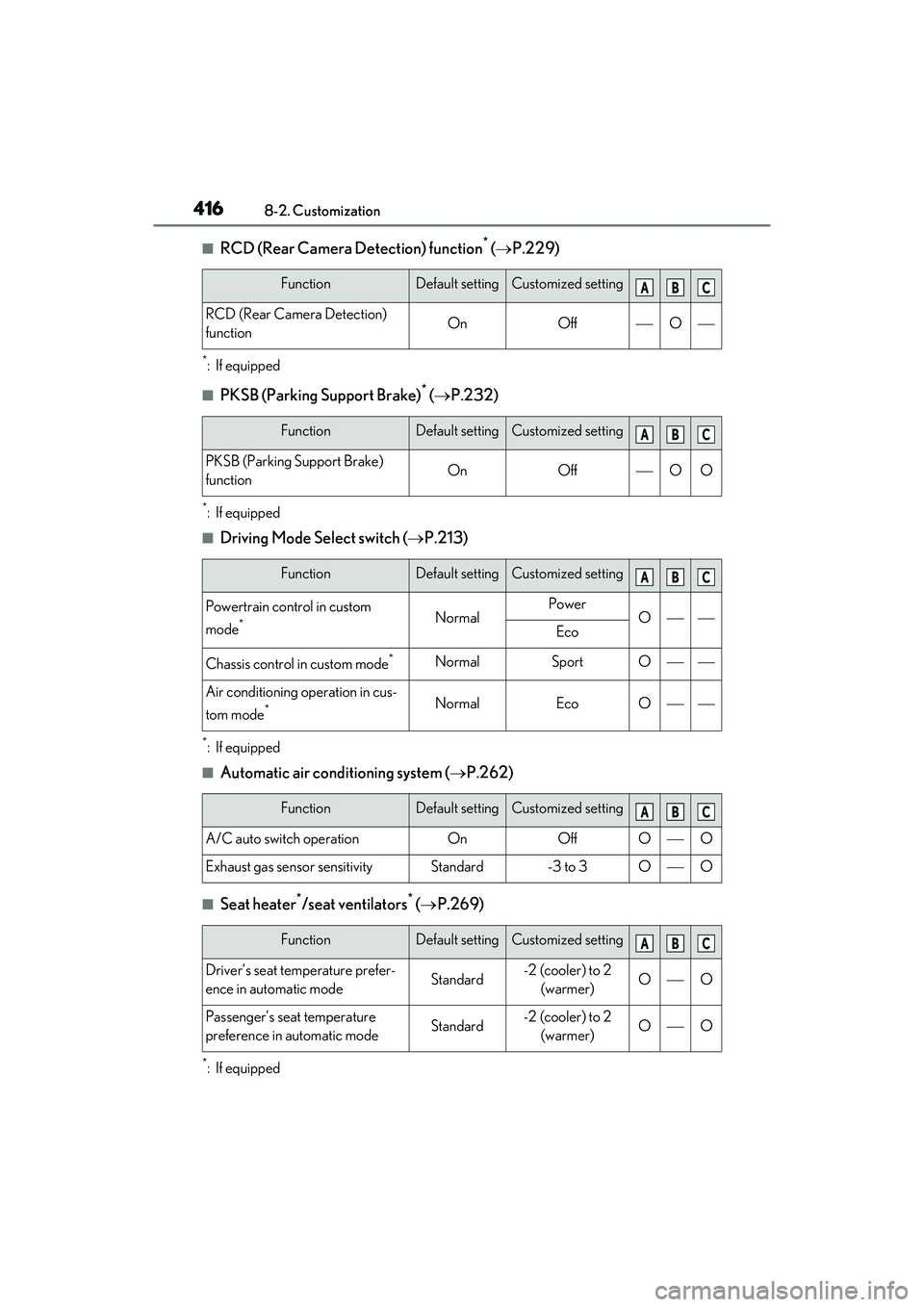
4168-2. Customization
■RCD (Rear Camera Detection) function* ( P.229)
*: If equipped
■PKSB (Parking Support Brake)* ( P.232)
*: If equipped
■Driving Mode Select switch ( P.213)
*: If equipped
■Automatic air conditioning system ( P.262)
■Seat heater*/seat ventilators* ( P.269)
*: If equipped
FunctionDefault settingCustomized setting
RCD (Rear Camera Detection)
functionOnOffO
FunctionDefault settingCustomized setting
PKSB (Parking Support Brake)
functionOnOffOO
FunctionDefault settingCustomized setting
Powertrain control in custom
mode
*NormalPowerOEco
Chassis control in custom mode*NormalSportO
Air conditioning operation in cus-
tom mode
*NormalEcoO
FunctionDefault settingCustomized setting
A/C auto switch operationOnOffOO
Exhaust gas sensor sensitivityStandard-3 to 3OO
FunctionDefault settingCustomized setting
Driver’s seat temperature prefer-
ence in automatic modeStandard-2 (cooler) to 2
(warmer)OO
Passenger’s seat temperature
preference in automatic modeStandard-2 (cooler) to 2 (warmer)OO
ABC
ABC
ABC
ABC
ABC