navigation LEXUS ES350 2022 Owners Manual
[x] Cancel search | Manufacturer: LEXUS, Model Year: 2022, Model line: ES350, Model: LEXUS ES350 2022Pages: 468, PDF Size: 26.96 MB
Page 17 of 468
15Pictorial index
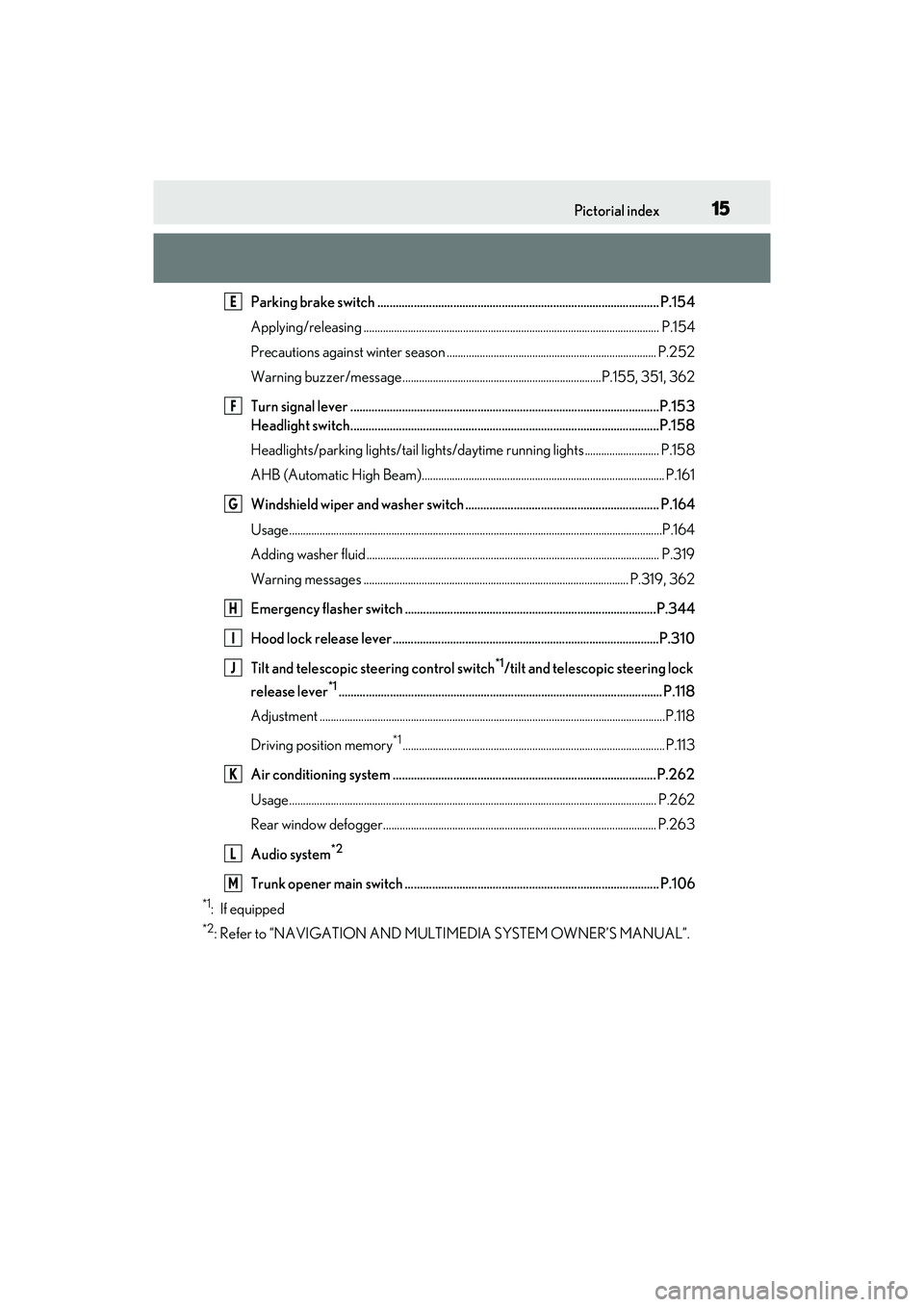
Parking brake switch ............................................................................................. P.154
Applying/releasing ........................................................................................................... P.154
Precautions against winter season ............................................................................ P.252
Warning buzzer/message ........................................................................P.155, 351, 362
Turn signal lever ......................................................................................................P.153
Headlight switch......................................................................................................P.158
Headlights/parking lights/tail lights/daytime running lights ........................... P.158
AHB (Automatic High Beam)........................................................................................ P.161
Windshield wiper and washer switch ................................................................ P.164
Usage.......................................................................................................................................P.164
Adding washer fluid .......................................................................................................... P. 319
Warning messages ................................................................................................ P.319, 362
Emergency flasher switch ...................................................................................P.344
Hood lock release lever........................................................................................P.310
Tilt and telescopic steering control switch
*1/tilt and telescopic steering lock
release lever
*1........................................................................................................... P.118
Adjustment ..................................................................................................................... ........P.118
Driving position memory
*1............................................................................................... P.113
Air conditioning system .......................................................................................P.262
Usage..................................................................................................................................... P.262
Rear window defogger................................................................................................... P.263
Audio system
*2
Trunk opener main switch .................................................................................... P.106
*1: If equipped
*2: Refer to “NAVIGATION AND MULTIMEDIA SYSTEM OWNER’S MANUAL”.
E
F
G
H
I
J
K
L
M
Page 18 of 468
16Pictorial index
■Switches
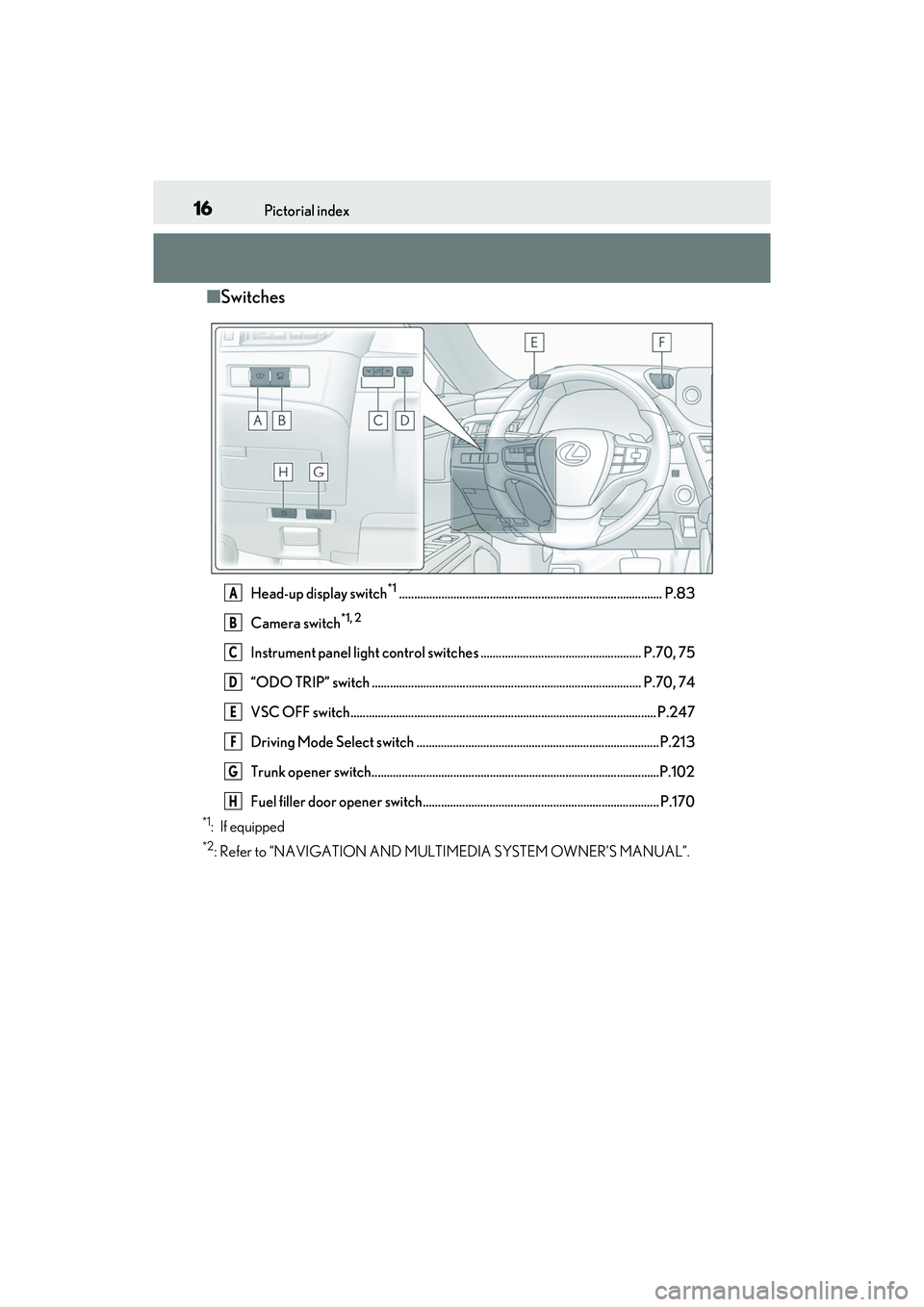
Head-up display switch*1....................................................................................... P.83
Camera switch
*1, 2
Instrument panel light control switches ..................................................... P.70, 75
“ODO TRIP” switch ......................................................................................... P.70, 74
VSC OFF switch..................................................................................................... P.247
Driving Mode Select switch ................................................................................P.213
Trunk opener switch...............................................................................................P.102
Fuel filler door opener switch.............................................................................. P.170
*1: If equipped
*2: Refer to “NAVIGATION AND MULTIMEDIA SYSTEM OWNER’S MANUAL”.
A
B
C
D
E
F
G
H
Page 20 of 468
18Pictorial index
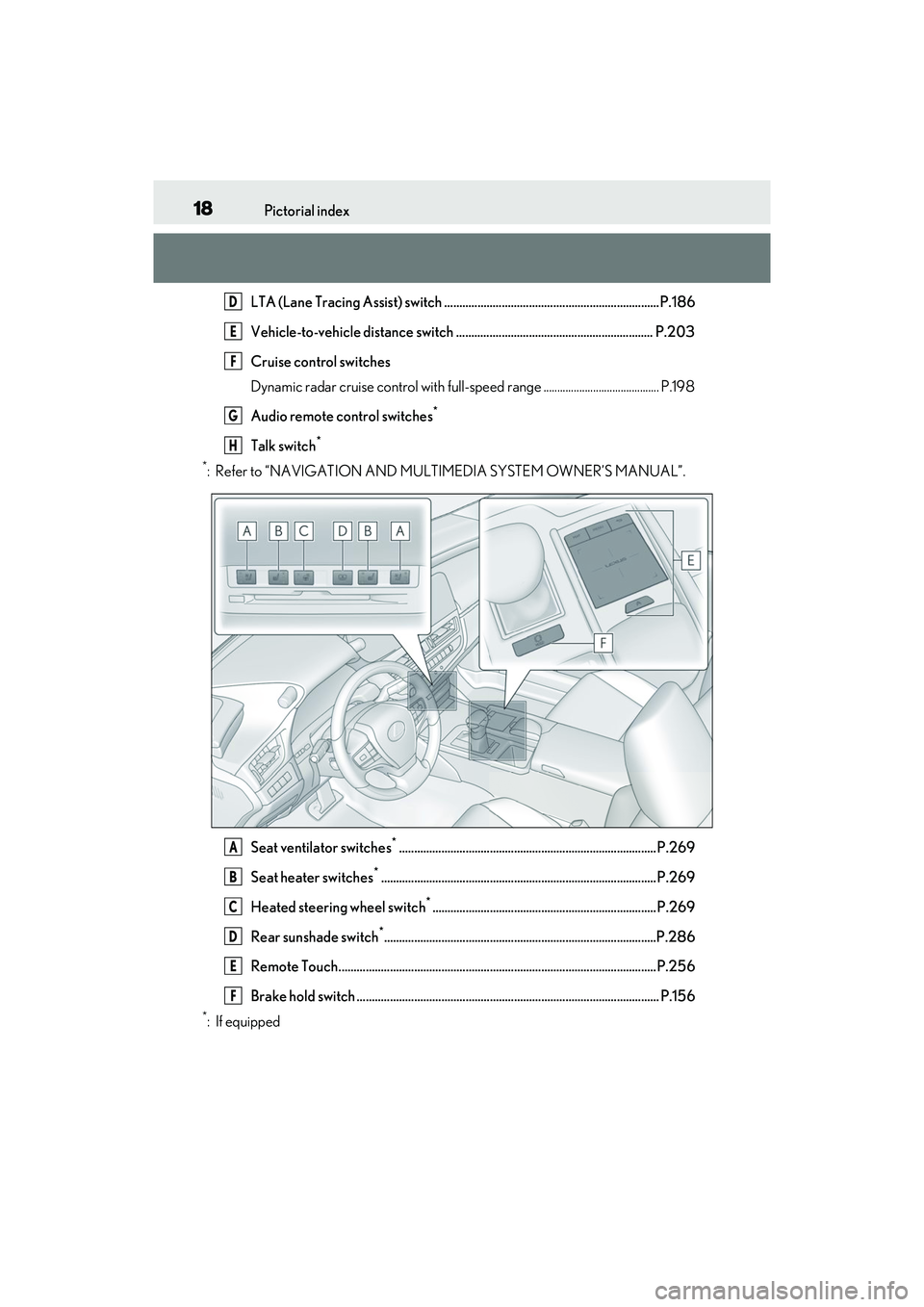
LTA (Lane Tracing Assist) switch .......................................................................P.186
Vehicle-to-vehicle distance switch ................................................................. P.203
Cruise control switches
Dynamic radar cruise control with full-speed range .......................................... P.198
Audio remote control switches
*
Talk switch*
*
: Refer to “NAVIGATION AND MULTIMEDIA SYSTEM OWNER’S MANUAL”.
Seat ventilator switches
*.....................................................................................P.269
Seat heater switches
*...........................................................................................P.269
Heated steering wheel switch
*..........................................................................P.269
Rear sunshade switch
*..........................................................................................P.286
Remote Touch.........................................................................................................P.256
Brake hold switch .................................................................................................... P.156
*: If equipped
D
E
F
G
H
A
B
C
D
E
F
Page 78 of 468
762-1. Instrument cluster
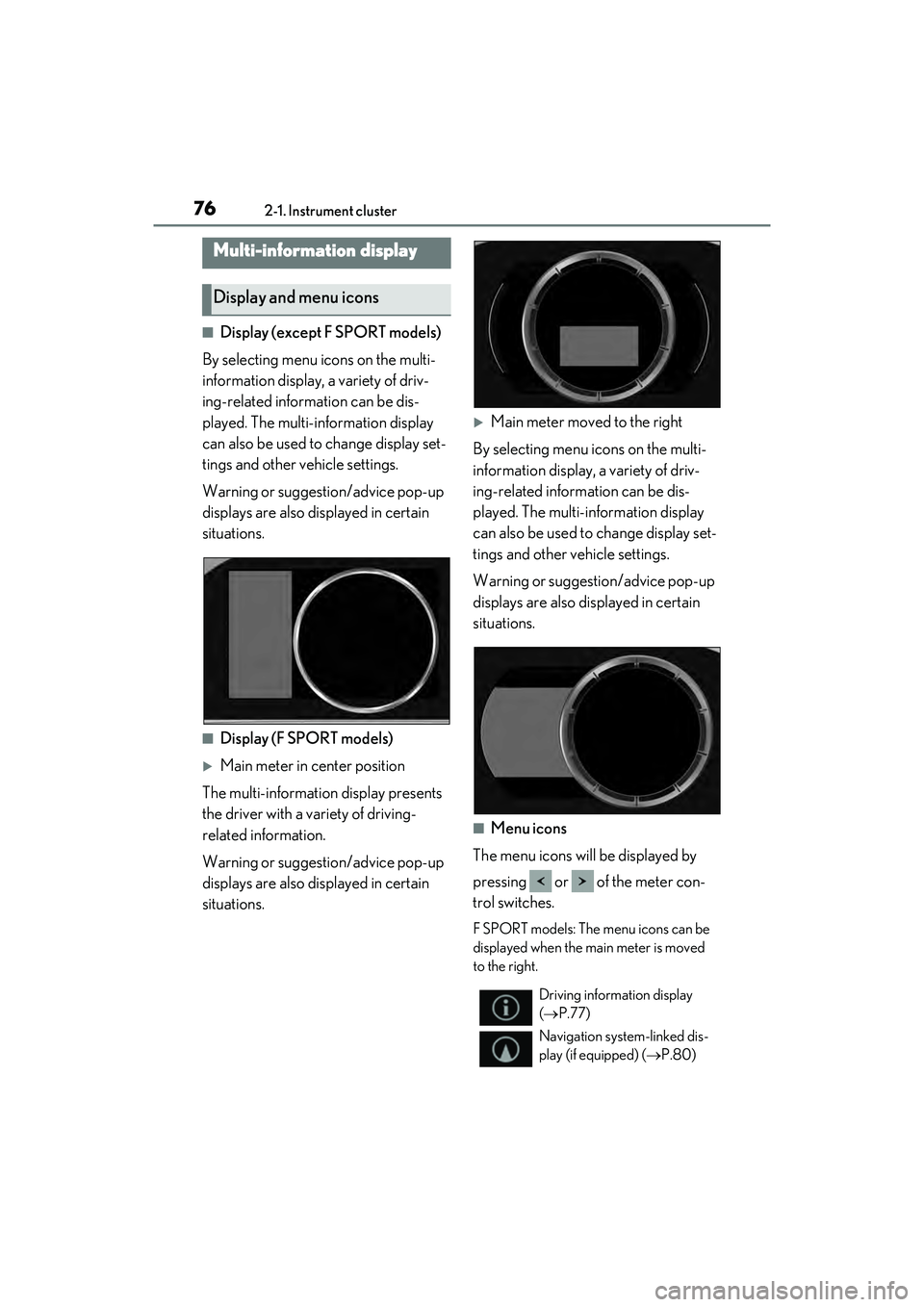
■Display (except F SPORT models)
By selecting menu icons on the multi-
information display, a variety of driv-
ing-related information can be dis-
played. The multi-information display
can also be used to change display set-
tings and other vehicle settings.
Warning or suggestion/advice pop-up
displays are also displayed in certain
situations.
■Display (F SPORT models)
Main meter in center position
The multi-information display presents
the driver with a variety of driving-
related information.
Warning or suggestion/advice pop-up
displays are also displayed in certain
situations.
Main meter moved to the right
By selecting menu icons on the multi-
information display, a variety of driv-
ing-related information can be dis-
played. The multi-information display
can also be used to change display set-
tings and other vehicle settings.
Warning or suggesti on/advice pop-up
displays are also displayed in certain
situations.
■Menu icons
The menu icons will be displayed by
pressing or of the meter con-
trol switches.
F SPORT models: The menu icons can be
displayed when the main meter is moved
to the right.
Multi-information display
Display and menu icons
Driving information display
( P.77)
Navigation system-linked dis-
play (if equipped) ( P.80)
Page 79 of 468
772-1. Instrument cluster
2
Vehicle status information and indicators
■Liquid crystal display
Small spots or light spots may appear on the
display. This phenomenon is characteristic
of liquid crystal displays, and there is no
problem continuing to use the display.
The multi-information display is oper-
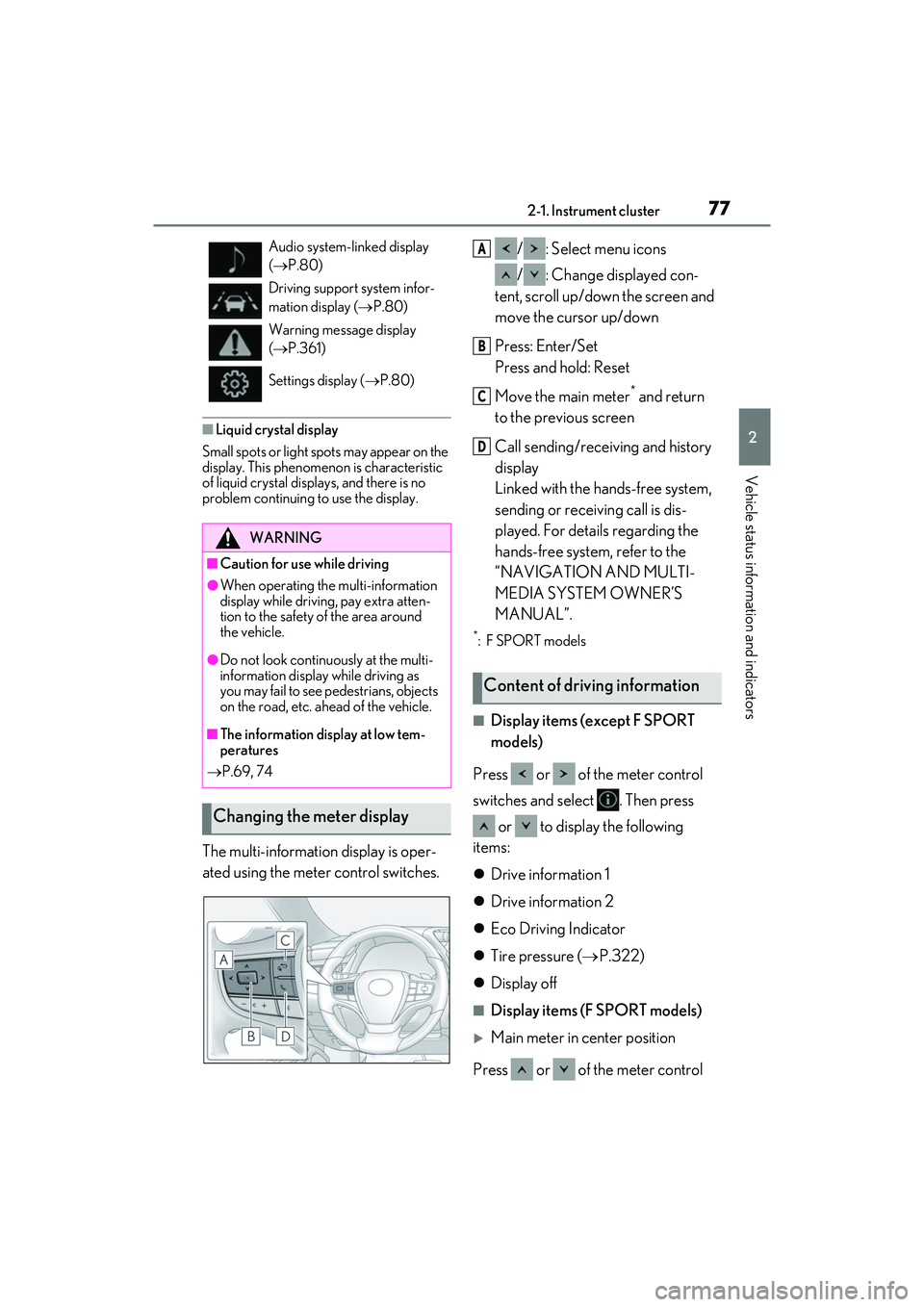
ated using the meter control switches. / : Select menu icons
/ : Change displayed con-
tent, scroll up/down the screen and
move the cursor up/down
Press: Enter/Set
Press and hold: Reset
Move the main meter
* and return
to the previous screen
Call sending/receiving and history
display
Linked with the hands-free system,
sending or receiving call is dis-
played. For details regarding the
hands-free system, refer to the
“NAVIGATION AND MULTI-
MEDIA SYSTEM OWNER’S
MANUAL”.
*:F SPORT models
■Display items (except F SPORT
models)
Press or of the meter control
switches and select . Then press or to display the following
items:
Drive information 1
Drive information 2
Eco Driving Indicator
Tire pressure ( P.322)
Display off
■Display items (F SPORT models)
Main meter in center position
Press or of the meter control
Audio system-linked display
( P.80)
Driving support system infor-
mation display ( P.80)
Warning message display
( P.361)
Settings display ( P.80)
WARNING
■Caution for use while driving
●When operating the multi-information
display while driving, pay extra atten-
tion to the safety of the area around
the vehicle.
●Do not look continuously at the multi-
information display while driving as
you may fail to see pedestrians, objects
on the road, etc. ahead of the vehicle.
■The information display at low tem-
peratures
P.69, 74
Changing the meter display
Content of driving information
A
B
C
D
Page 82 of 468
802-1. Instrument cluster
generated, the G-force value display will
turn amber and be held for 2 seconds.
■Gear Position (F SPORT models)
Displays the current shift range or gear
position when the shift lever is in D or S.
■Units (F SPORT models)
The units of measure used can be
changed while driving.
Unlike the units setting performed on the
settings display, the units setting per-
formed on the drive information display
can be changed while driving.
■Eco Driving Indicator
Eco Driving Indicator will not operate
under the following conditions:
●The shift lever is in any position other than
D.
●A paddle shift switch is operated.
●The driving mode is set to other than nor-
mal mode or eco drive mode.
●The vehicle speed is approximately 80
mph (130 km/h) or higher.
Select to display the following naviga-
tion system-linked information.
Route guidance to destination
Compass display (heading-up dis-
play)
■Route guidance to destination display
When the route guidance to destination
display is enabled on the head-up display, it
will not be displayed on the multi-informa-
tion display. ( P.84)
Select to enable selection of an audio
source or track on the meter using the
meter control switches.
Select to display the operational status
of the following systems:
LTA (Lane Tracing Assist)
( P.186)
Dynamic radar cruise control with
full-speed range ( P.198)
RSA (Road Sign Assist) (if
equipped) ( P.195)
■Meter display settings that can be
changed
Language
Select to change the language displayed.
Units
Select to change the units of measure dis-
played.
Speedometer display (except F
SPORT models)
Select to set the display of the speedome-
ter to digital or analog.
Drive information 1/Drive informa-
tion 2
Select to select up to 2 items ( P.78) that
will be displayed on e ach Drive information
screen (Drive inform ation 1 screen and
Drive information 2 screen) respectively.
Clock
Navigation system-linked dis-
play (if equipped)
Audio system-linked display
Driving support system informa-
tion display
Settings display
Page 85 of 468
832-1. Instrument cluster
2
Vehicle status information and indicators
*: If equipped
Illustrations used in this text are intended as examples, and may differ from the image that is
actually displayed by the head-up display.
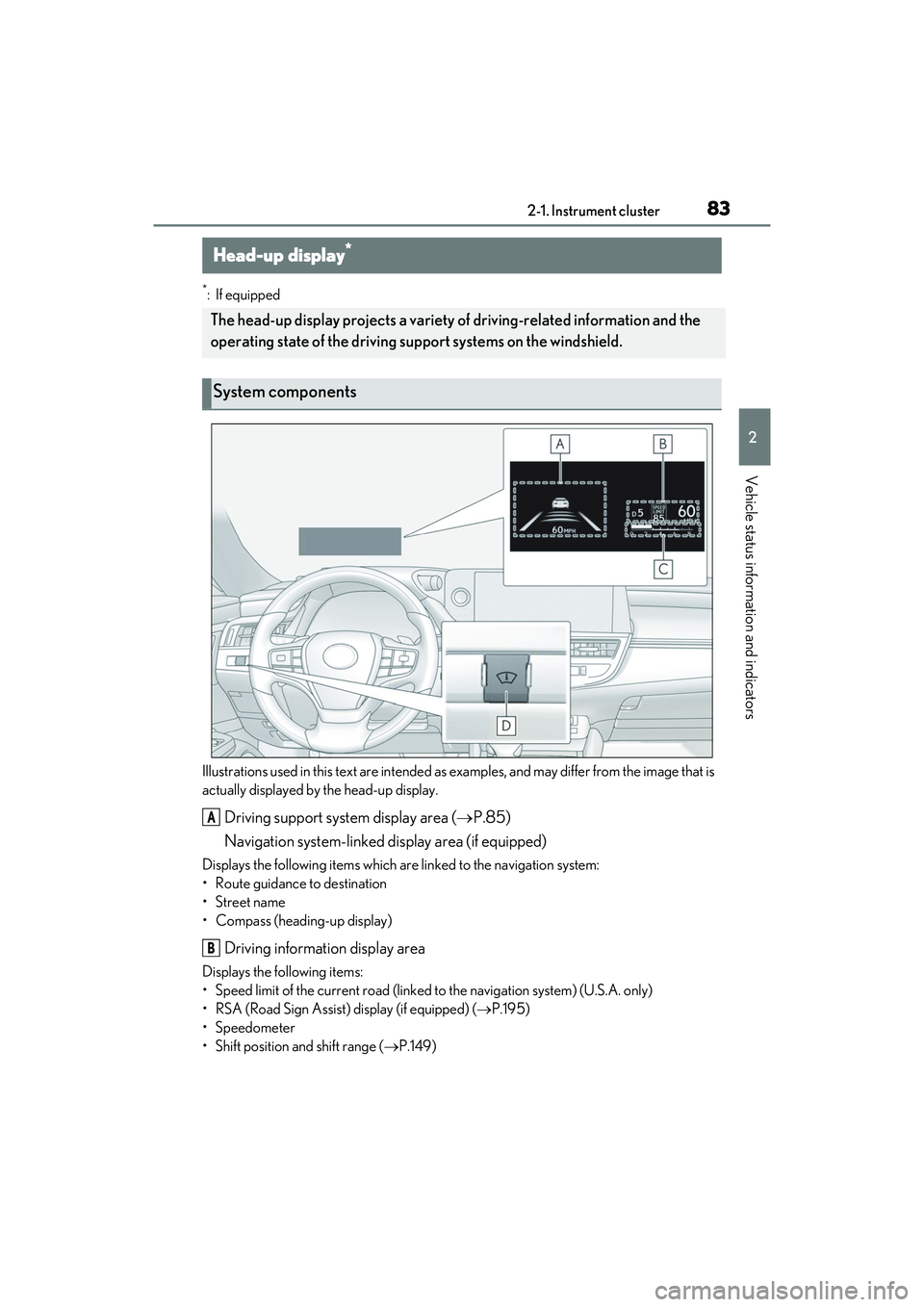
Driving support system display area ( P.85)
Navigation system-linked display area (if equipped)
Displays the following items which are linked to the navigation system:
• Route guidance to destination
• Street name
• Compass (heading-up display)
Driving information display area
Displays the following items:
• Speed limit of the current road (linked to the navigation system) (U.S.A. only)
• RSA (Road Sign Assist) display (if equipped) ( P.195)
• Speedometer
• Shift position and shift range ( P.149)
Head-up display*
The head-up display projects a variety of driving-related information and the
operating state of the driving s upport systems on the windshield.
System components
A
B
Page 197 of 468
1954-5. Using the driving support systems
4
Driving
The function cannot be used as the vehicle
speed exceeds the LTA operation range.
Drive slower.
■Customization
Function settings can be changed.
(Customizable features: P.408)
*: If equipped
When the front camera recognizes a
sign and/or information of a sign is
RSA (Road Sign Assist)*
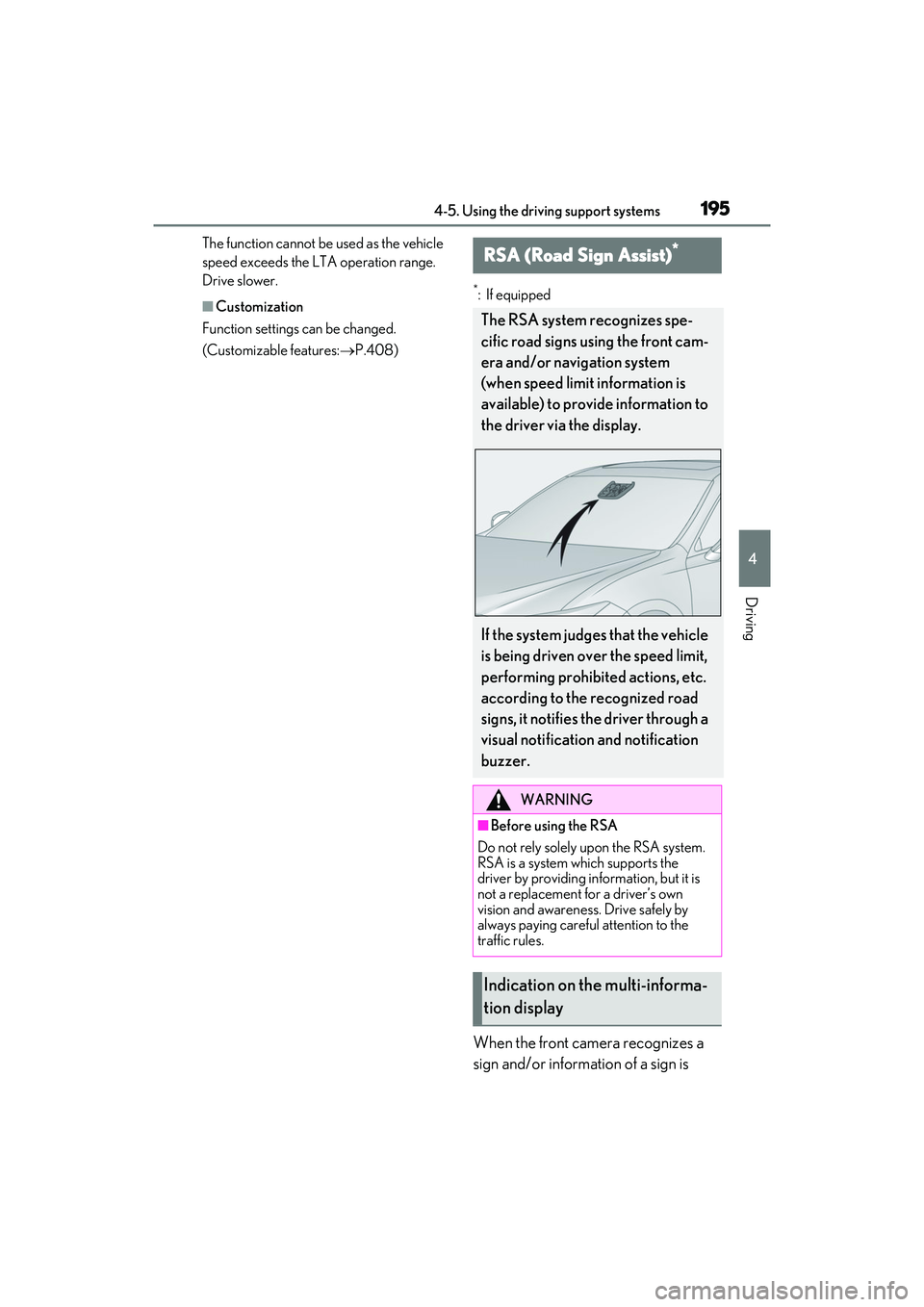
The RSA system recognizes spe-
cific road signs using the front cam-
era and/or navigation system
(when speed limit information is
available) to provide information to
the driver via the display.
If the system judges that the vehicle
is being driven over the speed limit,
performing prohibited actions, etc.
according to the recognized road
signs, it notifies the driver through a
visual notification and notification
buzzer.
WARNING
■Before using the RSA
Do not rely solely upon the RSA system.
RSA is a system which supports the
driver by providing information, but it is
not a replacement for a driver’s own
vision and awareness. Drive safely by
always paying careful attention to the
traffic rules.
Indication on the multi-informa-
tion display
Page 198 of 468
1964-5. Using the driving support systems
available from the navigation system,
the sign will be displayed on the multi-
information display.
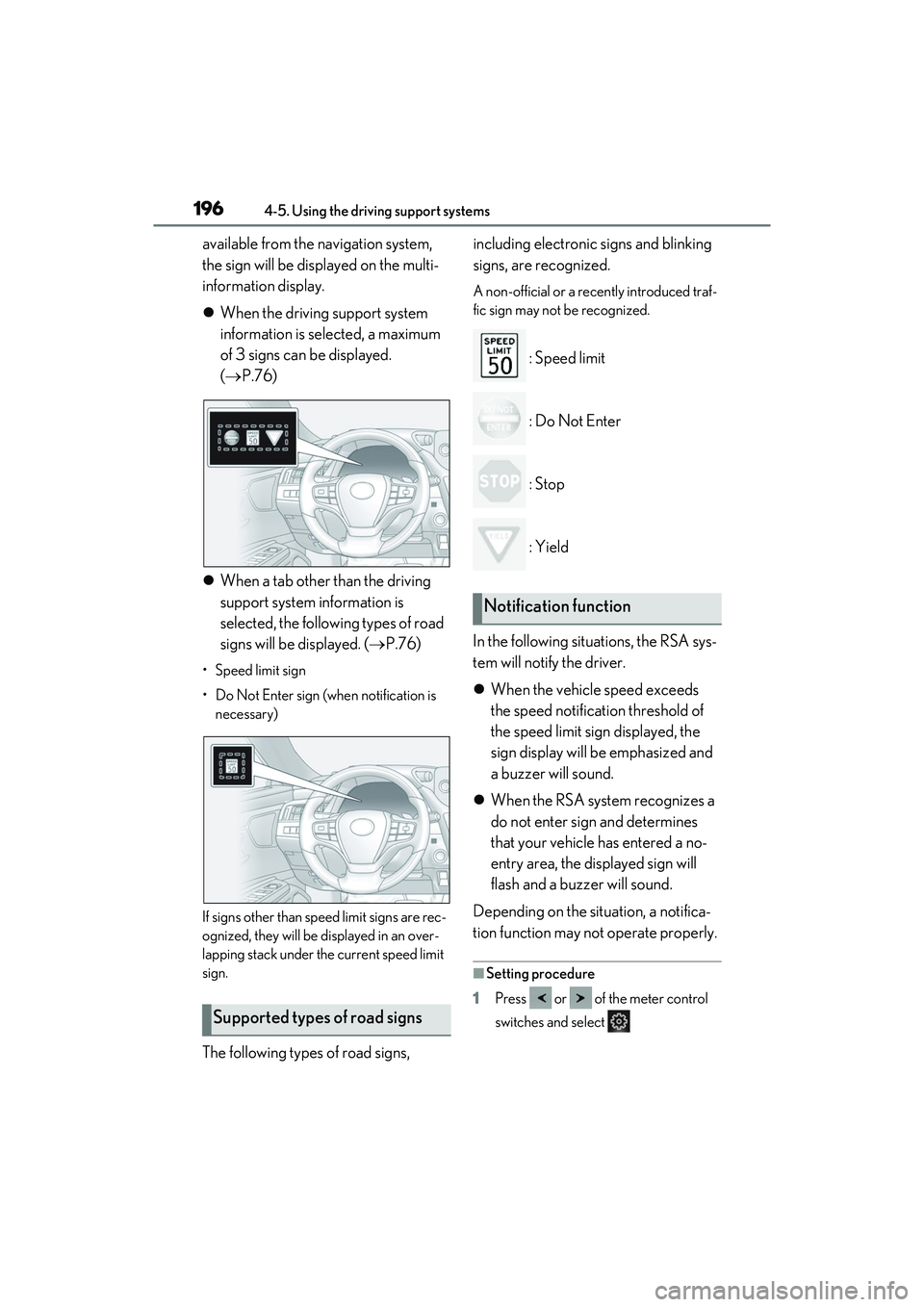
When the driving support system
information is selected, a maximum
of 3 signs can be displayed.
( P.76)
When a tab other than the driving
support system information is
selected, the following types of road
signs will be displayed. ( P.76)
• Speed limit sign
• Do Not Enter sign (when notification is
necessary)
If signs other than speed limit signs are rec-
ognized, they will be displayed in an over-
lapping stack under the current speed limit
sign.
The following types of road signs, including electronic signs and blinking
signs, are recognized.
A non-official or a recently introduced traf-
fic sign may not be recognized.
: Speed limit
: Do Not Enter
: Stop
: Yield
In the following situations, the RSA sys-
tem will notify the driver.
When the vehicle speed exceeds
the speed notification threshold of
the speed limit sign displayed, the
sign display will be emphasized and
a buzzer will sound.
When the RSA system recognizes a
do not enter sign and determines
that your vehicle has entered a no-
entry area, the displayed sign will
flash and a buzzer will sound.
Depending on the situation, a notifica-
tion function may not operate properly.
■Setting procedure
1 Press or of the meter control
switches and select
Supported types of road signs
Notification function
Page 199 of 468
1974-5. Using the driving support systems
4
Driving
2Press or of the meter control
switches and select “Vehicle Settings”,
then press “OK”
3 Press or of the meter control
switches and sele ct , then press
“OK”
4 Press or of the meter control
switches and select “RSA”, then press
“OK”
■Automatic turn-off of RSA sign display
In the following situations, a displayed
speed limit sign and/or do not enter sign
will stop being displayed automatically:
●No sign has been recognized for a cer-
tain distance.
●The road changes due to a left or right
turn, etc.
In the following situations, stop and yield
signs will stop being displayed automati-
cally:
●The system determines that your vehicle
has passed the sign.
●The road changes due to a left or right
turn, etc.
■Conditions in whic h the function may
not operate or detect correctly
In the following situations, RSA does not
operate normally and may not recognize
signs, display the inco rrect sign, etc. How-
ever, this does not indicate a malfunction.
●The front camera is misaligned due to a
strong impact being applied to the sen-
sor, etc.
●Dirt, snow, stickers, etc. are on the wind-
shield near the front camera.
●In inclement weather such as heavy rain,
fog, snow or sand storms.
●Light from an oncoming vehicle, the sun,
etc. enters the front camera.
●The sign is dirty, faded, tilted or bent.
●The contrast of electronic sign is low.
●All or part of the sign is hidden by the
leaves of a tree, a pole, etc.
●The sign is only visible to the front camera for a short amount of time.
●The driving scene (turning, lane change,
etc.) is judged incorrectly.
●If a sign not appropriate for the currently
traveled lane, but the sign exists directly
after a freeway branches, or in an adja-
cent lane just before merging.
●Stickers are attached to the rear of the
preceding vehicle.
●A sign resembling a system compatible
sign is recognized.
●Side road speed signs may be detected
and displayed (if positioned in sight of the
front camera) while the vehicle is travel-
ing on the main road.
●Roundabout exit road speed signs may
be detected and displayed (if positioned
in sight of the front camera) while travel-
ing on a roundabout.
●The front of the vehicle is raised or low-
ered due to the carried load.
●The surrounding brightness is not suffi-
cient or changes suddenly.
●When a sign intended for trucks, etc. is
recognized.
●The navigation system map data is out-
dated.
●The navigation system is not operating.
●The speed informatio
n displayed on the
meter and on the navigation system may
be different due to the navigation system
using map data.
■Speed limit sign display
If the engine switch was last turned off while
a speed limit sign was displayed on the
multi-information display, the same sign dis-
plays again when the engine switch is
turned to IGNITION ON mode.
■If “RSA Malfunction Visit Your Dealer”
is shown
The system may be malfunctioning. Have
the vehicle inspected by your Lexus dealer.
■Customization
Some functions can be customized. (Cus-
tomizable features: P.408)