navigation LEXUS ES350 2022 User Guide
[x] Cancel search | Manufacturer: LEXUS, Model Year: 2022, Model line: ES350, Model: LEXUS ES350 2022Pages: 468, PDF Size: 26.96 MB
Page 258 of 468

2565-1. Remote Touch/Display
5-1 . Remote To uch/ Di spl ay
■Switches
8-inch display model“HOME” button
Press this button to display the home
screen.
12.3-inch display model
“MAP” button
Press this button to display the current
location.
“MENU” button
Press this button to display the menu
screen.
Back button
Press this button to display the previous
screen.
Touchpad
Slide your finger on the touchpad and move the pointer to select a function, letter
and screen button.
Press the touchpad to enter the selected
function, letter or screen button. Certain
finger movements on the touchpad can
perform functions, such as changing map
scalings and scrolling list screens.
Sub function button
When is displayed on the screen, a
function screen assigned to the screen can
be displayed.
■Using the touchpad
1 Select: Touch the touchpad to
select the desired button on the
screen.
2 Enter: The buttons on the screen
can be selected by either depress-
ing or double tapping on the
touchpad. Once a button has been
selected, the screen will change.
■Touch operation
Operations are performed by touch-
ing the touchpad with your finger.
Trace
Trace the pad surface while maintaining
contact with the touchpad. Moving the
cursor and the pointer.
Remote Touch
The Remote Touch can be used to
operate the Center Display.
For details on the Remote touch,
refer to the “NAVIGATION AND
MULTIMEDIA SYSTEM
OWNER’S MANUAL”.
Remote Touch operation
A
A
B
C
D
E
Page 260 of 468

2585-1. Remote Touch/Display
■Menu screen
Press the “MENU” button on the
Remote Touch to display the menu
screen.
This system can also be operated by
the touch screen.
For details, refer to the “NAVIGA-
TION AND MULTIMEDIA SYSTEM
OWNER’S MANUAL”.
The displays shown in the illustrations
are used for example only and may dif-
fer from the actual vehicle.
8-inch display model
12.3-inch display model
*1: If equipped
*2: Refer to the “NAVIGATION AND MULTIMEDIA SYSTEM OWNER’S
MANUAL”.
*3: This function is not made available in some countries or areas.
■Split-screen display (12.3-inch display model)
Different information can be displayed on the left and right of the screen. For
Center Display
Center Display overview
SwitchFunction
Select to display the destination
screen.
*1, 2
Select to display the audio con-
trol screen.
*2
Select to display the hands-free
control screen.
*2
Select to display the “Apps”
screen.
*2, 3
/
/
When an Apple
CarPlay/Android Auto connec-
tion is established and this but-
ton displays “Apple
CarPlay”/“Android Auto”,
select to display the home
screen of Apple
CarPlay/Android Auto.
*2, 3
Select to display the information
screen.
*2 ( 87)
Select to display the general set-
tings screen.
*2
Select to display the air condi-
tioning control screen.
( P.265)
Select to adjust the contrast and
brightness of the screens, turn
the screen off, etc.
*1, 2
Page 261 of 468
2595-1. Remote Touch/Display
5
Interior features
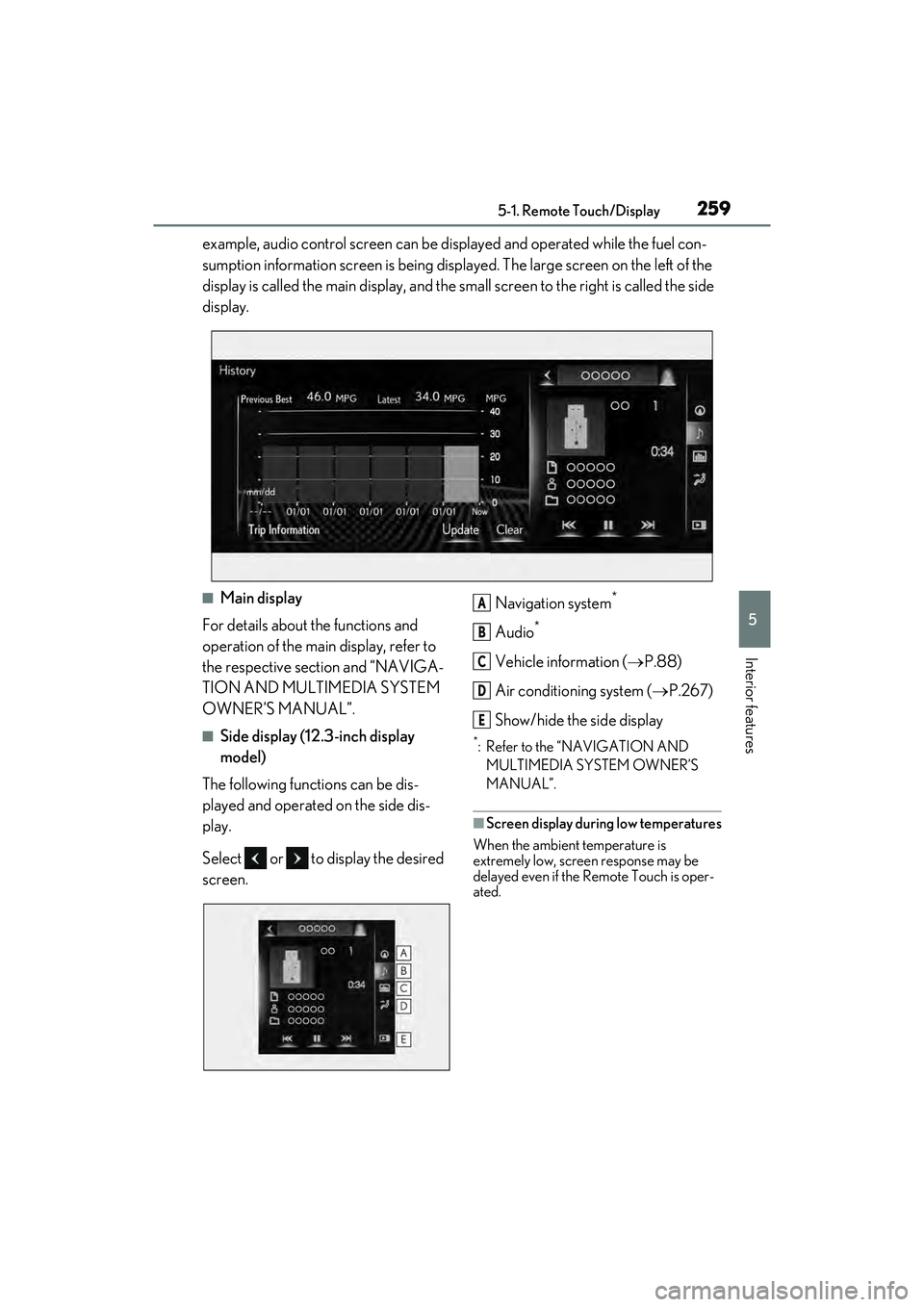
example, audio control screen can be displayed and operated while the fuel con-
sumption information screen is being displayed. The large screen on the left of the
display is called the main display, and the small screen to the right is called the side
display.
■Main display
For details about the functions and
operation of the main display, refer to
the respective section and “NAVIGA-
TION AND MULTIMEDIA SYSTEM
OWNER’S MANUAL”.
■Side display (12.3-inch display
model)
The following functions can be dis-
played and operated on the side dis-
play.
Select or to display the desired
screen. Navigation system
*
Audio*
Vehicle information (
P.88)
Air conditioning system ( P.267)
Show/hide the side display
*: Refer to the “NAVIGATION AND MULTIMEDIA SYSTEM OWNER’S
MANUAL”.
■Screen display during low temperatures
When the ambient temperature is
extremely low, screen response may be
delayed even if the Remote Touch is oper-
ated.
A
B
C
D
E
Page 266 of 468

2645-3. Using the air conditioning system
mode and the fan speed to any setting
except off.
■Outside/recirculated air mode
●Setting to the recirculated air mode tem-
porarily is recommended in preventing
dirty air from entering the vehicle interior
and helping to cool the vehicle when the
outside air temperature is high.
●Outside/recirculated air mode may
automatically switch regardless of the air
conditioning setting depending on the
temperature setting or inside tempera-
ture.
■Registering air conditioning settings to
electronic keys
●Unlocking the vehicle using an electronic
key and turning the engine switch to
IGNITION ON mode will recall that
key’s registered air conditioning settings.
●When the engine switch is turned off, the
current air conditioning settings will auto-
matically be registered to the electronic
key that was used to unlock the vehicle.
●The system may not operate correctly if
more than one electronic key is in the
vicinity or if the smart access system with
push-button start is used to unlock the
passenger door.
●Vehicles with the driving position mem-
ory: The doors that can recall the air con-
ditioning setting
* when unlocked using
the smart access system with push-but-
ton start can be changed. For details,
contact your Lexus dealer.
*: The doors that can recall the driving posi-
tion memory are changed at the same
time.
■Operation of the air conditioning sys-
tem in Eco drive mode
In Eco drive mode, the air conditioning sys-
tem is controlled as follows to prioritize fuel
efficiency:
●Engine speed and compressor operation
controlled to restrict heating/cooling
capacity
●Fan speed restricted when automatic
mode is selected To improve air conditioning performance,
perform the following operations:
●Turn off eco air conditioning mode
(
P.266)
●Adjust the fan speed
●Turn off Eco drive mode ( P.213)
■When the outside temperature falls to
nearly 32°F (0°C)
The dehumidification function may not
operate even when “A/C” is selected.
■Ventilation and air conditioning odors
●To let fresh air in, set the air conditioning
system to the outside air mode.
●During use, various odors from inside
and outside the vehicle may enter into
and accumulate in the air conditioning
system. This may then cause odor to be
emitted from the vents.
●To reduce potential odors from occur-
ring, the start timing of the blower may be
delayed for a short period of time imme-
diately after the air conditioning system is
started in automatic mode.
●When parking, the system automatically
switches to fresh air intake mode to
encourage better air circulation through-
out the vehicle, helping to reduce odors
that occur when starting the vehicle.
■Using the voice command system
Air conditioning system can be operated
using voice commands. For details, refer to
the “NAVIGATION AND MULTIMEDIA
SYSTEM OWNER’S MANUAL”.
■Air conditioning filter
P.331
■Air conditioning system refrigerant
●A label regarding the refrigerant of the
air conditioning system is attached to the
hood at the location shown in the follow-
ing illustration.
Page 282 of 468
2805-6. Using the other interior features
5-6 .U sin g th e o th er in teri or f ea ture s
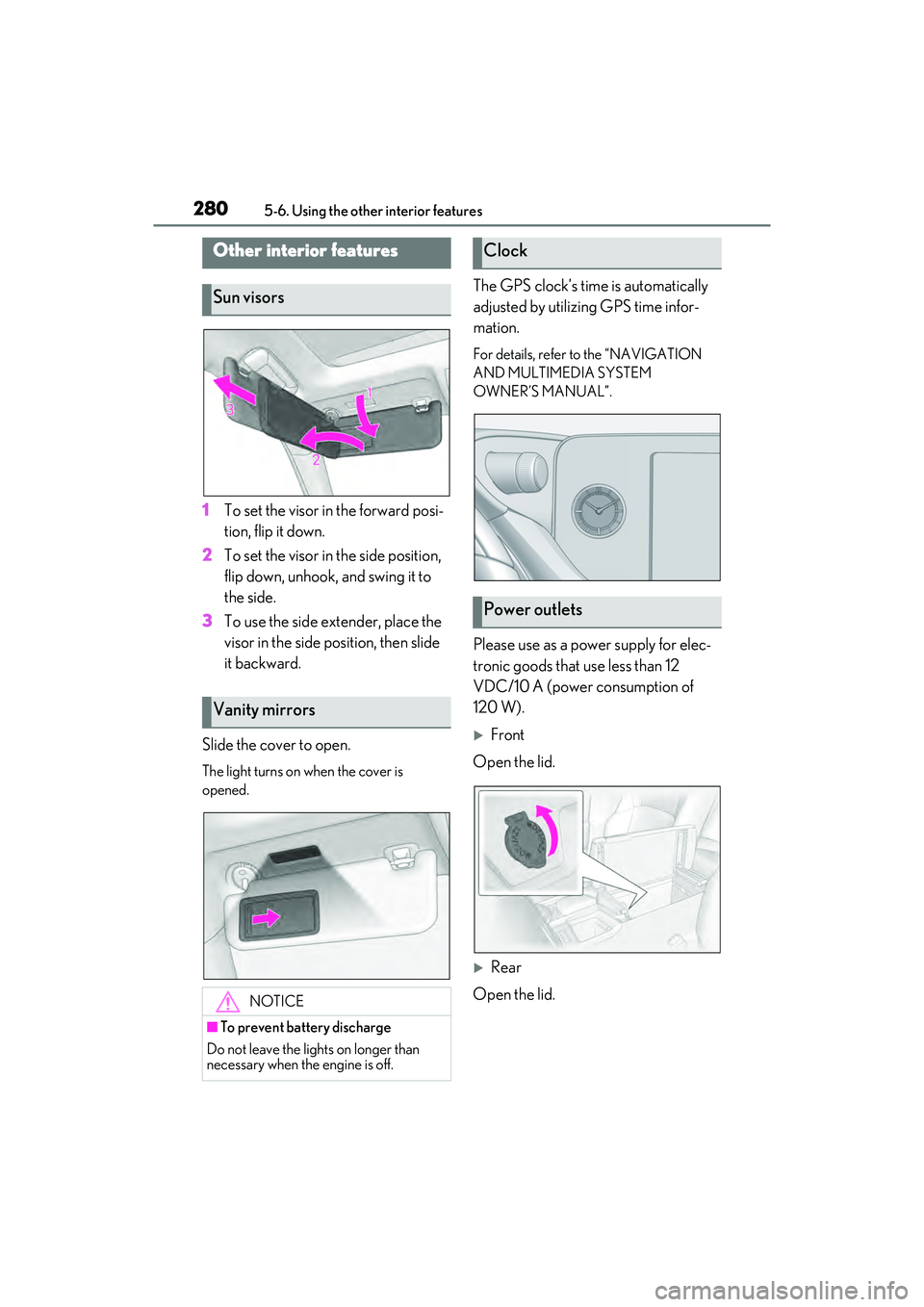
1To set the visor in the forward posi-
tion, flip it down.
2 To set the visor in the side position,
flip down, unhook, and swing it to
the side.
3 To use the side extender, place the
visor in the side position, then slide
it backward.
Slide the cover to open.
The light turns on when the cover is
opened.
The GPS clock’s time is automatically
adjusted by utilizing GPS time infor-
mation.
For details, refer to the “NAVIGATION
AND MULTIMEDIA SYSTEM
OWNER’S MANUAL”.
Please use as a power supply for elec-
tronic goods that use less than 12
VDC/10 A (power consumption of
120 W).
Front
Open the lid.
Rear
Open the lid.
Other interior features
Sun visors
Vanity mirrors
NOTICE
■To prevent battery discharge
Do not leave the lights on longer than
necessary when the engine is off.
Clock
Power outlets
Page 375 of 468
3737-2. Steps to take in an emergency
7
When trouble arises
WARNING
•TRAC
• Dynamic radar cruise control with full-speed range
• PCS (Pre-Collision System)
•EPS
• Adaptive Variable Suspension system (if equipped)
• LTA (Lane Tracing Assist)
• Panoramic view monitor (if equipped)
• Lexus parking assist monitor (if equipped)
• Intuitive parking assist (if equipped)
• Navigation system (if equipped)
• BSM (Blind Spot Monitor)
• AHB (Automatic High Beam)
Also, not only can the following system
not be utilized fully, but it may even nega-
tively affect the drive-train components:
• AWD system (if equipped)
■Speed limit when using the compact
spare tire
Do not drive at speeds in excess of 50
mph (80 km/h) when a compact spare
tire is installed on the vehicle.
The compact spare tire is not designed
for driving at high speeds. Failure to
observe this precaution may lead to an
accident causing death or serious injury.
■After using the tools and jack
Before driving, make sure all the tools
and jack are securely in place in their
storage location to reduce the possibility
of personal injury during a collision or
sudden braking.
NOTICE
■Be careful when driving over bumps
with the compact spare tire installed
on the vehicle
The vehicle becomes lower when driving
with the compact spare tire compared to
when driving with standard tires. Be
careful when driving over uneven road
surfaces.
■Driving with tire chains and the com-
pact spare tire
Do not fit tire chains to the compact
spare tire.
Tire chains may damage the vehicle
body and adversely affect driving perfor-
mance.
■When replacing the tires
When removing or fitting the wheels,
tires or the tire pressure warning valve
and transmitter, contact your Lexus
dealer as the tire pressure warning valve
and transmitter may be damaged if not
handled correctly.
Page 410 of 468
4088-2. Customization
8-2.Customization
■Changing by using the meter con-
trol switches
1 Press or to select .
2 Operate the meter control
switches to select the desired item
to be customized.
3 According to the display, select the
desired setting.
To go back to the previous screen or exit
the customize mode, press .
■Changing by using the Remote
Touch ( P.256)
1 Press the “MENU” button on the
Remote Touch.
2 Select “Setup” on the menu screen
and select “Vehicle”. 3
Select “Vehicle Customization” or
“Drive Mode Customization”.
Various setting can be changed. Refer to
the list of settings that can be changed for
details.
For details on the Remote Touch, refer
to the “NAVIGATION AND MULTI-
MEDIA SYSTEM OWNER’S MAN-
UAL”.
■During customization
Stop the vehicle in a safe place, apply the
parking brake, and shift the shift lever to P.
Also, to prevent battery discharge, leave
the engine running while customizing the
features.
Some function settings are changed simult aneously with other functions being cus-
tomized. Contact your Lexus dealer for further details.
Settings that can be chan ged using the Remote Touch
Settings that can be changed using the meter control switches
Settings that can be changed by your Lexus dealer
Customizable features
Your vehicle includes a variety of
electronic features that can be per-
sonalized to your preferences. The
settings of these features can be
changed by using the meter control
switches, the Remote Touch or at
your Lexus dealer.
Customizing vehicle features
WARNING
■During customization
As the engine needs to be running
during customization, ensure that the
vehicle is parked in a place with ade-
quate ventilation. In a closed area such as
a garage, exhaust gases including harm-
ful carbon monoxide (CO) may collect
and enter the vehicle. This may lead to
death or a serious health hazard.
NOTICE
■During customization
To prevent battery discharge, ensure
that the engine is running while custom-
izing features.
Customizable features
A
B
C
Page 443 of 468

Alphabetical index441
Current fuel consumption........................ 78
Fuel filler door .................................................169 If the fuel filler door cannot be opened......................................................................... 376
Refueling ..........................................................169
Fuel gauge ...................................................68, 71
Fuel pump shut off system........................350
Fuses ................................................................. 335
G
Garage door opener ................................. 289
Gauges .........................................................68, 71
Gear Position ................................................... 80
G-force ................................................................79
Glove box ........................................................ 277
Glove box light ..............................................277
Grocery bag hooks .................................... 279
H
Hands Free Power Trunk Lid .................. 103
Headlights ....................................................... 158 AHB (Automatic High Beam)............... 161
Light switch.................................................... 158
Replacing light bulbs................................338
Headlights aim .............................................. 337
Head restraints ................................................ 116
Head-up display.............................................. 83 Driving information display area........... 83
Driving support system display area ..85
Eco Driving Indicator .................................86
HUD (Head-up display) switch............ 84
Navigation system-linked display ........ 83
Pop-up display...............................................85
Settings .............................................................. 84
Heated steering wheel .............................. 269
Heaters Air conditioning system.......................... 262
Heated steering wheel............................ 269
Outside rear view mirrors .................... 263
Seat heaters .................................................. 269
High mounted stoplight Replacing light bulbs............................... 338
Hill-start assist control ............................... 246
Hood .................................................................. 310 Open................................................................. 310
Hooks Cargo hooks................................................ 279
Coat hooks .................................................. 288
Grocery bag hooks.................................. 279
Retaining hooks (floor mat) ..................... 22
Horn ..................................................................... 119
HUD (Head-up display) switch................ 84
I
I/M test ............................................................ 307
Identification Engine............................................................. 389
Vehicle ........................................................... 388
Ignition switch (engine switch).................144 Auto power off function............................147
Changing the engine switch modes ..147
If your vehicle has to be stopped in an emergency................................................. 344
Starting the engine ......................................144
Immobilizer system........................................ 59
Indicators ........................................................... 66
Initialization Items to initialize .......................................... 419
Maintenance......................................303, 315
Power windows............................................123
Tire pressure warning system ............. 324
Inside rear view mirror ................................. 119
Instrument panel light control ........... 70, 75
Interior lights.................................................. 273
Intuitive parking assist........................215, 216 Function ............................................................216
Warning message ...................................... 218
J
JackPositioning a floor jack ............................. 310
Vehicle-equipped jack .......................... 366
Page 445 of 468
Alphabetical index443
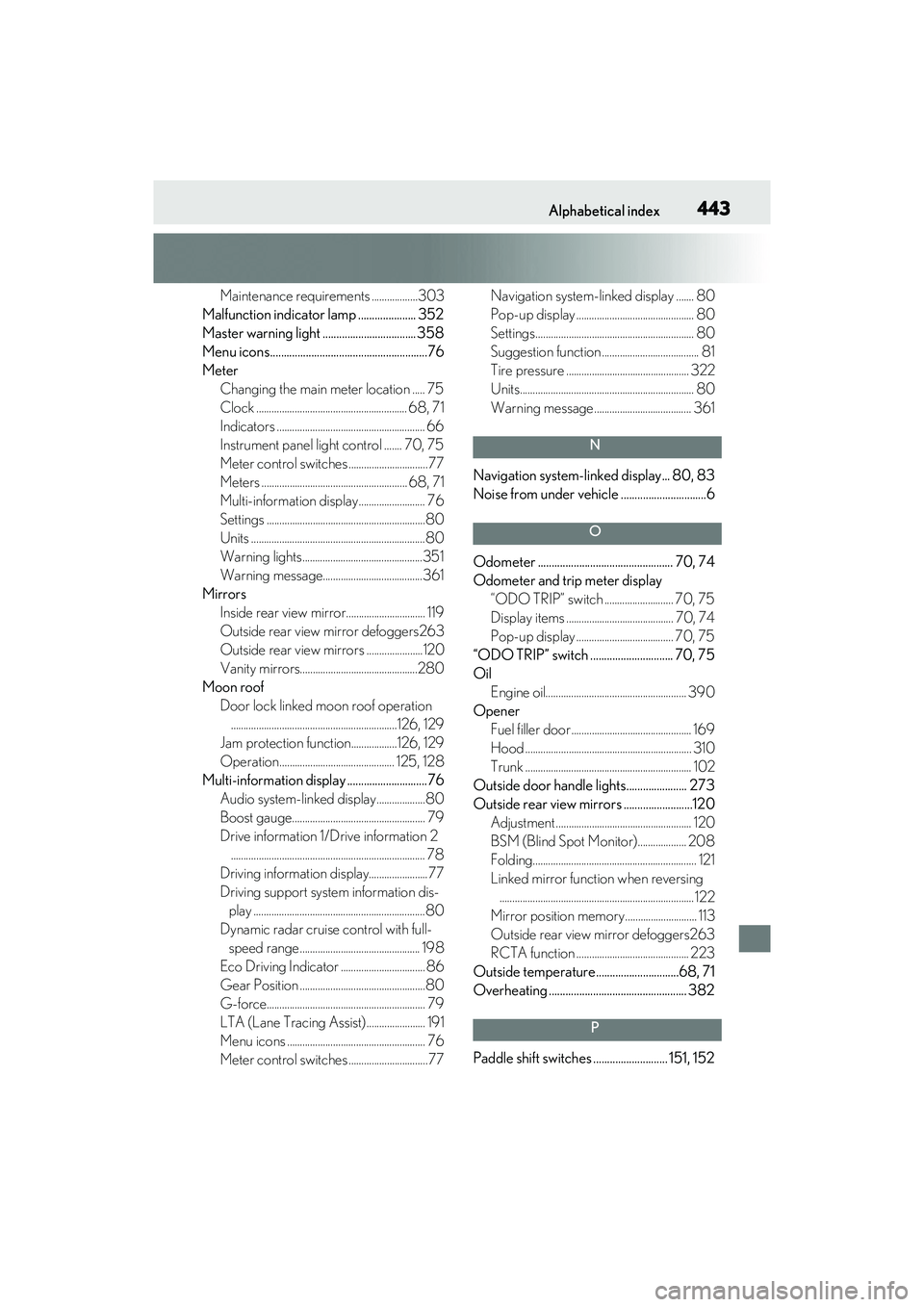
Maintenance requirements ..................303
Malfunction indicator lamp ..................... 352
Master warning light ..................................358
Menu icons.........................................................76
Meter Changing the main meter location ..... 75
Clock ........................................................... 68, 71
Indicators .......................................................... 66
Instrument panel light control ....... 70, 75
Meter control switches ...............................77
Meters ......................................................... 68, 71
Multi-information display.......................... 76
Settings ..............................................................80
Units ....................................................................80
Warning lights...............................................351
Warning message.......................................361
Mirrors Inside rear view mirror............................... 119
Outside rear view mirror defoggers263
Outside rear view mirrors ......................120
Vanity mirrors..............................................280
Moon roof Door lock linked moon roof operation.................................................................126, 129
Jam protection function..................126, 129
Operation............................................. 125, 128
Multi-information display .............................76 Audio system-linked display...................80
Boost gauge.................................................... 79
Drive information 1/Drive information 2............................................................................ 78
Driving information display.......................77
Driving support system information dis- play ...................................................................80
Dynamic radar cruise control with full- speed range ............................................... 198
Eco Driving Indicator .................................86
Gear Position .................................................80
G-force.............................................................. 79
LTA (Lane Tracing Assist)....................... 191
Menu icons ...................................................... 76
Meter control switches ...............................77 Navigation system-linked display ....... 80
Pop-up display .............................................. 80
Settings.............................................................. 80
Suggestion function ...................................... 81
Tire pressure ................................................ 322
Units.................................................................... 80
Warning message ...................................... 361
N
Navigation system-linked display... 80, 83
Noise from under vehicle ...............................6
O
Odometer ................................................. 70, 74
Odometer and trip meter display
“ODO TRIP” switch ........................... 70, 75
Display items .......................................... 70, 74
Pop-up display ...................................... 70, 75
“ODO TRIP” switch .............................. 70, 75
Oil Engine oil....................................................... 390
Opener Fuel filler door ............................................... 169
Hood ................................................................. 310
Trunk ................................................................. 102
Outside door handle lights...................... 273
Outside rear view mirrors .........................120 Adjustment ..................................................... 120
BSM (Blind Spot Monitor)................... 208
Folding................................................................ 121
Linked mirror function when reversing............................................................................122
Mirror position memory............................ 113
Outside rear view mirror defoggers263
RCTA function ............................................ 223
Outside temperature..............................68, 71
Overheating .................................................. 382
P
Paddle shift switches ........................... 151, 152
Page 451 of 468
Alphabetical index449
For information regarding the equipment listed below, refer to
the “NAVIGATION AND MUL-
TIMEDIA SYSTEM OWNER’S
MANUAL”.
· Audio/video system
· Navigation system
· Lexus parking assist monitor
· Panoramic view monitor
· Lexus Enform