parking brake LEXUS ES350 2022 Owners Manual
[x] Cancel search | Manufacturer: LEXUS, Model Year: 2022, Model line: ES350, Model: LEXUS ES350 2022Pages: 468, PDF Size: 26.96 MB
Page 5 of 468
3TABLE OF CONTENTS
1
2
3
4
5
6
7
8
9
Automatic transmission ..............149
Turn signal lever............................. 153
Parking brake ................................. 154
Brake Hold....................................... 156
4-3. Operating the lights and wipers Headlight switch ............................ 158
AHB (Automatic High Beam) .. 161
Windshield wipers and washer 164
4-4. Refueling Opening the fuel tank cap ......... 169
4-5. Using the driving support systems Lexus Safety System + 2.5 ......... 171
PCS (Pre-Collision System)..... 176
LTA (Lane Tracing Assist)......... 186
RSA (Road Sign Assist) .............. 195
Dynamic radar cruise control with full-speed range .......................... 198
BSM (Blind Spot Monitor) ....... 208
Driving Mode Select switch ..... 213
PKSA (Parking Support Alert) 215
Intuitive parking assist ................. 216
RCTA (Rear cross traffic alert) function .......................................... 223
RCD (Rear Camera Detection) function .......................................... 229
PKSB (Parking Support Brake) ........................................................... 232
Parking Support Brake function (static objects) ............................ 239
Parking Support Brake function (rear-crossing vehicles).......... 242
Parking Support Brake function (rear pedestrians) ..................... 244
Driving assist systems ................. 246
4-6. Driving tips Winter driving tips ........................ 2515-1. Remote Touch/Display
Remote Touch............................... 256
Center Display.............................. 258
5-2. Lexus Climate Concierge Lexus Climate Concierge........ 260
5-3. Using the air conditioning system Automatic air conditioning system...........................................................262
Heated steering wheel/seat heat- ers/seat ventilators................... 269
5-4. Using the interior lights Interior lights list ........................... 273
5-5. Using the storage features List of storage features .............. 276
Trunk features ............................... 279
5-6. Using the other interior features Other interior features .............. 280
Garage door opener ................. 289
Compass ......................................... 294
6-1. Maintenance and care Cleaning and protecting the vehi-cle exterior................................... 298
Cleaning and protecting the vehi- cle interior ..................................... 301
6-2. Maintenance Maintenance requirements ..... 303
General maintenance................ 304
Emission inspection and mainte- nance (I/M) programs ............ 3075Interior features
6Maintenance and care
Page 17 of 468
15Pictorial index
Parking brake switch ............................................................................................. P.154
Applying/releasing ........................................................................................................... P.154
Precautions against winter season ............................................................................ P.252
Warning buzzer/message ........................................................................P.155, 351, 362
Turn signal lever ......................................................................................................P.153
Headlight switch......................................................................................................P.158
Headlights/parking lights/tail lights/daytime running lights ........................... P.158
AHB (Automatic High Beam)........................................................................................ P.161
Windshield wiper and washer switch ................................................................ P.164
Usage.......................................................................................................................................P.164
Adding washer fluid .......................................................................................................... P. 319
Warning messages ................................................................................................ P.319, 362
Emergency flasher switch ...................................................................................P.344
Hood lock release lever........................................................................................P.310
Tilt and telescopic steering control switch
*1/tilt and telescopic steering lock
release lever
*1........................................................................................................... P.118
Adjustment ..................................................................................................................... ........P.118
Driving position memory
*1............................................................................................... P.113
Air conditioning system .......................................................................................P.262
Usage..................................................................................................................................... P.262
Rear window defogger................................................................................................... P.263
Audio system
*2
Trunk opener main switch .................................................................................... P.106
*1: If equipped
*2: Refer to “NAVIGATION AND MULTIMEDIA SYSTEM OWNER’S MANUAL”.
E
F
G
H
I
J
K
L
M
Page 67 of 468
652-1. Instrument cluster
2
Vehicle status information and indicators
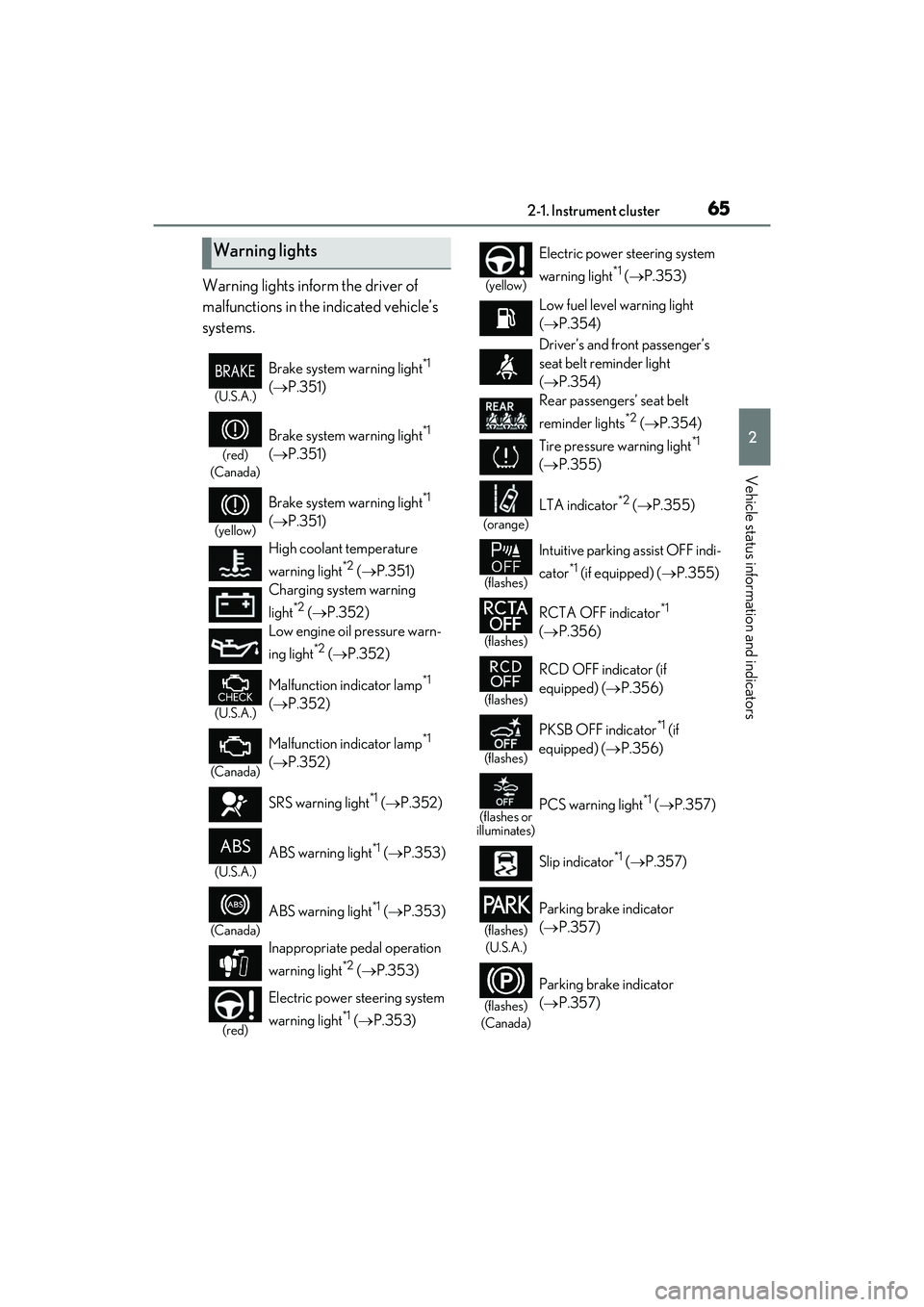
Warning lights inform the driver of
malfunctions in the indicated vehicle’s
systems.
Warning lights
(U.S.A.)
Brake system warning light*1
( P.351)
(red)
(Canada)
Brake system warning light*1
( P.351)
(yellow)
Brake system warning light*1
( P.351)
High coolant temperature
warning light
*2 ( P.351)
Charging system warning
light
*2 ( P.352)
Low engine oil pressure warn-
ing light
*2 ( P.352)
(U.S.A.)
Malfunction indicator lamp*1
( P.352)
(Canada)
Malfunction indicator lamp*1
( P.352)
SRS warning light
*1 ( P.352)
(U.S.A.)
ABS warning light*1 ( P.353)
(Canada)
ABS warning light*1 ( P.353)
Inappropriate pedal operation
warning light
*2 ( P.353)
(red)
Electric power steering system
warning light
*1 ( P.353)
(yellow)
Electric power steering system
warning light
*1 ( P.353)
Low fuel level warning light
( P.354)
Driver’s and front passenger’s
seat belt reminder light
( P.354)
Rear passengers’ seat belt
reminder lights
*2 ( P.354)
Tire pressure warning light
*1
( P.355)
(orange)
LTA indicator*2 ( P.355)
(flashes)
Intuitive parking assist OFF indi-
cator
*1 (if equipped) ( P.355)
(flashes)
RCTA OFF indicator*1
( P.356)
(flashes)
RCD OFF indicator (if
equipped) ( P.356)
(flashes)
PKSB OFF indicator*1 (if
equipped) ( P.356)
(flashes or
illuminates)PCS warning light*1 ( P.357)
Slip indicator
*1 ( P.357)
(flashes)
(U.S.A.)
Parking brake indicator
( P.357)
(flashes)
(Canada)
Parking brake indicator
( P.357)
Page 68 of 468
662-1. Instrument cluster
*1: These lights come on when the engine switch is turned to IGNITION ON
mode to indicate that a system check is
being performed. They will turn off after
the engine is started, or after a few sec-
onds. There may be a malfunction in a
system if the lights do not come on, or
turn off. Have the vehicle inspected by
your Lexus dealer.
*2: This light illuminates on the multi-infor-mation display.
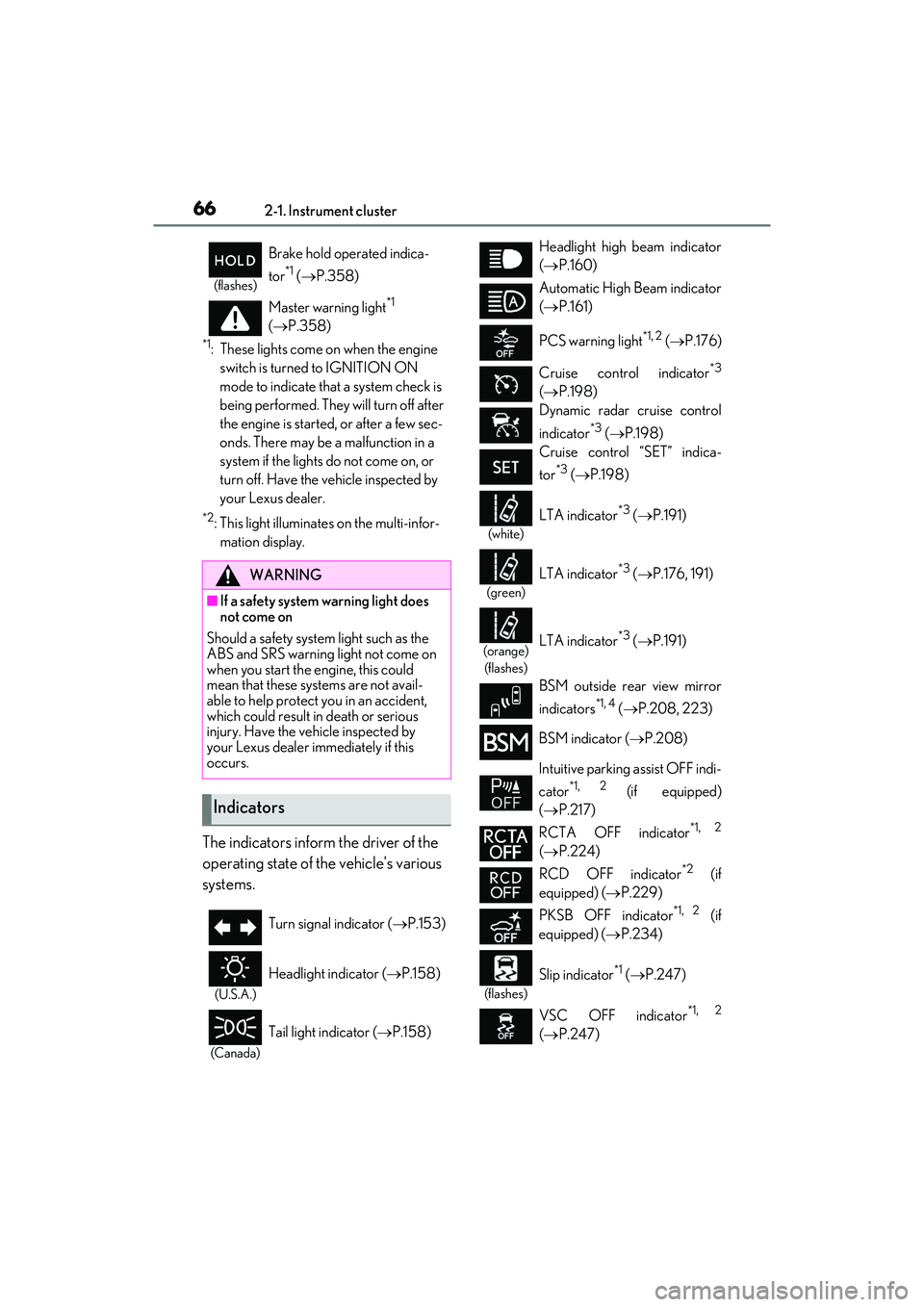
The indicators inform the driver of the
operating state of the vehicle’s various
systems.
(flashes)
Brake hold operated indica-
tor
*1 ( P.358)
Master warning light
*1
( P.358)
WARNING
■If a safety system warning light does
not come on
Should a safety system light such as the
ABS and SRS warning light not come on
when you start the engine, this could
mean that these systems are not avail-
able to help protect you in an accident,
which could result in death or serious
injury. Have the vehicle inspected by
your Lexus dealer immediately if this
occurs.
Indicators
Turn signal indicator ( P.153)
(U.S.A.)
Headlight indicator ( P.158)
(Canada)
Tail light indicator ( P.158)
Headlight high beam indicator
( P.160)
Automatic High Beam indicator
( P.161)
PCS warning light
*1, 2 ( P.176)
Cruise control indicator
*3
( P.198)
Dynamic radar cruise control
indicator
*3 ( P.198)
Cruise control “SET” indica-
tor
*3 ( P.198)
(white)
LTA indicator*3 ( P.191)
(green)
LTA indicator*3 ( P.176, 191)
(orange)
(flashes)LTA indicator*3 ( P.191)
BSM outside rear view mirror
indicators
*1, 4 ( P.208, 223)
BSM indicator ( P.208)
Intuitive parking assist OFF indi-
cator
*1, 2 (if equipped)
( P.217)
RCTA OFF indicator
*1, 2
( P.224)
RCD OFF indicator
*2 (if
equipped) ( P.229)
PKSB OFF indicator
*1, 2 (if
equipped) ( P.234)
(flashes)
Slip indicator*1 ( P.247)
VSC OFF indicator
*1, 2
( P.247)
Page 69 of 468
672-1. Instrument cluster
2
Vehicle status information and indicators
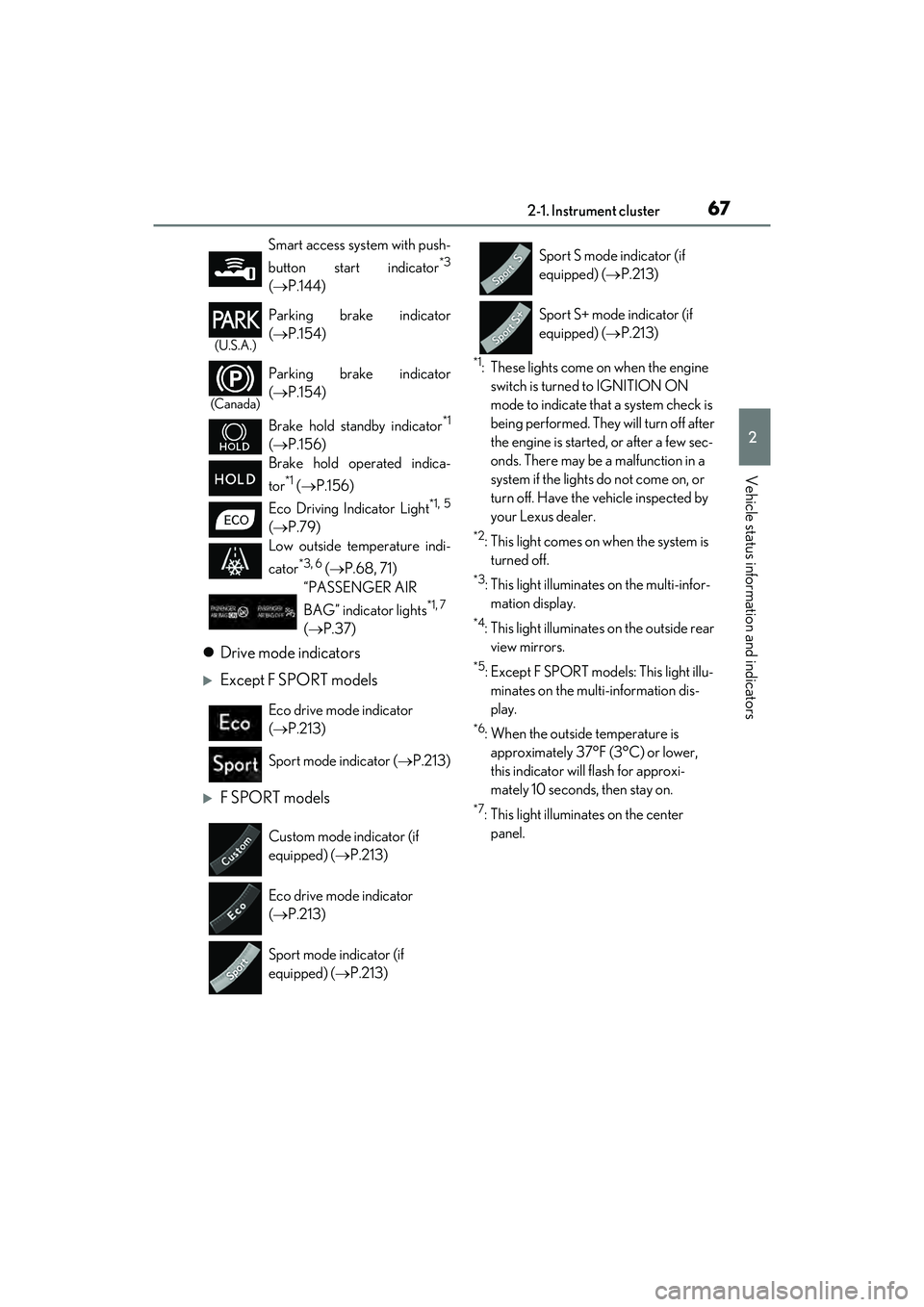
Drive mode indicators
Except F SPORT models
F SPORT models
*1: These lights come on when the engine
switch is turned to IGNITION ON
mode to indicate that a system check is
being performed. They will turn off after
the engine is started, or after a few sec-
onds. There may be a malfunction in a
system if the lights do not come on, or
turn off. Have the vehicle inspected by
your Lexus dealer.
*2: This light comes on when the system is turned off.
*3: This light illuminates on the multi-infor-mation display.
*4: This light illuminates on the outside rear view mirrors.
*5: Except F SPORT models: This light illu-minates on the multi-information dis-
play.
*6: When the outside temperature is approximately 37°F (3°C) or lower,
this indicator will flash for approxi-
mately 10 seconds, then stay on.
*7: This light illuminates on the center panel.
Smart access system with push-
button start indicator
*3
(
P.144)
(U.S.A.)
Parking brake indicator
( P.154)
(Canada)
Parking brake indicator
( P.154)
Brake hold standby indicator
*1
( P.156)
Brake hold operated indica-
tor
*1 ( P.156)
Eco Driving Indicator Light
*1, 5
( P.79)
Low outside temperature indi-
cator
*3, 6 ( P.68, 71)
“PASSENGER AIR
BAG” indicator lights
*1, 7
( P.37)
Eco drive mode indicator
( P.213)
Sport mode indicator ( P.213)
Custom mode indicator (if
equipped) ( P.213)
Eco drive mode indicator
( P.213)
Sport mode indicator (if
equipped) ( P.213)
Sport S mode indicator (if
equipped) ( P.213)
Sport S+ mode indicator (if
equipped) ( P.213)
Page 88 of 468
862-1. Instrument cluster
message or the operating state of a rel-
evant system.
PCS (Pre-Collision System)
( P.176)
Intuitive parking assist (if equipped)
( P.216)
Parking Support Brake function
(static objects) (if equipped)
( P.239)
Brake Override System ( P.134)
Drive-Start Control ( P.139)
Details of content displayed on the head-
up display may differ from that displayed
on the multi-information display. For
details, refer to the explanation of each sys-
tem.
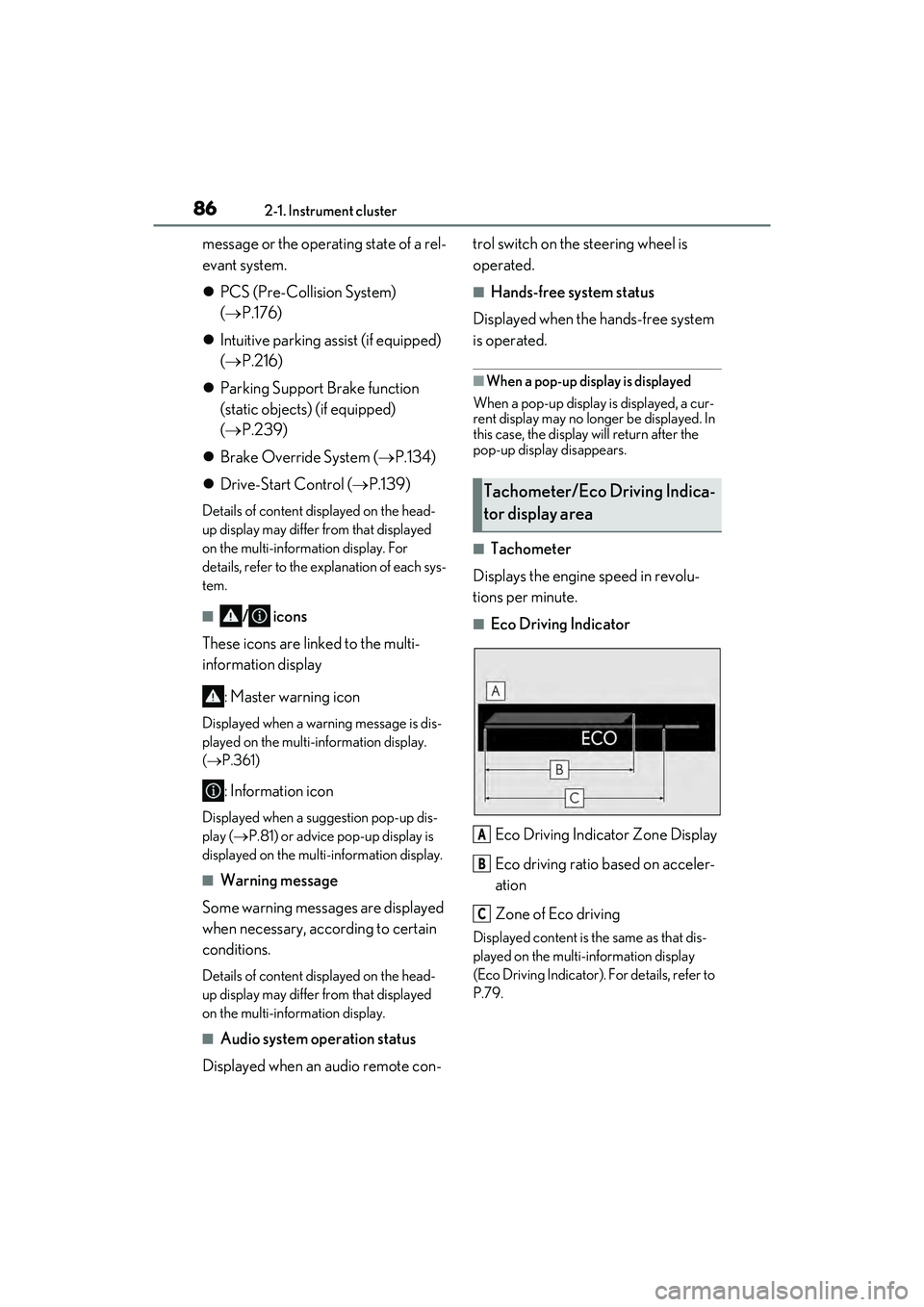
■/ icons
These icons are linked to the multi-
information display
: Master warning icon
Displayed when a warning message is dis-
played on the multi-information display.
( P.361)
: Information icon
Displayed when a suggestion pop-up dis-
play ( P.81) or advice pop-up display is
displayed on the multi-information display.
■Warning message
Some warning messages are displayed
when necessary, according to certain
conditions.
Details of content displayed on the head-
up display may differ from that displayed
on the multi-information display.
■Audio system operation status
Displayed when an audio remote con- trol switch on the steering wheel is
operated.
■Hands-free system status
Displayed when the hands-free system
is operated.
■When a pop-up display is displayed
When a pop-up display is displayed, a cur-
rent display may no longer be displayed. In
this case, the display will return after the
pop-up display disappears.
■Tachometer
Displays the engine speed in revolu-
tions per minute.
■Eco Driving Indicator
Eco Driving Indicator Zone Display
Eco driving ratio based on acceler-
ation
Zone of Eco driving
Displayed content is the same as that dis-
played on the multi-information display
(Eco Driving Indicator). For details, refer to
P.79.
Tachometer/Eco Driving Indica-
tor display area
A
B
C
Page 135 of 468
133
4
4
Driving
Driving
4-1. Before drivingDriving the vehicle ..................... 134
Cargo and luggage ................... 140
Vehicle load limits ...................... 142
Trailer towing ............................... 142
Dinghy towing ............................. 143
4-2. Driving procedures Engine (ignition) switch ........... 144
Automatic transmission ........... 149
Turn signal lever.......................... 153
Parking brake .............................. 154
Brake Hold.................................... 156
4-3. Operating the lights and wipers Headlight switch ......................... 158
AHB (Automatic High Beam) 161
Windshield wipers and washer ......................................................... 164
4-4. Refueling
Opening the fuel tank cap ...... 169
4-5. Using the driving support sys- tems
Lexus Safety System + 2.5 ...... 171
PCS (Pre-Collision System).. 176
LTA (Lane Tracing Assist)...... 186
RSA (Road Sign Assist) ........... 195
Dynamic radar cruise control with full-speed range ....................... 198
BSM (Blind Spot Monitor) .... 208
Driving Mode Select switch .. 213PKSA (Parking Support Alert)
........................................................ 215
Intuitive parking assist .............. 216
RCTA (Rear cross traffic alert) function....................................... 223
RCD (Rear Camera Detection) function....................................... 229
PKSB (Parking Support Brake) ....................................................... 232
Parking Support Brake function (static objects) ......................... 239
Parking Support Brake function (rear-crossing vehicles) ....... 242
Parking Support Brake function (rear pedestrians) .................. 244
Driving assist systems.............. 246
4-6. Driving tips Winter driving tips ..................... 251
Page 136 of 468

1344-1. Before driving
4-1. Be fore driving
■Starting the engine
P.144
■Driving
1 With the brake pedal depressed,
shift the shift lever to D. ( P.150)
2 If the parking brake is in manual
mode, release the parking brake.
( P.154)
3 Gradually release the brake pedal
and gently depress the accelerator
pedal to accelerate the vehicle.
■Stopping
1 With the shift lever in D, depress
the brake pedal.
2 If necessary, set the parking brake.
If the vehicle is to be stopped for an
extended period of time, shift the shift lever
to P or N. ( P.150)
■Parking the vehicle
1 With the shift lever in D, depress
the brake pedal.
2 Set the parking brake ( P.154),
and shift the shift lever to P
( P.150).
3 Press the engine switch to stop the
engine.
4 Lock the door, making sure that
you have the electronic key on your
person.
If parking on a hill, block the wheels as
needed.
■Starting off on a steep uphill
1 Make sure that the parking brake is
set with the brake pedal depressed,
and then shift the shift lever to D.
2 Release the brake pedal and gently
depress the accelerator pedal.
3 Release the parking brake.
■When starting off on a uphill
The hill-start assist control will activate.
( P.246)
■Driving in the rain
●Drive carefully when it is raining, because
visibility will be reduced, the windows
may become fogged-up, and the road
will be slippery.
●Drive carefully when it starts to rain,
because the road surface will be espe-
cially slippery.
●Refrain from high speeds when driving on
an expressway in the rain, because there
may be a layer of water between the tires
and the road surface, preventing the
steering and brakes from operating
properly.
■Engine speed while driving
In the following conditions, the engine
speed may become high while driving. This
is due to automatic up-shifting control or
down-shifting implementation to meet driv-
ing conditions. It does not indicate sudden
acceleration.
●The vehicle is judged to be driving uphill
or downhill
●When the accelerator pedal is released
●When the brake pedal is firmly or quickly
depressed
■Restraining the engine output (Brake
Override System)
●When the accelerator and brake pedals
are depressed at the same time, the
engine output may be restrained.
Driving the vehicle
The following procedures should be
observed to ensure safe driving:
Driving procedure
Page 139 of 468
1374-1. Before driving
4
Driving
WARNING
■If you hear a squealing or scraping
noise (brake pad wear limit indica-
tors)
Have the brake pads checked and
replaced by your Lexus dealer as soon as
possible. Rotor damage may result if the
pads are not replaced when needed. It is
dangerous to drive the vehicle when the
wear limits of the brake pads and/or
those of the brake discs are exceeded.
■When the vehicle is stopped
●Do not race the engine.
If the vehicle is in any gear other than P
or N, the vehicle may accelerate sud-
denly and unexpectedly, causing an
accident.
●In order to prevent accidents due to
the vehicle rolling away, always keep
depressing the brake pedal while the
engine is running, and apply the park-
ing brake as necessary.
●If the vehicle is stopped on an incline,
in order to prevent accidents caused
by the vehicle rolling forward or back-
ward, always depress the brake pedal
and securely apply the parking brake
as needed.
●Avoid revving or racing the engine.
Running the engine at high speed
while the vehicle is stopped may cause
the exhaust system to overheat, which
could result in a fire if combustible
material is nearby.
■When the vehicle is parked
●Do not leave glasses, cigarette light-
ers, spray cans, or soft drink cans in the
vehicle when it is in the sun.
Doing so may result in the following:
• Gas may leak from a cigarette lighter or spray can, and may lead to a fire.
• The temperature inside the vehicle may cause the plastic lenses and plas-
tic material of glasses to deform or
crack.
• Soft drink cans may fracture, causing the contents to spray over the interior
of the vehicle, and may also cause a
short circuit in the vehicle’s electrical
components.
●Do not leave cigarette lighters in the
vehicle. If a cigarette lighter is in a
place such as the glove box or on the
floor, it may be lit accidentally when
luggage is loaded or the seat is
adjusted, causing a fire.
●Do not attach adhesive discs to the
windshield or windows. Do not place
containers such as air fresheners on
the instrument panel or dashboard.
Adhesive discs or containers may act
as lenses, causing a fire in the vehicle.
●Do not leave a door or window open if
the curved glass is coated with a met-
allized film such as a silver-colored
one. Reflected sunlight may cause the
glass to act as a lens, causing a fire.
●Always apply the parking brake, shift
the shift lever to P, stop the engine and
lock the vehicle.
Do not leave the vehicle unattended
while the engine is running.
If the vehicle is parked with the shift
lever in P but the parking brake is not
set, the vehicle may start to move, pos-
sibly leading to an accident.
●Do not touch the exhaust pipes while
the engine is running or immediately
after turning the engine off.
Doing so may cause burns.
Page 140 of 468
1384-1. Before driving
WARNING
■When taking a nap in the vehicle
Always turn the engine off. Otherwise, if
you accidentally move the shift lever or
depress the accelerator pedal, this could
cause an accident or fire due to engine
overheating. Additionally, if the vehicle is
parked in a poorly ventilated area,
exhaust gases may collect and enter the
vehicle, leading to death or a serious
health hazard.
■When braking
●When the brakes are wet, drive more
cautiously.
Braking distance increases when the
brakes are wet, and this may cause
one side of the vehicle to brake differ-
ently than the other side. Also, the
parking brake may not securely hold
the vehicle.
●If the brake booster device does not
operate, do not follow other vehicles
closely and avoid hills or sharp turns
that require braking.
In this case, braking is still possible, but
the brake pedal should be depressed
more firmly than usual. Also, the brak-
ing distance will in crease. Have your
brakes fixed immediately.
●Do not pump the brake pedal if the
engine stalls.
Each push on the brake pedal uses up
the reserve for the power-assisted
brakes.
●The brake system consists of 2 individ-
ual hydraulic systems; if one of the sys-
tems fails, the other will still operate. In
this case, the brake pedal should be
depressed more firmly than usual and
the braking distance will increase.
Have your brakes fixed immediately.
■If the vehicle becomes stuck (AWD
models)
Do not spin the wheels excessively when
any of the tires is up in the air, or the vehi-
cle is stuck in sand, mud, etc. This may
damage the driveline components or
propel the vehicle forward or backward,
causing an accident.
NOTICE
■When driving the vehicle
●Do not depress the accelerator and
brake pedals at the same time while
driving, as this may restrain the engine
output.
●Do not use the accelerator pedal or
depress the accelerator and brake
pedals at the same time to hold the
vehicle on a hill.
■Avoiding damage to vehicle parts
●Do not turn the steering wheel fully in
either direction and hold it there for an
extended period of time.
Doing so may damage the power
steering motor.
●When driving over bumps in the road,
drive as slowly as possible to avoid
damaging the wheels, underside of the
vehicle, etc.
■If you get a flat tire while driving
A flat or damaged tire may cause the fol-
lowing situations. Hold the steering
wheel firmly and gradually depress the
brake pedal to slow down the vehicle.
●It may be difficult to control your vehi-
cle.
●The vehicle will make abnormal
sounds or vibrations.
●The vehicle will lean abnormally.
Information on what to do in case of a flat
tire ( P.365)