spare LEXUS ES350 2022 Owners Manual
[x] Cancel search | Manufacturer: LEXUS, Model Year: 2022, Model line: ES350, Model: LEXUS ES350 2022Pages: 468, PDF Size: 26.96 MB
Page 8 of 468
6
Please note that this manual applies to
all models and explains all equipment,
including options. Therefore, you may
find explanations for equipment not
installed on your vehicle and the illus-
trations used may differ from your vehi-
cle.
All specifications provided in this man-
ual are current at the time of printing.
Over time, your vehicle may receive
updates that modify the vehicle and
make material in this manual incom-
plete and/or inaccurate. Because of
Lexus’ interest in continual product
improvement, Lexus reserves the right
to make changes to this manual at any
time without notice.
If Lexus chooses to update the manual,
updated versions can be viewed by
selecting your vehicle by model and
year at the following URL or on your
mobile device if you have access to the
Lexus app.
https://drivers.lexus.com
Approximately five hours after the
engine is turned off, you may hear
sound coming from under the vehicle
for several minutes. This is the sound of
a fuel evaporation leakage check and,
it does not indicate a malfunction.A wide variety of non-genuine spare
parts and accessories for Lexus vehi-
cles are currently available in the mar-
ket. You should know that Toyota does
not warrant these products and is not
responsible for their performance,
repair, or replacement, or for any dam-
age they may cause to, or adverse
effect they may have on, your Lexus
vehicle.
This vehicle should not be modified
with non-genuine Lexus products.
Modification with non-genuine Lexus
products could affect its performance,
safety or durability, and may even vio-
late governmental regulations. In addi-
tion, damage or performance
problems resulting from the modifica-
tion may not be covered under war-
ranty.
Also, remodeling like this will have an
effect on advanced safety equipment
such as Lexus Safety System + 2.5 and
there is a danger that it will not work
properly or the danger that it may work
in situations where it should not be
working.
The installation of a mobile two-way
radio system in your vehicle could
affect electronic systems such as:
Multiport fuel injection sys-
tem/sequential multiport fuel injec-
For your information
Main Owner’s Manual
Noise from under vehicle after
turning off the engine
Accessories, spare parts and
modification of your Lexus
Installation of a mobile two-way
radio system
Page 107 of 468
1053-2. Opening, closing and locking the doors and trunk
3
Before driving
the trunk lid.
●If the spare electronic key is put in the
trunk with all the doors locked, the key
confinement prevention function is acti-
vated so the trunk can be opened. In
order to prevent theft, take all electronic
keys with you when leaving the vehicle.
●If the electronic key is put in the trunk
with all the doors locked, the key may not
be detected depending on the location of
the key and the surrounding radio wave
conditions. In this case, the key confine-
ment prevention function cannot be acti-
vated, causing the doors to lock when the
trunk is closed. Make sure to check
where the key is before closing the trunk.
●The key confinement prevention function
cannot be activated if any one of the
doors is unlocked. In this case, open the
trunk using the trunk opener.
■Overload protection function (vehicles
with power trunk lid)
The trunk lid will not operate when exces-
sive load is present on the top of the trunk
lid.
■Fall-down protection function (vehicles
with power trunk lid)
While the trunk lid is opening automatically,
applying excessive force to it will stop the
opening operation to prevent the trunk lid
from rapidly falling down.
■Jam protection function (vehicles with
power trunk lid)
While the trunk lid is closing automatically,
the trunk lid will stop closing and open if
something gets caught.
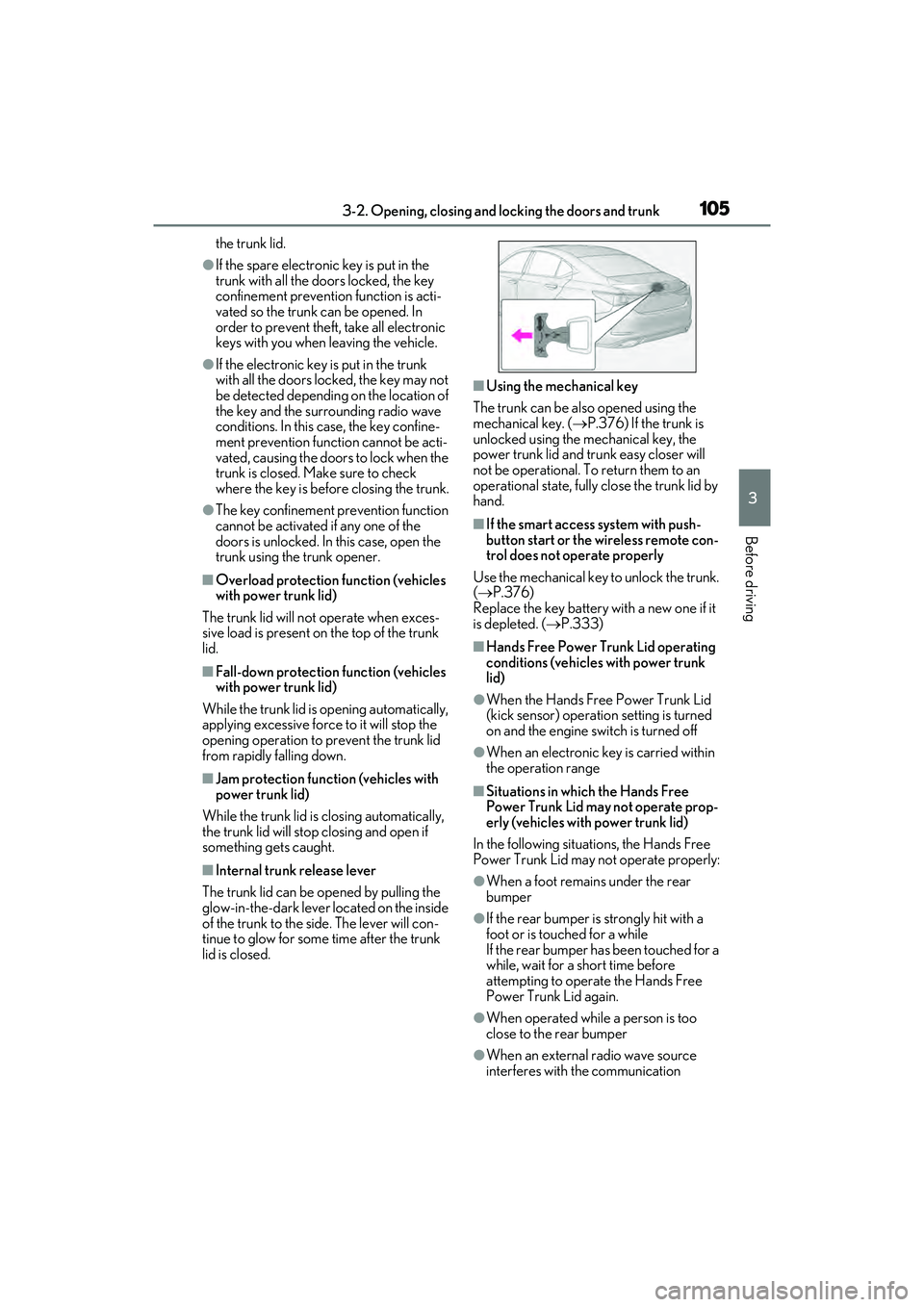
■Internal trunk release lever
The trunk lid can be opened by pulling the
glow-in-the-dark lever located on the inside
of the trunk to the side. The lever will con-
tinue to glow for some time after the trunk
lid is closed.
■Using the mechanical key
The trunk can be also opened using the
mechanical key. ( P.376) If the trunk is
unlocked using the mechanical key, the
power trunk lid and trunk easy closer will
not be operational. To return them to an
operational state, fully close the trunk lid by
hand.
■If the smart access system with push-
button start or the wireless remote con-
trol does not operate properly
Use the mechanical key to unlock the trunk.
( P.376)
Replace the key battery with a new one if it
is depleted. ( P.333)
■Hands Free Power Trunk Lid operating
conditions (vehicles with power trunk
lid)
●When the Hands Free Power Trunk Lid
(kick sensor) operation setting is turned
on and the engine sw itch is turned off
●When an electronic key is carried within
the operation range
■Situations in which the Hands Free
Power Trunk Lid may not operate prop-
erly (vehicles with power trunk lid)
In the following situations, the Hands Free
Power Trunk Lid may not operate properly:
●When a foot remains under the rear
bumper
●If the rear bumper is strongly hit with a
foot or is touched for a while
If the rear bumper has been touched for a
while, wait for a short time before
attempting to operate the Hands Free
Power Trunk Lid again.
●When operated while a person is too
close to the rear bumper
●When an external radio wave source
interferes with the communication
Page 113 of 468
1113-2. Opening, closing and locking the doors and trunk
3
Before driving
■To operate the system properly
●Make sure to carry the electronic key
when operating the system. Do not get
the electronic key too close to the vehicle
when operating the system from the out-
side of the vehicle.
Depending on the position and holding
condition of the electronic key, the key
may not be detected correctly and the
system may not operate properly. (The
alarm may go off accidentally, or the door
lock prevention function may not oper-
ate.)
●Do not leave the electronic key inside the
trunk.
The key confinement prevention function
may not operate, depending on the loca-
tion of the key (close to a spare tire, the
inside edge of the trunk), conditions
(inside a metal bag, close to metallic
objects) and the radio waves in the sur-
rounding area. (P.104)
■If an electronic key does not work prop-
erly
●If the doors cannot be locked or
unlocked and the trunk cannot be
opened, perform the following.
• Bring the electronic key close to the door
handle and perform a lock or unlock
operation.
• Bring the electronic key close to the but-
ton on the trunk ( P.103) and press the
button.
• Use the wireless remote control.
If the doors cannot be locked or unlocked
by perform the above, use the mechanical
key. ( P.376)
For Canada: However, if the mechanical
key is used while the alarm system is set, the
warning will sound. ( P.60)
●If the engine cannot be started, refer to
P.378
■Customization
Settings (e. g. smart access system with
push-button start) can be changed.
(Customizable features: P.408)
If the smart access system with push-button
start has been deactivated in a customized
setting, refer to the explanations for the fol- lowing operations.
●Locking and unlocking the doors and
opening the trunk:
Use the wireless remote control or
mechanical key. (
P.96, 103, 376)
●Starting the engine and changing engine
switch modes: P.378
●Stopping the engine: P.146
WARNING
■Caution regarding interference with
electronic devices
●People with implantable cardiac pace-
makers, cardiac resynchronization
therapy-pacemakers or implantable
cardioverter defibrillators should keep
away from the smart access system
with push-button start antennas.
( P.107)
The radio waves may affect the opera-
tion of such devices. If necessary, the
entry function can be disabled. Ask
your Lexus dealer for details, such as
the frequency of radio waves and tim-
ing of the emitted radio waves. Then,
consult your doctor to see if you
should disable the entry function.
●Users of any electrical medical device
other than implantable cardiac pace-
makers, cardiac resynchronization
therapy-pacemakers or implantable
cardioverter defibrillators should con-
sult the manufacturer of the device for
information about its operation under
the influence of radio waves.
Radio waves could have unexpected
effects on the operation of such medi-
cal devices.
Ask your Lexus dealer for details on dis-
abling the entry function.
Page 174 of 468
1724-5. Using the driving support systems
WARNING
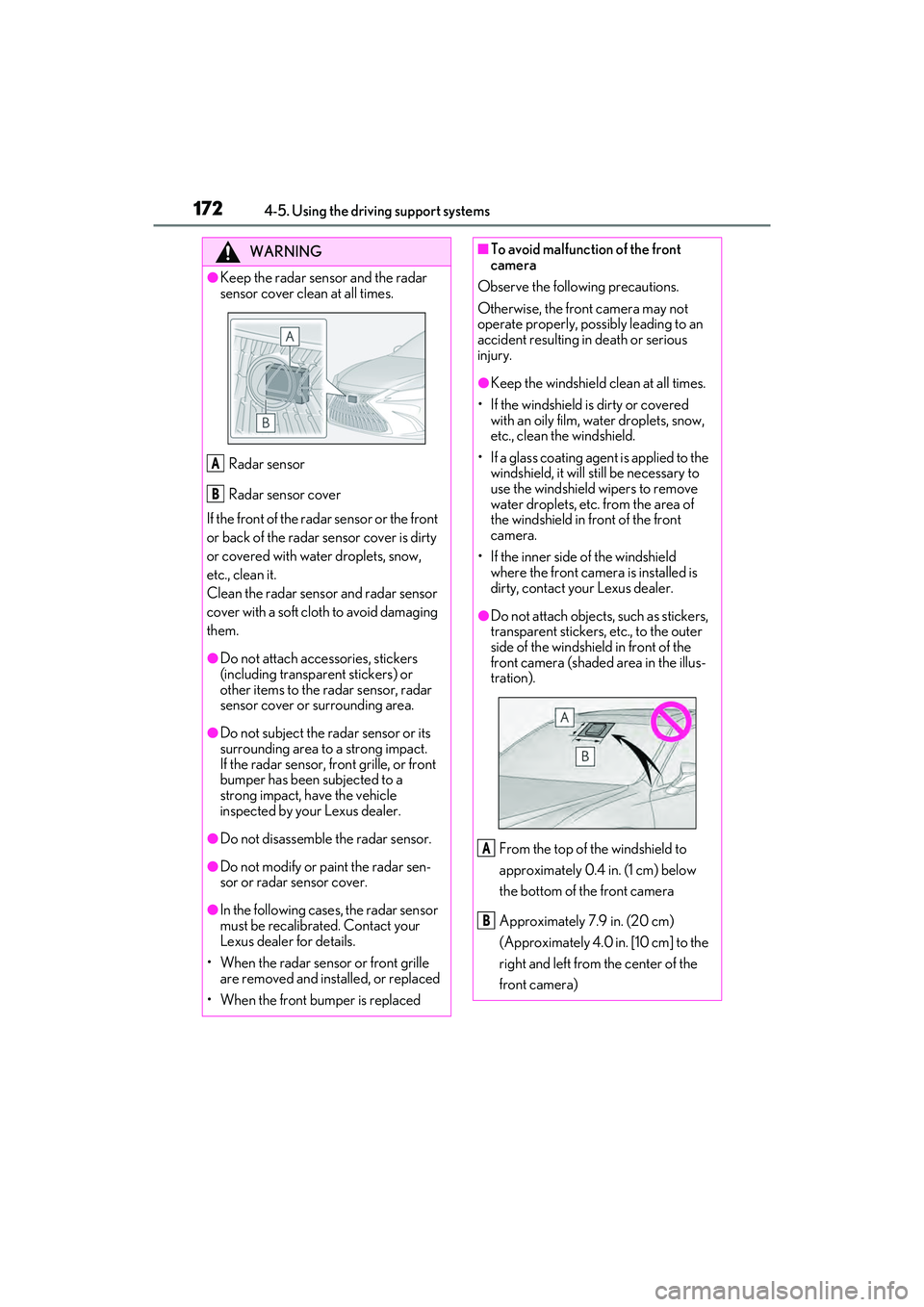
●Keep the radar sensor and the radar
sensor cover clean at all times.Radar sensor
Radar sensor cover
If the front of the rada r sensor or the front
or back of the radar sensor cover is dirty
or covered with water droplets, snow,
etc., clean it.
Clean the radar sensor and radar sensor
cover with a soft cloth to avoid damaging
them.
●Do not attach accessories, stickers
(including transparent stickers) or
other items to the radar sensor, radar
sensor cover or surrounding area.
●Do not subject the radar sensor or its
surrounding area to a strong impact.
If the radar sensor, front grille, or front
bumper has been subjected to a
strong impact, have the vehicle
inspected by your Lexus dealer.
●Do not disassemble the radar sensor.
●Do not modify or paint the radar sen-
sor or radar sensor cover.
●In the following cases, the radar sensor
must be recalibrated. Contact your
Lexus dealer for details.
• When the radar sensor or front grille are removed and installed, or replaced
• When the front bumper is replaced
A
B
■To avoid malfunction of the front
camera
Observe the following precautions.
Otherwise, the front camera may not
operate properly, possibly leading to an
accident resulting in death or serious
injury.
●Keep the windshield clean at all times.
• If the windshield is dirty or covered with an oily film, water droplets, snow,
etc., clean the windshield.
• If a glass coating agent is applied to the windshield, it will still be necessary to
use the windshield wipers to remove
water droplets, etc. from the area of
the windshield in front of the front
camera.
• If the inner side of the windshield where the front camera is installed is
dirty, contact your Lexus dealer.
●Do not attach objects, such as stickers,
transparent stickers, etc., to the outer
side of the windshield in front of the
front camera (shaded area in the illus-
tration).
From the top of the windshield to
approximately 0.4 in. (1 cm) below
the bottom of the front camera
Approximately 7.9 in. (20 cm)
(Approximately 4.0 in. [10 cm] to the
right and left from the center of the
front camera)
A
B
Page 181 of 468
1794-5. Using the driving support systems
4
Driving
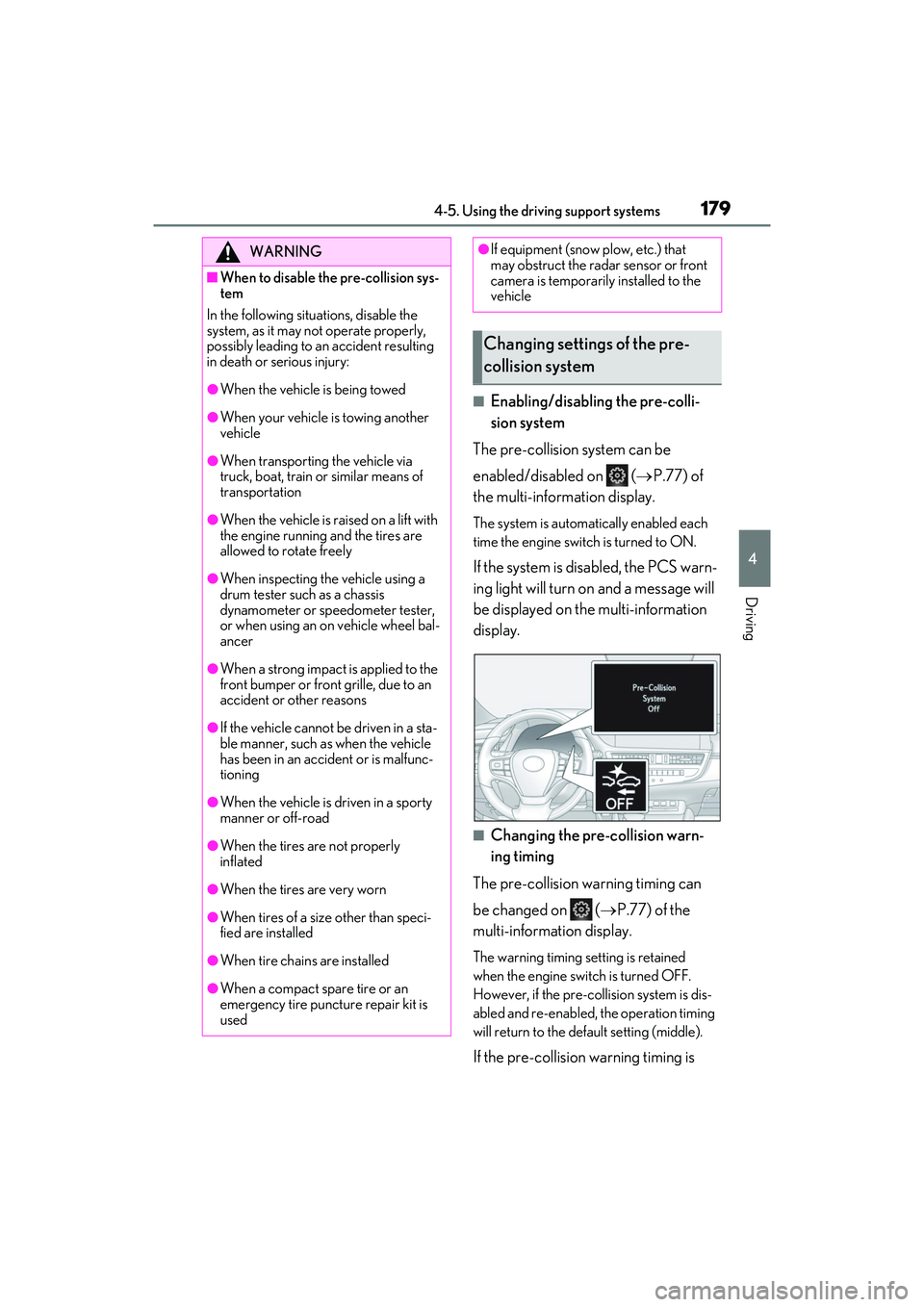
■Enabling/disabling the pre-colli-
sion system
The pre-collision system can be
enabled/disabled on ( P.77) of
the multi-information display.
The system is automatically enabled each
time the engine switch is turned to ON.
If the system is disabled, the PCS warn-
ing light will turn on and a message will
be displayed on the multi-information
display.
■Changing the pre-collision warn-
ing timing
The pre-collision warning timing can
be changed on ( P.77) of the
multi-information display.
The warning timing setting is retained
when the engine switch is turned OFF.
However, if the pre-collision system is dis-
abled and re-enabled, the operation timing
will return to the default setting (middle).
If the pre-collision warning timing is
WARNING
■When to disable the pre-collision sys-
tem
In the following situations, disable the
system, as it may not operate properly,
possibly leading to an accident resulting
in death or serious injury:
●When the vehicle is being towed
●When your vehicle is towing another
vehicle
●When transporting the vehicle via
truck, boat, train or similar means of
transportation
●When the vehicle is raised on a lift with
the engine running and the tires are
allowed to rotate freely
●When inspecting the vehicle using a
drum tester such as a chassis
dynamometer or speedometer tester,
or when using an on vehicle wheel bal-
ancer
●When a strong impact is applied to the
front bumper or front grille, due to an
accident or other reasons
●If the vehicle cannot be driven in a sta-
ble manner, such as when the vehicle
has been in an accident or is malfunc-
tioning
●When the vehicle is driven in a sporty
manner or off-road
●When the tires are not properly
inflated
●When the tires are very worn
●When tires of a size other than speci-
fied are installed
●When tire chains are installed
●When a compact spare tire or an
emergency tire puncture repair kit is
used
●If equipment (snow plow, etc.) that
may obstruct the radar sensor or front
camera is temporarily installed to the
vehicle
Changing settings of the pre-
collision system
Page 189 of 468
1874-5. Using the driving support systems
4
Driving
WARNING
■Before using LTA system
●Do not rely solely upon the LTA sys-
tem. The LTA system does not auto-
matically drive the vehicle or reduce
the amount of attention that must be
paid to the area in front of the vehicle.
The driver must always assume full
responsibility for driving safely by pay-
ing careful attention to the surround-
ing conditions and operating the
steering wheel to correct the path of
the vehicle. Also, the driver must take
adequate breaks when fatigued, such
as from driving for a long period of
time.
●Failure to perform appropriate driving
operations and pay careful attention
may lead to an accident, resulting in
death or serious injury.
■Situations unsuitable for LTA system
In the following situations, use the LTA
switch to turn the system off. Failure to do
so may lead to an acc ident, resulting in
death or serious injury.
●Vehicle is driven on a road surface
which is slippery due to rainy weather,
fallen snow, freezing, etc.
●Vehicle is driven on a snow-covered
road.
●White (yellow) lines are difficult to see
due to rain, snow, fog, dust, etc.
●Vehicle is driven in a temporary lane
or restricted lane due to construction
work.
●Vehicle is driven in a construction
zone.
●A spare tire, tire chains, etc. are
equipped.
●When the tires have been excessively
worn, or when the tire inflation pres-
sure is low.
●During emergency towing
■Preventing LTA system malfunctions
and operations performed by mistake
●Do not modify the headlights or place
stickers, etc. on the surface of the
lights.
●Do not modify the suspension etc. If
the suspension etc. needs to be
replaced, contact your Lexus dealer.
●Do not install or place anything on the
hood or grille. Also, do not install a
grille guard (bull bars, kangaroo bar,
etc.).
●If your windshield needs repairs, con-
tact your Lexus dealer.
■Conditions in which functions may
not operate properly
In the following situations, the functions
may not operate properly and the vehi-
cle may depart from its lane. Drive safely
by always paying careful attention to
your surroundings and operate the
steering wheel to correct the path of the
vehicle without relying solely on the func-
tions.
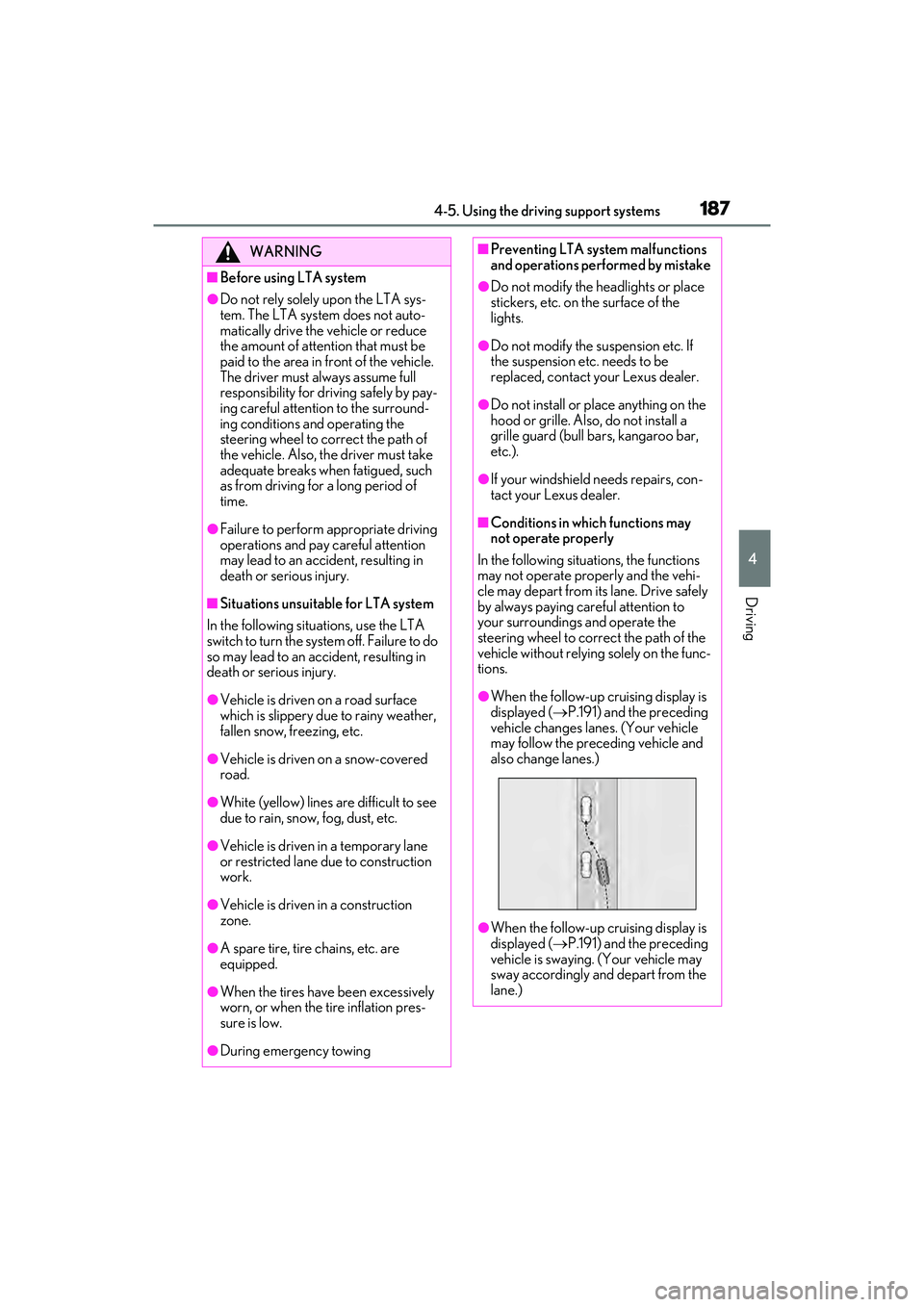
●When the follow-up cruising display is
displayed ( P.191) and the preceding
vehicle changes lanes. (Your vehicle
may follow the preceding vehicle and
also change lanes.)
●When the follow-up cruising display is
displayed ( P.191) and the preceding
vehicle is swaying. (Your vehicle may
sway accordingly and depart from the
lane.)
Page 212 of 468
2104-5. Using the driving support systems
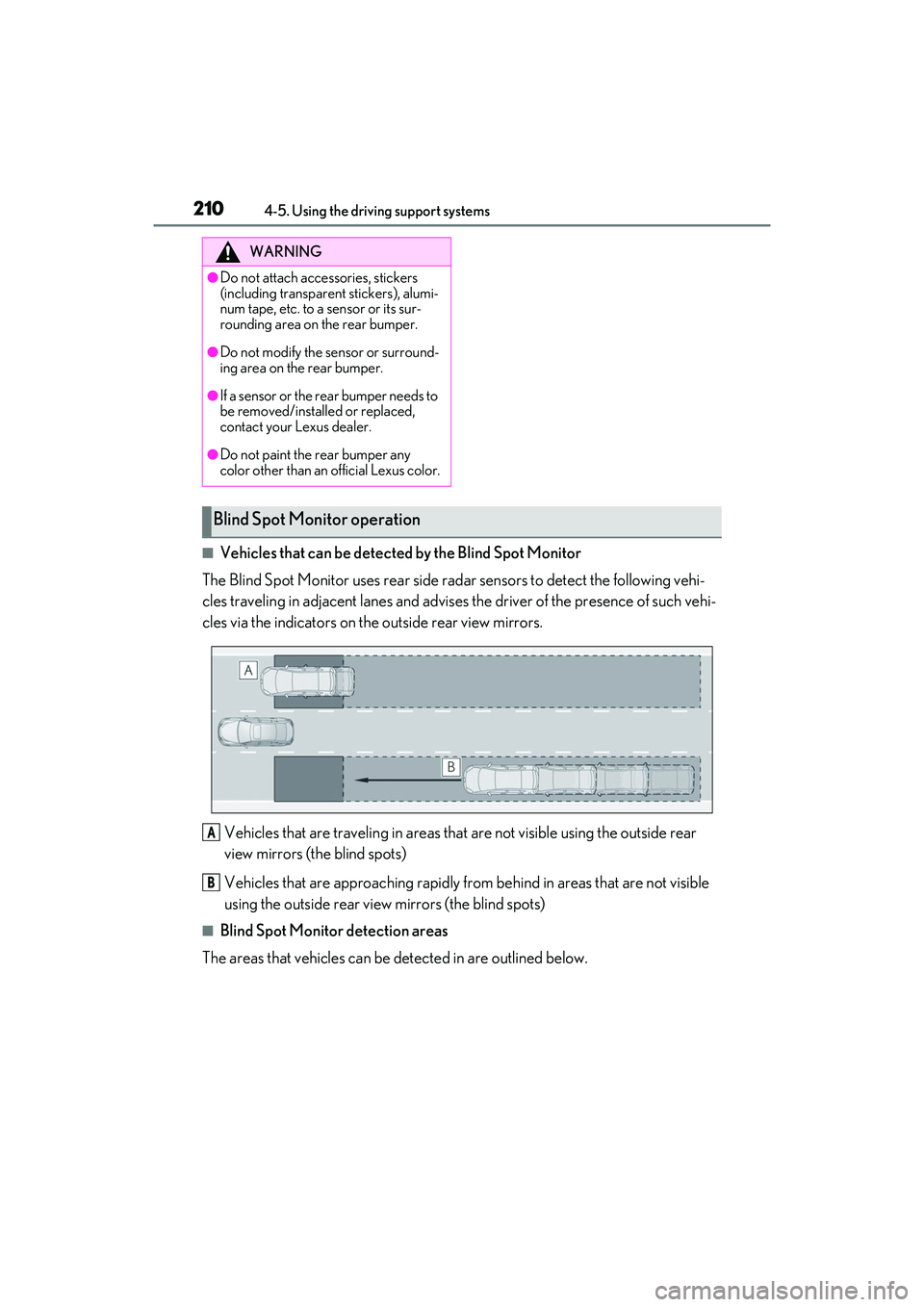
■Vehicles that can be detected by the Blind Spot Monitor
The Blind Spot Monitor uses rear side radar sensors to detect the following vehi-
cles traveling in adjacent lanes and advises the driver of the presence of such vehi-
cles via the indicators on the outside rear view mirrors.
Vehicles that are traveling in areas that are not visible using the outside rear
view mirrors (the blind spots)
Vehicles that are approaching rapidly from behind in areas that are not visible
using the outside rear view mirrors (the blind spots)
■Blind Spot Monitor detection areas
The areas that vehicles can be detected in are outlined below.
WARNING
●Do not attach accessories, stickers
(including transparent stickers), alumi-
num tape, etc. to a sensor or its sur-
rounding area on the rear bumper.
●Do not modify the sensor or surround-
ing area on the rear bumper.
●If a sensor or the rear bumper needs to
be removed/installed or replaced,
contact your Lexus dealer.
●Do not paint the rear bumper any
color other than an official Lexus color.
Blind Spot Moni tor operation
A
B
Page 221 of 468
2194-5. Using the driving support systems
4
Driving
attention to the following objects:
●Wires, fences, ropes, etc.
●Cotton, snow and other materials that
absorb sound waves
●Sharply-angled objects
●Low objects
●Tall objects with upper sections project-
ing outwards in the direction of your vehi-
cle
People may not be detected if they are
wearing certain types of clothing.
■Situations in which the system may not
operate properly
Certain vehicle conditions and the sur-
rounding environment may affect the ability
of a sensor to correctly detect objects. Par-
ticular instances where this may occur are
listed below.
●There is dirt, snow or ice on a sensor.
(Cleaning the sensors will resolve this
problem.)
●A sensor is frozen. (Thawing the area will
resolve this problem.)
In especially cold weather, if a sensor is
frozen the sensor display may be dis-
played abnormally, or objects, such as a
wall, may not be detected.
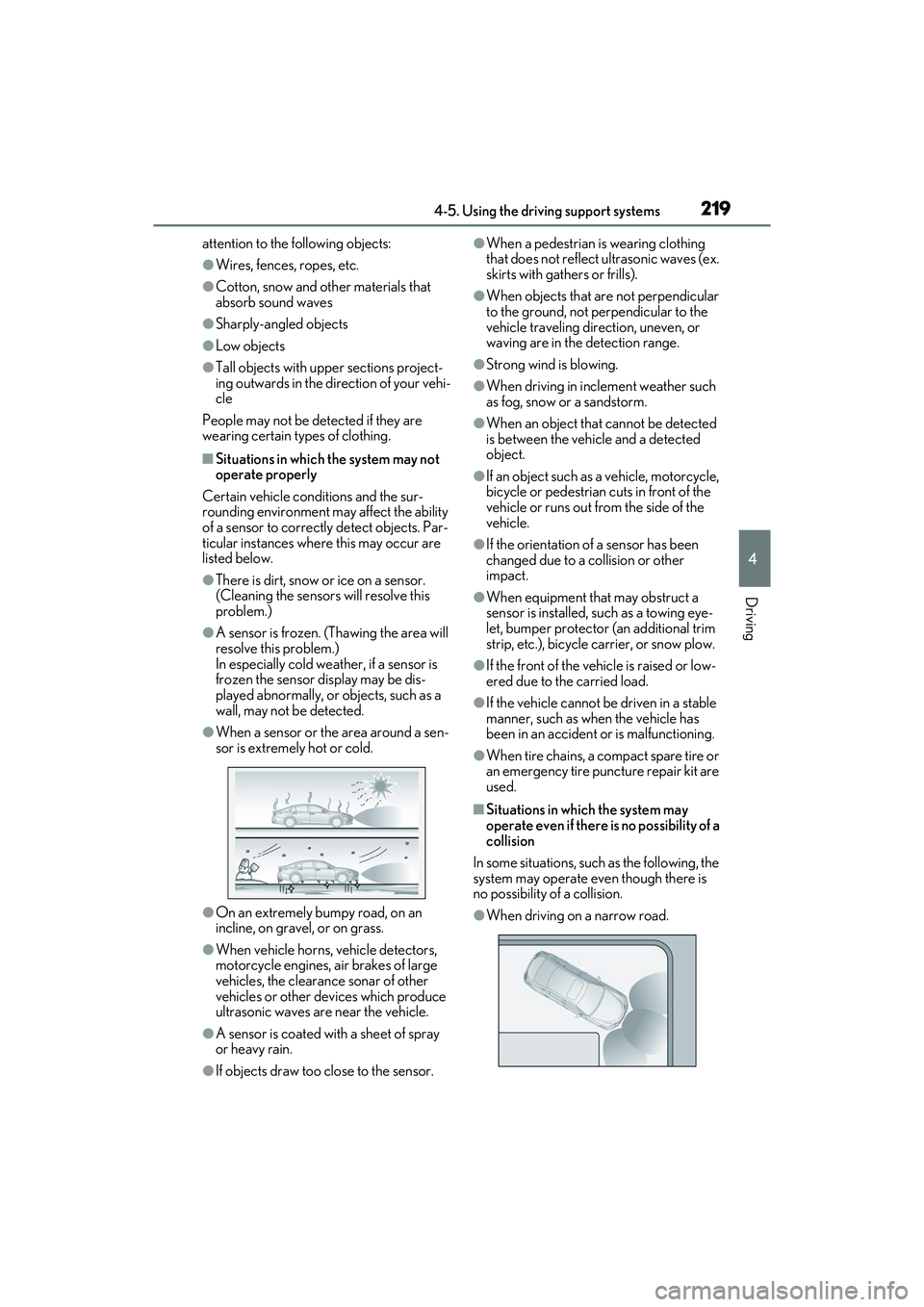
●When a sensor or the area around a sen-
sor is extremely hot or cold.
●On an extremely bumpy road, on an
incline, on gravel, or on grass.
●When vehicle horns, vehicle detectors,
motorcycle engines, air brakes of large
vehicles, the clearance sonar of other
vehicles or other devices which produce
ultrasonic waves are near the vehicle.
●A sensor is coated with a sheet of spray
or heavy rain.
●If objects draw too close to the sensor.
●When a pedestrian is wearing clothing
that does not reflect ultrasonic waves (ex.
skirts with gathers or frills).
●When objects that are not perpendicular
to the ground, not perpendicular to the
vehicle traveling direction, uneven, or
waving are in the detection range.
●Strong wind is blowing.
●When driving in inclement weather such
as fog, snow or a sandstorm.
●When an object that cannot be detected
is between the vehicle and a detected
object.
●If an object such as a vehicle, motorcycle,
bicycle or pedestrian cuts in front of the
vehicle or runs out from the side of the
vehicle.
●If the orientation of a sensor has been
changed due to a collision or other
impact.
●When equipment that may obstruct a
sensor is installed, such as a towing eye-
let, bumper protector (an additional trim
strip, etc.), bicycle carrier, or snow plow.
●If the front of the vehicle is raised or low-
ered due to the carried load.
●If the vehicle cannot be driven in a stable
manner, such as when the vehicle has
been in an accident or is malfunctioning.
●When tire chains, a compact spare tire or
an emergency tire puncture repair kit are
used.
■Situations in which the system may
operate even if there is no possibility of a
collision
In some situations, such as the following, the
system may operate even though there is
no possibility of a collision.
●When driving on a narrow road.
Page 222 of 468
2204-5. Using the driving support systems
●When driving toward a banner, flag, low-
hanging branch or boom barrier (such as
those used at railroad crossings, toll
gates and parking lots).
●When there is a rut or hole in the surface
of the road.
●When driving on a metal cover (grating),
such as those used for drainage ditches.
●When driving up or down a steep slope.
●If a sensor is hit by a large amount of
water, such as when driving on a flooded
road.
●There is dirt, snow, water drops or ice on
a sensor. (Cleaning the sensors will
resolve this problem.)
●A sensor is coated with a sheet of spray
or heavy rain.
●When driving in inclement weather such
as fog, snow or a sandstorm.
●When strong winds are blowing.
●When vehicle horns, vehicle detectors,
motorcycle engines, air brakes of large
vehicles, the clearance sonar of other
vehicles or other devices which produce
ultrasonic waves are near the vehicle.
●If the front of the vehicle is raised or low-
ered due to the carried load.
●If the orientation of a sensor has been
changed due to a collision or other
impact.
●The vehicle is approaching a tall or
curved curb.
●Driving close to columns (H-shaped steel
beams, etc.) in multi-story parking
garages, construction sites, etc.
●If the vehicle cannot be driven in a stable
manner, such as when the vehicle has
been in an accident or is malfunctioning.
●On an extremely bumpy road, on an incline, on gravel, or on grass.
●When tire chains, a compact spare tire or
an emergency tire puncture repair kit are
used.
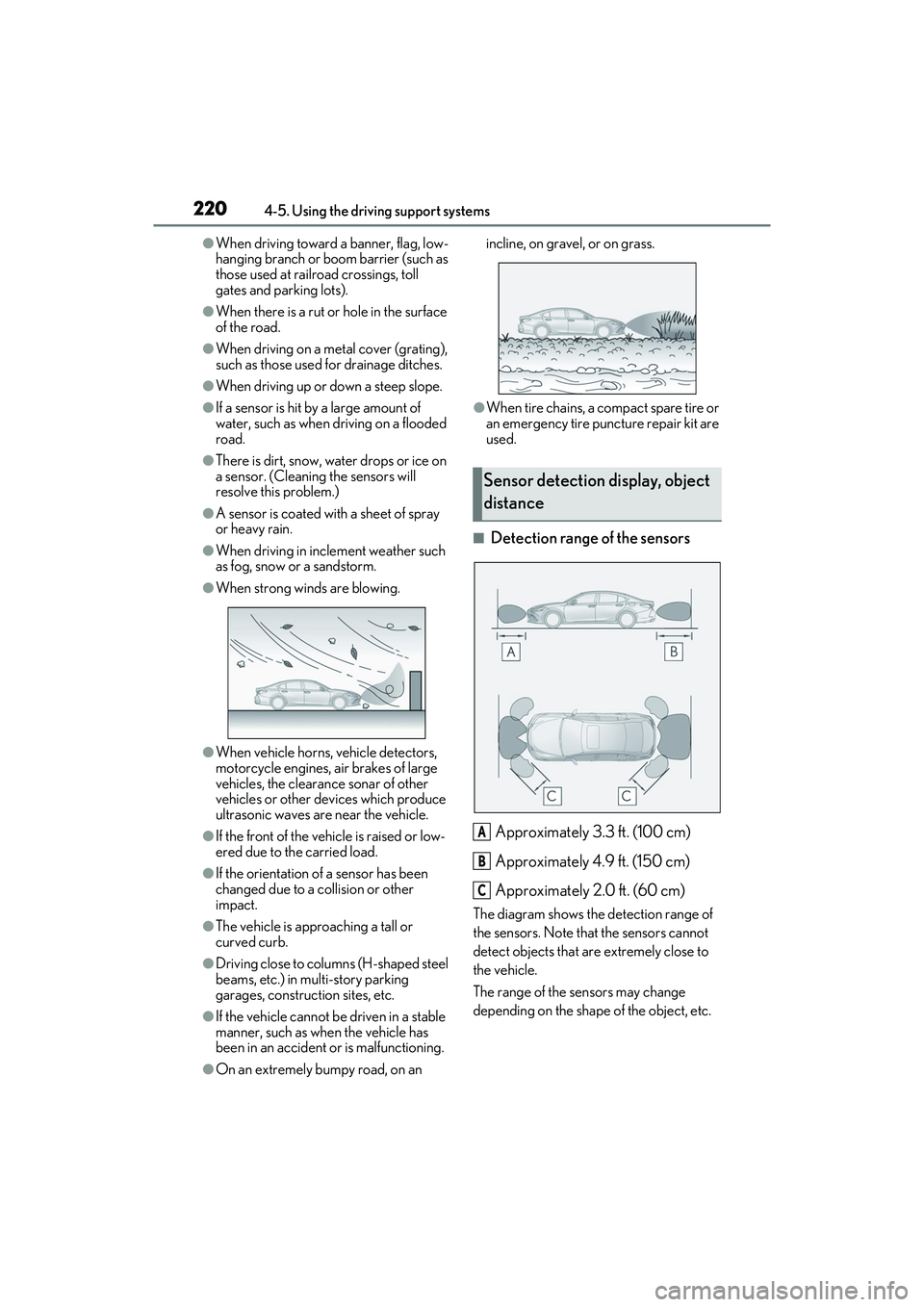
■Detection range of the sensors
Approximately 3.3 ft. (100 cm)
Approximately 4.9 ft. (150 cm)
Approximately 2.0 ft. (60 cm)
The diagram shows the detection range of
the sensors. Note that the sensors cannot
detect objects that are extremely close to
the vehicle.
The range of the sensors may change
depending on the shape of the object, etc.
Sensor detection di splay, object
distance
A
B
C
Page 235 of 468
2334-5. Using the driving support systems
4
Driving
■Parking Support Brake function
(rear pedestrians) (if equipped)
A rear camera sensor is used to detect
pedestrians in the detection area
behind the vehicle when backing up.
( P.244)
WARNING
■Cautions regarding the use of the
system
Do not overly rely on the system, as
doing so may lead to an accident.
Always drive while checking the safety of
the surroundings of the vehicle.
Depending on the vehicle and road con-
ditions, weather, etc., the system may not
operate.
The detection capabilities of sensors and
radars are limited. Always drive while
checking the safety of the surroundings
of the vehicle.
●The driver is solely responsible for safe
driving. Always drive carefully, taking
care to observe your surroundings.
The Parking Support Brake system is
designed to provide support to lessen
the severity of collisions. However, it
may not operate in some situations.
●The Parking Support Brake system is
not designed to stop the vehicle com-
pletely. Additionally, even if the system
has stopped the vehicle, it is necessary
to depress the brake pedal immedi-
ately as brake control will be canceled
after approximately 2 seconds.
●It is extremely dangerous to check the
system operations by intentionally
driving the vehicle in to the direction of
a wall, etc. Never attempt such actions.
■When to disable the Parking Support
Brake
In the following situations, disable the
Parking Support Brake as the system
may operate even though there is no
possibility of a collision.
●When inspecting the vehicle using a
chassis roller, chassis dynamo or free
roller.
●When loading the vehicle onto a boat,
truck or other transport vessel.
●If the suspension has been modified or
tires of a size other than specified are
installed.
●If the front of the vehicle is raised or
lowered due to the carried load.
●When equipment that may obstruct a
sensor is installed, such as a towing
eyelet, bumper protector (an addi-
tional trim strip, etc.), bicycle carrier,
or snow plow.
●When using automatic car washing
devices.
●If the vehicle cannot be driven in a sta-
ble manner, such as when the vehicle
has been in an accident or is malfunc-
tioning.
●When the vehicle is driven in a sporty
manner or off-road.
●When the tires are not properly
inflated.
●When the tires are very worn.
●When tire chains, a compact spare tire
or an emergency tire puncture repair
kit are used.