battery Lexus GS F 2017 User Guide
[x] Cancel search | Manufacturer: LEXUS, Model Year: 2017, Model line: GS F, Model: Lexus GS F 2017Pages: 676, PDF Size: 67.73 MB
Page 160 of 676
1603-2. Opening, closing and locking the doors and trunk
GS350_200t_GS F_OM_OM30F83E_(EE)
■Operation signals
The emergency flashers flash to indicate that the doors have been locked/unlocked.
(Locked: once; Unlocked: twice)
■Security feature
If a door is not opened within approximately 30 seconds after the vehicle is unlocked, the
security feature automatically locks the vehicle again.
■Welcome light illumination control
The front position, tail and license plate lights automatically turn on at night when the
doors are unlocked using the entry function or wireless remote control if the light switch
is in the “AUTO” position.
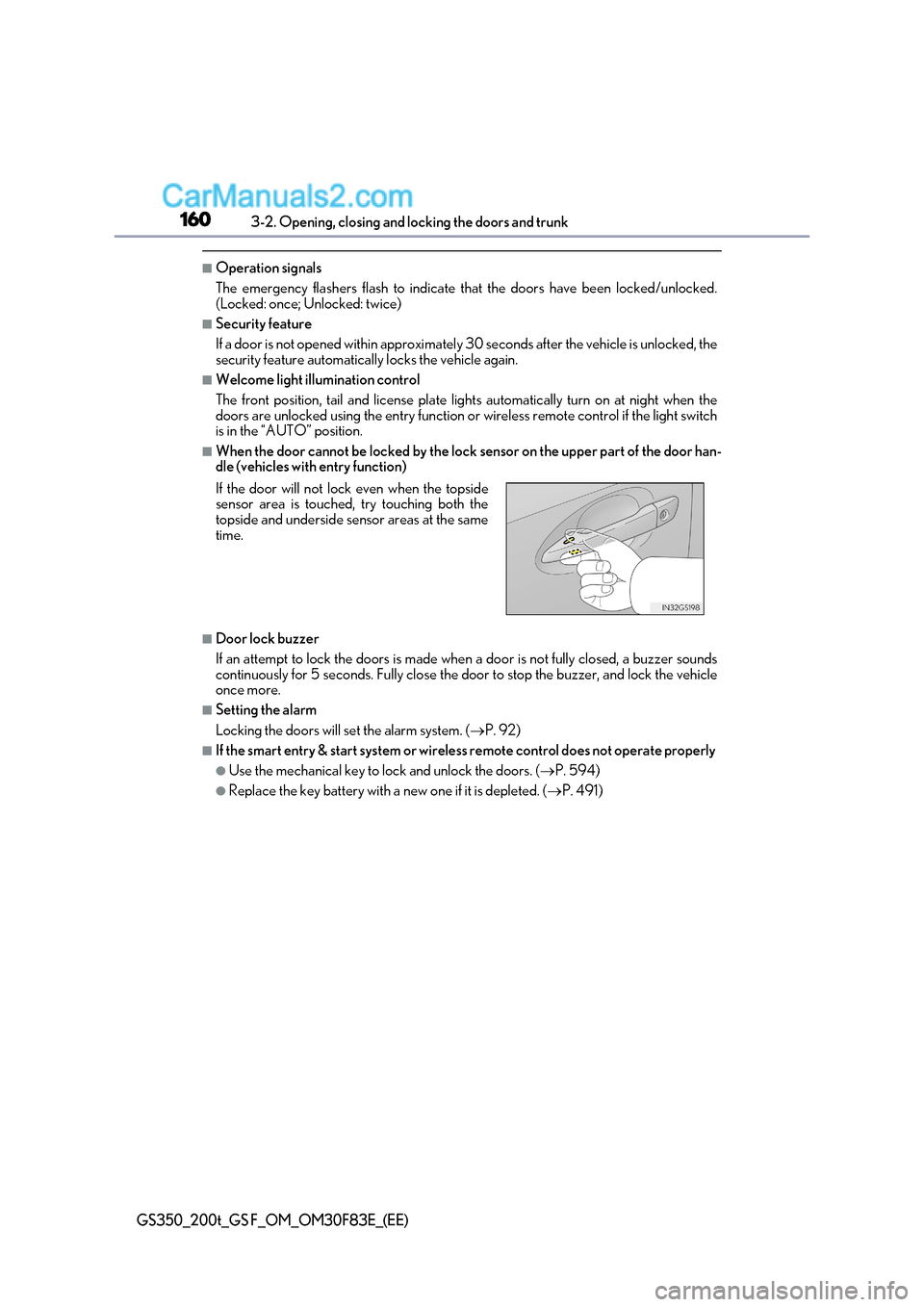
■When the door cannot be locked by the lock sensor on the upper part of the door han-
dle (vehicles with entry function)
■Door lock buzzer
If an attempt to lock the doors is made when a door is not fully closed, a buzzer sounds
continuously for 5 seconds. Fully close the door to stop the buzzer, and lock the vehicle once more.
■Setting the alarm
Locking the doors will set the alarm system. ( P. 92)
■If the smart entry & start system or wireless remote control does not operate properly
●Use the mechanical key to lock and unlock the doors. ( P. 594)
●Replace the key battery with a new one if it is depleted. (P. 491)
If the door will not lock even when the topside
sensor area is touched, try touching both the
topside and underside sensor areas at the same
time.
Page 169 of 676
169
3-2. Opening, closing and locking the doors and trunk
3
Operation of each component
GS350_200t_GS F_OM_OM30F83E_(EE)
■Jam protection function (vehicles with power trunk lid)
While the trunk lid is closing automatically, the trunk lid will stop closing and open if
something gets caught.
■If the smart entry & start system or wireless remote control does not operate properly
●Use the mechanical key to open the trunk. ( P. 594)
●Replace the key battery with a new one if it is depleted. (P. 491)
■When leaving a key to the vehicle with a parking attendant P. 156
■Customization
The trunk unlocking operation can be changed.
(Customizable features: P. 641)
WARNING
Observe the following precautions.
Failure to do so may result in death or serious injury.
■Before driving
●Make sure that the trunk lid is fully closed. If the trunk lid is not fully closed, it may
open unexpectedly while driv ing and hit near-by objects or luggage in the trunk may
be thrown out, causing an accident.
●Do not allow children to play in the trunk.
If a child is accidentally locked in the trunk, they could suffer from heat exhaustion,
suffocation or other injuries.
●Do not allow a child to open or close the trunk lid.
Doing so may cause the trunk lid to open unexpectedly, or cause the child’s hands,
head, or neck to be caught by the closing trunk lid.
■Important points while driving
Never let anyone sit in the trunk. In the event of sudden braking or a collision, they a re
susceptible to death or serious injury.
Page 174 of 676

1743-2. Opening, closing and locking the doors and trunk
GS350_200t_GS F_OM_OM30F83E_(EE)
■Alarms and warning indicators
An alarm sounds and warning message displa ys shown on the multi-information display
are used to protect against unexpected accidents or theft of the vehicle resulting from
erroneous operation. When a warning message is displayed, take appropriate measures
based on the displayed message. ( P. 552)
When only an alarm sounds, circumstances and correction procedures are as follows.
■Battery-saving function (vehicles with entry function)
The battery-saving function will be activated in order to prevent the electronic key bat-
tery and the vehicle battery from being discharged while the vehicle is not in opera tion
for a long time.
●In the following situations, the smart entry & start system may take some time to unlock
the doors.
Page 175 of 676
175
3-2. Opening, closing and locking the doors and trunk
3
Operation of each component
GS350_200t_GS F_OM_OM30F83E_(EE)
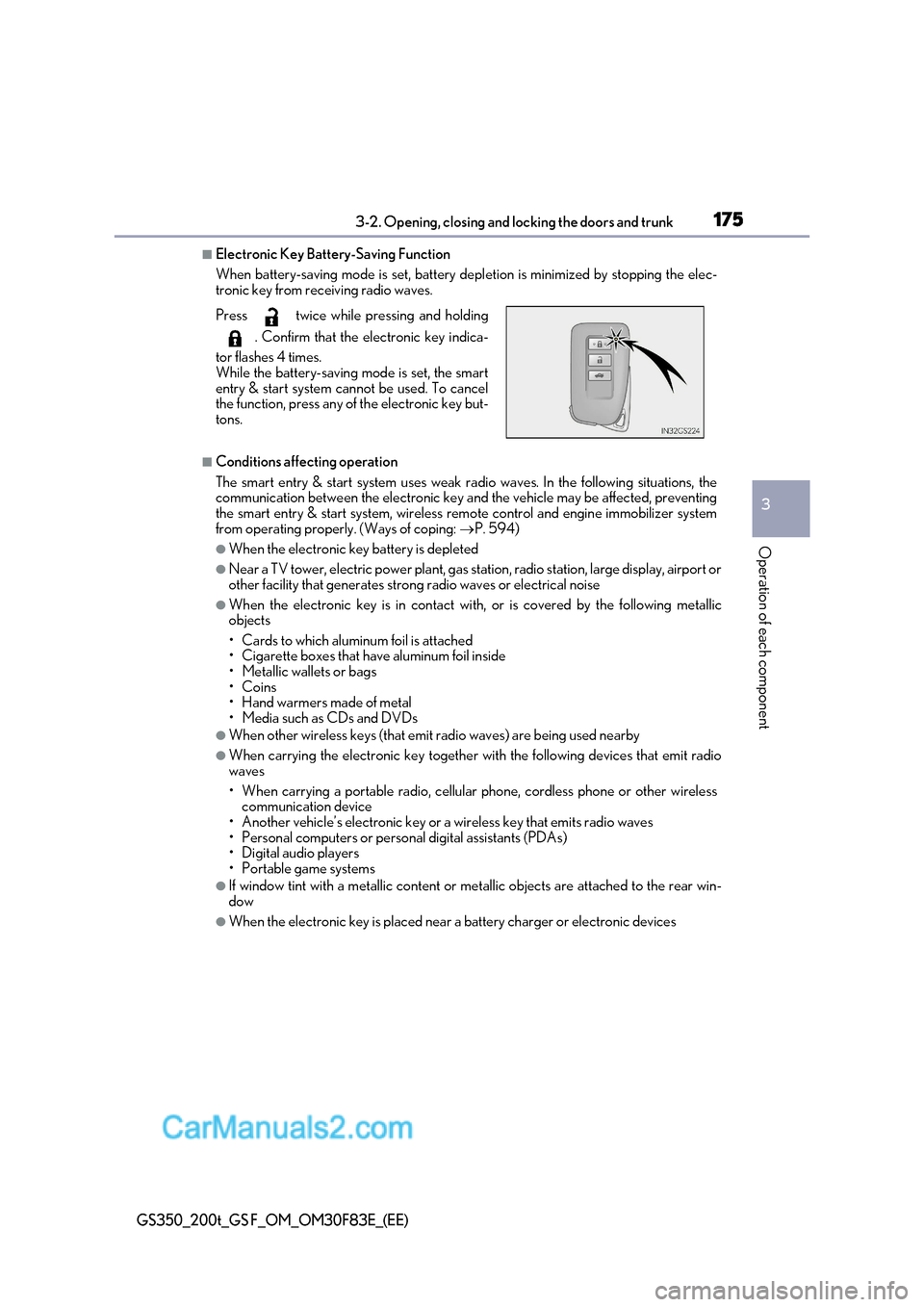
■Electronic Key Battery-Saving Function
When battery-saving mode is set, battery de pletion is minimized by stopping the elec-
tronic key from receiving radio waves.
■Conditions affecting operation
The smart entry & start system uses weak ra dio waves. In the following situations, the
communication between the electronic key and the vehicle may be affected, preventing
the smart entry & start system, wireless remote control and engine immobilizer system
from operating properly. (Ways of coping: P. 594)
●When the electronic key battery is depleted
●Near a TV tower, electric power plant, gas st ation, radio station, large display, airport or
other facility that gene rates strong radio waves or electrical noise
●When the electronic key is in contact wi th, or is covered by the following metallic
objects
Page 215 of 676

215
3-5. Opening, closing the windows and moon roof
3
Operation of each component
GS350_200t_GS F_OM_OM30F83E_(EE)
■When the window cannot be opened or closed
When the jam protection function or catch protection function operates unusually and
the door window cannot be opened or closed , perform the following operations with the
power window switch of that door.
●Stop the vehicle. With the engine switch in IGNITION ON mode , within 4 seconds of
the jam protection function or catch protecti on function activating, continuously oper-
ate the power window switch in the one-to uch closing direction or one-touch opening
direction so that the door window can be opened and closed.
●If the door window cannot be opened and closed even when performing the above
operations, perform the following procedure for function initialization.
Turn the engine switch to IGNITION ON mode.
Pull and hold the power window switch in the one-touch closing direction and com-
pletely close the door window.
Release the power window switch for a mo ment, resume pulling the switch in the
one-touch closing direction, and hold it there for approximately 6 seconds or more.
Press and hold the power window switch in the one-touch opening direc tion. After
the door window is completely opened, cont inue holding the switch for an additional
1 second or more.
Release the power window switch for a moment, resume pushing the switch in the
one-touch opening direction, and hold it there for approximately 4 seconds or
more.
Pull and hold the power window switch in the one-touch closing direction again.
After the door window is completely closed, continue holding the switch for a fur-
ther 1 second or more.
If you release the switch while the window is moving, start again from the beginning.
If the window reverses and cannot be fully closed or opened, have the vehicle inspected
by any authorized Lexus retailer or Lexus auth orized repairer, or any reliable repairer.
■Door lock linked window operation
●The power windows can be opened and closed using the mechanical key. * ( P. 594)
●The power windows can be opened and closed using the wireless remote control. *
( P. 159)
* : These settings must be customized at an y authorized Lexus retailer or Lexus autho-
rized repairer, or any reliable repairer.
■When the battery is disconnected
The window lock switch is disabled. If ne cessary, press the window lock switch after
reconnecting the battery.
■Power windows open warning buzzer
The buzzer sounds and a message is shown on the multi-information display in the instru-
ment cluster when the engine switch is turned off and the driver’s door is opened with the
power windows open.
■Customization
Settings (e.g. linked door lock operation) can be changed.
(Customizable features: P. 634)
1
2
3
4
5
6
Page 242 of 676
2424-2. Driving procedures
GS350_200t_GS F_OM_OM30F83E_(EE)
If the engine is stopped with the shift le ver in a position other than P, the engine
switch will not be turned off but inst ead be turned to ACCESSORY mode. Per-
form the following procedure to turn the switch off:
Check that the parking brake is set.
Shift the shift lever to P.
Check that “Turn Off Vehicle” is displayed on the multi-information display
and then press the engine switch once.
Check that “Turn Off Vehicle” on the multi-information display is off.
■Auto power off function
If the vehicle is left in ACCESSORY mode for more than 20 min utes or IGNITION ON
mode (the engine is not running) for more than an hour with th e shift lever in P, the engine
switch will automatically turn off. However, this function cannot entirely prevent battery
discharge. Do not leave the vehicle with the engine switch in ACCESSORY or IGNI-
TION ON mode for long periods of time when the engine is not running.
■Electronic key battery depletion P. 156
■Conditions affecting operation P. 175
■Notes for the push-start function P. 177
■If the engine does not start
●The engine immobilizer system ma y not have been deactivated. (P. 86)
Contact any authorized Lexus retailer or Le xus authorized repairer, or any reliable
repairer.
●Check that the shift lever is securely set in P. The engine may not start if the shift lever is
displaced out of P. “Shift to P position to Start” will be displayed on the multi-information
display.
■Steering lock
After turning the engine switch off and opening and closing the doors, the steering wheel
will be locked due to the steering lock functi on. Operating the engine switch again auto-
matically cancels the steering lock.
When stopping the engine with the shift lever in a position other than P
1
2
3
4
Page 243 of 676
243
4-2. Driving procedures
4
Driving
GS350_200t_GS F_OM_OM30F83E_(EE)
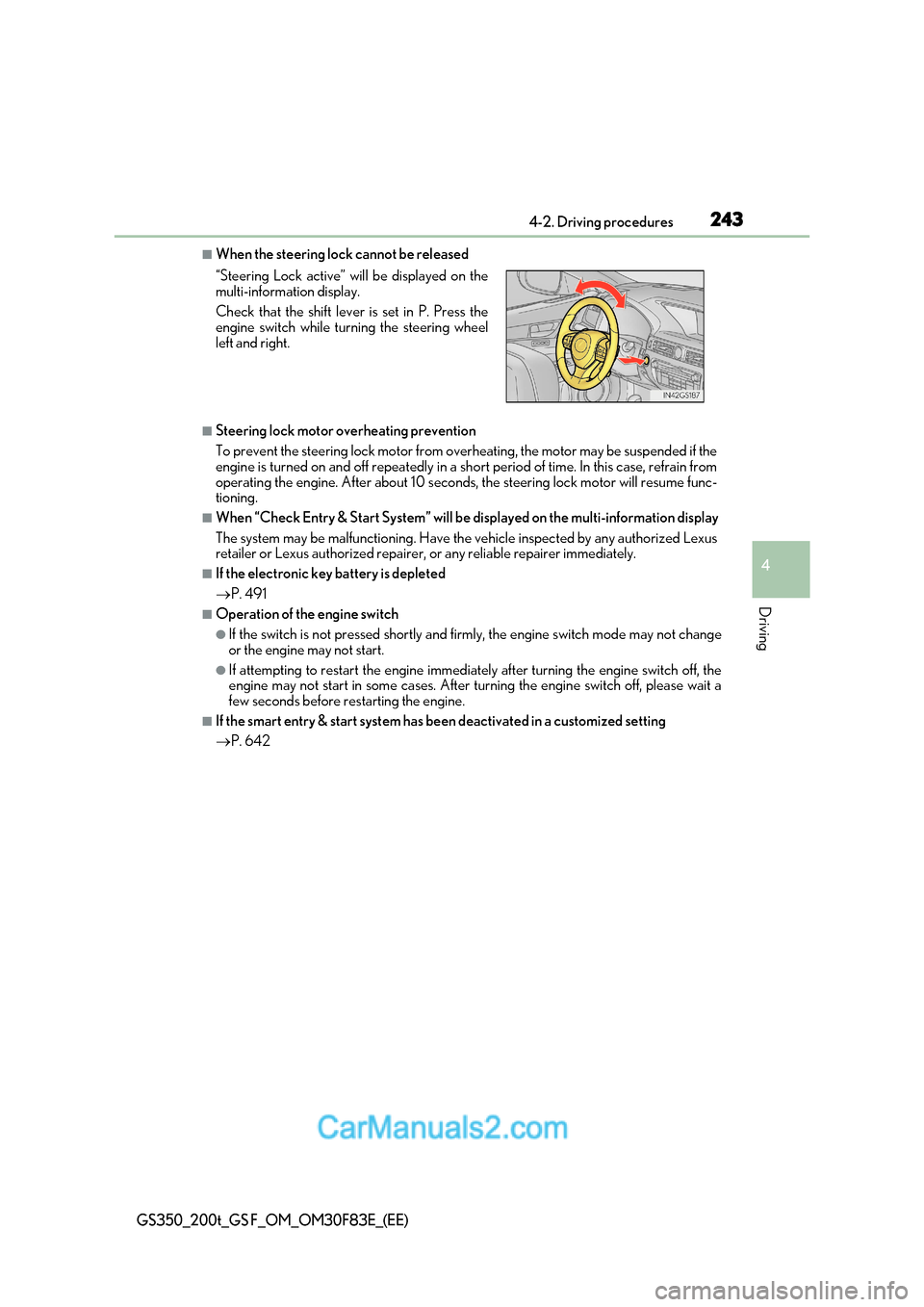
■When the steering lock cannot be released
■Steering lock motor overheating prevention
To prevent the steering lock motor from overheating, the motor may be suspended if the
engine is turned on and off repeatedly in a sh ort period of time. In this case, refrain from
operating the engine. After about 10 seconds, the steering lock motor will resume func-
tioning.
■When “Check Entry & Start System” will be displayed on the multi-information display
The system may be malfunctioning. Have the vehicle inspected by any authorized Lexus
retailer or Lexus authorized repairer, or any reliable repairer immediately.
■If the electronic key battery is depleted P. 491
■Operation of the engine switch
●If the switch is not pressed shortly and fi rmly, the engine switch mode may not change
or the engine may not start.
●If attempting to restart the engine immediately after turning the engine switch off, the
engine may not start in some cases. After turning the engine switch off, please wait a
few seconds before restarting the engine.
■If the smart entry & start system has be en deactivated in a customized setting
P. 642
“Steering Lock active” will be displayed on the
multi-information display.
Check that the shift lever is set in P. Press the
engine switch while turning the steering wheel
left and right.
Page 245 of 676

245
4-2. Driving procedures
4
Driving
GS350_200t_GS F_OM_OM30F83E_(EE)
NOTICE
■To prevent battery discharge
●Do not leave the engine switch in ACCESSORY or IGNITION ON mode for long
periods of time without the engine running.
●If “POWER ON” is displayed on the multi- information display, the engine switch is
not off. Exit the vehicle after turning the engine switch off.
●Do not stop the engine when the shift lever is in a position other than P. If the engine is
stopped in another shift lever position, the engine switch will not be turned off but
instead be turned to ACCESSORY mode. If the vehicle is left in ACCESSORY
mode, battery discharge may occur.
■When starting the engine
●Do not race a cold engine.
●If the engine becomes difficult to start or stalls frequently, have your vehicle checked
by any authorized Lexus retailer or Lexus au thorized repairer, or any reliable repairer
immediately
■Symptoms indicating a malfunction with the engine switch
If the engine switch seems to be operating so mewhat differently than usual, such as the
switch sticking slightly, there may be a malfunction. Contact any authorized Lexus
retailer or Lexus authorized repairer, or any reliable repairer immediately.
Page 264 of 676
2644-3. Operating the lights and wipers
GS350_200t_GS F_OM_OM30F83E_(EE)
■Daytime running light system
To make your vehicle more visible to other drivers during daytime driving, the daytime
running lights turn on automatically whenever the engine is started and the parking
brake is released with the head light switch is in the “AUTO” position. (Illuminate brighter
than the front position lights.)
Daytime running lights are not designed for use at night.
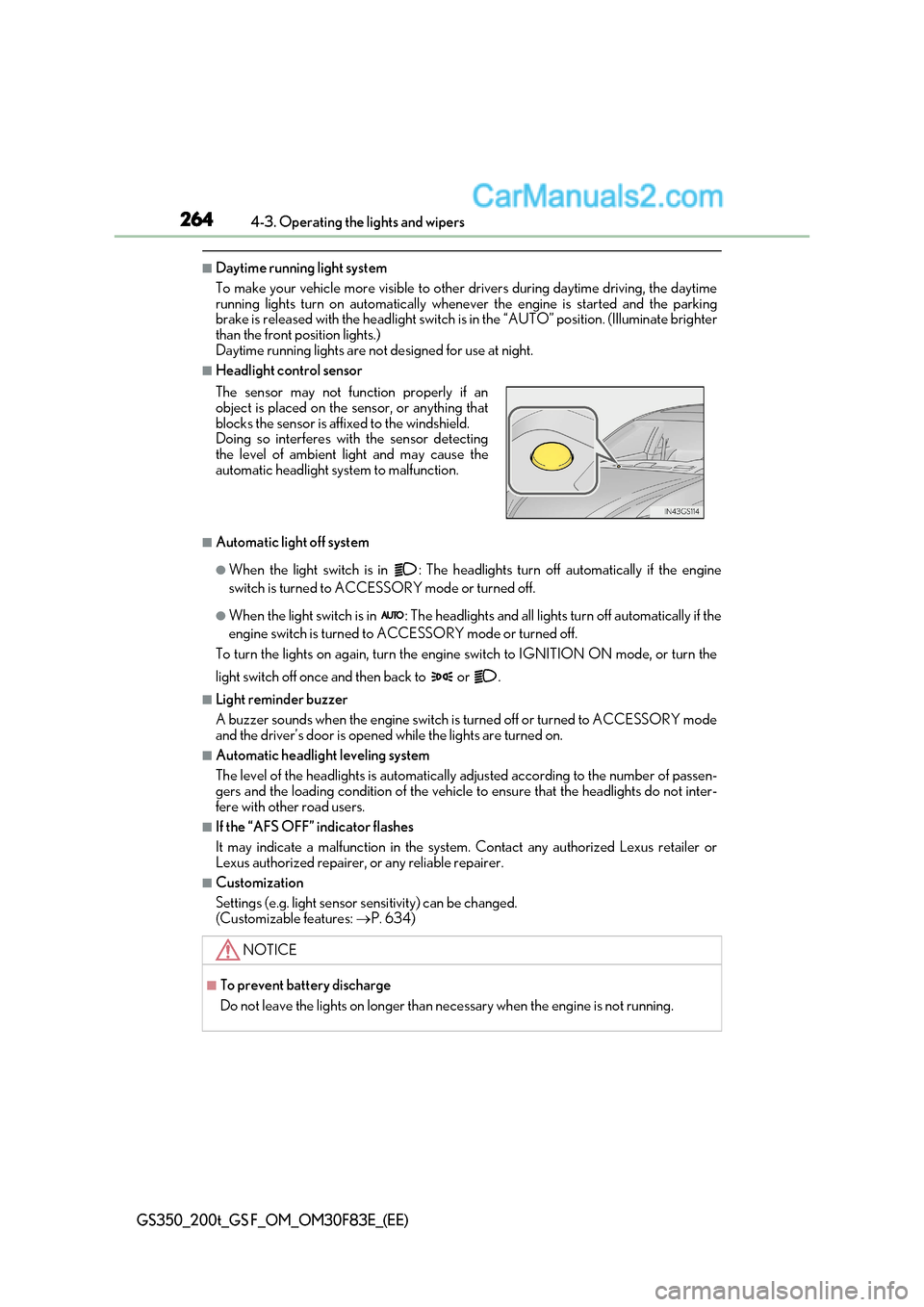
■Headlight control sensor
■Automatic light off system
●When the light switch is in : The headlights turn off automatically if the engine
switch is turned to ACCESSORY mode or turned off.
●When the light switch is in : The headlights and all lights turn off automatically if the
engine switch is turned to ACCESSORY mode or turned off.
To turn the lights on again, turn the engine switch to IGNITI ON ON mode, or turn the
light switch off once and then back to or .
■Light reminder buzzer
A buzzer sounds when the engine switch is turned off or turned to ACCESSORY mode
and the driver’s door is opened while the lights are turned on.
■Automatic headlight leveling system
The level of the headlights is automatically adjusted according to the number of passen-
gers and the loading condition of the vehicle to ensure that the headlights do not inter-
fere with other road users.
■If the “AFS OFF” indicator flashes
It may indicate a malfunction in the system. Contact any authorized Lexus retailer or
Lexus authorized repairer, or any reliable repairer.
■Customization
Settings (e.g. light sensor se nsitivity) can be changed.
(Customizable features: P. 634)
The sensor may not function properly if an
object is placed on the sensor, or anything that
blocks the sensor is affixed to the windshield.
Doing so interferes with the sensor detecting
the level of ambient light and may cause the
automatic headlight system to malfunction.
NOTICE
■To prevent battery discharge
Do not leave the lights on longer than necessary when the engine is not running.
Page 407 of 676

407
5-2. Using the air conditioning system and defogger
5
Interior features
GS350_200t_GS F_OM_OM30F83E_(EE)
WARNING
■To prevent the windshield from fogging up
●Do not use during cool air operation in extremely humid weather. The d iffer-
ence between the temperature of the outside air and that of the windshield can cause
the outer surface of the windshield to fog up, blocking your vision.
■To prevent burns
●Do not touch the rear view mirror surfaces when the outside rear view mirror defog-
gers are on.
●Vehicles with windshield wiper de-icer: Do not touch the glass at lower part of the
windshield or to the side of the front pilla rs when the windshield wiper de-icer is on.
■nanoe generator (if equipped)
Do not disassemble or repair the generator because it contains high voltage parts.
Contact any authorized Lexus retailer or Lexus authorized repairer, or any reliable
repairer if the generator needs repair.
NOTICE
■To prevent battery discharge
Do not leave the air conditioning system on longer than necessary when the engine is
stopped.
■To prevent damage to the nanoe (if equipped)
Do not insert anything into the driver’s side vent, attach a nything to it, or use sprays
around the driver’s side vent. These things may cause the generator not to work prop-
erly.
●Do not place anything on the instrument
panel which may cover the air outlets. Other-
wise, air flow may be obstructed, preventing
the windshield defoggers from defogging.