touch Lexus GS F 2017 User Guide
[x] Cancel search | Manufacturer: LEXUS, Model Year: 2017, Model line: GS F, Model: Lexus GS F 2017Pages: 676, PDF Size: 67.73 MB
Page 160 of 676
1603-2. Opening, closing and locking the doors and trunk
GS350_200t_GS F_OM_OM30F83E_(EE)
■Operation signals
The emergency flashers flash to indicate that the doors have been locked/unlocked.
(Locked: once; Unlocked: twice)
■Security feature
If a door is not opened within approximately 30 seconds after the vehicle is unlocked, the
security feature automatically locks the vehicle again.
■Welcome light illumination control
The front position, tail and license plate lights automatically turn on at night when the
doors are unlocked using the entry function or wireless remote control if the light switch
is in the “AUTO” position.
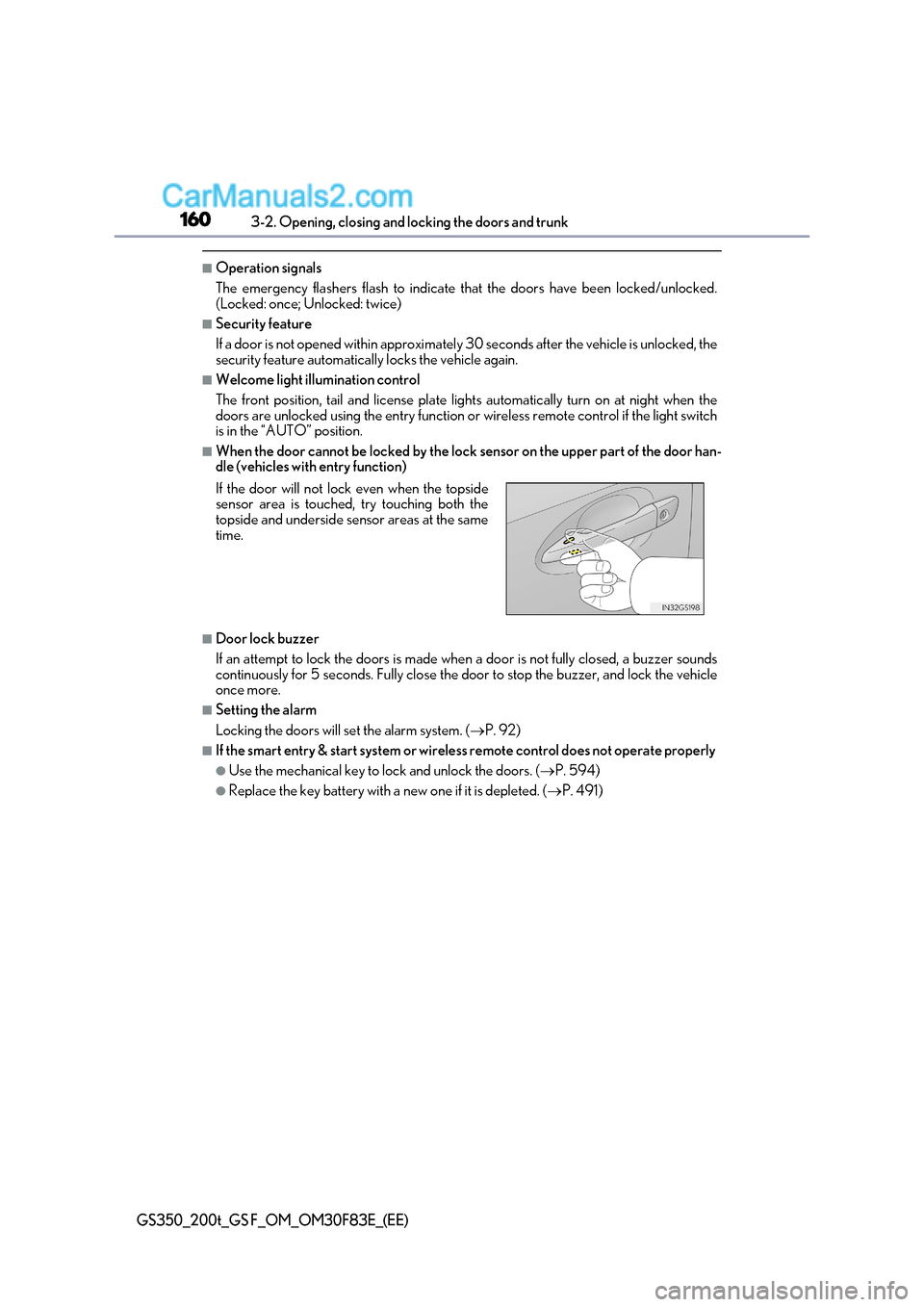
■When the door cannot be locked by the lock sensor on the upper part of the door han-
dle (vehicles with entry function)
■Door lock buzzer
If an attempt to lock the doors is made when a door is not fully closed, a buzzer sounds
continuously for 5 seconds. Fully close the door to stop the buzzer, and lock the vehicle once more.
■Setting the alarm
Locking the doors will set the alarm system. ( P. 92)
■If the smart entry & start system or wireless remote control does not operate properly
●Use the mechanical key to lock and unlock the doors. ( P. 594)
●Replace the key battery with a new one if it is depleted. (P. 491)
If the door will not lock even when the topside
sensor area is touched, try touching both the
topside and underside sensor areas at the same
time.
Page 197 of 676
197
3-3. Adjusting the seats
3
Operation of each component
GS350_200t_GS F_OM_OM30F83E_(EE)
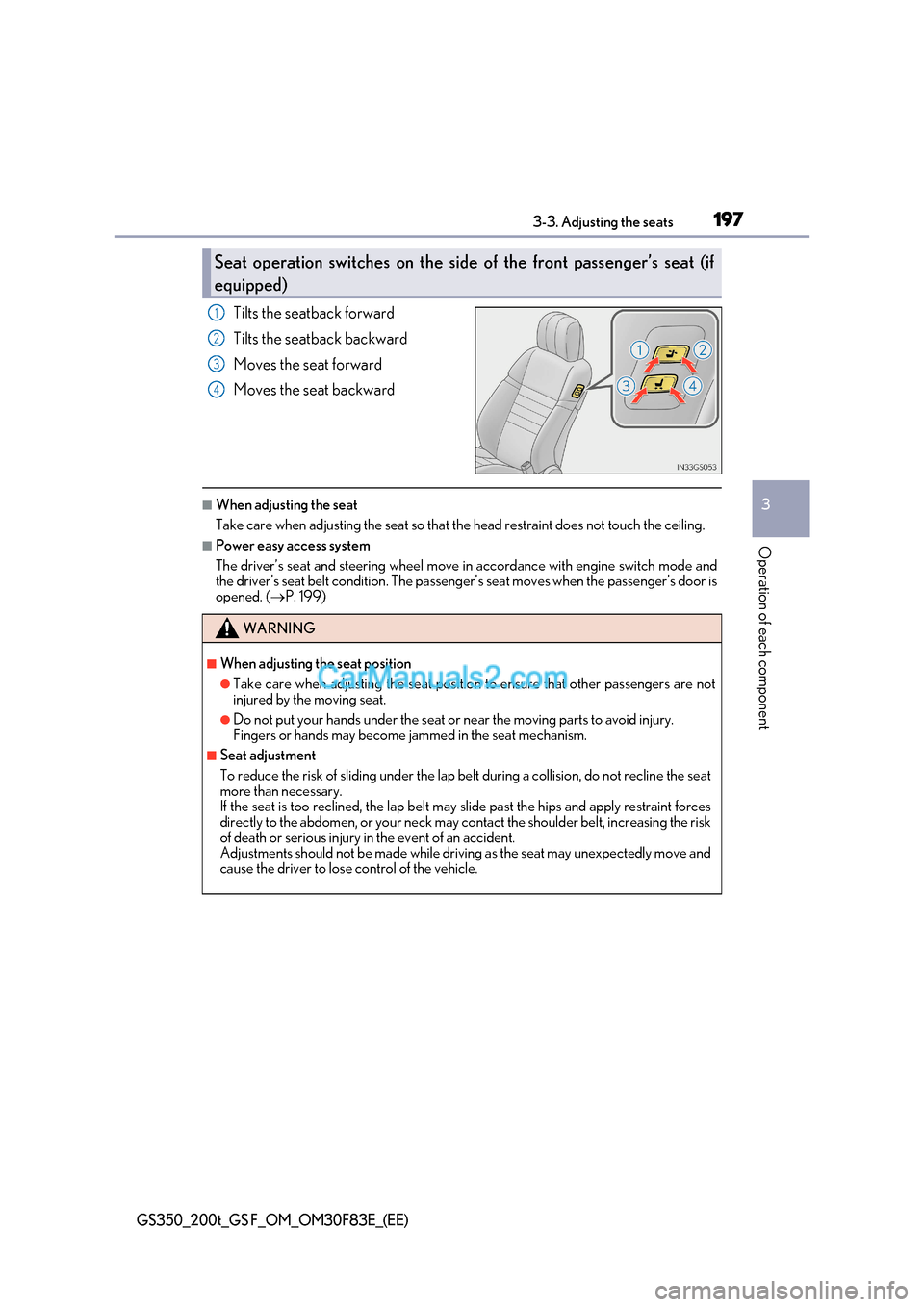
Tilts the seatback forward
Tilts the seatback backward
Moves the seat forward
Moves the seat backward
■When adjusting the seat
Take care when adjusting the seat so that the head restraint does not touch the ceiling.
■Power easy access system
The driver’s seat and steering wheel move in accordance with engine switch mode and
the driver’s seat belt condition. The passeng er’s seat moves when the passenger’s door is
opened. ( P. 199)
Seat operation switches on the side of the front passenger’s seat (if
equipped)
1
2
3
4
WARNING
■When adjusting the seat position
●Take care when adjusting the seat position to ensure that other passengers are not
injured by the moving seat.
●Do not put your hands under the seat or near the moving parts to avoid injury.
Fingers or hands may become jammed in the seat mechanism.
■Seat adjustment
To reduce the risk of sliding under the lap be lt during a collision, do not recline the seat
more than necessary.
If the seat is too reclined, th e lap belt may slide past the hips and apply restraint forces
directly to the abdomen, or your neck may contact the shoulder belt, increasing the risk
of death or serious injury in the event of an accident.
Adjustments should not be made while driving as the seat may unexpectedly move and
cause the driver to lose control of the vehicle.
Page 201 of 676
201
3-3. Adjusting the seats
3
Operation of each component
GS350_200t_GS F_OM_OM30F83E_(EE)
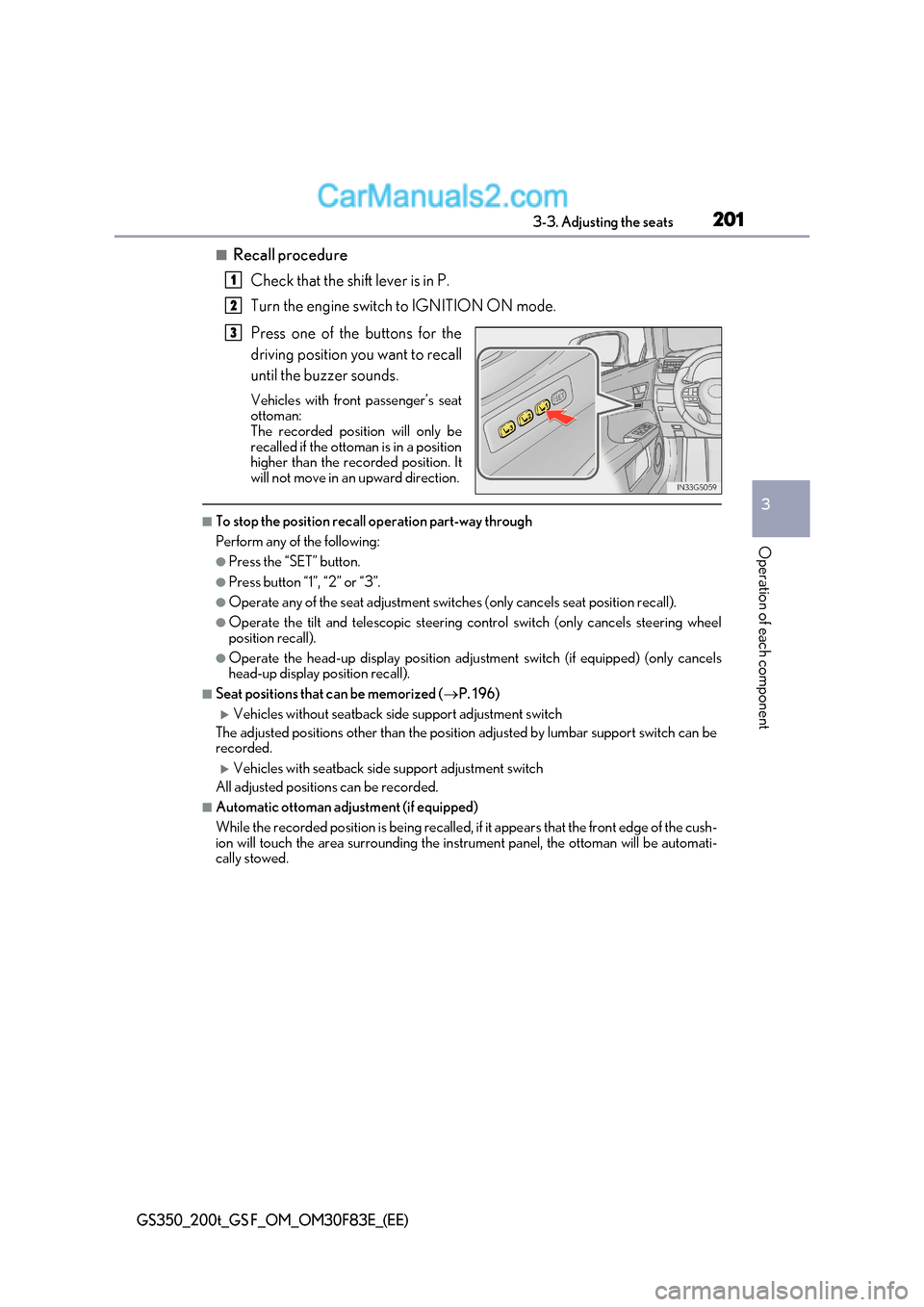
■Recall procedure
Check that the shift lever is in P.
Turn the engine switch to IGNITION ON mode.
Press one of the buttons for the
driving position you want to recall
until the buzzer sounds.
Vehicles with front passenger’s seat
ottoman:
The recorded position will only be
recalled if the ottoman is in a position
higher than the recorded position. It
will not move in an upward direction.
■To stop the position recall operation part-way through
Perform any of the following:
●Press the “SET” button.
●Press button “1”, “2” or “3”.
●Operate any of the seat adjustment switches (only cancels seat position recall).
●Operate the tilt and telescopic steering control switch (only cancels steering wheel
position recall).
●Operate the head-up display position adju stment switch (if equipped) (only cancels
head-up display position recall).
■Seat positions that can be memorized ( P. 196)
Vehicles without seatback side support adjustment switch
The adjusted positions other than the position adjusted by lumbar support switch can be
recorded.
Vehicles with seatback side support adjustment switch
All adjusted positions can be recorded.
■Automatic ottoman adjustment (if equipped)
While the recorded position is being recalled, if it appears that the front edge of the cush-
ion will touch the area surrounding the instrument panel, the ottoman will be automati-
cally stowed.
1
2
3
Page 205 of 676
205
3-3. Adjusting the seats
3
Operation of each component
GS350_200t_GS F_OM_OM30F83E_(EE)
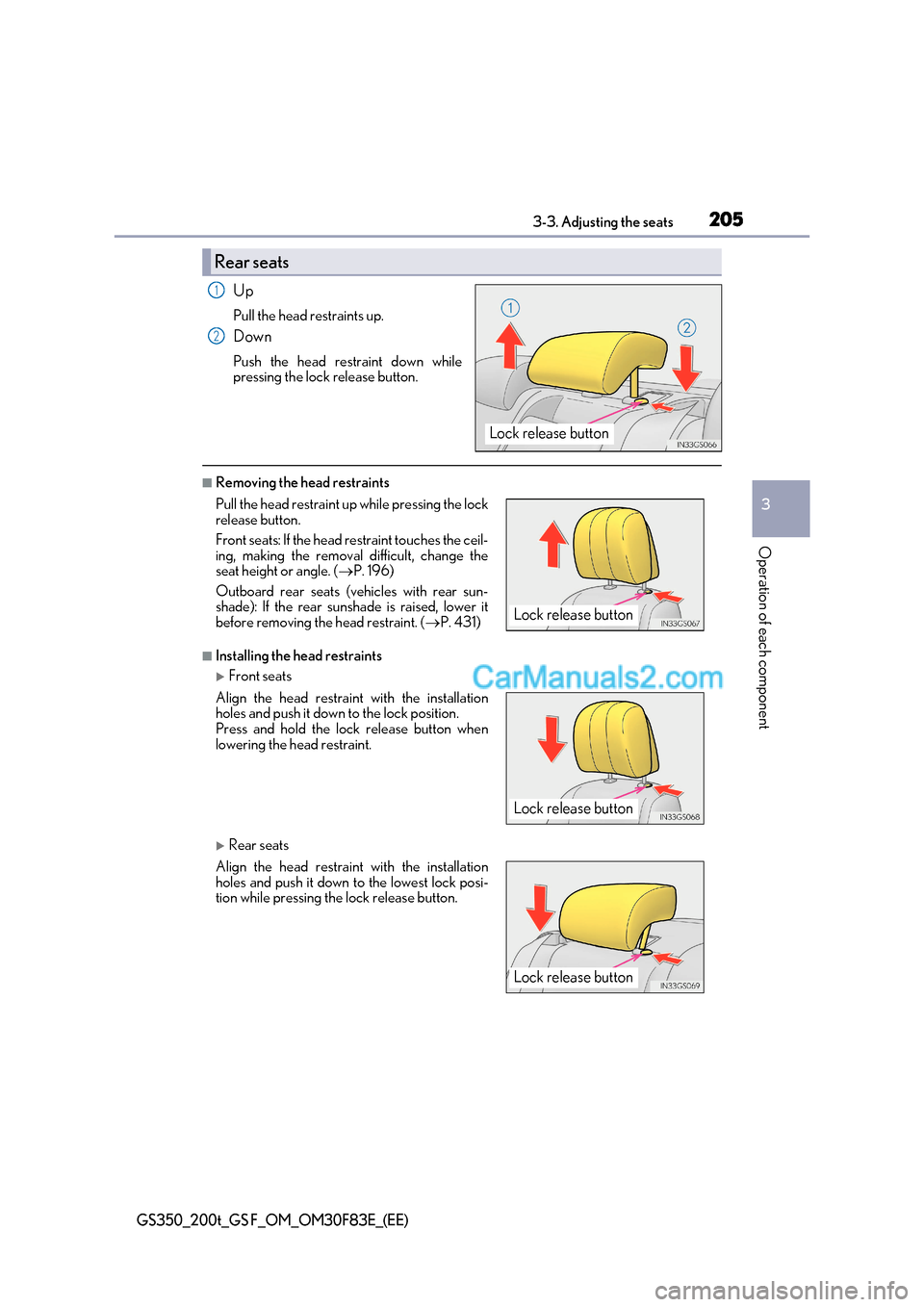
Up
Pull the head restraints up.
Down
Push the head restraint down while
pressing the lock release button.
■Removing the head restraints
■Installing the head restraints
Front seats
Rear seats
Rear seats
Lock release button
1
2
Pull the head restraint up while pressing the lock
release button.
Front seats: If the head restraint touches the ceil-
ing, making the removal difficult, change the
seat height or angle. ( P. 196)
Outboard rear seats (v ehicles with rear sun-
shade): If the rear sunshade is raised, lower it
before removing the head restraint. ( P. 431)
Align the head restraint with the installation
holes and push it down to the lock position.
Press and hold the lock release button when
lowering the head restraint.
Align the head restraint with the installation
holes and push it down to the lowest lock posi-
tion while pressing the lock release button.
Lock release button
Lock release button
Lock release button
Page 210 of 676

2103-4. Adjusting the steering wheel and mirrors
GS350_200t_GS F_OM_OM30F83E_(EE)
■To prevent sensor error
To ensure that the sensors operate properly, do
not touch or cover them.
WARNING
Do not adjust the position of the mirror while driving.
Doing so may lead to mishandling of the vehicle and cause an accident, resulting in
death or serious injury.
Page 213 of 676
213
3-4. Adjusting the steering wheel and mirrors
3
Operation of each component
GS350_200t_GS F_OM_OM30F83E_(EE)
■Mirror angle can be adjusted when
The engine switch is in ACCESSORY or IGNITION ON mode.
■When the mirrors are fogged up
The outside rear view mirrors can be clea red using the mirror defoggers. Turn on the
rear window defogger to turn on the outside rear view mirror defoggers. ( P. 402)
■Automatic adjustment of the mirror angle
A desired mirror face angle can be entered to memory and recalled automatically by the
driving position memory. ( P. 199)
■Auto anti-glare function
When the anti-glare inside rear view mirror is set to automatic mode, the outside rear
view mirrors will activate in conjunction with the anti-glare inside rear view mirror to
reduce reflected light. ( P. 209)
■Using automatic mode in cold weather
When automatic mode is used in cold weather, the door mirror could freeze up and
automatic stowing and return may not be possible. In this event, remove any ice and snow
from the door mirror, then either operate the mirror using manual mode or move the mir- ror by hand.
WARNING
■Important points while driving
Observe the following precautions while driving.
Failure to do so may result in loss of control of the vehicle and cause an accident, result-
ing in death or serious injury.
●Do not adjust the mirrors while driving.
●Do not drive with the mirrors folded.
●Both the driver and passenger side mirrors must be extended and properly adjusted
before driving.
■When a mirror is moving
To avoid personal injury and mirror malfunction, be careful not to get your hand caught
by the moving mirror.
■When the mirror defoggers are operating
Do not touch the rear view mirror surfaces, as they can become very hot and burn you.
Page 214 of 676

2143-5. Opening, closing the windows and moon roof
GS350_200t_GS F_OM_OM30F83E_(EE)
Power windows
The power windows can be opened and closed using the switches.
Operating the switch moves the windows as follows:Closing
One-touch closing *
Opening
One-touch opening *
* : To stop the window partway, operate the
switch in the opposite direction.
Press the switch to lock the passenger
window switches. The indicator will come on.
Use this switch to prevent children from
accidentally opening or closing a pas-
senger window.
■The power windows can be operated when
The engine switch is in IGNITION ON mode.
■Operating the power windows after turning the engine off
The power windows can be operated for approximately 45 seconds even after the
engine switch is turned to ACCESSORY mode or turned off. They can not, however, be
operated once either front door is opened.
■Jam protection function
If an object becomes jammed between the window and the window frame while the win-
dow is closing, window movement is stop ped and the window is opened slightly.
■Catch protection function
If an object becomes caught between the door and window while th e window is opening,
window movement is stopped.
Opening and closing procedures
1
2
3
4
Window lock switch
Indicator
Page 215 of 676

215
3-5. Opening, closing the windows and moon roof
3
Operation of each component
GS350_200t_GS F_OM_OM30F83E_(EE)
■When the window cannot be opened or closed
When the jam protection function or catch protection function operates unusually and
the door window cannot be opened or closed , perform the following operations with the
power window switch of that door.
●Stop the vehicle. With the engine switch in IGNITION ON mode , within 4 seconds of
the jam protection function or catch protecti on function activating, continuously oper-
ate the power window switch in the one-to uch closing direction or one-touch opening
direction so that the door window can be opened and closed.
●If the door window cannot be opened and closed even when performing the above
operations, perform the following procedure for function initialization.
Turn the engine switch to IGNITION ON mode.
Pull and hold the power window switch in the one-touch closing direction and com-
pletely close the door window.
Release the power window switch for a mo ment, resume pulling the switch in the
one-touch closing direction, and hold it there for approximately 6 seconds or more.
Press and hold the power window switch in the one-touch opening direc tion. After
the door window is completely opened, cont inue holding the switch for an additional
1 second or more.
Release the power window switch for a moment, resume pushing the switch in the
one-touch opening direction, and hold it there for approximately 4 seconds or
more.
Pull and hold the power window switch in the one-touch closing direction again.
After the door window is completely closed, continue holding the switch for a fur-
ther 1 second or more.
If you release the switch while the window is moving, start again from the beginning.
If the window reverses and cannot be fully closed or opened, have the vehicle inspected
by any authorized Lexus retailer or Lexus auth orized repairer, or any reliable repairer.
■Door lock linked window operation
●The power windows can be opened and closed using the mechanical key. * ( P. 594)
●The power windows can be opened and closed using the wireless remote control. *
( P. 159)
* : These settings must be customized at an y authorized Lexus retailer or Lexus autho-
rized repairer, or any reliable repairer.
■When the battery is disconnected
The window lock switch is disabled. If ne cessary, press the window lock switch after
reconnecting the battery.
■Power windows open warning buzzer
The buzzer sounds and a message is shown on the multi-information display in the instru-
ment cluster when the engine switch is turned off and the driver’s door is opened with the
power windows open.
■Customization
Settings (e.g. linked door lock operation) can be changed.
(Customizable features: P. 634)
1
2
3
4
5
6
Page 229 of 676
229
4-1. Before driving
4
Driving
GS350_200t_GS F_OM_OM30F83E_(EE)
WARNING
Observe the following precautions.
Failure to do so may result in death or serious injury.
■When the vehicle is parked
●Do not leave a door or window open if the curved glass is coated with a metallized
film such as a silver-colored one. Reflecte d sunlight may cause the glass to act as a
lens, causing a fire.
●Always apply the parking brake, shift the shift lever to P, stop the engine and lock the
vehicle.
Do not leave the vehicle unattended while the engine is running.
If the vehicle is parked with the shift lever in P but the parking brake is not set, the
vehicle may start to move, possibly leading to an accident.
●Do not touch the exhaust pipes while the engine is running or immediately after turn-
ing the engine off.
Doing so may cause burns.
■When taking a nap in the vehicle
Always turn the engine off. Otherwise, if you accidentally move the shift lever or
depress the accelerator pedal, this could cause an accident or fire due to engine over-
heating. Additionally, if the vehicle is park ed in a poorly ventilated area, exhaust gases
may collect and enter the vehicle, leading to death or a serious health hazard.
■When braking
●When the brakes are wet, drive more cautiously.
Braking distance increases when the brakes are wet, and this may cause one side of
the vehicle to brake differently than the other side. Also, the parking brake may not
securely hold the vehicle.
●If the power brake assist function does not operate, do not follow other vehicles closely and avoid hills or shar p turns that require braking.
In this case, braking is st ill possible, but the brake pedal should be depressed more
firmly than usual. Also, the braking distance will increase. Have your brakes fixed
immediately.
●Do not pump the brake pedal if the engine stalls.
Each push on the brake pedal uses up the reserve for the power-assisted brakes.
●The brake system consists of 2 individual hy draulic systems; if one of the systems fails,
the other will still operate. In this case, the brake pedal should be depressed more
firmly than usual and the brak ing distance will increase. Have your brakes fixed imme-
diately.
■If the vehicle becomes stuck
Do not spin the wheels excessively when any of the tires is up in the air, or the vehicle is
stuck in sand, mud, etc. This may damage the driveline components or propel the vehi-
cle forward or backward, causing an accident.
Page 244 of 676
2444-2. Driving procedures
GS350_200t_GS F_OM_OM30F83E_(EE)
WARNING
■When starting the engine
Always start the engine while sitting in the driver’s seat. Do not depress the accelerator
pedal while starting the engine under any circumstances.
Doing so may cause an accident resu lting in death or serious injury.
■Caution while driving
If engine failure occurs while the vehicle is moving, do not lock or open the doors until
the vehicle reaches a safe and complete stop. Activation of the steering lock in this cir-
cumstance may lead to an accident, resulting in death or serious injury.
■Stopping the engine in an emergency
If you want to stop the engine in an emergency while driving the vehicle, press and hold
the engine switch for more than 2 seconds, or press it briefly 3 times or more in succes-
sion. ( P. 509)
However, do not touch the engine switch while driving except in an emergency. Turning
the engine off while driving will not cause lo ss of steering or braking control, but the
power assist to these systems will be lost. Th is will make it more difficult to steer and
brake, so you should pull over and stop the vehicle as soon as it is safe to do so.