touch Lexus GS F 2017 Owner's Guide
[x] Cancel search | Manufacturer: LEXUS, Model Year: 2017, Model line: GS F, Model: Lexus GS F 2017Pages: 676, PDF Size: 67.73 MB
Page 280 of 676
2804-3. Operating the lights and wipers
GS350_200t_GS F_OM_OM30F83E_(EE)
■Raindrop sensor (vehicles with rain-sensing windshield wipers)
●If AUTO mode is selected while the engine switch is in IGNITION ON mode, the wip-
ers will operate once to show that AUTO mode is activated.
●If the temperature of the raindrop sensor is 85°C (185°F) or higher, or -30°C
(-22°F) or lower, automatic operation may not occur. In this case, operate the wip-
ers in any mode other than AUTO mode.
■When the windshield wipers are in temporary operation
AUTO mode cannot be activated even if is pressed.
■If no windshield washer fluid sprays
Check that the washer nozzles are not blocked if there is washer fluid in the windshield
washer fluid reservoir.
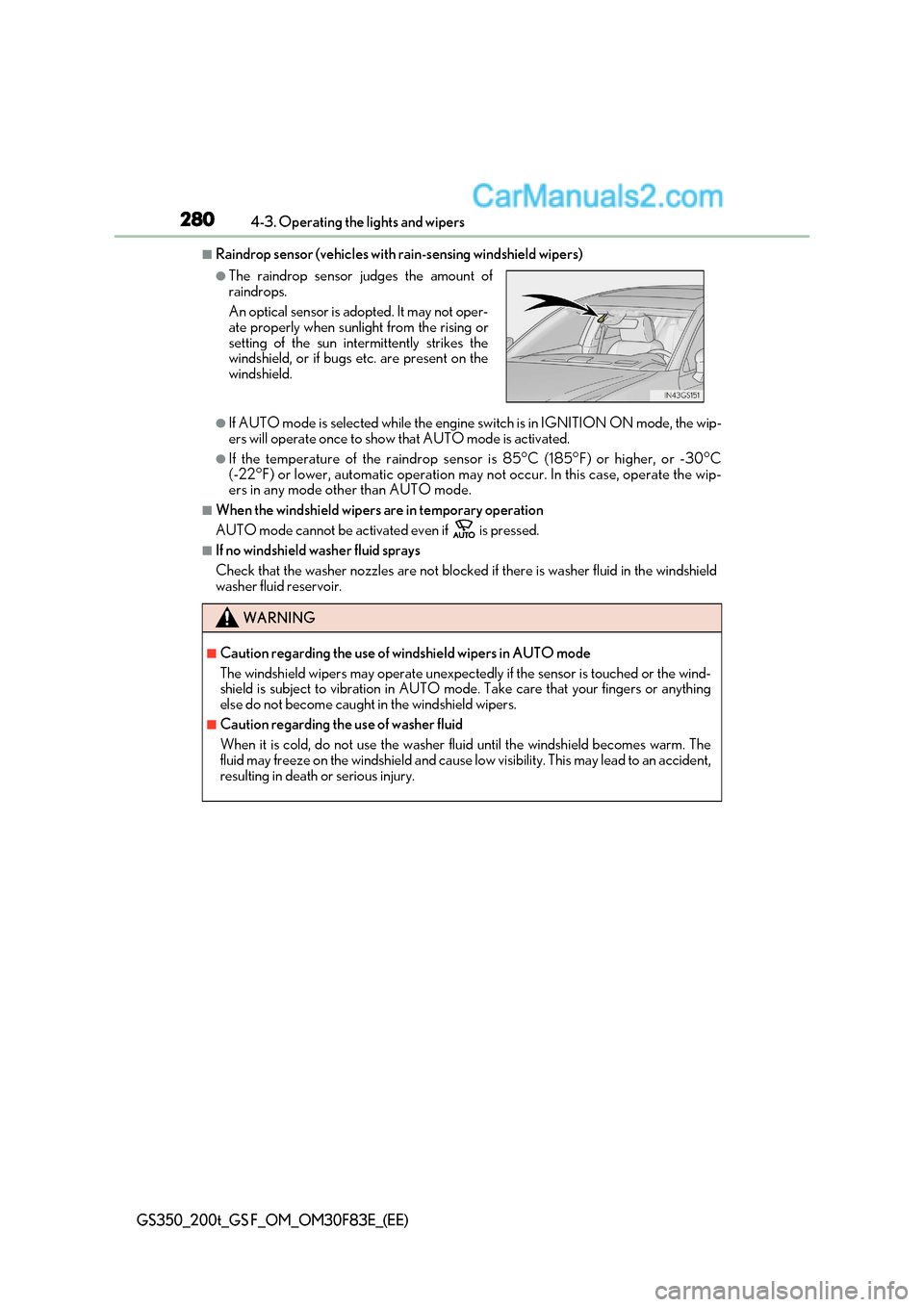
●The raindrop sensor judges the amount of raindrops.
An optical sensor is adopted. It may not oper-
ate properly when sunlight from the rising or
setting of the sun intermittently strikes the
windshield, or if bugs etc. are present on the
windshield.
WARNING
■Caution regarding the use of windshield wipers in AUTO mode
The windshield wipers may operate unexpectedly if the sensor is touched or the wind-
shield is subject to vibration in AUTO mode. Take care that your fingers or anything
else do not become caught in the windshield wipers.
■Caution regarding the use of washer fluid
When it is cold, do not use the washer fluid until the windshield becomes warm. The
fluid may freeze on the windshield and cause low visibility. This may lead to an accident,
resulting in death or serious injury.
Page 282 of 676

2824-4. Refueling
GS350_200t_GS F_OM_OM30F83E_(EE)
Opening the fuel tank cap
●Turn the engine switch off and ensure that all the doors and windows are
closed.
● Confirm the type of fuel.
■Fuel types P. 632
■Fuel tank opening for unleaded gasoline
To help prevent incorrect fueling, your vehicle has a fuel tank opening that only accom-
modates the special nozzle on unleaded fuel pumps.
Perform the following steps to open the fuel tank cap:
Before refueling the vehicle
WARNING
■When refueling the vehicle
Observe the following precautions while refueling the vehicle. Failure to do so may
result in death or serious injury.
●After exiting the vehicle and before opening the fuel door, touch an unpainted metal
surface to discharge any static electricity. It is important to discharge static electricity
before refueling because sparks resulting fr om static electricity can cause fuel vapors
to ignite while refueling.
●Always hold the grips on the fuel tank cap and turn it slowly to remove it.
A whooshing sound may be heard when the fuel tank cap is loosened. Wait until the
sound cannot be heard before fully removing the cap. In hot weather, pressurized fuel
may spray out the filler neck and cause injury.
●Do not allow anyone that has not discharged static electricity from their body to come
close to an open fuel tank.
●Do not inhale vaporized fuel.
Fuel contains substances that are harmful if inhaled.
●Do not smoke while refueling the vehicle.
Doing so may cause the fuel to ignite and cause a fire.
●Do not return to the vehicle or touch any person or object that is statically charged.
This may cause static electricity to build up, resulting in a possible ignition hazard.
■When refueling
Observe the following precautions to prevent fuel overflowing from the fuel tank:
●Securely insert the fuel nozzle into the fuel filler neck.
●Stop filling the tank after the fuel nozzle automatically clicks off.
●Do not top off the fuel tank.
Page 389 of 676
389
5Interior features
GS350_200t_GS F_OM_OM30F83E_(EE)
5-1. Remote Touch screenRemote Touch/12.3-inch display ......................................... 390
5-2. Using the air conditioning system and defogger
Front automatic air conditioning system .........396
Rear air conditioning system ........ 408
Heated steering wheel/ seat heaters/
seat ventilators ............................ 411
5-3. Using the interior lights Interior lights list........................... 416
Page 390 of 676
3905-1. Remote Touch screen
GS350_200t_GS F_OM_OM30F83E_(EE)
Remote Touch/12.3-inch display
: If equipped
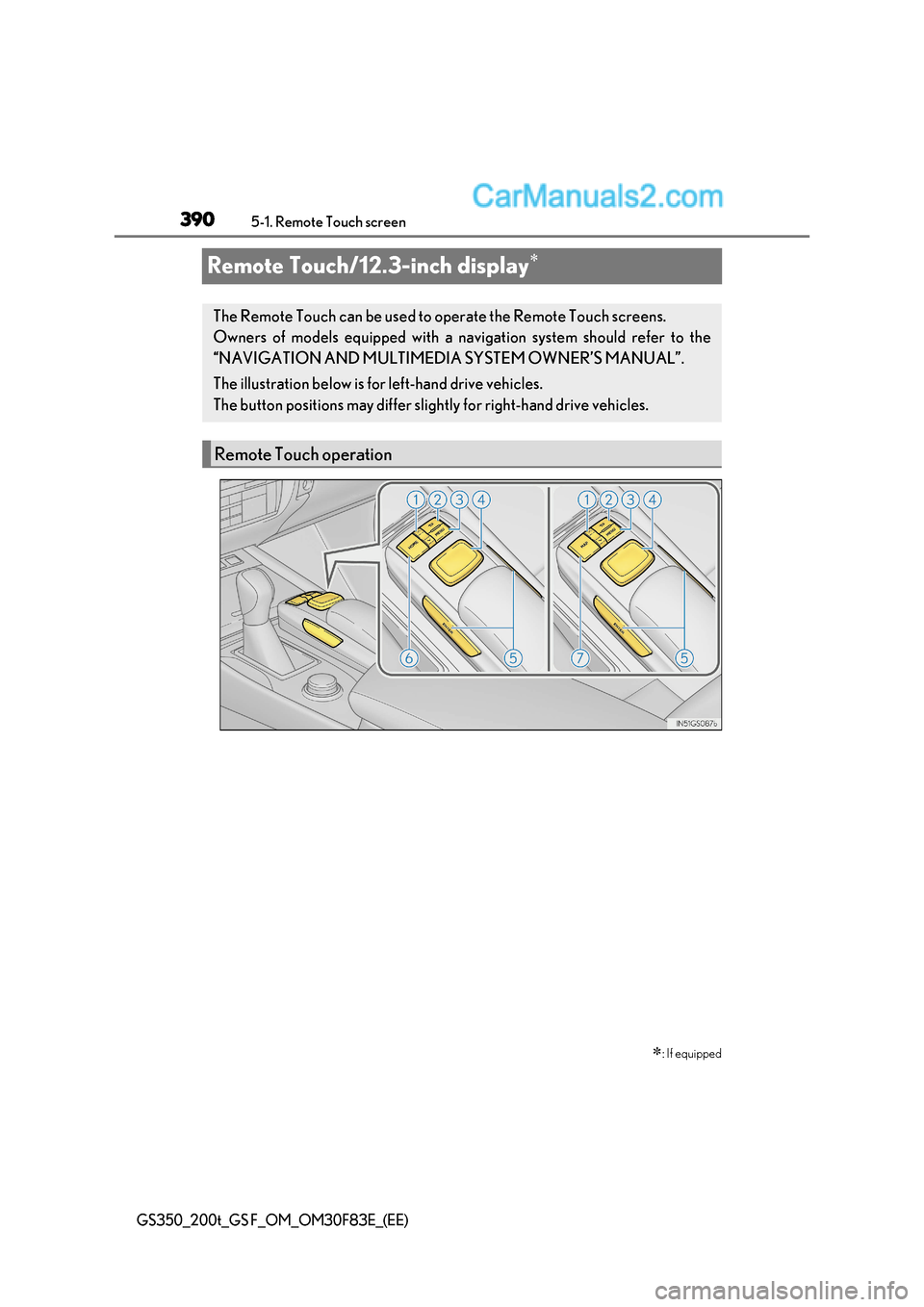
The Remote Touch can be used to operate the Remote Touch screens.
Owners of models equipped with a navi gation system should refer to the
“NAVIGATION AND MULTIMEDIA SYSTEM OWNER’S MANUAL”.
The illustration below is for left-hand drive vehicles.
The button positions may differ slight ly for right-hand drive vehicles.
Remote Touch operation
Page 391 of 676

391
5-1. Remote Touch screen
5
Interior features
GS350_200t_GS F_OM_OM30F83E_(EE)
“
Page 392 of 676

3925-1. Remote Touch screen
GS350_200t_GS F_OM_OM30F83E_(EE)
■Screen display during low temperatures
When the ambient temperature is extremely low, screen response may be delayed even
if the Remote Touch is operated.
WARNING
■When using the Remote Touch
●Do not allow fingers, fingernails or hair to become caught in the Remote Touch as this
may cause an injury.
●Be careful when selecting the Remote Touch in extreme temperatures as it may
become very hot or cold due to the temperature inside the vehicle.
NOTICE
■To prevent damage to the Remote Touch
●Do not allow the Remote Touch to come into contact with food, liquid, stickers or lit
cigarettes as doing so may cause it to change color, emit a strange odor or stop func-
tioning.
●Do not subject the Remote Touch to excessive pressure or strong impact as the knob
may bend or break off.
●Do not allow coins, contact lenses or other such items to become caught in the
Remote Touch as this may cause it to stop functioning.
●Items of clothing may rip if they be come caught on the Remote Touch knob.
●If your hand or any object is on the Re mote Touch knob when the engine switch is
turned to ACCESSORY mode, the Remote Touch knob may not operate properly.
Page 393 of 676
393
5-1. Remote Touch screen
5
Interior features
GS350_200t_GS F_OM_OM30F83E_(EE)
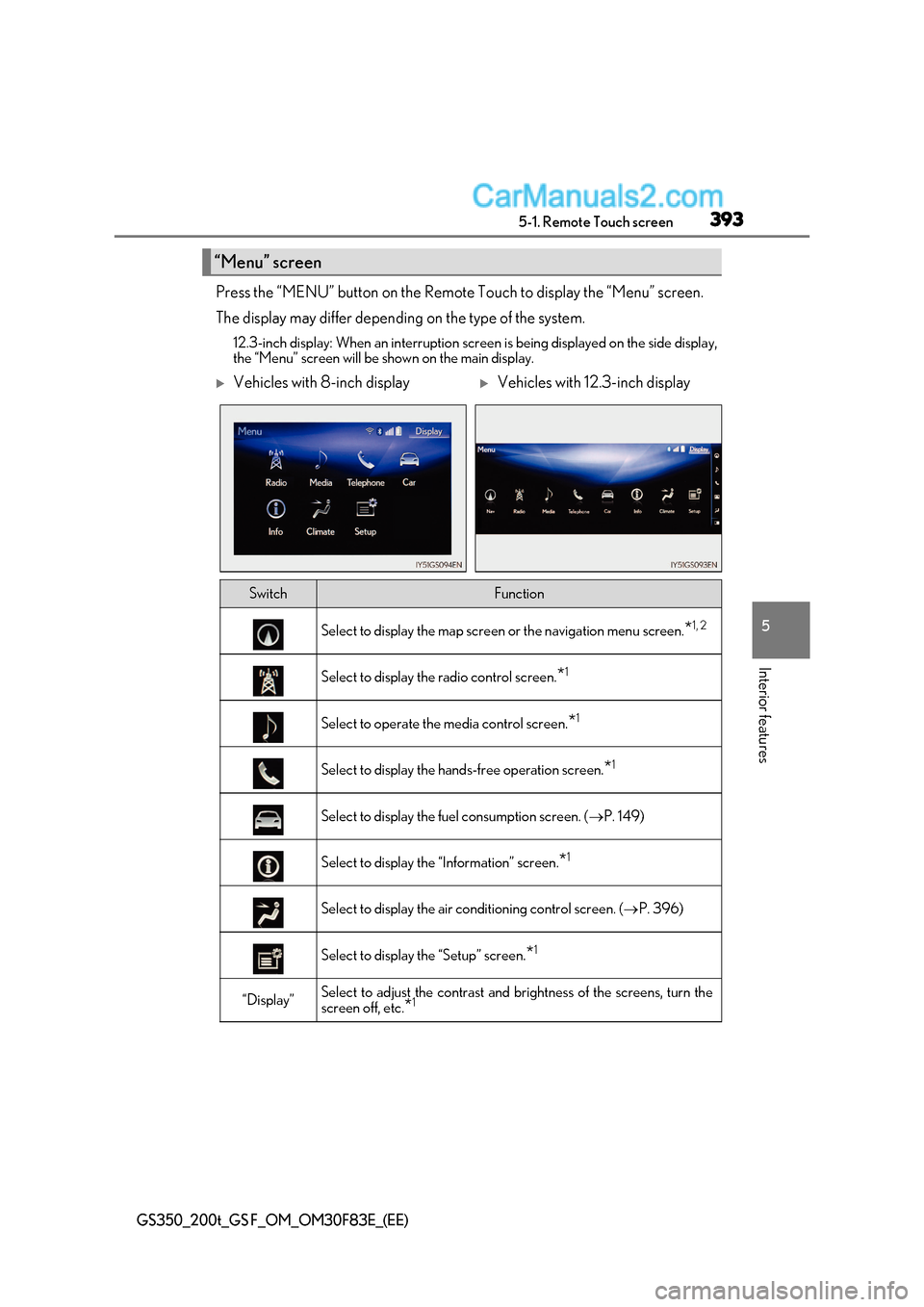
Press the “MENU” button on the Remote Touch to display the “Menu” screen.
The display may differ depending on the type of the system.
12.3-inch display: When an interruption scr een is being displayed on the side display,
the “Menu” screen will be shown on the main display.
“Menu” screen
Vehicles with 8-inch displayVehicles with 12.3-inch display
SwitchFunction
Select to display the map screen or the navigation menu screen.*1, 2
Select to display the radio control screen.
*1
Select to operate the media control screen.
*1
Select to display the hand
s-free operation screen.*1
Select to display the fuel consumption screen. (
P. 149)
Select to display the “Information” screen. *1
Select to display the air conditioning control screen. (
P. 396)
Select to display the “Setup” screen. *1
“Display”Select to adjust the contrast and
brightness of the screens, turn the
screen off, etc. *1
Page 394 of 676
3945-1. Remote Touch screen
GS350_200t_GS F_OM_OM30F83E_(EE)
*1
: Refer to the “NAVIGATION AND MULTIMEDIA SYSTEM OWNER’S MANUAL”.
* 2
: If equipped
■Full screen display
The following functions can be displayed full screen:
*: Refer to the “NAVIGATION AND MULTIMEDIA SYSTEM OWNER’S
MANUAL”.
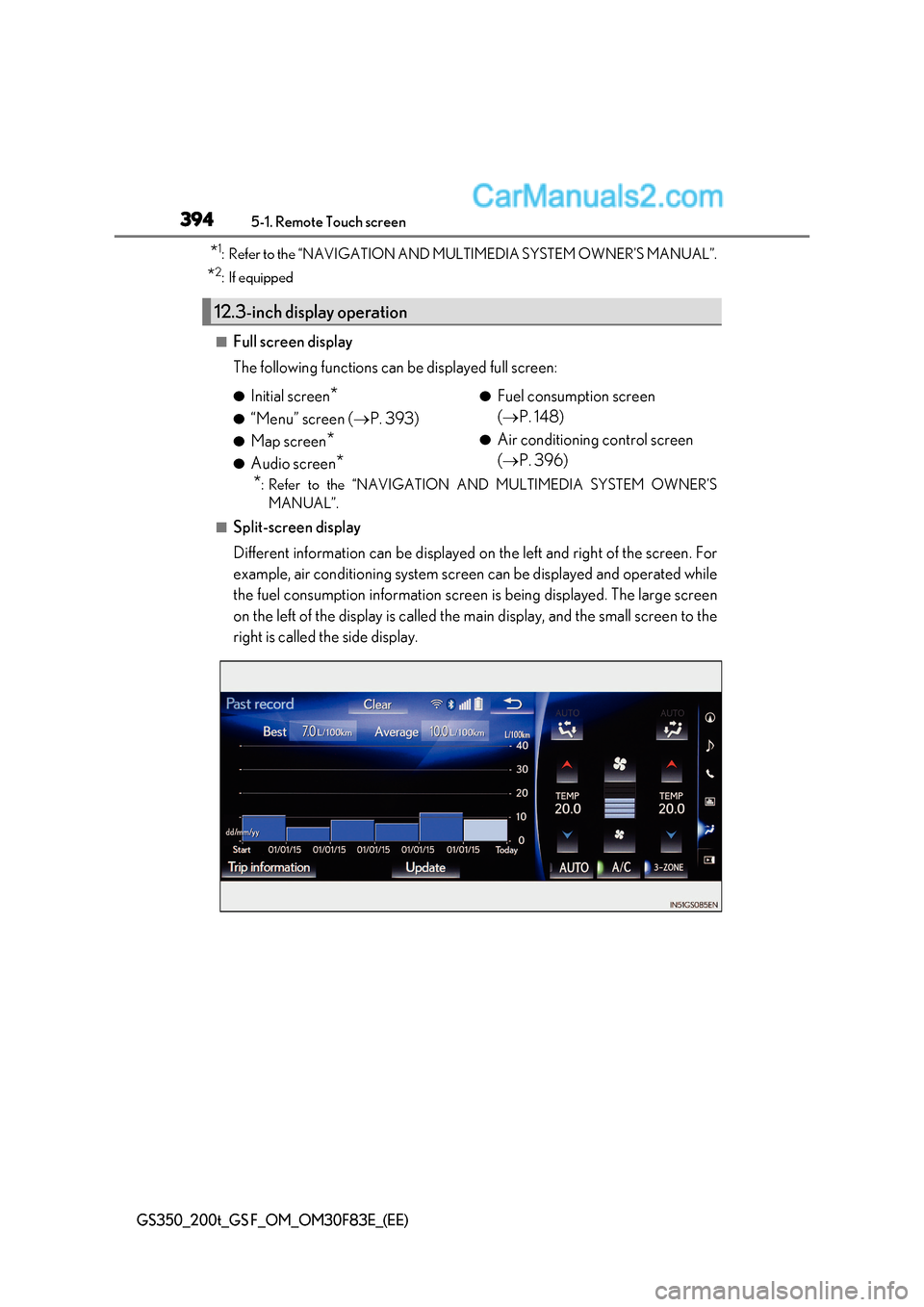
■Split-screen display
Different information can be displayed on the left and right of the screen. For
example, air conditioning system screen can be displayed and operated while
the fuel consumption information screen is being displayed. The large screen
on the left of the display is called the main display, and the small screen to the
right is called the side display.
12.3-inch display operation
● Initial screen *
● “Menu” screen ( P. 393)
● Map screen *
● Audio screen * ●
Fuel consumption screen ( P. 148)
● Air conditioning control screen ( P. 396)
Page 395 of 676
395
5-1. Remote Touch screen
5
Interior features
GS350_200t_GS F_OM_OM30F83E_(EE)
For details of the functions and operation of the main display, refer to the respec-
tive section.
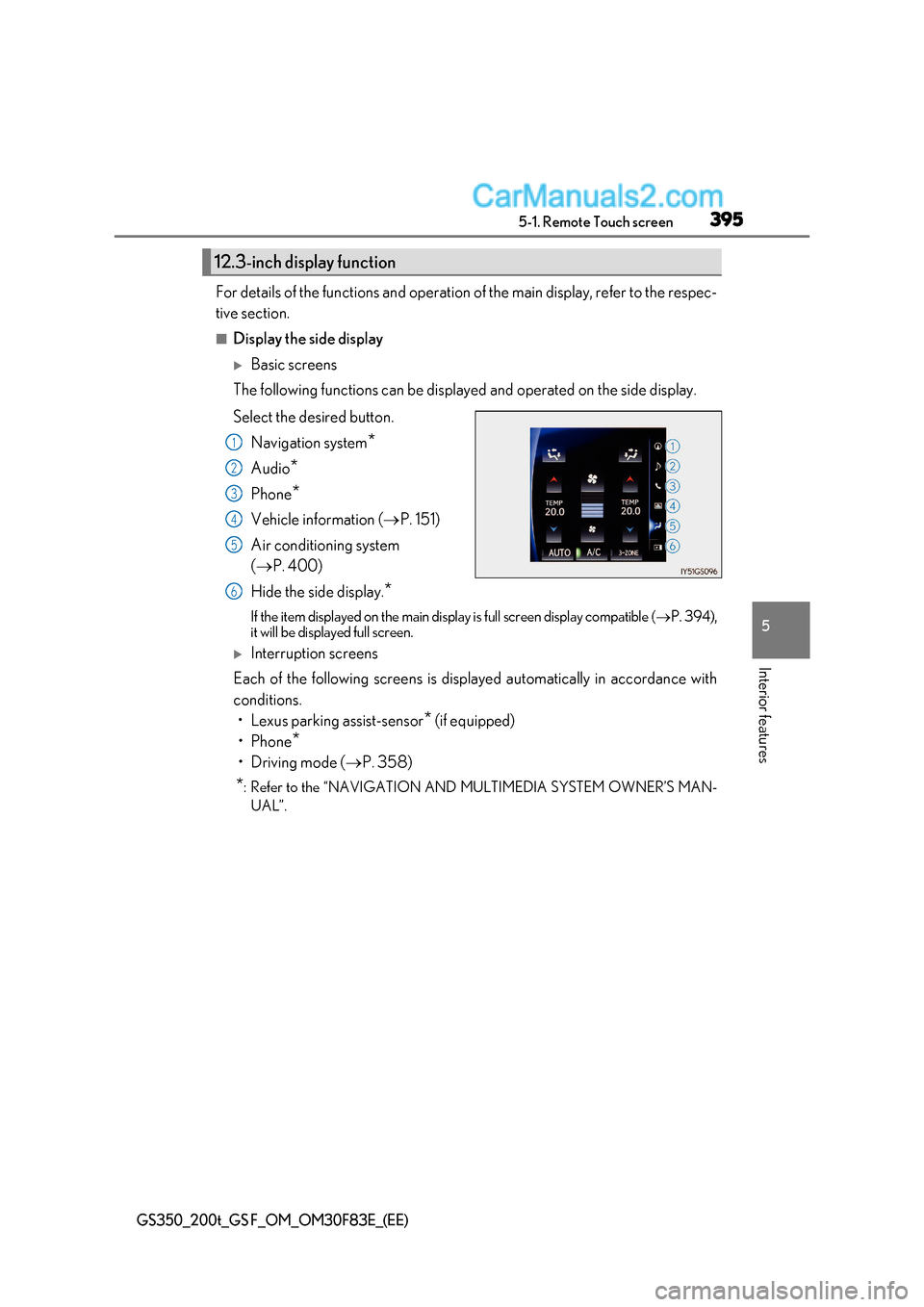
■Display the side display
Basic screens
The following functions can be displayed and operated on the side display.
Select the desired button.
Navigation system *
Audio *
Phone *
Vehicle information ( P. 151)
Air conditioning system ( P. 400)
Hide the side display. *
If the item displayed on the main display is full screen display compatible ( P. 394),
it will be displayed full screen.
Interruption screens
Each of the following screens is displayed automatically in accordance with
conditions.
Page 396 of 676

3965-2. Using the air conditioning system and defogger
GS350_200t_GS F_OM_OM30F83E_(EE)
Front automatic air conditioning system
Air outlets and fan speed are automatically adjusted according to the tem-
perature setting.
Press the “MENU” button on the Remote Touch, then select to display
the air conditioning operation screen.
Vehicles with 12.3-inch display: The air conditioning system can be displayed
and operated on the side display. ( P. 394)
The illustrations below are for left-hand drive vehicles.
The button positions and shapes will di ffer for right-hand drive vehicles.
Also, the display and button positions will differ depending on the type of the
system.
Control panel