change time Lexus GS200t 2015 Owner's Guide
[x] Cancel search | Manufacturer: LEXUS, Model Year: 2015, Model line: GS200t, Model: Lexus GS200t 2015Pages: 668, PDF Size: 177.56 MB
Page 266 of 668
2664-3. Operating the lights and wipers
GS350_200t_GS F_OM_OM30E87E_(EE)
■Conditions in which the light distribution control of the headlights changes automati-
cally
●When all of the following conditions are met, the high beams will be turned on automat-
ically and the system will operate:
• The vehicle speed is approximately 60 km/h (37 mph) or more.*
*: The area in the direction that the vehicle is turning will be illuminated more brightly
than other areas while driving on a curve.
●When all of the following conditions are met, the variable high beams will turn on and
the distance that the low beams are projecte d will be adjusted automatically, depending
on the location of vehicles ahead:
• The vehicle speed is approximately 60 km/h (37 mph) or more.
• The area ahead of the vehicle is dark.
• There are vehicles ahead with headlights or tail lights turned on.
●If any of the following conditions is met, the high beams or variable high beams will be
changed to the low beams automatically:
• The vehicle speed is below approximately 60 km/h (37 mph).
• The area ahead of the vehicle is not dark.
• There are many vehicles ahead.
• Vehicles ahead are moving quickly and the high beams may blind the drivers of the other vehicles.
■Camera sensor detection information
●The high beams may not be automatically ch anged to the variable high beams in the
following situations:
• When vehicles ahead suddenly appear from a curve
• When the vehicle is cut in front of by another vehicle
• When vehicles ahead are hidden from sight due to repeated curves, road dividers or
roadside trees
• When vehicles ahead appear from the faraway lane on wide road
• When vehicles ahead have no lights
●The high beams may be changed to the variab le high beams if a vehicle ahead that is
using fog lights without its headlights turned on is detected.
●House lights, street lights, traffic signals, and illuminated billboards or signs may cause
the high beams to change to the variable high beams, cause the high beams not to
change to the variable high beams, or change the area that is not illuminated.
●The following factors may affect the amount of time taken to turn the high beam on or
off, or the speed by which the areas not illuminated change:
• The brightness of headlights, fog lights, and tail lights of vehicles ahead
• The movement and direction of vehicles ahead
• When a vehicle ahead only has operational lights on one side
• When a vehicle ahead is a two-wheeled vehicle
• The condition of the road (gradient, curve, condition of the road surface etc.)
• The number of passengers and amount of luggage
●The light distribution control of th e headlights may change unexpectedly.
●Bicycles or similar objects may not be detected.
Page 276 of 668
2764-3. Operating the lights and wipers
GS350_200t_GS F_OM_OM30E87E_(EE)
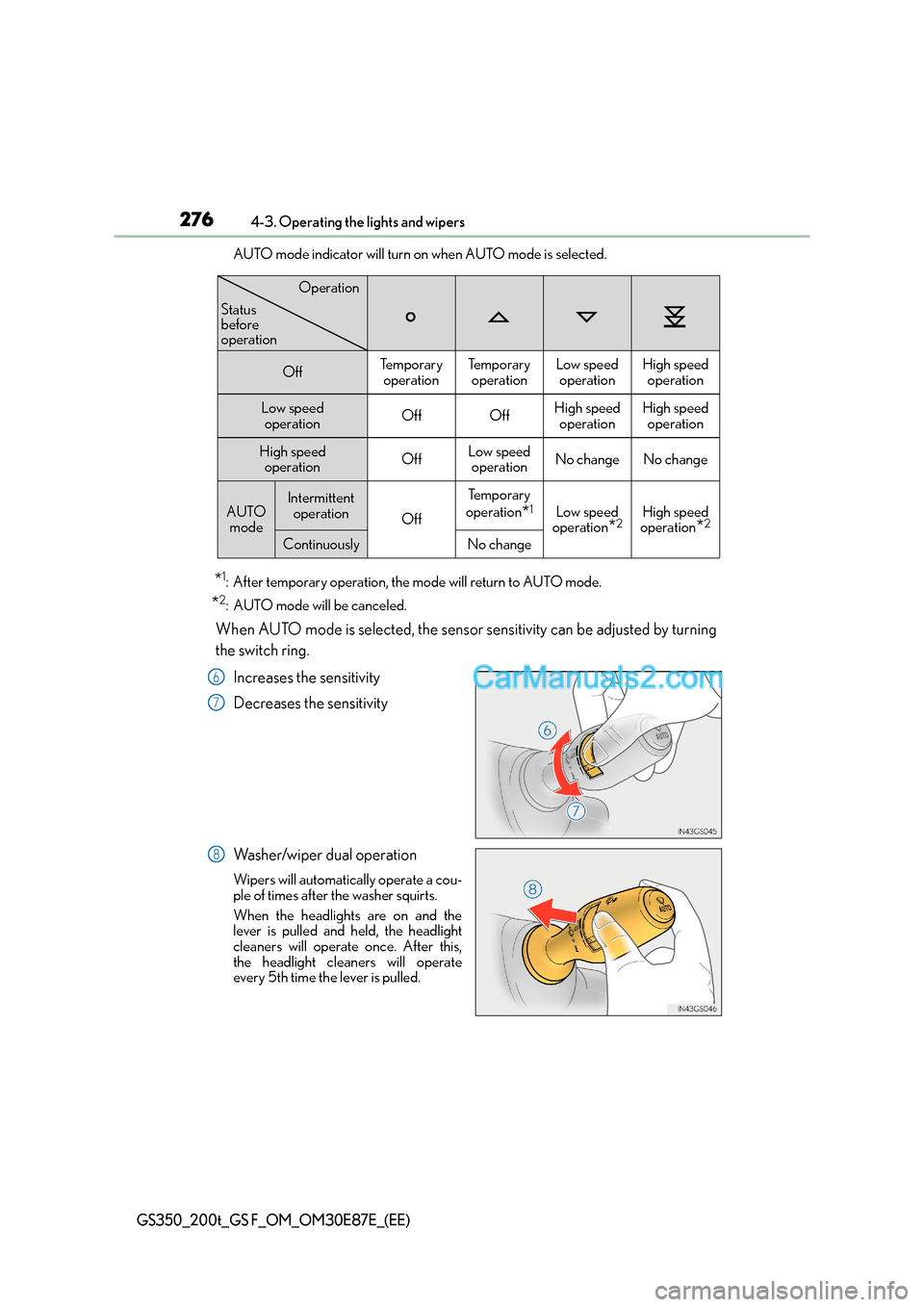
AUTO mode indicator will turn on when AUTO mode is selected.
*1: After temporary operation, the mode will return to AUTO mode.
*2: AUTO mode will be canceled.
When AUTO mode is selected, the sensor sensitivity can be adjusted by turning
the switch ring.Increases the sensitivity
Decreases the sensitivity
Washer/wiper dual operation
Wipers will automatically operate a cou-
ple of times after the washer squirts.
When the headlights are on and the
lever is pulled and held, the headlight
cleaners will operate once. After this,
the headlight cleaners will operate
every 5th time the lever is pulled.
OffTe m p o r a r y operationTe m p o r a r y operationLow speedoperationHigh speed operation
Low speed operationOffOffHigh speed operationHigh speedoperation
High speed operationOffLow speedoperationNo changeNo change
AUTO modeIntermittent operation
Off
Te m p o r a r y
operation
*1Low speed
operation
*2High speed
operation
*2
ContinuouslyNo change
Operation
Status
before
operation
6
7
8
Page 277 of 668
2774-3. Operating the lights and wipers
4
Driving
GS350_200t_GS F_OM_OM30E87E_(EE)
The wipers can be used as intermittent windshield wipers, which operate regard-
less of vehicle speed or amount of raindrops. The intermittent windshield wiper
operation can be switched when the vehicle is stopped and the wiper is off. The
wiper operation cannot be switched duri ng AUTO mode or while the intermit-
tent windshield wipers are operating.
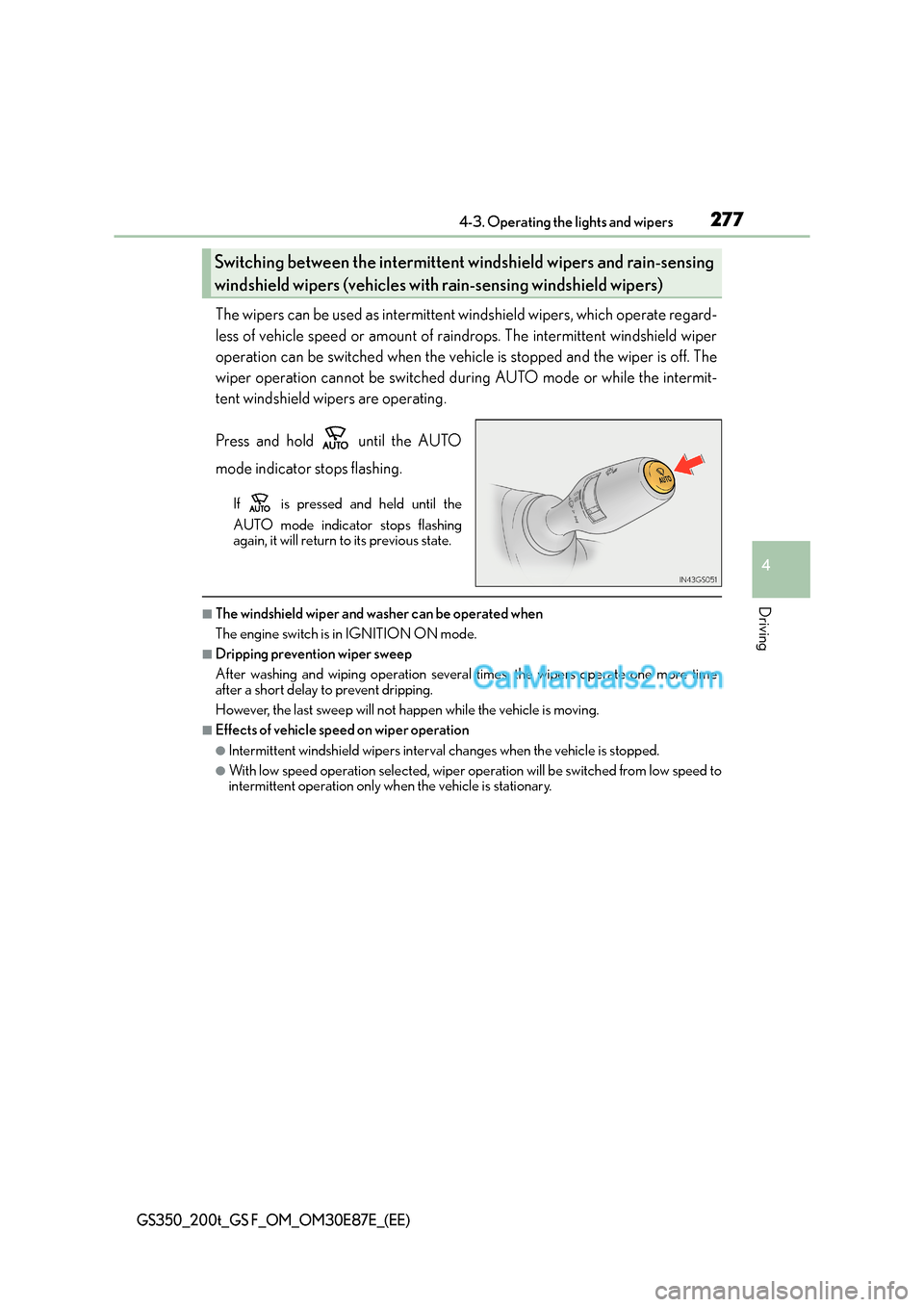
Press and hold until the AUTO
mode indicator stops flashing.
If is pressed and held until the
AUTO mode indicator stops flashing
again, it will return to its previous state.
■The windshield wiper and washer can be operated when
The engine switch is in IGNITION ON mode.
■Dripping prevention wiper sweep
After washing and wiping operation several times, the wipers operate one more time
after a short delay to prevent dripping.
However, the last sweep will not happen while the vehicle is moving.
■Effects of vehicle speed on wiper operation
●Intermittent windshield wipers interval changes when the vehicle is stopped.
●With low speed operation selected, wiper operation will be switched from low speed to
intermittent operation only wh en the vehicle is stationary.
Switching between the intermittent windshield wipers and rain-sensing
windshield wipers (vehicles with rain-sensing windshield wipers)
Page 288 of 668
2884-5. Using the driving support systems
GS350_200t_GS F_OM_OM30E87E_(EE)
WA R N I N G
■To avoid malfunction of the camera sensor
Observe the following precautions.
Otherwise, the camera sensor may not operate properly, possibly leading to an acci-
dent resulting in death or serious injury.
●Keep the windshield clean at all times.
• If the windshield is dirty or covered with an oily film, water droplets, snow, etc.,
clear the windshield.
• If a glass coating agent is applied to the windshield, it will still be necessary to use the windshield wipers to remove water drop lets from the area of the windshield in
front of the camera sensor.
• If the inner side of the windshield where th e camera sensor is installed is dirty, con-
tact any authorized Lexus dealer or repairer, or another duly qualified and
equipped professional.
●If the part of the windshield in front of the camera sensor is fogged up or covered with
condensation or ice, use the windshield defogger to remove the fog, condensation or
ice. ( →P. 4 0 0 )
●If water droplets cannot be properly remove d from the area of the windshield in front
of the camera sensor by the windshield wipers, replace the wiper insert or wiper
blade.
If the wiper inserts or wiper blades need to be replaced, contact any authorized
Lexus dealer or repairer, or another duly qualified and equipped professional.
●Do not attach window tinting to the windshield.
●Replace the windshield if it is damaged or cracked.
If the windshield needs to be replaced, contact any authorized Lexus dealer or
repairer, or another duly qualified and equipped professional.
●Do not get the camera sensor wet.
●Do not allow bright lights to shine into the camera sensor.
●Do not dirty or damage the camera sensor.
When cleaning the inside of the windshield, do not allow glass cleaner to contact the
lens. Also, do not touch the lens.
If the lens is dirty or damaged, contact any authorized Lexus dealer or repairer, or
another duly qualified and equipped professional.
●Do not subject the camera sensor to a strong impact.
●Do not change the installation position or direction of the camera sensor or remove it.
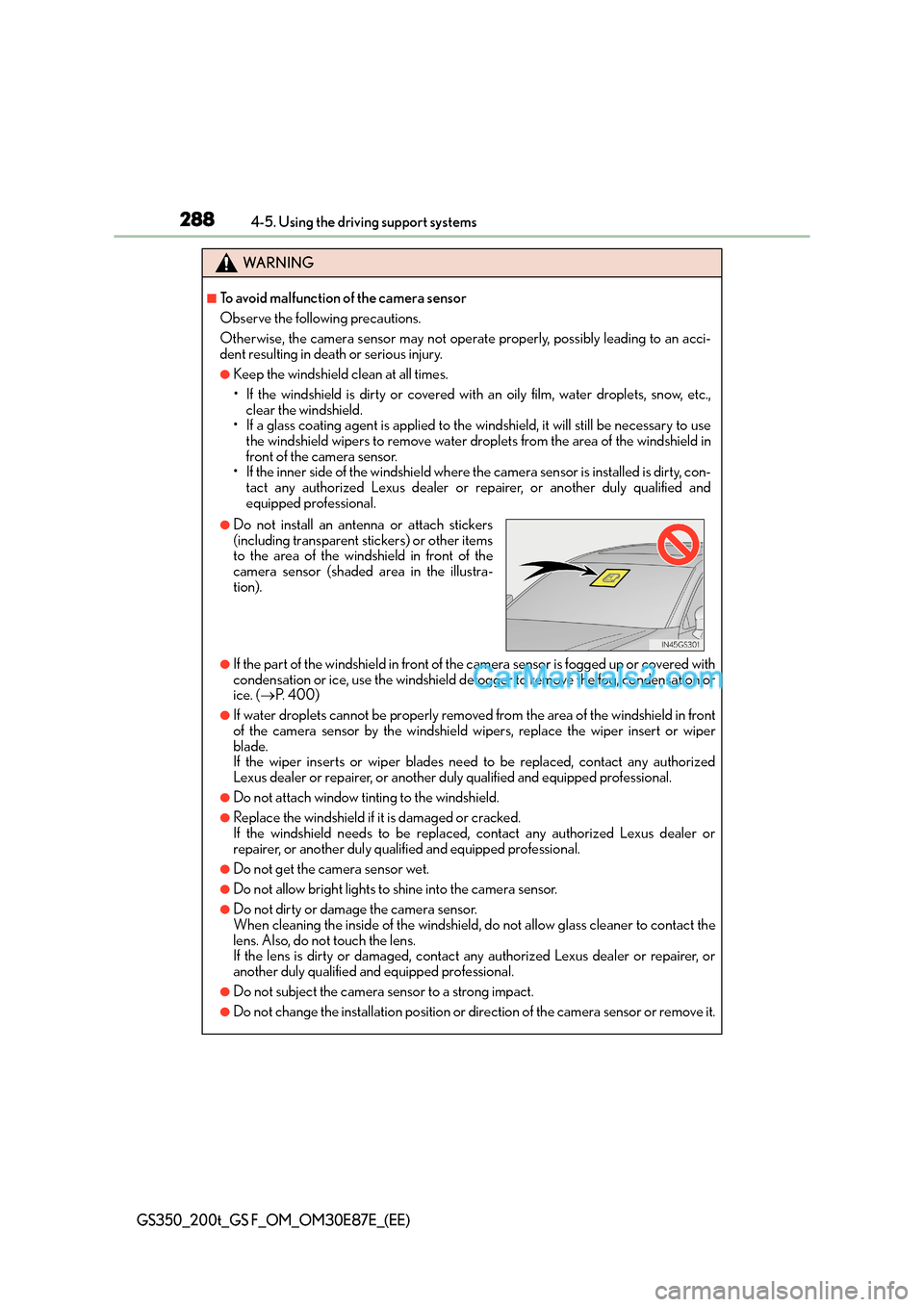
●Do not install an antenna or attach stickers
(including transparent stickers) or other items
to the area of the windshield in front of the
camera sensor (shaded area in the illustra-
tion).
Page 327 of 668
3274-5. Using the driving support systems
4
Driving
GS350_200t_GS F_OM_OM30E87E_(EE)
In the following situations, the RSA system alerts the driver using a warning dis-
play.
●When the vehicle speed exceeds the speed warning threshold applied to the
speed limit of the sign displayed on the multi-information display, the sign
color becomes inverted.
●If it is detected that your vehicle is overtaking when a no overtaking sign is dis-
played on the multi-information display, the sign flashes.
●When the RSA system recognizes a no-entry sign and detects that the vehicle
has entered a no-entry area based on the map information of the navigation
system, the no-entry sign flashes.
■Automatic turn-off of RSA sign display
One or more signs automatically turn off in the following situations.
●A new sign is not recognized for a certain distance.
●The road changes due to a left or right turn, etc.
■Conditions in which the function may not operate or detect correctly
In the following situations, RSA does not op erate normally and may not recognize signs,
display the incorrect sign, etc. However, this does not indicate a malfunction.
●The camera sensor is misaligned due to a st rong impact being applied to the sensor,
etc.
●Dirt, snow, stickers, etc., are on the windshield near the camera sensor.
●In inclement weather such as heavy rain, fog, snow or sand storms
●Light from an oncoming vehicle, the sun, etc., enters the camera sensor.
●The sign is dirty, faded, tilted or bent, and if an electronic sign, the contrast is poor.
●All or part of the sign is hidden by the leaves of a tree, a pole, etc.
●The sign is only visible to the camera sensor for a short amount of time.
●The driving scene (turning, lane change, etc.) is judged incorrectly.
●Even if it is a sign not appropriate for the currently traveled lane, such a sign exists
directly after a freeway branches, or in an adjacent lane just before merging.
●Stickers are attached to the rear of the preceding vehicle.
●A sign resembling a system compatible sign is recognized.
●The vehicle is driven in a country with a different direction of traffic.
●Side road speed signs may be detected and displayed (if positioned in sight of the cam-
era sensor) while the vehicle is traveling on the main road.
●Roundabout exit road speed signs may be detected and displayed (if positioned in sight
of the camera sensor) while traveling on a roundabout.
Warning display
Page 332 of 668
3324-5. Using the driving support systems
GS350_200t_GS F_OM_OM30E87E_(EE)
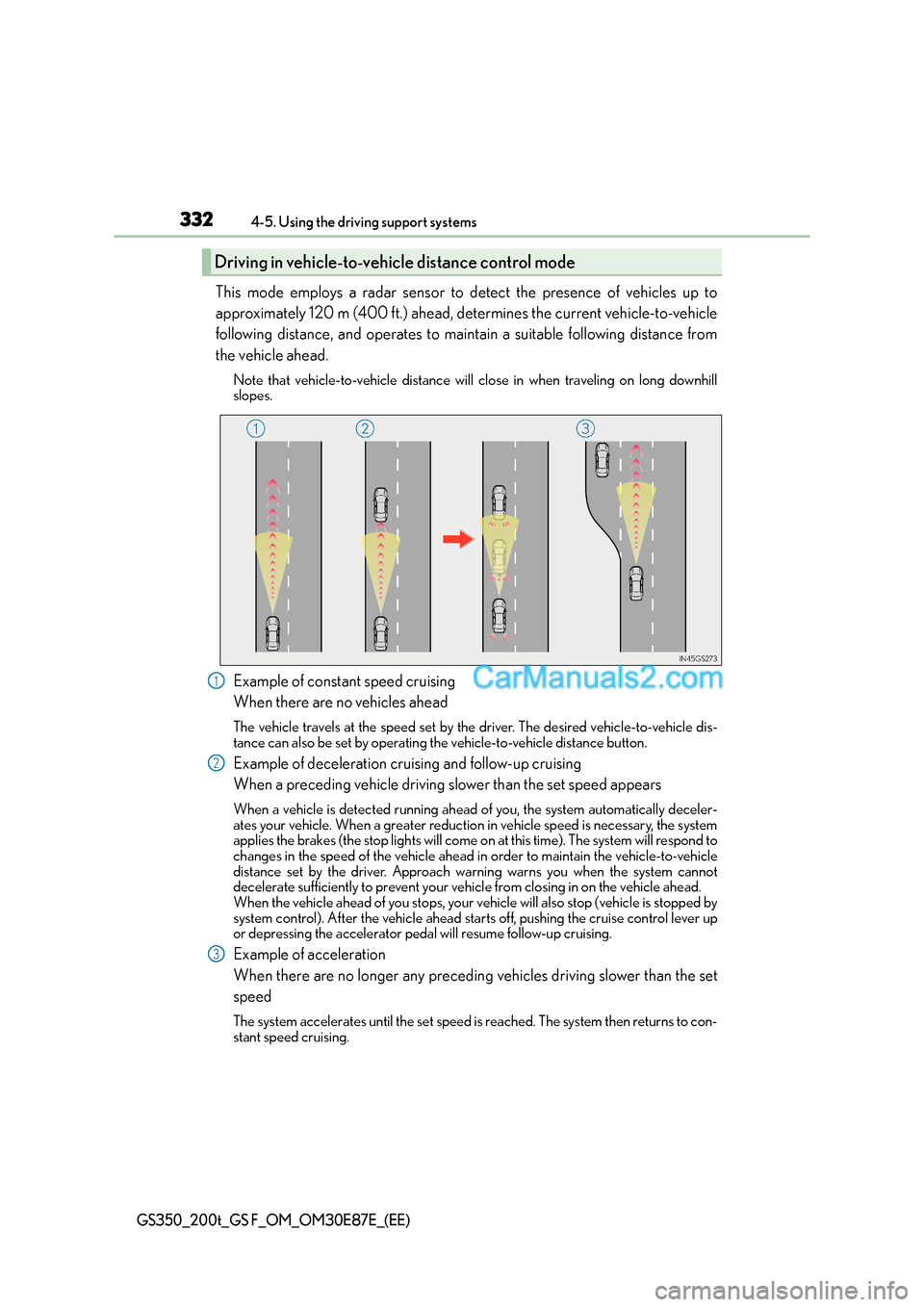
This mode employs a radar sensor to detect the presence of vehicles up to
approximately 120 m (400 ft.) ahead, determines the current vehicle-to-vehicle
following distance, and operates to maintain a suitable following distance from
the vehicle ahead.
Note that vehicle-to-vehicle distance will close in when traveling on long downhill
slopes.
Example of constant speed cruising
When there are no vehicles ahead
The vehicle travels at the speed set by the driver. The desired vehicle-to-vehicle dis-
tance can also be set by operating the vehicle-to-vehicle distance button.
Example of deceleration cruising and follow-up cruising
When a preceding vehicle driving slower than the set speed appears
When a vehicle is detected running ahead of you, the system automatically deceler-
ates your vehicle. When a greater reduction in vehicle speed is necessary, the system
applies the brakes (the stop lights will come on at this time). The system will respond to
changes in the speed of the vehicle ahead in order to maintain the vehicle-to-vehicle
distance set by the driver. Approach wa rning warns you when the system cannot
decelerate sufficiently to prevent your ve hicle from closing in on the vehicle ahead.
When the vehicle ahead of you stops, your vehicle will also stop (vehicle is stopped by
system control). After the vehicle ahead star ts off, pushing the cruise control lever up
or depressing the accelerator pedal will resume follow-up cruising.
Example of acceleration
When there are no longer any preceding vehicles driving slower than the set
speed
The system accelerates until the set speed is reached. The system then returns to con-
stant speed cruising.
Driving in vehicle-to-veh icle distance control mode
1
2
3
Page 334 of 668
3344-5. Using the driving support systems
GS350_200t_GS F_OM_OM30E87E_(EE)
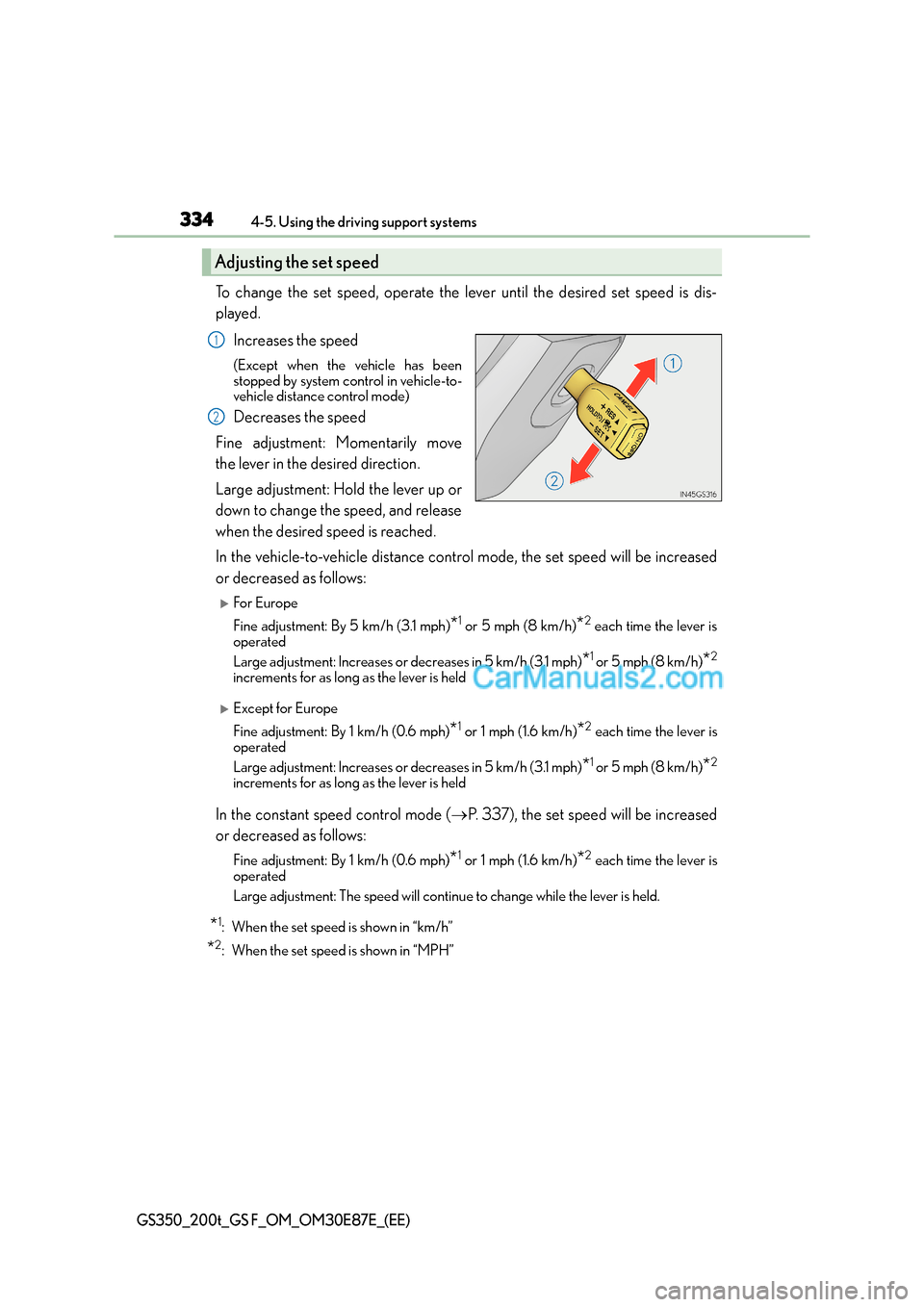
To change the set speed, operate the lever until the desired set speed is dis-
played.Increases the speed
(Except when the vehicle has been
stopped by system control in vehicle-to-
vehicle distance control mode)
Decreases the speed
Fine adjustment: Momentarily move
the lever in the desired direction.
Large adjustment: Hold the lever up or
down to change the speed, and release
when the desired speed is reached.
In the vehicle-to-vehicle distance control mode, the set speed will be increased
or decreased as follows:
XFor Europe
Fine adjustment: By 5 km/h (3.1 mph)
*1 or 5 mph (8 km/h)*2 each time the lever is
operated
Large adjustment: Increases or decreases in 5 km/h (3.1 mph)
*1 or 5 mph (8 km/h)*2
increments for as long as the lever is held
XExcept for Europe
Fine adjustment: By 1 km/h (0.6 mph)
*1 or 1 mph (1.6 km/h)*2 each time the lever is
operated
Large adjustment: Increases or decreases in 5 km/h (3.1 mph)
*1 or 5 mph (8 km/h)*2
increments for as long as the lever is held
In the constant speed control mode ( →P. 337), the set speed will be increased
or decreased as follows:
Fine adjustment: By 1 km/h (0.6 mph)*1 or 1 mph (1.6 km/h)*2 each time the lever is
operated
Large adjustment: The speed will continue to change while the lever is held.
*1: When the set speed is shown in “km/h”
*2: When the set speed is shown in “MPH”
Adjusting the set speed
1
2
Page 344 of 668
3444-5. Using the driving support systems
GS350_200t_GS F_OM_OM30E87E_(EE)
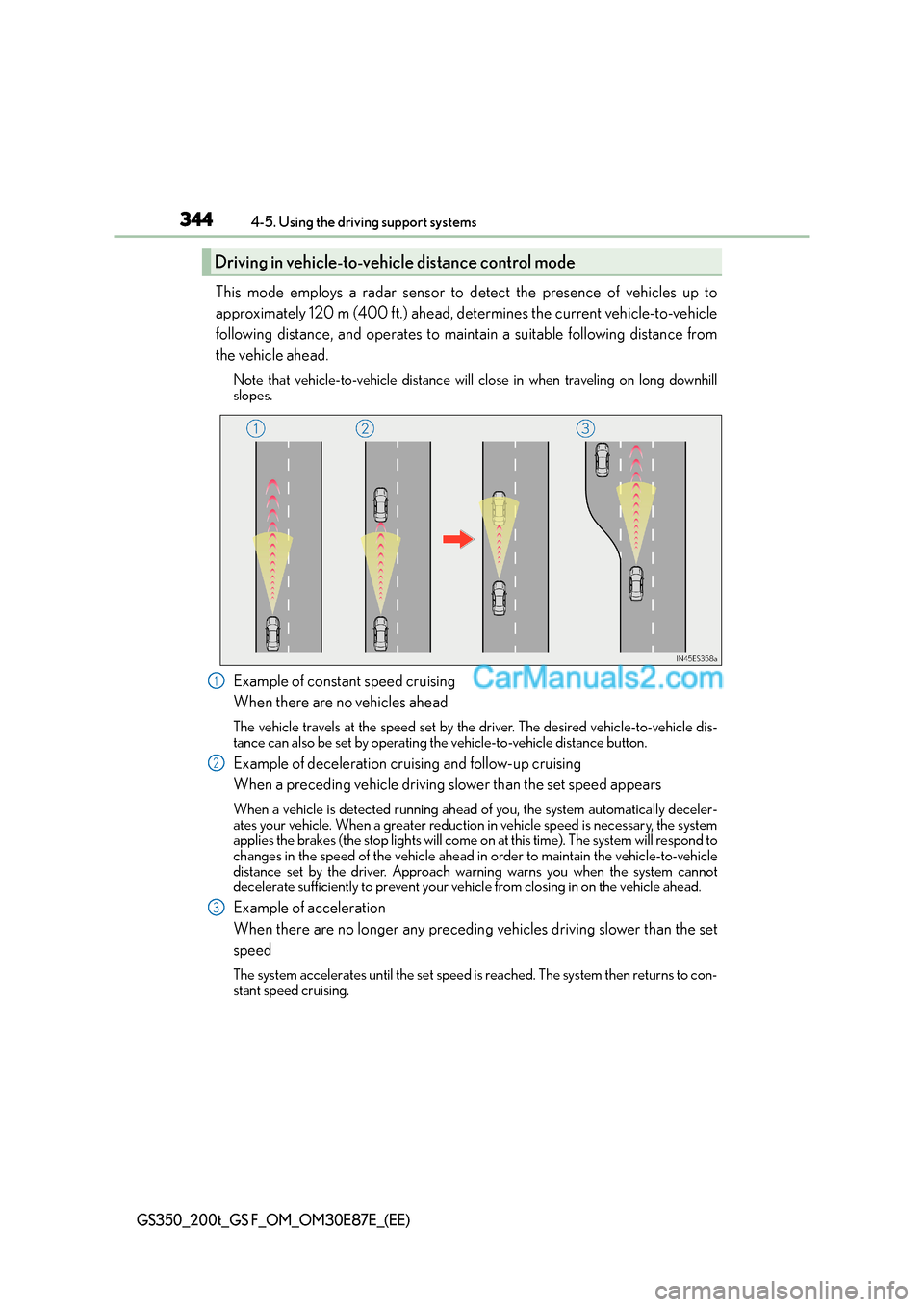
This mode employs a radar sensor to detect the presence of vehicles up to
approximately 120 m (400 ft.) ahead, determines the current vehicle-to-vehicle
following distance, and operates to maintain a suitable following distance from
the vehicle ahead.
Note that vehicle-to-vehicle distance will close in when traveling on long downhill
slopes.
Example of constant speed cruising
When there are no vehicles ahead
The vehicle travels at the speed set by the driver. The desired vehicle-to-vehicle dis-
tance can also be set by operating the vehicle-to-vehicle distance button.
Example of deceleration cruising and follow-up cruising
When a preceding vehicle driving slower than the set speed appears
When a vehicle is detected running ahead of you, the system automatically deceler-
ates your vehicle. When a greater reduction in vehicle speed is necessary, the system
applies the brakes (the stop lights will come on at this time). The system will respond to
changes in the speed of the vehicle ahead in order to maintain the vehicle-to-vehicle
distance set by the driver. Approach wa rning warns you when the system cannot
decelerate sufficiently to prevent your ve hicle from closing in on the vehicle ahead.
Example of acceleration
When there are no longer any preceding vehicles driving slower than the set
speed
The system accelerates until the set speed is reached. The system then returns to con-
stant speed cruising.
Driving in vehicle-to-vehicle distance control mode
1
2
3
Page 346 of 668
3464-5. Using the driving support systems
GS350_200t_GS F_OM_OM30E87E_(EE)
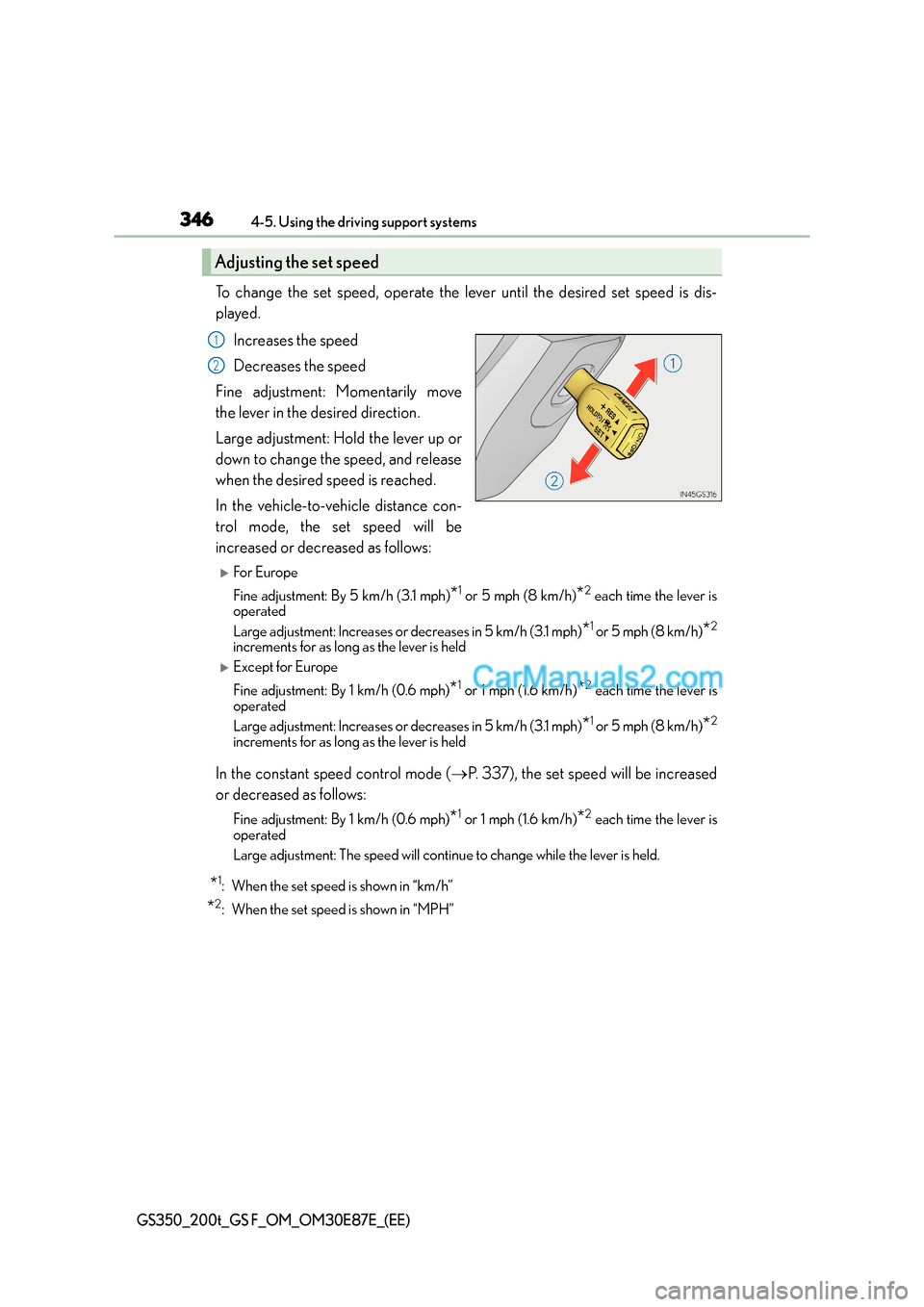
To change the set speed, operate the lever until the desired set speed is dis-
played.Increases the speed
Decreases the speed
Fine adjustment: Momentarily move
the lever in the desired direction.
Large adjustment: Hold the lever up or
down to change the speed, and release
when the desired speed is reached.
In the vehicle-to-vehicle distance con-
trol mode, the set speed will be
increased or decreased as follows:
XFor Europe
Fine adjustment: By 5 km/h (3.1 mph)
*1 or 5 mph (8 km/h)*2 each time the lever is
operated
Large adjustment: Increases or decreases in 5 km/h (3.1 mph)
*1 or 5 mph (8 km/h)*2
increments for as long as the lever is held
XExcept for Europe
Fine adjustment: By 1 km/h (0.6 mph)
*1 or 1 mph (1.6 km/h)*2 each time the lever is
operated
Large adjustment: Increases or decreases in 5 km/h (3.1 mph)
*1 or 5 mph (8 km/h)*2
increments for as long as the lever is held
In the constant speed control mode ( →P. 337), the set speed will be increased
or decreased as follows:
Fine adjustment: By 1 km/h (0.6 mph)*1 or 1 mph (1.6 km/h)*2 each time the lever is
operated
Large adjustment: The speed will continue to change while the lever is held.
*1: When the set speed is shown in “km/h”
*2: When the set speed is shown in “MPH”
Adjusting the set speed
1
2
Page 354 of 668
3544-5. Using the driving support systems
GS350_200t_GS F_OM_OM30E87E_(EE)
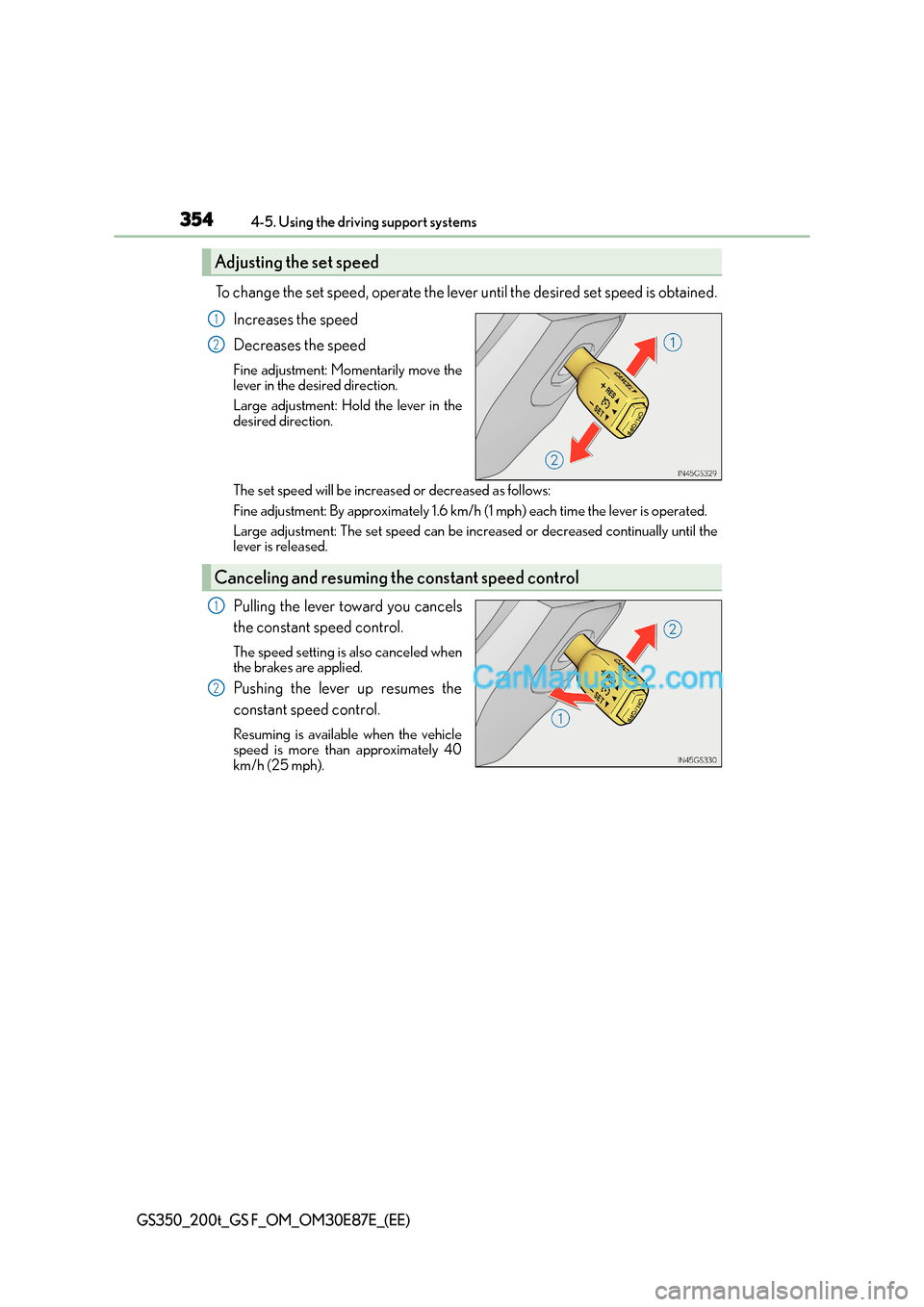
To change the set speed, operate the lever until the desired set speed is obtained.Increases the speed
Decreases the speed
Fine adjustment: Momentarily move the
lever in the desired direction.
Large adjustment: Hold the lever in the
desired direction.
The set speed will be increased or decreased as follows:
Fine adjustment: By approximately 1.6 km/h (1 mph) each time the lever is operated.
Large adjustment: The set speed can be incr eased or decreased continually until the
lever is released.
Pulling the lever toward you cancels
the constant speed control.
The speed setting is also canceled when
the brakes are applied.
Pushing the lever up resumes the
constant speed control.
Resuming is available when the vehicle
speed is more than approximately 40
km/h (25 mph).
Adjusting the set speed
1
2
Canceling and resuming th e constant speed control
1
2