change time Lexus GS200t 2015 User Guide
[x] Cancel search | Manufacturer: LEXUS, Model Year: 2015, Model line: GS200t, Model: Lexus GS200t 2015Pages: 668, PDF Size: 177.56 MB
Page 164 of 668
1643-2. Opening, closing and locking the doors and trunk
GS350_200t_GS F_OM_OM30E87E_(EE)
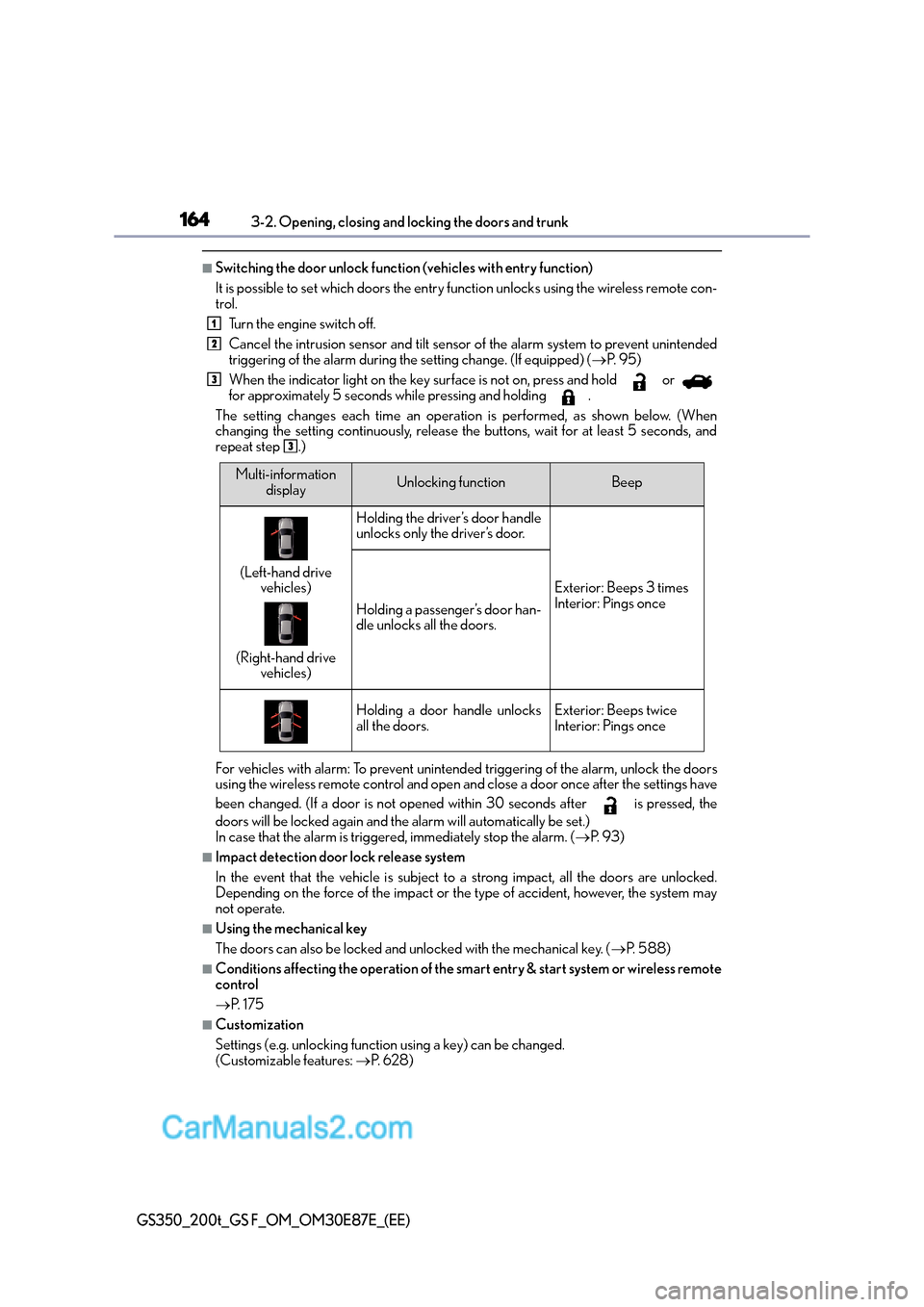
■Switching the door unlock function (vehicles with entry function)
It is possible to set which doors the entry function unlocks using the wireless remote con-
trol. Turn the engine switch off.
Cancel the intrusion sensor and tilt sensor of the alarm system to prevent unintended
triggering of the alarm during the setting change. (If equipped) ( →P. 9 5 )
When the indicator light on the key surface is not on, press and hold or
for approximately 5 seconds while pressing and holding .
The setting changes each time an operation is performed, as shown below. (When
changing the setting continuously, release the buttons, wait for at least 5 seconds, and
repeat step .)
For vehicles with alarm: To prevent unintended triggering of the alarm, unlock the doors
using the wireless remote control and open an d close a door once after the settings have
been changed. (If a door is not opened within 30 seconds after is pressed, the
doors will be locked again and the alarm will automatically be set.)
In case that the alarm is triggered, immediately stop the alarm. ( →P. 9 3 )
■Impact detection door lock release system
In the event that the vehicle is subject to a strong impact, all the doors are unlocked.
Depending on the force of the impact or the type of accident, however, the system may
not operate.
■Using the mechanical key
The doors can also be locked and unlocked with the mechanical key. ( →P. 5 8 8 )
■Conditions affecting the operation of the smart entry & start system or wireless remote
control
→P. 1 7 5
■Customization
Settings (e.g. unlocking function using a key) can be changed.
(Customizable features: →P. 6 2 8 )
1
2
3
3
Multi-information
displayUnlocking functionBeep
(Left-hand drive vehicles)
(Right-hand drive vehicles)
Holding the driver’s door handle
unlocks only the driver’s door.
Exterior: Beeps 3 times
Interior: Pings once
Holding a passenger’s door han-
dle unlocks all the doors.
Holding a door handle unlocks
all the doors.Exterior: Beeps twice
Interior: Pings once
Page 211 of 668
2113-4. Adjusting the steering wheel and mirrors
3
Operation of each component
GS350_200t_GS F_OM_OM30E87E_(EE)
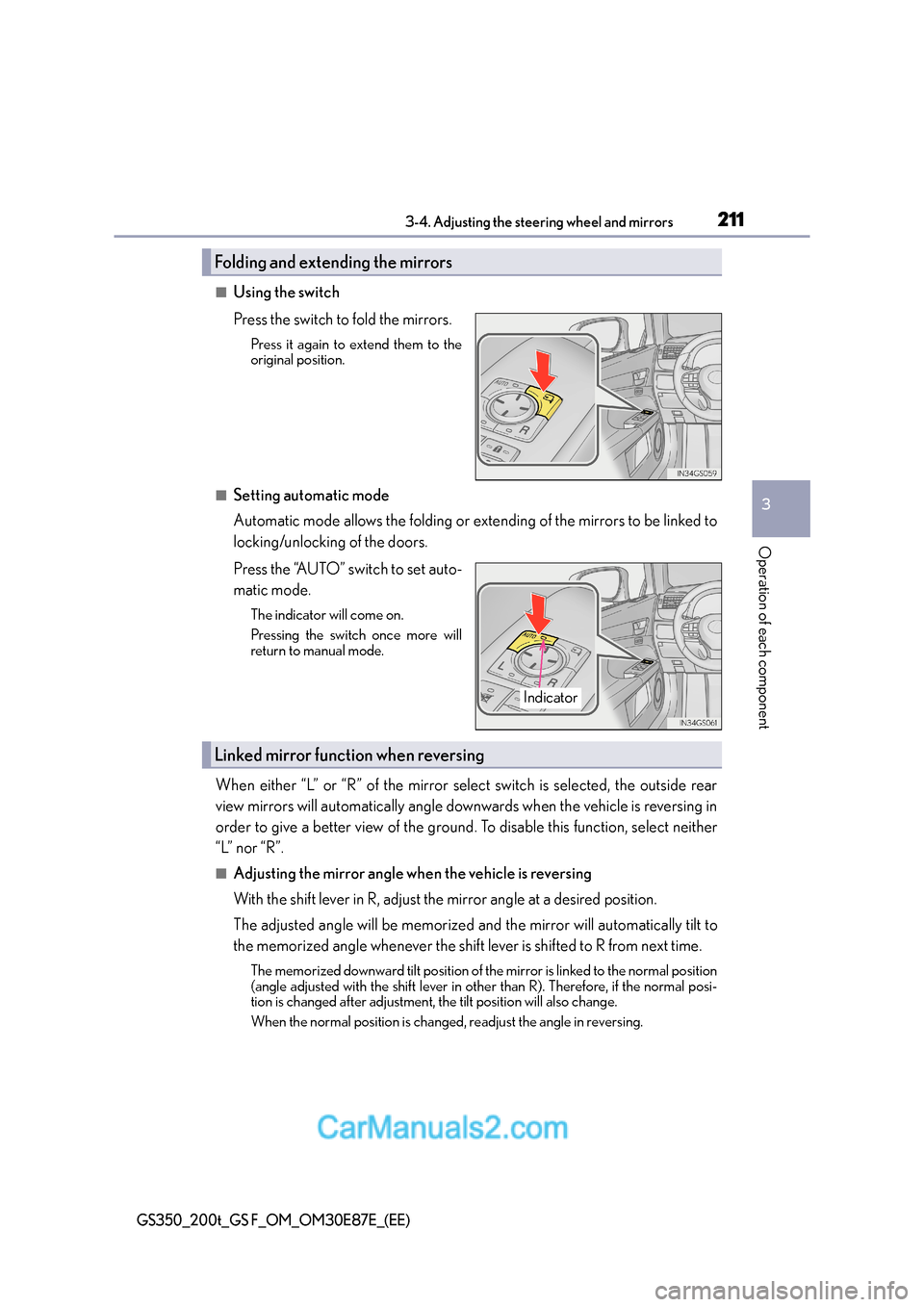
■Using the switch
Press the switch to fold the mirrors.
Press it again to extend them to the
original position.
■Setting automatic mode
Automatic mode allows the folding or extending of the mirrors to be linked to
locking/unlocking of the doors.
Press the “AUTO” switch to set auto-
matic mode.
The indicator will come on.
Pressing the switch once more will
return to manual mode.
When either “L” or “R” of the mirror select switch is selected, the outside rear
view mirrors will automatically angle downwards when the vehicle is reversing in
order to give a better view of the ground. To disable this function, select neither
“L” nor “R”.
■Adjusting the mirror angle when the vehicle is reversing
With the shift lever in R, adjust the mirror angle at a desired position.
The adjusted angle will be memorized and the mirror will automatically tilt to
the memorized angle whenever the shift lever is shifted to R from next time.
The memorized downward tilt position of the mirror is linked to the normal position
(angle adjusted with the shift lever in othe r than R). Therefore, if the normal posi-
tion is changed after adjustment, the tilt position will also change.
When the normal position is changed, readjust the angle in reversing.
Folding and extending the mirrors
Indicator
Linked mirror function when reversing
Page 218 of 668

2183-5. Opening, closing the windows and moon roof
GS350_200t_GS F_OM_OM30E87E_(EE)
■When the moon roof does not close normally
Perform the following procedure:
●If the moon roof closes but then re-opens slightlyStop the vehicle.
Press and hold the “CLOSE” switch.
*1
The moon roof will close, reopen an d pause for approximately 10 seconds.*2 Then it
will close again, tilt up and pause for approx imately 1 second. Finally, it will tilt down,
open and close.
Check to make sure that the moon roof is completely closed and then release the
switch.
●If the moon roof tilts down but then tilts back up
Stop the vehicle.
Press and hold the “UP” switch
*1 until the moon roof moves into the tilt up position
and stops.
Release the “UP” switch once and then press and hold the “UP” switch again.
*1
The moon roof will pause for approximatel y 10 seconds in the tilt up position.*2
Then it will adjust slightly and pause for approximately 1 second. Finally, it will tilt
down, open and close.
Check to make sure that the moon roof is completely closed and then release the
switch.
*1: If the switch is released at the incorrect time, the procedure will have to be per-
formed again from the beginning.
*2: If the switch is released after the above mentioned 10 second pause, automatic operation will be disabled. In that case, pr ess and hold the “CLOSE” or “UP” switch,
and the moon roof will tilt up and pause fo r approximately 1 second. Then it will tilt
down, open and close. Check to make sure that the moon roof is completely closed
and then release the switch.
If the moon roof does not fully close even after performing the above procedure cor-
rectly, have the vehicle inspected by any authorized Lexus dealer or repairer, or another
duly qualified and equipped professional.
■Moon roof open warning buzzer
The buzzer sounds and a message is shown on the multi-information display in the instru-
ment cluster when the engine switch is turned off and the driver’s door is opened with the
moon roof open.
■Customization
Settings (e.g. linked door lock operation) can be changed.
(Customizable features: →P. 6 2 8 )
1
2
3
1
2
3
4
Page 229 of 668

2294-1. Before driving
4
Driving
GS350_200t_GS F_OM_OM30E87E_(EE)
NOTICE
■When driving the vehicle
●Do not depress the accelerator and brake pedals at the same time during driving, as
this may restrain the engine output.
●Do not use the accelerator pedal or depress the accelerator and brake pedals at the
same time to hold the vehicle on a hill.
■When parking the vehicle
Always shift the shift lever to P. Failure to do so may cause the vehicle to move or the
vehicle may accelerate suddenly if the accelerator pedal is accidentally depressed.
■Avoiding damage to vehicle parts
●Do not turn the steering wheel fully in either direction and hold it there for an
extended period of time.
Doing so may damage the power steering motor.
●When driving over bumps in the road, drive as slowly as possible to avoid damaging
the wheels, underside of the vehicle, etc.
●GS200t: Make sure to idle the engine immediately after high speed driving or hill
climbing. Stop the engine only after the turbocharger has cooled down. ( →P. 2 2 4 )
Failure to do so may cause damage to the turbocharger.
■If you get a flat tire while driving
A flat or damaged tire may cause the following situations. Hold the steering wheel
firmly and gradually depress the brake pedal to slow down the vehicle.
●It may be difficult to control your vehicle.
●The vehicle will make abnormal sounds or vibrations.
●The vehicle will lean abnormally.
Information on what to do in case of a flat tire ( →P. 5 5 1 , 5 6 7 )
■When encountering flooded roads
Do not drive on a road that has flooded after heavy rain etc. Doing so may cause the
following serious damage to the vehicle:
●Engine stalling
●Short in electrical components
●Engine damage caused by water immersion
In the event that you drive on a flooded road and the vehicle is flooded, be sure to have
any authorized Lexus dealer or repairer, or another duly qualified and equipped pro-
fessional check the following:
●Brake function
●Changes in quantity and quality of oil and fluid used for the engine, transmission,
transfer (AWD models), differential, etc.
●Lubricant condition for the propeller shaft, bearings and suspension joints (where
possible), and the function of all joints, bearings, etc.
Page 237 of 668
2374-1. Before driving
4
Driving
GS350_200t_GS F_OM_OM30E87E_(EE)
■Passing other vehicles
Consider the total combined length of your vehicle and trailer and ensure that
the vehicle-to-vehicle distance is sufficient before executing lane changes.
■Transmission information
To maintain engine braking efficiency, when using engine braking, when driv-
ing on a long steep downgrad e, do not use the transmission in D. If in the M
mode, the transmission shift range position must be in 4 or lower. ( →P. 2 4 8 )
■If the engine overheats
Towing a loaded trailer up a long, steep incline in temperatures exceeding
30 °C (85 °F) may result in the engine overheating. If the engine coolant tem-
perature gauge indicates that the engine is overheating, turn the air condition-
ing off immediately, leave the road and stop the vehicle in a safe place.
( → P. 5 9 6 )
■When parking the vehicle
Always place wheel chocks under the whee ls of both the vehicle and trailer.
Firmly set the parking brake and shift the shift lever to P.
WA R N I N G
Follow all the instructions described in this section. Failure to do so could cause an acci-
dent resulting in death or serious injury.
■Trailer towing precautions
When towing, make sure that none of the weight limits are exceeded. ( →P. 233)
■To avoid accident or injury
●Do not tow a trailer when the compact spare tire is installed on your vehicle.
●Do not tow a trailer when the tire installed is repaired with the emergency tire punc-
ture repair kit.
●Do not use cruise control (if equipped), dynamic radar cruise control (if equipped) or
dynamic radar cruise control with full-speed range (if equipped) when trailer towing.
■Vehicle speed in towing
Observe the legal maximum speeds for trailer towing.
■Before descending hills or long declines
Reduce speed and downshift. However, never downshift suddenly while descending
steep or long downhill grades.
■Operation of the brake pedal
Do not hold the brake pedal depressed often or for long periods of time.
Doing so may result in the brake overheating or reduce braking effects.
Page 240 of 668

2404-2. Driving procedures
GS350_200t_GS F_OM_OM30E87E_(EE)
Stop the vehicle.
Shift the shift lever to P.
Set the parking brake. (→P. 2 5 4 )
Press the engine switch.
Release the brake pedal and check that “POWER ON” on the multi-informa-
tion display is off.
Modes can be changed by pressing the engine switch with brake pedal released.
(The mode changes each time the switch is pressed.)
Off
*
The emergency flashers can be used.
“POWER ON” will not be displayed on
the multi-information display.
ACCESSORY mode
Some electrical components such as the
audio system can be used.
“POWER ON” will be displayed on the
multi-information display.
IGNITION ON mode
All electrical components can be used.
“POWER ON” will be displayed on the
multi-information display.
*: If the shift lever is in a position other than P when turning off the engine, the
engine switch will be turned to ACCES-
SORY mode, not to off.
Stopping the engine
Changing engine switch modes
1
2
3
4
5
Page 242 of 668

2424-2. Driving procedures
GS350_200t_GS F_OM_OM30E87E_(EE)
■When the steering lock cannot be released
■Steering lock motor overheating prevention
To prevent the steering lock motor from overheating, the motor may be suspended if the
engine is turned on and off repeatedly in a short period of time. In this case, refrain from
operating the engine. After about 10 seconds, the steering lock motor will resume func-
tioning.
■When “Check Entry & Start System” will be displayed on the multi-information display
The system may be malfunctioning. Have the vehicle inspected by any authorized Lexus
dealer or repairer, or another duly qualified and equipped professional immediately.
■If the electronic key battery is depleted
→ P. 4 8 5
■Operation of the engine switch
●When operating the engine switch, one short, firm press is enough. If the switch is
pressed improperly, the engine may not start or the engine switch mode may not
change. It is not necessary to press and hold the switch.
●If attempting to restart the engine immediately after turning the engine switch off, the
engine may not start in some cases. After turning the engine switch off, please wait a
few seconds before restarting the engine.
■If the smart entry & start system has been deactivated in a customized setting
→P. 6 3 5
“Steering Lock active” w
ill be displayed on the
multi-information display.
Check that the shift lever is set in P. Press the
engine switch while tu rning the steering wheel
left and right.
Page 248 of 668
2484-2. Driving procedures
GS350_200t_GS F_OM_OM30E87E_(EE)
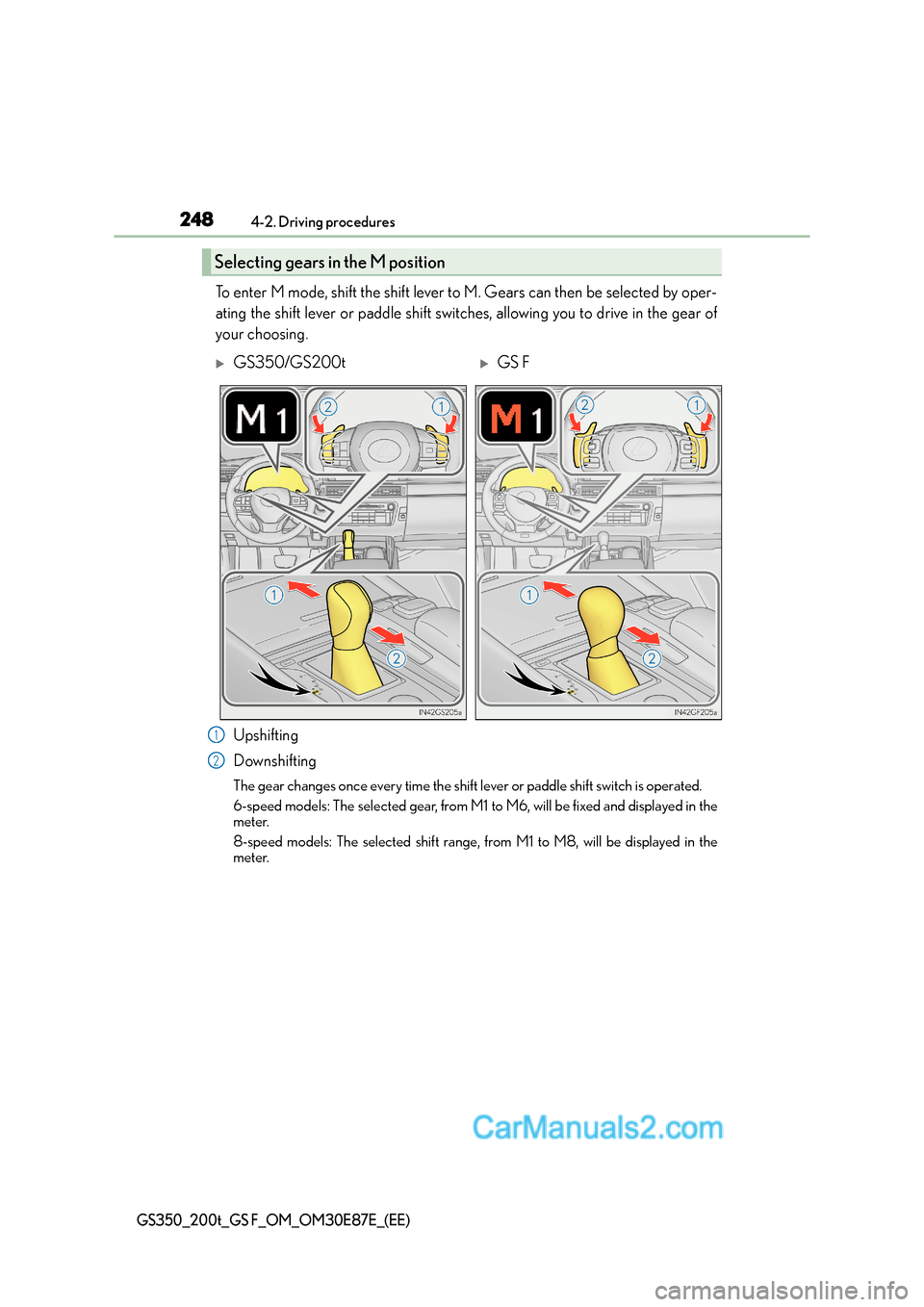
To enter M mode, shift the shift lever to M. Gears can then be selected by oper-
ating the shift lever or paddle shift switches, allowing you to drive in the gear of
your choosing.
Upshifting
Downshifting
The gear changes once every time the shift lever or paddle shift switch is operated.
6-speed models: The selected gear, from M1 to M6, will be fixed and displayed in the
meter.
8-speed models: The selected shift range, from M1 to M8, will be displayed in the
meter.
Selecting gears in the M position
XGS350/GS200tXGS F
1
2
Page 253 of 668

253
4
4-2. Driving procedures
Driving
GS350_200t_GS F_OM_OM30E87E_(EE)
Turn signal lever
The lever will return to its original position immediately after operation.
Right turn
Lane change to the right (move the
lever partway and release it)
The right hand signals will flash 3 times.
Lane change to the left (move the
lever partway and release it)
The left hand signals will flash 3 times.
Left turn
■If the turn signals do not stop flashing after turning left or right, or if you want
to stop them flashing
Operate the lever in the opposite direction to either position or .
If you move the lever to either position or , the selected turn signals will
flash.
■Turn signals can be operated when
The engine switch is in IGNITION ON mode.
■If the indicator flashes faster than usual
Check that a light bulb in the front or rear turn signal lights has not burned out.
■If the turn signals stop flashing before a lane change has been performed
Operate the lever again.
Operating instructions
1
2
3
4
23
14
Page 262 of 668
2624-3. Operating the lights and wipers
GS350_200t_GS F_OM_OM30E87E_(EE)
■Daytime running light system
To make your vehicle more visible to other drivers during daytime driving, the daytime
running lights turn on automatically whenever the engine is started and the parking
brake is released with the headlight switch is in the “AUTO” position. (Illuminate brighter
than the front position lights.)
Daytime running lights are not designed for use at night.
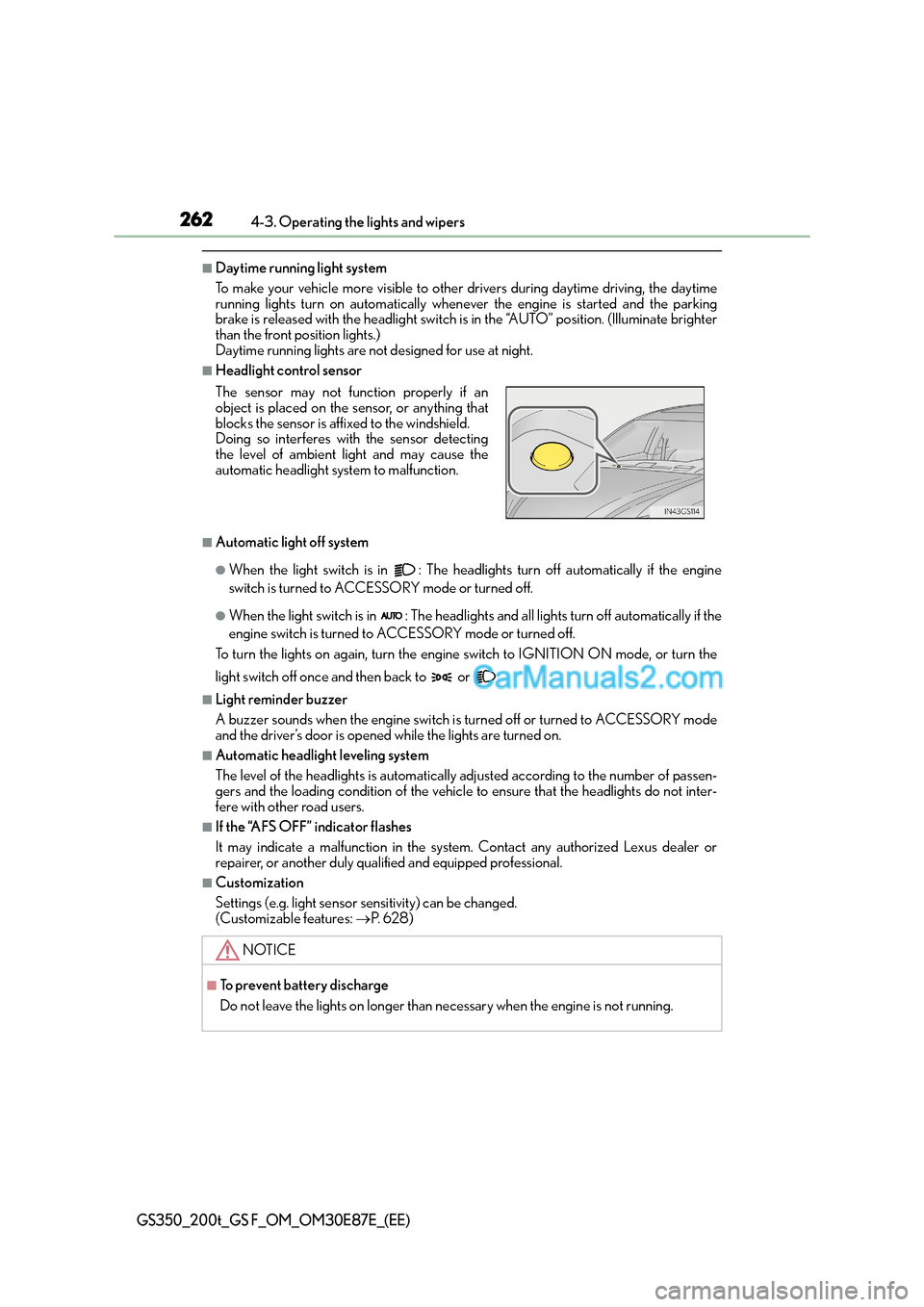
■Headlight control sensor
■Automatic light off system
●When the light switch is in : The headlig hts turn off automatically if the engine
switch is turned to ACCESSORY mode or turned off.
●When the light switch is in : The headlights and all lights turn off automatically if the
engine switch is turned to ACCESSORY mode or turned off.
To turn the lights on again, turn the engine switch to IGNITION ON mode, or turn the
light switch off once and then back to or .
■Light reminder buzzer
A buzzer sounds when the engine switch is turned off or turned to ACCESSORY mode
and the driver’s door is opened while the lights are turned on.
■Automatic headlight leveling system
The level of the headlights is automatically adjusted according to the number of passen-
gers and the loading condition of the vehicle to ensure that the headlights do not inter-
fere with other road users.
■If the “AFS OFF” indicator flashes
It may indicate a malfunction in the system. Contact any authorized Lexus dealer or
repairer, or another duly qualified and equipped professional.
■Customization
Settings (e.g. light sensor se nsitivity) can be changed.
(Customizable features: →P. 6 2 8 )
The sensor may not function properly if an
object is placed on the sensor, or anything that
blocks the sensor is affixed to the windshield.
Doing so interferes with the sensor detecting
the level of ambient light and may cause the
automatic headlight system to malfunction.
NOTICE
■To prevent battery discharge
Do not leave the lights on longer than necessary when the engine is not running.