light Lexus GS250 2012 Owner's Manual
[x] Cancel search | Manufacturer: LEXUS, Model Year: 2012, Model line: GS250, Model: Lexus GS250 2012Pages: 914, PDF Size: 53.04 MB
Page 348 of 914
341
4 4-5. Using the driving support
Driving
GS350/250_EE (OM30C36E)
Hill-start assist control
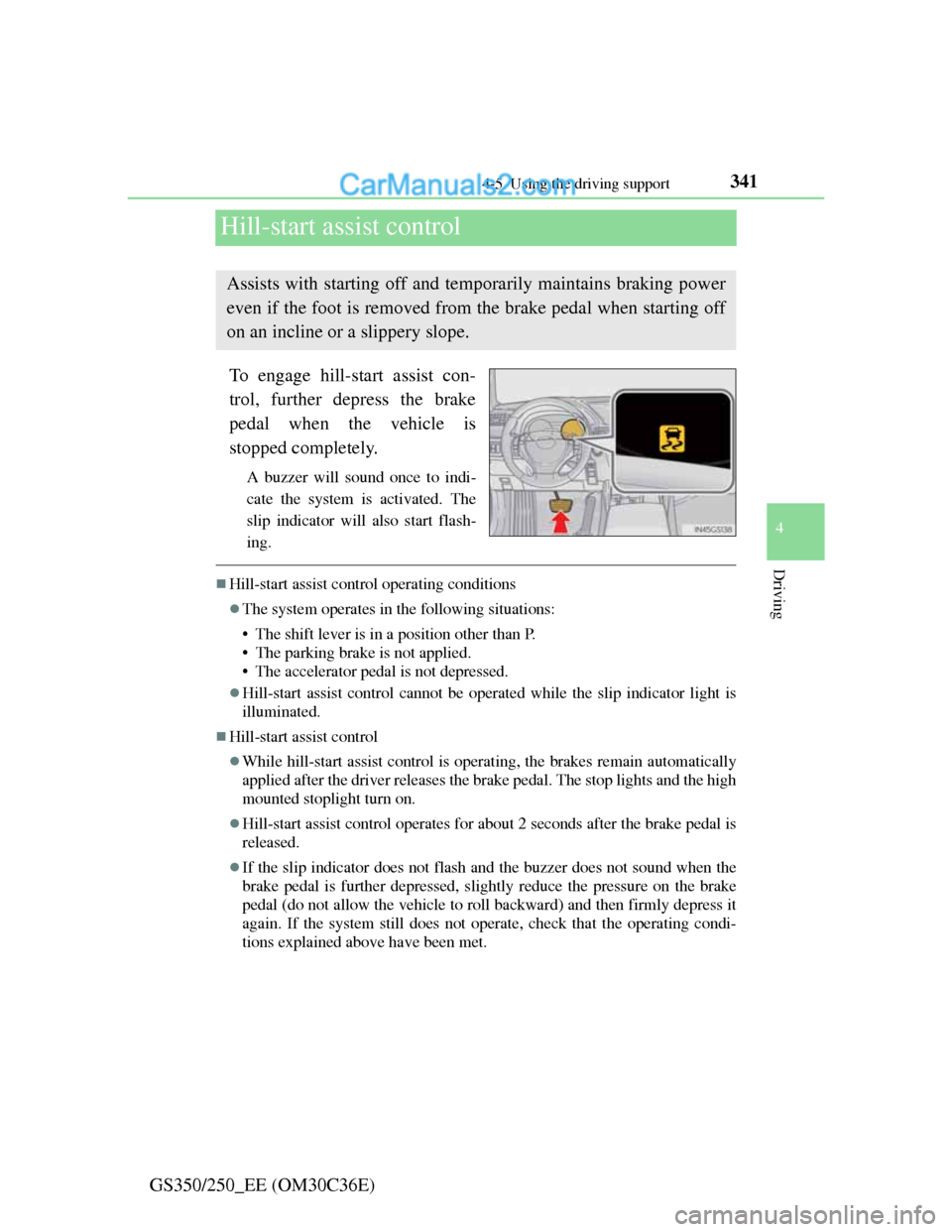
To engage hill-start assist con-
trol, further depress the brake
pedal when the vehicle is
stopped completely.
A buzzer will sound once to indi-
cate the system is activated. The
slip indicator will also start flash-
ing.
Hill-start assist control operating conditions
The system operates in the following situations:
• The shift lever is in a position other than P.
• The parking brake is not applied.
• The accelerator pedal is not depressed.
Hill-start assist control cannot be operated while the slip indicator light is
illuminated.
Hill-start assist control
While hill-start assist control is operating, the brakes remain automatically
applied after the driver releases the brake pedal. The stop lights and the high
mounted stoplight turn on.
Hill-start assist control operates for about 2 seconds after the brake pedal is
released.
If the slip indicator does not flash and the buzzer does not sound when the
brake pedal is further depressed, slightly reduce the pressure on the brake
pedal (do not allow the vehicle to roll backward) and then firmly depress it
again. If the system still does not operate, check that the operating condi-
tions explained above have been met.
Assists with starting off and temporarily maintains braking power
even if the foot is removed from the brake pedal when starting off
on an incline or a slippery slope.
Page 350 of 914
3434-5. Using the driving support
4
Driving
GS350/250_EE (OM30C36E)
PCS (Pre-Crash Safety system)
Pre-crash seat belts (front seat only)
If the pre-crash sensor detects that a collision is unavoidable, the
pre-crash safety system will retract the seat belt before the colli-
sion occurs.
The same will happen if the driver makes an emergency braking
or loses control of the vehicle. (P. 40)
Pre-crash brake assist
When there is a high possibility of a frontal collision, the system
applies greater braking force in relation to how strongly the
brake pedal is depressed.
Pre-crash braking
When there is a high possibility of a frontal collision, the system
warns the driver using a warning light, warning display and
buzzer. If the system determines that a collision is unavoidable,
the brakes are automatically applied to reduce the collision
speed.
: If equipped
When the radar sensor detects that a frontal collision is highly
likely or even unavoidable, safety systems such as the brakes and
seat belts are automatically engaged to lessen impact as well as
vehicle damage.
The pre-crash safety system can be turned on and off as necessary
by operating the switch. (P. 344)
Page 351 of 914
3444-5. Using the driving support
GS350/250_EE (OM30C36E)
Suspension control (if equipped)
When the system determines that a collision is unavoidable, the
operation of AVS (P. 334) optimally controls the damping
force of the shock absorber.
Driver monitor system (if equipped)
When the system determines that there is a possibility of a colli-
sion, and either the driver is not facing forward or the driver’s
eyes are closed, PCS warnings are given in advance to warn the
driver. If the system determines that the conditions to operate
pre-crash alert braking have been met even when the possibility
of a collision increases further, pre-crash alert braking will oper-
ate.
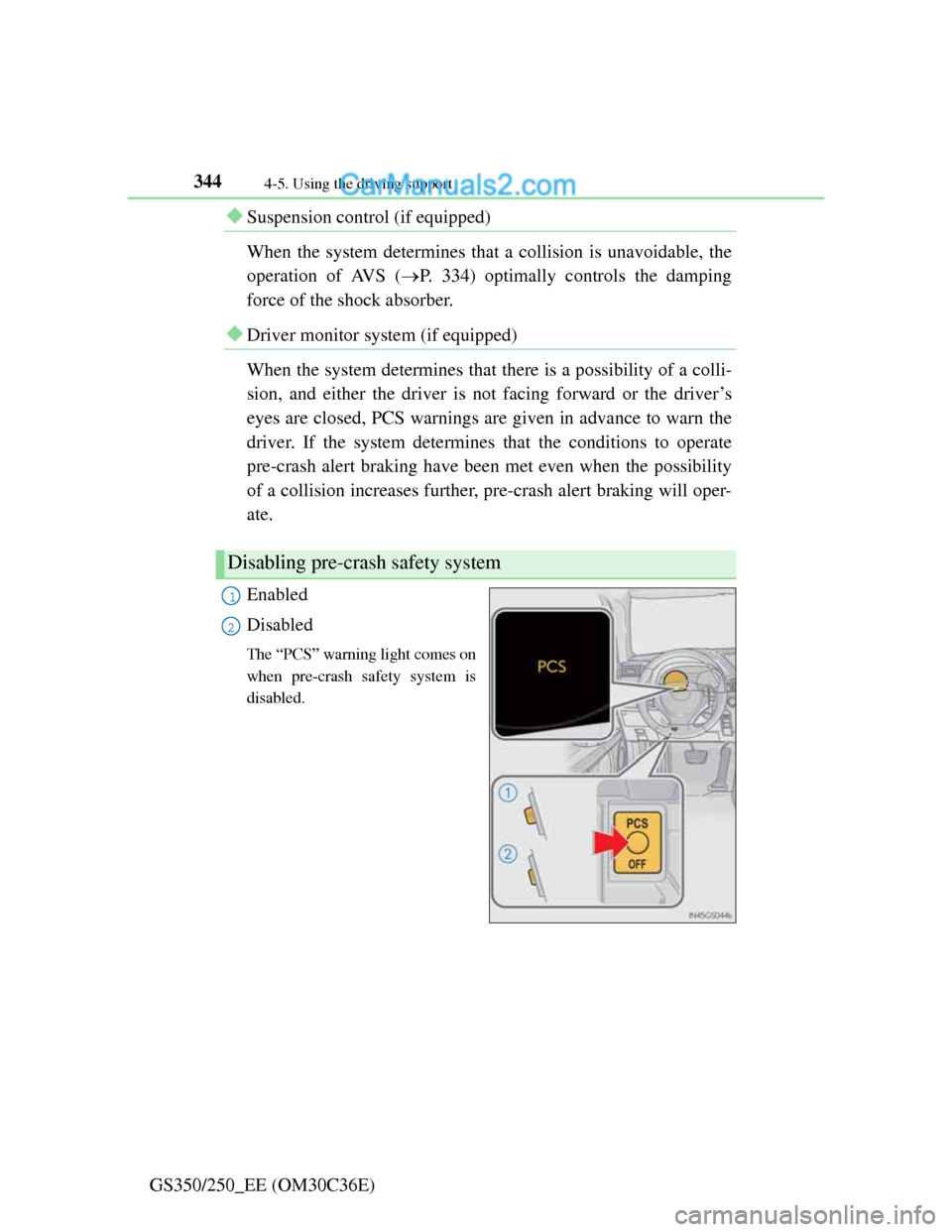
Enabled
Disabled
The “PCS” warning light comes on
when pre-crash safety system is
disabled.
Disabling pre-crash safety system
1
2
Page 355 of 914

3484-5. Using the driving support
GS350/250_EE (OM30C36E)
Situations in which the pre-crash safety system does not function properly
The system may not function effectively in situations such as the following:
On roads with sharp bends or uneven surfaces
If a vehicle suddenly moves in front of your vehicle, such as at an intersec-
tion
If a vehicle suddenly cuts in front of your vehicle, such as when overtaking
In inclement weather such as heavy rain, fog, snow or sand storms
When your vehicle is skidding such as the VSC system off
When your vehicle is steeply inclined
Automatic cancelation of the pre-crash safety system
When a malfunction occurs due to sensor contamination, etc. that results in
the sensors being unable to detect obstacles, the pre-crash safety system will
be automatically disabled. In this case, the system will not activate even if
there is a collision possibility.
When there is a malfunction in the system
“PCS” warning light will flash and warning messages will be displayed.
(P. 751, 759)
Page 358 of 914
3514-5. Using the driving support
4
Driving
GS350/250_EE (OM30C36E)
CAUTION
Limitations of the pre-crash safety system
Do not overly rely on the pre-crash safety system. Always drive safely, tak-
ing care to observe your surroundings and checking for any obstacles or
other road hazards.
Failure to do so may cause an accident resulting in death or serious injury.
Handling the radar sensor
Observe the following to ensure the pre-crash safety system can function
effectively. Otherwise, the system may not function correctly and could
result in an accident.
Keep the sensor and grille cover clean at all times.
Clean the sensor and grille cover with a soft cloth so you do not mark or
damage them.
Do not subject the sensor or surrounding area to a strong impact.
If the sensor moves even slightly off position, the system may malfunc-
tion. If the sensor or surrounding area is subject to a strong impact, always
have the area inspected and adjusted by any authorized Lexus dealer or
repairer, or another duly qualified and equipped professional.
Do not disassemble the sensor.
Do not attach accessories or stickers to the sensor, grille cover or sur-
rounding area.
Do not modify or paint the sensor and grille cover.
Do not replace them with non-genuine parts.
Determining the direction the driver is facing and whether the driver’s eyes
are open or closed
The direction the driver is facing and whether the driver’s eyes are open or
closed may not be determined correctly if the following conditions exist:
There is an object between the driver monitor sensor and the driver’s face,
such as when the sensor is blocked.
A part of the driver’s face is covered.
The sensor or the driver’s face is exposed to intense light such as sunlight.
The driving posture is improper.
Page 364 of 914

3574-5. Using the driving support
4
Driving
GS350/250_EE (OM30C36E)
Conditions under which the Blind Spot Monitor system may not function cor-
rectly
The Blind Spot Monitor system may not detect vehicles correctly in the fol-
lowing conditions:
• During bad weather such as heavy rain, fog, snow etc.
• When ice or mud etc. is attached to the rear bumper
• When driving on a road surface that is wet due to rain, standing water
etc.
• When there is a significant difference in speed between your vehicle and
the vehicle that enters the detection area
• When a vehicle is in the detection area from a stop and remains in the
detection area as your vehicle accelerates
• When driving up or down consecutive steep inclines, such as hills, a dip
in the road etc.
• When multiple vehicles approach with only a small gap between each
vehicle
• When vehicle lanes are wide, and the vehicle in the next lane is too far
away from your vehicle
• When the vehicle that enters the detection area is traveling at about the
same speed as your vehicle
• When there is a significant difference in height between your vehicle and
the vehicle that enters the detection area
• Directly after the BSM switch is set to on
• When your vehicle is towing a trailer
Instances of the Blind Spot Monitor unnecessarily detecting a vehicle and/
or object may increase under the following conditions:
• When there is only a short distance between your vehicle and a guardrail,
wall etc.
• When there is only a short distance between your vehicle and a following
vehicle
• When vehicle lanes are narrow and a vehicle driving 2 lanes across from
your vehicle enters the detection area
The outside rear view mirror indicators visibility
When under strong sunlight, the outside rear view mirror indicator may be
difficult to see.
When there is a malfunction in the system
If a system malfunction is detected due to any of the following reasons,
warning messages will be displayed: (P. 762, 768)
There is a malfunction with the sensors
The sensors have become dirty
Page 368 of 914
3614-5. Using the driving support
4
Driving
GS350/250_EE (OM30C36E)
CAUTION
Cautions regarding the use of the system
The driver is solely responsible for safe driving. Always drive safely, taking
care to observe your surroundings.
The Blind Spot Monitor is a supplementary system which alerts the driver
that a vehicle is present in the blind spot. Do not overly rely on the Blind
Spot Monitor system. The system cannot judge if it is safe to change lanes,
therefore over reliance could cause an accident resulting in death or serious
injury. According to conditions, the system may not function correctly.
Therefore the driver’s own visual confirmation of safety is necessary.
Handling the radar sensor
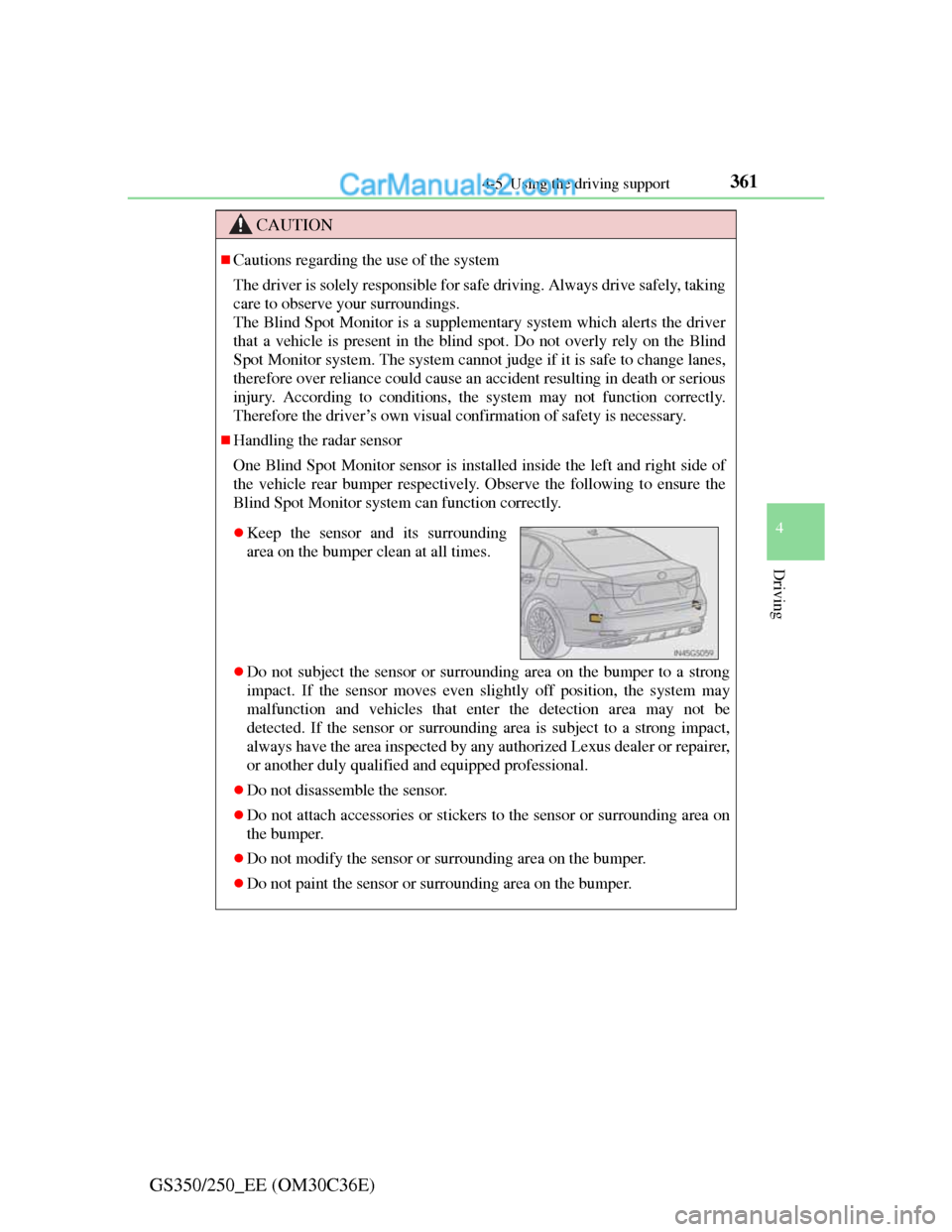
One Blind Spot Monitor sensor is installed inside the left and right side of
the vehicle rear bumper respectively. Observe the following to ensure the
Blind Spot Monitor system can function correctly.
Do not subject the sensor or surrounding area on the bumper to a strong
impact. If the sensor moves even slightly off position, the system may
malfunction and vehicles that enter the detection area may not be
detected. If the sensor or surrounding area is subject to a strong impact,
always have the area inspected by any authorized Lexus dealer or repairer,
or another duly qualified and equipped professional.
Do not disassemble the sensor.
Do not attach accessories or stickers to the sensor or surrounding area on
the bumper.
Do not modify the sensor or surrounding area on the bumper.
Do not paint the sensor or surrounding area on the bumper.
Keep the sensor and its surrounding
area on the bumper clean at all times.
Page 370 of 914
3604-6. Driving tips
GS350/250_EE (OM30C36E)Perform the following according to the driving conditions:
Do not try to forcibly open a window or move a wiper that is fro-
zen. Pour warm water over the frozen area to melt the ice. Wipe
away the water immediately to prevent it from freezing.
To ensure proper operation of the climate control system fan,
remove any snow that has accumulated on the air inlet vents in
front of the windshield.
Check for and remove any excess ice or snow that may have
accumulated on the exterior lights, vehicle’s roof, chassis, around
the tires or on the brakes.
Remove any snow or mud from the bottom of your shoes before
getting in the vehicle.
Accelerate the vehicle slowly, keep a safe distance between you
and the vehicle ahead, and drive at a reduced speed suitable to road
conditions.
Park the vehicle and move the shift lever to P without setting the
parking brake. The parking brake may freeze up, preventing it from
being released. If necessary, block the wheels to prevent inadver-
tent sliding or creeping.
Before driving the vehicle
When driving the vehicle
When parking the vehicle
Page 377 of 914
367
5Interior features
GS350/250_EE (OM30C36E)
5-4. Using the hands-free phone
system (for cellular phone)
Hands-free system
(for cellular phone) ......... 542
Using a Bluetooth
®
phone............................... 556
Setting the hands-free system
(for cellular phone) ......... 575
Setting the Bluetooth
®...... 598
5-5. Using the interior lights
Interior lights list ............... 611
• Interior light .................. 612
• Personal lights............... 6125-6. Using the storage features
List of storage features ..... 614
• Glove box ..................... 616
• Console box .................. 617
• Cup holders .................. 618
• Auxiliary boxes ............ 620
Trunk features ................... 621
5-7. Other interior features
Sun visors and
vanity mirrors ................. 624
Clock................................. 625
Ashtrays ............................ 626
Power outlets .................... 627
Heated steering wheel....... 629
Seat heaters/
seat ventilators ................ 631
Armrest ............................. 635
Rear sunshade/
rear door sunshades ........ 636
Trunk storage extension.... 639
Coat hooks ........................ 640
Assist grip ......................... 641
Utility hook ....................... 642
For vehicles sold outside Europe, some of the functions can-
not be operated while driving.
Page 378 of 914
3685-1. Remote Touch screen
GS350/250_EE (OM30C36E)
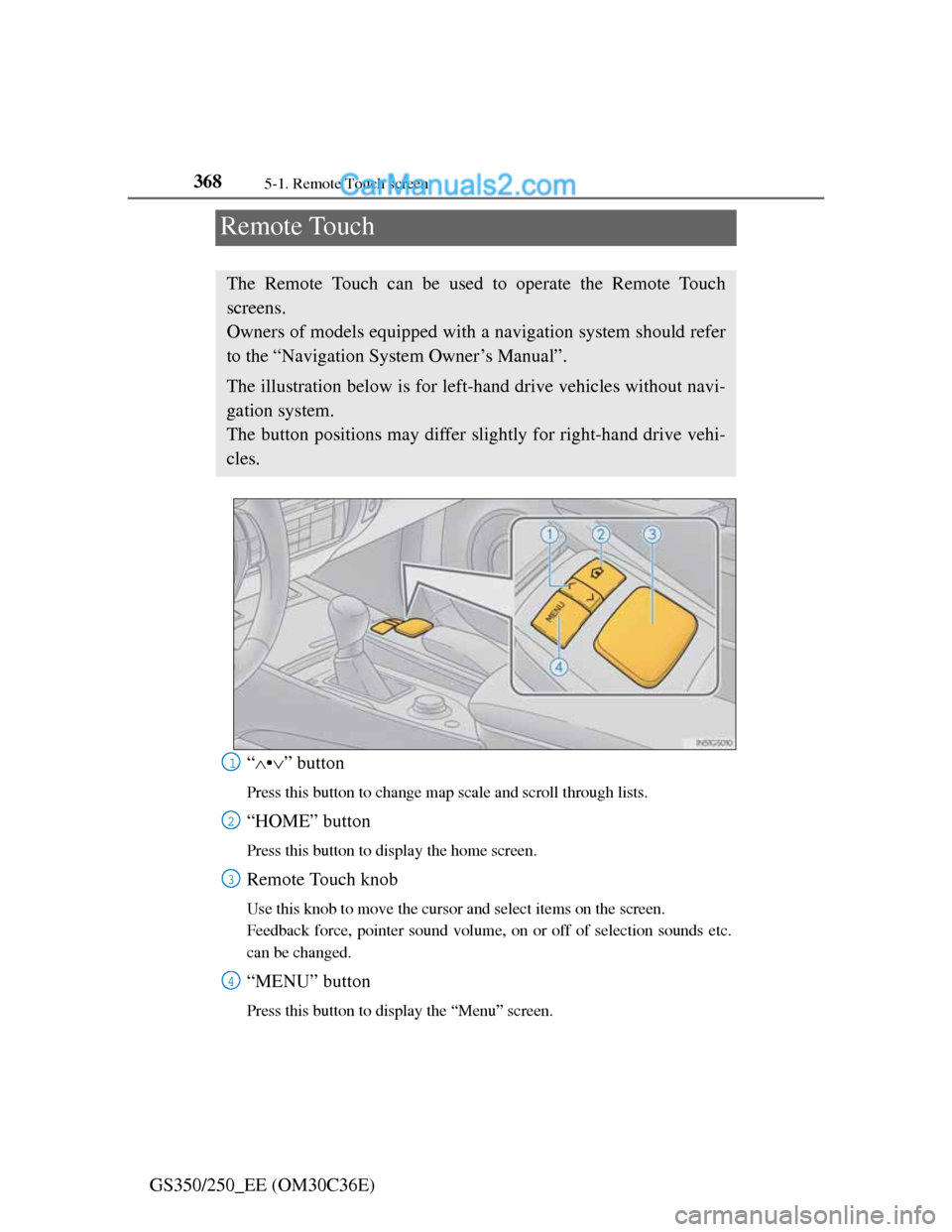
Remote Touch
“•” button
Press this button to change map scale and scroll through lists.
“HOME” button
Press this button to display the home screen.
Remote Touch knob
Use this knob to move the cursor and select items on the screen.
Feedback force, pointer sound volume, on or off of selection sounds etc.
can be changed.
“MENU” button
Press this button to display the “Menu” screen.
The Remote Touch can be used to operate the Remote Touch
screens.
Owners of models equipped with a navigation system should refer
to the “Navigation System Owner’s Manual”.
The illustration below is for left-hand drive vehicles without navi-
gation system.
The button positions may differ slightly for right-hand drive vehi-
cles.
1
2
3
4