CD player Lexus GS250 2012 User Guide
[x] Cancel search | Manufacturer: LEXUS, Model Year: 2012, Model line: GS250, Model: Lexus GS250 2012Pages: 914, PDF Size: 53.04 MB
Page 500 of 914
4895-3. Using the audio system
5
Interior features
GS350/250_EE (OM30C36E)
The DVD player conforms to PAL/NTSC color TV formats.
Region code: Some DVD video discs have a region code indi-
cating the region in which you can use the DVD video disc. If
the DVD video disc is not labeled as “ALL”, “2” or “5”, you
cannot use it on this DVD player. If you attempt to play an
inappropriate DVD video disc on this player, “Region code
error” appears on the screen. Even if the DVD video disc does
not have a region code, you may not be able to use it.
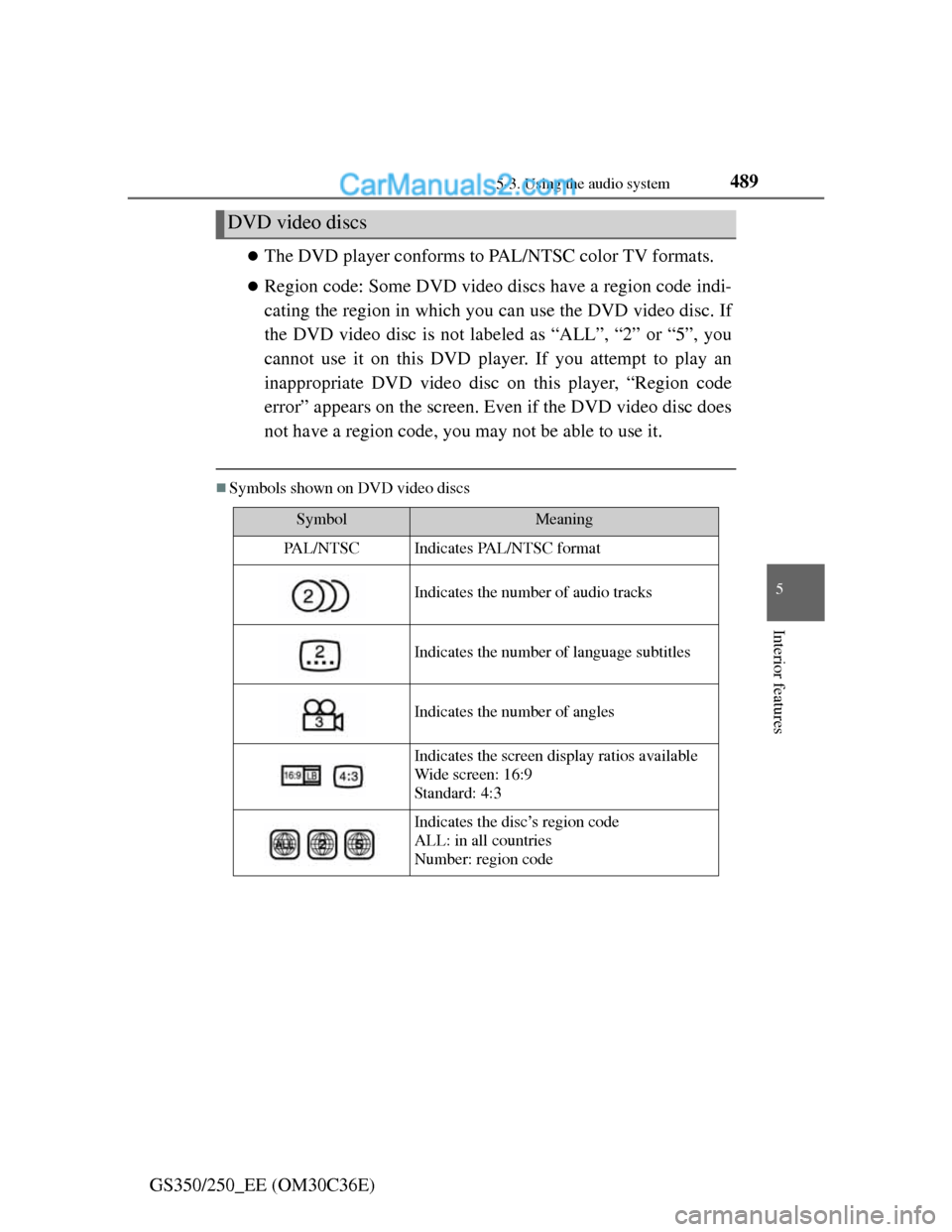
Symbols shown on DVD video discs
DVD video discs
SymbolMeaning
PA L / N T S CIndicates PAL/NTSC format
Indicates the number of audio tracks
Indicates the number of language subtitles
Indicates the number of angles
Indicates the screen display ratios available
Wide screen: 16:9
Standard: 4:3
Indicates the disc’s region code
ALL: in all countries
Number: region code
Page 501 of 914
4905-3. Using the audio system
GS350/250_EE (OM30C36E)
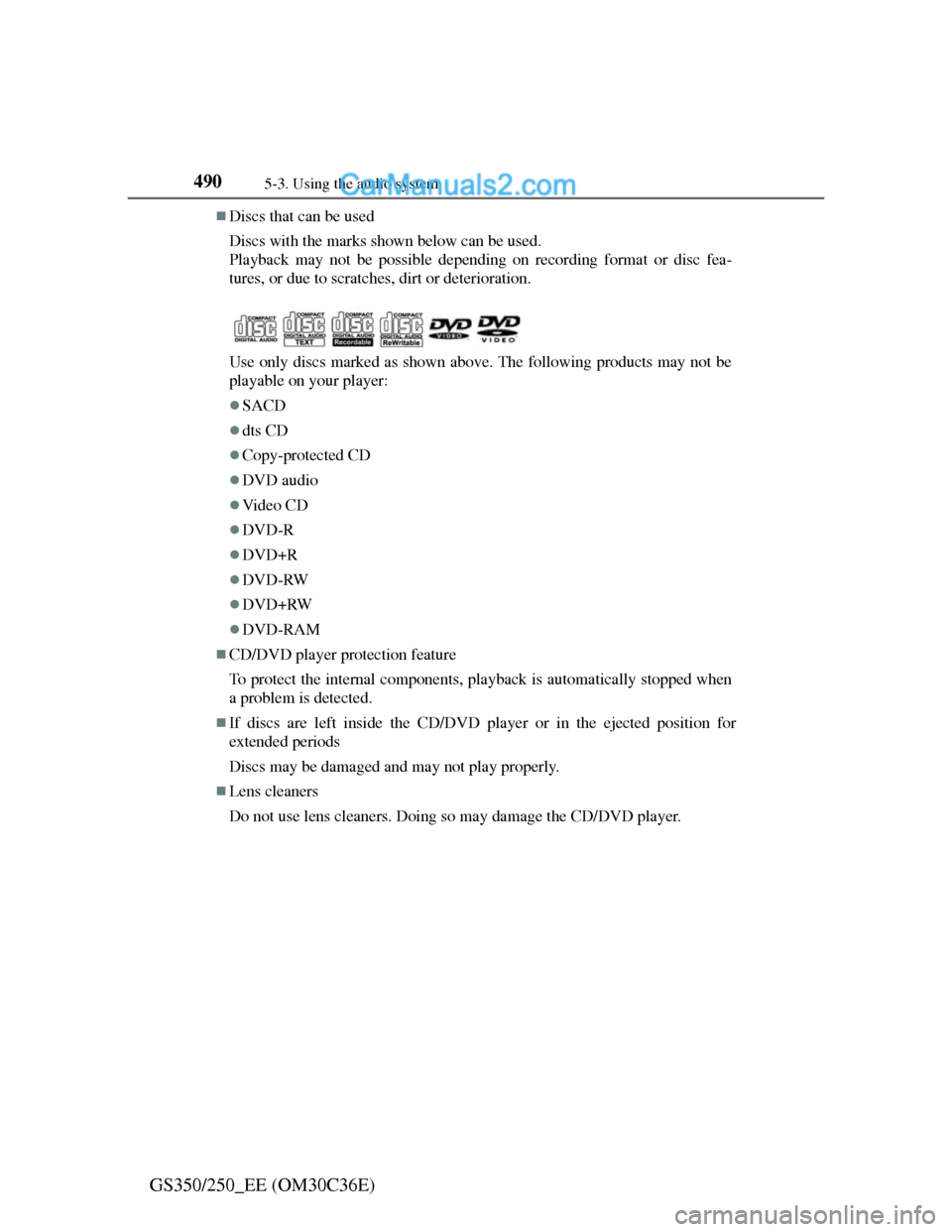
Discs that can be used
Discs with the marks shown below can be used.
Playback may not be possible depending on recording format or disc fea-
tures, or due to scratches, dirt or deterioration.
Use only discs marked as shown above. The following products may not be
playable on your player:
SACD
dts CD
Copy-protected CD
DVD audio
Vi d e o C D
DVD-R
DVD+R
DVD-RW
DVD+RW
DVD-RAM
CD/DVD player protection feature
To protect the internal components, playback is automatically stopped when
a problem is detected.
If discs are left inside the CD/DVD player or in the ejected position for
extended periods
Discs may be damaged and may not play properly.
Lens cleaners
Do not use lens cleaners. Doing so may damage the CD/DVD player.
Page 502 of 914
4915-3. Using the audio system
5
Interior features
GS350/250_EE (OM30C36E)
DVD video disc information
DVD video discs
A DVD video disc is a Digital Versatile Disc that holds video. DVD video
discs have adopted “MPEG2”, one of the world standards of digital com-
pression technologies. The picture data is compressed by 1/40 on average
and stored. Variable rate encoded technology in which the volume of data
assigned to the picture is changed depending on the picture format has also
been adopted. Audio data is stored using PCM and Dolby Digital, which
enables higher quality of sound. Furthermore, multi-angle and multi-lan-
guage features will also help you enjoy the more advanced technology of
DVD video.
Viewer restrictions
This feature limits what can be viewed in conformity with the level of
restrictions of the country. The level of restrictions varies depending on the
DVD video disc. Some DVD video discs cannot be played at all, or violent
scenes are skipped or replaced with other scenes.
Level 1: DVD video discs for children can be played.
Level 2-7: DVD video discs for children and G-rated movies can be
played.
Level 8: All types of DVD video discs can be played.
Multi-angle option
You can enjoy the same scene from different angles.
Multi-language option
You can select the subtitle and audio languages.
Region codes
The region codes are provided on DVD players and DVD discs. If the DVD
video disc does not have the same region code as the DVD player, you can-
not play the disc on the DVD player. (P. 489)
Audio
This DVD player can play linear PCM, Dolby Digital and MPEG audio for-
mat DVDs. Other decoded types cannot be played.
Page 507 of 914
4965-3. Using the audio system
GS350/250_EE (OM30C36E)
NOTICE
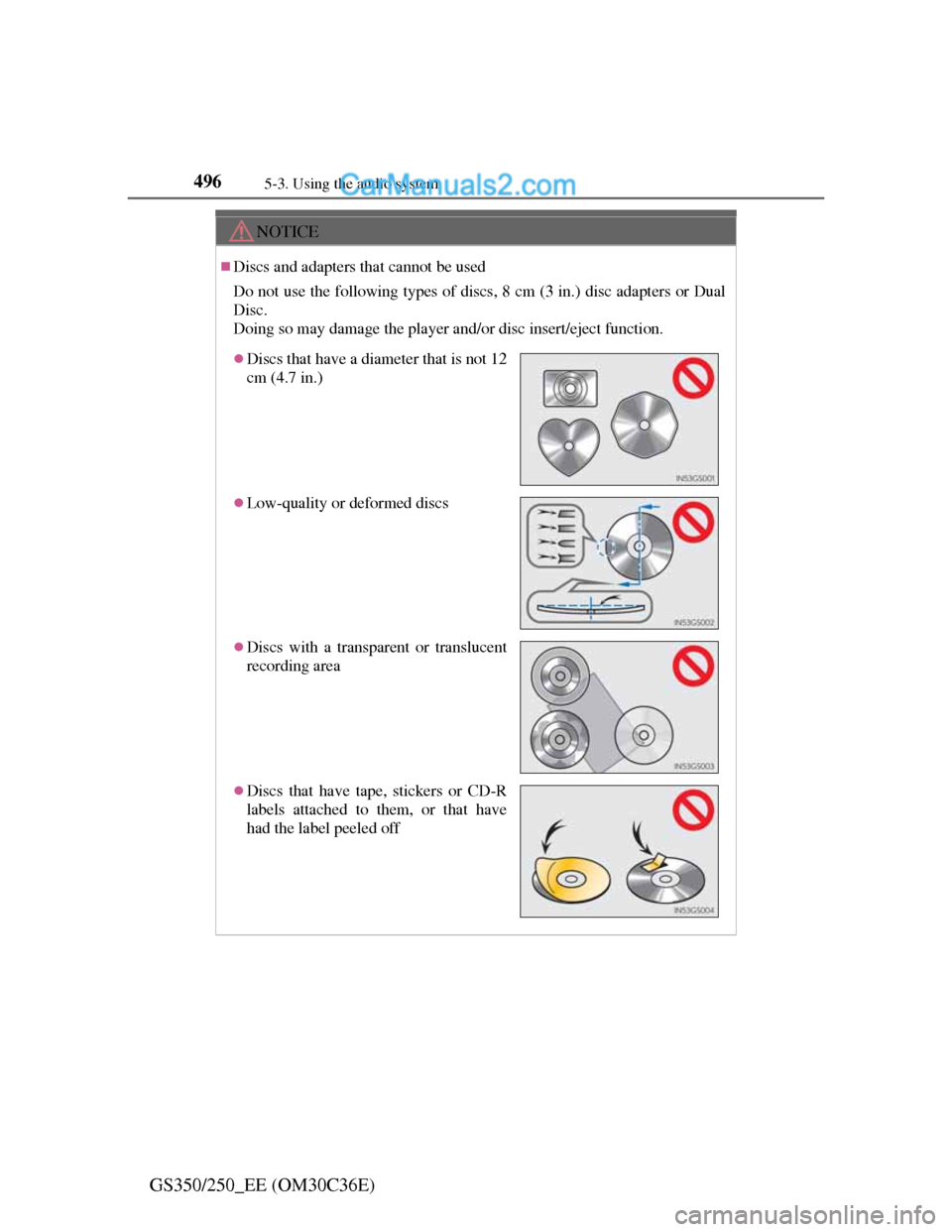
Discs and adapters that cannot be used
Do not use the following types of discs, 8 cm (3 in.) disc adapters or Dual
Disc.
Doing so may damage the player and/or disc insert/eject function.
Discs that have a diameter that is not 12
cm (4.7 in.)
Low-quality or deformed discs
Discs with a transparent or translucent
recording area
Discs that have tape, stickers or CD-R
labels attached to them, or that have
had the label peeled off
Page 508 of 914
4975-3. Using the audio system
5
Interior features
GS350/250_EE (OM30C36E)
NOTICE
Player precautions
Failure to follow the precautions below may result in damage to the discs or
the player itself.
Do not insert anything other than discs into the disc slot.
Do not apply oil to the player.
Store discs away from direct sunlight.
Never try to disassemble any part of the player.
Page 509 of 914
4985-3. Using the audio system
GS350/250_EE (OM30C36E)
Listening to Bluetooth® audio
The Bluetooth® audio system enables users to enjoy music played
on a portable player from the vehicle speaker via wireless commu-
nication.
This audio system supports Bluetooth
®, a wireless data system
capable of playing portable audio music without cables. If your
portable player does not support Bluetooth
®, the Bluetooth® audio
system will not function.
Press the “MEDIA” button if a Bluetooth
® audio player has
already been connected.
Select the “BT audio” tab or press the “MEDIA” button repeatedly
until the “BT audio” tab is selected.
Page 510 of 914
4995-3. Using the audio system
5
Interior features
GS350/250_EE (OM30C36E)
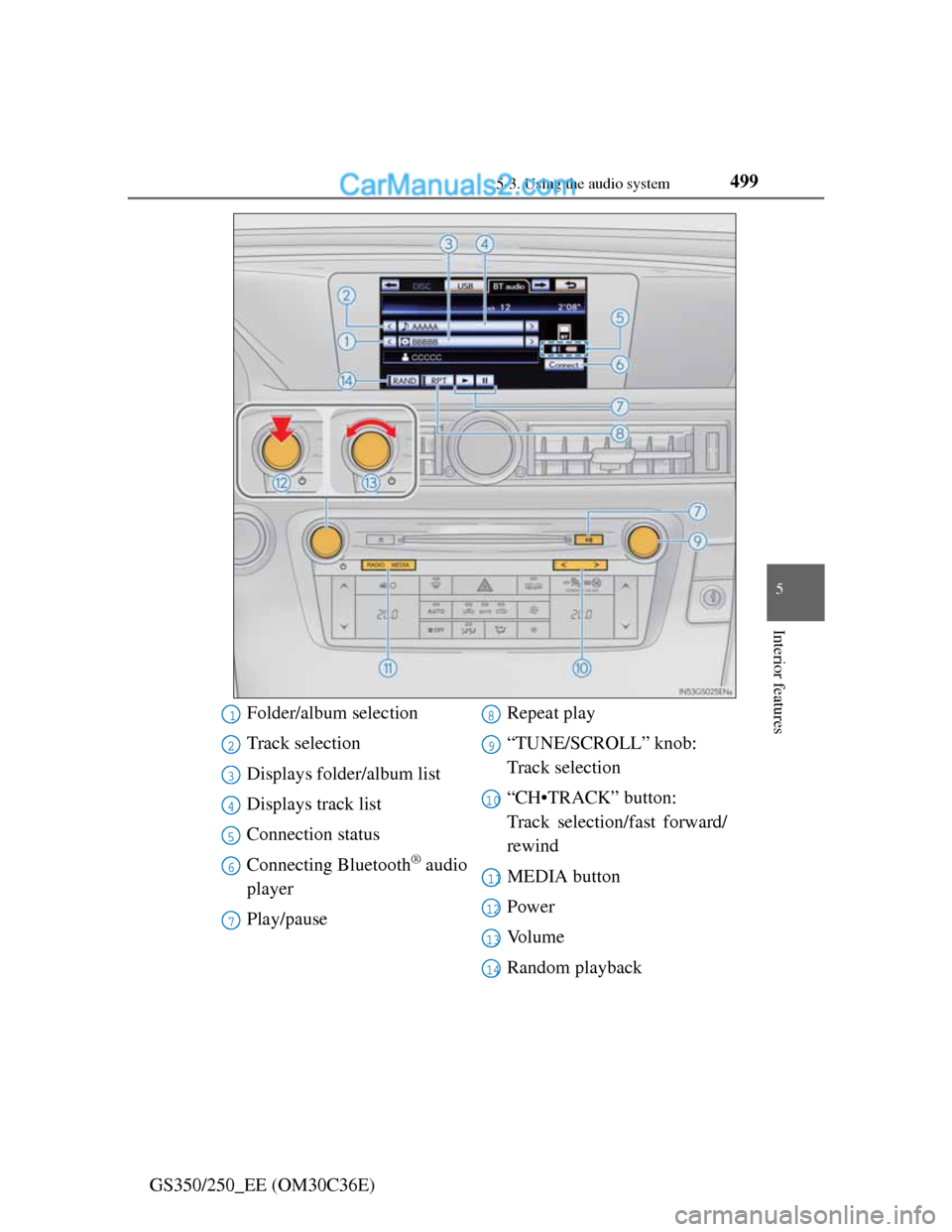
Folder/album selection
Track selection
Displays folder/album list
Displays track list
Connection status
Connecting Bluetooth
® audio
player
Play/pauseRepeat play
“TUNE/SCROLL” knob:
Track selection
“CH•TRACK” button:
Track selection/fast forward/
rewind
MEDIA button
Power
Vo l u m e
Random playback
1
2
3
4
5
6
7
8
9
10
11
12
13
14
Page 512 of 914
5015-3. Using the audio system
5
Interior features
GS350/250_EE (OM30C36E)To use the Bluetooth
® audio system, you need to enter your porta-
ble player into the system. Once registered, you can enjoy your
music on the vehicle’s audio system. (P. 606)
For the operation procedure for the portable player, consult your
player’s accompanying instruction manual.
When “Bluetooth* power” is turned on
When the portable player is on standby for the connection, it will
be automatically connected whenever the engine switch is in
either ACCESSORY or IGNITION ON mode.
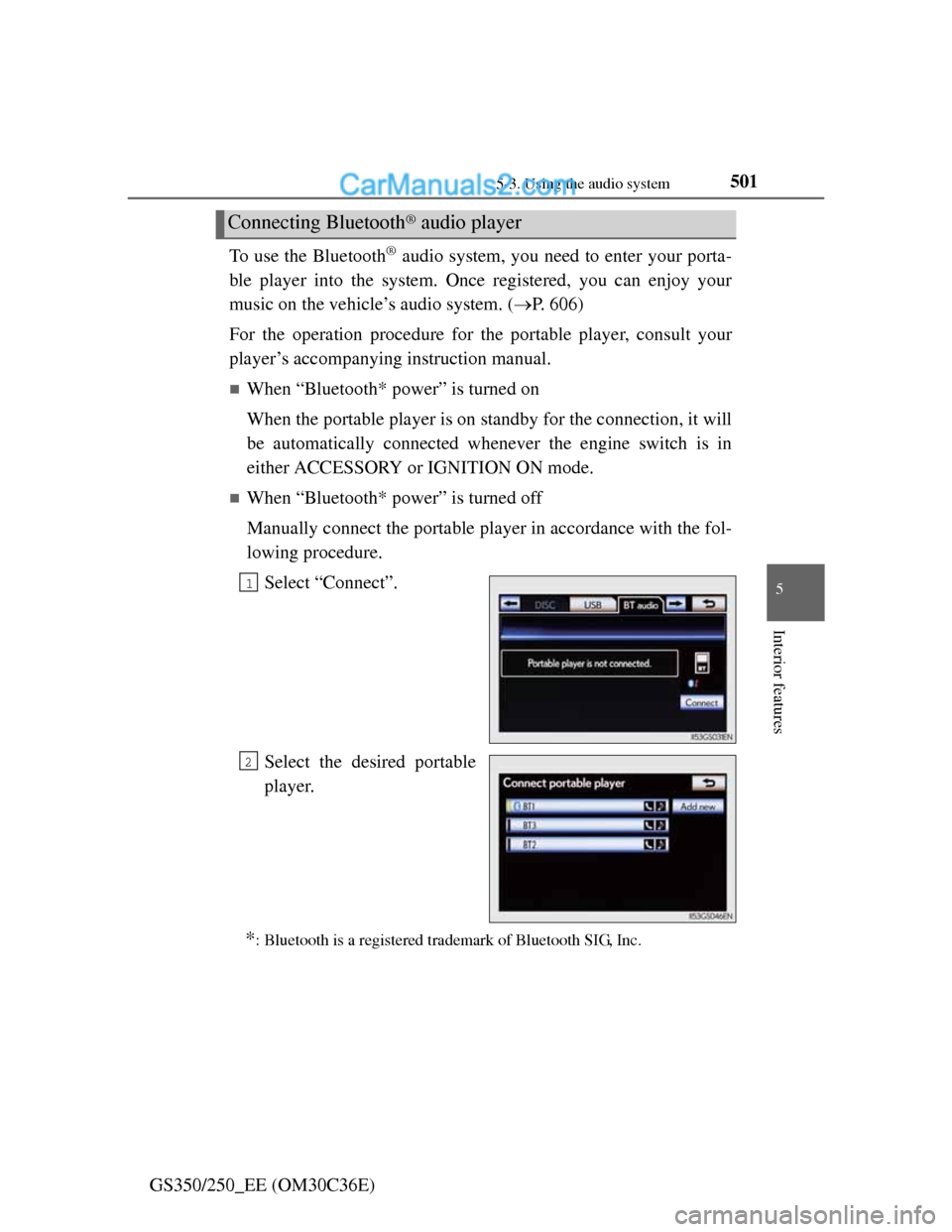
When “Bluetooth* power” is turned off
Manually connect the portable player in accordance with the fol-
lowing procedure.
Select “Connect”.
Select the desired portable
player.
*: Bluetooth is a registered trademark of Bluetooth SIG, Inc.
Connecting Bluetooth® audio player
1
2
Page 513 of 914
5025-3. Using the audio system
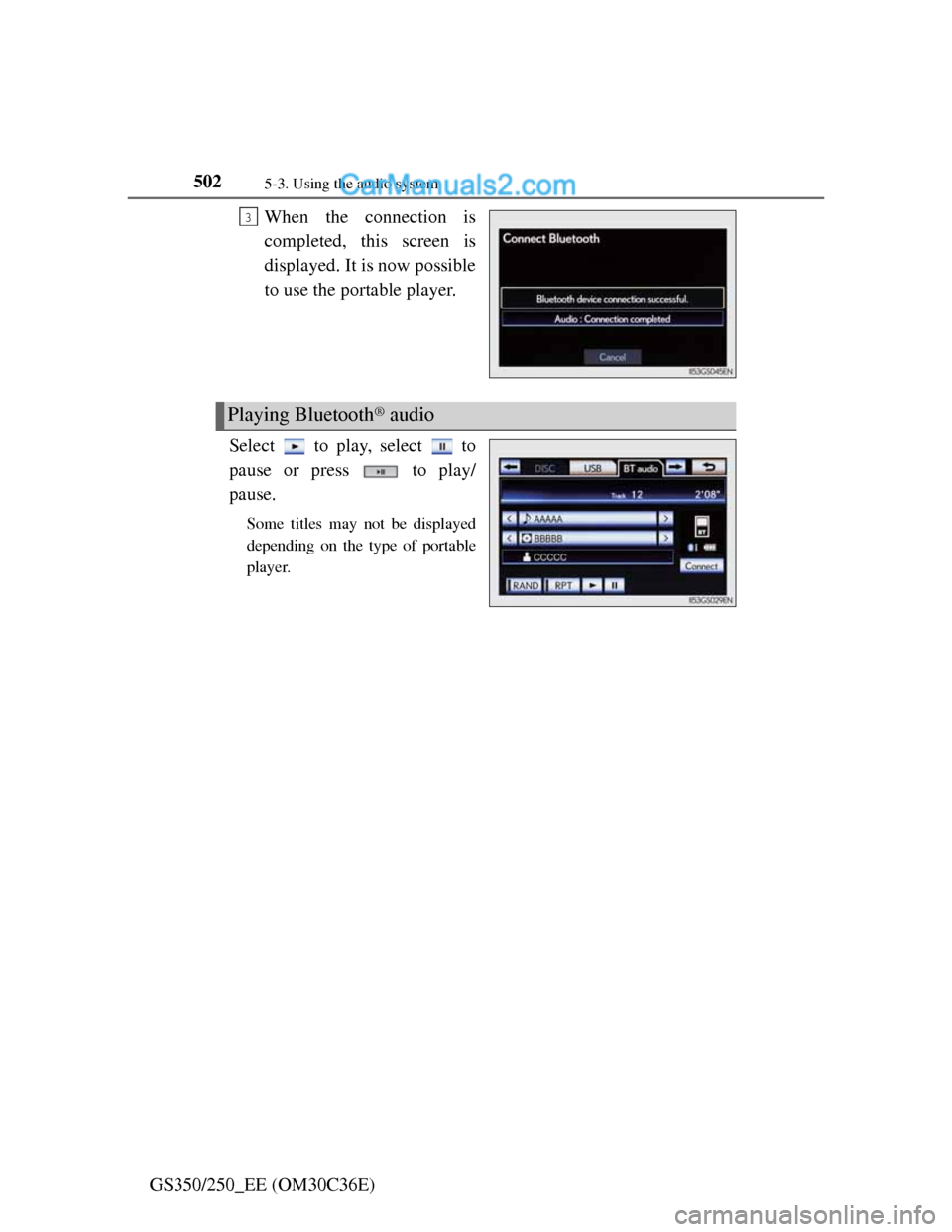
GS350/250_EE (OM30C36E)When the connection is
completed, this screen is
displayed. It is now possible
to use the portable player.
Select to play, select to
pause or press to play/
pause.
Some titles may not be displayed
depending on the type of portable
player.
3
Playing Bluetooth® audio
Page 518 of 914
5075-3. Using the audio system
5
Interior features
GS350/250_EE (OM30C36E)
If you select
The display returns to the previous screen.
Connecting Bluetooth® audio player
Selecting “Connect portable player” on the “Bluetooth*” screen also con-
nects a Bluetooth® audio player. (P. 606)
When none of the selectable portable players have been registered, a screen
confirming registration is displayed. The registration method is the same as
phone registration. (P. 599)
When the currently connected portable player is selected, a screen confirm-
ing the selected player’s disconnection is displayed. (P. 599)
If connection fails once, a changing connection method confirmation screen
is displayed. If connection fails 2 or more times, a message will be dis-
played. When this message is displayed, try again.
*: Bluetooth is a registered trademark of Bluetooth SIG. Inc.
When using the Bluetooth® audio system
In the following conditions, the system may not function.
• The portable player is turned off
• The portable player is not connected
• The portable player battery is low
There may be a delay if phone connection is carried out during Bluetooth®
audio play.
Depending on the type of portable player that is connected to the system,
operation may differ slightly and certain functions may not be available.
Bluetooth® antenna
The antenna is built into the instrument panel. If the portable player is behind
the seat or in the glove box or console box, or is touching or covered by
metal objects, connection status may deteriorate.
Battery charge/signal status
This display may not correspond exactly with the portable player, and this
system does not have a charging function.