headlight Lexus GS250 2012 Owner's Guide
[x] Cancel search | Manufacturer: LEXUS, Model Year: 2012, Model line: GS250, Model: Lexus GS250 2012Pages: 914, PDF Size: 53.04 MB
Page 255 of 914

2484-3. Operating the lights and wipers
GS350/250_EE (OM30C36E)
Headlight cleaner switch
Press the switch to clean the
headlights.
The headlight cleaners can be operated when
The engine switch is in IGNITION ON mode and the headlight switch is
turned on.
Windshield washer linked operation
When the windshield washer is operated with the engine switch in IGNI-
TION ON mode and the headlights on, the headlight cleaners will operate
once. (P. 241)
Washer fluid can be sprayed on the headlights.
NOTICE
When the washer fluid tank is empty
Do not press the switch continually as the washer fluid pump may overheat.
Page 287 of 914
2804-5. Using the driving support
GS350/250_EE (OM30C36E)
After the vehicle has been parked in the sun
The LKA system functions may not be available and a warning message
(P. 767) will be displayed for a while after driving has started. In such
cases, turn the LKA system off and turn it on again after normal temperature
returns. When the temperature in the cabin decreases and the temperature
around the camera sensor (P. 274) becomes suitable for its operation, the
functions will begin to operate.
If there are lane markers on only one side of the vehicle
The lane keeping assist function will not operate. Also, the lane departure
warning will not operate for the side on which lane markers could not be rec-
ognized.
Conditions in which the function may not operate correctly
In the following conditions, the LKA system functions may not operate, or it
may not be possible to ensure adequate performance. Also, the camera sensor
may be unable to recognize lane lines causing the lane departure warning
function to operate incorrectly, or the lane keeping assist function may not
operate properly. However, this does not indicate a malfunction.
When driving through an area with no lane markers, such as a tollbooth, a
crossing or before a ticket checkpoint
When driving on a sharp curve
When lanes are extremely narrow or extremely wide
When the vehicle leans to one side an unusual amount due to a heavy load
or improper tire inflation pressure
When the following distance between your vehicle and the vehicle ahead is
extremely short
When the lane markers are yellow (These may be more difficult for the sys-
tem to recognize compared to white markers.)
When the lane markers are broken, “Raised pavement marker” or stones
When lane markers are obscured or partially obscured by sand, dirt, etc.
When there are shadows on the road running parallel with lane markers, or
if a shadow covers the lane markers
When driving on a particularly bright road surface, such as concrete
When driving on a road surface that is bright due to reflected light
When driving in a location where the light level changes rapidly, such as the
entrance to or exit from a tunnel
When sunlight or the headlights of oncoming vehicles are shining directly
into the camera lens
Page 288 of 914
2814-5. Using the driving support
4
Driving
GS350/250_EE (OM30C36E)
When driving on roads that are branching or merging
When driving on a road surface that is wet due to rain, previous rainfall,
standing water, etc.
When the vehicle experiences strong up-and-down motion such as when
driving on an extremely rough road or on a seam in the pavement
When headlight brightness at nighttime is reduced due to dirt on the lenses,
or when the headlights are misaligned
When driving with a strong crosswind
When driving on winding roads or roads that are uneven
When driving on rough or unpaved roads
When changing the tires
Depending on the tires used, sufficient performance may not be maintain-
able.
Warning messages for LKA
Warning messages are used to indicate a system malfunction or to inform the
driver of the need for caution while driving. (P. 760, 767)
CAUTION
Before using the LKA system
Do not rely solely on the LKA system. The LKA system does not drive the
vehicle automatically, nor does it reduce the amount of care you need to
take. As such, the driver must always assume full responsibility for under-
standing his/her surroundings, for operating the steering wheel to correct
the driving line, and for driving safely.
Inappropriate or negligent driving could lead to an accident.
To avoid operating the LKA by mistake
Switch the LKA off using the “LKA” switch when not in use.
Page 289 of 914
2824-5. Using the driving support
GS350/250_EE (OM30C36E)
CAUTION
Situations unsuitable for LKA
Do not use LKA in any of the following situations.
Otherwise, the system may not function correctly and could result in an
accident.
When driving with snow tires, tire chains, a spare tire, or similar equip-
ment
When the tires have been excessively worn, or when the tire inflation
pressure is low
When there are objects or structures along the roadside that might be mis-
interpreted as lane markers (such as guardrails, curb, reflector posts, etc.)
When driving on snowy roads
When pavement lane markers are difficult to see due to rain, snow, fog,
etc.
When there are visible lines on the pavement from road repairs, or if the
remains of old lane markers are still visible on the road
When driving on slippery roads, such as those covered with rain, ice or
snow
When driving in a lane other than the driving or passing lanes on a free-
way or highway
When driving on a road with lane closures due to maintenance, or when
driving in a temporary lane
When towing a trailer
NOTICE
To prevent damage to or incorrect operation of the LKA system
Do not modify the headlights or attach stickers to the surface of the lights.
Do not modify the suspension, or replace them with non-genuine parts.
Do not install or place anything on the hood or the grille. Also, do not
install a grille guard (bull bars, kangaroo bar etc.).
Do not modify the sun visor or replace it with anything other than a genu-
ine Lexus product.
If your windshield needs repairs, contact any authorized Lexus dealer or
repairer, or another duly qualified and equipped professional.
Page 383 of 914
3735-1. Remote Touch screen
5
Interior features
GS350/250_EE (OM30C36E)
To avoid damaging the Remote Touch screen
Remove any dirt on the screen by wiping with a soft cloth. Do not use deter-
gent.
When using the Remote Touch screen
If the screen is cold, the display may be dark, or the system may seem to be
operating slightly slower than normal.
When the screen is viewed through polarized sunglasses, a rainbow pattern
may appear on the screen due to optical characteristics of the screen. If this
is disturbing, please operate the screen without polarized sunglasses.
Dimmed screen buttons cannot be operated.
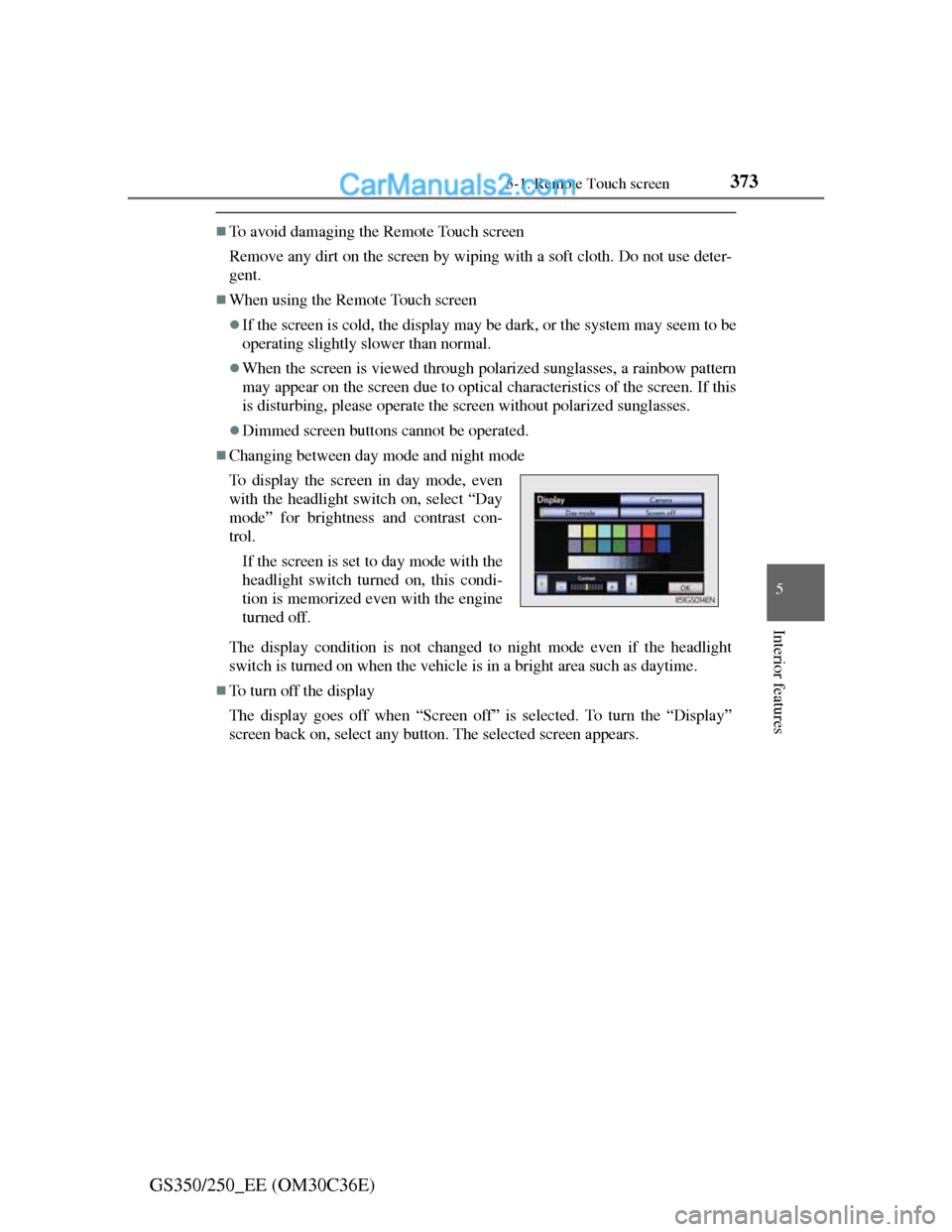
Changing between day mode and night mode
The display condition is not changed to night mode even if the headlight
switch is turned on when the vehicle is in a bright area such as daytime.
To turn off the display
The display goes off when “Screen off” is selected. To turn the “Display”
screen back on, select any button. The selected screen appears. To display the screen in day mode, even
with the headlight switch on, select “Day
mode” for brightness and contrast con-
trol.
If the screen is set to day mode with the
headlight switch turned on, this condi-
tion is memorized even with the engine
turned off.
Page 724 of 914
7066-3. Do-it-yourself maintenance
GS350/250_EE (OM30C36E)
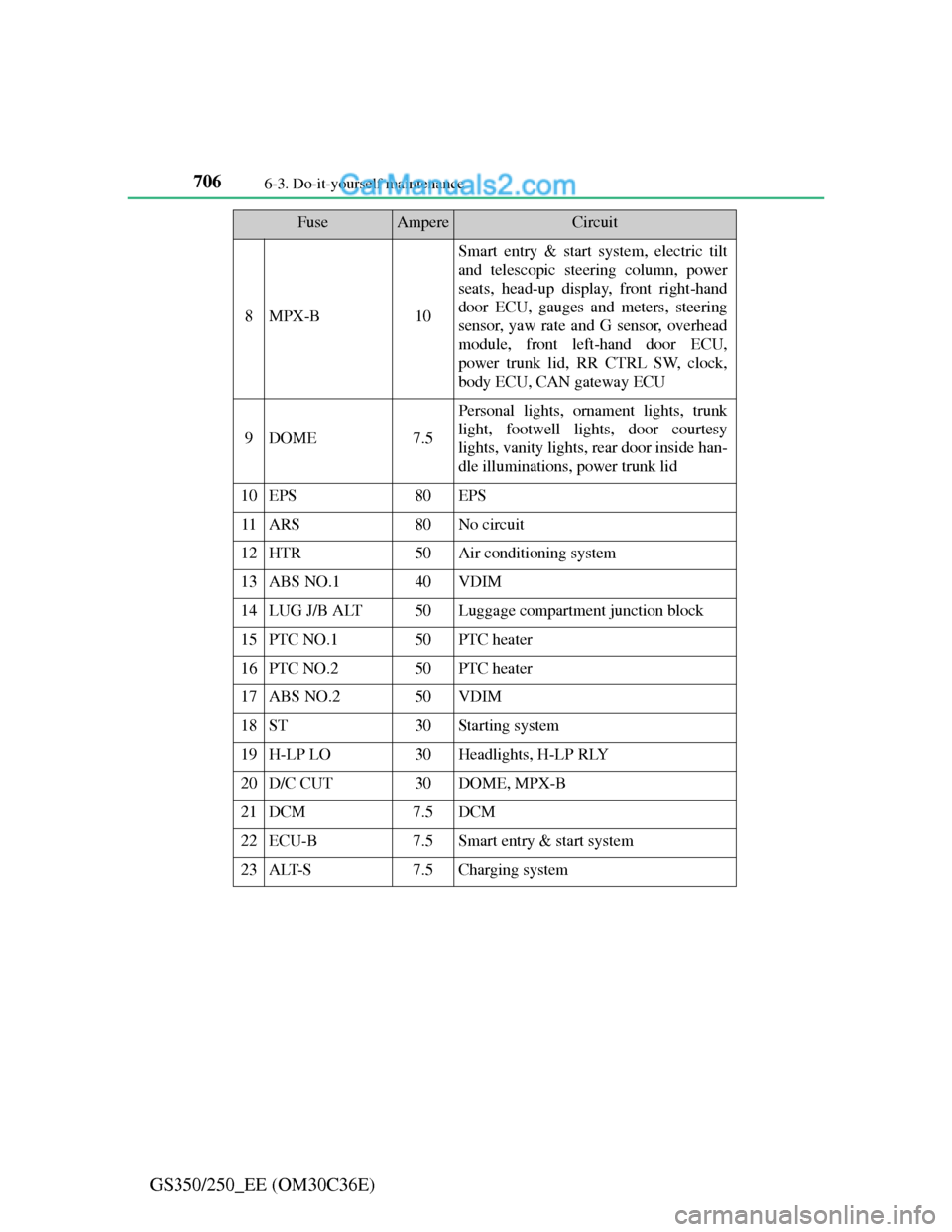
8MPX-B10
Smart entry & start system, electric tilt
and telescopic steering column, power
seats, head-up display, front right-hand
door ECU, gauges and meters, steering
sensor, yaw rate and G sensor, overhead
module, front left-hand door ECU,
power trunk lid, RR CTRL SW, clock,
body ECU, CAN gateway ECU
9DOME7.5
Personal lights, ornament lights, trunk
light, footwell lights, door courtesy
lights, vanity lights, rear door inside han-
dle illuminations, power trunk lid
10EPS80EPS
11ARS80No circuit
12HTR50Air conditioning system
13ABS NO.140VDIM
14LUG J/B ALT50Luggage compartment junction block
15PTC NO.150PTC heater
16PTC NO.250PTC heater
17ABS NO.250VDIM
18ST30Starting system
19H-LP LO30Headlights, H-LP RLY
20D/C CUT30DOME, MPX-B
21DCM7.5DCM
22ECU-B7.5Smart entry & start system
23ALT-S7.5Charging system
FuseAmpereCircuit
Page 725 of 914
707 6-3. Do-it-yourself maintenance
6
Maintenance and care
GS350/250_EE (OM30C36E)
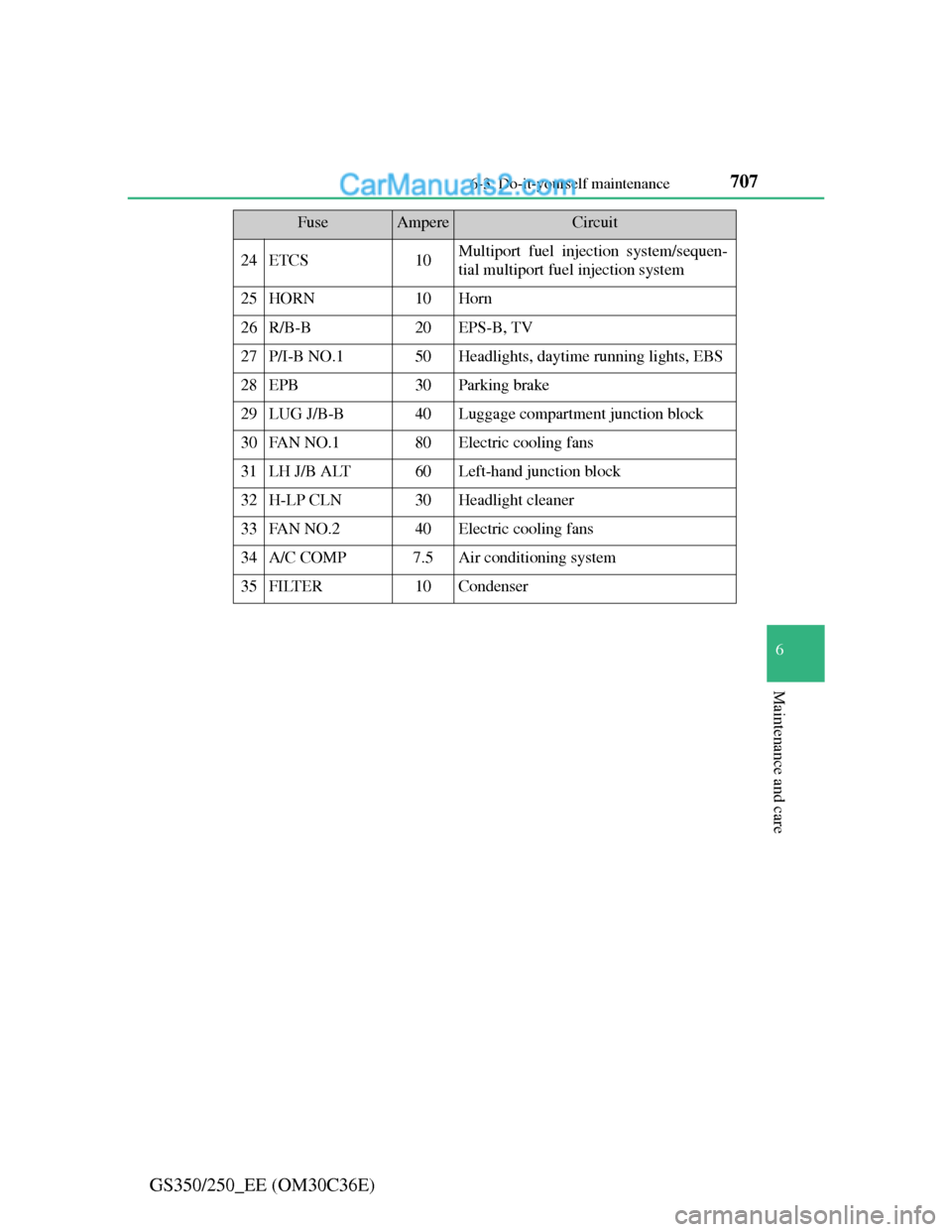
24ETCS10Multiport fuel injection system/sequen-
tial multiport fuel injection system
25HORN10Horn
26R/B-B20EPS-B, TV
27P/I-B NO.150Headlights, daytime running lights, EBS
28EPB30Parking brake
29LUG J/B-B40Luggage compartment junction block
30FAN NO.180Electric cooling fans
31LH J/B ALT60Left-hand junction block
32H-LP CLN30Headlight cleaner
33FAN NO.240Electric cooling fans
34A/C COMP7.5Air conditioning system
35FILTER10Condenser
FuseAmpereCircuit
Page 727 of 914
709 6-3. Do-it-yourself maintenance
6
Maintenance and care
GS350/250_EE (OM30C36E)
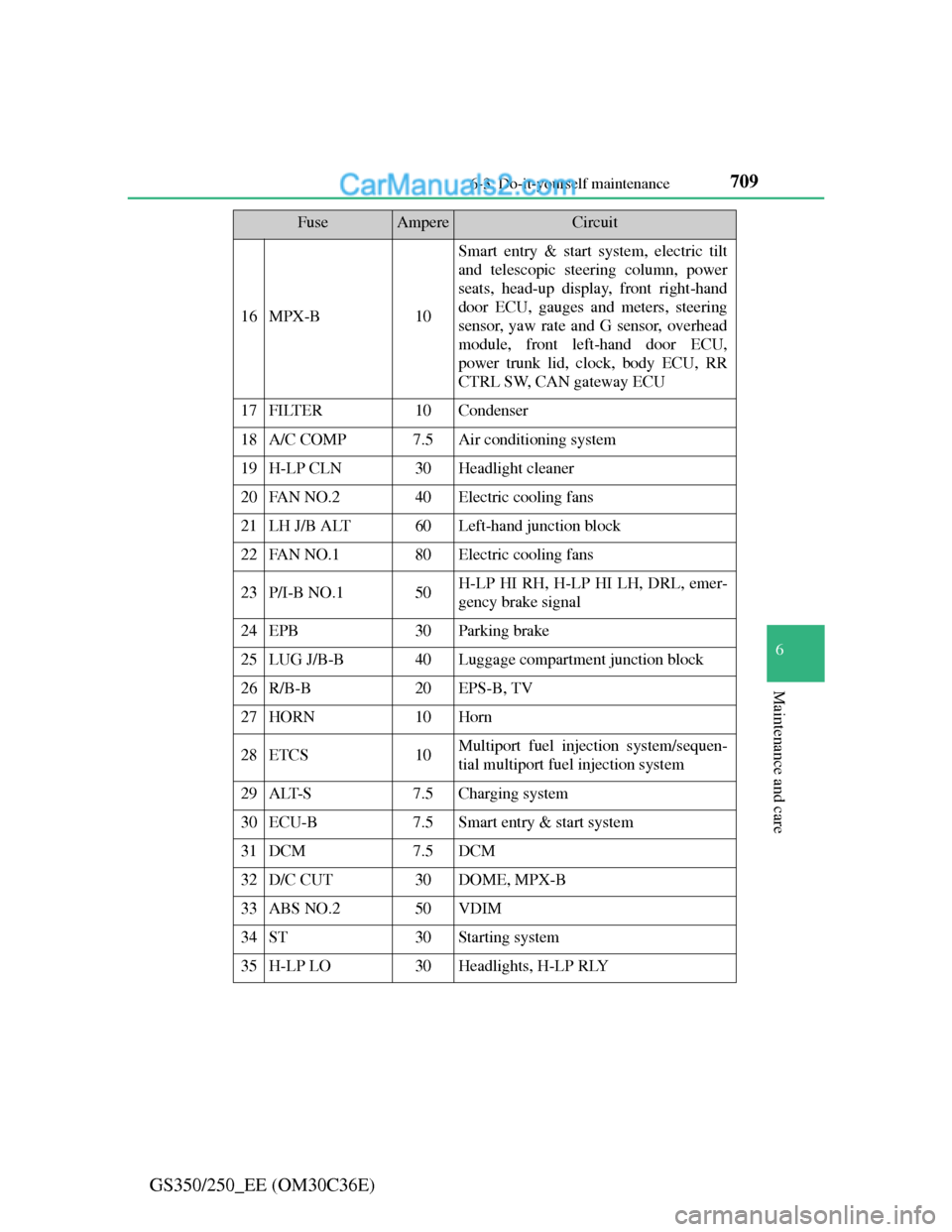
16MPX-B10
Smart entry & start system, electric tilt
and telescopic steering column, power
seats, head-up display, front right-hand
door ECU, gauges and meters, steering
sensor, yaw rate and G sensor, overhead
module, front left-hand door ECU,
power trunk lid, clock, body ECU, RR
CTRL SW, CAN gateway ECU
17FILTER10Condenser
18A/C COMP7.5Air conditioning system
19H-LP CLN30Headlight cleaner
20FAN NO.240Electric cooling fans
21LH J/B ALT60Left-hand junction block
22FAN NO.180Electric cooling fans
23P/I-B NO.150H-LP HI RH, H-LP HI LH, DRL, emer-
gency brake signal
24EPB30Parking brake
25LUG J/B-B40Luggage compartment junction block
26R/B-B20EPS-B, TV
27HORN10Horn
28ETCS10Multiport fuel injection system/sequen-
tial multiport fuel injection system
29ALT-S7.5Charging system
30ECU-B7.5Smart entry & start system
31DCM7.5DCM
32D/C CUT30DOME, MPX-B
33ABS NO.250VDIM
34ST30Starting system
35H-LP LO30Headlights, H-LP RLY
FuseAmpereCircuit
Page 729 of 914
711 6-3. Do-it-yourself maintenance
6
Maintenance and care
GS350/250_EE (OM30C36E)
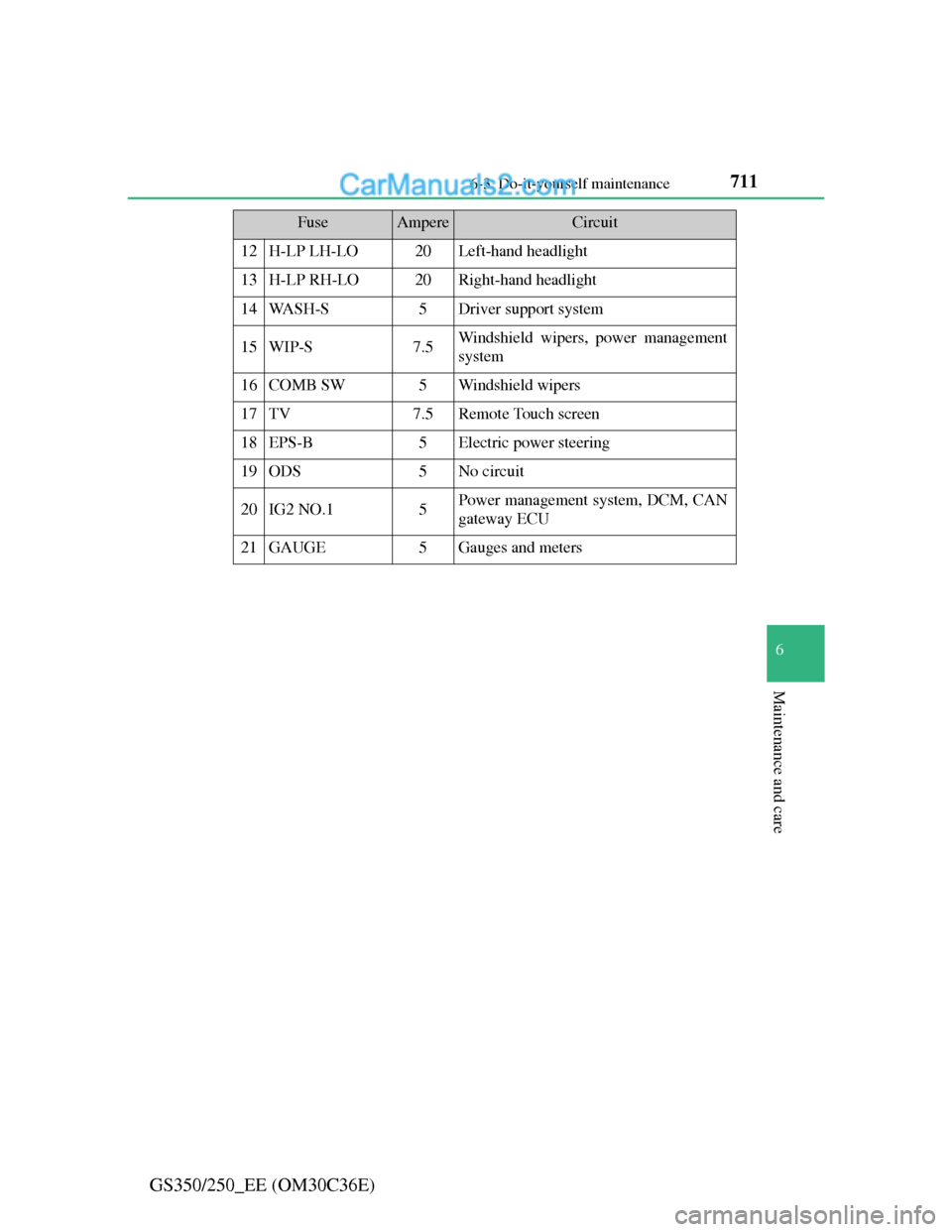
12H-LP LH-LO20Left-hand headlight
13H-LP RH-LO20Right-hand headlight
14WA S H - S5Driver support system
15WIP-S7.5Windshield wipers, power management
system
16COMB SW5Windshield wipers
17TV7.5Remote Touch screen
18EPS-B5Electric power steering
19ODS5No circuit
20IG2 NO.15Power management system, DCM, CAN
gateway ECU
21GAUGE5Gauges and meters
FuseAmpereCircuit
Page 753 of 914
735 6-3. Do-it-yourself maintenance
6
Maintenance and care
GS350/250_EE (OM30C36E)
Replacing the following bulbs
If any of the lights listed below has burnt out, have it replaced by
any authorized Lexus dealer or repairer, or another duly qualified
and equipped professional.
Headlights
Front position lights and daytime running lights
Side turn signal lights
Stop/tail lights
Tail lights
Rear fog light
High mounted stoplight
License plate lights
Discharge headlights
If voltage to the discharge bulbs is insufficient, the bulbs may not come on,
or may go out temporarily. The discharge bulbs will come on when normal
power is restored.
LED light bulbs
The lights other than the headlights, front fog lights (if equipped), front turn
signal lights, rear turn signal lights, back-up light and outer foot lights each
consist of a number of LEDs. If any of the LEDs burn out, take your vehicle
to any authorized Lexus dealer or repairer, or another duly qualified and
equipped professional to have the light replaced.
Condensation build-up on the inside of the lens
Contact any authorized Lexus dealer or repairer, or another duly qualified
and equipped professional for more information in the following situations.
Temporary condensation build-up on the inside of the headlight lens does not
indicate a malfunction.
Large drops of water have built up on the inside of the lens.
Water has built up inside the headlight.
When replacing light bulbs
P. 7 2 1