wheel Lexus GS250 2012 Owner's Guide
[x] Cancel search | Manufacturer: LEXUS, Model Year: 2012, Model line: GS250, Model: Lexus GS250 2012Pages: 914, PDF Size: 53.04 MB
Page 212 of 914
2084-1. Before driving
GS350/250_EE (OM30C36E)
If the engine overheats
Towing a loaded trailer up a long, steep incline in temperatures
exceeding 30C (85F) may result in the engine overheating. If
the engine coolant temperature gauge indicates that the engine is
overheating, turn the air conditioning off immediately, leave the
road and stop the vehicle in a safe place. (P. 829)
When parking the vehicle
Always place wheel chocks under the wheels of both the vehicle
and trailer. Firmly set the parking brake and shift the shift lever
to P.
CAUTION
To avoid accident or injury
Do not tow a trailer when the compact spare tire is installed on your vehi-
cle.
Do not tow the vehicle when the tire installed is repaired with the emer-
gency tire puncture repair kit.
Vehicle speed in towing
Observe the legal maximum speeds for trailer towing.
Before descending hills or long declines
Reduce speed and downshift. However, never downshift suddenly while
descending steep or long downhill grades.
Operation of the brake pedal
Do not hold the brake pedal depressed often or for long periods of time.
Doing so may result in the brake overheating or reduce braking effects.
NOTICE
For vehicles with an emergency tire puncture repair kit (if equipped)
Do not tow anything if a tire that has been repaired using the emergency tire
puncture repair kit is installed. The load on the tire may cause unexpected
damage to the tire.
Page 217 of 914
2114-2. Driving procedures
4
Driving
GS350/250_EE (OM30C36E)
Auto power off function
If the vehicle is left in ACCESSORY mode for more than 20 minutes or
IGNITION ON mode (the engine is not running) for more than an hour with
the shift lever in P, the engine switch will automatically turn off. However,
this function cannot entirely prevent battery discharge. Do not leave the vehi-
cle with the engine switch in ACCESSORY or IGNITION ON mode for long
periods of time when the engine is not running.
Electronic key battery depletion
P. 1 3 4
Conditions affecting operation
P. 1 3 0
Notes for the entry function
P. 1 3 1
If the engine does not start
The engine immobilizer system may not have been deactivated. (P. 8 0 )
Contact any authorized Lexus dealer or repairer, or another duly qualified
and equipped professional.
Check that the shift lever is securely set in P. The engine may not start if the
shift lever is displaced out of P. “Shift to P position to Start” will be dis-
played on the multi-information display.
Steering lock
After turning the engine switch off and opening and closing the doors, the
steering wheel will be locked due to the steering lock function. Operating the
engine switch again automatically cancels the steering lock.
Page 218 of 914
2124-2. Driving procedures
GS350/250_EE (OM30C36E)
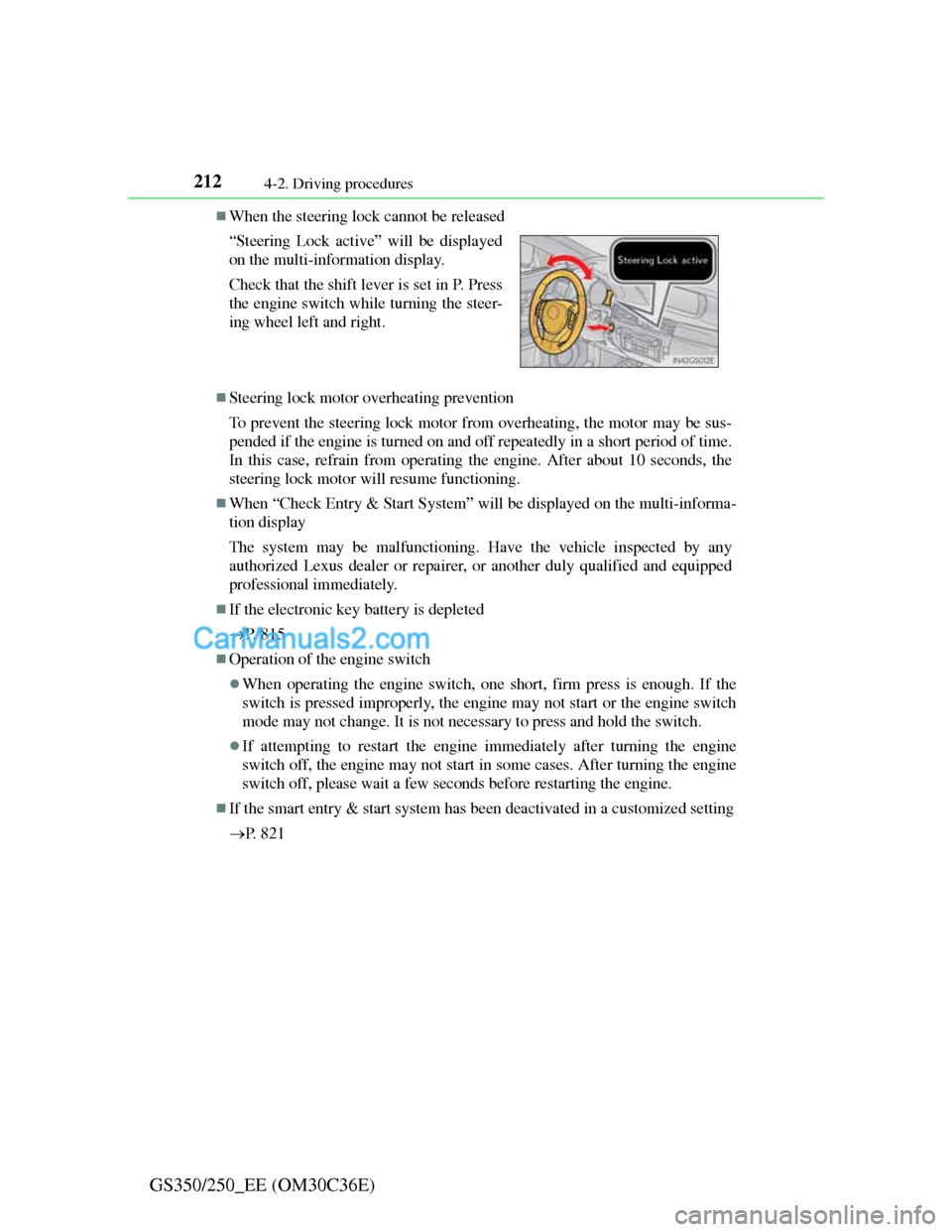
When the steering lock cannot be released
Steering lock motor overheating prevention
To prevent the steering lock motor from overheating, the motor may be sus-
pended if the engine is turned on and off repeatedly in a short period of time.
In this case, refrain from operating the engine. After about 10 seconds, the
steering lock motor will resume functioning.
When “Check Entry & Start System” will be displayed on the multi-informa-
tion display
The system may be malfunctioning. Have the vehicle inspected by any
authorized Lexus dealer or repairer, or another duly qualified and equipped
professional immediately.
If the electronic key battery is depleted
P. 8 1 5
Operation of the engine switch
When operating the engine switch, one short, firm press is enough. If the
switch is pressed improperly, the engine may not start or the engine switch
mode may not change. It is not necessary to press and hold the switch.
If attempting to restart the engine immediately after turning the engine
switch off, the engine may not start in some cases. After turning the engine
switch off, please wait a few seconds before restarting the engine.
If the smart entry & start system has been deactivated in a customized setting
P. 8 2 1 “Steering Lock active” will be displayed
on the multi-information display.
Check that the shift lever is set in P. Press
the engine switch while turning the steer-
ing wheel left and right.
Page 243 of 914
2364-3. Operating the lights and wipers
GS350/250_EE (OM30C36E)
The Automatic High Beam can be operated when
The engine switch is in IGNITION ON mode.
Camera sensor detection information
High beam may not be automatically turned off in the following situations:
• When oncoming vehicles suddenly appear from a curve
• When the vehicle is cut in front of by another
• When oncoming or preceding vehicles are hidden from sight due to
repeated curves, road dividers or roadside trees
High beam may be turned off if an oncoming vehicle that is using fog lights
without using the headlights is detected.
House lights, street lights, red traffic signals, and illuminated billboards or
signs may cause the high beam to turn off.
The following factors may affect the amount of time taken to turn high
beam on or off:
• The brightness of headlights, fog lights, and tail lights of oncoming and
preceding vehicles
• The movement and direction of oncoming and preceding vehicles
• When a oncoming or preceding vehicle only has operational lights on
one side
• When a oncoming or preceding vehicle is a two-wheeled vehicle
• The condition of the road (gradient, curve, condition of the road surface
etc.)
• The number of passengers and amount of luggage
High beam may be turned on or off when unexpected by the driver.
Page 279 of 914
2724-5. Using the driving support
GS350/250_EE (OM30C36E)
CAUTION
When the sensor may not be correctly detecting the vehicle ahead
Apply the brakes as necessary when any of the following types of vehicles
are in front of you.
As the sensor may not be able to correctly detect these types of vehicles, the
approach warning (P. 264) will not be activated, and a fatal or serious
accident may result.
Vehicles that cut in suddenly
Vehicles traveling at low speeds
Vehicles that are not moving
Vehicles with small rear ends (trailers with no load on board etc.)
Motorcycles traveling in the same lane
Conditions under which the vehicle-to-vehicle distance control may not
function correctly
Apply the brakes as necessary in the following conditions as the radar sen-
sor may not be able to correctly detect vehicles ahead, and a fatal or serious
accident may result:
When water or snow thrown up by the surrounding vehicles hinders the
functioning of the sensor
When your vehicle is pointing upwards (caused by a heavy load in the
trunk etc.)
When the road curves or when the lanes are narrow
When steering wheel operation or your position in the lane is unstable
When the vehicle ahead of you decelerates suddenly
Page 282 of 914

2754-5. Using the driving support
4
Driving
GS350/250_EE (OM30C36E)Lane departure warning function
If the system judges that the vehicle may deviate from its lane, it
alerts the driver using beeping, screen displays and a sensory
warning
* given via the steering wheel.
*: A slight steering torque is applied for a short period of time in the direc-
tion of the center of the lane.
Lane keeping assist function
• This function will be active when the vehicle-to-vehicle dis-
tance control mode of the cruise control (P. 258) is set with
vehicle speed above approximately 72 km/h (45 mph) and
while the lane departure warning function is active.
• When the lane keeping assist function is active, a slight steer-
ing torque will be applied, to help the driver maintain the vehi-
cle inside the lane.
The lane keeping assist function will be temporarily canceled if the
steering wheel is not operated, or if you continue driving with your
hands lightly touching the steering wheel. (P. 279)
Functions included in the LKA
1
2
Page 285 of 914
2784-5. Using the driving support
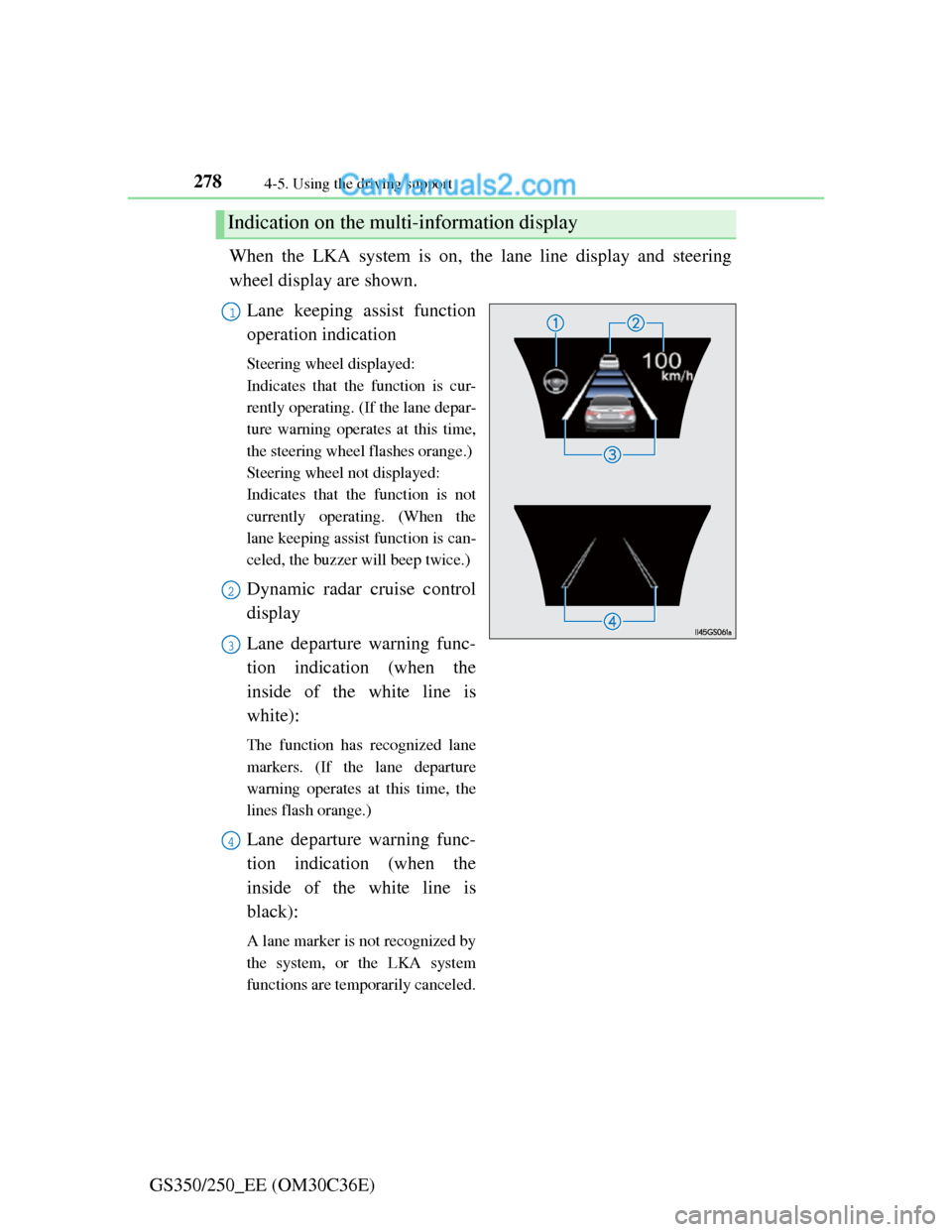
GS350/250_EE (OM30C36E)When the LKA system is on, the lane line display and steering
wheel display are shown.
Lane keeping assist function
operation indication
Steering wheel displayed:
Indicates that the function is cur-
rently operating. (If the lane depar-
ture warning operates at this time,
the steering wheel flashes orange.)
Steering wheel not displayed:
Indicates that the function is not
currently operating. (When the
lane keeping assist function is can-
celed, the buzzer will beep twice.)
Dynamic radar cruise control
display
Lane departure warning func-
tion indication (when the
inside of the white line is
white):
The function has recognized lane
markers. (If the lane departure
warning operates at this time, the
lines flash orange.)
Lane departure warning func-
tion indication (when the
inside of the white line is
black):
A lane marker is not recognized by
the system, or the LKA system
functions are temporarily canceled.
Indication on the multi-information display
1
2
3
4
Page 286 of 914
2794-5. Using the driving support
4
Driving
GS350/250_EE (OM30C36E)
Temporary cancelation of the LKA system functions
If any of the following occurs, the LKA system functions will be temporarily
canceled. The functions will resume after the necessary operating conditions
have returned.
The steering wheel is turned as far as necessary to cause the vehicle to
change lanes.
When the system detects no-handed driving. (The lane keeping assist func-
tion will be temporarily canceled, but the lane departure warning function
will continue.)
The turn signal lever is operated.
The vehicle speed deviates from the operating range of the LKA system
functions. (The buzzer will beep twice when the lane keeping assist func-
tion is being canceled.)
When the lane lines cannot be recognized while driving. (The buzzer will
beep twice when the lane keeping assist function is being canceled.)
The wiper switch is set on high speed mode or is set on AUTO mode with
wipers operating at high speed. (The lane keeping assist function will be
temporarily canceled, but the lane departure warning function will con-
tinue.)
If the vehicle crosses a line for approximately half a minute or more. (The
lane keeping assist function will be temporarily canceled, but the lane
departure warning function will continue.)
When the lane departure warning function is activated.
The lane departure warning function will not operate again for a several
seconds after it has been activated, even if the vehicle leaves the lane again.
The lane departure warning
It may be difficult to feel the sensory warning depending on the road condi-
tions.
No-handed driving warning
If the steering wheel is not operated for approximately 15 seconds on a
straight road or approximately 5 seconds on a curve, the buzzer will beep
twice, indicators on the multi-information display will flash, and the lane
keeping assist function will be temporarily canceled. If you drive the vehicle
with your hands lightly touching the steering wheel, this may also be
detected as no-handed driving.
Page 288 of 914
2814-5. Using the driving support
4
Driving
GS350/250_EE (OM30C36E)
When driving on roads that are branching or merging
When driving on a road surface that is wet due to rain, previous rainfall,
standing water, etc.
When the vehicle experiences strong up-and-down motion such as when
driving on an extremely rough road or on a seam in the pavement
When headlight brightness at nighttime is reduced due to dirt on the lenses,
or when the headlights are misaligned
When driving with a strong crosswind
When driving on winding roads or roads that are uneven
When driving on rough or unpaved roads
When changing the tires
Depending on the tires used, sufficient performance may not be maintain-
able.
Warning messages for LKA
Warning messages are used to indicate a system malfunction or to inform the
driver of the need for caution while driving. (P. 760, 767)
CAUTION
Before using the LKA system
Do not rely solely on the LKA system. The LKA system does not drive the
vehicle automatically, nor does it reduce the amount of care you need to
take. As such, the driver must always assume full responsibility for under-
standing his/her surroundings, for operating the steering wheel to correct
the driving line, and for driving safely.
Inappropriate or negligent driving could lead to an accident.
To avoid operating the LKA by mistake
Switch the LKA off using the “LKA” switch when not in use.
Page 307 of 914
3004-5. Using the driving support
GS350/250_EE (OM30C36E)
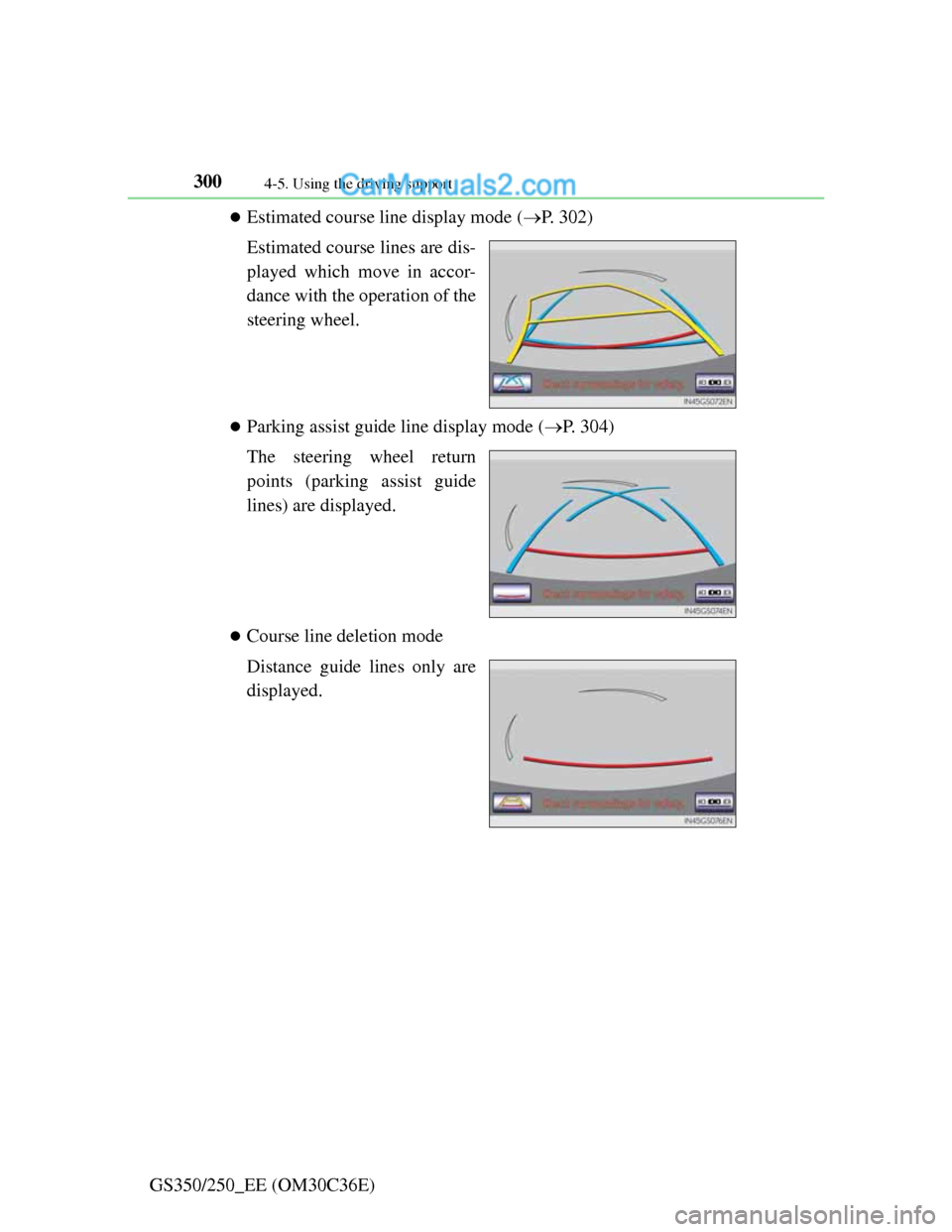
Estimated course line display mode (P. 302)
Estimated course lines are dis-
played which move in accor-
dance with the operation of the
steering wheel.
Parking assist guide line display mode (P. 304)
The steering wheel return
points (parking assist guide
lines) are displayed.
Course line deletion mode
Distance guide lines only are
displayed.