brake sensor Lexus GS250 2012 Owner's Manual
[x] Cancel search | Manufacturer: LEXUS, Model Year: 2012, Model line: GS250, Model: Lexus GS250 2012Pages: 914, PDF Size: 53.04 MB
Page 97 of 914
962. Instrument cluster
GS350/250_EE (OM30C36E)
inspected by any authorized Lexus dealer or repairer, or another duly qual-
ified and equipped professional.
*2: The light flashes to indicate a malfunction.
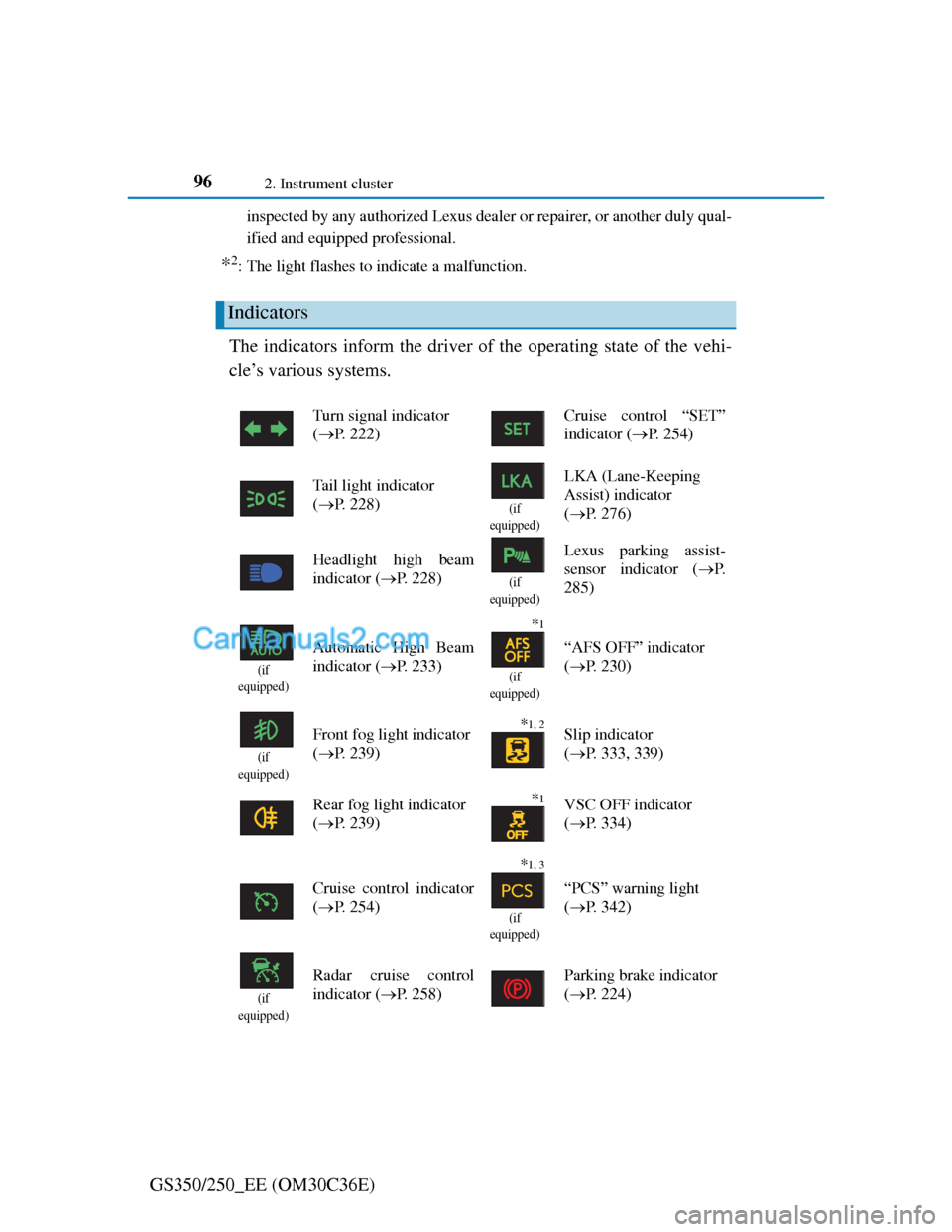
The indicators inform the driver of the operating state of the vehi-
cle’s various systems.
Indicators
Turn signal indicator
(P. 222)Cruise control “SET”
indicator (P. 254)
Tail light indicator
(P. 228)
(if
equipped)
LKA (Lane-Keeping
Assist) indicator
(P. 276)
Headlight high beam
indicator (P. 228)
(if
equipped)
Lexus parking assist-
sensor indicator (P.
285)
(if
equipped)
Automatic High Beam
indicator (P. 233)
*1
(if
equipped)
“AFS OFF” indicator
(P. 230)
(if
equipped)
Front fog light indicator
(P. 239)*1, 2 Slip indicator
(P. 333, 339)
Rear fog light indicator
(P. 239)
*1VSC OFF indicator
(P. 334)
Cruise control indicator
(P. 254)
*1, 3
(if
equipped)
“PCS” warning light
(P. 342)
(if
equipped)
Radar cruise control
indicator (P. 258)Parking brake indicator
(P. 224)
Page 189 of 914
185
4Driving
GS350/250_EE (OM30C36E)
4-1. Before driving
Driving the vehicle............ 186
Cargo and luggage ............ 197
Trailer towing.................... 198
4-2. Driving procedures
Engine (ignition) switch.... 207
Automatic transmission .... 214
Turn signal lever ............... 222
Parking brake .................... 224
Horn .................................. 227
4-3. Operating the lights
and wipers
Headlight switch............... 228
Automatic High Beam ...... 233
Fog light switch ................ 239
Windshield wipers
and washer ...................... 241
Headlight cleaner switch ... 2484-4. Refueling
Opening the fuel tank cap . 249
4-5. Using the driving support
systems
Cruise control ................... 254
Dynamic radar cruise
control ............................. 258
LKA
(Lane-Keeping Assist) .... 274
Lexus
parking assist-sensor....... 284
Lexus
parking assist monitor..... 297
Driving mode select switch326
Driving assist systems ...... 331
Hill-start assist control ...... 339
PCS (Pre-Crash Safety
system)............................ 341
BSM (Blind Spot Monitor) 352
4-6. Driving tips
Winter driving tips ............ 359
Page 238 of 914

2314-3. Operating the lights and wipers
4
Driving
GS350/250_EE (OM30C36E)
Daytime running light system
To make your vehicle more visible to other drivers, the front position lights
turn on automatically whenever the engine is started and the parking brake is
released. Daytime running lights are not designed for use at night.
Headlight control sensor
Automatic light off system
When the light switch is in : The headlights turn off automatically if the
engine switch is turned to ACCESSORY mode or turned off.
When the light switch is in : The headlights and all lights turn off auto-
matically if the engine switch is turned to ACCESSORY mode or turned
off.
To turn the lights on again, turn the engine switch to IGNITION ON mode,
or turn the light switch off once and then back to or .
If any of the doors or trunk lid is kept open, the lights automatically turn off
after 20 minutes.
Light reminder buzzer
A buzzer sounds when the engine switch is turned off or turned to ACCES-
SORY mode and the driver’s door is opened while the lights are turned on.
Automatic headlight leveling system
The level of the headlights is automatically adjusted according to the number
of passengers and the loading condition of the vehicle to ensure that the
headlights do not interfere with other road users. The sensor may not function properly if
an object is placed on the sensor, or any-
thing that blocks the sensor is affixed to
the windshield.
Doing so interferes with the sensor
detecting the level of ambient light and
may cause the automatic headlight system
to malfunction.
Page 270 of 914
2634-5. Using the driving support
4
Driving
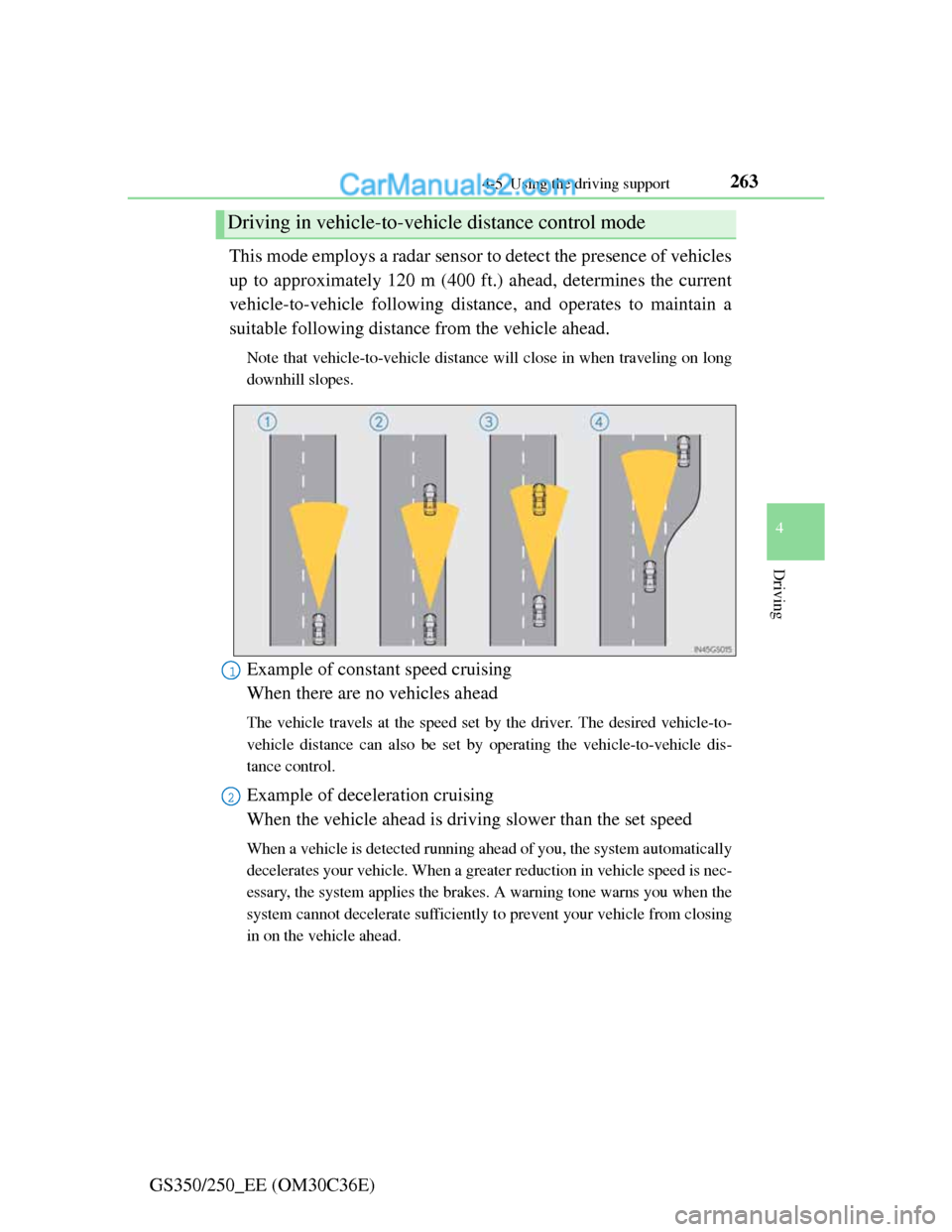
GS350/250_EE (OM30C36E)This mode employs a radar sensor to detect the presence of vehicles
up to approximately 120 m (400 ft.) ahead, determines the current
vehicle-to-vehicle following distance, and operates to maintain a
suitable following distance from the vehicle ahead.
Note that vehicle-to-vehicle distance will close in when traveling on long
downhill slopes.
Example of constant speed cruising
When there are no vehicles ahead
The vehicle travels at the speed set by the driver. The desired vehicle-to-
vehicle distance can also be set by operating the vehicle-to-vehicle dis-
tance control.
Example of deceleration cruising
When the vehicle ahead is driving slower than the set speed
When a vehicle is detected running ahead of you, the system automatically
decelerates your vehicle. When a greater reduction in vehicle speed is nec-
essary, the system applies the brakes. A warning tone warns you when the
system cannot decelerate sufficiently to prevent your vehicle from closing
in on the vehicle ahead.
Driving in vehicle-to-vehicle distance control mode
1
2
Page 279 of 914
2724-5. Using the driving support
GS350/250_EE (OM30C36E)
CAUTION
When the sensor may not be correctly detecting the vehicle ahead
Apply the brakes as necessary when any of the following types of vehicles
are in front of you.
As the sensor may not be able to correctly detect these types of vehicles, the
approach warning (P. 264) will not be activated, and a fatal or serious
accident may result.
Vehicles that cut in suddenly
Vehicles traveling at low speeds
Vehicles that are not moving
Vehicles with small rear ends (trailers with no load on board etc.)
Motorcycles traveling in the same lane
Conditions under which the vehicle-to-vehicle distance control may not
function correctly
Apply the brakes as necessary in the following conditions as the radar sen-
sor may not be able to correctly detect vehicles ahead, and a fatal or serious
accident may result:
When water or snow thrown up by the surrounding vehicles hinders the
functioning of the sensor
When your vehicle is pointing upwards (caused by a heavy load in the
trunk etc.)
When the road curves or when the lanes are narrow
When steering wheel operation or your position in the lane is unstable
When the vehicle ahead of you decelerates suddenly
Page 301 of 914

2944-5. Using the driving support
GS350/250_EE (OM30C36E)
Lexus parking assist-sensor display
When an obstacle is detected while the rear view monitor system, is in use,
the warning indicator will appear in the top right of the screen even if the dis-
play setting has been set to off.
Sensor detection information
The sensor’s detection areas are limited to the areas around the vehicle’s
front corner and rear bumpers.
Certain vehicle conditions and the surrounding environment may affect the
ability of the sensor to correctly detect obstacles. Particular instances where
this may occur are listed below.
• There is dirt, snow or ice on the sensor. (Wiping the sensors will resolve
this problem.)
• The sensor is frozen. (Thawing the area will resolve this problem.)
In especially cold weather, if a sensor is frozen the screen may show an
abnormal display, or obstacles may not be detected.
• The sensor is covered in any way.
• The vehicle is leaning considerably to one side.
• On an extremely bumpy road, on an incline, on gravel, or on grass.
• The vicinity of the vehicle is noisy due to vehicle horns, motorcycle
engines, air brakes of large vehicles, or other loud noises producing
ultrasonic waves.
• There is another vehicle equipped with parking assist sensors in the
vicinity.
• The sensor is coated with a sheet of spray or heavy rain.
• The vehicle is equipped with a fender pole or wireless antenna.
• Towing eyelets are installed.
• The bumper or sensor receives a strong impact.
• The vehicle is approaching a tall or curved curb.
• In harsh sunlight or intense cold weather.
• The area directly under the bumpers is not detected.
• If obstacles draw too close to the sensor.
• A non-genuine Lexus suspension (lowered suspension etc.) is installed.
• People may not be detected if they are wearing certain types of clothing.
In addition to the examples above, there are instances in which, because of
their shape, signs and other objects may be judged by the sensor to be closer
than they are.
Page 303 of 914

2964-5. Using the driving support
GS350/250_EE (OM30C36E)
CAUTION
When using the Lexus parking assist-sensor
Observe the following precautions.
Failing to do so may result in the vehicle being unable to be driven safely
and possibly cause an accident.
Do not use the sensor at speeds in excess of 10 km/h (6 mph).
The sensors’ detection areas and reaction times are limited. When moving
forward or reversing, check the areas surrounding the vehicle (especially
the sides of the vehicle) for safety, and drive slowly, using the brake to
control the vehicle’s speed.
Do not install accessories within the sensors’ detection areas.
NOTICE
When using Lexus parking assist-sensor
In the following situations, the system may not function correctly due to a
sensor malfunction etc. Have the vehicle checked by any authorized Lexus
dealer or repairer, or another duly qualified and equipped professional.
The Lexus parking assist-sensor operation display flashes, and a beep
sounds when no obstacles are detected.
If the area around a sensor collides with something, or is subjected to
strong impact.
If the bumper collides with something.
If the display shows continuously without a beep.
If a display error occurs, first check the sensor.
If the error occurs even if there is no ice, snow or mud on the sensor, it is
likely that the sensor is malfunctioning.
Notes when washing the vehicle
Do not apply intensive bursts of water or steam to the sensor area.
Doing so may result in the sensor malfunctioning.
Page 350 of 914
3434-5. Using the driving support
4
Driving
GS350/250_EE (OM30C36E)
PCS (Pre-Crash Safety system)
Pre-crash seat belts (front seat only)
If the pre-crash sensor detects that a collision is unavoidable, the
pre-crash safety system will retract the seat belt before the colli-
sion occurs.
The same will happen if the driver makes an emergency braking
or loses control of the vehicle. (P. 40)
Pre-crash brake assist
When there is a high possibility of a frontal collision, the system
applies greater braking force in relation to how strongly the
brake pedal is depressed.
Pre-crash braking
When there is a high possibility of a frontal collision, the system
warns the driver using a warning light, warning display and
buzzer. If the system determines that a collision is unavoidable,
the brakes are automatically applied to reduce the collision
speed.
: If equipped
When the radar sensor detects that a frontal collision is highly
likely or even unavoidable, safety systems such as the brakes and
seat belts are automatically engaged to lessen impact as well as
vehicle damage.
The pre-crash safety system can be turned on and off as necessary
by operating the switch. (P. 344)
Page 354 of 914

3474-5. Using the driving support
4
Driving
GS350/250_EE (OM30C36E)
Pre-crash alert braking:
• The system determines that the driver is not facing forward, or that the
driver’s eyes are closed.
• Vehicle speed is greater than about 40 km/h (25 mph).
• The speed at which your vehicle is approaching the vehicle running
ahead of you is greater than about 40 km/h (25 mph).
• The steering is not being turned.
Conditions that may trigger the system even if there is no danger of a collision
When there is an object by the roadside at the entrance to a curve
When passing an oncoming vehicle on a curve
When driving over a narrow iron bridge
When there is a metal object on the road surface
When driving on an uneven road surface
When passing an oncoming vehicle on a left-turn (left-hand drive vehicles)
or right-turn (right-hand drive vehicles)
When your vehicle rapidly closes on the vehicle in front
When a grade separation/interchange, sign, billboard, or other structure
appears to be directly in the vehicle’s line of travel
When climbing a steep hill causes an overhead billboard or other metallic
structure to appear directly in the vehicle’s line of travel
When the system is activated in the situations described above, there is also a
possibility that the seat belts will retract quickly and the brakes will be
applied with a force greater than normal. When the seat belt is locked in the
retracted position, stop the vehicle in a safe place, release the seat belt and
refasten it.
Obstacles not detected
The sensor cannot detect plastic obstacles such as traffic cones. There may
also be occasions when the sensor cannot detect pedestrians, animals, bicy-
cles, motorcycles, trees, or snowdrifts.
Page 360 of 914

3534-5. Using the driving support
4
Driving
GS350/250_EE (OM30C36E)
CAUTION
Cautions regarding the assist contents of the system
By means of alarms and brake control, the pre-crash safety system is
intended to assist the driver in avoiding collisions through the process of
LOOK-JUDGE-ACT. There are limits to the degree of assistance the sys-
tem can provide, so please keep in mind the following important points.
Assisting the driver in watching the road
The pre-crash safety system is only able to detect obstacles directly in
front of the vehicle, and only within a limited range. It is not a mechanism
that allows careless or inattentive driving, and it is not a system that can
assist the driver in low-visibility conditions. It is still necessary for the
driver to pay close attention to the vehicle’s surroundings.
Assisting the driver in making correct judgment
When attempting to estimate the likelihood of a collision, the only data
available to the pre-crash safety system is that from obstacles it has
detected directly in front of the vehicle. Therefore, it is absolutely neces-
sary for the driver to remain vigilant and to determine whether or not there
is a possibility of collision in any given situation.
Assisting the driver in taking action
The pre-crash safety system’s braking assist feature is designed to help
reduce the severity of a collision, and so only acts when the system has
judged that a collision is unavoidable. This system by itself is not capable
of automatically avoiding a collision or bringing the vehicle to a stop
safely. For this reason, when encountering a dangerous situation the driver
must take direct and immediate action in order to ensure the safety of all
involved.
NOTICE
Precautions for cleaning the driver monitor sensor
Gently wipe the sensor with a soft cloth to prevent damage.
Wipe any excess dirt with a cloth dampened with neutral detergent, all liq-
uids having been wringed out of the cloth. After that, wipe again with a
dry cloth.
Do not use benzene, thinner, glass cleaners, wax, etc.