key battery Lexus GS250 2014 User Guide
[x] Cancel search | Manufacturer: LEXUS, Model Year: 2014, Model line: GS250, Model: Lexus GS250 2014Pages: 688, PDF Size: 152.64 MB
Page 156 of 688
1563-2. Opening, closing and locking the doors and trunk
GS350_250_OM_OM30E16E_(EE)
■Door lock buzzer
If an attempt to lock the doors is made when a door is not fully closed, a buzzer
sounds continuously for 5 seconds. Fully close the door to stop the buzzer, and lock
the vehicle once more.
■Security feature
→P. 1 2 7
■Alarm (if equipped)
Using the wireless remote control to lo ck the doors will set the alarm system.
( → P. 8 6 )
■Conditions affecting operation
→P. 1 3 4
■If the wireless remote control does not operate properly
Locking and unlocking the doors and opening the trunk: Use the mechanical key.
(→ P. 6 1 8 )
■Electronic key battery depletion
→P. 1 3 8
■When the electronic key battery is fully depleted
→P. 4 8 9
■Confirmation of the registered key number
The number of keys already registered to the vehicle can be confirmed. Ask any
authorized Lexus dealer or repairer, or another duly qualified and equipped profes-
sional for details.
■Customization
Settings (e.g. wireless remote control system) can be changed.
(Customizable features: →P. 650)
GS350_250_OM_OM30E16E_(EE).book Page 156 Tuesday, July 8, 201 4 7:11 PM
Page 206 of 688
2063-5. Opening, closing the windows and moon roof
GS350_250_OM_OM30E16E_(EE)
■Door lock linked window operation
●The power windows can be opened and closed using the mechanical key.*
( → P. 6 1 8 )
●The power windows can be opened and closed using the wireless remote control.*
(→ P. 1 5 5 )
*: These settings must be customized at any authorized Lexus dealer or repairer, or
another duly qualified and equipped professional.
■When the battery is disconnected
The window lock switch is disabled. If necessary, press the window lock switch after
reconnecting the battery.
■Power windows open warning buzzer
The buzzer sounds and a message is shown on the multi-information display in the
instrument cluster when the engine switch is turned off and the driver’s door is
opened with the power windows open.
■Customization
Settings (e.g. linked door lock operation) can be changed.
(Customizable features: →P. 650)
GS350_250_OM_OM30E16E_(EE).book Page 206 Tuesday, July 8, 201 4 7:11 PM
Page 240 of 688
2404-2. Driving procedures
GS350_250_OM_OM30E16E_(EE)
■Auto power off function
If the vehicle is left in ACCESSORY mode for more than 20 minutes or IGNITION
ON mode (the engine is not running) for more than an hour with the shift lever in P,
the engine switch will automatically turn off. However, this function cannot entirely
prevent battery discharge. Do not leave the vehicle with the engine switch in
ACCESSORY or IGNITION ON mode for long periods of time when the engine is
not running.
■Electronic key battery depletion
→P. 1 3 8
■Conditions affecting operation
→P. 1 3 4
■Notes for the push-start function
→P. 1 3 7
■If the engine does not start
●The engine immobilizer system may not have been deactivated. ( →P. 8 0 )
Contact any authorized Lexus dealer or repairer, or another duly qualified and
equipped professional.
●Check that the shift lever is securely set in P. The engine may not start if the shift
lever is displaced out of P. “Shift to P position to Start” will be displayed on the multi-
information display.
■Steering lock
After turning the engine switch off and opening and closing the doors, the steering
wheel will be locked due to the steering lock function. Operating the engine switch
again automatically cancels the steering lock.
GS350_250_OM_OM30E16E_(EE).book Page 240 Tuesday, July 8, 201 4 7:11 PM
Page 241 of 688
2414-2. Driving procedures
4
Driving
GS350_250_OM_OM30E16E_(EE)
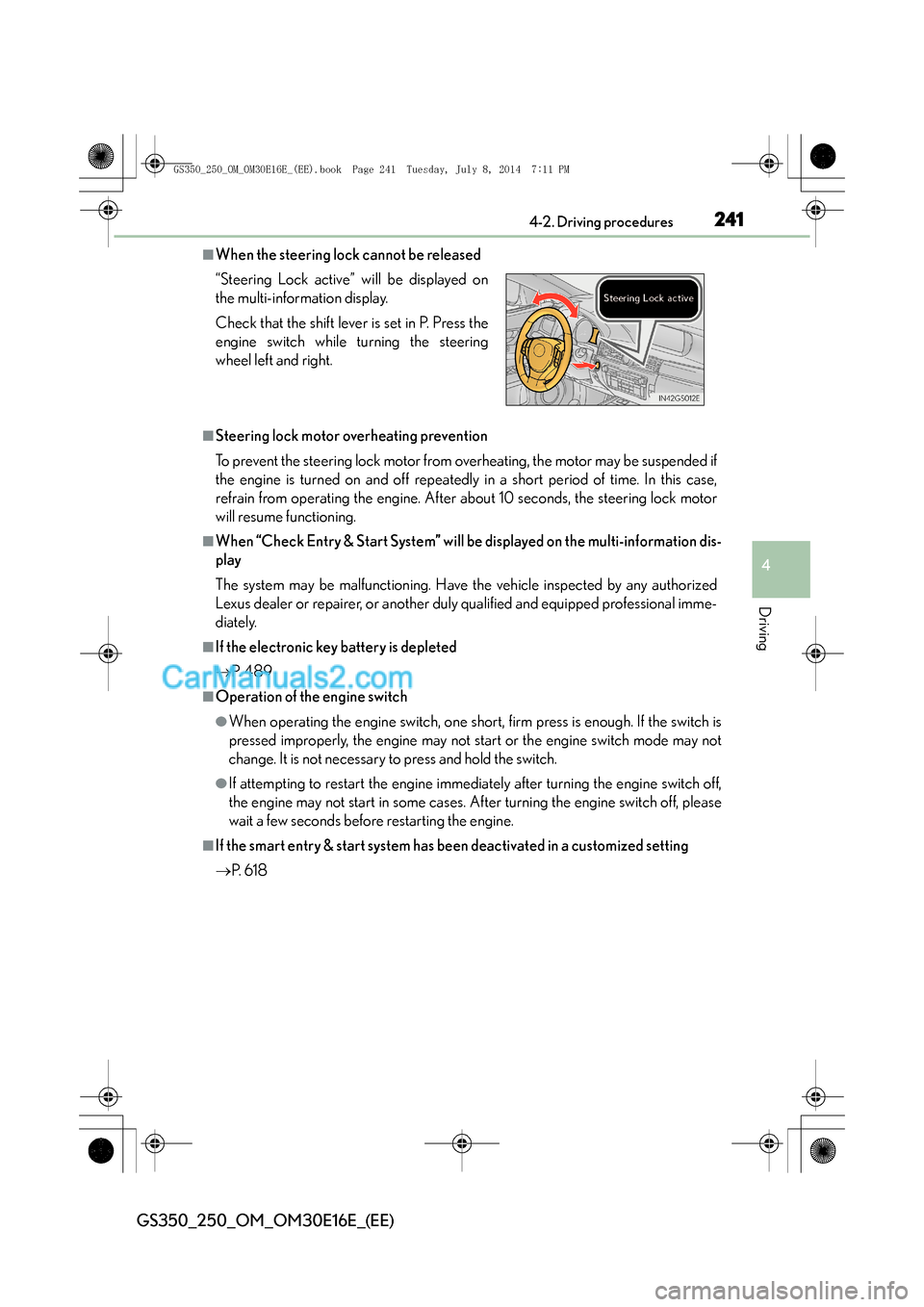
■When the steering lock cannot be released
■Steering lock motor overheating prevention
To prevent the steering lock motor from overheating, the motor may be suspended if
the engine is turned on and off repeatedly in a short period of time. In this case,
refrain from operating the engine. After about 10 seconds, the steering lock motor
will resume functioning.
■When “Check Entry & Start System” will be displayed on the multi-information dis-
play
The system may be malfunctioning. Have the vehicle inspected by any authorized
Lexus dealer or repairer, or another duly qualified and equipped professional imme-
diately.
■If the electronic key battery is depleted
→P. 4 8 9
■Operation of the engine switch
●When operating the engine switch, one short, firm press is enough. If the switch is
pressed improperly, the engine may not start or the engine switch mode may not
change. It is not necessary to press and hold the switch.
●If attempting to restart the engine immediately after turning the engine switch off,
the engine may not start in some cases. After turning the engine switch off, please
wait a few seconds before restarting the engine.
■If the smart entry & start system has been deactivated in a customized setting
→P. 6 1 8
“Steering Lock active” will be displayed on
the multi-information display.
Check that the shift lever is set in P. Press the
engine switch while turning the steering
wheel left and right.
GS350_250_OM_OM30E16E_(EE).book Page 241 Tuesday, July 8, 201
4 7:11 PM
Page 401 of 688
4015-3. Using the interior lights
5
Interior features
GS350_250_OM_OM30E16E_(EE)
■Illuminated entry system
The lights automatically turn on/off according to engine switch mode, the presence
of the electronic key, whether the doors are locked/unlocked, and whether the doors
are opened/closed.
■To prevent battery discharge
If the interior lights remain on when the engine switch is turned off, the lights will go
off automatically after 20 minutes.
■Customization
Setting (e.g. the time elapsed before lights turn off) can be changed.
(Customizable features: →P. 650)
NOTICE
■To prevent battery discharge
Do not leave the lights on longer than necessary when the engine is not running.
GS350_250_OM_OM30E16E_(EE).book Page 401 Tuesday, July 8, 201 4 7:11 PM
Page 435 of 688
435
6Maintenance and care
GS350_250_OM_OM30E16E_(EE)
6-1. Maintenance and careCleaning and protecting the vehicle exterior................. 436
Cleaning and protecting the vehicle interior.................. 440
6-2. Maintenance Maintenance requirements............................. 444
6-3. Do-it-yourself maintenance Do-it-yourself service precautions.................................447
Hood ............................................... 450
Positioning a floor jack...............451
Engine compartment ............... 454
Tires.................................................. 466
Tire inflation pressure ...............483
Wheels ...........................................485
Air conditioning filter ............... 487
Electronic key battery ..............489
Checking and replacing fuses.............................................. 492
Light bulbs.......................................514
GS350_250_OM_OM30E16E_(EE).book Page 435 Tuesday, July 8, 201 4 7:11 PM
Page 437 of 688
4376-1. Maintenance and care
6
Maintenance and care
GS350_250_OM_OM30E16E_(EE)
■High-pressure car washes
●Do not allow the nozzles of the car wash to come within close proximity of the win-
dows.
●Before using the car wash, check that the fuel filler door on your vehicle is closed
properly.
■Notes for a smart entry & start system
If the door handle becomes wet while the electronic key is within the effective range,
the door may lock and unlock repeatedly. In that case, follow the following correc-
tion procedures to wash the vehicle:
●Place the key in a position 2 m (6 ft.) or more separate from the vehicle while the
vehicle is being washed. (Take care to ensure that the key is not stolen.)
●Set the electronic key to battery-saving mode to disable the smart entry & start sys-
tem. (→P. 1 3 3 )
■Aluminum wheels
●Remove any dirt immediately by using a neutral detergent. Do not use hard
brushes or abrasive cleaners. Do not use strong or harsh chemical cleaners.
Use the same mild detergent and wax as used on the paint.
●Do not use detergent on the wheels when they are hot, for example after driving for
long distance in the hot weather.
●Wash detergent from the wheels immediately after use.
■Bumpers
Do not scrub with abrasive cleaners.
■Front side windows water-repellent coating
●The following precautions can extend the effectiveness of the water-repellent coat-
ing.
• Remove any dirt, etc. from the front side windows regularly.
• Do not allow dirt and dust to accumulate on the windows for a long period.
Clean the windows with a soft, damp cloth as soon as possible.
• Do not use wax or glass cleaners that contain abrasives when cleaning the win- dows.
• Do not use any metallic objects to remove condensation build up.
●When the water-repellent performance has become insufficient, the coating can
be repaired. Contact any authorized Lexus dealer or repairer, or another duly
qualified and equipped professional.
GS350_250_OM_OM30E16E_(EE).book Page 437 Tuesday, July 8, 201 4 7:11 PM
Page 463 of 688
463 6-3. Do-it-yourself maintenance
6
Maintenance and care
GS350_250_OM_OM30E16E_(EE)
■Before recharging
When recharging, the battery produces hydrogen gas which is flammable and
explosive. Therefore, observe the following before recharging:
●If recharging with the battery installed on the vehicle, be sure to disconnect the
ground cable.
●Make sure the power switch on the charger is off when connecting and discon-
necting the charger cables to the battery.
■After recharging/reconnecting the battery
The engine may not start. Follow the procedure below to initialize the system.Shift the shift lever to P.
Open and close any of the doors.
Restart the engine.
●Unlocking the doors using the smart entry & start system may not be possible
immediately after reconnecting the battery. If this happens, use the wireless remote
control or the mechanical key to lock/unlock the doors.
●Start the engine with the engine switch in ACCESSORY mode. The engine may
not start with the engine switch turned off. However, the engine will operate nor-
mally from the second attempt.
●The engine switch mode is recorded by the vehicle. If the battery is reconnected,
the vehicle will return the engine switch mode to the status it was in before the bat-
tery was disconnected. Make sure to turn off the engine before disconnect the bat-
tery. Take extra care when connecting the battery if the engine switch mode prior
to discharge is unknown.
If the engine will not start even after multiple attempts at both methods, contact any
authorized Lexus dealer or repairer, or another duly qualified and equipped profes-
sional.
1
2
3
GS350_250_OM_OM30E16E_(EE).book Page 463 Tuesday, July 8, 201 4 7:11 PM
Page 489 of 688
489
6
6-3. Do-it-yourself maintenance
Maintenance and care
GS350_250_OM_OM30E16E_(EE)
Electronic key battery
●Flathead screwdriver
●Small flathead screwdriver
●Lithium battery CR2032
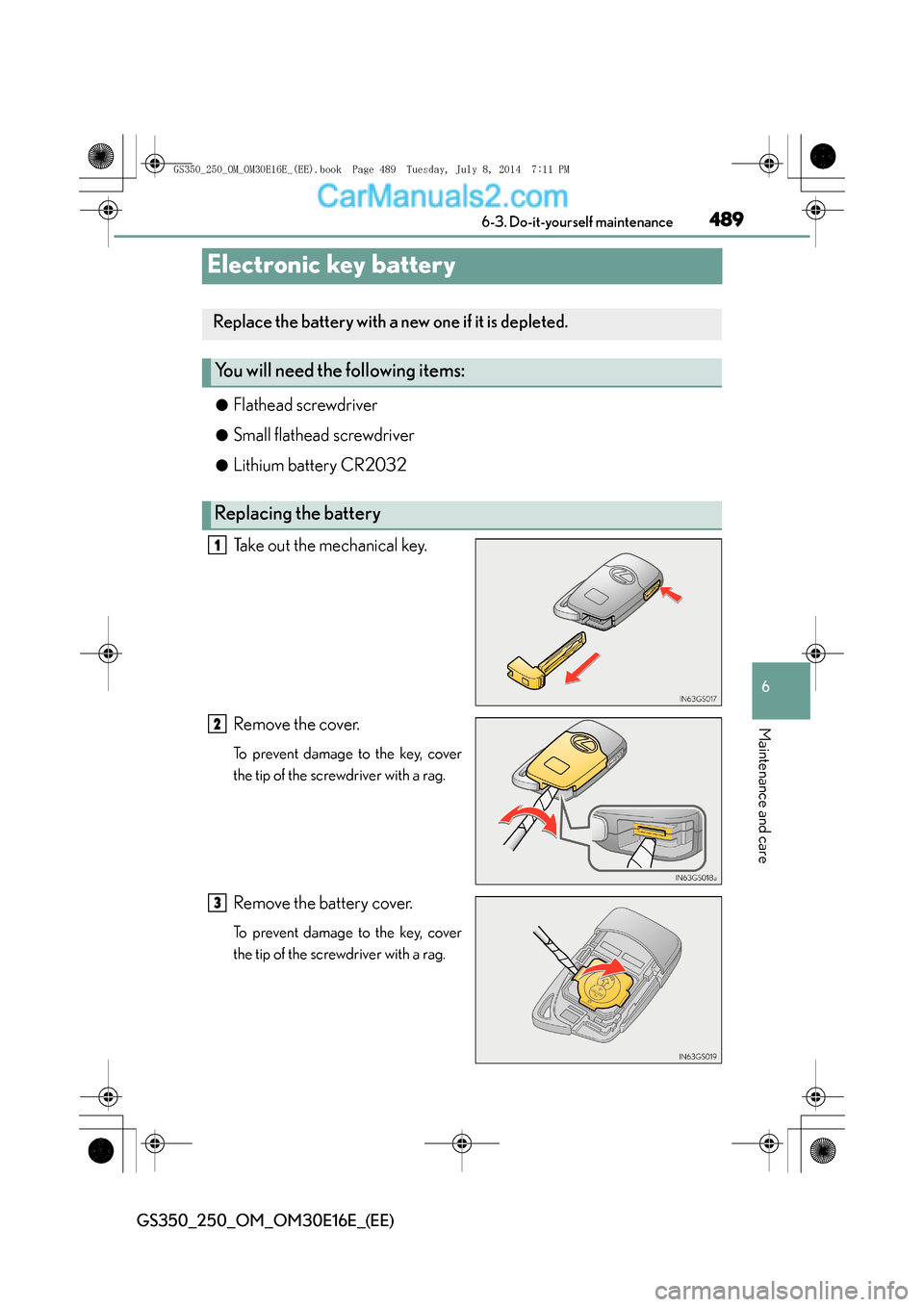
Take out the mechanical key.
Remove the cover.
To prevent damage to the key, cover
the tip of the screwdriver with a rag.
Remove the battery cover.
To prevent damage to the key, cover
the tip of the screwdriver with a rag.
Replace the battery with a new one if it is depleted.
You will need the following items:
Replacing the battery
1
2
3
GS350_250_OM_OM30E16E_(EE).book Page 489 Tuesday, July 8, 201
4 7:11 PM
Page 490 of 688
4906-3. Do-it-yourself maintenance
GS350_250_OM_OM30E16E_(EE)
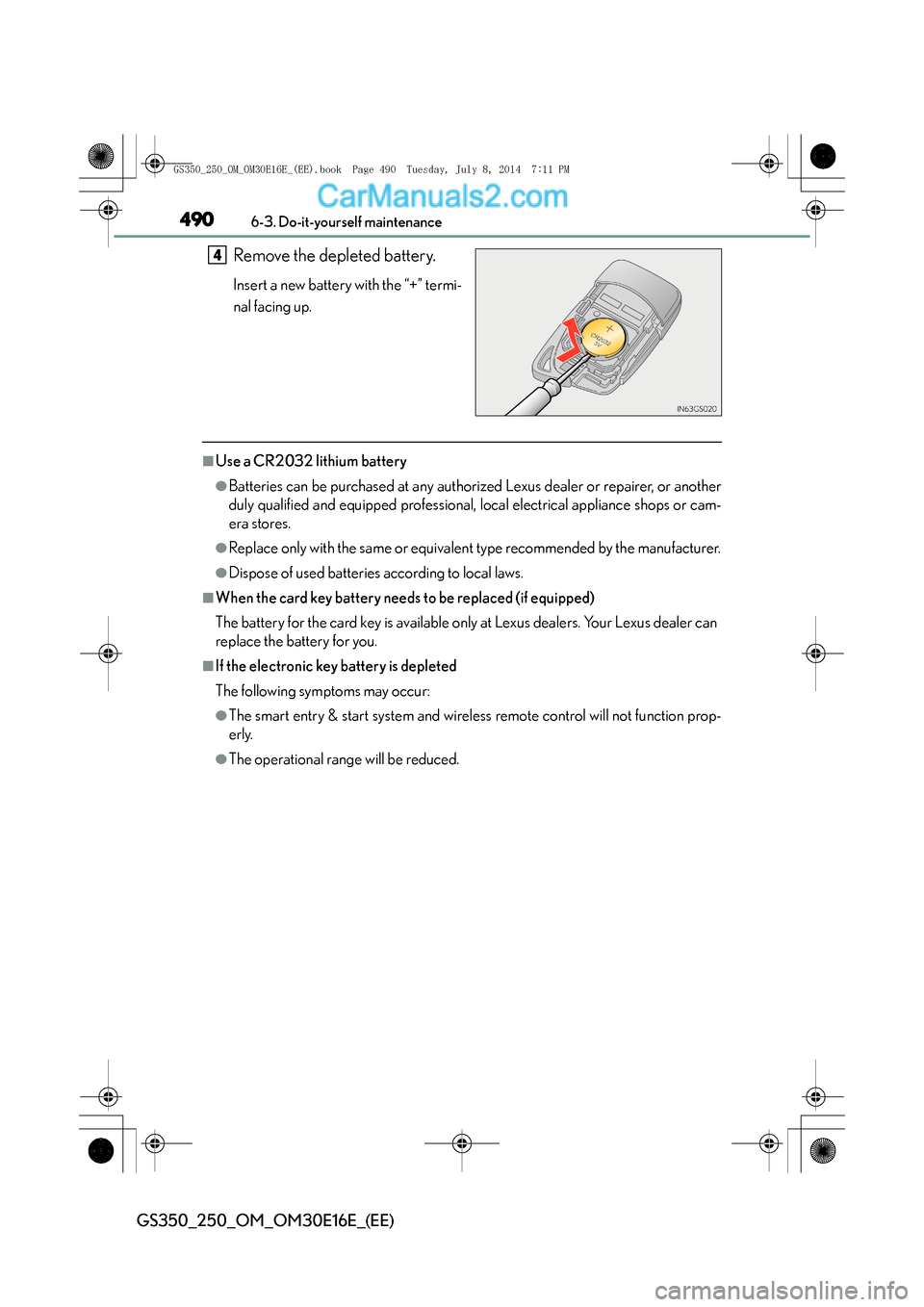
Remove the depleted battery.
Insert a new battery with the “+” termi-
nal facing up.
■Use a CR2032 lithium battery
●Batteries can be purchased at any authorized Lexus dealer or repairer, or another
duly qualified and equipped professional, local electrical appliance shops or cam-
era stores.
●Replace only with the same or equivalent type recommended by the manufacturer.
●Dispose of used batteries according to local laws.
■When the card key battery needs to be replaced (if equipped)
The battery for the card key is available only at Lexus dealers. Your Lexus dealer can
replace the battery for you.
■If the electronic key battery is depleted
The following symptoms may occur:
●The smart entry & start system and wireless remote control will not function prop-
erly.
●The operational range will be reduced.
4
GS350_250_OM_OM30E16E_(EE).book Page 490 Tuesday, July 8, 2014 7:11 PM