change time Lexus GS250 2014 Owner's Guide
[x] Cancel search | Manufacturer: LEXUS, Model Year: 2014, Model line: GS250, Model: Lexus GS250 2014Pages: 688, PDF Size: 152.64 MB
Page 422 of 688
4225-5. Other interior features
GS350_250_OM_OM30E16E_(EE)
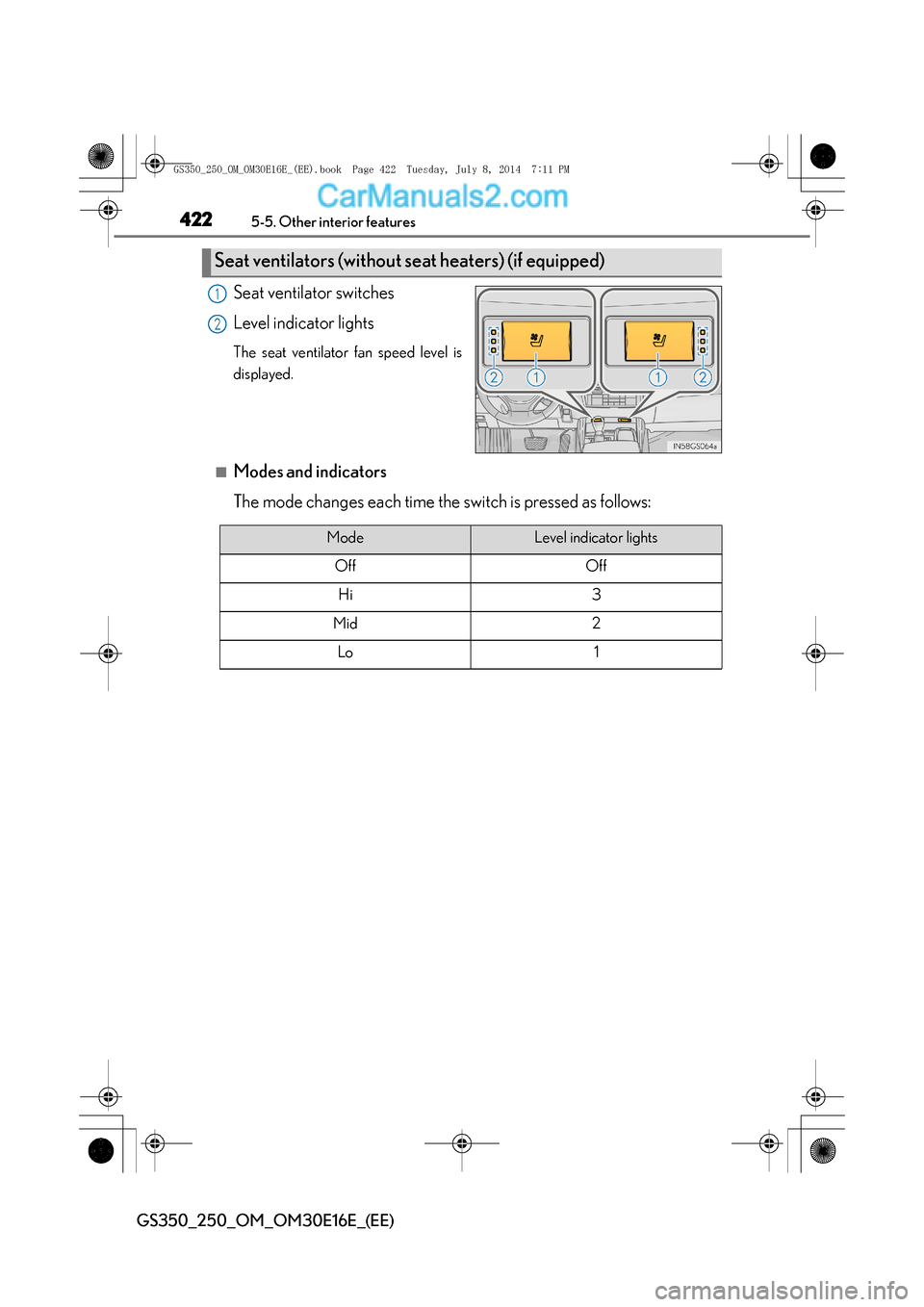
Seat ventilator switches
Level indicator lights
The seat ventilator fan speed level is
displayed.
■Modes and indicators
The mode changes each time the switch is pressed as follows:
Seat ventilators (without seat heaters) (if equipped)
1
2
ModeLevel indicator lights
OffOff
Hi3
Mid2
Lo1
GS350_250_OM_OM30E16E_(EE).book Page 422 Tuesday, July 8, 2014 7:11 PM
Page 423 of 688
4235-5. Other interior features
5
Interior features
GS350_250_OM_OM30E16E_(EE)
■The seat heaters/seat ventilators can be used when
The engine switch is in IGNITION ON mode.
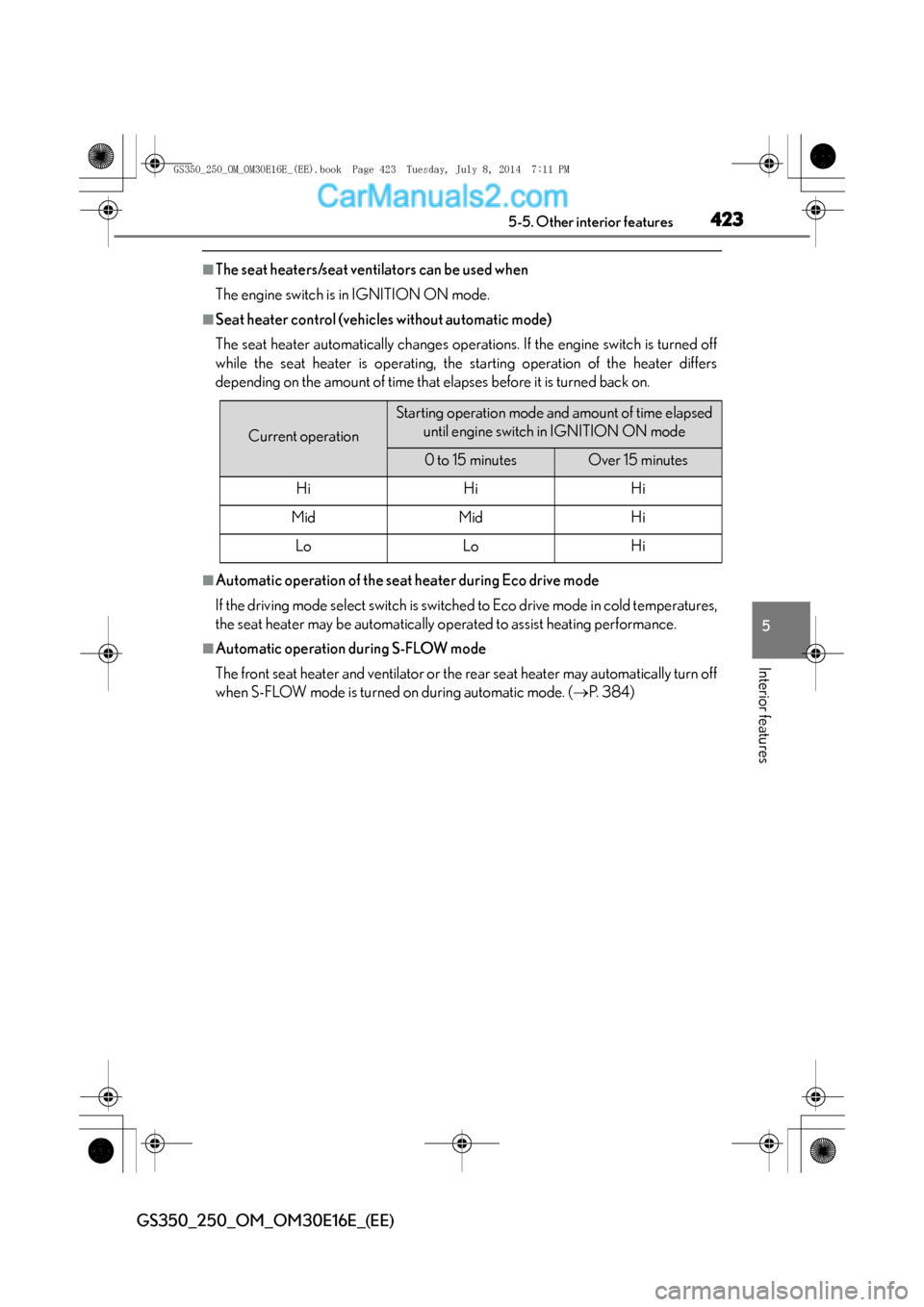
■Seat heater control (vehicles without automatic mode)
The seat heater automatically changes operations. If the engine switch is turned off
while the seat heater is operating, the starting operation of the heater differs
depending on the amount of time that elapses before it is turned back on.
■Automatic operation of the seat heater during Eco drive mode
If the driving mode select switch is switched to Eco drive mode in cold temperatures,
the seat heater may be automatically operated to assist heating performance.
■Automatic operation during S-FLOW mode
The front seat heater and ventilator or the rear seat heater may automatically turn off
when S-FLOW mode is turned on during automatic mode. (→P. 3 8 4 )
Current operation
Starting operation mode and amount of time elapsed
until engine switch in IGNITION ON mode
0 to 15 minutesOver 15 minutes
HiHiHi
MidMidHi
LoLoHi
GS350_250_OM_OM30E16E_(EE).book Page 423 Tuesday, July 8, 201 4 7:11 PM
Page 429 of 688
4295-5. Other interior features
5
Interior features
GS350_250_OM_OM30E16E_(EE)
■Button lock function (vehicles with rear control panel)
To prevent inadvertent operation, some buttons on the rear armrest can be locked.
(→ P. 3 9 5 )
■Rear control panel illumination off function (vehicles with rear control panel)
Control panel illumination on the rear armrest can be turned off. ( →P. 3 9 5 )
■Customization
Time elapsed before the reverse operation feature activates can be changed.
(Customizable features: →P. 650)
CAUTION
■When the rear sunshade is being operated
Do not place fingers or other objects in the fastener section or in the opening.
They may get caught, causing injury.
NOTICE
■To prevent battery discharge
Do not operate the rear sunshade when the engine is off.
■To ensure normal operation of the rear sunshade and rear door sunshades
Observe the following precautions.
●Do not place excessive load on the motor or other components of the rear sun-
shade.
●Do not place objects where they may hinder opening and closing operations.
●Do not attach items to the rear sunshade and rear door sunshades.
●Keep the opening clean and clear of obstructions.
●Do not operate the rear sunshade continuously for long periods of time.
GS350_250_OM_OM30E16E_(EE).book Page 429 Tuesday, July 8, 201 4 7:11 PM
Page 473 of 688
473 6-3. Do-it-yourself maintenance
6
Maintenance and care
GS350_250_OM_OM30E16E_(EE)
■The initialization operation (vehicles with the tire pressure warning system)
●Make sure to carry out initialization after adjusting the tire inflation pressure.
Also, make sure the tires are cold before carrying out initialization or tire inflation
pressure adjustment.
●If you have accidentally turned the engine switch off during initialization, it is not
necessary to press the reset switch again as initialization will restart automatically
when the engine switch has been turned to IGNITION ON mode for the next time.
●If you accidentally press the reset switch when initialization is not necessary, adjust
the tire inflation pressure to the specifie d level when the tires are cold, and conduct
initialization again.
■Warning performance of the tire pressure warning system (if equipped)
The warning of the tire pressure warning system will change in accordance with the
conditions under which it was initialized. For this reason, the system may give a warn-
ing even if the tire pressure does not reach a low enough level, or if the pressure is
higher than the pressure that was adjusted to when the system was initialized.
■When initialization of the tire pressure warning system has failed (vehicles with the
tire pressure warning system)
Initialization can be completed in a few minutes. However, in the following cases, the
settings have not been recorded and the system will not operate properly. If
repeated attempts to record tire inflation pressure settings are unsuccessful, have
the vehicle inspected by any authorized Lexus dealer or repairer, or another duly
qualified and equipped professional.
●When operating the tire pressure warning reset switch, the tire pressure warning
light does not blink 3 times.
●After carrying out the initialization procedure, the tire pressure warning light blinks
for 1 minute then stays on after driving for 20 minutes.
■Registering ID codes (vehicles with the tire pressure warning system)
The ID codes of the tire pressure warning valve and transmitters for two sets of
wheels can be registered.
It is not necessary to register the ID codes when replacing normal tires with snow
tires, if the ID codes for the wheels of both normal tires and snow tires are registered
beforehand.
For information about changing ID codes, ask any authorized Lexus dealer or
repairer, or another duly qualified and equipped professional.
GS350_250_OM_OM30E16E_(EE).book Page 473 Tuesday, July 8, 201 4 7:11 PM
Page 620 of 688
6207-2. Steps to take in an emergency
GS350_250_OM_OM30E16E_(EE)
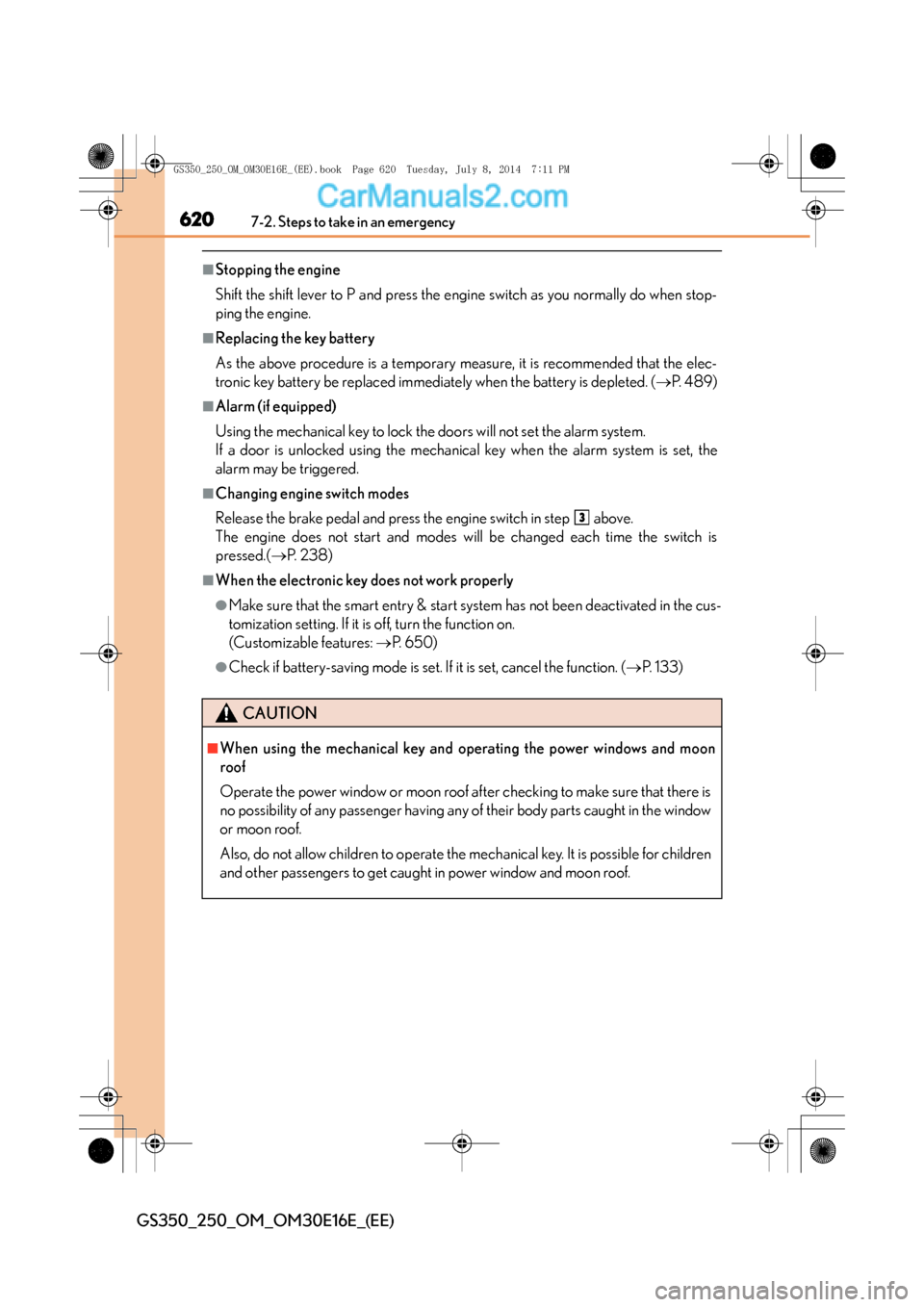
■Stopping the engine
Shift the shift lever to P and press the engine switch as you normally do when stop-
ping the engine.
■Replacing the key battery
As the above procedure is a temporary measure, it is recommended that the elec-
tronic key battery be replaced immediately when the battery is depleted. (→P. 4 8 9 )
■Alarm (if equipped)
Using the mechanical key to lock the doors will not set the alarm system.
If a door is unlocked using the mechanical key when the alarm system is set, the
alarm may be triggered.
■Changing engine switch modes
Release the brake pedal and press the engine switch in step above.
The engine does not start and modes will be changed each time the switch is
pressed.( →P. 2 3 8 )
■When the electronic key does not work properly
●Make sure that the smart entry & start system has not been deactivated in the cus-
tomization setting. If it is off, turn the function on.
(Customizable features: →P. 6 5 0 )
●Check if battery-saving mode is set. If it is set, cancel the function. ( →P. 1 3 3 )
CAUTION
■When using the mechanical key and operating the power windows and moon
roof
Operate the power window or moon roof after checking to make sure that there is
no possibility of any passenger having any of their body parts caught in the window
or moon roof.
Also, do not allow children to operate the mechanical key. It is possible for children
and other passengers to get caught in power window and moon roof.
3
GS350_250_OM_OM30E16E_(EE).book Page 620 Tuesday, July 8, 201 4 7:11 PM
Page 655 of 688
655
8
8-2. Customization
Vehicle specifications
GS350_250_OM_OM30E16E_(EE)
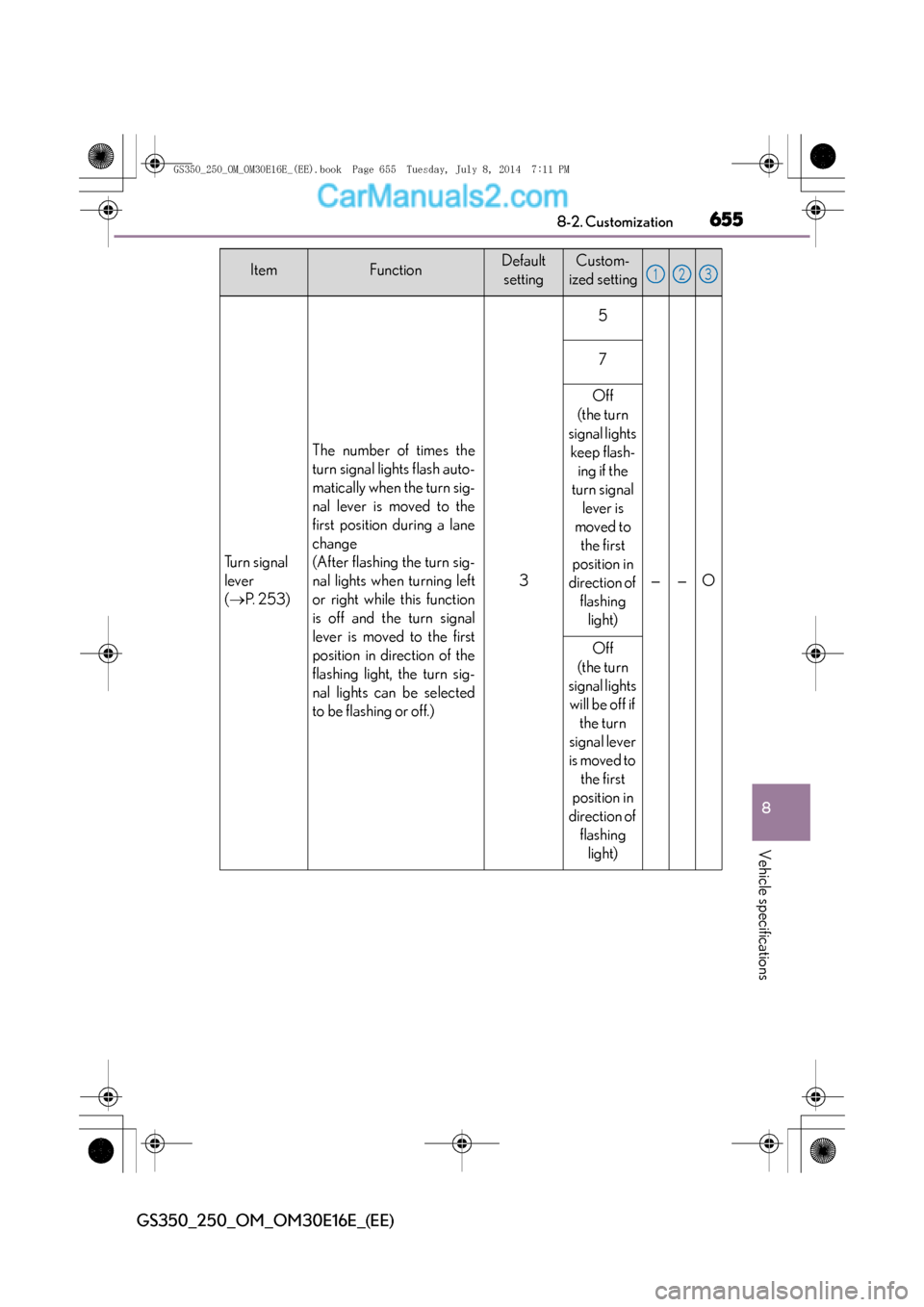
Tu r n s i g n a l
lever
(
→ P. 2 5 3 )
The number of times the
turn signal lights flash auto-
matically when the turn sig-
nal lever is moved to the
first position during a lane
change
(After flashing the turn sig-
nal lights when turning left
or right while this function
is off and the turn signal
lever is moved to the first
position in direction of the
flashing light, the turn sig-
nal lights can be selected
to be flashing or off.)
3
5
——O
7
Off
(the turn
signal lights keep flash- ing if the
turn signal lever is
moved to the first
position in
direction of flashing light)
Off
(the turn
signal lights will be off if the turn
signal lever
is moved to the first
position in
direction of flashing light)
ItemFunctionDefaultsettingCustom-
ized setting123
GS350_250_OM_OM30E16E_(EE).book Page 655 Tuesday, July 8, 201 4 7:11 PM