remote control Lexus GS250 2014 Owner's Guide
[x] Cancel search | Manufacturer: LEXUS, Model Year: 2014, Model line: GS250, Model: Lexus GS250 2014Pages: 688, PDF Size: 152.64 MB
Page 175 of 688
175
3
3-2. Opening, closing and locking the doors and trunk
Operation of each component
GS350_250_OM_OM30E16E_(EE)
Trunk
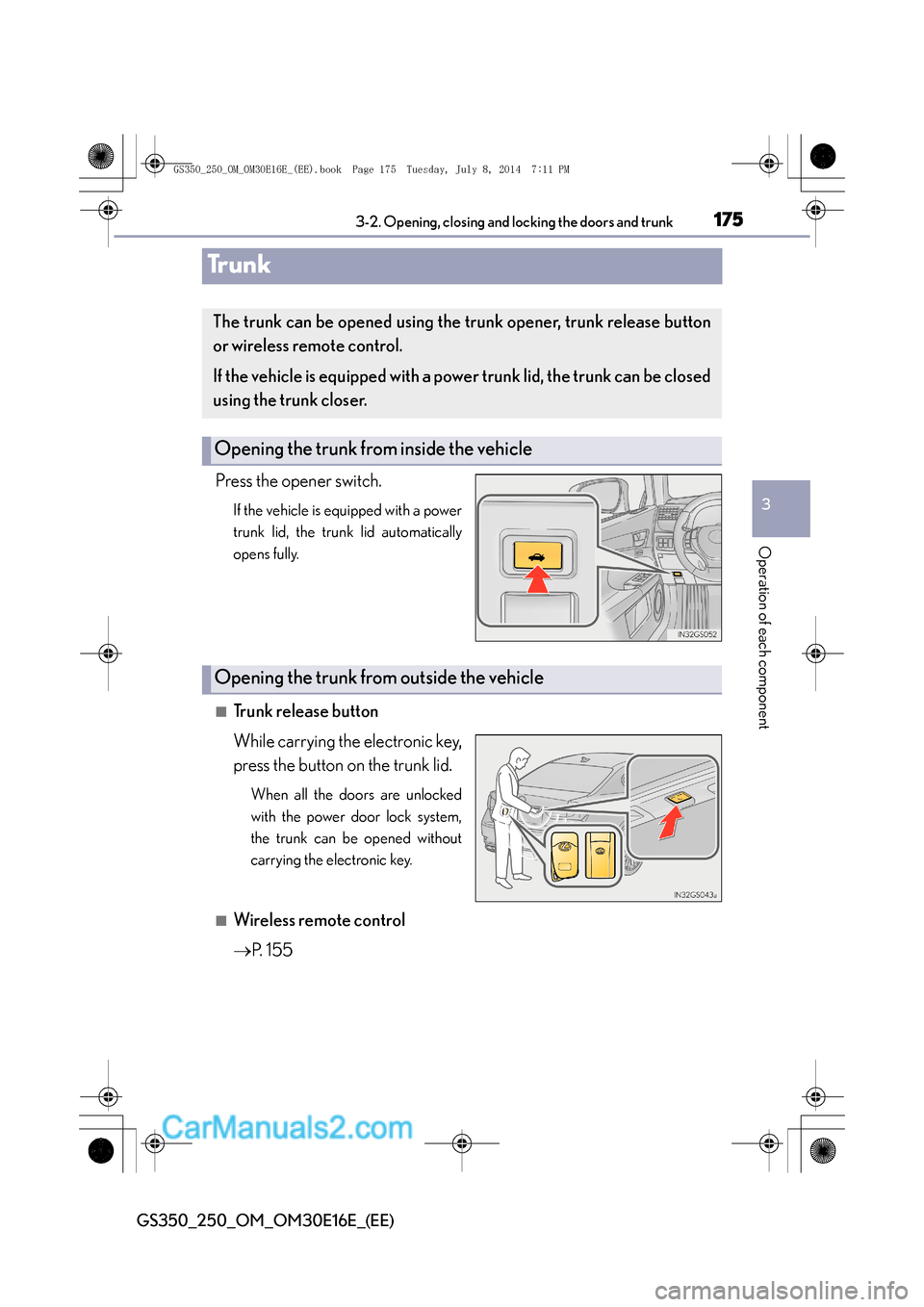
Press the opener switch.
If the vehicle is equipped with a power
trunk lid, the trunk lid automatically
opens fully.
■Trunk release button
While carrying the electronic key,
press the button on the trunk lid.
When all the doors are unlocked
with the power door lock system,
the trunk can be opened without
carrying the electronic key.
■Wireless remote control
→
P. 1 5 5
The trunk can be opened using the trunk opener, trunk release button
or wireless remote control.
If the vehicle is equipped with a powe r trunk lid, the trunk can be closed
using the trunk closer.
Opening the trunk from inside the vehicle
Opening the trunk from outside the vehicle
GS350_250_OM_OM30E16E_(EE).book Page 175 Tuesday, July 8, 201 4 7:11 PM
Page 176 of 688
1763-2. Opening, closing and locking the doors and trunk
GS350_250_OM_OM30E16E_(EE)
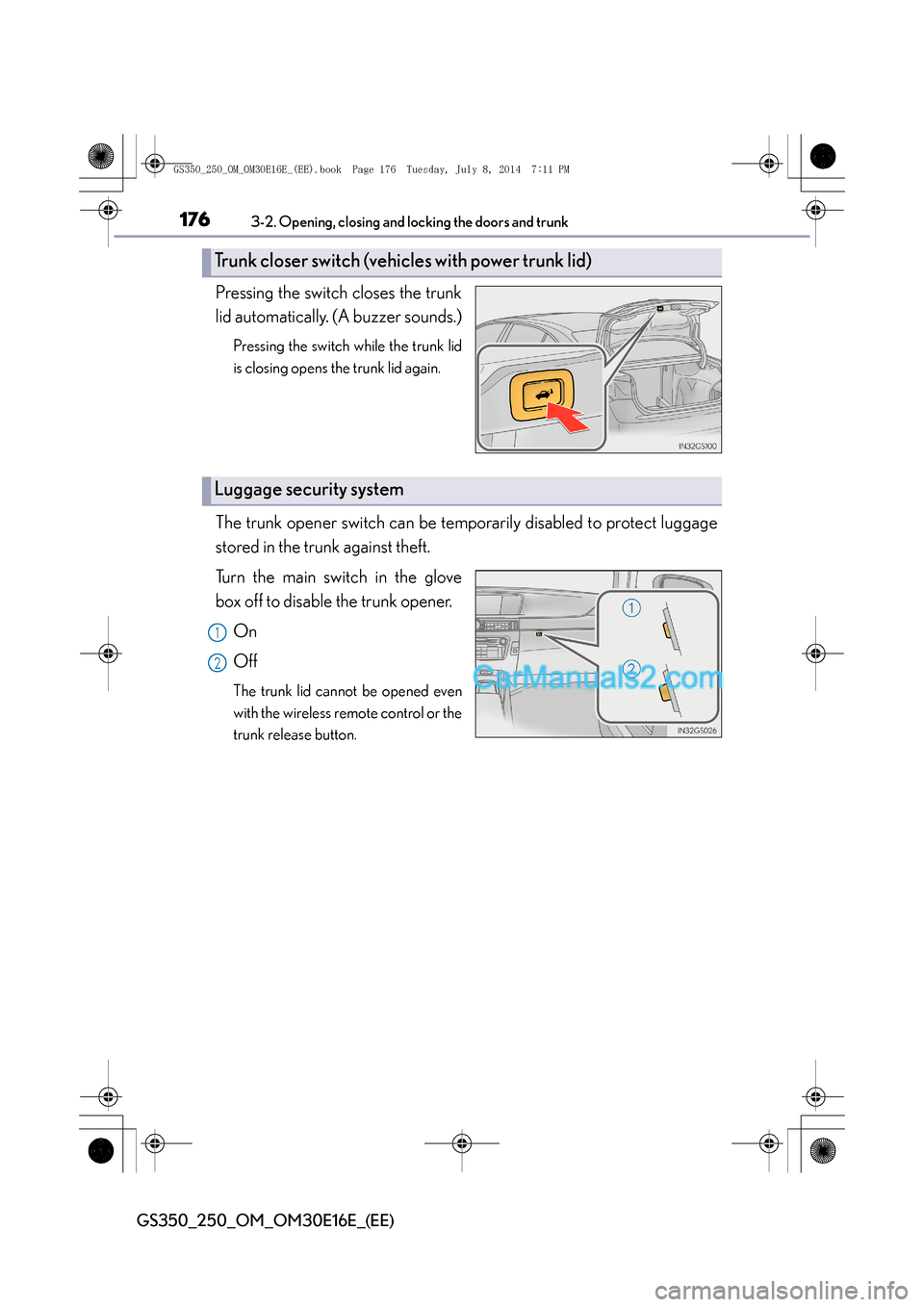
Pressing the switch closes the trunk
lid automatically. (A buzzer sounds.)
Pressing the switch while the trunk lid
is closing opens the trunk lid again.
The trunk opener switch can be temporarily disabled to protect luggage
stored in the trunk against theft.
Turn the main switch in the glove
box off to disable the trunk opener.On
Off
The trunk lid cannot be opened even
with the wireless remote control or the
trunk release button.
Trunk closer switch (vehicles with power trunk lid)
Luggage security system
1
2
GS350_250_OM_OM30E16E_(EE).book Page 176 Tuesday, July 8, 201 4 7:11 PM
Page 190 of 688
1903-3. Adjusting the seats
GS350_250_OM_OM30E16E_(EE)
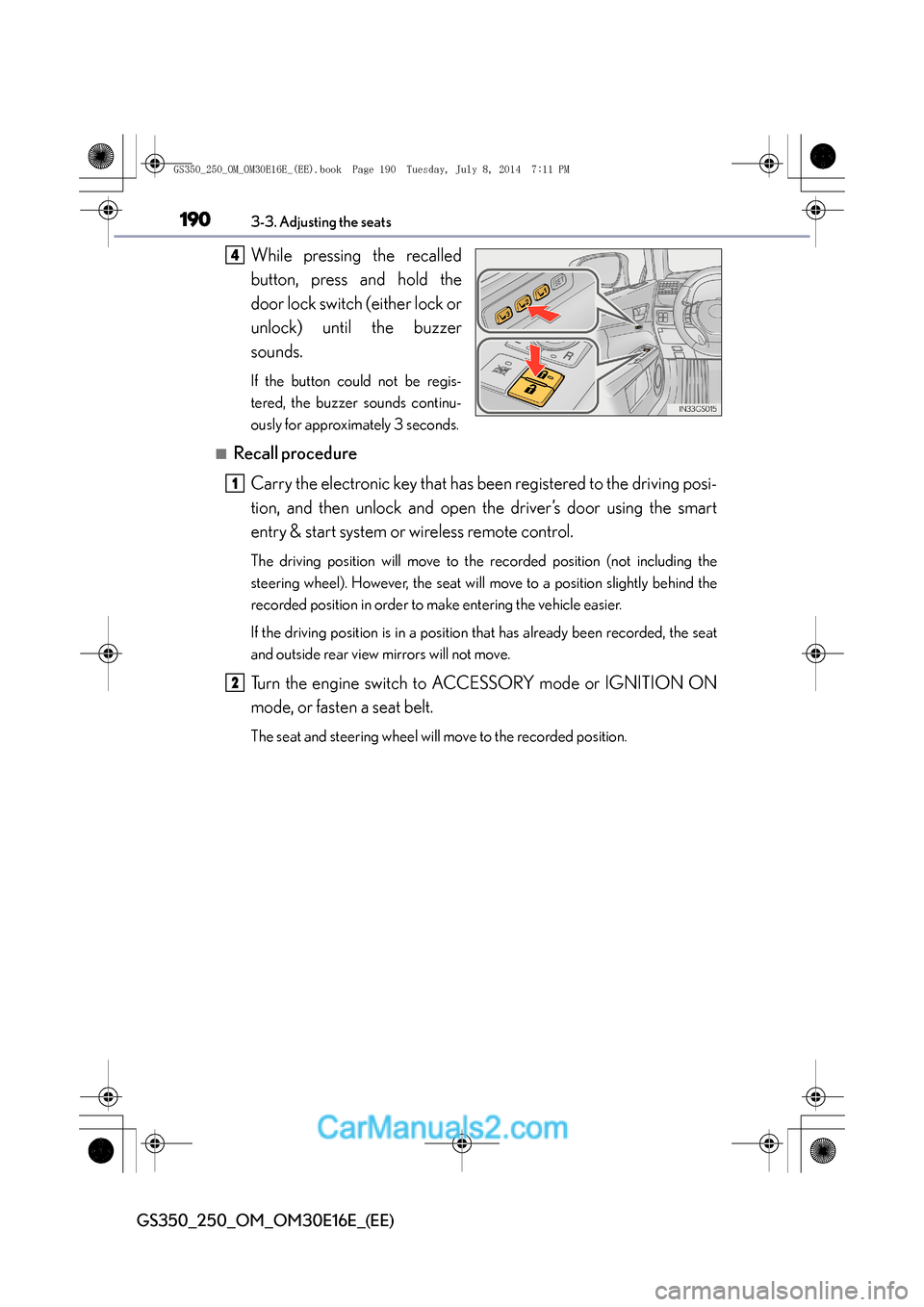
While pressing the recalled
button, press and hold the
door lock switch (either lock or
unlock) until the buzzer
sounds.
If the button could not be regis-
tered, the buzzer sounds continu-
ously for approximately 3 seconds.
■Recall procedureCarry the electronic key that has been registered to the driving posi-
tion, and then unlock and open the driver’s door using the smart
entry & start system or wireless remote control.
The driving position will move to the recorded position (not including the
steering wheel). However, the seat will move to a position slightly behind the
recorded position in order to make entering the vehicle easier.
If the driving position is in a position that has already been recorded, the seat
and outside rear view mirrors will not move.
Turn the engine switch to ACCESSORY mode or IGNITION ON
mode, or fasten a seat belt.
The seat and steering wheel will move to the recorded position.
4
1
2
GS350_250_OM_OM30E16E_(EE).book Page 190 Tuesday, July 8, 201 4 7:11 PM
Page 206 of 688
2063-5. Opening, closing the windows and moon roof
GS350_250_OM_OM30E16E_(EE)
■Door lock linked window operation
●The power windows can be opened and closed using the mechanical key.*
( → P. 6 1 8 )
●The power windows can be opened and closed using the wireless remote control.*
(→ P. 1 5 5 )
*: These settings must be customized at any authorized Lexus dealer or repairer, or
another duly qualified and equipped professional.
■When the battery is disconnected
The window lock switch is disabled. If necessary, press the window lock switch after
reconnecting the battery.
■Power windows open warning buzzer
The buzzer sounds and a message is shown on the multi-information display in the
instrument cluster when the engine switch is turned off and the driver’s door is
opened with the power windows open.
■Customization
Settings (e.g. linked door lock operation) can be changed.
(Customizable features: →P. 650)
GS350_250_OM_OM30E16E_(EE).book Page 206 Tuesday, July 8, 201 4 7:11 PM
Page 207 of 688
2073-5. Opening, closing the windows and moon roof
3
Operation of each component
GS350_250_OM_OM30E16E_(EE)
CAUTION
Observe the following precautions.
Failure to do so may result in death or serious injury.
■Closing the windows
●The driver is responsible for all the power window operations, including the oper-
ation for the passengers. In order to prevent accidental operation, especially by a
child, do not let a child operate the power windows. It is possible for children and
other passengers to have body parts caught in the power window. Also, when
riding with a child, it is recommended to use the window lock switch. (→P. 2 0 4 )
●Check to make sure that all passengers do not have any part of their body in a
position where it could be caught when a window is being operated.
●When using the wireless remote control or mechanical key and operating the
power windows, operate the power window after checking to make sure that
there is no possibility of any passenger having any of their body parts caught in
the window. Also do not let a child oper ate window by the wireless remote con-
trol or mechanical key. It is possible for children and other passengers to get
caught in the power window.
●When exiting the vehicle, turn the engine switch off, carry the key and exit the
vehicle along with the child. There may be accidental operation, due to mischief,
etc., that may possibly lead to an accident.
■Jam protection function
●Never use any part of your body to intentionally activate the jam protection func-
tion.
●The jam protection function may not work if something gets caught just before
the window fully closes.
GS350_250_OM_OM30E16E_(EE).book Page 207 Tuesday, July 8, 201 4 7:11 PM
Page 209 of 688
2093-5. Opening, closing the windows and moon roof
3
Operation of each component
GS350_250_OM_OM30E16E_(EE)
■The moon roof can be operated when
The engine switch is in IGNITION ON mode.
■Operating the moon roof after turning the engine off
The moon roof can be operated for approximately 45 seconds after the engine
switch is turned to ACCESSORY mode or turned off. It cannot, however, be oper-
ated once either front door is opened.
■Jam protection function
If an object is detected between the moon roof and the frame while the moon roof is
closing or tilting down, travel is stopped and the moon roof opens slightly.
■Sunshade
The sunshade can be opened and closed manually. However, the sunshade will open
automatically when the moon roof is opened.
■Door lock linked moon roof operation
●The moon roof can be opened and closed using the mechanical key.* (→ P. 6 1 8 )
●The moon roof can be opened and closed using the wireless remote control.*
( → P. 1 5 5 )
*: These settings must be customized at any authorized Lexus dealer or repairer, or
another duly qualified and equipped professional.
GS350_250_OM_OM30E16E_(EE).book Page 209 Tuesday, July 8, 201 4 7:11 PM
Page 211 of 688
2113-5. Opening, closing the windows and moon roof
3
Operation of each component
GS350_250_OM_OM30E16E_(EE)
■Moon roof open warning buzzer
The buzzer sounds and a message is shown on the multi-information display in the
instrument cluster when the engine switch is turned off and the driver’s door is
opened with the moon roof open.
■Customization
Settings (e.g. linked door lock operation) can be changed.
(Customizable features: →P. 650)
CAUTION
Observe the following precautions.
Failure to do so may cause death or serious injury.
■Opening the moon roof
●Do not allow any passengers to put their hands or heads outside the vehicle while
it is moving.
●Do not sit on top of the moon roof.
■Closing the moon roof
●The driver is responsible for moon roof opening and closing operations.
In order to prevent accidental operation, especially by a child, do not let a child
operate the moon roof. It is possible for children and other passengers to have
body parts caught in the moon roof.
●Check to make sure that all passengers do not have any part of their body in a
position where it could be caught when the moon roof is being operated.
●When using the wireless remote control or mechanical key and operating the
moon roof, operate the moon roof after checking to make sure that there is no
possibility of any passenger having any of their body parts caught in the moon
roof. Also, do not let a child operate moon roof by the wireless remote control or
mechanical key. It is possible for children and other passengers to get caught in
the moon roof.
●When exiting the vehicle, turn the engine switch off, carry the key and exit the
vehicle along with the child. There may be accidental operation, due to mischief,
etc., that may possibly lead to an accident.
■Jam protection function
●Never use any part of your body to intentionally activate the jam protection func-
tion.
●The jam protection function may not work if something gets caught just before
the moon roof fully closes.
GS350_250_OM_OM30E16E_(EE).book Page 211 Tuesday, July 8, 201 4 7:11 PM
Page 225 of 688
225
4
4-1. Before driving
Driving
GS350_250_OM_OM30E16E_(EE)
Cargo and luggage
Take notice of the following information about storage precautions,
cargo capacity and load:
CAUTION
■Things that must not be carried in the trunk
The following things may cause a fire if loaded in the trunk:
●Receptacles containing gasoline
●Aerosol cans
■Storage precautions
Observe the following precautions.
Failure to do so may prevent the pedals from being depressed properly, may block
the driver’s vision, or may result in items hitting the driver or passengers, possibly
causing an accident.
●Stow cargo and luggage in the trunk whenever possible.
●Do not place cargo or luggage in
or on the following locations.
• At the feet of the driver
• On the front passenger or rear seats (when stacking items)
• On the package tray
• On the instrument panel
• On the dashboard
• In front of the Remote Touch screen
●Secure all items in the occupant compartment.
■Load and distribution
●Do not overload your vehicle.
●Do not apply loads unevenly.
Improper loading may cause deterioration of steering or braking control which
may cause death or serious injury.
GS350_250_OM_OM30E16E_(EE).book Page 225 Tuesday, July 8, 201 4 7:11 PM
Page 365 of 688
3655-1. Remote Touch screen
5
Interior features
GS350_250_OM_OM30E16E_(EE)
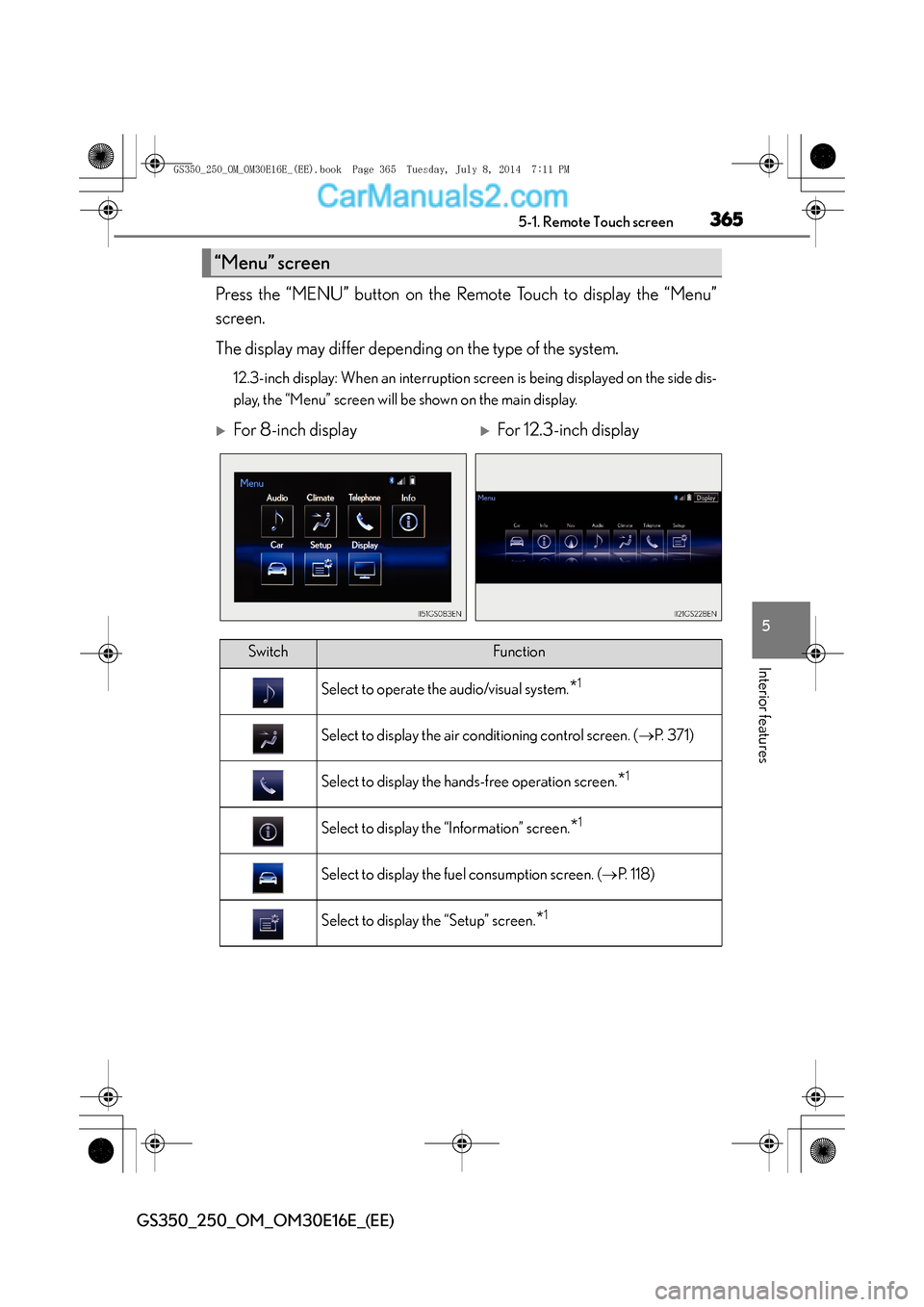
Press the “MENU” button on the Remote Touch to display the “Menu”
screen.
The display may differ depending on the type of the system.
12.3-inch display: When an interruption screen is being displayed on the side dis-
play, the “Menu” screen will be shown on the main display.
“Menu” screen
XFor 8-inch displayXFor 12.3-inch display
SwitchFunction
Select to operate the audio/visual system.*1
Select to display the air conditioning control screen. (→P. 3 7 1 )
Select to display the hands-free operation screen.*1
Select to display the “Information” screen.*1
Select to display the fuel consumption screen. ( →P. 118)
Select to display the “Setup” screen.*1
GS350_250_OM_OM30E16E_(EE).book Page 365 Tuesday, July 8, 201 4 7:11 PM
Page 397 of 688
397
5
5-2. Using the air conditioning system and defogger
Interior features
GS350_250_OM_OM30E16E_(EE)
Windshield wiper de-icer∗
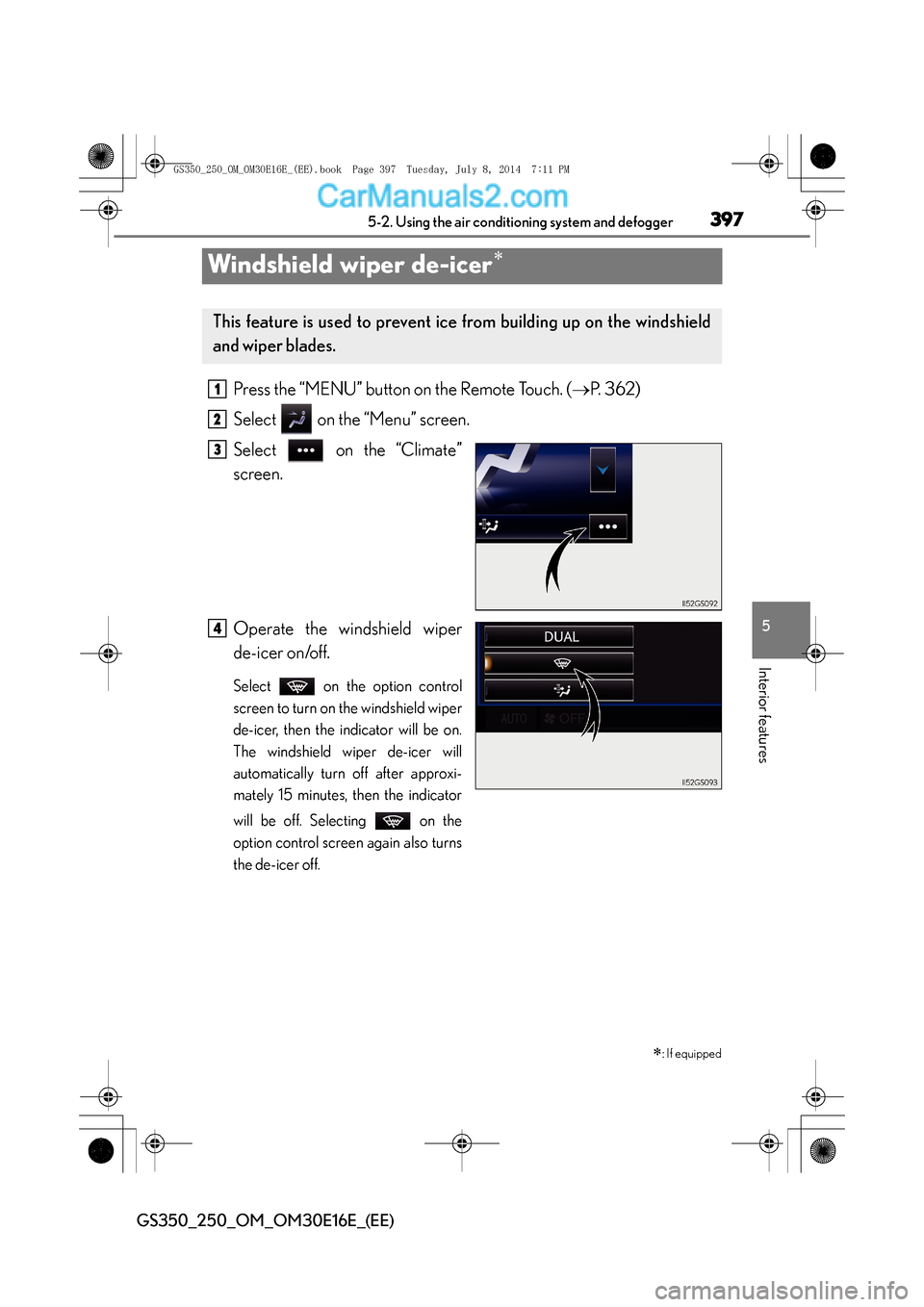
Press the “MENU” button on the Remote Touch. (
→P. 362)
Select on the “Menu” screen.
Select on the “Climate”
screen.
Operate the windshield wiper
de-icer on/off.
Select on the option control
screen to turn on the windshield wiper
de-icer, then the indicator will be on.
The windshield wiper de-icer will
automatically turn off after approxi-
mately 15 minutes, then the indicator
will be off. Selecting on the
option control screen again also turns
the de-icer off.
∗: If equipped
This feature is used to prevent ice from building up on the windshield
and wiper blades.
1
2
3
4
GS350_250_OM_OM30E16E_(EE).book Page 397 Tuesday, July 8, 201 4 7:11 PM