warning Lexus GS250 2014 Owner's Guide
[x] Cancel search | Manufacturer: LEXUS, Model Year: 2014, Model line: GS250, Model: Lexus GS250 2014Pages: 688, PDF Size: 152.64 MB
Page 105 of 688
1052. Instrument cluster
2
Instrument cluster
GS350_250_OM_OM30E16E_(EE)
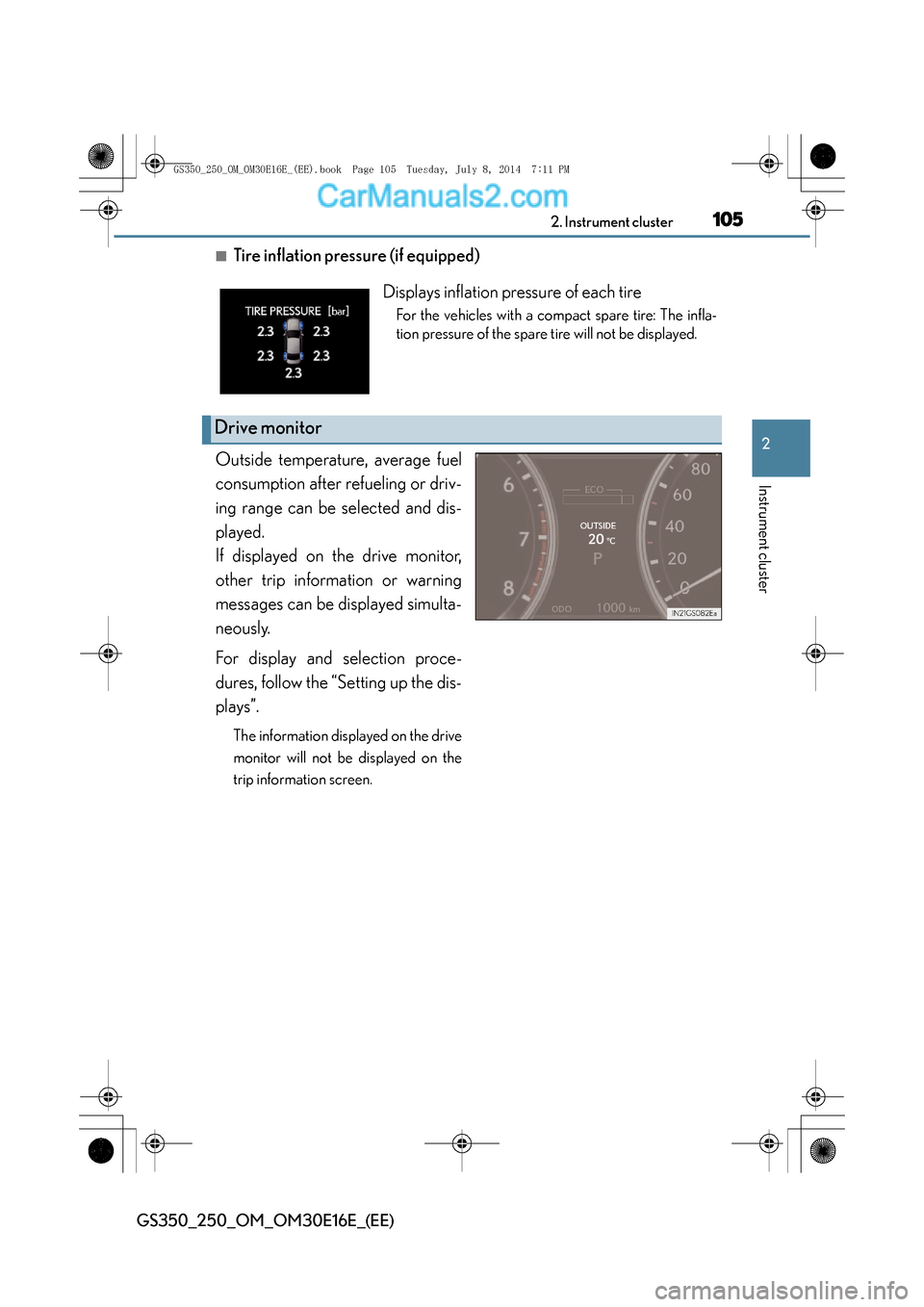
■Tire inflation pressure (if equipped)
Outside temperature, average fuel
consumption after refueling or driv-
ing range can be selected and dis-
played.
If displayed on the drive monitor,
other trip information or warning
messages can be displayed simulta-
neously.
For display and selection proce-
dures, follow the “Setting up the dis-
plays”.
The information displayed on the drive
monitor will not be displayed on the
trip information screen.
Displays inflation pressure of each tire
For the vehicles with a compact spare tire: The infla-
tion pressure of the spare tire will not be displayed.
Drive monitor
GS350_250_OM_OM30E16E_(EE).book Page 105 Tuesday, July 8, 201 4 7:11 PM
Page 108 of 688
1082. Instrument cluster
GS350_250_OM_OM30E16E_(EE)
■System check display
After turning the engine switch to IGNITION ON mode, “SYSTEM CHECK” is dis-
played while system operation is checked.
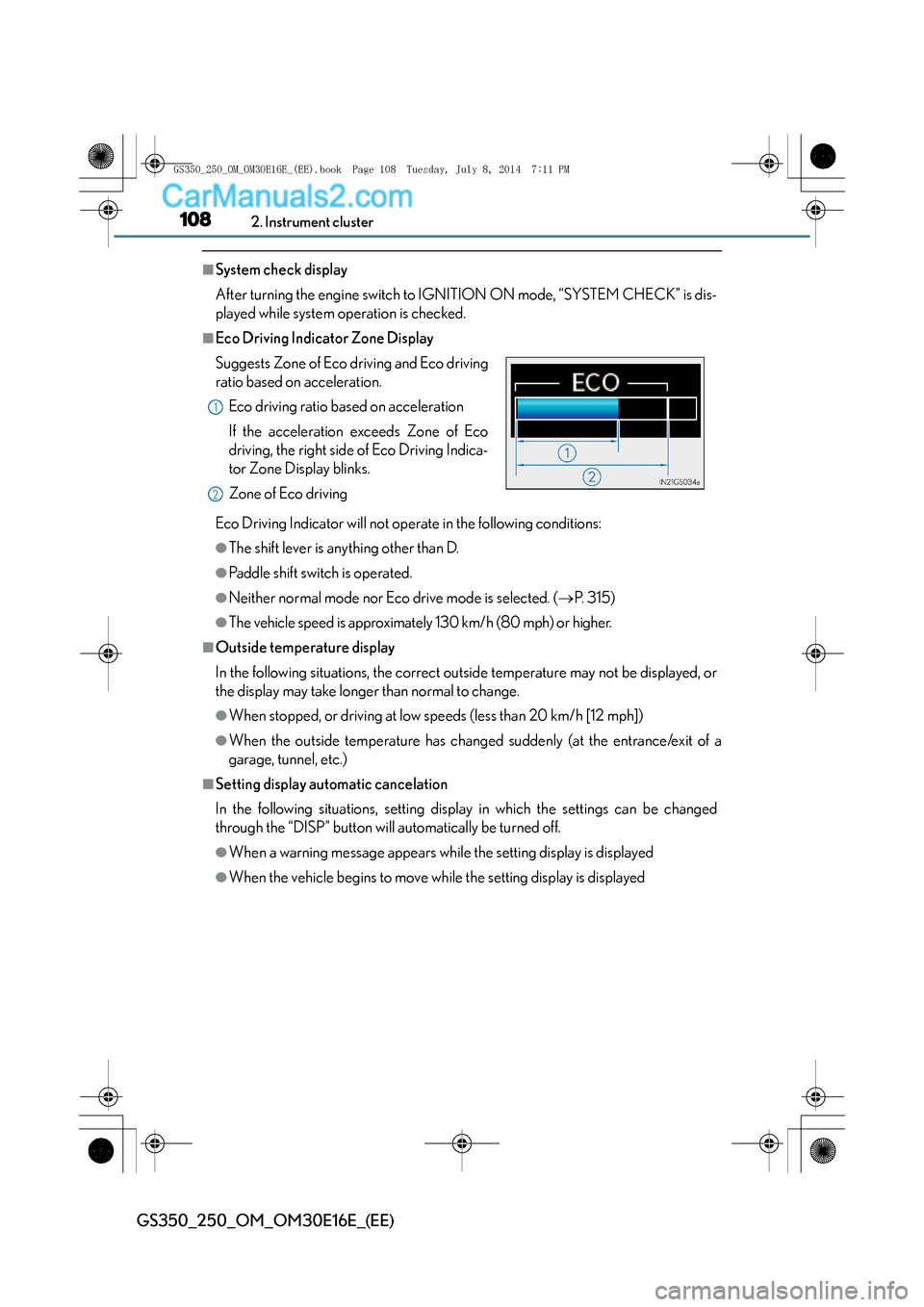
■Eco Driving Indicator Zone Display
Eco Driving Indicator will not operate in the following conditions:
●The shift lever is anything other than D.
●Paddle shift switch is operated.
●Neither normal mode nor Eco drive mode is selected. (→P. 3 1 5 )
●The vehicle speed is approximately 130 km/h (80 mph) or higher.
■Outside temperature display
In the following situations, the correct ou tside temperature may not be displayed, or
the display may take longer than normal to change.
●When stopped, or driving at low speeds (less than 20 km/h [12 mph])
●When the outside temperature has changed suddenly (at the entrance/exit of a
garage, tunnel, etc.)
■Setting display automatic cancelation
In the following situations, setting display in which the settings can be changed
through the “DISP” button will automatically be turned off.
●When a warning message appears while the setting display is displayed
●When the vehicle begins to move while the setting display is displayed
Suggests Zone of Eco driving and Eco driving
ratio based on acceleration.
Eco driving ratio based on acceleration
If the acceleration exceeds Zone of Eco
driving, the right side of Eco Driving Indica-
tor Zone Display blinks.
Zone of Eco driving
1
2
GS350_250_OM_OM30E16E_(EE).book Page 108 Tuesday, July 8, 201 4 7:11 PM
Page 111 of 688
1112. Instrument cluster
2
Instrument cluster
GS350_250_OM_OM30E16E_(EE)
●Ve h i c l e s p e e d
●Tachometer
●Shift position and shift range
Displays the selected shift position or selected shift range (→P. 2 4 4 )
●
Eco Driving Indicator ( →P. 1 0 8 )
●Audio display
Displays audio information for approximately 3 seconds when the audio system is
operated
●
Route guidance display (vehicles with navigation system) (→ P. 114)
When approaching an intersection while the navigation system is giving route
guidance, an arrow will automatically be displayed to indicate the direction of
travel.
●
Lane departure warning display (LKA [Lane-Keeping Assist])
(if equipped) ( →P. 564)
●Approach warning display (dynamic radar cruise control) (if equipped)
(→ P. 563)
●Pre-crash braking warning message (pre-crash safety system)
(if equipped) ( →P. 563)
Head-up display contents
GS350_250_OM_OM30E16E_(EE).book Page 111 Tuesday, July 8, 201 4 7:11 PM
Page 131 of 688
1313-2. Opening, closing and locking the doors and trunk
3
Operation of each component
GS350_250_OM_OM30E16E_(EE)
■Alarms and warning indicators
An alarm sounds and warning message displays shown on the multi-information dis-
play are used to protect against unexpected accidents or theft of the vehicle result-
ing from erroneous operation. When a warning message is displayed, take
appropriate measures based on the displayed message. (→P. 5 7 0 )
When only an alarm sounds, circumstances and correction procedures are as fol-
lows.
AlarmSituationCorrection procedure
Exterior alarm sounds
once for 5 seconds
The trunk was closed
while the electronic key
was still inside the trunk
and all the doors were
locked.
Retrieve the electronic
key from the trunk and
close the trunk lid.
An attempt was made to
lock the vehicle while a
door was open.Close all of the doors and
lock the doors again.
Interior alarm sounds
continuously
The engine switch was
turned to ACCESSORY
mode while the driver’s
door was open (or the
driver’s door was opened
while the engine switch
was in ACCESSORY
mode).
Turn the engine switch off
and close the driver’s
door.
GS350_250_OM_OM30E16E_(EE).book Page 131 Tuesday, July 8, 201 4 7:11 PM
Page 206 of 688
2063-5. Opening, closing the windows and moon roof
GS350_250_OM_OM30E16E_(EE)
■Door lock linked window operation
●The power windows can be opened and closed using the mechanical key.*
( → P. 6 1 8 )
●The power windows can be opened and closed using the wireless remote control.*
(→ P. 1 5 5 )
*: These settings must be customized at any authorized Lexus dealer or repairer, or
another duly qualified and equipped professional.
■When the battery is disconnected
The window lock switch is disabled. If necessary, press the window lock switch after
reconnecting the battery.
■Power windows open warning buzzer
The buzzer sounds and a message is shown on the multi-information display in the
instrument cluster when the engine switch is turned off and the driver’s door is
opened with the power windows open.
■Customization
Settings (e.g. linked door lock operation) can be changed.
(Customizable features: →P. 650)
GS350_250_OM_OM30E16E_(EE).book Page 206 Tuesday, July 8, 201 4 7:11 PM
Page 211 of 688
2113-5. Opening, closing the windows and moon roof
3
Operation of each component
GS350_250_OM_OM30E16E_(EE)
■Moon roof open warning buzzer
The buzzer sounds and a message is shown on the multi-information display in the
instrument cluster when the engine switch is turned off and the driver’s door is
opened with the moon roof open.
■Customization
Settings (e.g. linked door lock operation) can be changed.
(Customizable features: →P. 650)
CAUTION
Observe the following precautions.
Failure to do so may cause death or serious injury.
■Opening the moon roof
●Do not allow any passengers to put their hands or heads outside the vehicle while
it is moving.
●Do not sit on top of the moon roof.
■Closing the moon roof
●The driver is responsible for moon roof opening and closing operations.
In order to prevent accidental operation, especially by a child, do not let a child
operate the moon roof. It is possible for children and other passengers to have
body parts caught in the moon roof.
●Check to make sure that all passengers do not have any part of their body in a
position where it could be caught when the moon roof is being operated.
●When using the wireless remote control or mechanical key and operating the
moon roof, operate the moon roof after checking to make sure that there is no
possibility of any passenger having any of their body parts caught in the moon
roof. Also, do not let a child operate moon roof by the wireless remote control or
mechanical key. It is possible for children and other passengers to get caught in
the moon roof.
●When exiting the vehicle, turn the engine switch off, carry the key and exit the
vehicle along with the child. There may be accidental operation, due to mischief,
etc., that may possibly lead to an accident.
■Jam protection function
●Never use any part of your body to intentionally activate the jam protection func-
tion.
●The jam protection function may not work if something gets caught just before
the moon roof fully closes.
GS350_250_OM_OM30E16E_(EE).book Page 211 Tuesday, July 8, 201 4 7:11 PM
Page 251 of 688
2514-2. Driving procedures
4
Driving
GS350_250_OM_OM30E16E_(EE)
■Automatic deactivation of shift range selection in the D position
Shift range selection in the D position will be deactivated in the following situations:
●When the vehicle comes to a stop
●If the accelerator pedal is depressed for more than a certain period of time
●When the shift lever is shifted to other than D
■To protect automatic transmission
When the temperature of the transmission fluid or engine oil becomes high, protec-
tion control is performed temporarily. When “Transmission Fluid High Temperature”
is displayed on the multi-information display, have the vehicle inspected by any
authorized Lexus dealer or repairer, or another duly qualified and equipped profes-
sional.
■Downshifting restrict ions warning buzzer
To help ensure safety and driving performance, downshifting operation may some-
times be restricted. In some circumstances, downshifting may not be possible even
when the shift lever or paddle shift switch is operated. (A buzzer will sound twice.)
■Snow mode automatic deactivation
Snow mode is automatically deactivated if the engine switch is turned off after driv-
ing in snow mode.
■If the shift lever cannot be shifted from P
→ P. 6 1 4
GS350_250_OM_OM30E16E_(EE).book Page 251 Tuesday, July 8, 201 4 7:11 PM
Page 257 of 688
2574-2. Driving procedures
4
Driving
GS350_250_OM_OM30E16E_(EE)
■When there is a malfunction in the system
Warning lights and/or warning message will turn on or flash. (→P. 5 4 4 , 5 5 2 )
Depending on the condition, the parking brake indicator light may flash.
■Usage in winter time
→ P. 3 5 4
NOTICE
■When parking the vehicle
Before you leave the vehicle, set the parking brake, shift the shift lever to P and
make sure that the vehicle does not move.
■When the system malfunctions
Stop the vehicle in a safe place and check the warning messages.
■When the parking brake cannot be released due to a malfunction
Use the parking brake release tool to manually release the parking brake.
( → P. 6 1 5 )
Driving the vehicle with the parking brake set will lead to brake components over-
heating, which may affect braking performance and increase brake wear.
GS350_250_OM_OM30E16E_(EE).book Page 257 Tuesday, July 8, 201 4 7:11 PM
Page 287 of 688
2874-5. Using the driving support systems
4
Driving
GS350_250_OM_OM30E16E_(EE)
■Cruise control can be set when
●The shift lever is in D.
●Range 4 or higher of D has been selected by using the paddle shift.
●Vehicle speed is above approximately 40 km/h (25 mph).
■Accelerating after setting the vehicle speed
●The vehicle can be accelerated normally. After acceleration, the set speed
resumes.
●Even without canceling the cruise control, the set speed can be increased by first
accelerating the vehicle to the desired speed and then pushing the lever down to
set the new speed.
■Automatic cruise control cancelation
Cruise control will stop maintaining the vehicle speed in any of the following situa-
tions.
●Actual vehicle speed falls more than approximately 16 km/h (10 mph) below the
preset vehicle speed.
At this time, the memorized set speed is not retained.
●Actual vehicle speed is below approximately 40 km/h (25 mph).
●VSC is activated.
●TRC is activated for a period of time.
●When the VSC or TRC system is turned off by pressing the VSC OFF switch.
■If the warning message for the cruise control is shown on the multi-information dis-
play
Press the “ON/OFF” button once to deactivate the system, and then press the but-
ton again to reactivate the system.
If the cruise control speed cannot be set or if the cruise control cancels immediately
after being activated, there may be a malfunction in the cruise control system. Have
the vehicle inspected by any authorized Lexus dealer or repairer, or another duly
qualified and equipped professional.
GS350_250_OM_OM30E16E_(EE).book Page 287 Tuesday, July 8, 2014 7:11 PM
Page 294 of 688
2944-5. Using the driving support systems
GS350_250_OM_OM30E16E_(EE)
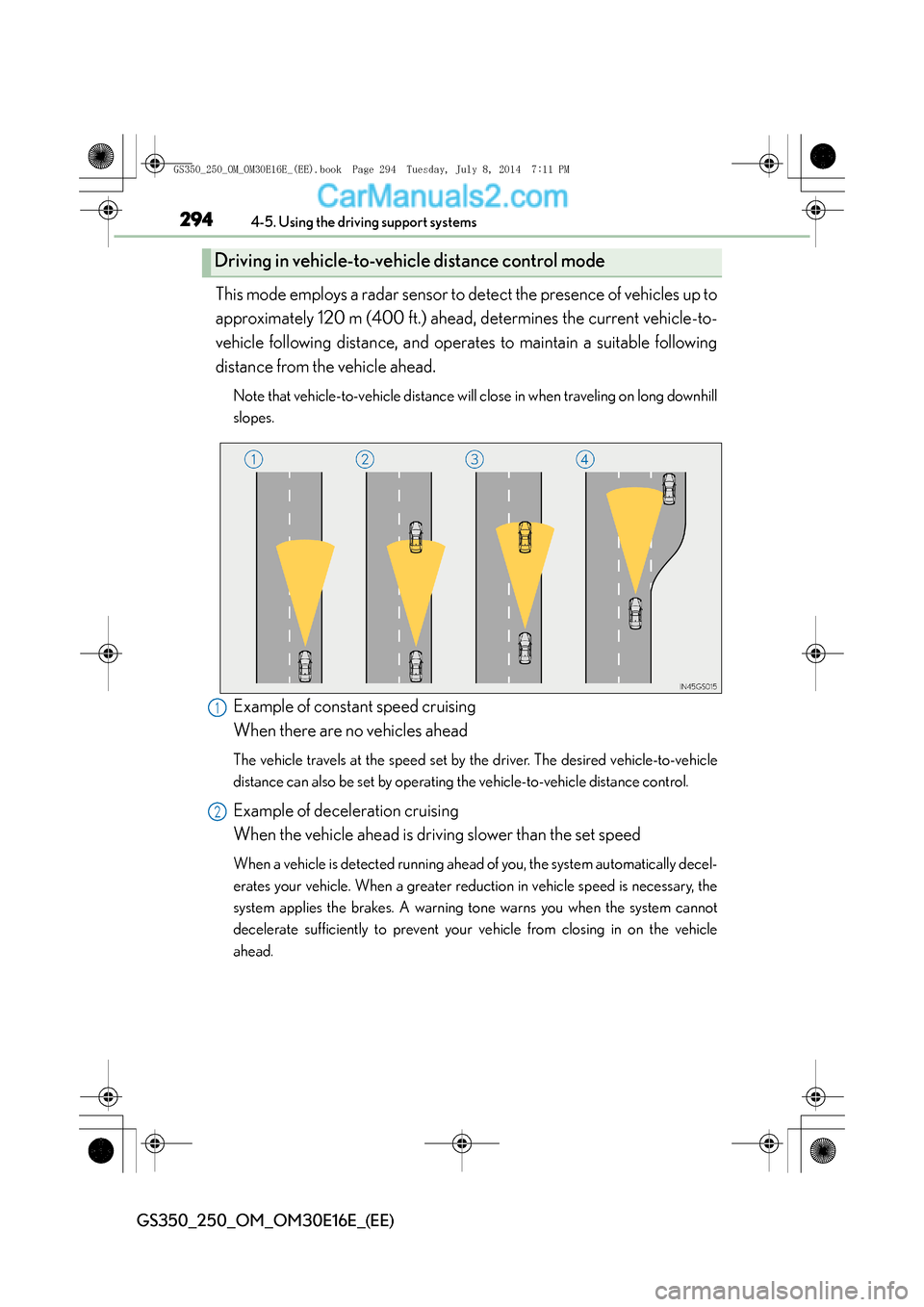
This mode employs a radar sensor to detect the presence of vehicles up to
approximately 120 m (400 ft.) ahead, determines the current vehicle-to-
vehicle following distance, and operates to maintain a suitable following
distance from the vehicle ahead.
Note that vehicle-to-vehicle distance will close in when traveling on long downhill
slopes.
Example of constant speed cruising
When there are no vehicles ahead
The vehicle travels at the speed set by the driver. The desired vehicle-to-vehicle
distance can also be set by operating the vehicle-to-vehicle distance control.
Example of deceleration cruising
When the vehicle ahead is driving slower than the set speed
When a vehicle is detected running ahead of you, the system automatically decel-
erates your vehicle. When a greater reduction in vehicle speed is necessary, the
system applies the brakes. A warning tone warns you when the system cannot
decelerate sufficiently to prevent your vehicle from closing in on the vehicle
ahead.
Driving in vehicle-to-vehicle distance control mode
1
2
GS350_250_OM_OM30E16E_(EE).book Page 294 Tuesday, July 8, 201 4 7:11 PM