warning light Lexus GS300 2019 Owner's Guide
[x] Cancel search | Manufacturer: LEXUS, Model Year: 2019, Model line: GS300, Model: Lexus GS300 2019Pages: 604, PDF Size: 14.6 MB
Page 86 of 604
86
GS350_300_OM_OM30G96U_(U)2. Instrument cluster
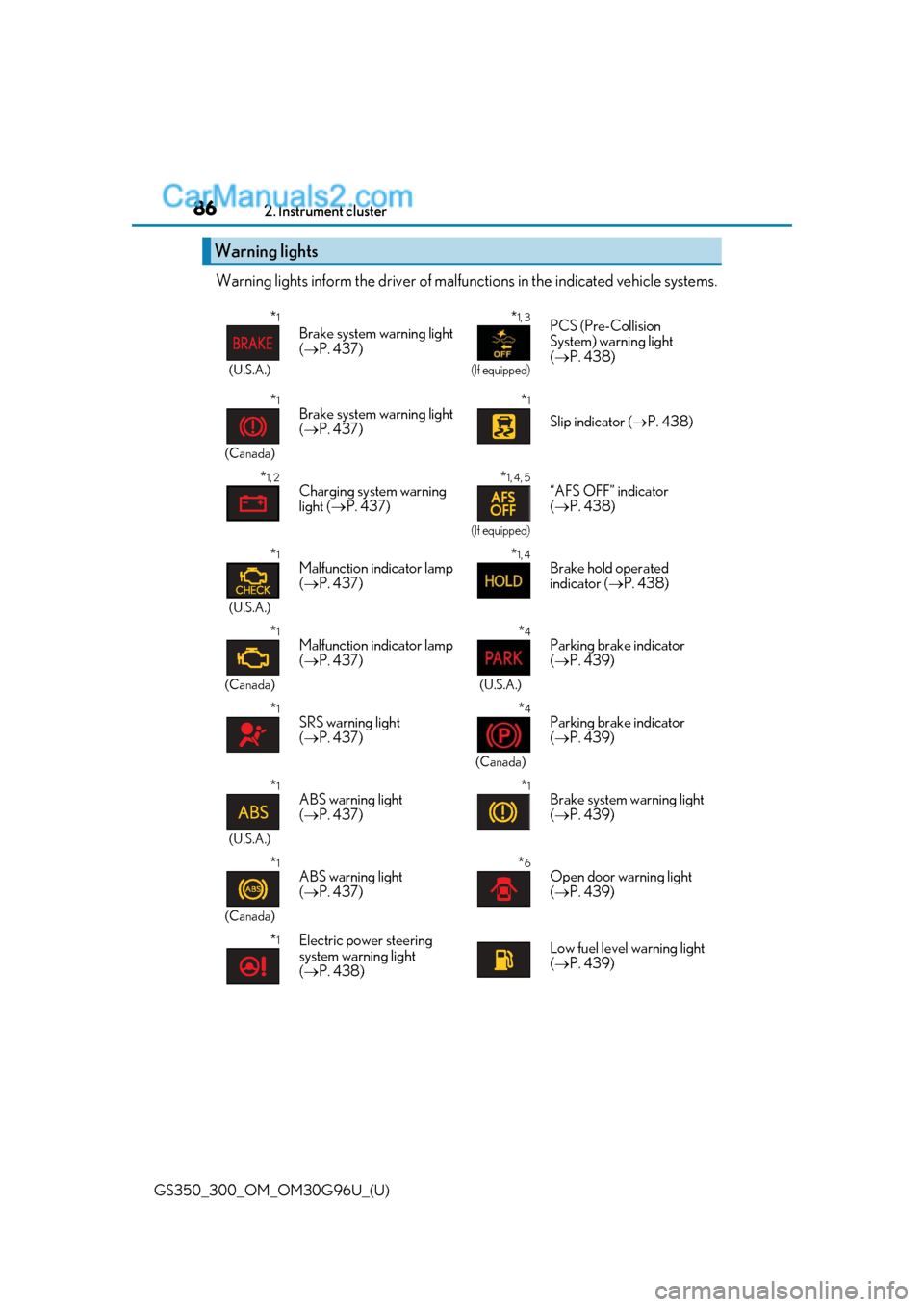
Warning lights inform the driv
er of malfunctions in the indicated vehicle systems.
Warning lights
*1
(U.S.A.)
Brake system warning light
( P. 437)
*1, 3
(If equipped)
PCS (Pre-Collision
System) warning light
( P. 438)
*1
(Canada)
Brake system warning light
( P. 437)*1
Slip indicator ( P. 438)
*1, 2Charging system warning
light ( P. 437)*1, 4, 5
(If equipped)
“AFS OFF” indicator
( P. 438)
*1
(U.S.A.)
Malfunction indicator lamp
( P. 437)*1, 4Brake hold operated
indicator ( P. 438)
*1
(Canada)
Malfunction indicator lamp
( P. 437)*4
(U.S.A.)
Parking brake indicator
( P. 439)
*1SRS warning light
( P. 437)*4
(Canada)
Parking brake indicator
( P. 439)
*1
(U.S.A.)
ABS warning light
( P. 437)*1Brake system warning light
( P. 439)
*1
(Canada)
ABS warning light
( P. 437)*6Open door warning light
( P. 439)
*1Electric power steering
system warning light
( P. 438)Low fuel level warning light
( P. 439)
Page 87 of 604
GS350_300_OM_OM30G96U_(U)
872. Instrument cluster
2
Instrument cluster
*1: These lights turn on when the engine switch is turned to IGNITION ON mode toindicate that a system check is being performed. They will turn off after the engine is
started, or after a few seconds. There may be a malfunction in a system if a light does
not come on, or turn off. Have the ve hicle inspected by your Lexus dealer.
*2:On some models
*3: The light flashes or illuminates to indicate a malfunction.
*4: The light flashes to indicate a malfunction.
*5: GS350/GS300
*6:GS F
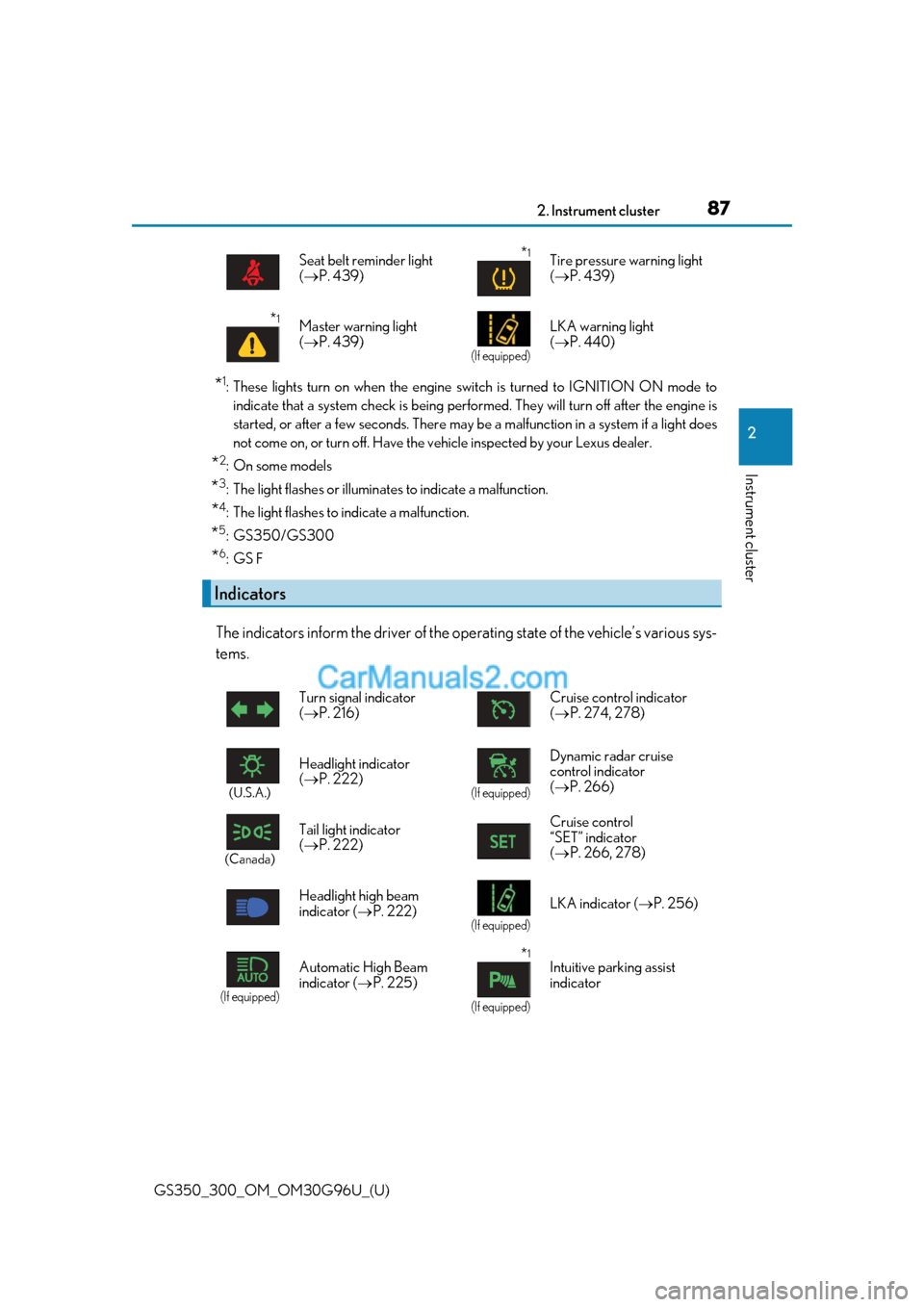
The indicators inform the driver of the op erating state of the vehicle’s various sys-
tems.
Seat belt reminder light
( P. 439)*1Tire pressure warning light
( P. 439)
*1Master warning light
( P. 439)
(If equipped)
LKA warning light
( P. 440)
Indicators
Turn signal indicator
( P. 216) Cruise control indicator
(
P. 274, 278)
(U.S.A.)
Headlight indicator
( P. 222)
(If equipped)
Dynamic radar cruise
control indicator
( P. 266)
(Canada)
Tail light indicator
( P. 222) Cruise control
“SET” indicator
(
P. 266, 278)
Headlight high beam
indicator ( P. 222)
(If equipped)
LKA indicator ( P. 256)
(If equipped)
Automatic High Beam
indicator (P. 225)*1
(If equipped)
Intuitive parking assist
indicator
Page 88 of 604
88
GS350_300_OM_OM30G96U_(U)2. Instrument cluster
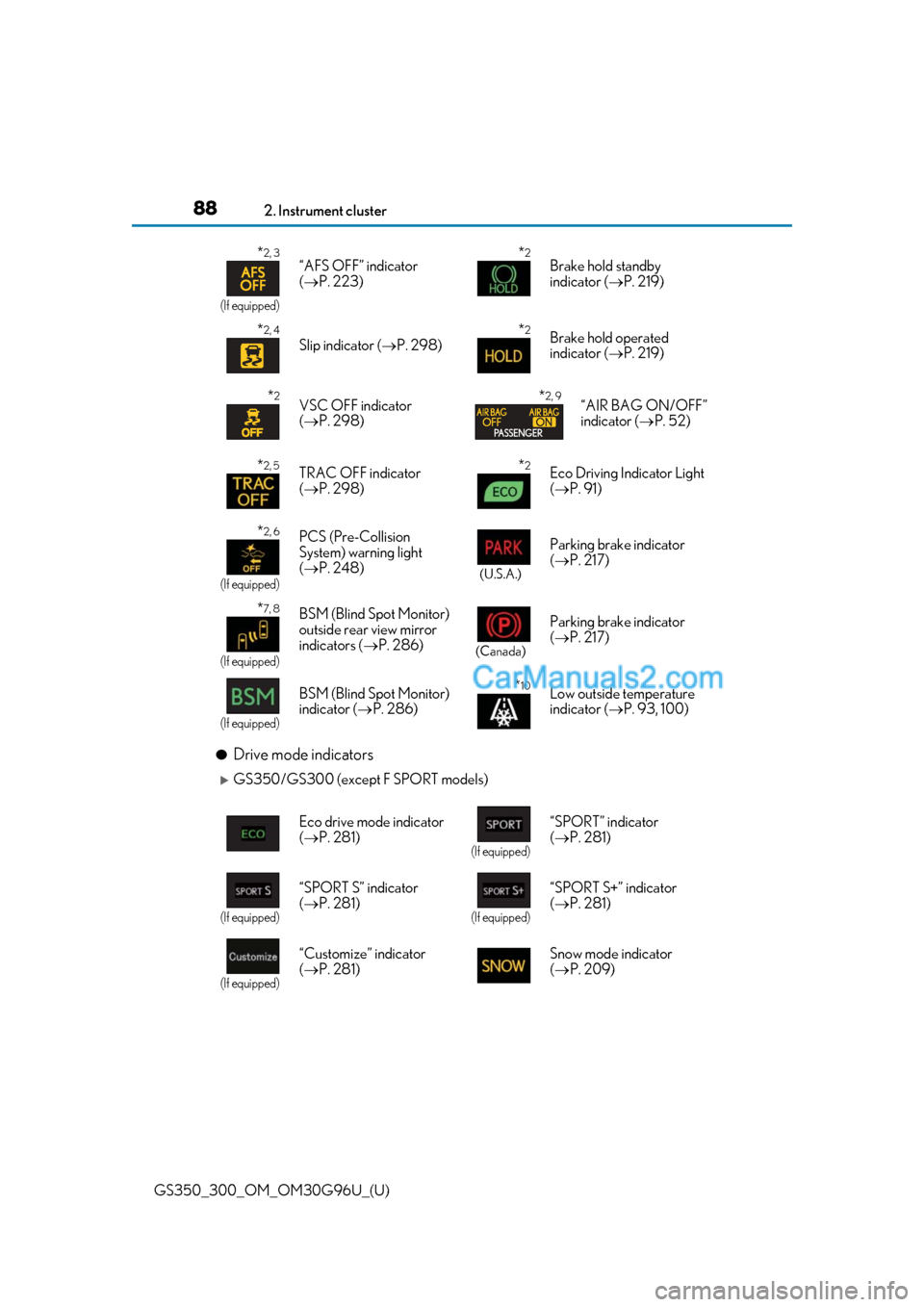
●Drive mode indicators
GS350/GS300 (except F SPORT models)
*2, 3
(If equipped)
“AFS OFF” indicator
(
P. 223)*2Brake hold standby
indicator ( P. 219)
*2, 4
Slip indicator ( P. 298)*2Brake hold operated
indicator ( P. 219)
*2VSC OFF indicator
( P. 298)*2, 9“AIR BAG ON/OFF”
indicator ( P. 52)
*2, 5TRAC OFF indicator
( P. 298)*2Eco Driving Indicator Light
( P. 91)
*2, 6
(If equipped)
PCS (Pre-Collision
System) warning light
( P. 248)
(U.S.A.)
Parking brake indicator
( P. 217)
*7, 8
(If equipped)
BSM (Blind Spot Monitor)
outside rear view mirror
indicators ( P. 286)
(Canada)
Parking brake indicator
( P. 217)
(If equipped)
BSM (Blind Spot Monitor)
indicator ( P. 286)*10Low outside temperature
indicator ( P. 93, 100)
Eco drive mode indicator
( P. 281)
(If equipped)
“SPORT” indicator
( P. 281)
(If equipped)
“SPORT S” indicator
( P. 281)
(If equipped)
“SPORT S+” indicator
( P. 281)
(If equipped)
“Customize” indicator
( P. 281) Snow mode indicator
(
P. 209)
Page 91 of 604
GS350_300_OM_OM30G96U_(U)
912. Instrument cluster
2
Instrument cluster
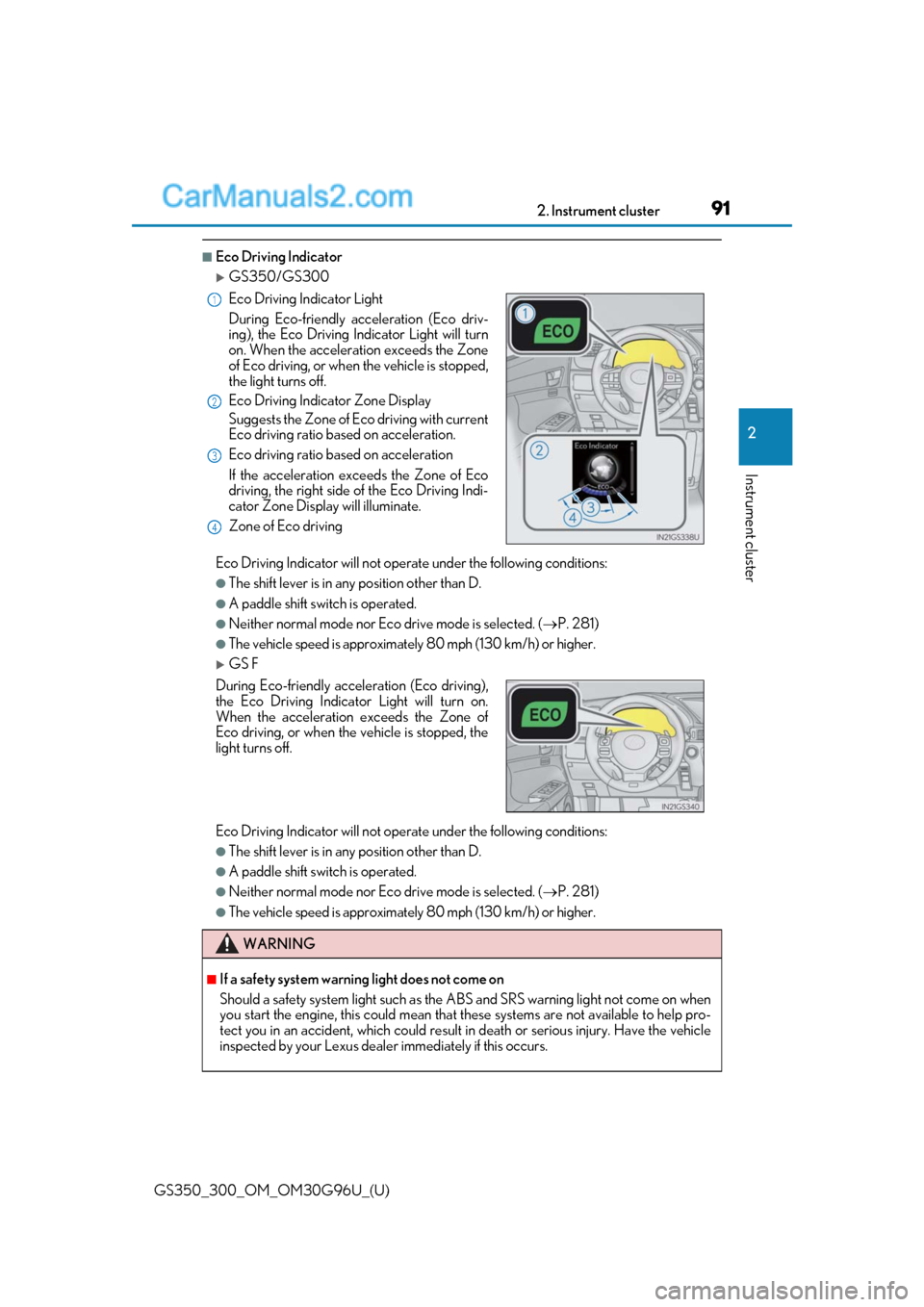
■Eco Driving Indicator
GS350/GS300
Eco Driving Indicator will not operate under the following conditions:
●The shift lever is in any position other than D.
●A paddle shift swit ch is operated.
●Neither normal mode nor Eco drive mode is selected. ( P. 281)
●The vehicle speed is approximatel y 80 mph (130 km/h) or higher.
GS F
Eco Driving Indicator will not operate under the following conditions:
●The shift lever is in any position other than D.
●A paddle shift swit ch is operated.
●Neither normal mode nor Eco drive mode is selected. ( P. 281)
●The vehicle speed is approximatel y 80 mph (130 km/h) or higher.
Eco Driving Indicator Light
During Eco-friendly acceleration (Eco driv-
ing), the Eco Driving Indicator Light will turn
on. When the acceleration exceeds the Zone
of Eco driving, or when
the vehicle is stopped,
the light turns off.
Eco Driving Indicator Zone Display
Suggests the Zone of Eco driving with current
Eco driving ratio based on acceleration.
Eco driving ratio based on acceleration
If the acceleration exceeds the Zone of Eco
driving, the right side of the Eco Driving Indi-
cator Zone Display will illuminate.
Zone of Eco driving
During Eco-friendly acceleration (Eco driving),
the Eco Driving Indicator Light will turn on.
When the acceleration exceeds the Zone of
Eco driving, or when the vehicle is stopped, the
light turns off.
WARNING
■If a safety system warnin g light does not come on
Should a safety system light such as the ABS and SRS warning light not come on when
you start the engine, this could mean that these systems are not available to help pro-
tect you in an accident, which could result in death or serious injury. Have the vehicle
inspected by your Lexus dealer immediately if this occurs.
1
2
3
4
Page 96 of 604
96
GS350_300_OM_OM30G96U_(U)2. Instrument cluster
■Outside temperature display
●In the following situations, the correct outside temperature may not be displayed, or the
display may take longer than normal to change.
• When stopped, or driving at low speeds (less than 12 mph [20 km/h])
• When the outside temperature has changed suddenly (at the entrance/exit of a
garage, tunnel, etc.)
●When “--” or “E” is displayed, the system may be malfunctioning.
Take your vehicle to your Lexus dealer.
■Pop-up display
In some situations, a pop-up display will be temporarily displayed on the multi-informa-
tion display or the odometer/trip meter/maintenance required information screen.
Some pop-up displays can be set on/off. ( P. 550)
■Liquid crystal display
Small spots or light spots may appear on the display. This phenomenon is characteristic
of liquid crystal displays, and there is no problem continuing to use the display.
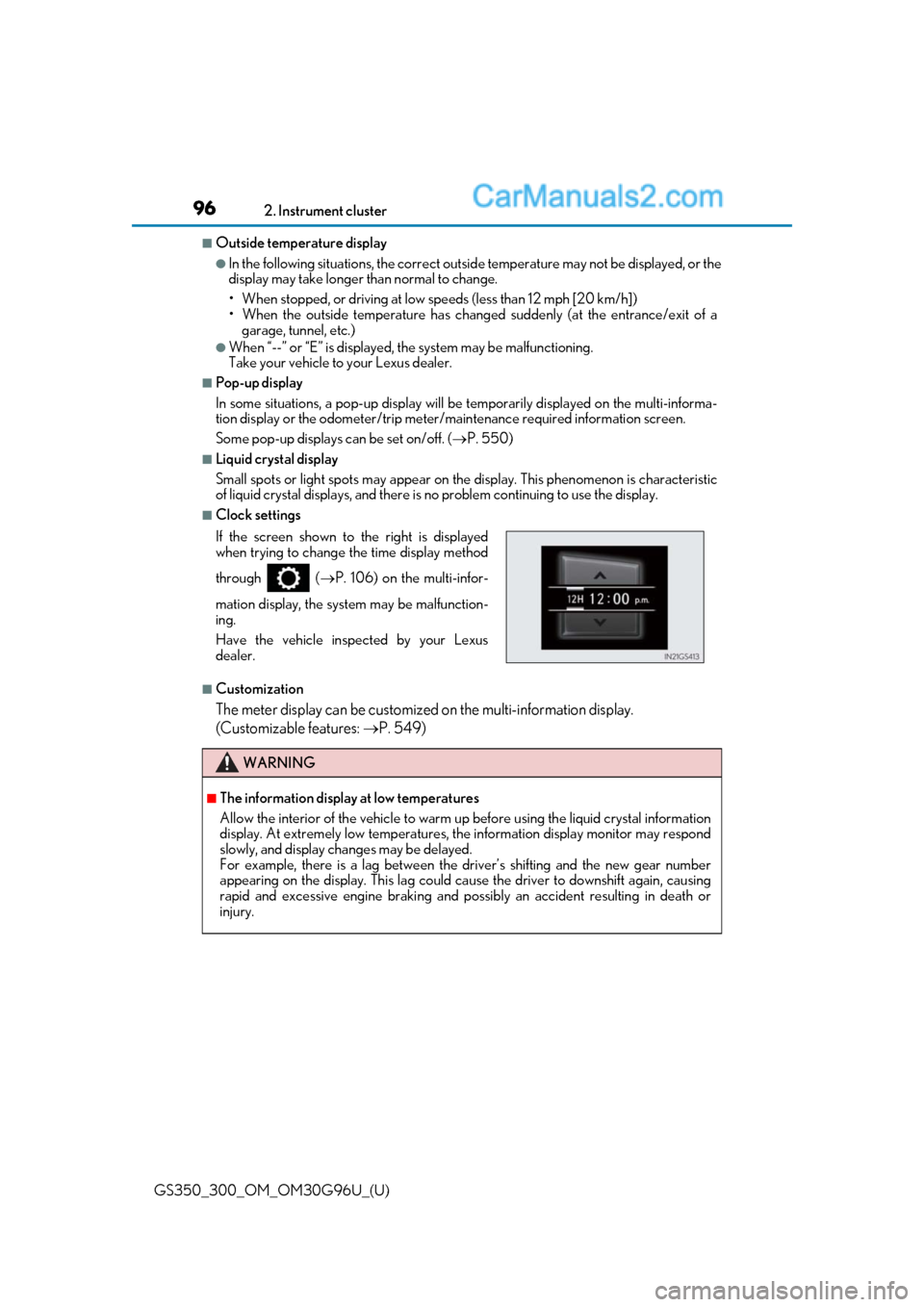
■Clock settings
■Customization
The meter display can be customized on the multi-information display.
(Customizable features: P. 549)
If the screen shown to the right is displayed
when trying to change the time display method
through ( P. 106) on the multi-infor-
mation display, the system may be malfunction-
ing.
Have the vehicle inspected by your Lexus
dealer.
WARNING
■The information display at low temperatures
Allow the interior of the vehicle to warm up before using the liquid crystal information
display. At extremely low temperatures, th e information display monitor may respond
slowly, and display changes may be delayed.
For example, there is a lag between the dr iver’s shifting and the new gear number
appearing on the display. This lag could ca use the driver to downshift again, causing
rapid and excessive engine braking and possibly an accident resulting in death or
injury.
Page 104 of 604
104
GS350_300_OM_OM30G96U_(U)2. Instrument cluster
■Instrument panel brightness adjustment
The instrument panel brightness levels when the tail lights are on and off can be adjusted
individually. However, when the
surroundings are bright (daytime, etc.), turning on the tail
lights will not change the inst rument panel brightness. At th is time, any adjustments made
to the instrument panel brightness levels will be applied to both settings at once.
■Dimming the analog speedometer lighting
The analog speedometer lighting will be dimm ed when the ambient light is bright, such
as during the daytime, and SPORT S or SPORT S+ mode screen is selected.
■Outside temperature display
●In the following situations, the correct outside temperature may not be displayed, or the
display may take longer than normal to change.
• When stopped, or driving at low speeds (less than 12 mph [20 km/h])
• When the outside temperature has changed suddenly (at the entrance/exit of a
garage, tunnel, etc.)
●When “--” or “E” is displayed, the system may be malfunctioning.
Take your vehicle to your Lexus dealer.
■Pop-up display
In some situations, such as when a switch operation is performed, a pop-up display will
be temporarily displayed on the multi-information display.
Some pop-up displays can be set on/off. ( P. 552)
■Liquid crystal display
Small spots or light spots may appear on the display. This phenomenon is characteristic
of liquid crystal displays, and there is no problem continuing to use the display.
■Customization
The meter display can be customized on the multi-information display.
(Customizable features: P. 549)
WARNING
■The information display at low temperatures
Allow the interior of the vehicle to warm up before using the liquid crystal information
display. At extremely low temperatures, th e information display monitor may respond
slowly, and display changes may be delayed.
For example, there is a lag between the dr iver’s shifting and the new gear number
appearing on the display. This lag could ca use the driver to downshift again, causing
rapid and excessive engine braking and possibly an accident resulting in death or
injury.
Page 110 of 604
110
GS350_300_OM_OM30G96U_(U)2. Instrument cluster
■Tire inflation pressure
Displays inflation pressure of each tire.
The inflation pressure of the compac
t spare tire will not be displayed.
■LKA (Lane-Keeping Assist) vehicle sway warning (if equipped)
P. 256
■Display off
A blank screen is displayed
*1: Displayed when the item is se t in “Drive Info 1”, “Drive Info 2” or “Drive Info 3”.
( P. 550)
*2: The function can be reset by pressing th e of the meter control switches for longer
than 1 second when the item to reset is displayed.
If there is more than one item that can be reset, the item selection screen will appear.
The settings of the following items can be changed, refer to P. 549
For functions that can be enabled or disabled, the function switches between on and
off each time is pressed.
■(Lane-Keeping Assist) (if equipped) ( P. 256)
■(Pre-Collision System) (if equipped) ( P. 245)
■(Adaptive Front-lighting System) (if equipped) ( P. 223)
■(Blind Spot Monitor) (if equipped) ( P. 286)
■
Select to set the display mode of the clock.
Settings display
Page 111 of 604
GS350_300_OM_OM30G96U_(U)
1112. Instrument cluster
2
Instrument cluster
■●
Scheduled Maintenance ( P. 368)
●Oil Maintenance ( P. 386)
●TPMS (Tire pressure warning system) ( P. 397)
■
●
Language
Select to change the la nguage on the display.
●Units
Select to change the unit of measure.
●Eco Driving Indicator Light
Select to activate/deactivate the Eco Driving Indicator Light.
● switch
Displays a procedure to register a desired screen to .
You can register 1 screen as a shortcut , which can be displayed by pressing .
●Drive information 1/2/3
Select to select up to 2 items that will be displayed on a Drive information screen,
up to 3 Drive informat ion screens can be set.
●Pop-up display
Select to set the following pop-up displays, which may appear in some situations,
on/off.
• Route guidance of the navigation system-linked display (if equipped)
• Incoming call display of the hands-free phone system
• Instrument panel brightness adjustment display
●Accent color (except F SPORT models)
Select to change the accent colors on the screen, such as the cursor color.
●Needle (F SPORT models)
Select to change the needle color for the tachometer.
●Rev indicator (F SPORT models)
Select to set the rev indicator on/off.
When set to on, proceed to set the engine speed at which the rev indicator will be
displayed.
Selectable engine speed range:
GS350: 2000 rpm to 6800 rpm
GS300: 2000 rpm to 6100 rpm
●Rev peak (F SPORT models)
Select to set the rev peak on/off.
●Default settings
Registered or changed meter settings will be deleted or returned to their default
setting.
Page 122 of 604
122
GS350_300_OM_OM30G96U_(U)2. Instrument cluster
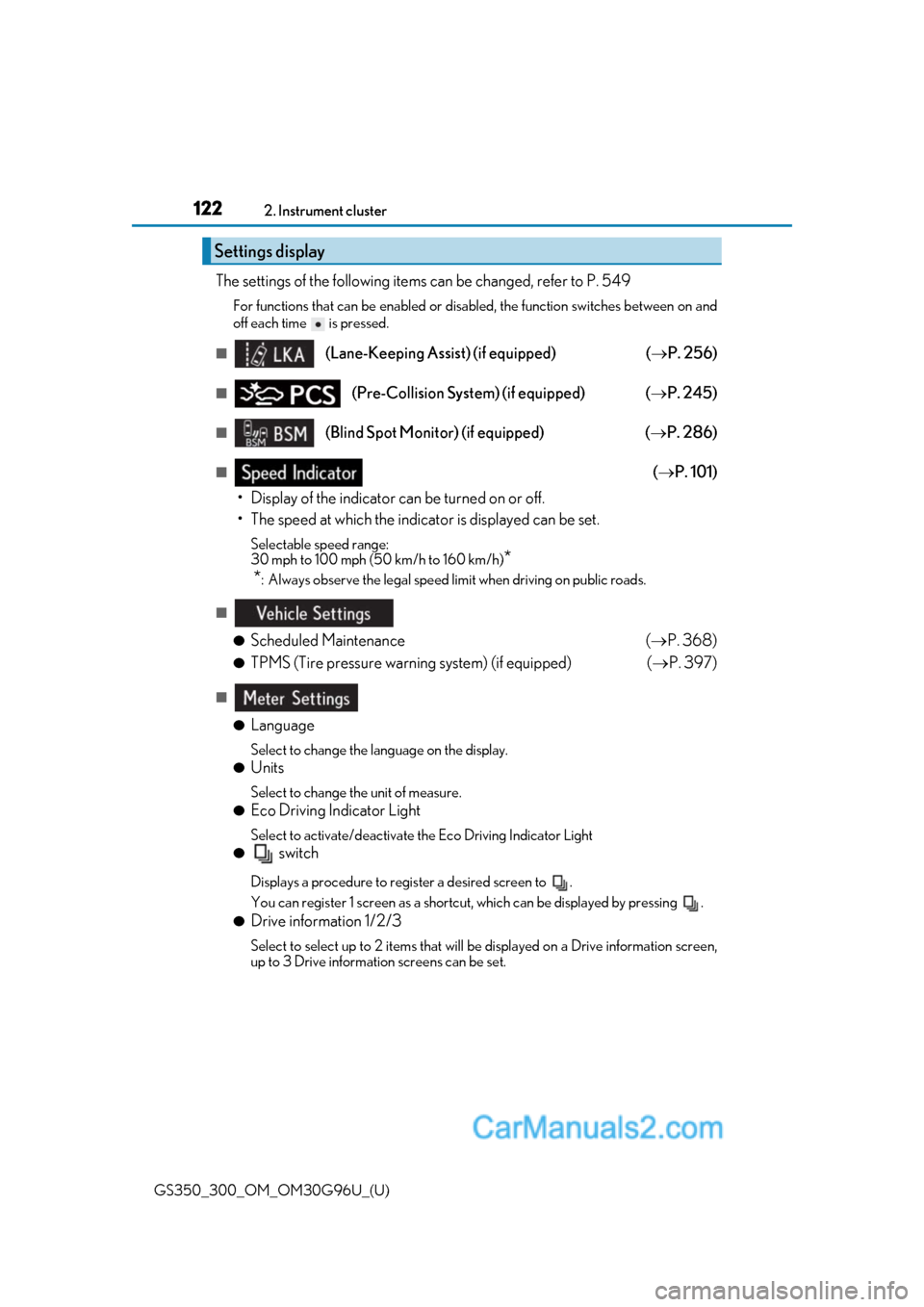
The settings of the following items can be changed, refer to P. 549
For functions that can be enabled or disabled, the function switches between on and
off each time is pressed.
■(Lane-Keeping Assist) (if equipped)
( P. 256)
■(Pre-Collision System) (if equipped) ( P. 245)
■(Blind Spot Monitor) (if equipped) ( P. 286)
■( P. 101)
• Display of the indicator can be turned on or off.
• The speed at which the indicator is displayed can be set.
Selectable speed range:
30 mph to 100 mph (50 km/h to 160 km/h)
*
*
: Always observe the legal speed limi t when driving on public roads.
■
●
Scheduled Maintenance ( P. 368)
●TPMS (Tire pressure warning system) (if equipped) ( P. 397)
■
●
Language
Select to change the la nguage on the display.
●Units
Select to change the unit of measure.
●Eco Driving Indicator Light
Select to activate/deactivate the Eco Driving Indicator Light
● switch
Displays a procedure to register a desired screen to .
You can register 1 screen as a shortcut , which can be displayed by pressing .
●Drive information 1/2/3
Select to select up to 2 items that will be displayed on a Drive information screen,
up to 3 Drive informat ion screens can be set.
Settings display
Page 153 of 604
GS350_300_OM_OM30G96U_(U)
1533-2. Opening, closing and locking the doors and trunk
3
Operation of each component
WARNING
■Using the trunk
Observe the following precautions.
Failure to do so may cause parts of the body to be caught, resulting in serious injury.
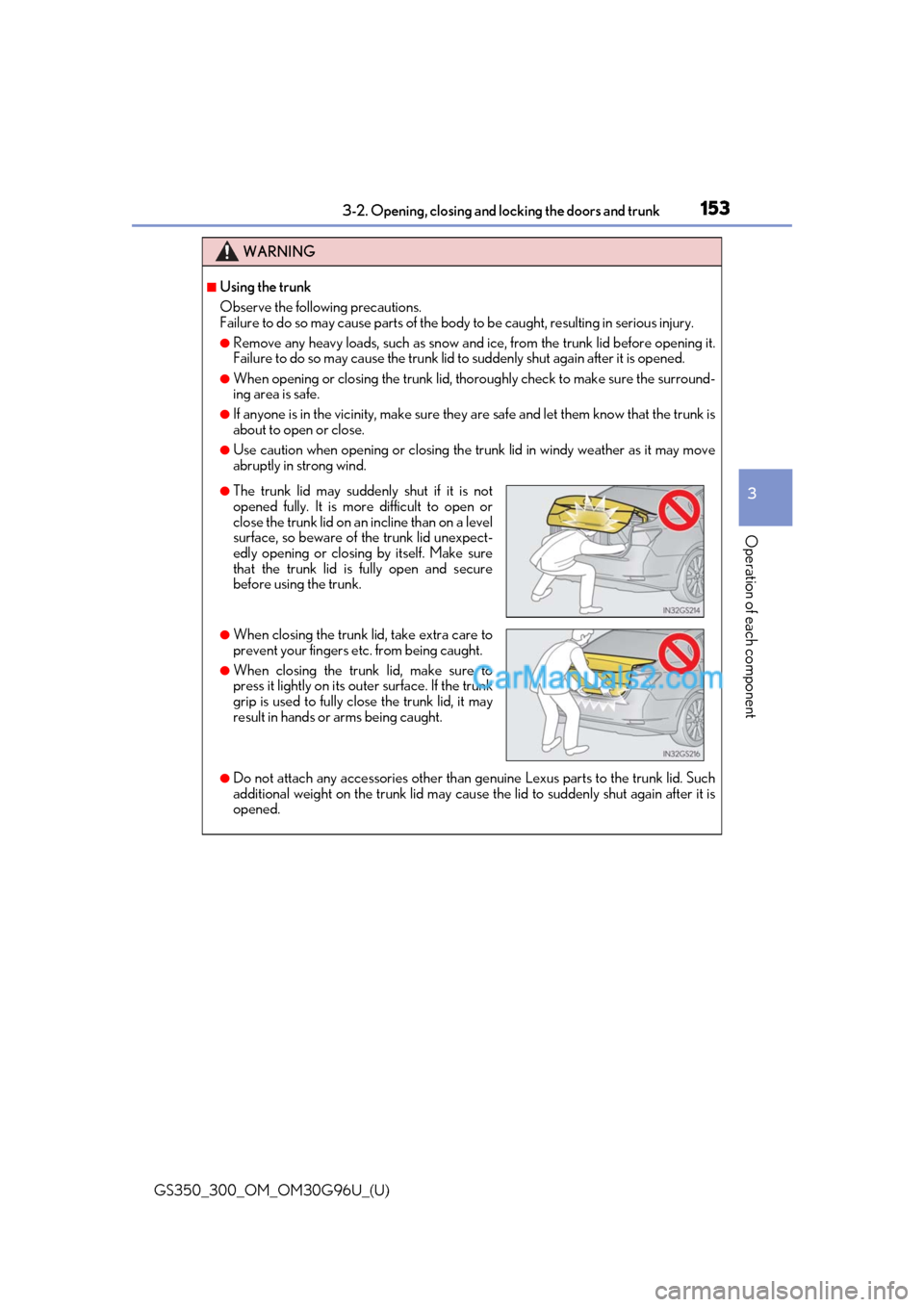
●Remove any heavy loads, such as snow and ice, from the trunk lid before opening it.
Failure to do so may cause the trunk lid to suddenly shut again after it is opened.
●When opening or closing the trunk lid, thoroughly check to make sure the surround-
ing area is safe.
●If anyone is in the vicinity, make sure they are safe and let them know that the trunk is
about to open or close.
●Use caution when opening or closing the tr unk lid in windy weather as it may move
abruptly in strong wind.
●Do not attach any accessories other than genuine Lexus parts to the trunk lid. Such
additional weight on the trunk lid may cause the lid to suddenly shut again after it is
opened.
●The trunk lid may suddenly shut if it is not
opened fully. It is more difficult to open or
close the trunk lid on an incline than on a level
surface, so beware of the trunk lid unexpect-
edly opening or closin g by itself. Make sure
that the trunk lid is fully open and secure
before using the trunk.
●When closing the trunk li d, take extra care to
prevent your fingers etc. from being caught.
●When closing the trunk lid, make sure to
press it lightly on its outer surface. If the trunk
grip is used to fully close the trunk lid, it may
result in hands or arms being caught.