steering Lexus GS300h 2013 Owners Manual
[x] Cancel search | Manufacturer: LEXUS, Model Year: 2013, Model line: GS300h, Model: Lexus GS300h 2013Pages: 1014
Page 663 of 1014
6405-4. Using the hands-free phone system(for cellular phone)
GS450h_300h_OM_OM30D53E_(EE)
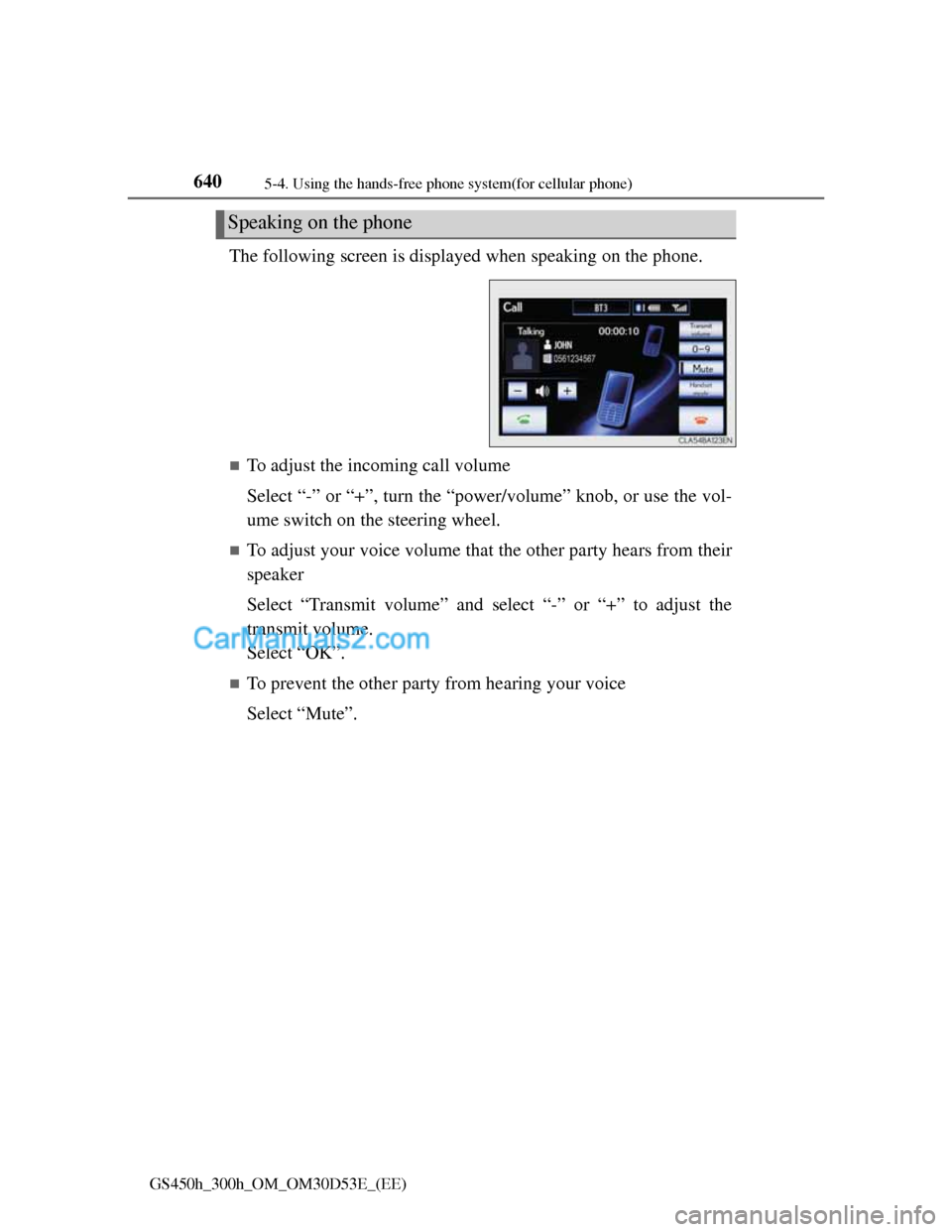
The following screen is displayed when speaking on the phone.
To adjust the incoming call volume
Select “-” or “+”, turn the “power/volume” knob, or use the vol-
ume switch on the steering wheel.
To adjust your voice volume that the other party hears from their
speaker
Select “Transmit volume” and select “-” or “+” to adjust the
transmit volume.
Select “OK”.
To prevent the other party from hearing your voice
Select “Mute”.
Speaking on the phone
Page 664 of 1014
6415-4. Using the hands-free phone system(for cellular phone)
5
Interior features
GS450h_300h_OM_OM30D53E_(EE)
Inputting tones
When using phone services such as an answering service or a
bank, you can store phone numbers and code numbers in the
phonebook.
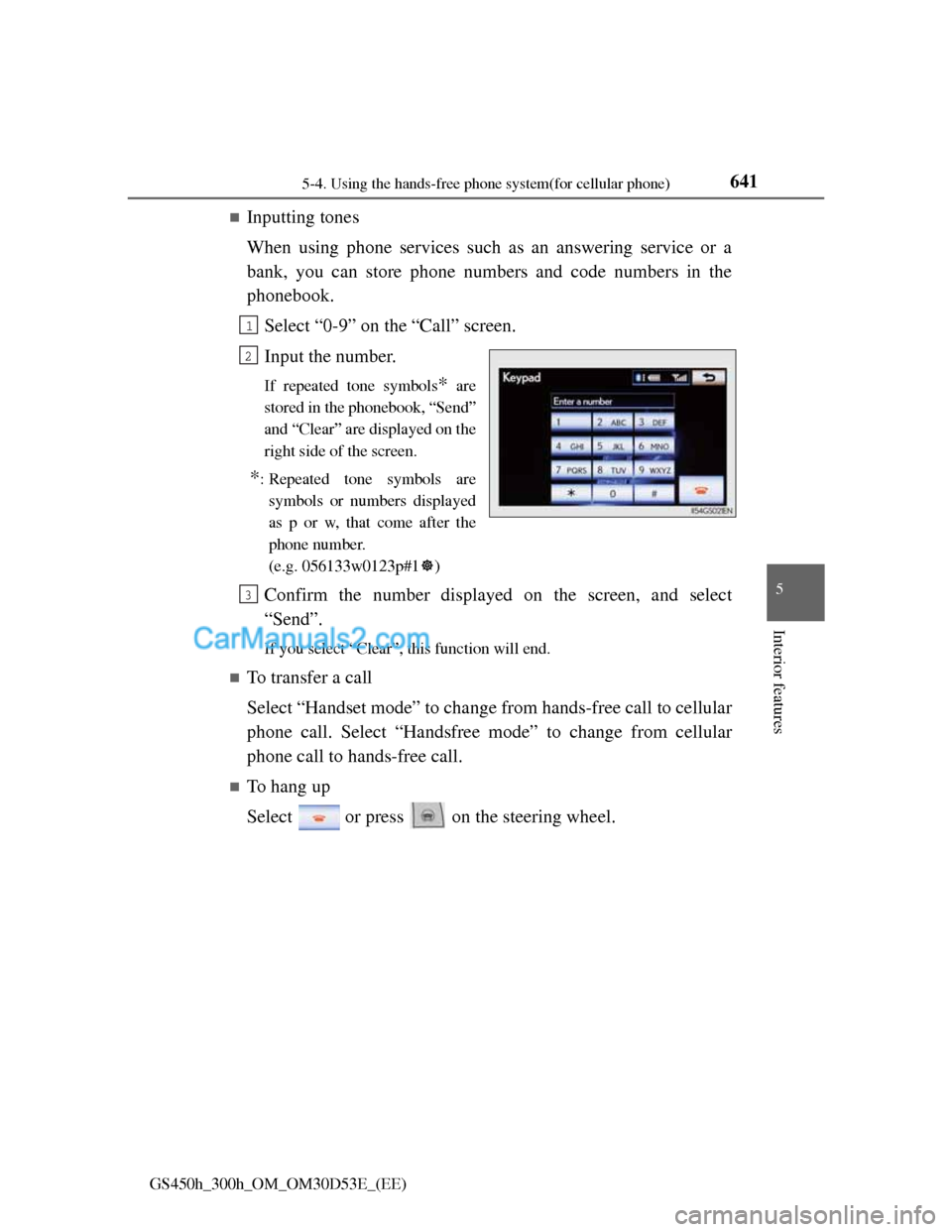
Select “0-9” on the “Call” screen.
Input the number.
If repeated tone symbols* are
stored in the phonebook, “Send”
and “Clear” are displayed on the
right side of the screen.
*: Repeated tone symbols are
symbols or numbers displayed
as p or w, that come after the
phone number.
(e.g. 056133w0123p#1)
Confirm the number displayed on the screen, and select
“Send”.
If you select “Clear”, this function will end.
To transfer a call
Select “Handset mode” to change from hands-free call to cellular
phone call. Select “Handsfree mode” to change from cellular
phone call to hands-free call.
To hang up
Select or press on the steering wheel.
1
2
3
Page 665 of 1014
6425-4. Using the hands-free phone system(for cellular phone)
GS450h_300h_OM_OM30D53E_(EE)
Call waiting
When a connected call is interrupted by the third party, the
incoming call message will be displayed.
To talk with the other party: Select or press on the
steering wheel.
To refuse the call: Select or press on the steering
wheel.
Everytime you select or press on the steering wheel
after a call is interrupted, you will be switched to the other party.
If your cellular phone is not accepted in HFP Ver. 1.5, this func-
tion cannot be used.
Incoming call
The ring tone that has been set in the “Sound settings” screen sounds when
there is an incoming call. (P. 648)
Depending on the type of Bluetooth® phone, both the system and Blue-
tooth® phone may sound simultaneously when there is an incoming call.
Transferring calls
It is not possible to transfer from hands-free to a cellular phone while driv-
ing.
If you transfer from a cellular phone to hands-free, the hands-free screen
will be displayed, and you can operate the system using the screen.
Transfer method and operation may vary according to the cellular phone
used.
For operation of the cellular phone in use, see the phone’s manual.
Repeated tone symbols
When the “p” pause tone is used, after waiting 2 seconds the tone data up
until the next pause tone will be automatically sent. When the “w” pause tone
is used, the tone data up until the next pause tone will be automatically sent
after user operation.
While driving
Key input is unavailable.
Calls can be made by giving a speech command.
Page 667 of 1014
6445-4. Using the hands-free phone system(for cellular phone)
GS450h_300h_OM_OM30D53E_(EE)
Received messages can be forwarded from the connected Blue-
tooth
® phone, enabling checking and replying (Quick reply).
Checking a message
Display the “Telephone” screen. (P. 625)
Select “Messages” on the “Telephone” screen.
Depending on the type of Bluetooth® phone being connected, it may be
necessary to perform additional steps on the phone.
When “Message transfer” is set to “Off”, a confirmation screen will be
displayed. Select “Yes”.
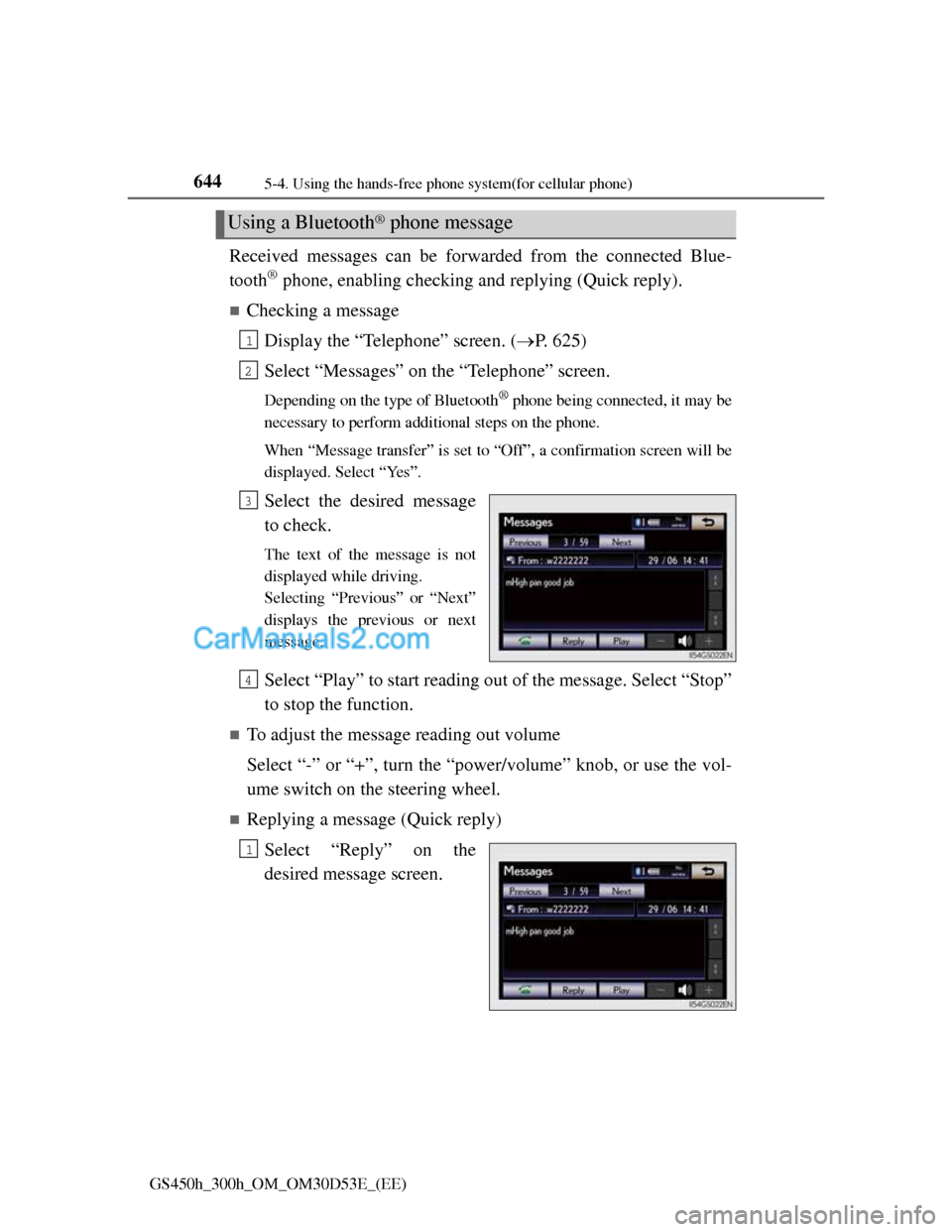
Select the desired message
to check.
The text of the message is not
displayed while driving.
Selecting “Previous” or “Next”
displays the previous or next
message.
Select “Play” to start reading out of the message. Select “Stop”
to stop the function.
To adjust the message reading out volume
Select “-” or “+”, turn the “power/volume” knob, or use the vol-
ume switch on the steering wheel.
Replying a message (Quick reply)
Select “Reply” on the
desired message screen.
Using a Bluetooth® phone message
1
2
3
4
1
Page 693 of 1014
6705-4. Using the hands-free phone system(for cellular phone)
GS450h_300h_OM_OM30D53E_(EE)
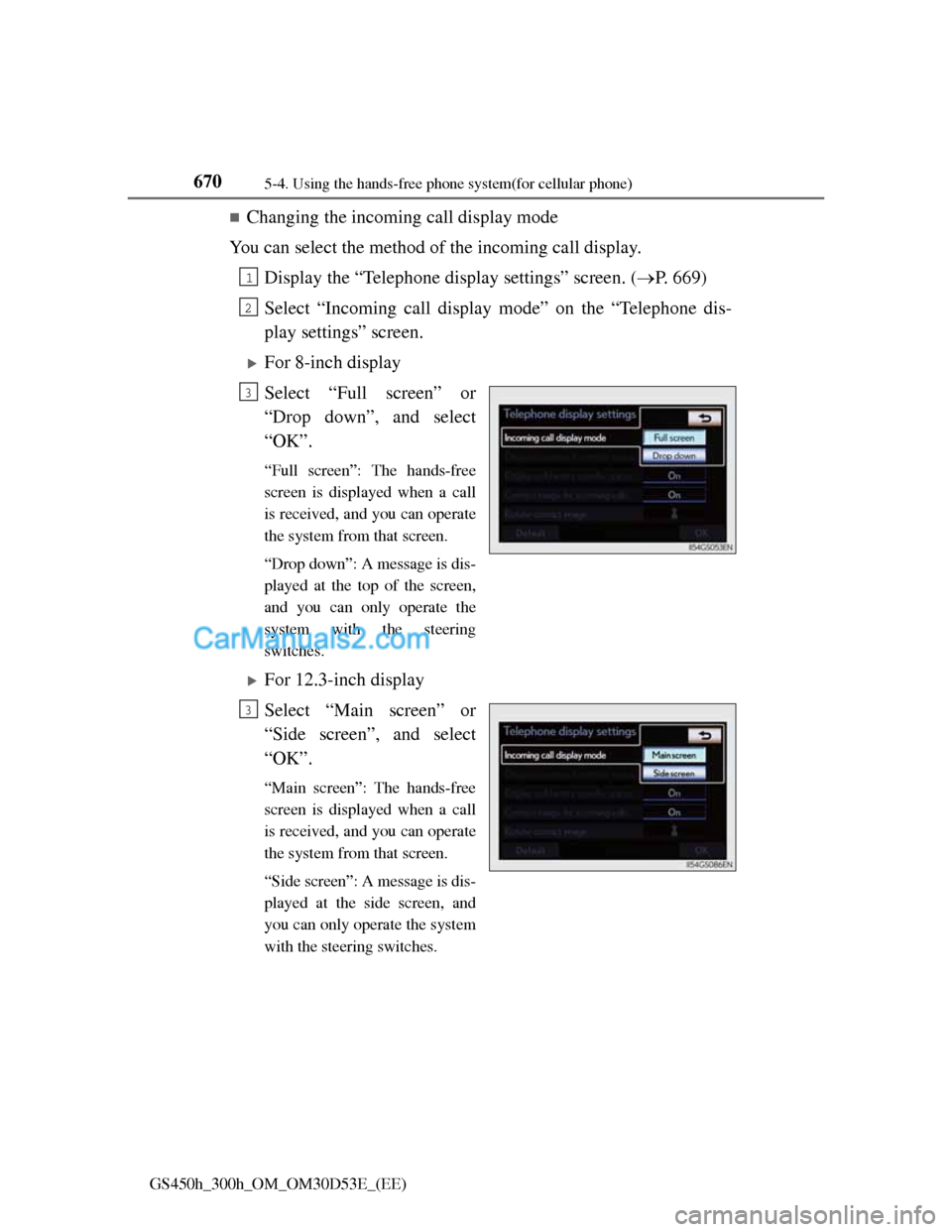
Changing the incoming call display mode
You can select the method of the incoming call display.
Display the “Telephone display settings” screen. (P. 669)
Select “Incoming call display mode” on the “Telephone dis-
play settings” screen.
For 8-inch display
Select “Full screen” or
“Drop down”, and select
“OK”.
“Full screen”: The hands-free
screen is displayed when a call
is received, and you can operate
the system from that screen.
“Drop down”: A message is dis-
played at the top of the screen,
and you can only operate the
system with the steering
switches.
For 12.3-inch display
Select “Main screen” or
“Side screen”, and select
“OK”.
“Main screen”: The hands-free
screen is displayed when a call
is received, and you can operate
the system from that screen.
“Side screen”: A message is dis-
played at the side screen, and
you can only operate the system
with the steering switches.
1
2
3
3
Page 726 of 1014
7025-7. Other interior features
GS450h_300h_OM_OM30D53E_(EE)
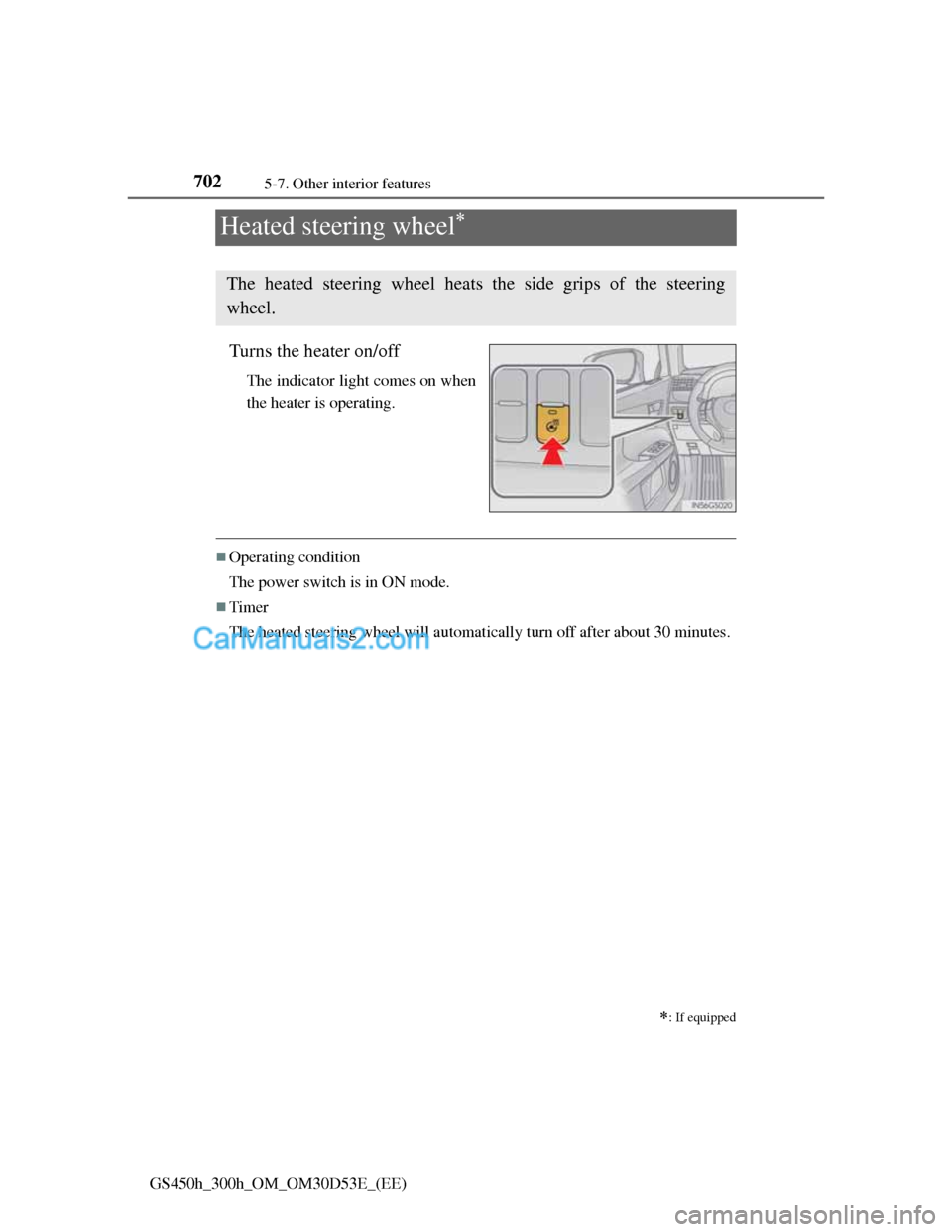
Heated steering wheel
Turns the heater on/off
The indicator light comes on when
the heater is operating.
Operating condition
The power switch is in ON mode.
Timer
The heated steering wheel will automatically turn off after about 30 minutes.
: If equipped
The heated steering wheel heats the side grips of the steering
wheel.
Page 727 of 1014
7035-7. Other interior features
5
Interior features
GS450h_300h_OM_OM30D53E_(EE)
CAUTION
Burns
Care should be taken to prevent injury if anyone in the following categories
comes in contact with the steering wheel when the heated steering wheel is
on:
Babies, small children, the elderly, the sick and the physically challenged
Persons with sensitive skin
Persons who are fatigued
Persons who have taken alcohol or drugs that induce sleep (sleeping
drugs, cold remedies, etc.)
NOTICE
To prevent the 12-volt battery from being discharged
Turn the switch off when the hybrid system is off.
Page 812 of 1014
7886-3. Do-it-yourself maintenance
GS450h_300h_OM_OM30D53E_(EE)
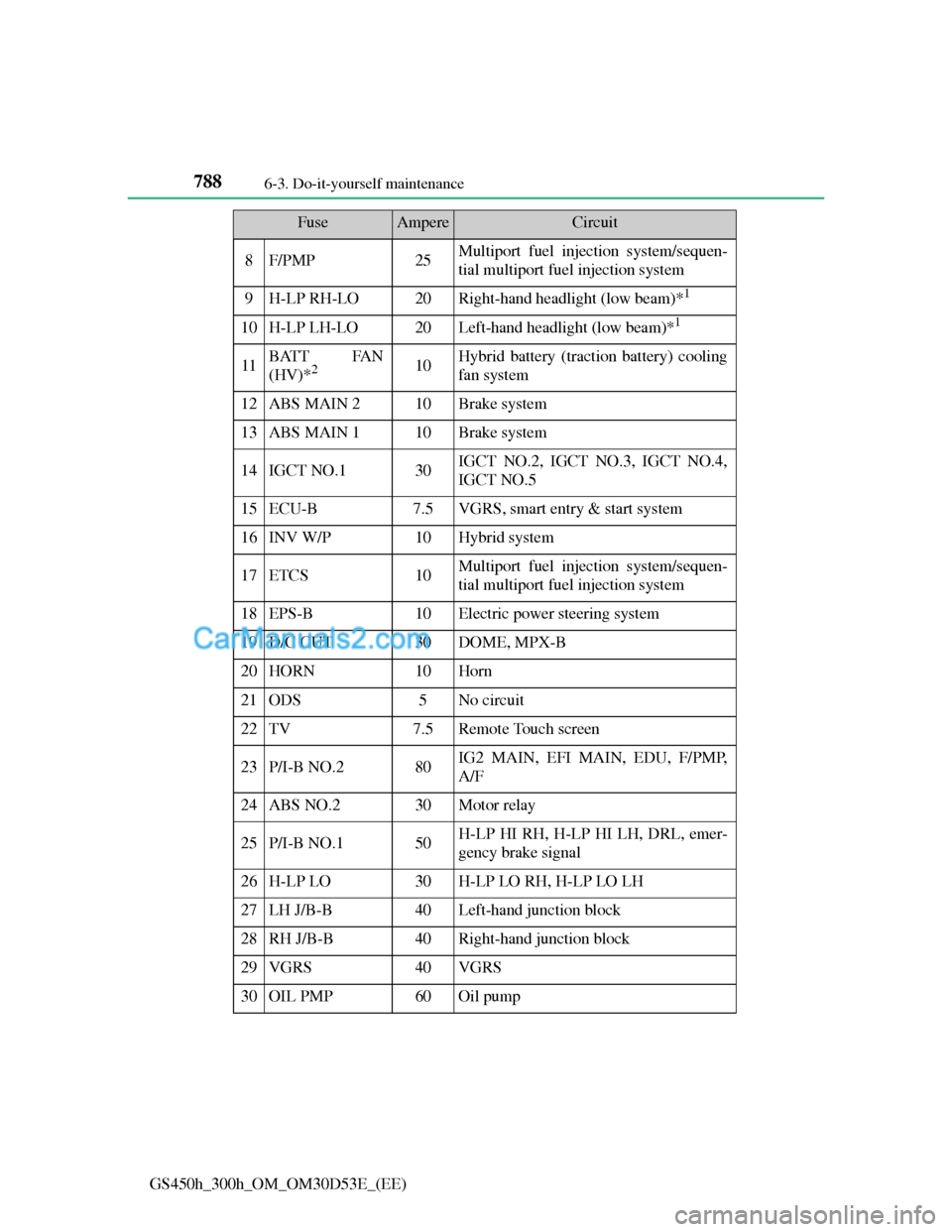
8F/PMP25Multiport fuel injection system/sequen-
tial multiport fuel injection system
9H-LP RH-LO20Right-hand headlight (low beam)*1
10H-LP LH-LO20Left-hand headlight (low beam)*1
11BATT FAN
(HV)*210Hybrid battery (traction battery) cooling
fan system
12ABS MAIN 210Brake system
13ABS MAIN 110Brake system
14IGCT NO.130IGCT NO.2, IGCT NO.3, IGCT NO.4,
IGCT NO.5
15ECU-B7.5VGRS, smart entry & start system
16INV W/P10Hybrid system
17ETCS10Multiport fuel injection system/sequen-
tial multiport fuel injection system
18EPS-B10Electric power steering system
19D/C CUT30DOME, MPX-B
20HORN10Horn
21ODS5No circuit
22TV7.5Remote Touch screen
23P/I-B NO.280IG2 MAIN, EFI MAIN, EDU, F/PMP,
A/F
24ABS NO.230Motor relay
25P/I-B NO.150H-LP HI RH, H-LP HI LH, DRL, emer-
gency brake signal
26H-LP LO30H-LP LO RH, H-LP LO LH
27LH J/B-B40Left-hand junction block
28RH J/B-B40Right-hand junction block
29VGRS40VGRS
30OIL PMP60Oil pump
FuseAmpereCircuit
Page 813 of 1014
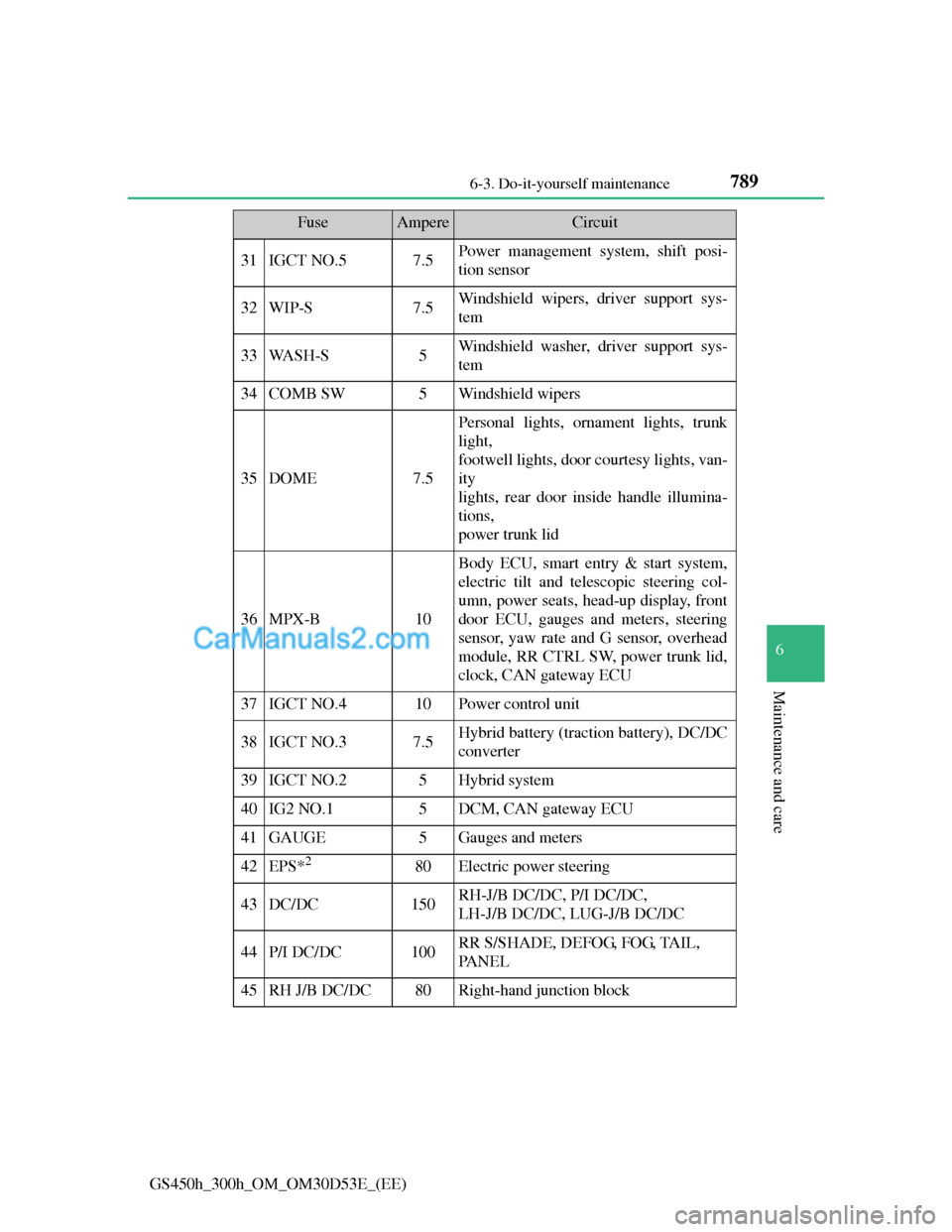
789 6-3. Do-it-yourself maintenance
6
Maintenance and care
GS450h_300h_OM_OM30D53E_(EE)
31IGCT NO.57.5Power management system, shift posi-
tion sensor
32WIP-S7.5Windshield wipers, driver support sys-
tem
33WA S H - S5Windshield washer, driver support sys-
tem
34COMB SW5Windshield wipers
35DOME7.5
Personal lights, ornament lights, trunk
light,
footwell lights, door courtesy lights, van-
ity
lights, rear door inside handle illumina-
tions,
power trunk lid
36MPX-B10
Body ECU, smart entry & start system,
electric tilt and telescopic steering col-
umn, power seats, head-up display, front
door ECU, gauges and meters, steering
sensor, yaw rate and G sensor, overhead
module, RR CTRL SW, power trunk lid,
clock, CAN gateway ECU
37IGCT NO.410Power control unit
38IGCT NO.37.5Hybrid battery (traction battery), DC/DC
converter
39IGCT NO.25Hybrid system
40IG2 NO.15DCM, CAN gateway ECU
41GAUGE5Gauges and meters
42EPS*280Electric power steering
43DC/DC150RH-J/B DC/DC, P/I DC/DC,
LH-J/B DC/DC, LUG-J/B DC/DC
44P/I DC/DC100RR S/SHADE, DEFOG, FOG, TAIL,
PA N E L
45RH J/B DC/DC80Right-hand junction block
FuseAmpereCircuit
Page 816 of 1014
7926-3. Do-it-yourself maintenance
GS450h_300h_OM_OM30D53E_(EE)
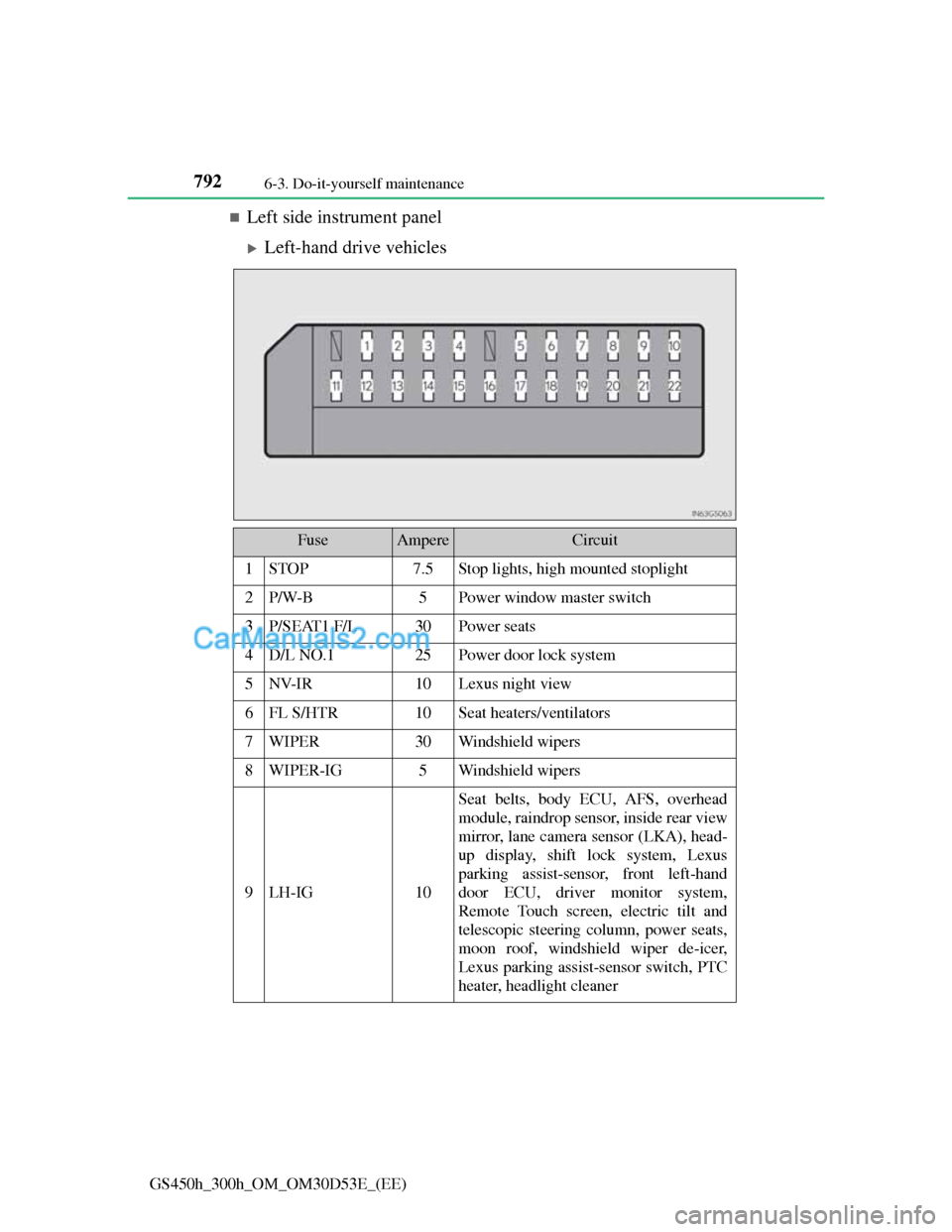
Left side instrument panel
Left-hand drive vehicles
FuseAmpereCircuit
1STOP7.5Stop lights, high mounted stoplight
2P/W-B5Power window master switch
3P/SEAT1 F/L30Power seats
4D/L NO.125Power door lock system
5NV-IR10Lexus night view
6FL S/HTR10Seat heaters/ventilators
7WIPER30Windshield wipers
8WIPER-IG5Windshield wipers
9LH-IG10
Seat belts, body ECU, AFS, overhead
module, raindrop sensor, inside rear view
mirror, lane camera sensor (LKA), head-
up display, shift lock system, Lexus
parking assist-sensor, front left-hand
door ECU, driver monitor system,
Remote Touch screen, electric tilt and
telescopic steering column, power seats,
moon roof, windshield wiper de-icer,
Lexus parking assist-sensor switch, PTC
heater, headlight cleaner