light Lexus GS300h 2013 Owner's Manual
[x] Cancel search | Manufacturer: LEXUS, Model Year: 2013, Model line: GS300h, Model: Lexus GS300h 2013Pages: 1014
Page 415 of 1014
4044-5. Using the driving support system
GS450h_300h_OM_OM30D53E_(EE)
CAUTION
The ABS does not operate effectively when
The limits of tire gripping performance have been exceeded (such as
excessively worn tires on a snow covered road).
The vehicle hydroplanes while driving at high speed on wet or slick roads.
Stopping distance when the ABS is operating may exceed that of normal
conditions
The ABS is not designed to shorten the vehicle’s stopping distance. Always
maintain a safe distance from the vehicle in front of you, especially in the
following situations:
When driving on dirt, gravel or snow-covered roads
When driving with tire chains
When driving over bumps in the road
When driving over roads with potholes or uneven surfaces
TRC may not operate effectively when
Directional control and power may not be achievable while driving on slip-
pery road surfaces, even if the TRC system is operating.
Drive the vehicle carefully in conditions where stability and power may be
lost.
When the VSC is activated
The slip indicator light flashes. Always drive carefully. Reckless driving
may cause an accident. Exercise particular care when the indicator light
flashes.
When the TRC/VSC systems are turned off
Be especially careful and drive at a speed appropriate to the road condi-
tions. As these are the systems to help vehicle stability and driving force,
do not turn the TRC/VSC systems off unless necessary.
Page 417 of 1014

4064-5. Using the driving support system
GS450h_300h_OM_OM30D53E_(EE)
PCS (Pre-Crash Safety system)
Pre-crash seat belts (front seat only)
If the pre-crash sensor detects that a collision is unavoidable, the
pre-crash safety system will retract the seat belt before the colli-
sion occurs.
The same will happen if the driver makes an emergency braking
or loses control of the vehicle. (P. 40)
Pre-crash brake assist
When there is a high possibility of a frontal collision, the system
applies greater braking force in relation to how strongly the
brake pedal is depressed.
Pre-crash braking
When there is a high possibility of a frontal collision, the system
warns the driver using a warning light, warning display and
buzzer. If the system determines that a collision is unavoidable,
the brakes are automatically applied to reduce the collision
speed.
: If equipped
When the radar sensor detects the possibility of a frontal collision,
the pre-crash safety system such as the brakes and seat belts are
automatically engaged to lessen impact as well as vehicle damage.
The pre-crash safety system can be turned on and off as necessary
by operating the switch. (P. 408)
Page 419 of 1014
4084-5. Using the driving support system
GS450h_300h_OM_OM30D53E_(EE)
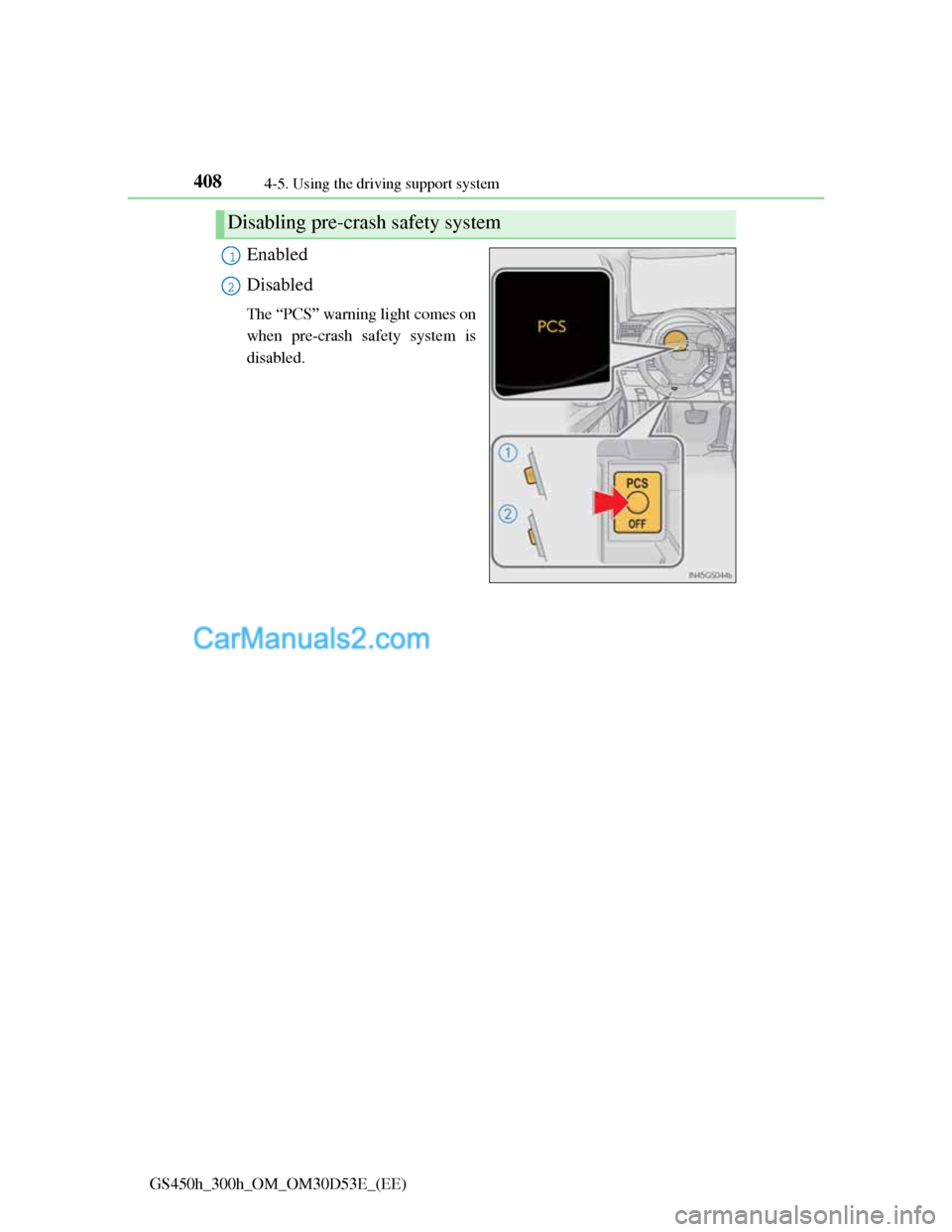
Enabled
Disabled
The “PCS” warning light comes on
when pre-crash safety system is
disabled.
Disabling pre-crash safety system
1
2
Page 423 of 1014
4124-5. Using the driving support system
GS450h_300h_OM_OM30D53E_(EE)
Situations in which the pre-crash safety system does not function properly
The system may not function effectively in situations such as the following:
On roads with sharp bends or uneven surfaces
If a vehicle suddenly moves in front of your vehicle, such as at an intersec-
tion
If a vehicle suddenly cuts in front of your vehicle, such as when overtaking
In inclement weather such as heavy rain, fog, snow or sand storms
When your vehicle is skidding
When your vehicle is steeply inclined
When the radar sensor moves off position due to its surrounding area being
subjected to a strong impact
Automatic cancelation of the pre-crash safety system
When a malfunction occurs due to sensor contamination, etc. that results in
the sensors being unable to detect obstacles, the pre-crash safety system will
be automatically disabled. In this case, the system will not activate even if
there is a collision possibility.
When there is a malfunction in the system, or if the system is temporarily
unusable
“PCS” warning light will flash and warning messages will be displayed.
(P. 832, 841)
Page 426 of 1014
4154-5. Using the driving support system
4
Driving
GS450h_300h_OM_OM30D53E_(EE)
CAUTION
Limitations of the pre-crash safety system
Do not overly rely on the pre-crash safety system. Always drive safely, tak-
ing care to observe your surroundings and checking for any obstacles or
other road hazards.
Failure to do so may cause an accident resulting in death or serious injury.
Handling the radar sensor
Observe the following to ensure the pre-crash safety system can function
effectively. Otherwise, the system may not function correctly and could
result in an accident.
Keep the sensor and grille cover clean at all times.
Clean the sensor and grille cover with a soft cloth so you do not mark or
damage them.
Do not subject the sensor or surrounding area to a strong impact.
If the sensor moves even slightly off position, the system may become
inaccurate or malfunction. If the sensor or surrounding area is subject to a
strong impact, always have the area inspected and adjusted by any autho-
rized Lexus dealer or repairer, or another duly qualified and equipped pro-
fessional.
Do not disassemble the sensor.
Do not attach accessories or stickers to the sensor, grille cover or sur-
rounding area.
Do not modify or paint the sensor and grille cover.
Do not replace them with non-genuine parts.
Determining the direction the driver is facing and whether the driver’s eyes
are open or closed
The direction the driver is facing and whether the driver’s eyes are open or
closed may not be determined correctly if the following conditions exist:
There is an object between the driver monitor sensor and the driver’s face,
such as when the sensor is blocked.
A part of the driver’s face is covered.
The sensor or the driver’s face is exposed to intense light such as sunlight.
The driving posture is improper.
Page 431 of 1014

4204-5. Using the driving support system
GS450h_300h_OM_OM30D53E_(EE)
The outside rear view mirror indicators visibility
When under strong sunlight, the outside rear view mirror indicator may be
difficult to see.
Rear Crossing Traffic Alert buzzer hearing
Rear Crossing Traffic Alert function may be difficult to hear over loud noises
such as high audio volume.
When there is a malfunction in the Blind Spot Monitor
If a system malfunction is detected due to any of the following reasons,
warning messages will be displayed: (P. 845, 855)
There is a malfunction with the sensors
The sensors have become dirty
The outside temperature is extremely high or low
The sensor voltage has become abnormal
Certification for the Blind Spot Monitor
For vehicles sold in Russia
type approval number: POCC DE.ML05.H01144
For vehicles sold in Ukraine
type approval number: 1O094.000966-13
Page 434 of 1014
4234-5. Using the driving support system
4
Driving
GS450h_300h_OM_OM30D53E_(EE)
CAUTION
Handling the radar sensor
Keep the sensor and its surrounding area on the bumper clean at all times.
Do not subject the sensor or surrounding area on the bumper to a strong
impact. If the sensor moves even slightly off position, the system may
malfunction and vehicles that enter the detection area may not be
detected. If the sensor or surrounding area is subject to a strong impact,
always have the area inspected by any authorized Lexus dealer or repairer,
or another duly qualified and equipped professional.
Do not disassemble the sensor.
Do not attach accessories or stickers to the sensor or surrounding area on
the bumper.
Do not modify the sensor or surrounding area on the bumper.
Do not paint the sensor or surrounding area on the bumper.
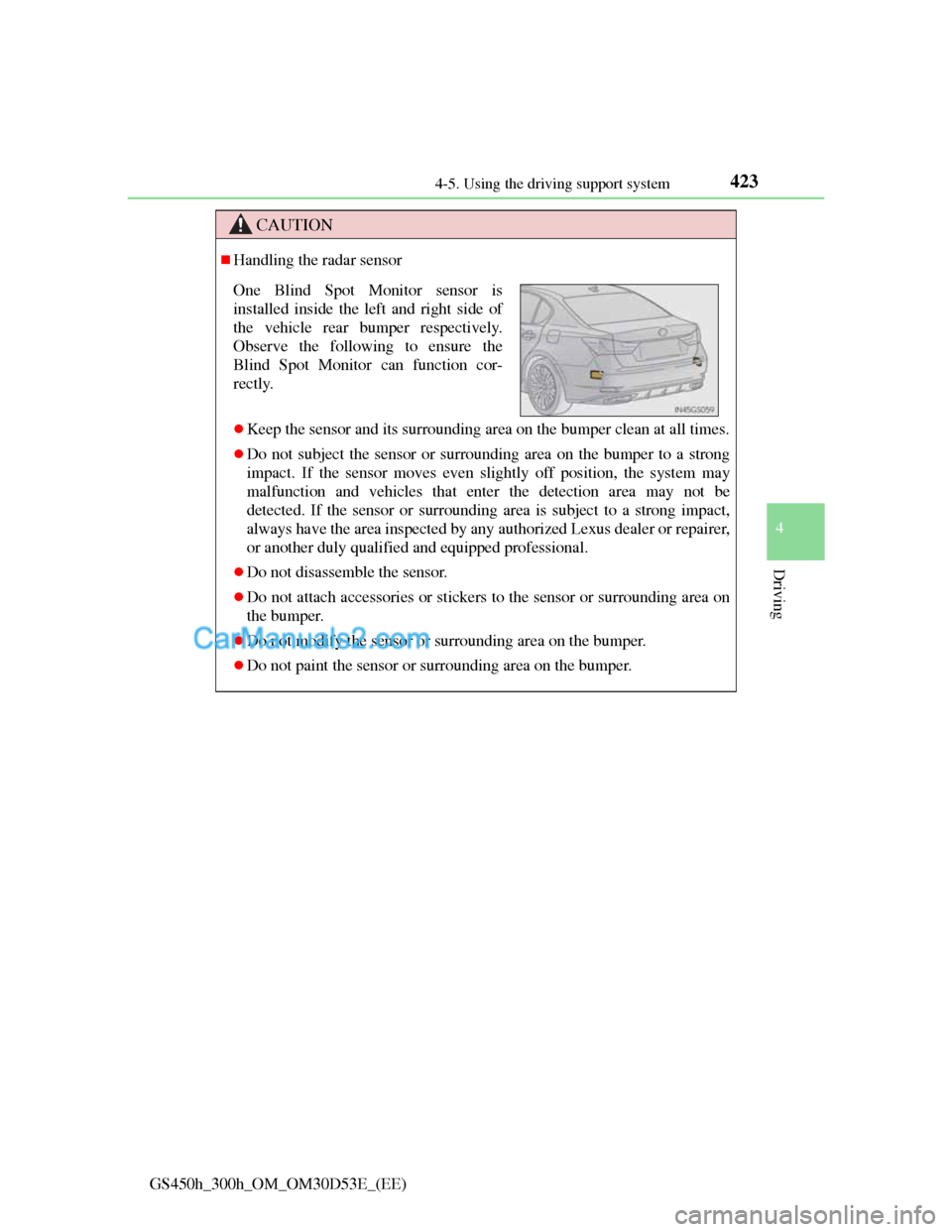
One Blind Spot Monitor sensor is
installed inside the left and right side of
the vehicle rear bumper respectively.
Observe the following to ensure the
Blind Spot Monitor can function cor-
rectly.
Page 441 of 1014
4304-5. Using the driving support system
GS450h_300h_OM_OM30D53E_(EE)
Lexus night view
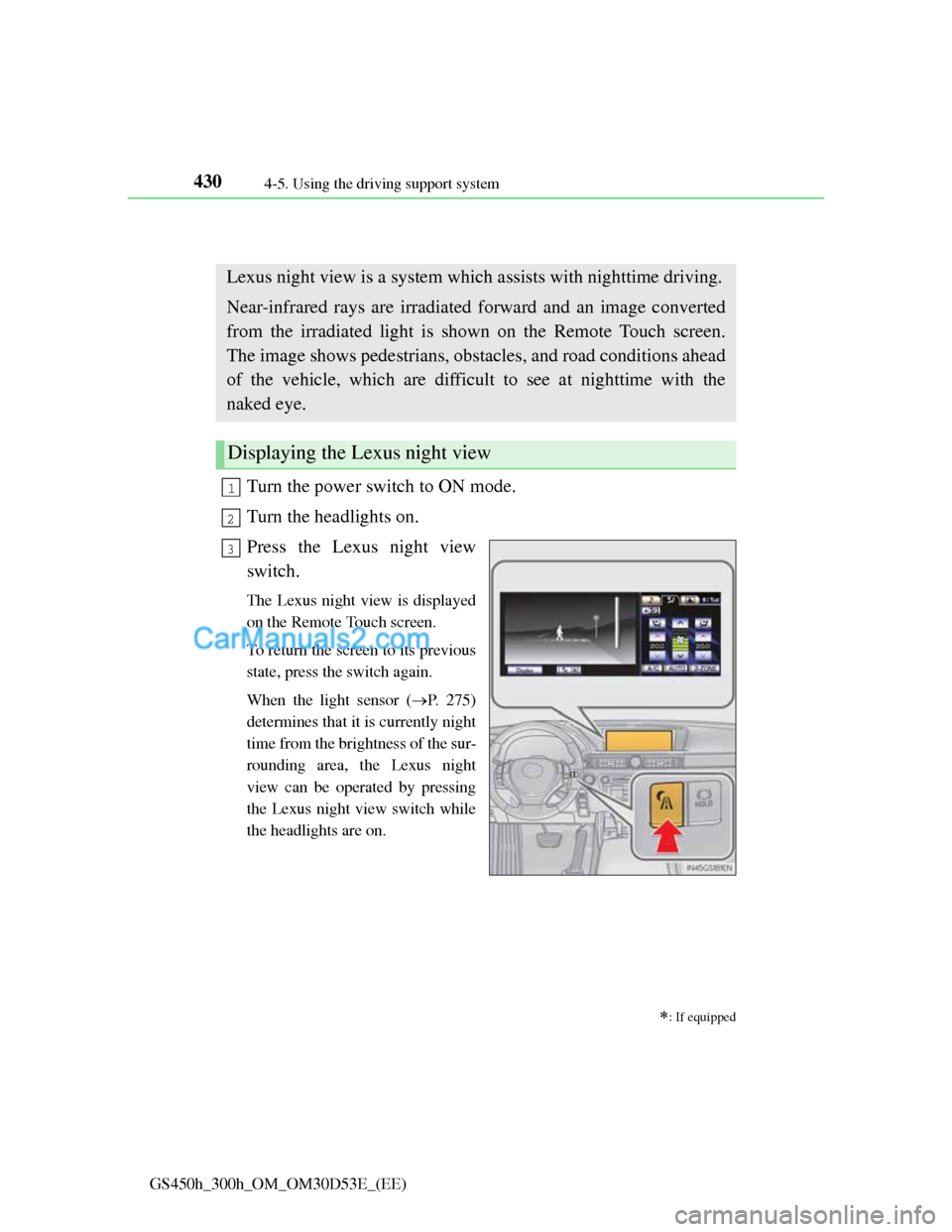
Turn the power switch to ON mode.
Turn the headlights on.
Press the Lexus night view
switch.
The Lexus night view is displayed
on the Remote Touch screen.
To return the screen to its previous
state, press the switch again.
When the light sensor (P. 275)
determines that it is currently night
time from the brightness of the sur-
rounding area, the Lexus night
view can be operated by pressing
the Lexus night view switch while
the headlights are on.
: If equipped
Lexus night view is a system which assists with nighttime driving.
Near-infrared rays are irradiated forward and an image converted
from the irradiated light is shown on the Remote Touch screen.
The image shows pedestrians, obstacles, and road conditions ahead
of the vehicle, which are difficult to see at nighttime with the
naked eye.
Displaying the Lexus night view
1
2
3
Page 446 of 1014
4354-5. Using the driving support system
4
Driving
GS450h_300h_OM_OM30D53E_(EE)
Before using the Lexus night view
Never depend on this system only.
Lexus night view is intended as a supplemental aid to help you see pedestri-
ans and road conditions ahead of the vehicle. As there are limits to the sys-
tem, do not rely solely on the system while in use, and drive safely while
observing the following precautions.
When using the Lexus night view
Observe the following precautions.
Failure to do so may cause an accident resulting in death or serious injury.
Never drive while looking at the Lexus night view screen only.
Do not look continuously at the Lexus night view screen while driving.
Pedestrians, objects etc. ahead of the vehicle may be overlooked by the
system. The system should always be used as a supplemental aid only.
Lexus night view is designed to help you see objects better when driving
in darkness on a road with few curves. Do not use the Lexus night view in
well-lit areas or on roads with many curves or slopes. There may be areas
that cannot be displayed by the system due to the road conditions (curve
size, gradient, etc.)
Lexus night view may be unable to project some features at an appropriate
level of brightness. Some or all parts of certain features may be dark or
difficult to see. Do not rely solely on the Lexus night view, and drive care-
fully while checking the surroundings for safety, as you would with a nor-
mal vehicle. Also, the following features and conditions may not be
displayed clearly.
Features that are difficult to display:
• Clothing of a pedestrian made of a certain kind of material (ex. leather
jackets)
• The characters on signs and billboards
• The information on road signs
Conditions in which display is difficult:
• Unfavorable weather conditions such as rain, fog, snowfall, snow
storms etc.
• There are large puddles of water on the road surface following rainfall
• The area of the front windshield in front of the camera is fogged up,
dirty or icy
• The areas around the headlights are covered with ice, snow, mud etc.
• The 12-volt battery voltage is remarkably low
• There are bright lights ahead of the vehicle
Page 448 of 1014
4374-5. Using the driving support system
4
Driving
GS450h_300h_OM_OM30D53E_(EE)
NOTICE
The near-infrared light
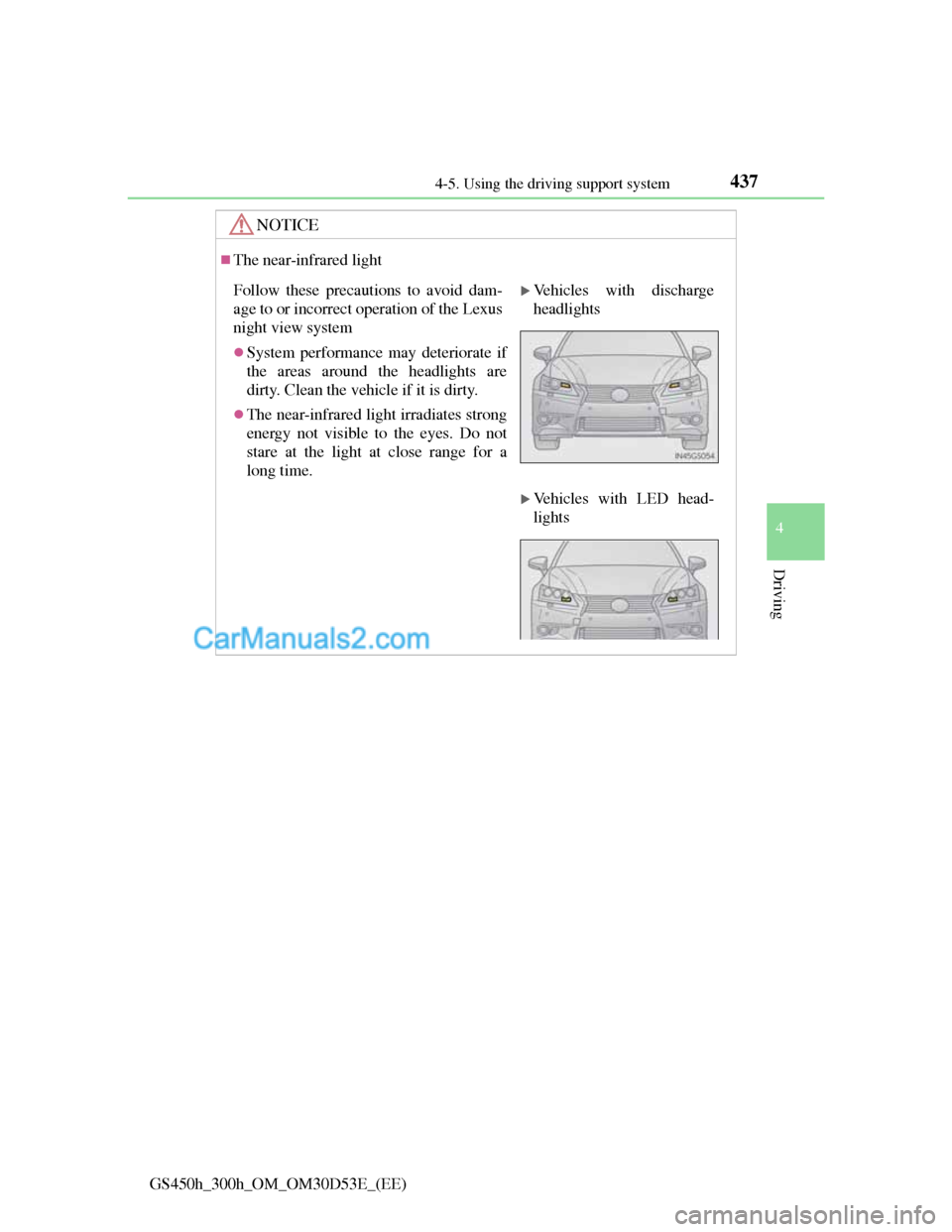
Follow these precautions to avoid dam-
age to or incorrect operation of the Lexus
night view system
System performance may deteriorate if
the areas around the headlights are
dirty. Clean the vehicle if it is dirty.
The near-infrared light irradiates strong
energy not visible to the eyes. Do not
stare at the light at close range for a
long time.
Vehicles with discharge
headlights
Vehicles with LED head-
lights