radio Lexus GS300h 2013 User Guide
[x] Cancel search | Manufacturer: LEXUS, Model Year: 2013, Model line: GS300h, Model: Lexus GS300h 2013Pages: 1014
Page 155 of 1014
1543-2. Opening, closing and locking the doors and trunk
GS450h_300h_OM_OM30D53E_(EE)
Electronic key battery depletion
The standard battery life is 1 to 2 years. (The card key battery life is about a
year and a half.)
If the battery becomes low, an alarm will sound in the cabin when the
hybrid system stops. (P. 867)
As the electronic key always receives radio waves, the battery will become
depleted even if the electronic key is not used. The following symptoms
indicate that the electronic key battery may be depleted. Replace the battery
when necessary. (P. 777)
• The smart entry & start system or the wireless remote control does not
operate.
• The detection area becomes smaller.
• The LED indicator on the key surface does not turn on.
To avoid serious deterioration, do not leave the electronic key within 1 m (3
ft.) of the following electrical appliances that produce a magnetic field:
•TVs
• Personal computers
• Cellular phones, cordless phones and battery chargers
• Recharging cellular phones or cordless phones
•Table lamps
• Induction cookers
When the electronic key battery is fully depleted
P. 7 7 7
Customization
Settings (e. g. smart entry & start system) can be changed.
(Customizable features: P. 942)
If the smart entry & start system has been deactivated in a customized setting
Locking and unlocking the doors and opening the trunk:
Use the wireless remote control or mechanical key. (P. 168, 908)
Starting the hybrid system and changing power switch modes:P. 9 0 9
Stopping the hybrid system: P. 2 4 7
Page 168 of 1014
1673-2. Opening, closing and locking the doors and trunk
3
Operation of each component
GS450h_300h_OM_OM30D53E_(EE)Hereby, DENSO CORPORATION declares that this 14CCA is in compli-
ance with the essential requirements and other relevant provisions of Direc-
tive 1999/5/EC.
For vehicles sold in Montenegro
CAUTION
Caution regarding interference with electronic devices
People with implantable cardiac pacemakers, cardiac resynchronization
therapy-pacemakers or implantable cardioverter defibrillators should
maintain a reasonable distance between themselves and the smart entry &
start system antennas. (P. 145)
The radio waves may affect the operation of such devices. If necessary,
the entry function can be disabled. Ask any authorized Lexus dealer or
repairer, or another duly qualified and equipped professional for details,
such as the frequency of radio waves and timing of the emitted radio
waves. Then, consult your doctor to see if you should disable the entry
function.
Users of any electrical medical device other than implantable cardiac
pacemakers, cardiac resynchronization therapy-pacemakers or implant-
able cardioverter defibrillators should consult the manufacturer of the
device for information about its operation under the influence of radio
waves.
Radio waves could have unexpected effects on the operation of such med-
ical devices.
Ask any authorized Lexus dealer or repairer, or another duly qualified and
equipped professional for details on disabling the entry function.
Page 190 of 1014
1893-2. Opening, closing and locking the doors and trunk
3
Operation of each component
GS450h_300h_OM_OM30D53E_(EE)
Trunk light
The trunk light turns on when the trunk is opened.
Trunk easy closer (vehicles with power trunk lid)
In the event that the trunk lid is left slightly open, the trunk easy closer will
automatically close it to the fully closed position.
Function to prevent the trunk being locked with the electronic key inside
When all doors are being locked, closing the trunk lid with the electronic
key left inside the trunk will sound an alarm.
In this case, the trunk lid can be opened pressing the trunk release button on
the trunk lid.
Even when the spare electronic key is put in the trunk with all the doors
locked, the key confinement prevention function can be activated so the
trunk can be opened. In order to prevent theft, take all electronic keys with
you when leaving the vehicle.
Even when the electronic key is put in the trunk with all the doors are
locked, the key may not be detected depending on the places and the sur-
rounding radio wave conditions. In this case, the key confinement preven-
tion function cannot be activated, causing the doors to lock when the trunk
is closed. Make sure to check where the key is before closing the trunk.
The key confinement prevention function cannot be activated if any one of
the doors is unlocked. In this case, open the trunk using the trunk opener.
Overload protection function (vehicles with power trunk lid)
The trunk lid will not operate when excessive load is present on the top of the
trunk lid.
Fall-down protection function (vehicles with power trunk lid)
While the trunk lid is opening automatically, applying excessive force to it
will stop the opening operation to prevent the trunk lid from rapidly falling
down.
Page 457 of 1014
440
GS450h_300h_OM_OM30D53E_(EE)5-1. Remote Touch screen
Remote Touch ................... 442
Remote Touch screen ........ 444
Set up screen ..................... 452
Speech command system .. 470
5-2. Using the air conditioning
system and defogger
Front automatic
air conditioning system ... 478
Rear
air conditioning system ... 494
Rear window and outside
rear view mirror
defoggers......................... 499
Windshield wiper de-icer .. 5005-3. Using the audio system
Audio system type ............ 501
Using the radio.................. 526
Using the CD/DVD
player .............................. 534
Playing an audio CD and
MP3/WMA discs ............ 536
Playing DVD video .......... 542
CD/DVD player and DVD
video disc information .... 555
Listening to
Bluetooth
® audio ............ 565
Listening to
a USB memory ............... 577
Listening to an iPod .......... 588
Optimal use of
the audio/video system ... 599
Using the AUX port.......... 601
Using the rear seat
audio controls ................. 603
Using the steering wheel
audio switches ................ 608
Page 487 of 1014
4705-1. Remote Touch screen
GS450h_300h_OM_OM30D53E_(EE)
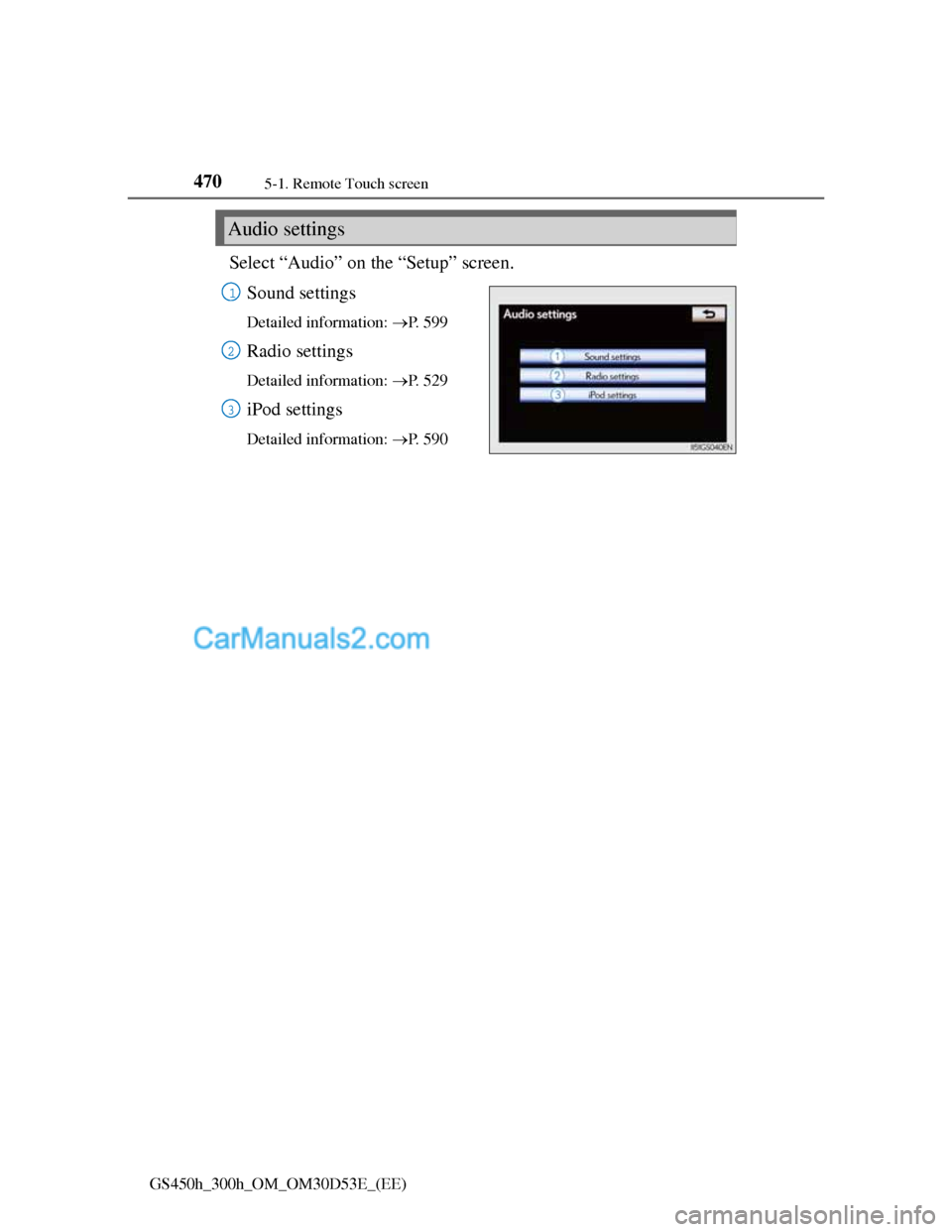
Select “Audio” on the “Setup” screen.
Sound settings
Detailed information: P. 5 9 9
Radio settings
Detailed information: P. 5 2 9
iPod settings
Detailed information: P. 5 9 0
Audio settings
1
2
3
Page 521 of 1014
501
5 5-3. Using the audio system
Interior features
GS450h_300h_OM_OM30D53E_(EE)
Audio system type
CD and DVD player with AM/FM radio
Vehicles with a 12.3-inch display: The audio functions can be dis-
played and operated on the “Side Display”. For details, refer to the
“Navigation System Owner’s Manual”.
The illustration below is for left-hand drive vehicles with a 8-inch
display.
The button positions and shapes will differ for right-hand drive
vehicles.
Also, the display and button positions will differ depending on the
type of the system.
Using the instrument panel
Press the “RADIO” or “MEDIA” button to display the audio
control screen.
Using the Remote Touch
Press the “MENU” button on the Remote Touch, select
“Audio” and select each tab to display the audio control screen.
Page 523 of 1014
5035-3. Using the audio system
5
Interior features
GS450h_300h_OM_OM30D53E_(EE)
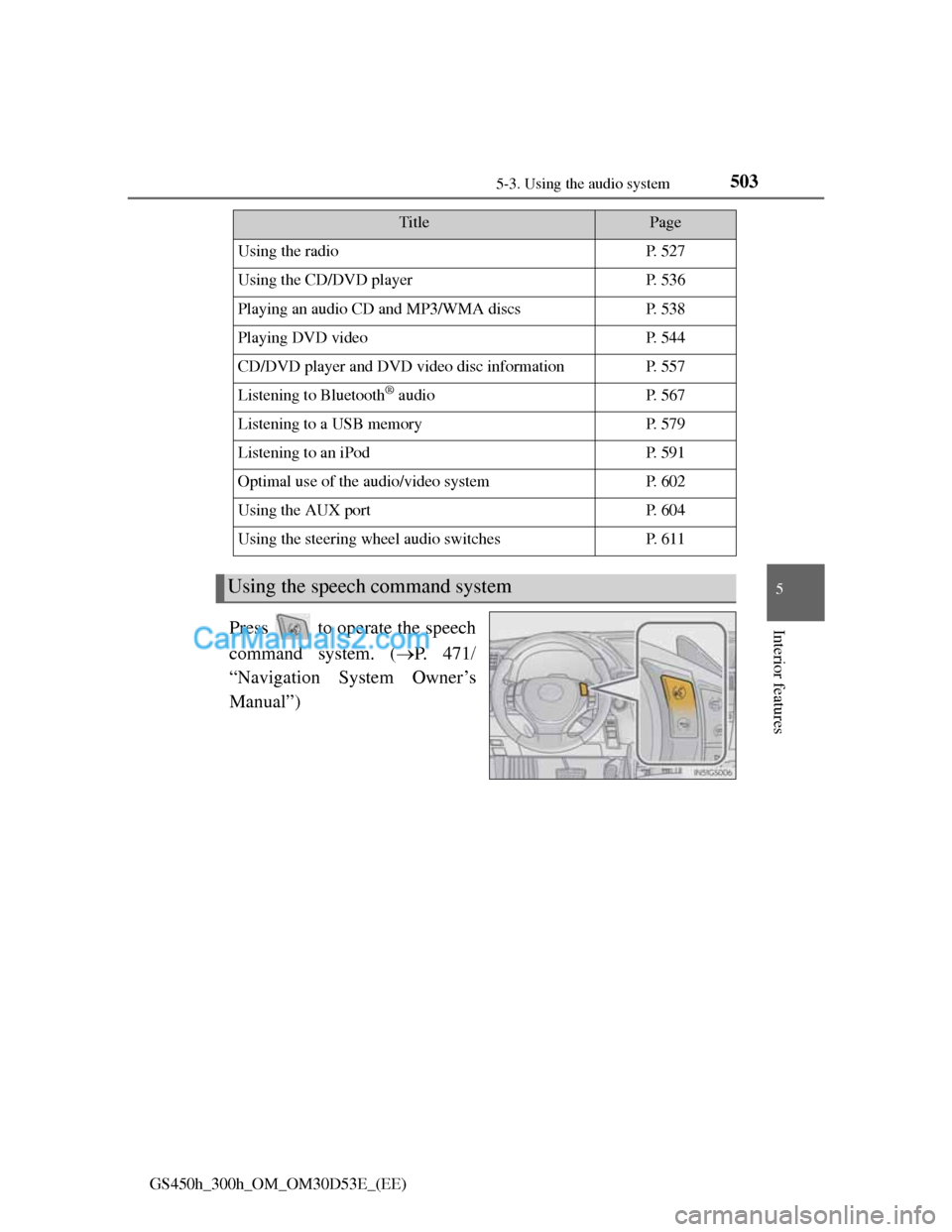
Press to operate the speech
command system. (P. 4 7 1
“Navigation System Owner’s
Manual”)
TitlePage
Using the radioP. 5 2 7
Using the CD/DVD playerP. 5 3 6
Playing an audio CD and MP3/WMA discsP. 5 3 8
Playing DVD videoP. 5 4 4
CD/DVD player and DVD video disc informationP. 5 5 7
Listening to Bluetooth® audioP. 5 6 7
Listening to a USB memoryP. 5 7 9
Listening to an iPodP. 5 9 1
Optimal use of the audio/video systemP. 6 0 2
Using the AUX portP. 6 0 4
Using the steering wheel audio switchesP. 6 1 1
Using the speech command system
Page 547 of 1014
5275-3. Using the audio system
5
Interior features
GS450h_300h_OM_OM30D53E_(EE)
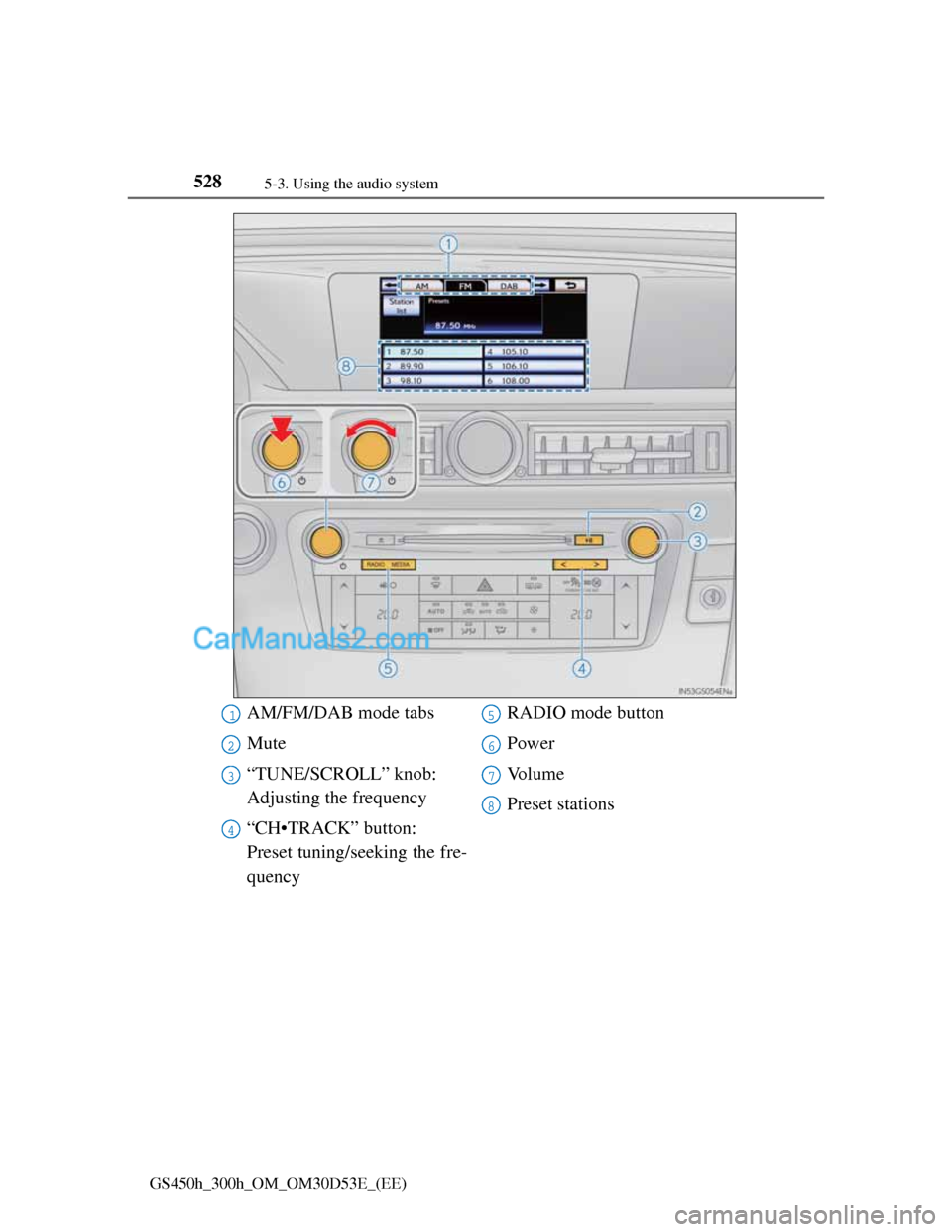
Using the radio
Press the “RADIO” button to display the radio control screen.
Select the “AM”, “FM” or “DAB” tab or press the “RADIO” but-
ton repeatedly to select the desired tab.
Page 548 of 1014
5285-3. Using the audio system
GS450h_300h_OM_OM30D53E_(EE)
AM/FM/DAB mode tabs
Mute
“TUNE/SCROLL” knob:
Adjusting the frequency
“CH•TRACK” button:
Preset tuning/seeking the fre-
quencyRADIO mode button
Power
Vo l u m e
Preset stations1
2
3
4
5
6
7
8
Page 550 of 1014
5305-3. Using the audio system
GS450h_300h_OM_OM30D53E_(EE)
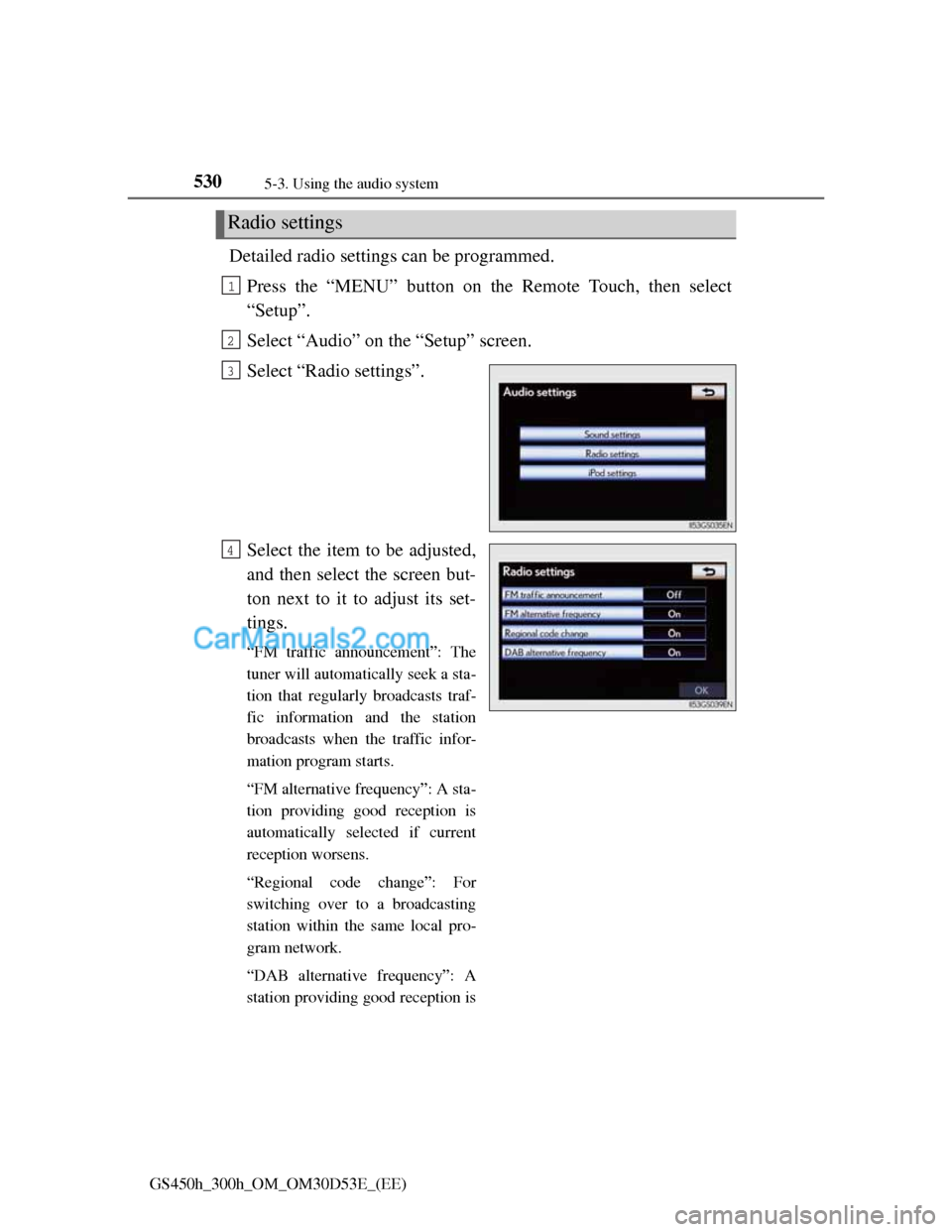
Detailed radio settings can be programmed.
Press the “MENU” button on the Remote Touch, then select
“Setup”.
Select “Audio” on the “Setup” screen.
Select “Radio settings”.
Select the item to be adjusted,
and then select the screen but-
ton next to it to adjust its set-
tings.
“FM traffic announcement”: The
tuner will automatically seek a sta-
tion that regularly broadcasts traf-
fic information and the station
broadcasts when the traffic infor-
mation program starts.
“FM alternative frequency”: A sta-
tion providing good reception is
automatically selected if current
reception worsens.
“Regional code change”: For
switching over to a broadcasting
station within the same local pro-
gram network.
“DAB alternative frequency”: A
station providing good reception is
Radio settings
1
2
3
4