tow Lexus GS300h 2013 Service Manual
[x] Cancel search | Manufacturer: LEXUS, Model Year: 2013, Model line: GS300h, Model: Lexus GS300h 2013Pages: 1014
Page 440 of 1014
4294-5. Using the driving support system
4
Driving
GS450h_300h_OM_OM30D53E_(EE)
Conditions under which the Rear Crossing Traffic Alert function will not
detect a vehicle
The Rear Crossing Traffic Alert function is not designed to detect the follow-
ing types of vehicles and/or objects.
Small motorcycles, bicycles, pedestrians etc.*
Vehicles approaching from directly behind
Guardrails, walls, signs, parked vehicles and similar stationary objects*
Vehicles moving away from your vehicle
Vehicles approaching from the parking spaces next to your vehicle*
Vehicles backing up in the parking space next to your vehicle*
*
: Depending on conditions, detection of a vehicle and/or object may occur.
Conditions under which the Rear Crossing Traffic Alert function may not
function correctly
The Rear Crossing Traffic Alert function may not detect vehicles correctly in
the following conditions:
During bad weather such as heavy rain, fog, snow etc.
When ice or mud etc. is attached to the rear bumper
When multiple vehicles approach continuously
Shallow angle parking
When a vehicle is approaching at high speed
When parking on a steep incline, such as hills, a dip in the road etc.
Directly after the BSM main switch is set to on
When your vehicle is towing a trailer
When items such as a bicycle carrier are installed on the rear of the vehicle
Directly after the hybrid system is started with the BSM main switch on
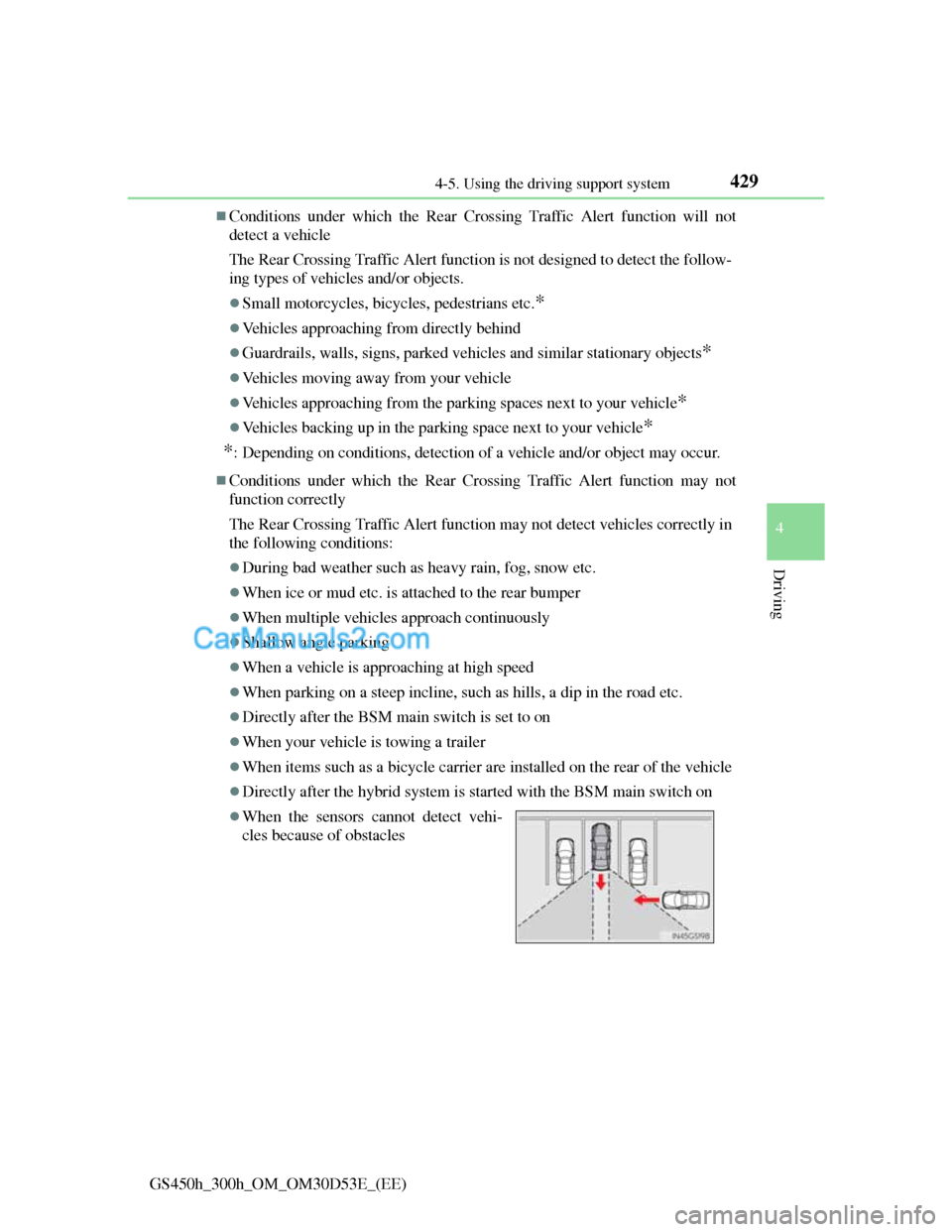
When the sensors cannot detect vehi-
cles because of obstacles
Page 495 of 1014
4785-1. Remote Touch screen
GS450h_300h_OM_OM30D53E_(EE)
When using the microphone
It is unnecessary to speak directly into the microphone when giving a com-
mand.
Wait for the confirmation beep before speaking a command.
Speech commands may not be recognized if:
• Spoken too quickly.
• Spoken at a low or high volume.
• The roof or windows are open.
• Passengers are talking while speech commands are spoken.
• The air conditioning speed is set high.
• The air conditioning vents are turned towards the microphone.
In the following conditions, the system may not recognize the command
properly and using speech commands may not be possible:
• The command is incorrect or unclear. Note that certain words, accents or
speech patterns may be difficult for the system to recognize.
• There is excessive background noise, such as wind noise.
When searching for a track
A USB memory or iPod must be connected to enable track searching and
playback. (P. 579, 590)
When a USB memory or iPod is connected, recognition data is created so
tracks can be searched using speech commands.
Recognition data is updated under the following conditions:
• When the USB memory or iPod data has changed.
• When the voice recognition language is changed. (P. 456)
While the recognition data is being created or being updated, a track search
cannot be performed using a speech command.
When “Play music” is dimmed in the “Shortcuts” screen, it is not possible
to search for a track using a speech command. In this situation, reduce the
amount of music data in the USB memory or iPod and update the recogni-
tion data to enable searching by speech command.
Page 638 of 1014
6155-4. Using the hands-free phone system(for cellular phone)
5
Interior features
GS450h_300h_OM_OM30D53E_(EE)
When using the hands-free system
The audio system is muted when making a call.
If both parties speak at the same time, it may be difficult to hear.
If the incoming call volume is overly loud, an echo may be heard.
Try to face toward the microphone as much as possible when speaking.
In the following circumstances, it may be difficult to hear the other party:
• When driving on unpaved roads
• When driving at high speeds
• If a window is open
• If the air conditioning is blowing directly on the microphone
• If the air conditioning is set to high
• There is an effect from the network of the cellular phone
Conditions under which the system will not operate
If using a cellular phone that does not support Bluetooth®
If the cellular phone is turned off
If you are outside service range
If the cellular phone is not connected
If the cellular phone’s battery is low
Bluetooth® antenna
The antenna is built into the instrument panel. If the cellular phone is behind
the seat or in the console box, or touching or covered by metal objects, con-
nection status may deteriorate.
Battery charge/Signal status
This display may not correspond exactly with the cellular phone itself.
When the cellular phone is not connected, “No connect” is displayed.
When the cellular phone is out of the service area or in a place inaccessible
by radio waves, “No service” is displayed.
When using Bluetooth® audio and hands-free system at the same time
The following problems may occur.
The Bluetooth® connection may be cut.
Noise may be heard on the Bluetooth® audio playback.
Page 715 of 1014
6915-6. Using the storage featurers
5
Interior features
GS450h_300h_OM_OM30D53E_(EE)
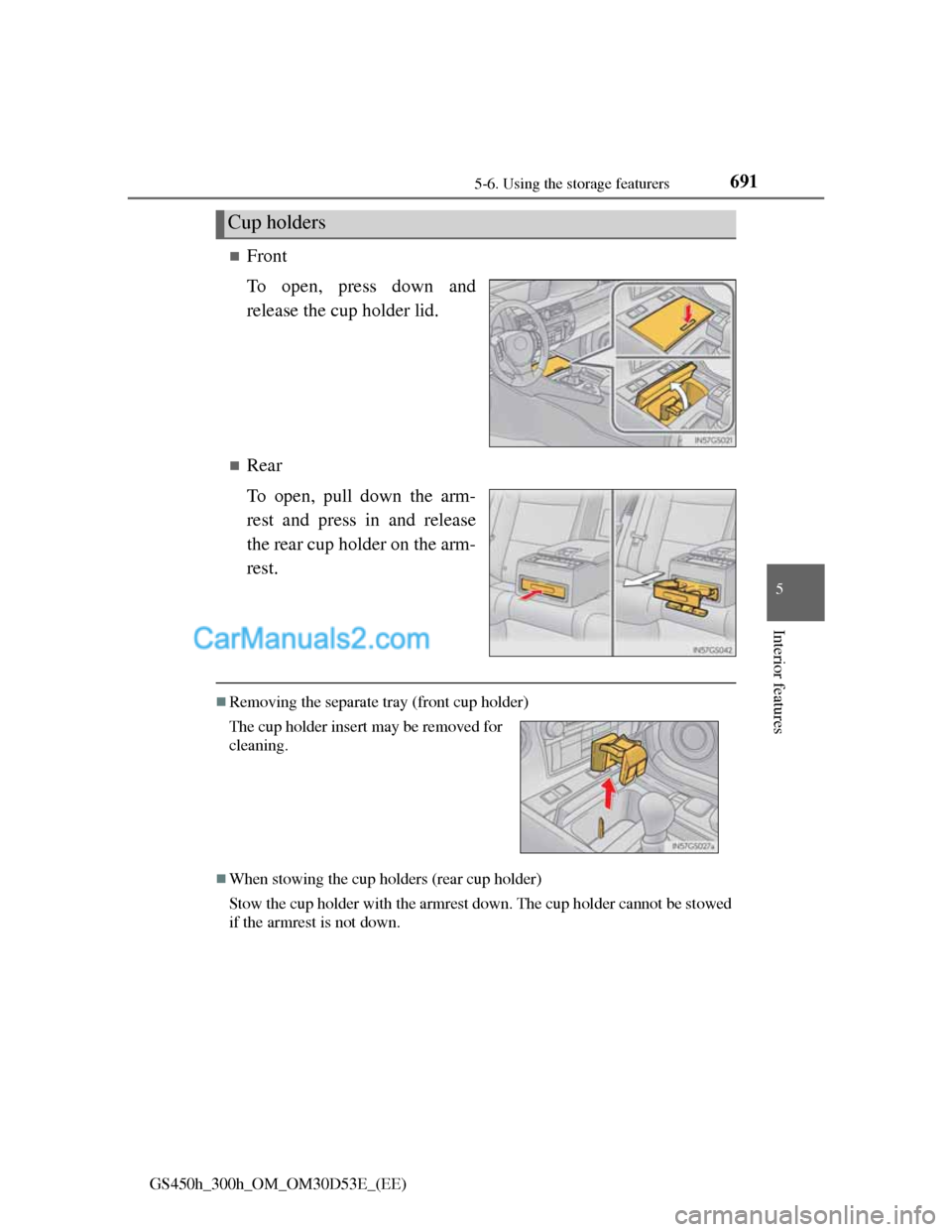
Front
To open, press down and
release the cup holder lid.
Rear
To open, pull down the arm-
rest and press in and release
the rear cup holder on the arm-
rest.
Removing the separate tray (front cup holder)
When stowing the cup holders (rear cup holder)
Stow the cup holder with the armrest down. The cup holder cannot be stowed
if the armrest is not down.
Cup holders
The cup holder insert may be removed for
cleaning.
Page 716 of 1014
6925-6. Using the storage featurers
GS450h_300h_OM_OM30D53E_(EE)
CAUTION
Items unsuitable for the cup holders
Do not place anything other than cups or aluminum cans in the cup holders.
Other items may be thrown out of the holders in the event of an accident or
sudden braking, causing injury. If possible, cover hot drinks to prevent
burns.
NOTICE
To prevent damage to the rear cup holder
Stow the cup holder before stowing the armrest.
Page 720 of 1014
6965-6. Using the storage featurers
GS450h_300h_OM_OM30D53E_(EE)
CAUTION
When the cargo hooks are not in use
To avoid injury, always return the cargo hooks to their stowed positions.
NOTICE
Luggage hook weight capacity
Do not hang any object heavier than 5 kg (11 lb.) on the luggage hook.
Page 741 of 1014
717
5 5-7. Other interior features
Interior features
GS450h_300h_OM_OM30D53E_(EE)
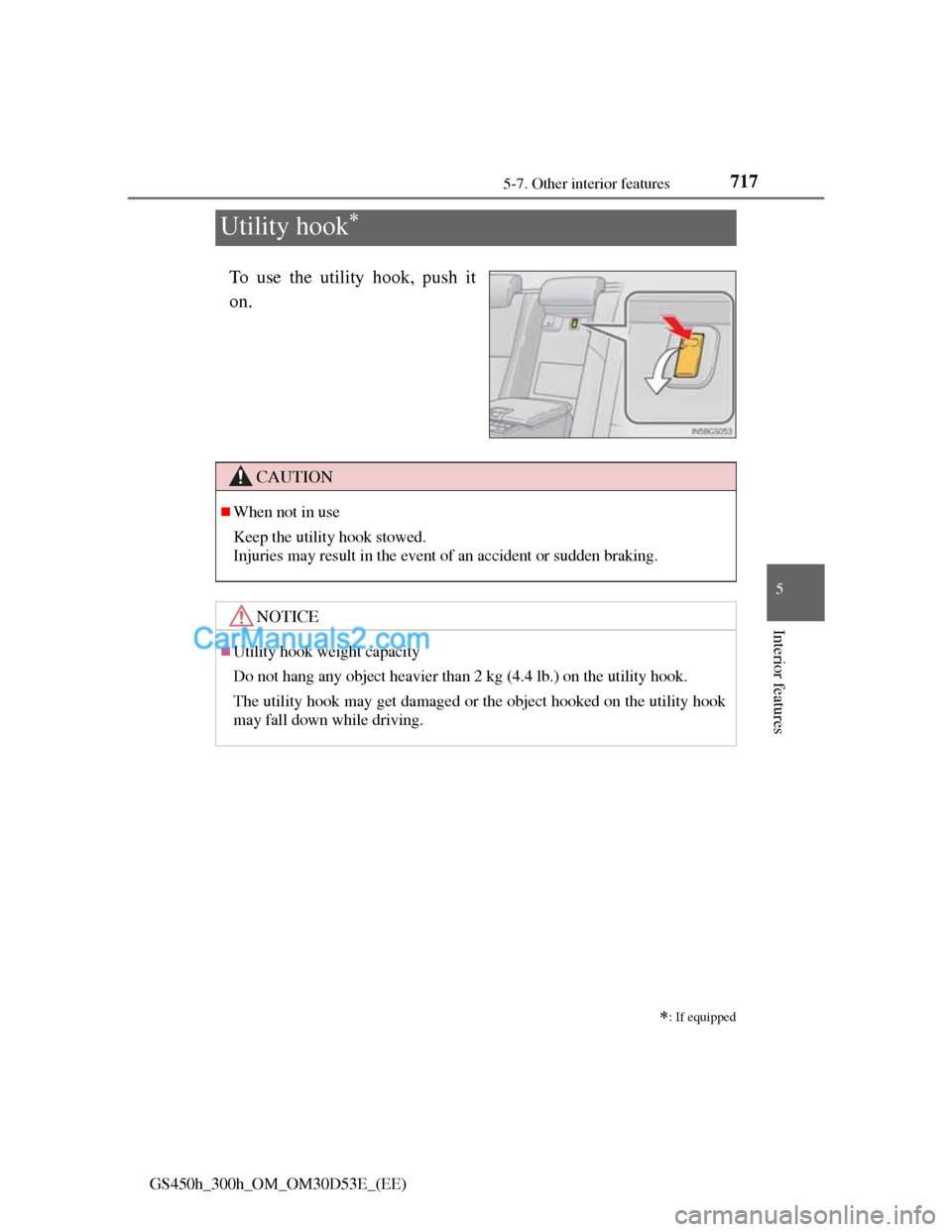
Utility hook
To use the utility hook, push it
on.
: If equipped
CAUTION
When not in use
Keep the utility hook stowed.
Injuries may result in the event of an accident or sudden braking.
NOTICE
Utility hook weight capacity
Do not hang any object heavier than 2 kg (4.4 lb.) on the utility hook.
The utility hook may get damaged or the object hooked on the utility hook
may fall down while driving.
Page 755 of 1014
731
6 6-3. Do-it-yourself maintenance
Maintenance and care
GS450h_300h_OM_OM30D53E_(EE)
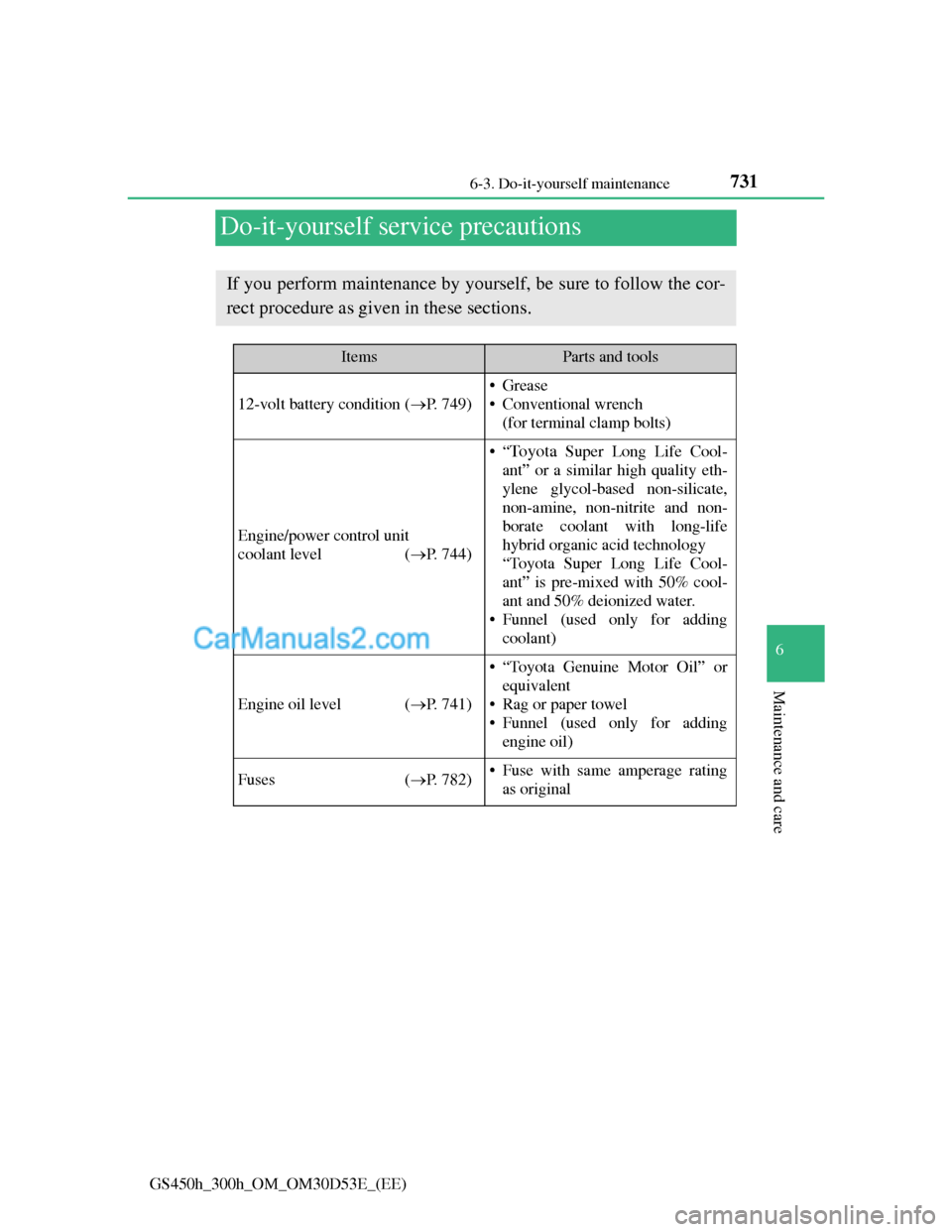
Do-it-yourself service precautions
If you perform maintenance by yourself, be sure to follow the cor-
rect procedure as given in these sections.
ItemsParts and tools
12-volt battery condition (P. 749)
•Grease
• Conventional wrench
(for terminal clamp bolts)
Engine/power control unit
coolant level (P. 744)
•“To y o t a Super Long Life Cool-
ant” or a similar high quality eth-
ylene glycol-based non-silicate,
non-amine, non-nitrite and non-
borate coolant with long-life
hybrid organic acid technology
“Toyota Super Long Life Cool-
ant” is pre-mixed with 50% cool-
ant and 50% deionized water.
• Funnel (used only for adding
coolant)
Engine oil level (P. 741)
• “Toyota Genuine Motor Oil” or
equivalent
• Rag or paper towel
• Funnel (used only for adding
engine oil)
Fuses (P. 782)• Fuse with same amperage rating
as original
Page 767 of 1014
743 6-3. Do-it-yourself maintenance
6
Maintenance and care
GS450h_300h_OM_OM30D53E_(EE)
Engine oil consumption
A certain amount of engine oil will be consumed while driving. In the fol-
lowing situations, oil consumption may increase, and engine oil may need to
be refilled in between oil maintenance intervals.
When the engine is new, for example directly after purchasing the vehicle
or after replacing the engine
If low quality oil or oil of an inappropriate viscosity is used
When driving at high engine speeds or with a heavy load, when towing, or
when driving while accelerating or decelerating frequently
When leaving the engine idling for a long time, or when driving frequently
through heavy traffic
CAUTION
Used engine oil
Used engine oil contains potentially harmful contaminants which may
cause skin disorders such as inflammation and skin cancer, so care should
be taken to avoid prolonged and repeated contact. To remove used engine
oil from your skin, wash thoroughly with soap and water.
Dispose of used oil and filters only in a safe and acceptable manner. Do
not dispose of used oil and filters in household trash, in sewers or onto the
ground.
Call any authorized Lexus dealer or repairer, or another duly qualified and
equipped professional, service station or auto parts store for information
concerning recycling or disposal.
Do not leave used engine oil within the reach of children.
NOTICE
To prevent serious engine damage
Check the oil level on a regular basis.
When replacing the engine oil
Be careful not to spill engine oil on the vehicle components.
Avoid overfilling, or the engine could be damaged.
Check the oil level on the dipstick every time you refill the vehicle.
Be sure the engine oil filler cap is properly tightened.
Page 784 of 1014
7606-3. Do-it-yourself maintenance
GS450h_300h_OM_OM30D53E_(EE)
Low profile tires (except 225/50R17 tires)
Generally, low profile tires will wear more rapidly and tire grip performance
will be reduced on snowy and/or icy roads when compared to standard tires.
Be sure to use snow tires or tire chains on snowy and/or icy roads and drive
carefully at a speed appropriate for road and weather conditions. (P. 436)
If the tread on snow tires wears down below 4 mm (0.16 in.)
The effectiveness of the tires as snow tires is lost.
Situations in which the tire pressure warning system may not operate properly
(vehicles with the tire pressure warning system)
In the following cases, the tire pressure warning system may not operate
properly.
• If non-genuine Lexus wheels are used.
• A tire has been replaced with a tire that is not an OE (Original Equip-
ment) tire.
• A tire has been replaced with a tire that is not of the specified size.
• Tire chains etc. are equipped.
• Lock nuts are equipped.
• An auxiliary-supported run-flat tire is equipped.
• If a window tint that affects the radio wave signals is installed.
• If there is a lot of snow or ice on the vehicle, particularly around the
wheels or wheel housings.
• If the tire inflation pressure is extremely higher than the specified level.
Performance may be affected in the following situations.
• Near a TV tower, electric power plant, gas station, radio station, large
display, airport or other facility that generates strong radio waves or elec-
trical noise
• When carrying a portable radio, cellular phone, cordless phone or other
wireless communication device
Vehicles with the tire inflation pressure display function: If tire position
information is not correctly displayed due to the radio wave conditions, the
display may be corrected by driving and changing the radio wave condi-
tions.
When the vehicle is parked, the time taken for the warning to start or go off
could be extended.
When tire inflation pressure declines rapidly for example when a tire has
burst, the warning may not function.