tow Lexus GS300h 2013 Owner's Guide
[x] Cancel search | Manufacturer: LEXUS, Model Year: 2013, Model line: GS300h, Model: Lexus GS300h 2013Pages: 1014
Page 302 of 1014
2924-3. Operating the lights and wipers
GS450h_300h_OM_OM30D53E_(EE)
NOTICE
When the windshield is dry
Do not use the wipers, as they may damage the windshield.
When there is no washer fluid spray from the nozzle
Damage to the washer fluid pump may be caused if the lever is pulled
toward you and held continually.
When a nozzle becomes blocked
In this case, contact any authorized Lexus dealer or repairer, or another
duly qualified and equipped professional.
Do not try to clear it with a pin or other object. The nozzle will be damaged.
When standing the windshield wipers up
Raise the wipers in line with the windshield. (P. 437)
Failure to do so may result in damage to the wipers and/or the hood.
Page 310 of 1014
2994-5. Using the driving support system
4
Driving
GS450h_300h_OM_OM30D53E_(EE)
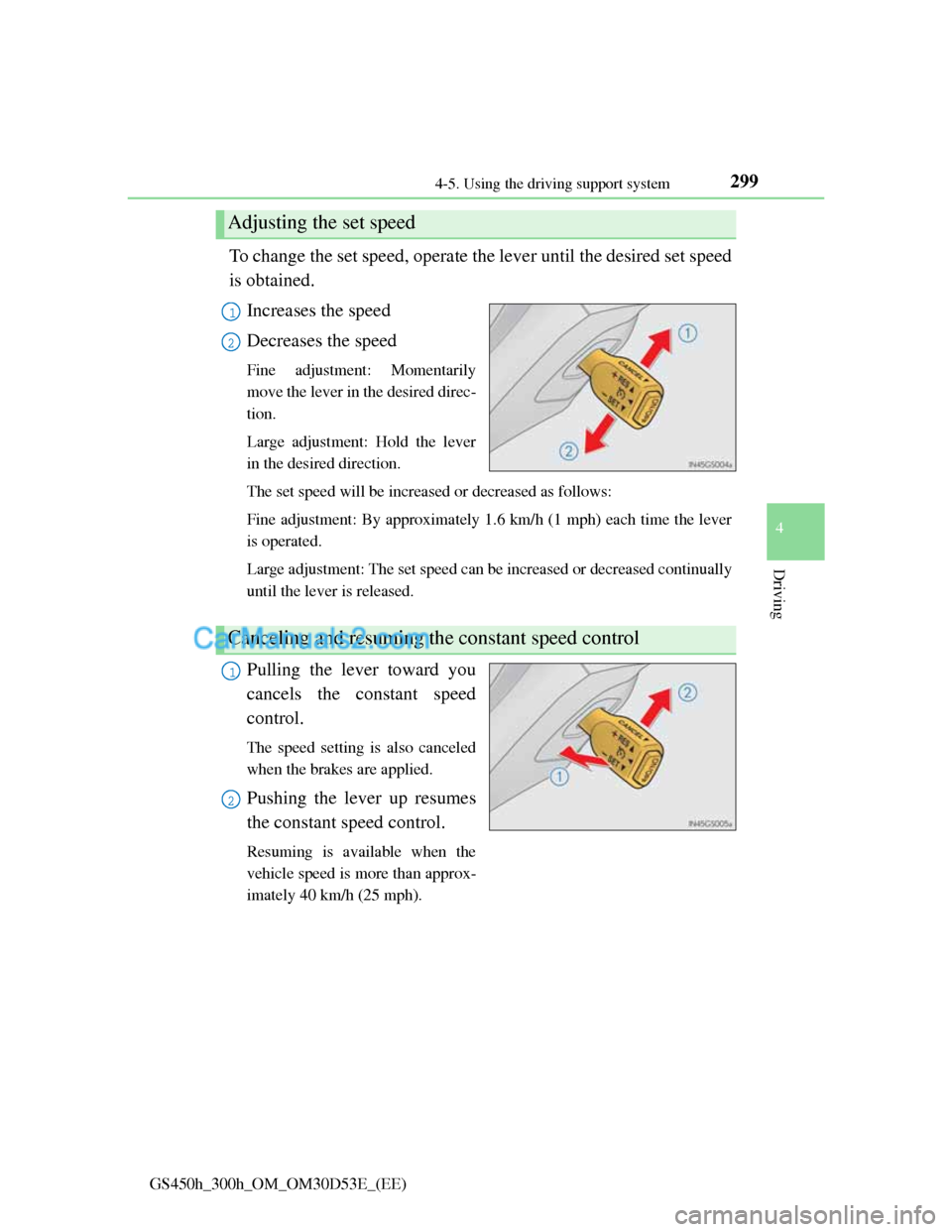
To change the set speed, operate the lever until the desired set speed
is obtained.
Increases the speed
Decreases the speed
Fine adjustment: Momentarily
move the lever in the desired direc-
tion.
Large adjustment: Hold the lever
in the desired direction.
The set speed will be increased or decreased as follows:
Fine adjustment: By approximately 1.6 km/h (1 mph) each time the lever
is operated.
Large adjustment: The set speed can be increased or decreased continually
until the lever is released.
Pulling the lever toward you
cancels the constant speed
control.
The speed setting is also canceled
when the brakes are applied.
Pushing the lever up resumes
the constant speed control.
Resuming is available when the
vehicle speed is more than approx-
imately 40 km/h (25 mph).
Adjusting the set speed
1
2
Canceling and resuming the constant speed control
1
2
Page 312 of 1014
3014-5. Using the driving support system
4
Driving
GS450h_300h_OM_OM30D53E_(EE)
CAUTION
To avoid operating the cruise control by mistake
Switch the cruise control off using the “ON/OFF” button when not in use.
Situations unsuitable for cruise control
Do not use cruise control in any of the following situations.
Doing so may result in loss of control and could cause an accident resulting
in death or serious injury.
In heavy traffic
On roads with sharp bends
On winding roads
On slippery roads, such as those covered with rain, ice or snow
On steep hills
Vehicle speed may exceed the set speed when driving down a steep hill.
When your vehicle is towing a trailer or during emergency towing
Page 317 of 1014
3064-5. Using the driving support system
GS450h_300h_OM_OM30D53E_(EE)
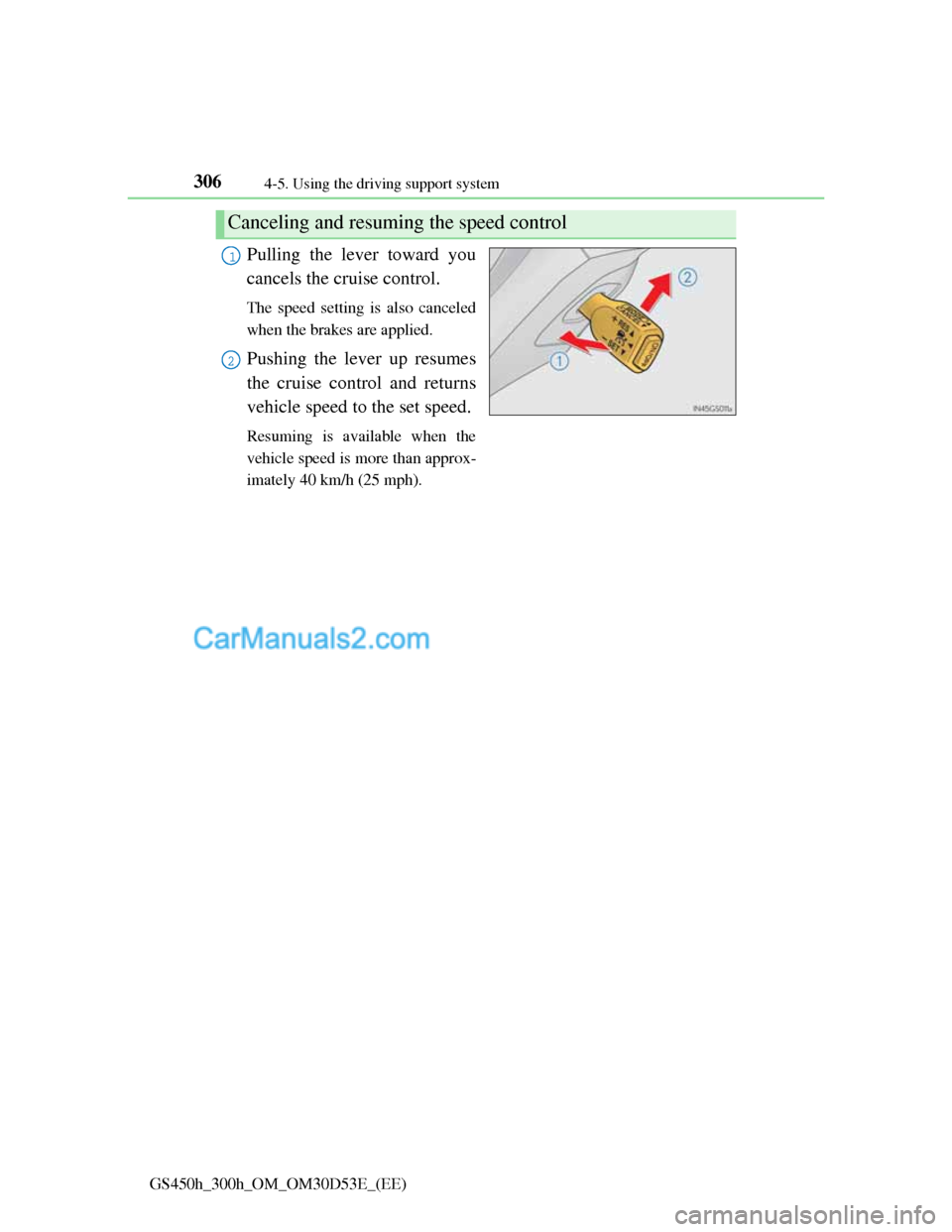
Pulling the lever toward you
cancels the cruise control.
The speed setting is also canceled
when the brakes are applied.
Pushing the lever up resumes
the cruise control and returns
vehicle speed to the set speed.
Resuming is available when the
vehicle speed is more than approx-
imately 40 km/h (25 mph).
Canceling and resuming the speed control
1
2
Page 327 of 1014
3164-5. Using the driving support system
GS450h_300h_OM_OM30D53E_(EE)
CAUTION
To avoid inadvertent cruise control activation
Switch the cruise control off using the “ON/OFF” button when not in use.
Situations unsuitable for dynamic radar cruise control
Do not use dynamic radar cruise control in any of the following situations.
Doing so may result in inappropriate speed control and could cause an acci-
dent resulting in death or serious injury.
In heavy traffic
On roads with sharp bends
On winding roads
On slippery roads, such as those covered with rain, ice or snow
On steep downhills, or where there are sudden changes between sharp up
and down gradients
Vehicle speed may exceed the set speed when driving down a steep hill.
At entrances to expressways
When weather conditions are bad enough that they may prevent the sen-
sors from functioning correctly (fog, snow, sandstorm, heavy rain, etc.)
When an approach warning buzzer is heard often
When your vehicle is towing a trailer or during emergency towing
Page 335 of 1014
3244-5. Using the driving support system
GS450h_300h_OM_OM30D53E_(EE)
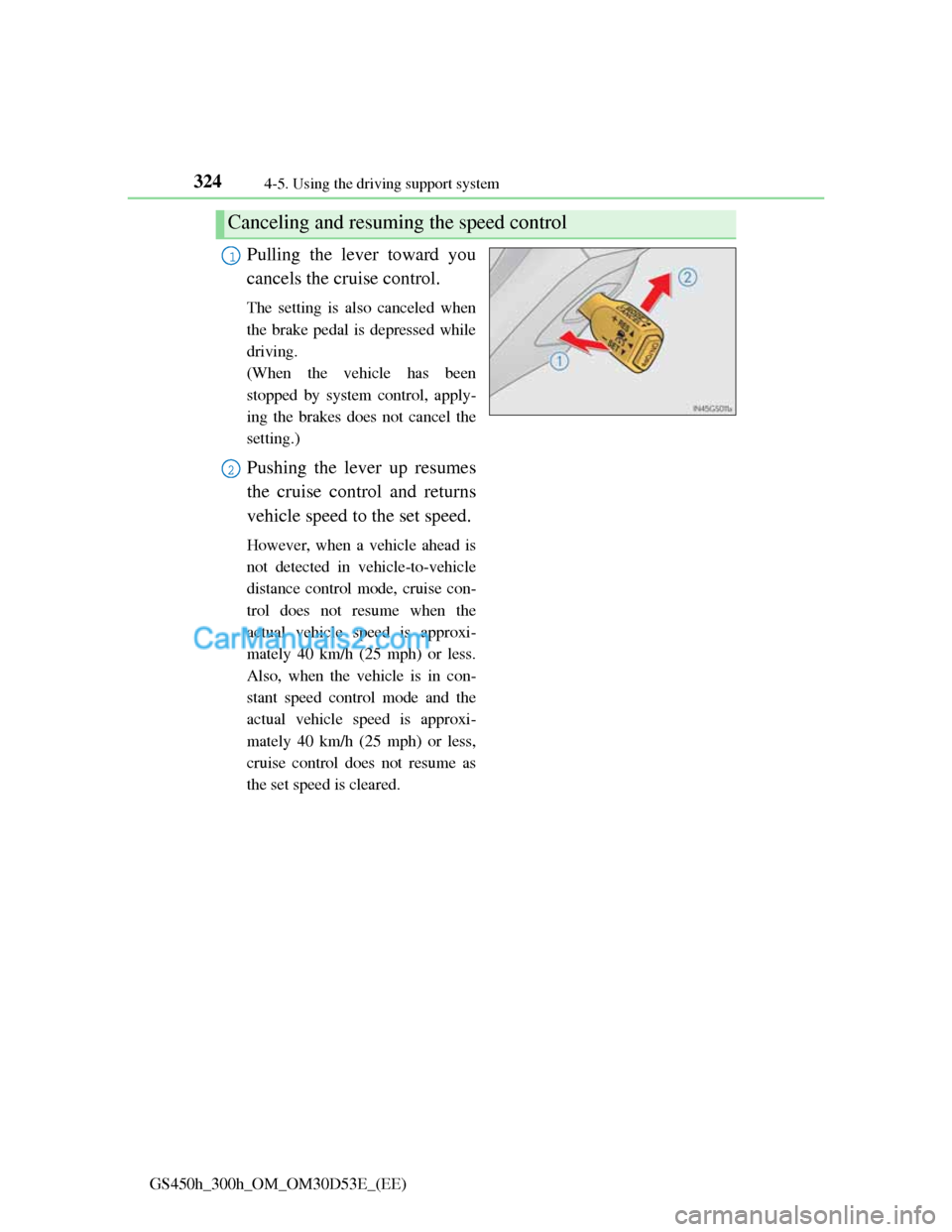
Pulling the lever toward you
cancels the cruise control.
The setting is also canceled when
the brake pedal is depressed while
driving.
(When the vehicle has been
stopped by system control, apply-
ing the brakes does not cancel the
setting.)
Pushing the lever up resumes
the cruise control and returns
vehicle speed to the set speed.
However, when a vehicle ahead is
not detected in vehicle-to-vehicle
distance control mode, cruise con-
trol does not resume when the
actual vehicle speed is approxi-
mately 40 km/h (25 mph) or less.
Also, when the vehicle is in con-
stant speed control mode and the
actual vehicle speed is approxi-
mately 40 km/h (25 mph) or less,
cruise control does not resume as
the set speed is cleared.
Canceling and resuming the speed control
1
2
Page 346 of 1014
335
4 4-5. Using the driving support system
Driving
GS450h_300h_OM_OM30D53E_(EE)
CAUTION
To avoid inadvertent dynamic radar cruise control with full-speed range
activation
Switch the cruise control off using the “ON/OFF” button when not in use.
Situations unsuitable for dynamic radar cruise control with full-speed range
Do not use dynamic radar cruise control with full-speed range in any of the
following situations.
Doing so may result in inappropriate speed control and could cause an acci-
dent resulting in death or serious injury.
In heavy traffic
On roads with sharp bends
On winding roads
On slippery roads, such as those covered with rain, ice or snow
On steep downhills, or where there are sudden changes between sharp up
and down gradients
Vehicle speed may exceed the set speed when driving down a steep hill.
At entrances to expressways
When weather conditions are bad enough that they may prevent the sen-
sors from functioning correctly (fog, snow, sandstorm, heavy rain, etc.)
When an approach warning buzzer is heard often
When your vehicle is towing a trailer or during emergency towing
Page 357 of 1014
3464-5. Using the driving support system
GS450h_300h_OM_OM30D53E_(EE)
CAUTION
Situations unsuitable for LKA
Do not use LKA in any of the following situations.
Otherwise, the system may not function correctly and could result in an
accident.
When driving with snow tires, tire chains, a spare tire, or similar equip-
ment
When the tires have been excessively worn, or when the tire inflation
pressure is low
When there are objects or structures along the roadside that might be mis-
interpreted as lane markers (such as guardrails, curb, reflector posts, etc.)
When driving on snowy roads
When pavement lane markers are difficult to see due to rain, snow, fog,
sand, dirt, etc.
When there are visible lines on the pavement from road repairs, or if the
remains of old lane markers are still visible on the road
When driving on slippery roads, such as those covered with rain, ice or
snow
When driving in a lane other than the driving or passing lanes on a free-
way or highway
When driving on a road with lane closures due to maintenance, or when
driving in a temporary lane
When towing a trailer
NOTICE
To prevent damage to or incorrect operation of the LKA system
Do not modify the headlights or attach stickers to the surface of the lights.
Do not modify the suspension, or replace them with non-genuine parts.
Do not install or place anything on the hood or the grille. Also, do not
install a grille guard (bull bars, kangaroo bar etc.).
Do not modify the sun visor or replace it with anything other than a genu-
ine Lexus product.
If your windshield needs repairs, contact any authorized Lexus dealer or
repairer, or another duly qualified and equipped professional.
Page 369 of 1014
3584-5. Using the driving support system
GS450h_300h_OM_OM30D53E_(EE)
Lexus parking assist-sensor display
When an obstacle is detected while the rear view monitor system, is in use,
the warning indicator will appear in the top right of the screen even if the dis-
play setting has been set to off.
Sensor detection information
The sensor’s detection areas are limited to the areas around the vehicle’s
bumpers.
Certain vehicle conditions and the surrounding environment may affect the
ability of the sensor to correctly detect obstacles. Particular instances where
this may occur are listed below.
• There is dirt, snow or ice on the sensor. (Wiping the sensors will resolve
this problem.)
• The sensor is frozen. (Thawing the area will resolve this problem.)
In especially cold weather, if a sensor is frozen the screen may show an
abnormal display, or obstacles may not be detected.
• The sensor is covered in any way.
• The vehicle is leaning considerably to one side.
• On an extremely bumpy road, on an incline, on gravel, or on grass.
• The vicinity of the vehicle is noisy due to vehicle horns, motorcycle
engines, air brakes of large vehicles, or other loud noises producing
ultrasonic waves.
• There is another vehicle equipped with parking assist sensors in the
vicinity.
• The sensor is coated with a sheet of spray or heavy rain.
• The vehicle is equipped with a fender pole or wireless antenna.
• Towing eyelets are installed.
• The bumper or sensor receives a strong impact.
• The vehicle is approaching a tall or curved curb.
• In harsh sunlight or intense cold weather.
• The area directly under the bumpers is not detected.
• If obstacles draw too close to the sensor.
• A non-genuine Lexus suspension (lowered suspension etc.) is installed.
• People may not be detected if they are wearing certain types of clothing.
In addition to the examples above, there are instances in which, because of
their shape, signs and other objects may be judged by the sensor to be closer
than they are.
Page 437 of 1014
4264-5. Using the driving support system
GS450h_300h_OM_OM30D53E_(EE)
Conditions under which the Blind Spot Monitor function may not function
correctly
The Blind Spot Monitor function may not detect vehicles correctly in the
following conditions:
• During bad weather such as heavy rain, fog, snow etc.
• When ice or mud etc. is attached to the rear bumper
• When driving on a road surface that is wet due to rain, standing water
etc.
• When there is a significant difference in speed between your vehicle and
the vehicle that enters the detection area
• When a vehicle is in the detection area from a stop and remains in the
detection area as your vehicle accelerates
• When driving up or down consecutive steep inclines, such as hills, a dip
in the road etc.
• When multiple vehicles approach with only a small gap between each
vehicle
• When vehicle lanes are wide, and the vehicle in the next lane is too far
away from your vehicle
• When the vehicle that enters the detection area is traveling at about the
same speed as your vehicle
• When there is a significant difference in height between your vehicle and
the vehicle that enters the detection area
• Directly after the BSM main switch is set to on
• When your vehicle is towing a trailer
Instances of the Blind Spot Monitor function unnecessarily detecting a
vehicle and/ or object may increase under the following conditions:
• When there is only a short distance between your vehicle and a guardrail,
wall etc.
• When there is only a short distance between your vehicle and a following
vehicle
• When vehicle lanes are narrow and a vehicle driving 2 lanes across from
your vehicle enters the detection area
• When items such as a bicycle carrier are installed on the rear of the vehi-
cle