remote control Lexus GS300h 2013 Owner's Manual
[x] Cancel search | Manufacturer: LEXUS, Model Year: 2013, Model line: GS300h, Model: Lexus GS300h 2013Pages: 1014
Page 2 of 1014
TABLE OF CONTENTS2
GS450h_300h_OM_OM30D53E_(EE)For your information...................... 8
Reading this manual .................... 12
How to search .............................. 13
Pictorial index .............................. 14
1-1. For safe use
Before driving ..................... 34
For safety drive ................... 36
Seat belts ............................. 38
SRS airbags ......................... 44
Airbag manual on-off sys-
tem.......................................56
Safety information for children
Child restraint systems ........ 59
Installing child restraints ..... 70
Exhaust gas precautions ...... 79
1-2. Hybrid system
Hybrid system features........ 80
Hybrid system precautions .. 84
1-3. Theft deterrent system
Immobilizer system ............. 91
Double locking system ........ 96
Alarm .................................. 972. Instrument cluster
Warning lights and indica-
tore....................................104
Gauges and meters ............ 109
Multi-information display . 114
Head-up display ................ 122
Energy monitor/ consumption
screen................................130
3-1. Key Information
Keys .................................. 138
3-2. Opening, closing and locking
the doors and trunk
Smart entry & start system 143
Wireless remote control .... 168
Doors ................................. 183
Trunk ................................. 187
3-3. Adjusting the seats
Front seats ......................... 194
Driving position memory .. 198
Head restraints................... 204
3-4. Adjusting the steering wheel and
mirrors
Steering wheel ................... 207
Inside rear view mirror ...... 208
Outside rear view mirrors . 211
Opening, closing the windows
and moon roof
1For safety and security
2Instrument cluster
3Operation of each compo-
nent
Page 20 of 1014
20Pictorial index
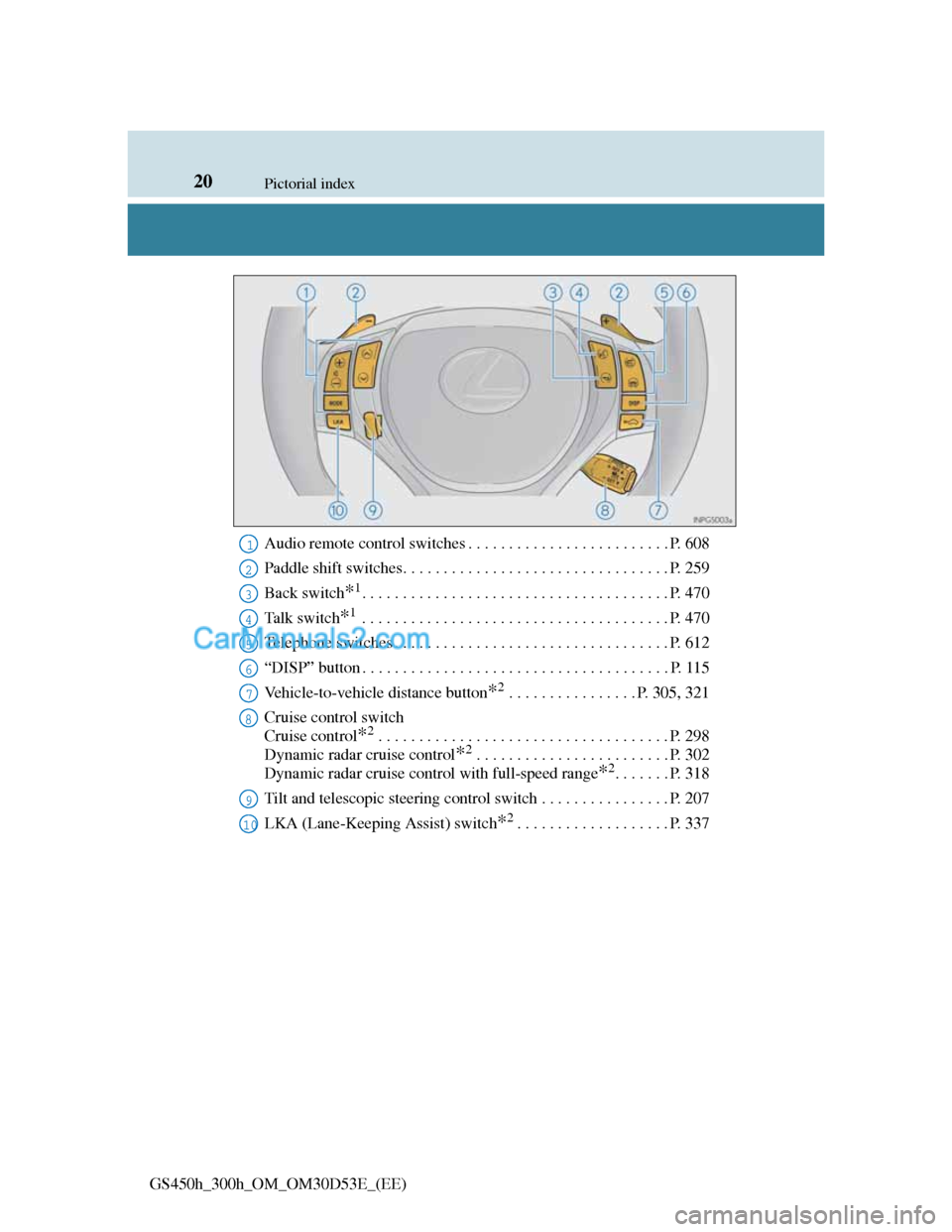
GS450h_300h_OM_OM30D53E_(EE)Audio remote control switches . . . . . . . . . . . . . . . . . . . . . . . . . P. 608
Paddle shift switches. . . . . . . . . . . . . . . . . . . . . . . . . . . . . . . . . P. 259
Back switch
*1. . . . . . . . . . . . . . . . . . . . . . . . . . . . . . . . . . . . . . P. 470
Ta l k s w i t c h
*1 . . . . . . . . . . . . . . . . . . . . . . . . . . . . . . . . . . . . . . P. 470
Telephone switches . . . . . . . . . . . . . . . . . . . . . . . . . . . . . . . . . . P. 612
“DISP” button . . . . . . . . . . . . . . . . . . . . . . . . . . . . . . . . . . . . . . P. 115
Vehicle-to-vehicle distance button
*2 . . . . . . . . . . . . . . . . P. 305, 321
Cruise control switch
Cruise control
*2 . . . . . . . . . . . . . . . . . . . . . . . . . . . . . . . . . . . . P. 298
Dynamic radar cruise control
*2 . . . . . . . . . . . . . . . . . . . . . . . . P. 302
Dynamic radar cruise control with full-speed range
*2. . . . . . . P. 318
Tilt and telescopic steering control switch . . . . . . . . . . . . . . . . P. 207
LKA (Lane-Keeping Assist) switch
*2. . . . . . . . . . . . . . . . . . . P. 337
1
2
3
4
5
6
7
8
9
10
Page 28 of 1014
28Pictorial index
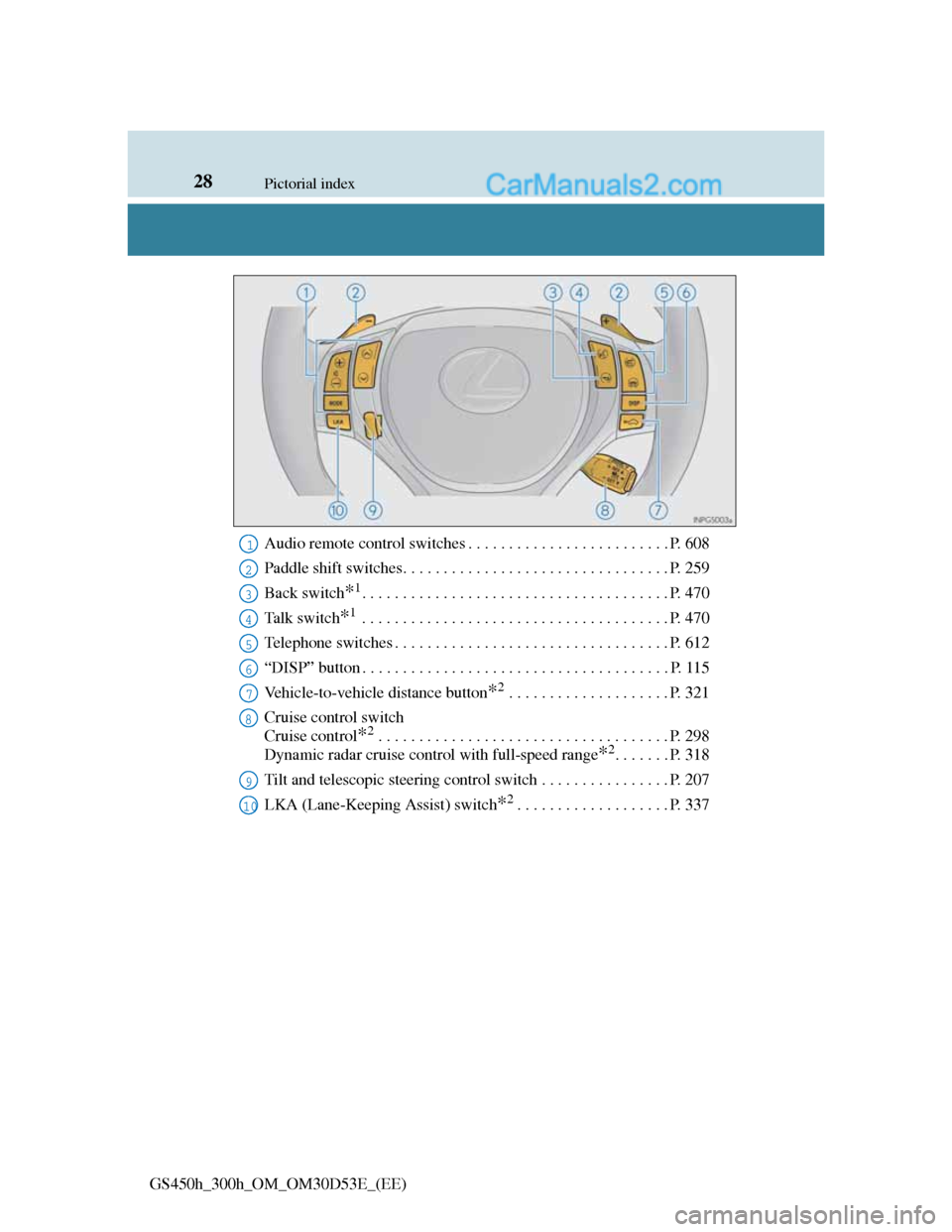
GS450h_300h_OM_OM30D53E_(EE)Audio remote control switches . . . . . . . . . . . . . . . . . . . . . . . . . P. 608
Paddle shift switches. . . . . . . . . . . . . . . . . . . . . . . . . . . . . . . . . P. 259
Back switch
*1. . . . . . . . . . . . . . . . . . . . . . . . . . . . . . . . . . . . . . P. 470
Ta l k s w i t c h
*1 . . . . . . . . . . . . . . . . . . . . . . . . . . . . . . . . . . . . . . P. 470
Telephone switches . . . . . . . . . . . . . . . . . . . . . . . . . . . . . . . . . . P. 612
“DISP” button . . . . . . . . . . . . . . . . . . . . . . . . . . . . . . . . . . . . . . P. 115
Vehicle-to-vehicle distance button
*2 . . . . . . . . . . . . . . . . . . . . P. 321
Cruise control switch
Cruise control
*2 . . . . . . . . . . . . . . . . . . . . . . . . . . . . . . . . . . . . P. 298
Dynamic radar cruise control with full-speed range
*2. . . . . . . P. 318
Tilt and telescopic steering control switch . . . . . . . . . . . . . . . . P. 207
LKA (Lane-Keeping Assist) switch
*2. . . . . . . . . . . . . . . . . . . P. 337
1
2
3
4
5
6
7
8
9
10
Page 97 of 1014
961-3. Theft deterrent system
GS450h_300h_OM_OM30D53E_(EE)
Double locking system
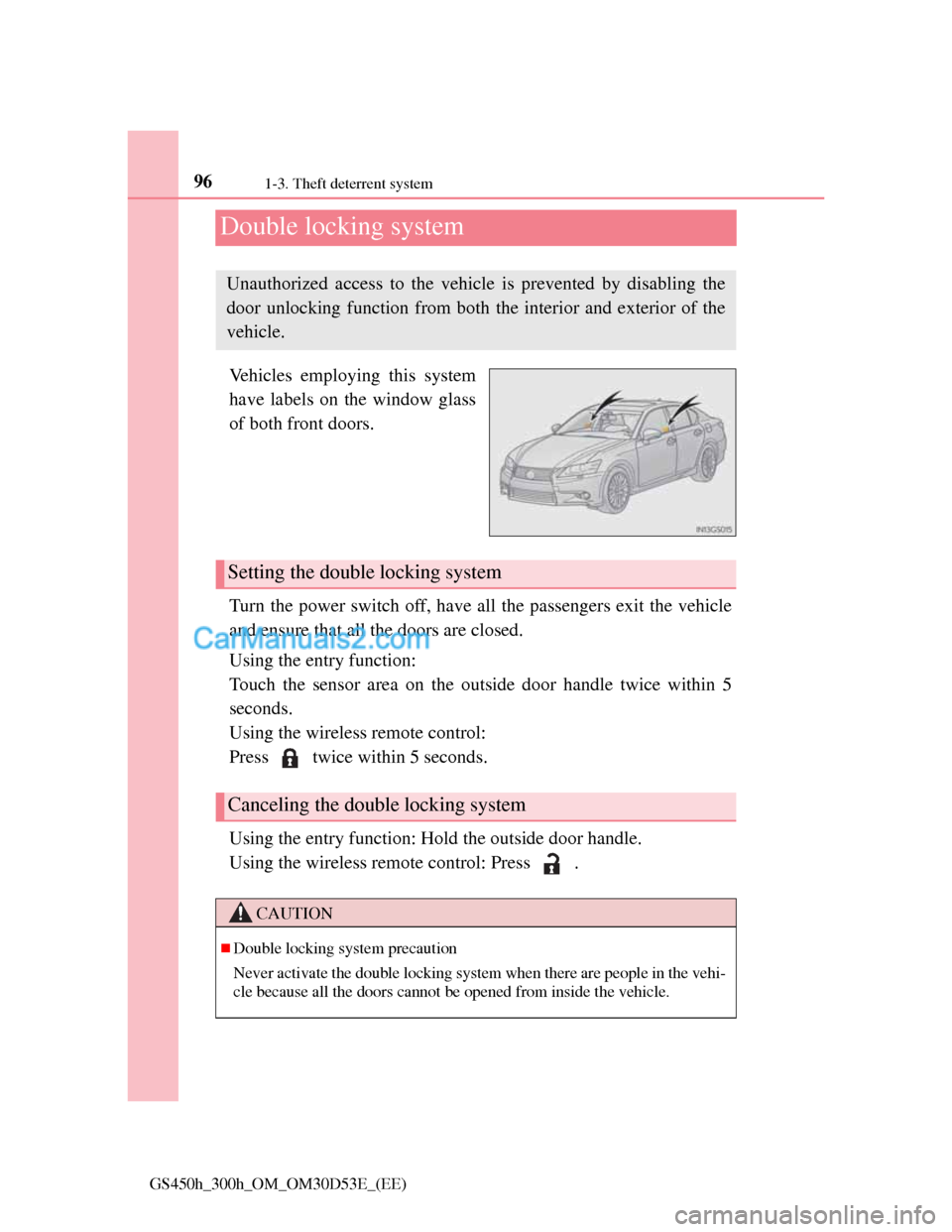
Vehicles employing this system
have labels on the window glass
of both front doors.
Turn the power switch off, have all the passengers exit the vehicle
and ensure that all the doors are closed.
Using the entry function:
Touch the sensor area on the outside door handle twice within 5
seconds.
Using the wireless remote control:
Press twice within 5 seconds.
Using the entry function: Hold the outside door handle.
Using the wireless remote control: Press .
Unauthorized access to the vehicle is prevented by disabling the
door unlocking function from both the interior and exterior of the
vehicle.
Setting the double locking system
Canceling the double locking system
CAUTION
Double locking system precaution
Never activate the double locking system when there are people in the vehi-
cle because all the doors cannot be opened from inside the vehicle.
Page 98 of 1014
97
1 1-3. Theft deterrent system
GS450h_300h_OM_OM30D53E_(EE)
For safety and security
Alarm
The alarm uses light and sound to give an alert when an intrusion is
detected.
The alarm is triggered in the following situations when the alarm is
set:
A locked door is unlocked or opened in any way other than using
the entry function or wireless remote control. (The door will lock
again automatically.)
A trunk is opened in any way other than using the entry function,
wireless remote control or mechanical key.
The hood is opened.
The tilt sensor detects a change of vehicle inclination. (if
equipped)
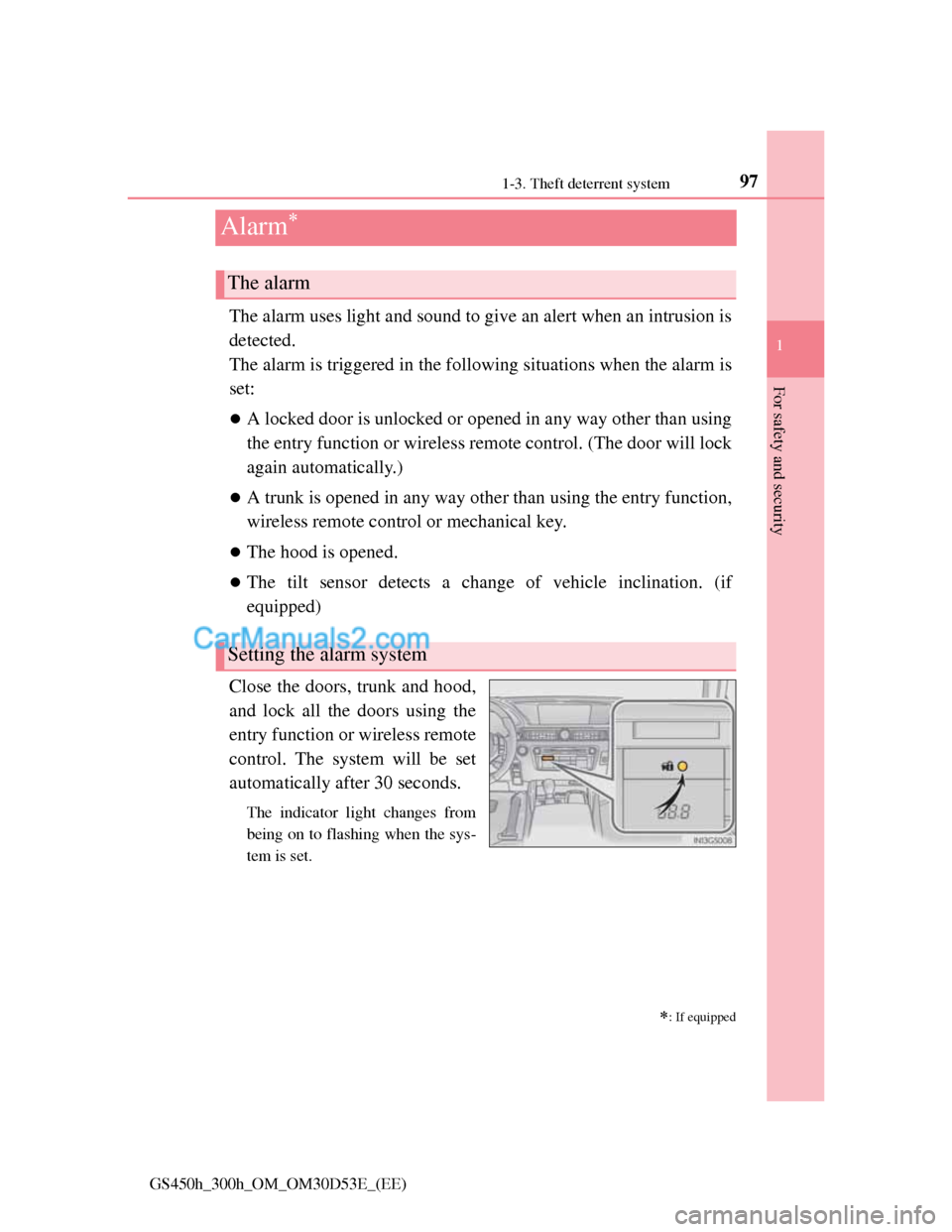
Close the doors, trunk and hood,
and lock all the doors using the
entry function or wireless remote
control. The system will be set
automatically after 30 seconds.
The indicator light changes from
being on to flashing when the sys-
tem is set.
: If equipped
The alarm
Setting the alarm system
Page 99 of 1014
981-3. Theft deterrent system
GS450h_300h_OM_OM30D53E_(EE)
Do one of the following to deactivate or stop the alarm:
Unlock the doors or open the trunk using the entry function or
wireless remote control.
Turn the power switch to ACCESSORY or ON mode, or start the
hybrid system. (The alarm will be deactivated or stopped after a
few seconds.)
System maintenance
The vehicle has a maintenance-free type alarm system.
Items to check before locking the vehicle
To prevent unexpected triggering of the alarm and vehicle theft, make sure of
the following:
Nobody is in the vehicle.
The windows and moon roof (if equipped) are closed before the alarm is
set.
No valuables or other personal items are left in the vehicle.
Deactivating or stopping the alarm
Page 138 of 1014
137
3
Operation of
each component
GS450h_300h_OM_OM30D53E_(EE)3-1. Key information
Keys .................................. 138
3-2. Opening, closing and locking
the doors and trunk
Smart entry & start system 143
Wireless remote control .... 168
Doors ................................ 183
Trunk................................. 187
3-3. Adjusting the seats
Front seats ......................... 194
Driving position memory.. 198
Head restraints .................. 204
3-4. Adjusting the steering wheel
and mirrors
Steering wheel .................. 207
Inside rear view mirror ..... 208
Outside rear view mirrors ..211
3-5. Opening, closing the windows
and moon roof
Power windows................. 215
Moon roof ......................... 218
Page 139 of 1014
1383-1. Key Information
GS450h_300h_OM_OM30D53E_(EE)
Keys
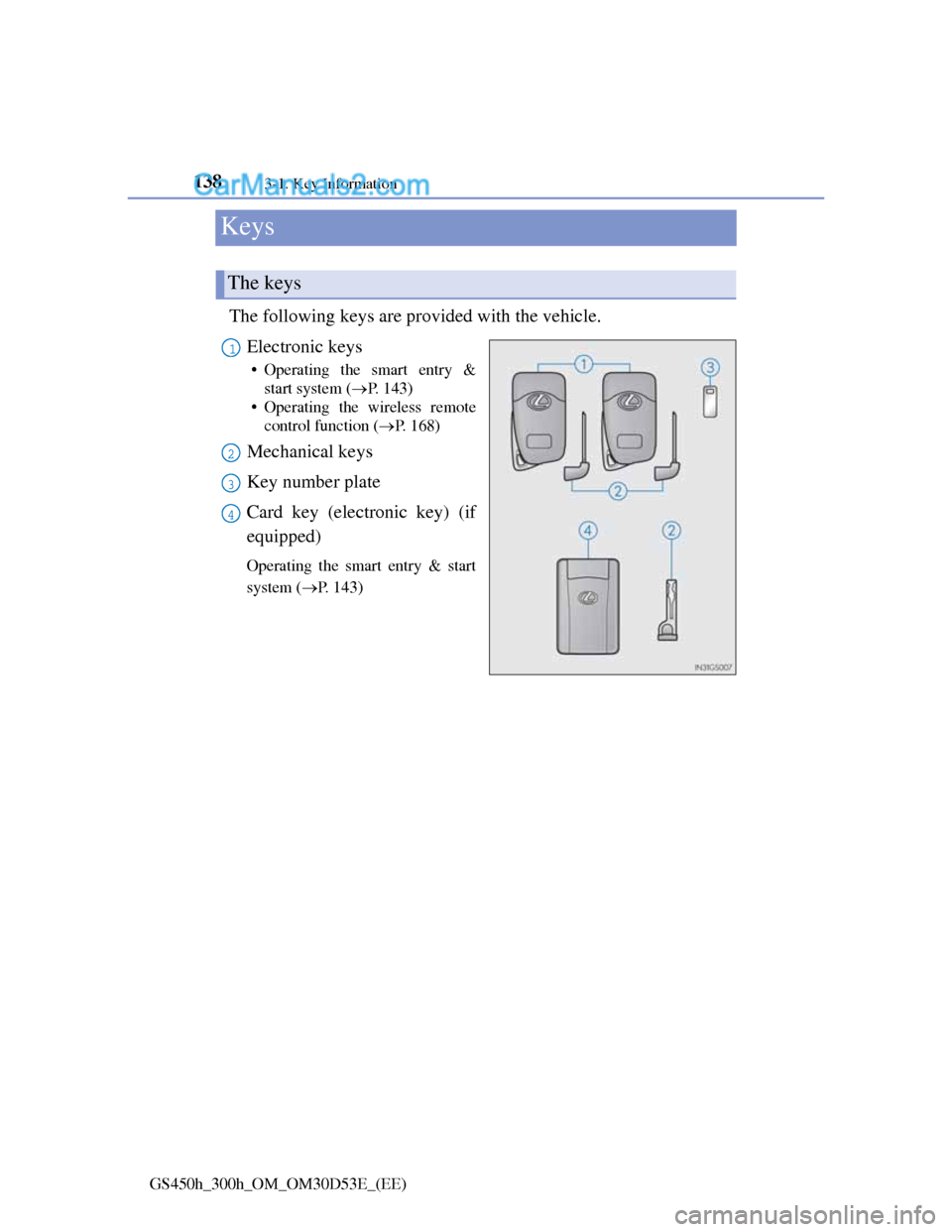
The following keys are provided with the vehicle.
Electronic keys
• Operating the smart entry &
start system (P. 143)
• Operating the wireless remote
control function (P. 1 6 8 )
Mechanical keys
Key number plate
Card key (electronic key) (if
equipped)
Operating the smart entry & start
system (P. 143)
The keys
1
2
3
4
Page 144 of 1014
143
3 3-2. Opening, closing and locking the doors and trunk
Operation of each component
GS450h_300h_OM_OM30D53E_(EE)
Smart entry & start system
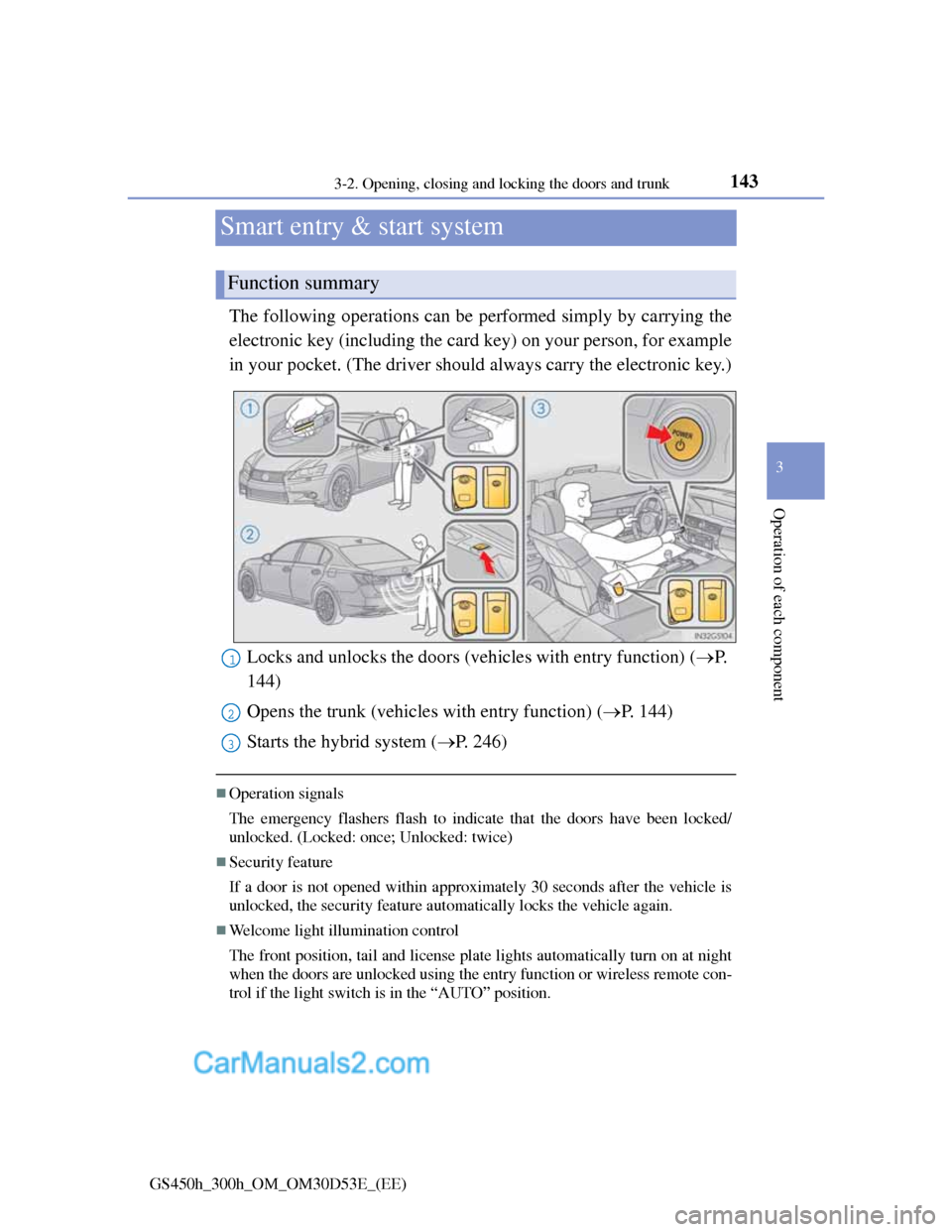
The following operations can be performed simply by carrying the
electronic key (including the card key) on your person, for example
in your pocket. (The driver should always carry the electronic key.)
Operation signals
The emergency flashers flash to indicate that the doors have been locked/
unlocked. (Locked: once; Unlocked: twice)
Security feature
If a door is not opened within approximately 30 seconds after the vehicle is
unlocked, the security feature automatically locks the vehicle again.
Welcome light illumination control
The front position, tail and license plate lights automatically turn on at night
when the doors are unlocked using the entry function or wireless remote con-
trol if the light switch is in the “AUTO” position.
Function summary
Locks and unlocks the doors (vehicles with entry function) (P.
144)
Opens the trunk (vehicles with entry function) (P. 144)
Starts the hybrid system (P. 246)1
2
3
Page 149 of 1014
1483-2. Opening, closing and locking the doors and trunk
GS450h_300h_OM_OM30D53E_(EE)
Switching the door unlock function (vehicles with entry function)
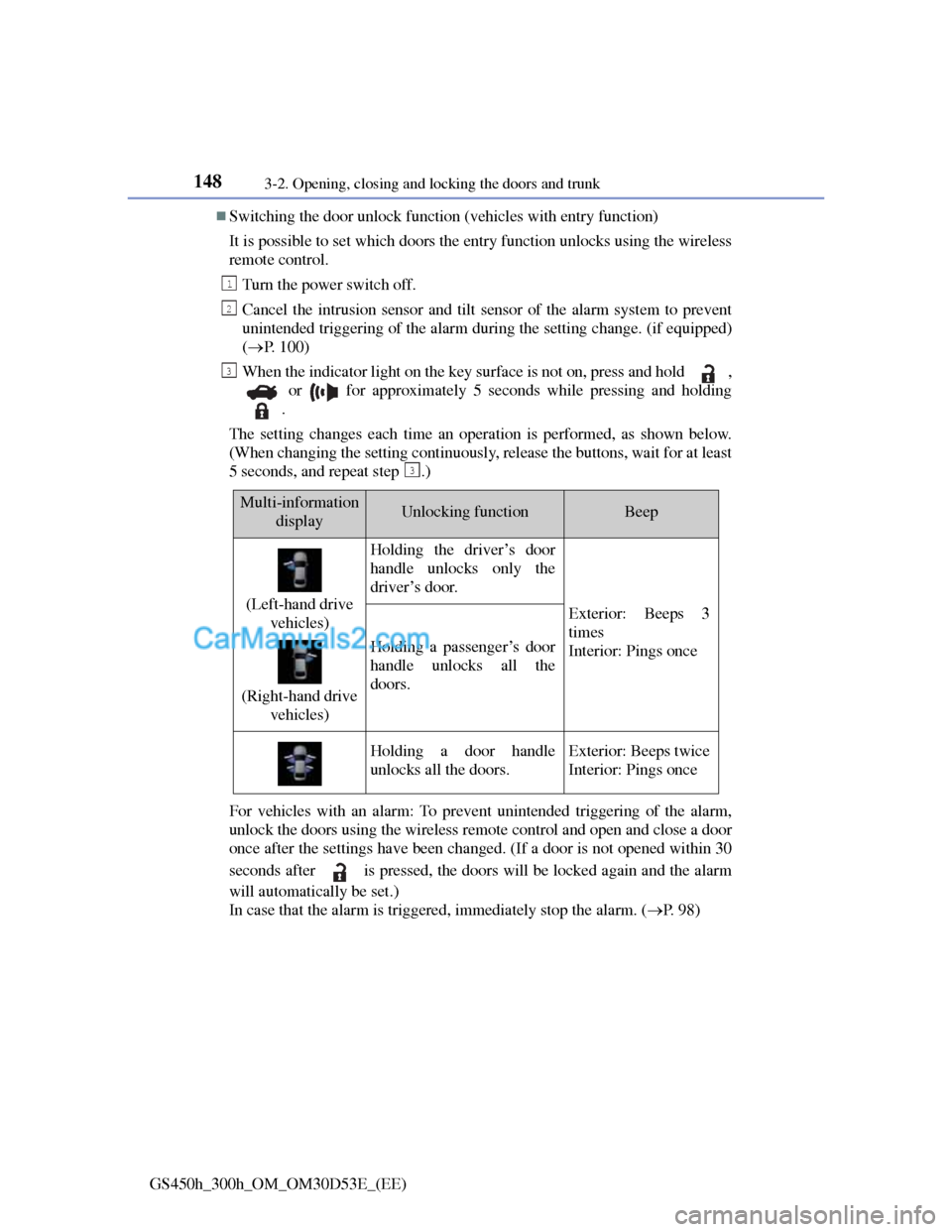
It is possible to set which doors the entry function unlocks using the wireless
remote control.
Turn the power switch off.
Cancel the intrusion sensor and tilt sensor of the alarm system to prevent
unintended triggering of the alarm during the setting change. (if equipped)
(P. 100)
When the indicator light on the key surface is not on, press and hold ,
or for approximately 5 seconds while pressing and holding
.
The setting changes each time an operation is performed, as shown below.
(When changing the setting continuously, release the buttons, wait for at least
5 seconds, and repeat step .)
For vehicles with an alarm: To prevent unintended triggering of the alarm,
unlock the doors using the wireless remote control and open and close a door
once after the settings have been changed. (If a door is not opened within 30
seconds after is pressed, the doors will be locked again and the alarm
will automatically be set.)
In case that the alarm is triggered, immediately stop the alarm. (P. 9 8 )
1
2
3
3
Multi-information
displayUnlocking functionBeep
(Left-hand drive
vehicles)
(Right-hand drive
vehicles)
Holding the driver’s door
handle unlocks only the
driver’s door.
Exterior: Beeps 3
times
Interior: Pings once
Holding a passenger’s door
handle unlocks all the
doors.
Holding a door handle
unlocks all the doors.Exterior: Beeps twice
Interior: Pings once