Brake hold Lexus GS300h 2015 User Guide
[x] Cancel search | Manufacturer: LEXUS, Model Year: 2015, Model line: GS300h, Model: Lexus GS300h 2015Pages: 620
Page 214 of 620
2144-1. Before driving
GS450h_300h_OM_OM30F00E_(EE)
Your vehicle will handle differently when towing a trailer. In order to avoid acci-
dent, death or serious injury, keep the following in mind when towing:
■Checking connections between trailer and lights
Stop the vehicle and check the operation of the connection between the
trailer and lights after driving for a brief period as well as before starting off.
■Practicing driving with a coupled trailer
●Get the feel for turning, stopping and reversing with the trailer coupled by
practicing in an area with no or light traffic.
●When reversing with a coupled trailer, hold the section of the steering
wheel nearest to you and rotate clockwise to turn the trailer left or counter-
clockwise to turn it right. Always rotate a little at a time to prevent steering
error. Have someone guide you when reversing to lessen the risk of an
accident.
■Increasing vehicle-to-vehicle distance
At a speed of 10 km/h (6 mph), the distance to the vehicle running ahead of
you should be equivalent to or greater than the combined length of your vehi-
cle and trailer. Avoid sudden braking th at may cause skidding. Otherwise, the
vehicle may spin out of control. This is especially true when driving on wet or
slippery road surfaces.
■Sudden acceleration/steering input/cornering
Executing sharp turns when towing may result in the trailer colliding with your
vehicle. Decelerate well in advance when approaching turns and take them
slowly and carefully to avoid sudden braking.
■Important points regarding turning
The wheels of the trailer will travel closer to the inside of the curve than the
wheels of the vehicle. To make allowance for this, take the turns wider than you
would normally do.
■Important points regarding stability
Vehicle movement resulting from uneven road surfaces and strong cross-
winds will affect handling. The vehicle may also be rocked by passing buses or
large trucks. Frequently check behind when moving alongside such vehicles.
As soon as such vehicle movement occurs, immediately start to decelerate
smoothly by slowly applying the brakes. Always steer the vehicle straight
ahead while braking.
Guidance
Page 215 of 620
2154-1. Before driving
4
Driving
GS450h_300h_OM_OM30F00E_(EE)
■Passing other vehicles
Consider the total combined length of your vehicle and trailer and ensure that
the vehicle-to-vehicle distance is sufficient before executing lane changes.
■Transmission information
To maintain engine braking efficiency, when using engine braking, when driv-
ing on a long steep downgrade, do not use the transmission in D. ( →P. 2 2 7 )
■If the engine overheats
Towing a loaded trailer up a long, steep incline in temperatures exceeding
30 °C (85 °F) may result in the engine overheating. If the engine coolant tem-
perature gauge indicates that the engine is overheating, turn the air condition-
ing off immediately, leave the road and stop the vehicle in a safe place.
( → P. 5 5 6 )
■When parking the vehicle
Always place wheel chocks under the whee ls of both the vehicle and trailer.
Firmly set the parking brake and shift the shift lever to P.
WA R N I N G
Follow all the instructions described in this section. Failure to do so could cause an acci-
dent resulting in death or serious injury.
■Trailer towing precautions
When towing, make sure that none of the weight limits are exceeded. ( →P. 211)
■To avoid accident or injury
●Do not tow a trailer when the compact spare tire is installed on your vehicle.
●Do not tow a trailer when the tire installed is repaired with the emergency tire punc-
ture repair kit.
●Do not use cruise control (if equipped), dynamic radar cruise control (if equipped) or
dynamic radar cruise control with full-speed range (if equipped) when trailer towing.
■Vehicle speed in towing
Observe the legal maximum speeds for trailer towing.
■Before descending hills or long declines
Reduce speed and downshift. However, never downshift suddenly while descending
steep or long downhill grades.
■Operation of the brake pedal
Do not hold the brake pedal depressed often or for long periods of time.
Doing so may result in the brake overheating or reduce braking effects.
Page 231 of 620
231
4
4-2. Driving procedures
Driving
GS450h_300h_OM_OM30F00E_(EE)
Parking brake
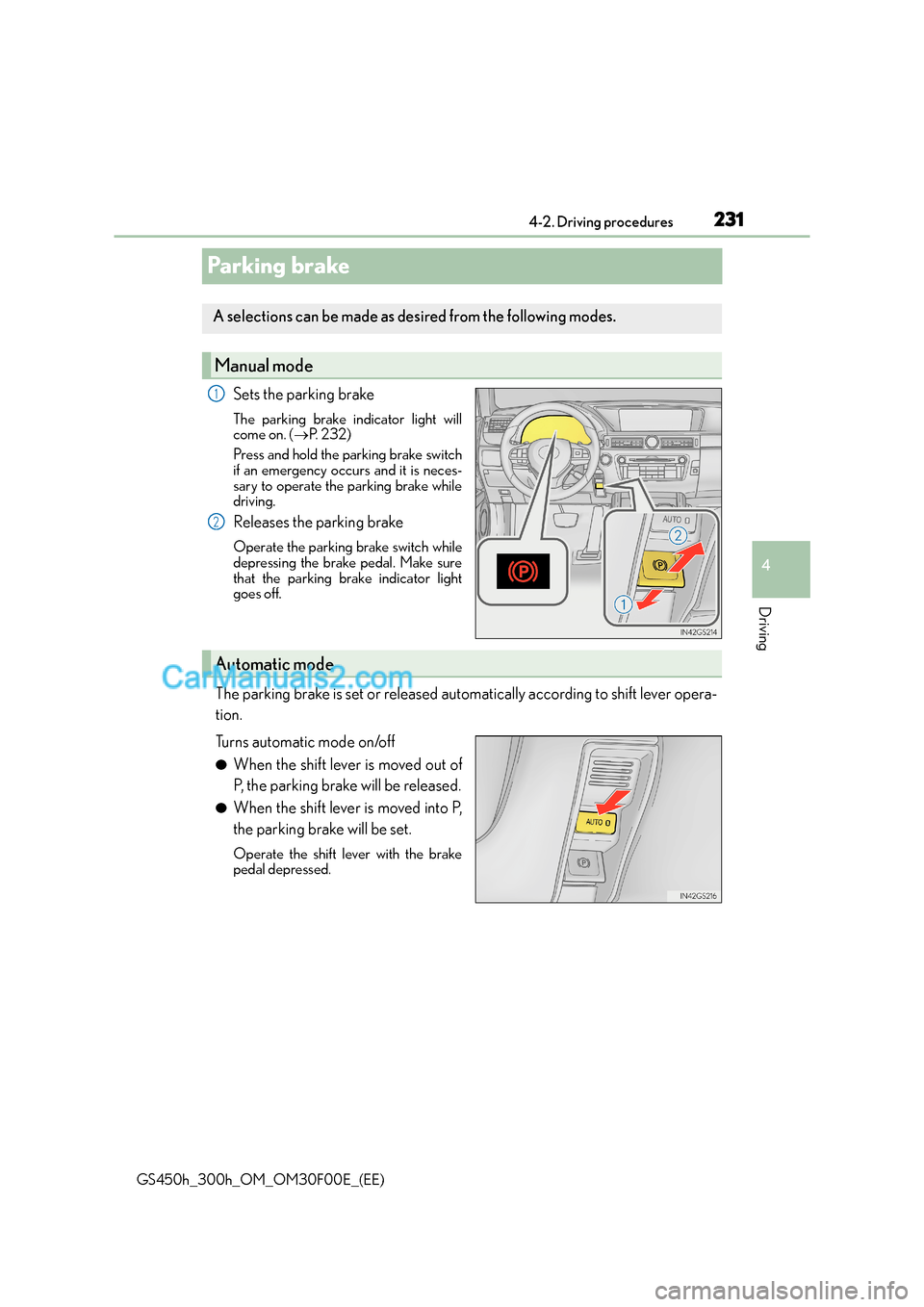
Sets the parking brake
The parking brake indicator light will
come on. (
→P. 232)
Press and hold the parking brake switch
if an emergency occurs and it is neces-
sary to operate the parking brake while
driving.
Releases the parking brake
Operate the parking brake switch while
depressing the brake pedal. Make sure
that the parking brake indicator light
goes off.
The parking brake is set or released automatically according to shift lever opera-
tion.
Turns automatic mode on/off
●When the shift lever is moved out of
P, the parking brake will be released.
●When the shift lever is moved into P,
the parking brake will be set.
Operate the shift lever with the brake
pedal depressed.
A selections can be made as de sired from the following modes.
Manual mode
1
2
Automatic mode
Page 234 of 620
2344-2. Driving procedures
GS450h_300h_OM_OM30F00E_(EE)
Brake Hold
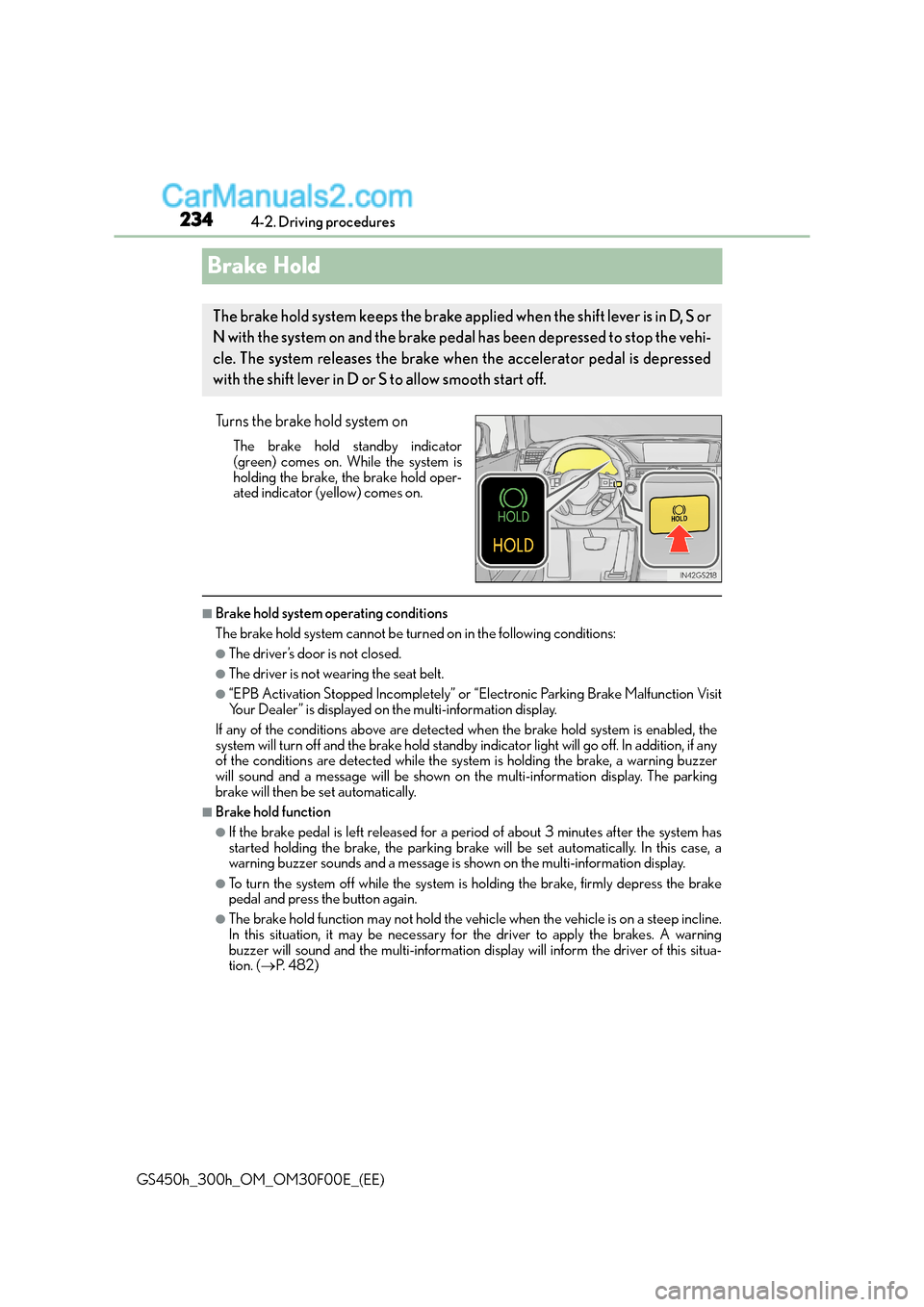
Turns the brake hold system on
The brake hold standby indicator
(green) comes on. While the system is
holding the brake, the brake hold oper-
ated indicator (yellow) comes on.
■Brake hold system operating conditions
The brake hold system cannot be turn ed on in the following conditions:
●The driver’s door is not closed.
●The driver is not wearing the seat belt.
●“EPB Activation Stopped Incompletely” or “Electronic Parking Brake Malfunction Visit
Your Dealer” is displayed on the multi-information display.
If any of the conditions above are detected when the brake hold system is enabled, the
system will turn off and the brake hold standby indicator light will go off. In addition, if any
of the conditions are detected while the sy stem is holding the brake, a warning buzzer
will sound and a message will be shown on th e multi-information display. The parking
brake will then be set automatically.
■Brake hold function
●If the brake pedal is left released for a period of about 3 minutes after the system has
started holding the brake, th e parking brake will be set automatically. In this case, a
warning buzzer sounds and a message is shown on the multi-information display.
●To turn the system off while the system is holding the brake, firmly depress the brake
pedal and press the button again.
●The brake hold function may not hold the vehicle when the vehicle is on a steep incline.
In this situation, it may be necessary for the driver to apply the brakes. A warning
buzzer will sound and the multi-information di splay will inform the driver of this situa-
tion. ( →P. 4 8 2 )
The brake hold system keeps the brake applied when the shift lever is in D, S or
N with the system on and the brake peda l has been depressed to stop the vehi-
cle. The system releases the brake wh en the accelerator pedal is depressed
with the shift lever in D or S to allow smooth start off.
Page 235 of 620
2354-2. Driving procedures
4
Driving
GS450h_300h_OM_OM30F00E_(EE)
■When the parking brake is set automatically while the system is holding the brakes
The parking brake will not be released automatically. Perform one of the following proce-
dures to release the parking brake and confirm that the parking brake indicator light
turns off. ( →P. 2 3 1 )
●With the brake pedal depressed, operate the parking brake switch.
●Fasten your seat belt, check that the shift leve r is in either D or R and slowly depress the
accelerator pedal.
■Warning message and buzzers
Warning messages and buzzers are used to in dicate a system malfunction or to inform
the driver of the need for caution. ( →P. 4 8 2 )
WA R N I N G
■When the vehicle is on a steep incline
When using the brake hold system on a steep incline exercise caution. The brake hold
function may not hold the vehicle in such a situation.
■When stopped on a slippery road
The system cannot stop the vehicle when the gripping ability of the tires has been
exceeded. Do not use the system when stopped on a slippery road.
NOTICE
■When parking the vehicle
The brake hold system is not designed for use when parking the vehicle for a long
period of time. Turning the power switch o ff while the system is holding the brake may
release the brake, which would cause the vehicle to move. When operating the power
switch, depress the brake pedal, set the parking brake and shift the shift lever to P.
Page 279 of 620
2794-5. Using the driving support systems
4
Driving
GS450h_300h_OM_OM30F00E_(EE)• After the hybrid system has started the vehicle has not been driven for a certain
amount of time
• While making a left/right turn and for a few seconds after making a left/right turn
• While driving on a curve and for a few seconds after driving on a curve
• If your vehicle is skidding
• If the front of the vehicle is raised or lowered
• If the wheels are misaligned
• If a wiper blade is blocking the camera sensor
• The vehicle is wobbling.
• The vehicle is being driven at extremely high speeds.
• When driving on a hill
• If the radar sensor or camera sensor is misaligned
●In some situations such as the following, su fficient braking force may not be obtained,
preventing the system from performing properly:
• If the braking functions cannot operate to their full extent, such as when the brake parts are extremely cold, extremely hot, or wet
• If the vehicle is not properly maintained (brakes or tires are excessively worn,
improper tire inflation pressure, etc.)
• When the vehicle is being driven on a gravel road or other slippery surface
●Some pedestrians such as the following may not be detected by the radar sensor and
camera sensor, preventing the system from operating properly
*4:
• Pedestrians shorter than approximately 1 m (3.2 ft.) or taller than approximately 2 m (6.5 ft.)
• Pedestrians wearing oversized clothing (a rain coat, long skirt, etc.), making their sil- houette obscure
• Pedestrians who are carrying large baggage, holding an umbrella, etc., hiding part
of their body
• Pedestrians who are bending forward or squatting
• Pedestrians who are pushing a stroller, wheelchair, bicycle or other vehicle
• Groups of pedestrians which are close together
• Pedestrians who are wearing white and look extremely bright
• Pedestrians in the dark, such as at night or while in a tunnel
• Pedestrians whose clothing appears to be nearly the same color or brightness as their surroundings
• Pedestrians near walls, fences, guardrails, or large objects
• Pedestrians who are on a metal object (manhole cover, steel plate, etc.) on the road
• Pedestrians who are walking fast
• Pedestrians who are changing speed abruptly
• Pedestrians running out from behind a vehicle or a large object
• Pedestrians who are extremely close to th e side of the vehicle (outside rear view
mirror, etc.)
*4: Depending on the region in which the vehicle was sold, the pedestrian detection
function may not be available.
Page 328 of 620
3284-5. Using the driving support systems
GS450h_300h_OM_OM30F00E_(EE)
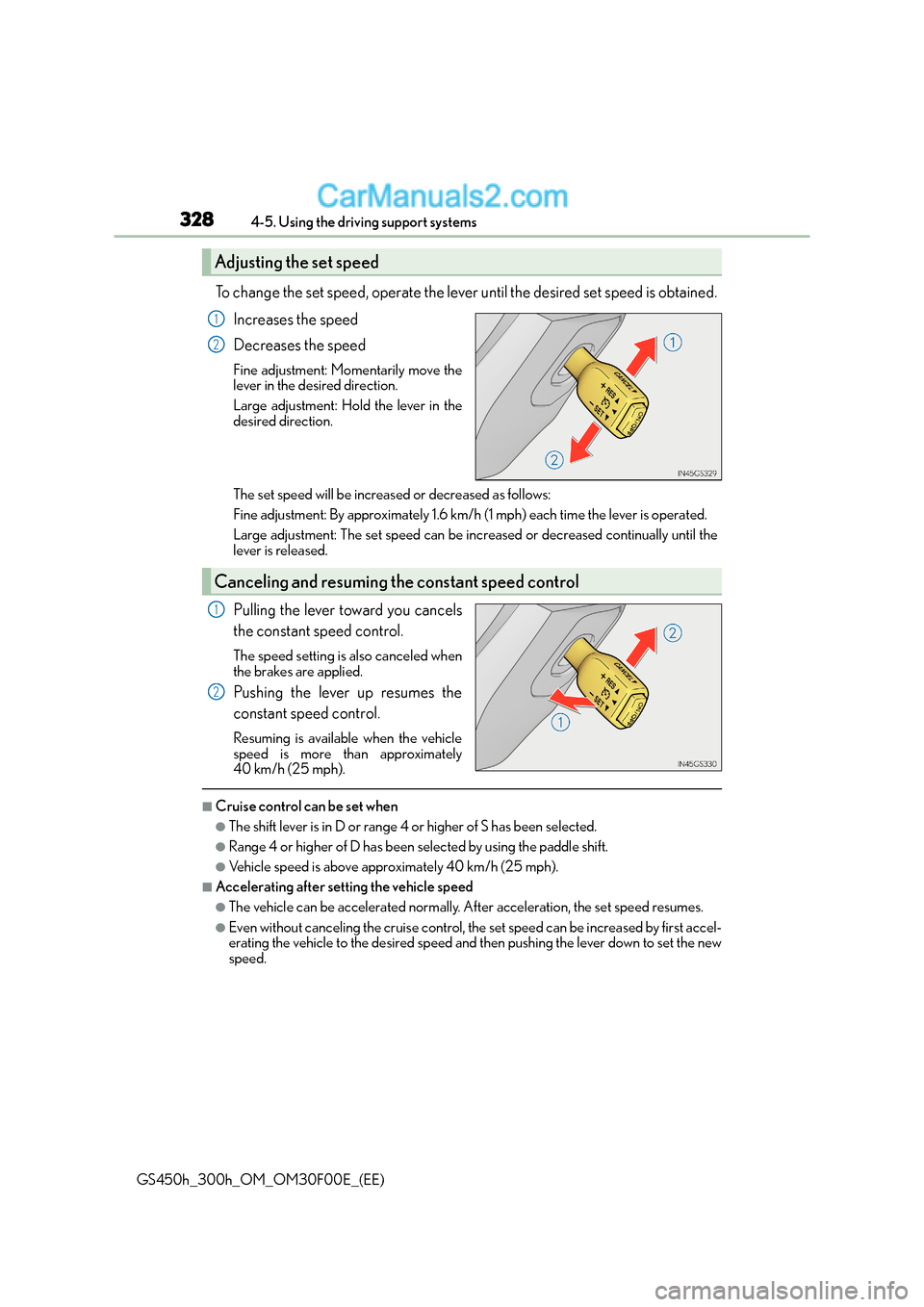
To change the set speed, operate the lever until the desired set speed is obtained.Increases the speed
Decreases the speed
Fine adjustment: Momentarily move the
lever in the desired direction.
Large adjustment: Hold the lever in the
desired direction.
The set speed will be increased or decreased as follows:
Fine adjustment: By approximately 1.6 km/h (1 mph) each time the lever is operated.
Large adjustment: The set speed can be incr eased or decreased continually until the
lever is released.
Pulling the lever toward you cancels
the constant speed control.
The speed setting is also canceled when
the brakes are applied.
Pushing the lever up resumes the
constant speed control.
Resuming is available when the vehicle
speed is more than approximately
40 km/h (25 mph).
■Cruise control can be set when
●The shift lever is in D or range 4 or higher of S has been selected.
●Range 4 or higher of D has been selected by using the paddle shift.
●Vehicle speed is above approximately 40 km/h (25 mph).
■Accelerating after setting the vehicle speed
●The vehicle can be accelerated normally. After acceleration, the set speed resumes.
●Even without canceling the cruise control, the set speed can be increased by first accel-
erating the vehicle to the desired speed and then pushing the lever down to set the new
speed.
Adjusting the set speed
1
2
Canceling and resuming th e constant speed control
1
2
Page 347 of 620
3474-5. Using the driving support systems
4
Driving
GS450h_300h_OM_OM30F00E_(EE)
■Turning off both TRC and VSC systems
To turn the TRC and VSC systems off, press and hold for more than 3 seconds while
the vehicle is stopped.
The VSC OFF indicator light will come on an d the “Traction Control Turned Off” will
be shown on the multi-information display.
*
Press again to turn the systems back on.
*: On vehicles with PCS (Pre-Crash Safety system), pre-crash brake assist and pre-
crash braking will also be disabled. The PCS (Pre-Crash Safety system) warning
light will come on and a message will be di splayed on the multi-information display.
( → P. 4 8 2 )
■When the message is displayed on the mult i-information display showing that TRC has
been disabled even if has not been pressed
TRC and hill-start assist control cannot be operated. Contact any authorized Lexus
dealer or repairer, or another duly qualified and equipped professional.
■VGRS is disabled when
VGRS may stop operating in the following situations.
In this event, the steering wheel may move fr om its straight forward position, but it will
return when the system restarts.
●The steering wheel is operated for an extended period of time while the vehicle is
stopped or is moving very slowly.
●When force is continuously applied for a long time with the steering wheel turned as far
as it will go.
The center position of the steering wheel may change when VGRS is disabled. How-
ever, the position will return to normal after VGRS is reactivated.
■When the 12-volt battery is disconnected
The steering wheel may move from its straight forward position, but this will be corrected
automatically when driving.
Page 349 of 620
3494-5. Using the driving support systems
4
Driving
GS450h_300h_OM_OM30F00E_(EE)
■Automatic system cancelation of hill-start assist control
The hill-start assist control will be canceled in any of the following situations;
●The shift lever is shifted to N or P.
●The accelerator pedal is depressed.
●The parking brake is engaged.
●Approximately 2 seconds elapse after the brake pedal is released.
■Operating conditions of emergency brake signal
When the following three conditions are me t, the emergency brake signal will operate:
●The emergency flashers are off.
●Actual vehicle speed is over 55 km/h (35 mph).
●The brake pedal is depressed in a manner that cause the system to judge from the vehi-
cle deceleration that this is a sudden braking operation.
■Automatic system cancelation of emergency brake signal
The emergency brake signal will turn off in any of the following situations:
●The emergency flashers are turned on.
●The brake pedal is released.
●The system judges from the vehicle deceleration that is not a sudden braking operation.
WA R N I N G
■The ABS does not operate effectively when
●The limits of tire gripping performance have been exceeded (such as excessively
worn tires on a snow covered road).
●The vehicle hydroplanes while driving at high speed on wet or slick roads.
■Stopping distance when the ABS is operat ing may exceed that of normal conditions
The ABS is not designed to shorten the vehi cle’s stopping distance. Always maintain a
safe distance from the vehicle in front of you, especially in the following situations:
●When driving on dirt, gravel or snow-covered roads
●When driving with tire chains
●When driving over bumps in the road
●When driving over roads with potholes or uneven surfaces
■TRC may not operate effectively when
Directional control and power may not be achievable while driving on slippery road
surfaces, even if the TRC system is operating.
Drive the vehicle carefully in conditions where stability and power may be lost.
■Hill-start assist control does not operate effectively when
●Do not overly rely on the hill-start assist control. The hill-start assist control may not
operate effectively on steep inclines and roads covered with ice.
●Unlike the parking brake, hill-start assist co ntrol is not intended to hold the vehicle
stationary for an extended period of time. Do not attempt to use hill-start assist con-
trol to hold the vehicle on an incline, as doing so may lead to an accident.
Page 469 of 620
469
7
7-1. Essential information
When trouble arises
GS450h_300h_OM_OM30F00E_(EE)
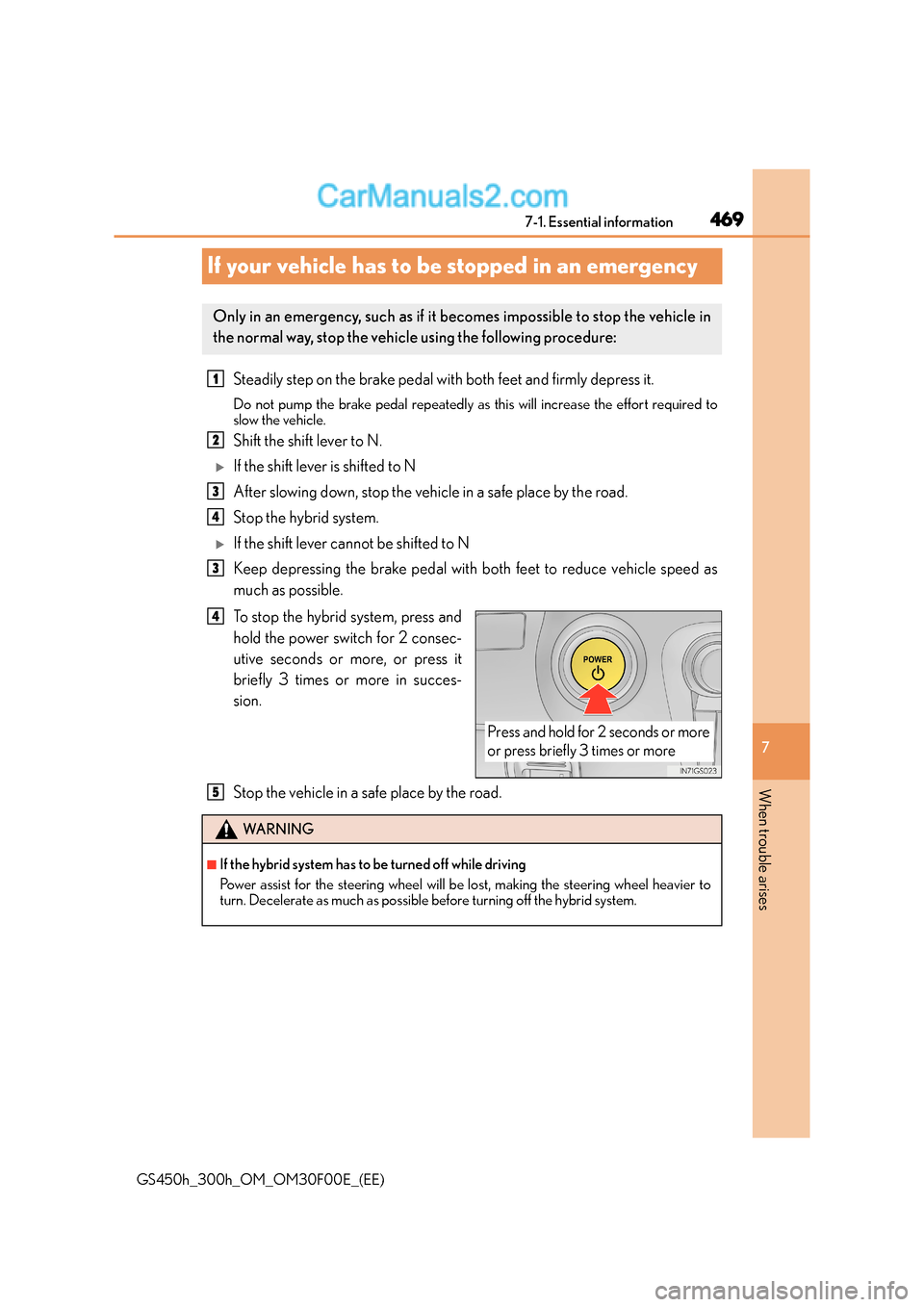
If your vehicle has to be stopped in an emergency
Steadily step on the brake pedal with both feet and firmly depress it.
Do not pump the brake pedal repeatedly as this will increase the effort required to
slow the vehicle.
Shift the shift lever to N.
XIf the shift lever is shifted to N
After slowing down, stop the vehicle in a safe place by the road.
Stop the hybrid system.
XIf the shift lever cannot be shifted to N
Keep depressing the brake pedal with both feet to reduce vehicle speed as
much as possible.
To stop the hybrid system, press and
hold the power switch for 2 consec-
utive seconds or more, or press it
briefly 3 times or more in succes-
sion.
Stop the vehicle in a safe place by the road.
Only in an emergency, such as if it becomes impossible to stop the vehicle in
the normal way, stop the vehicle using the following procedure:
1
2
3
4
3
Press and hold for 2 seconds or more
or press briefly 3 times or more
4
WA R N I N G
■If the hybrid system has to be turned off while driving
Power assist for the steering wheel will be lost, making the steering wheel heavier to
turn. Decelerate as much as possible before turning off the hybrid system.
5