audio Lexus GS300h 2015 User Guide
[x] Cancel search | Manufacturer: LEXUS, Model Year: 2015, Model line: GS300h, Model: Lexus GS300h 2015Pages: 620
Page 218 of 620
2184-2. Driving procedures
GS450h_300h_OM_OM30F00E_(EE)
Stop the vehicle completely.
Shift the shift lever to P.
Set the parking brake. (→P. 2 3 1 )
Press the power switch.
Release the brake pedal and check that “POWER ON” on the multi-informa-
tion display is off.
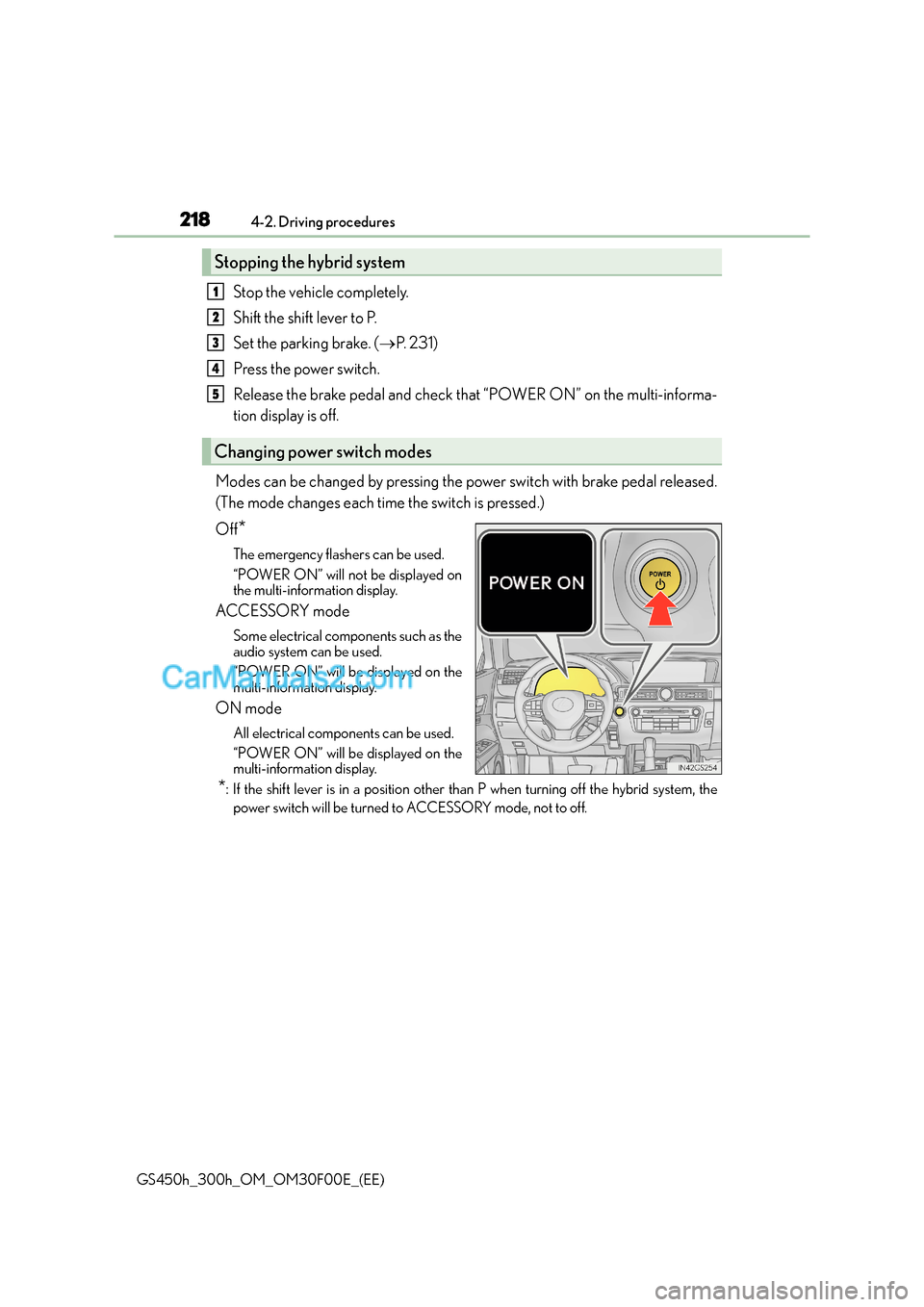
Modes can be changed by pressing the power switch with brake pedal released.
(The mode changes each time the switch is pressed.)
Off
*
The emergency flashers can be used.
“POWER ON” will not be displayed on
the multi-information display.
ACCESSORY mode
Some electrical components such as the
audio system can be used.
“POWER ON” will be displayed on the
multi-information display.
ON mode
All electrical components can be used.
“POWER ON” will be displayed on the
multi-information display.
*: If the shift lever is in a position other than P when turning off the hybrid system, the power switch will be turned to ACCESSORY mode, not to off.
Stopping the hybrid system
Changing power switch modes
1
2
3
4
5
Page 287 of 620
2874-5. Using the driving support systems
4
Driving
GS450h_300h_OM_OM30F00E_(EE)
●Ve h i c l e s w a y w a r n i n g
This function operates when all of the following conditions are met.
• Setting for “Sway Warning” in of the multi-information display is set to “On”.
( → P. 111)
• Vehicle speed is approximately 50 km/h (32 mph) or more.
• Width of traffic lane is approximately 3 m (9.8 ft.) or more.
• No system malfunctions are detected. ( →P. 2 8 9 )
●Lane centering function
This function operates when all of the following conditions are met.
• LKA is turned on.
• Setting for “Steering Assist” and “Lane Center” in of the multi-information
display are set to “On”. ( →P. 111)
•System recognizes wh ite (yellow) lines.
• Dynamic radar cruise control with full-speed range is operating.
• Width of traffic lane is approximately 2.5 to 4.1 m (8.2 to 13.5 ft.).
• Turn signal lever is not operated.
• Vehicle is driven on a straight road or around a gentle curve with a radius of more
than approximately 200 m (656 ft.).
• No system malfunctions are detected. ( →P. 2 8 9 )
• Vehicle does not accelerate or decelerate by a fixed amount or more.
• Steering wheel is not operated with a steering force level suitable for changing lanes.
• ABS, VSC, TRC and PCS (Pre-Crash Safety system) are not operating.
• TRC or VSC is not turned off.
• Hands off steering wheel alert ( →P. 288) is not displayed.
• Lane departure control function is not operating.
■Temporary cancellation of functions
When operation conditions are no longer met, a function may be temporarily canceled.
However, when the operation conditions are met again, operation of the function is auto-
matically restored. ( →P. 2 8 6 )
■Lane departure control function/lane centering function
Depending on the vehicle speed, lane departure situation, road conditions, etc., the
operation of the functions may not be reco gnized or the functions may not operate.
■Lane departure alert function
The warning buzzer may be difficult to hear due to external noise, audio playback, etc.
Also, it may be difficult to feel steering wheel vibrations due to the road conditions, etc.
Page 295 of 620
2954-5. Using the driving support systems
4
Driving
GS450h_300h_OM_OM30F00E_(EE)
●Ve h i c l e s w a y w a r n i n g
This function operates when all of the following conditions are met.
• Setting for “Sway Warning” in of the multi-information display is set to “On”.
( → P. 111)
• Vehicle speed is approximately 50 km/h (32 mph) or more.
• Width of traffic lane is approximately 3 m (9.8 ft.) or more.
• No system malfunctions are detected. ( →P. 2 9 7 )
■Temporary cancellation of functions
When operation conditions are no longer met, a function may be temporarily canceled.
However, when the operation conditions are met again, operation of the function is auto-
matically restored. ( →P. 2 9 4 )
■Steering control function
Depending on the vehicle speed, lane departure situation, road conditions, etc., the
operation of the functions may not be reco gnized or the functions may not operate.
■Lane departure alert function
The warning buzzer may be difficult to hear due to external noise, audio playback, etc.
Also, it may be difficult to feel steering wheel vibrations due to the road conditions, etc.
■Hands off steering wheel alert
Except for Israel: When the system determines that the driver has removed their hands
from the steering wheel while the steering co ntrol function is operating, a warning mes-
sage is displayed on the multi-information display.
If the driver continues to keep their hands off of the steering wheel, the buzzer sounds, a
warning message is displayed and the function is temporarily canceled. This alert also
operates in the same way when the vehicle is driven with the steering wheel lightly
gripped. However, depending on the road conditions, etc., the function may not cancel.
For Israel: When the system determines that the driver has removed their hands from the
steering wheel while the lane departure control function or lane centering function is
operating, a warning message is displayed on the multi-information display and the
buzzer sounds.
■White (yellow) lines are only on one side of road
The LDA system will not operate for the side on which white (yellow) lines could not be
recognized.
Page 334 of 620
3344-5. Using the driving support systems
GS450h_300h_OM_OM30F00E_(EE)
■The outside rear view mirror indicators visibility
When under strong sunlight, the outside rear view mirror indicator may be difficult to
see.
■Rear Crossing Traffic Alert buzzer hearing
Rear Crossing Traffic Alert function may be difficult to hear over loud noises such as high
audio volume.
■When there is a malfunction in the Blind Spot Monitor
If a system malfunction is detected due to any of the following reasons, warning mes-
sages will be displayed: ( →P. 4 8 2 )
●There is a malfunction with the sensors
●The sensors have become dirty
●The outside temperature is extremely high or low
●The sensor voltage has become abnormal
■Switching the Blind Spot Monitor function and Rear Crossing Traffic Alert function on
and off
Settings can be changed from on the multi-information display (→P. 111).
Press or on the meter control switch and select “BSM”.
Each time on the meter control switch is pressed, the function switches between
“On” and “Off”.
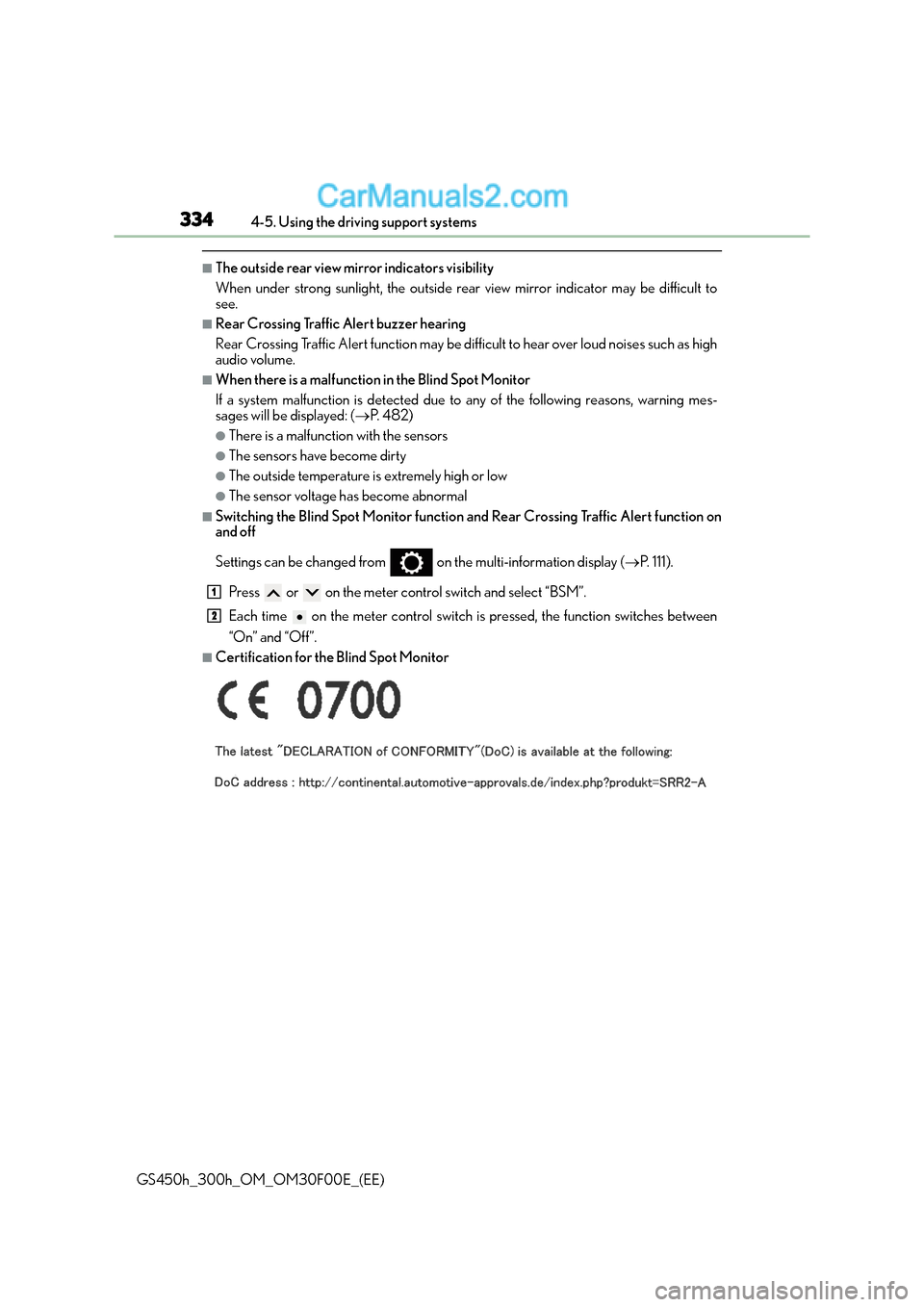
■Certification for the Blind Spot Monitor
1
2
Page 364 of 620
3645-1. Remote Touch screen
GS450h_300h_OM_OM30F00E_(EE)
*1: Refer to the “NAVIGATION AND MULTIMEDIA SYSTEM OWNER’S MANUAL”.
*2: If equipped
■Full screen display
The following functions can be displayed full screen:
*: Refer to the “NAVIGATION AND MULTIMEDIA SYSTEM OWNER’S MAN-UAL”.
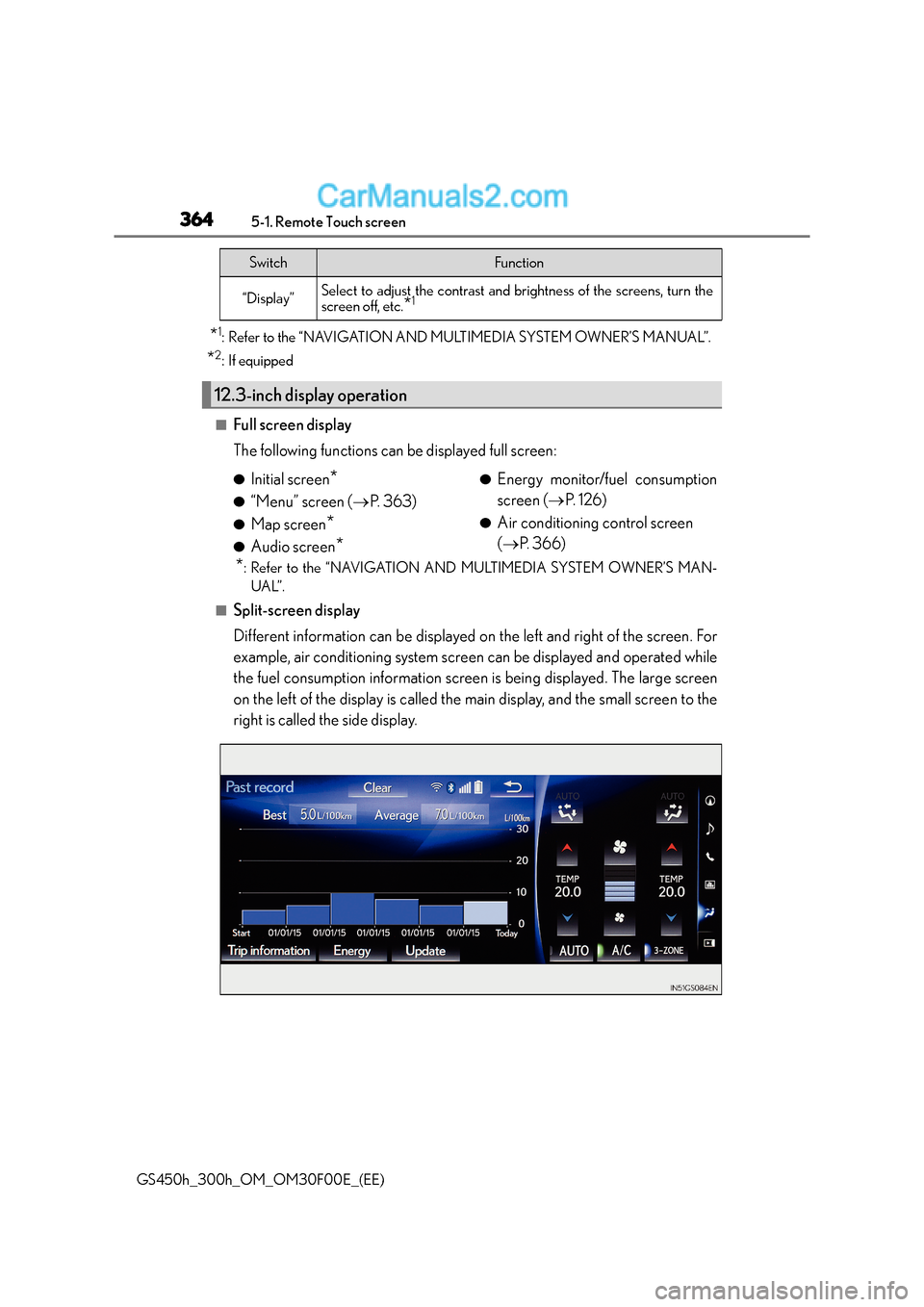
■Split-screen display
Different information can be displayed on the left and right of the screen. For
example, air conditioning system screen can be displayed and operated while
the fuel consumption information screen is being displayed. The large screen
on the left of the display is called the main display, and the small screen to the
right is called the side display.
“Display”Select to adjust the contrast and brightness of the screens, turn the
screen off, etc.*1
12.3-inch display operation
SwitchFunction
●Initial screen*
●“Menu” screen ( →P. 363)
●Map screen*
●Audio screen*
●Energy monitor/fuel consumption
screen ( →P. 1 2 6 )
●Air conditioning control screen
(→ P. 366)
Page 365 of 620
3655-1. Remote Touch screen
5
Interior features
GS450h_300h_OM_OM30F00E_(EE)
For details of the functions and operation of the main display, refer to the respec-
tive section.
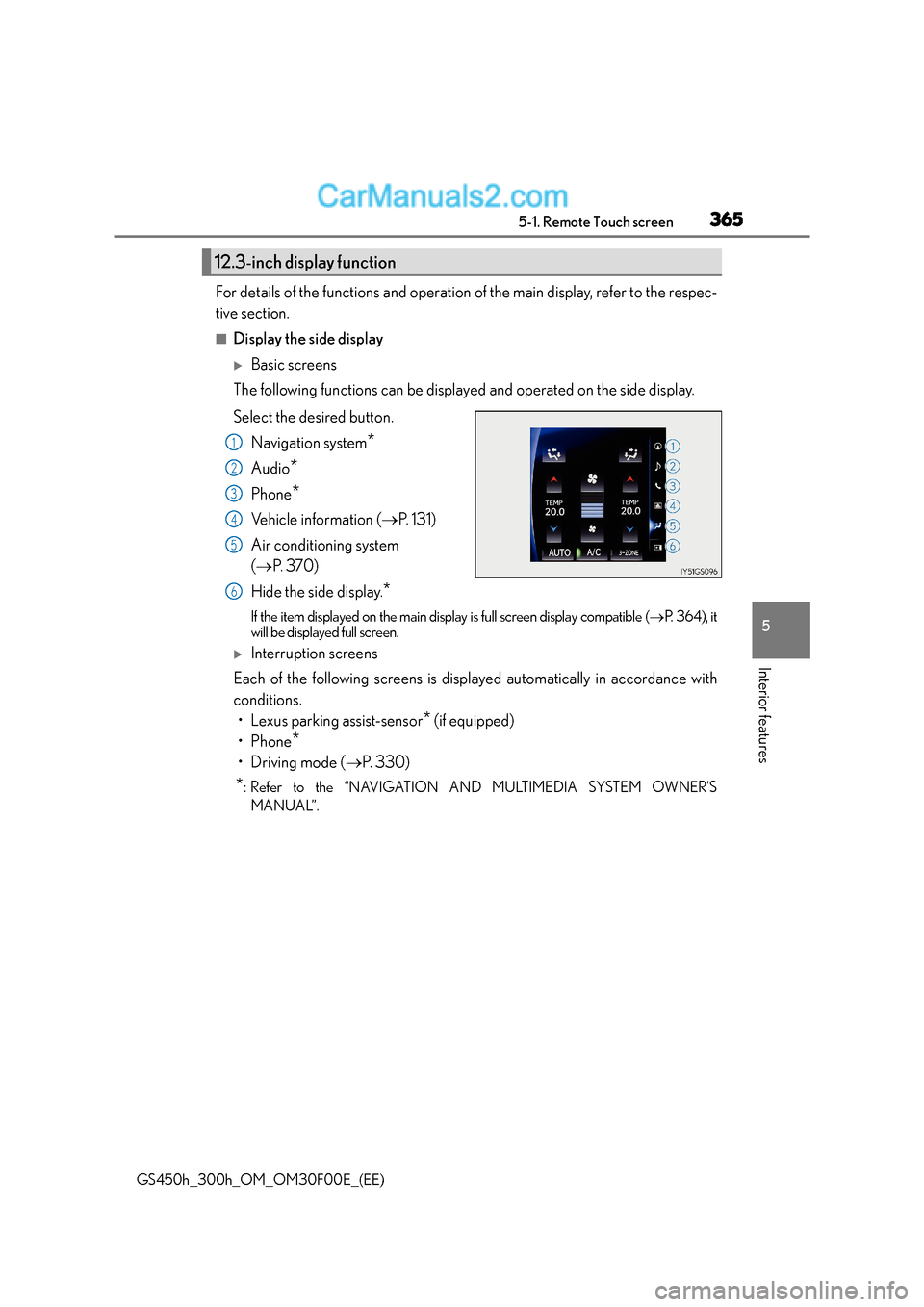
■Display the side display
XBasic screens
The following functions can be displayed and operated on the side display.
Select the desired button.
Navigation system
*
Audio*
Phone*
Vehicle information ( →P. 131)
Air conditioning system
( → P. 3 7 0 )
Hide the side display.
*
If the item displayed on the main display is full screen display compatible ( →P. 3 6 4 ) , i t
will be displayed full screen.
XInterruption screens
Each of the following screens is disp layed automatically in accordance with
conditions. • Lexus parking assist-sensor
* (if equipped)
•Phone
*
•Driving mode ( →P. 3 3 0 )
*: Refer to the “NAVIGATION AND MULTIMEDIA SYSTEM OWNER’S
MANUAL”.
12.3-inch display function
1
2
3
4
5
6
Page 412 of 620
4126-1. Maintenance and care
GS450h_300h_OM_OM30F00E_(EE)
NOTICE
■Cleaning detergents
●Do not use the following types of detergent, as they may discolor the vehicle interior
or cause streaks or damage to painted surfaces:
• Non-seat portions: Organic substances such as benzene or gasoline, alkaline oracidic solutions, dye, and bleach
• Seats: Alkaline or acidic solutions, such as thinner, benzene, and alcohol
●Do not use polish wax or polish cleaner. The instrument panel’s or other interior part’s
painted surface may be damaged.
■Preventing damage to leather surfaces
Observe the following precautions to avoid damage to and deterioration of leather
surfaces:
●Remove any dust or dirt from leather surfaces immediately.
●Do not expose the vehicle to direct sunlight for extended periods of time. Park the
vehicle in the shade, especially during summer.
●Do not place items made of vinyl, plastic, or containing wax on the upholstery, as they
may stick to the leather surface if the vehicle interior heats up significantly.
■Water on the floor
Do not wash the vehicle floor with water.
Vehicle systems such as the audio system may be damaged if water comes into contact
with electrical components such as the audio system above or under the floor of the
vehicle. Water may also cause the body to rust.
■When cleaning the inside of the windshield (vehicles with Lexus Safety System+)
Do not allow glass cleaner to contact the lens. Also, do not touch the lens. ( →P. 2 6 2 )
■Cleaning the inside of the rear window
●Do not use glass cleaner to clean the rear window, as this may cause damage to the
rear window defogger heater wires or antenna. Use a cloth dampened with luke-
warm water to gently wipe the window clean. Wipe the window in strokes running
parallel to the heater wires or antenna.
●Be careful not to scratch or damage the heater wires or antenna.
Page 480 of 620
4807-2. Steps to take in an emergency
GS450h_300h_OM_OM30F00E_(EE)
■The tire pressure warning light may come on due to natural causes
The tire pressure warning light may come on due to natural causes such as natural air
leaks and tire inflation pressure changes caused by temperature. In this case, adjusting
the tire inflation pressure will turn off the warning light (after a few minutes).
■When a tire is replaced with a spare tire
The compact spare tire is not equipped with a tire pressure warning valve and transmit-
ter. If a tire goes flat, the tire pressure warning light will not turn off even though the flat
tire has been replaced with the spare tire.
■Conditions that the tire pressure warning system may not function properly
→P. 4 3 6
■If the tire pressure warning light frequently comes on after blinking for 1 minute
If the tire pressure warning light frequently comes on after blinking for 1 minute when the
power switch is turned to ON mode, have it checked by any authorized Lexus dealer or
repairer, or another duly qualified and equipped professional.
■Warning buzzer
In some cases, the buzzer may not be heard because of noisy place or an audio sound.
WA R N I N G
■If both the ABS and the brake system warning lights remain on
Stop your vehicle in a safe place immediately and contact any authorized Lexus dealer
or repairer, or another duly qualified and equipped professional. The vehicle will
become extremely unstable during braking, and the ABS system may fail, which could
cause an accident resulting in death or serious injury.
■When the electric power steering system warning light comes on
The steering wheel may become extremely heavy.
If the steering wheel becomes heavier than us ual when operating, hold firmly and oper-
ate using more force than usual.
■If the tire pressure warning light comes on
Be sure to observe the following precautions. Failure to do so could cause a loss of
vehicle control and result in death or serious injury.
●Stop your vehicle in a safe place as soon as possible. Adjust the tire inflation pressure
immediately.
●If the tire pressure warning light comes on even after tire inflation pressure adjust-
ment, it is probable that you have a flat tire. Check the tires. If a tire is flat, change it
with the spare tire and have the flat tire repaired by the nearest any authorized Lexus
dealer or repairer, or another duly qualified and equipped professional.
●Avoid abrupt maneuvering and braking. If the vehicle tires deteriorate, you could lose
control of the steering wheel or the brakes.
■If a blowout or sudden air leakage should occur
The tire pressure warning system may not activate immediately.
Page 511 of 620
5117-2. Steps to take in an emergency
7
When trouble arises
GS450h_300h_OM_OM30F00E_(EE)
■Warning message in radar cruise mode (if equipped)
In the following cases, the warning message may not be displayed even if vehicle-to-vehi-
cle distance decreases:
●When your vehicle and the vehicle ahead are traveling at the same speed or the vehicle
ahead is traveling more quickly than your vehicle
●When the vehicle ahead is traveling at a very low speed
●Immediately after cruise control speed is set
●At the instant the accelerator pedal is depressed
■Open door warning message
The open door warning message continues to display until a door or the trunk is fully
closed, even if the power switch is turned off. However, approximately 20 minutes after a
door or the trunk is not fully closed, the 12-volt battery-saving function operates and the
display turns off even though a door or the trunk is not fully closed.
■Warning buzzer
In some cases, the buzzer may not be heard because of noisy place or an audio sound.
Page 516 of 620
5167-2. Steps to take in an emergency
GS450h_300h_OM_OM30F00E_(EE)
■Warning buzzer
In some cases, the buzzer may not be heard because of noisy place or an audio sound.
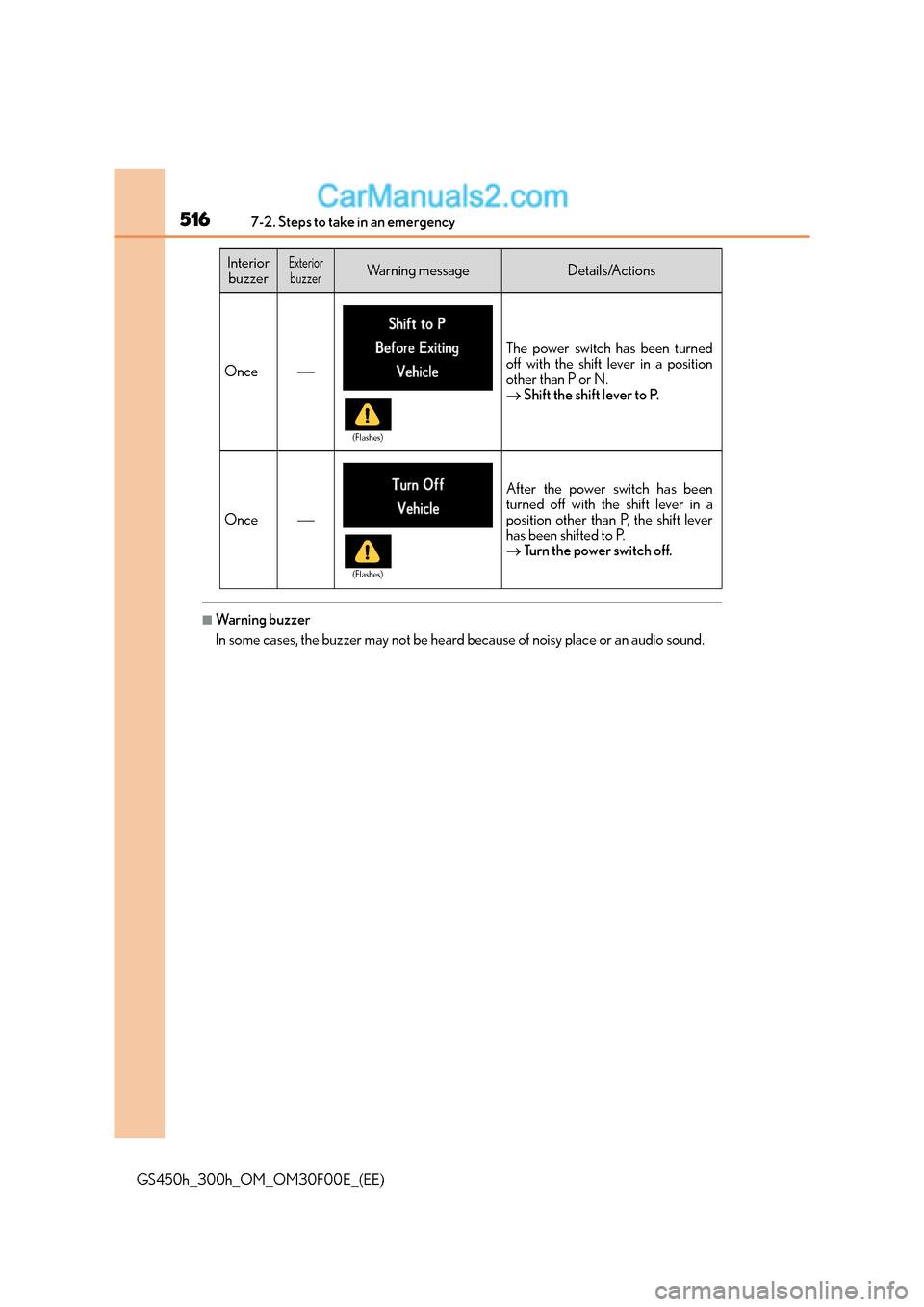
Once
The power switch has been turned
off with the shift lever in a position
other than P or N.
→Shift the shift lever to P.
Once
After the power switch has been
turned off with the shift lever in a
position other than P, the shift lever
has been shifted to P.
→Tu r n t h e p o w e r s w i t c h o f f .
Interior
buzzerExteriorbuzzerWarning messageDetails/Actions
(Flashes)
(Flashes)