setting home Lexus GS300h 2016 Navigation manual
[x] Cancel search | Manufacturer: LEXUS, Model Year: 2016, Model line: GS300h, Model: Lexus GS300h 2016Pages: 383, PDF Size: 46.51 MB
Page 132 of 383

132
4. MY MEMORY
GS_Navi+MM_OM30F13E_(EE)
15.09.01 14:54
1Display the “My memory” screen.
(→ P.131)
2Select “Home” .
3Select the desired item.
1Select “Register” .
2Select the desired item to search for the
location. (→P.104)
3Select “OK” when the editing home
screen appears. ( →P.133)
SETTING UP HOME
If a home has been registered, that infor-
mation can be recalled by selecting
“Home” on the “Destination” screen.
( → P.106)
No.FunctionPage
Select to register home.132
Select to edit home.133
Select to delete home.133
REGISTERING HOME
Page 241 of 383
241
1. SPEECH COMMAND SYSTEM OPERATION
SPEECH COMMAND SYSTEM
GS_Navi+MM_OM30F13E_(EE)
15.09.01 14:54
5
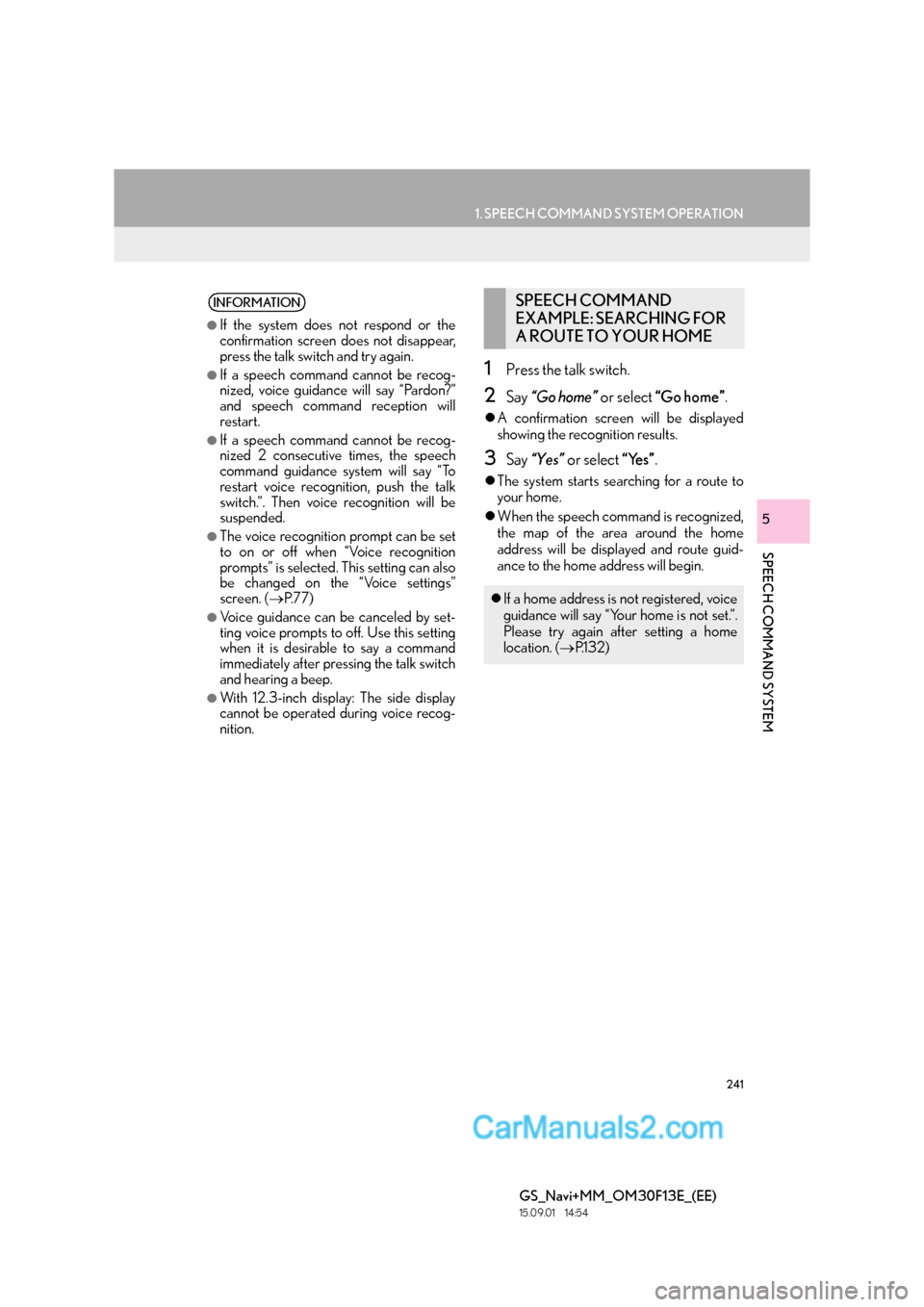
1Press the talk switch.
2Say “Go home” or select “Go home” .
zA confirmation screen will be displayed
showing the recognition results.
3Say “Yes” or select “Yes”.
zThe system starts se arching for a route to
your home.
z When the speech command is recognized,
the map of the area around the home
address will be displayed and route guid-
ance to the home address will begin.
INFORMATION
●
If the system does not respond or the
confirmation screen does not disappear,
press the talk switch and try again.
●If a speech command cannot be recog-
nized, voice guidance will say “Pardon?”
and speech command reception will
restart.
●If a speech command cannot be recog-
nized 2 consecutive times, the speech
command guidance system will say “To
restart voice recognition, push the talk
switch.”. Then voice recognition will be
suspended.
●The voice recognition prompt can be set
to on or off when “Voice recognition
prompts” is selected. This setting can also
be changed on the “Voice settings”
screen. ( →P.77)
●Voice guidance can be canceled by set-
ting voice prompts to off. Use this setting
when it is desirable to say a command
immediately after pressing the talk switch
and hearing a beep.
●With 12.3-inch display: The side display
cannot be operated during voice recog-
nition.
SPEECH COMMAND
EXAMPLE: SEARCHING FOR
A ROUTE TO YOUR HOME
zIf a home address is not registered, voice
guidance will say “Your home is not set.”.
Please try again after setting a home
location. ( →P.1 3 2 )
Page 246 of 383

246
1. SPEECH COMMAND SYSTEM OPERATION
GS_Navi+MM_OM30F13E_(EE)
15.09.01 14:54
2. COMMAND LIST
zFrequently used commands are listed in the following tables.
z For devices that are not installed in the vehicle, the related commands will not be dis-
played in the “Shortcuts” screen. Also, according to conditions, other commands may
not be displayed in the “Shortcuts” screen.
z The functions available may vary according to the system installed.
z Commands that have “O” in the shortcuts menu column can be recognized from the
“Shortcuts” screen.
XBasic
X Navi
Recognizable speech commands and their actions are shown below.
z Voice recognition language can be changed. ( →P. 7 0 )
CommandAction
“Help”Prompts voice guidance to offer examples of commands
and operation methods
“Go back”Returns to the previous screen
CommandActionShortcuts
menu
“Find nearby
rent positionO
“Enter an address”Enables setting a destination by saying the ad-
dressO
“Go home”Displays the route to homeO
*: For example; “Restaurant”, “Hospital” etc.
Page 371 of 383

371
GS_Navi+MM_OM30F13E_(EE)
15.09.01 14:53
D
Destination search .................................................. 104
Destination search operation ............................. 104Searching by address.........................................107
Searching by coordinates ................................. 112
Searching by intersection....................................111
Searching by map ............................................... 109
Searching by memory points ........................... 110
Searching by motorway entrance/exit..........111
Searching by POI ............................................... 109
Searching by POI near cursor ........................ 113
Searching by telephone number.................... 112
Searching by UK/NL postal code ................. 114
Searching from previous destinations ......... 110
Selecting the search area ................................ 106
Setting home as destination ........................... 106
Setting quick access as destination............. 106
DVD .............................................................................. 186
DVD options......................................................... 189
Overview ............................................................... 186
E
Editing route ............................................................... 127Adding destinations ............................................ 127
Deleting destinations..........................................128
Detour setting .......................................................128
Reordering destinations ................................... 127
Road preference ..................................................129
Route overview.................................................... 130
Setting search condition ...................................128
Entering letters and numbers/list screen operation .................................................................. 38
Entering letters and numbers .......................... 38
List screen ................................................................ 39
F
Fuel price ................................................................... 355
Function index .............................................................28
G
General settings .........................................................70
General settings screen .....................................70
GPS (Global Positioning System) .................... 160 Limitations of the navigation system............ 160
H
Home screen................................................................. 18
Home screen operation ..........................................36
How to use the Remote Touch .............................34
I
Importing memory points and stored routes....................................................................... 347
Procedure for downloading memory points and routes from a USB
memory ............................................................ 348
Registering an external point as a memory point and routes from the
internet............................................................... 347
“Information” screen ................................................. 22
Initial screen.................................................................. 32
iPod ................................................................................ 196 iPod audio............................................................. 200
iPod video ............................................................. 200
Overview ................................................................ 196
Page 372 of 383
372
ALPHABETICAL INDEX
GS_Navi+MM_OM30F13E_(EE)
15.09.01 14:53
L
Lexus parking assist monitor ..............................250Driving precautions...........................................250
Lexus parking assist monitor .........................250
Screen display ..................................................... 252
Switching the parking mode screen........... 256
Using the system when parallel parking...............................................................255
Using the system when perpendicular parking............................................................... 254
Lexus parking assist monitor precautions ......271
Area displayed on screen.................................271
Differences between the screen and the actual road................................................ 273
The camera ........................................................... 272
When approaching three-dimensional objects................................................................ 274
Lexus parking assist-sensor................................ 279 Detection range of the sensors ....................285
Display ................................................................... 280
Lexus parking assist-sensor display ...........286
Lexus parking assist-sensor failure warning ............................................................. 288
Lexus parking assist-sensor switch............. 279
Sensor detection display, obstacle distance .............................................................282
Sensor detection information .......................286
The Lexus parking assist-sensor can be operated when ...............................................286
Types of sensors ................................................. 279
Linking multi-information display and navigation system.................................................. 44
M
Map database version and covered area.......163
About the map data ............................................164
Map data .................................................................163
Map screen information ......................................... 96 Displaying information about the icon where the cursor is set................................... 98
Displaying POI icons........................................... 96
Route trace ...............................................................97
Standard map icons ............................................. 99
Map screen operation ............................................. 90 Adjusting location in small increments ........ 95
Current position display .................................... 90
Map scale ...................................................................91
Orientation of the map ....................................... 92
Screen scroll operation ...................................... 94
Switching map configurations ......................... 92
Media operation....................................................... 183
“Menu” screen .............................................................. 14 Status display ............................................................ 16
My memory .................................................................. 131
My memory settings ................................................. 131 Backup to a USB memory ............................... 144
Copying from a USB memory .......................146
Setting up area to avoid ................................... 140
Setting up home ...................................................132
Setting up memory points ................................136
Setting up quick access.....................................134
Setting up route trace ........................................142
N
Navigation operation ............................................... 24
Navigation settings .................................................. 147
Navigation settings screen .............................. 147
Navigation system ..................................................... 83
Network settings........................................................ 45
Page 373 of 383

373
GS_Navi+MM_OM30F13E_(EE)
15.09.01 14:53
O
Online search........................................................... 344Online search...................................................... 344
Viewing POI details.......................................... 346
Operating information ........................................... 221 DVD player and disc ........................................ 223
Error messages................................................... 234
File information ................................................... 229
iPod.......................................................................... 228
Radio ......................................................................... 221
Terms ...................................................................... 232
Operation flow: Guiding the route .................... 26
Other settings ............................................................. 70
P
Panoramio ...................................................................351
Parallel parking........................................................ 262 Narrow mode...................................................... 269
Parking ................................................................... 264
Vehicle movement procedure..................... 262
Peripheral monitoring system ........................... 249
Perpendicular parking (Estimated course line display mode) .............................. 257
Parking ................................................................... 259
Screen description ............................................ 257
Perpendicular parking (Parking assist guide line display mode) ................................. 260
Parking .....................................................................261
Screen description ............................................ 260
Q
Quick guide .....................................................................11
Quick reference .......................... 20, 86, 168, 294
Map screen ............................................................. 86
Navigation menu screen ................................... 88
R
Radio operation ........................................................ 179
Rear seat audio control switches ....................... 212
Receiving on the Bluetooth
® phone...............307
Incoming calls ......................................................307
Registering home ....................................................... 24
Registering quick access ........................................25
Registering/connecting Bluetooth
®
device .........................................................................45
Profiles .......................................................................49
Registering a Bluetooth
® audio player
for the first time.................................................. 47
Registering a Bluetooth
® phone
for the first time..................................................45
Remote Touch .............................................................. 12
Route guidance ...........................................................119
Route guidance screen ............................................119 Arrow screen ........................................................ 125
During motorway driving ................................. 123
Route guidance screen .......................................119
Turn list screen ..................................................... 125
When approaching intersection ................... 124
Page 374 of 383

374
ALPHABETICAL INDEX
GS_Navi+MM_OM30F13E_(EE)
15.09.01 14:53
S
Screen adjustment..................................................... 42
Setting Bluetooth® details ...................................... 51
“Bluetooth* setup” screen .................................. 51
Connecting a Bluetooth
® device .................. 54
Deleting a Bluetooth® device ......................... 54
“Detailed Bluetooth* settings” screen..........58
Editing the Bluetooth
® device
information.......................................................... 56
Registering a Bluetooth
® device ................... 52
Setting home as the destination ........................... 27
Setting up Lexus parking assist-sensor..........290
Alert distance setting......................................... 291
Alert volume setting..........................................290
Display on/off setting ........................................ 291
Settings required for using the service ..........343 Connecting to internet .................................... 343
Obtaining Lexus portal site account..........343
Setup............................................... 147, 215, 316, 357
“Setup” screen ............................................................. 20
Some basics..................................................... 170, 295 About the contacts in the contact list ........299
Disc slot ..................................................................... 171
Registering/connecting a Bluetooth
®
phone ................................................................. 296
Selecting an audio source ................................. 171
“Sound settings” screen.....................................174
Speech command system ....................178, 298
Turning the system on and off ........................ 170
USB/AUX port ....................................................172
Using the telephone switch/microphone ...................................... 297
When selling or disposing of the vehicle ................................................................ 299 Speech command system ........................237, 238
Speech command system operation......... 240
Using the speech command system .......... 238
Speech command system operation.............. 238
Starting route guidance .......................................... 115 Destination map screen ..................................... 116
Entire route map screen .................................... 117
Steering switches .................................................... 209
Street View ................................................................350
T
Talking on the Bluetooth® phone....................308
Incoming call waiting......................................... 310
Telephone .................................................................. 293
Telephone operation (Hands-free system for cellular phones) ........................................... 294
Telephone settings ...................................................316 “Contact/Call history” screen........................319
“Lexus Euro assistance 24 settings” screen ................................................................ 328
“Messaging settings” screen ......................... 327
“Notifications” screen ....................................... 318
“Sounds” screen ................................................... 317
Things you should know ........................................276
If you notice any symptoms ............................276
Tips for operating the audio/visual system ....................................................................... 221
Tips for the navigation system ............................ 160
Traffic and parking information.......................... 100
Displaying traffic and traffic prediction information ....................................................... 100
Parking information ............................................102
Traffic and parking settings ................................... 151 Traffic and parking settings screen ............... 151
Troubleshooting ...................................................... 330
Typical voice guidance prompts ........................ 126
*: The Bluetooth
® word mark and logos are registered trademarks owned by Bluetooth SIG, Inc.