Malfunction Lexus GS300h 2016 Owner's Guide
[x] Cancel search | Manufacturer: LEXUS, Model Year: 2016, Model line: GS300h, Model: Lexus GS300h 2016Pages: 620
Page 232 of 620
2324-2. Driving procedures
GS450h_300h_OM_OM30F00E_(EE)
■Parking brake operation
●When the power switch is not in ON mode, the parking brake cannot be released using
the parking brake switch.
●When the power switch is not in ON mode, automatic mode (automatic brake setting
and releasing) is not available.
●If the parking brake is operated repeatedly over a short period of time, the system may
restrict operation to prevent overheating. If this happens, refrain from operating the
parking brake. Normal operation will return after about 1 minute.
●Vehicles with towing package: In situations such as when parking while towing a trailer,
the maximum amount of braking force can be used by pressing the parking brake
switch with the parking brake already set.
●Vehicles without towing package: In situations such as when parking on a steep slope*,
the maximum amount of braking force can be used by pressing the parking brake
switch with the parking brake already set.
*: Use wheel chocks when parking on a steep slope.
■Parking brake operation sound
When the parking brake operates, a motor sound (whirring sound) may be heard. This
does not indicate a malfunction.
■Parking brake indicator light
●Depending on the power switch mode, the parking brake indicator light will come on
and stay on as described below:
ON mode: Comes on until the parking brake is released.
Not in ON mode: Stays on for approximately 15 seconds.
●When the power switch is turned off with the parking brake set, the parking brake indi-
cator light will stay on for about 15 seco nds. This does not indicate a malfunction.
■When there is a malfunction in the system
Warning lights and/or warning message will turn on or flash. (→P. 4 7 8 , 4 8 2 )
Depending on the condition, the park ing brake indicator light may flash.
■Parking brake engaged warning buzzer
→P. 4 8 8
■Usage in winter time
→P. 3 5 4
Page 233 of 620
2334-2. Driving procedures
4
Driving
GS450h_300h_OM_OM30F00E_(EE)
NOTICE
■When parking the vehicle
Before you leave the vehicle, set the parking brake, shift the shift lever to P and make
sure that the vehicle does not move.
■When the system malfunctions
Stop the vehicle in a safe place and check the warning messages.
■When the parking brake cannot be released due to a malfunction
Use the parking brake release tool to manually release the parking brake. (→P. 5 4 6 )
Driving the vehicle with the parking brake set will lead to brake components overheat-
ing, which may affect braking performance and increase brake wear.
Page 234 of 620
2344-2. Driving procedures
GS450h_300h_OM_OM30F00E_(EE)
Brake Hold
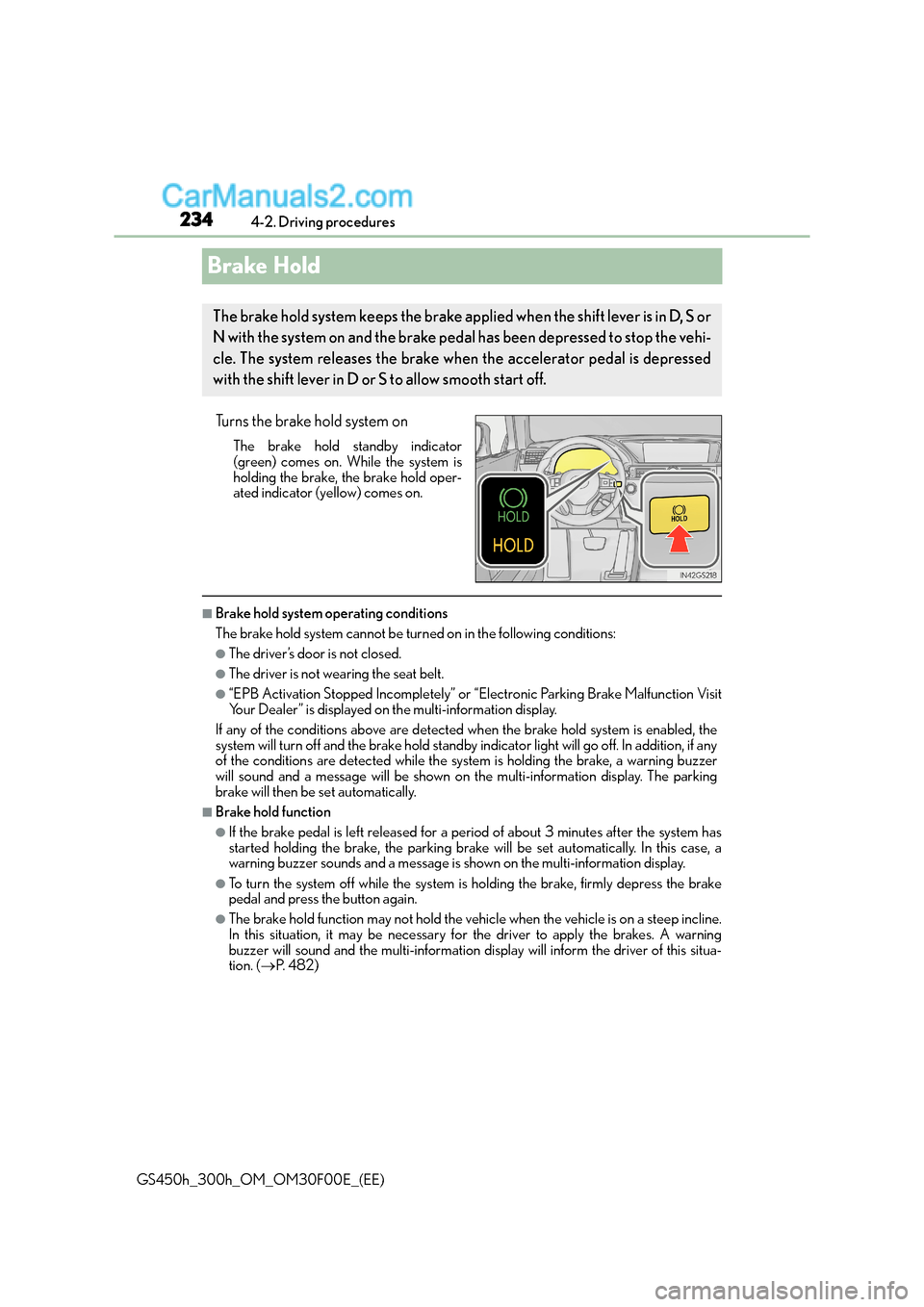
Turns the brake hold system on
The brake hold standby indicator
(green) comes on. While the system is
holding the brake, the brake hold oper-
ated indicator (yellow) comes on.
■Brake hold system operating conditions
The brake hold system cannot be turn ed on in the following conditions:
●The driver’s door is not closed.
●The driver is not wearing the seat belt.
●“EPB Activation Stopped Incompletely” or “Electronic Parking Brake Malfunction Visit
Your Dealer” is displayed on the multi-information display.
If any of the conditions above are detected when the brake hold system is enabled, the
system will turn off and the brake hold standby indicator light will go off. In addition, if any
of the conditions are detected while the sy stem is holding the brake, a warning buzzer
will sound and a message will be shown on th e multi-information display. The parking
brake will then be set automatically.
■Brake hold function
●If the brake pedal is left released for a period of about 3 minutes after the system has
started holding the brake, th e parking brake will be set automatically. In this case, a
warning buzzer sounds and a message is shown on the multi-information display.
●To turn the system off while the system is holding the brake, firmly depress the brake
pedal and press the button again.
●The brake hold function may not hold the vehicle when the vehicle is on a steep incline.
In this situation, it may be necessary for the driver to apply the brakes. A warning
buzzer will sound and the multi-information di splay will inform the driver of this situa-
tion. ( →P. 4 8 2 )
The brake hold system keeps the brake applied when the shift lever is in D, S or
N with the system on and the brake peda l has been depressed to stop the vehi-
cle. The system releases the brake wh en the accelerator pedal is depressed
with the shift lever in D or S to allow smooth start off.
Page 235 of 620
2354-2. Driving procedures
4
Driving
GS450h_300h_OM_OM30F00E_(EE)
■When the parking brake is set automatically while the system is holding the brakes
The parking brake will not be released automatically. Perform one of the following proce-
dures to release the parking brake and confirm that the parking brake indicator light
turns off. ( →P. 2 3 1 )
●With the brake pedal depressed, operate the parking brake switch.
●Fasten your seat belt, check that the shift leve r is in either D or R and slowly depress the
accelerator pedal.
■Warning message and buzzers
Warning messages and buzzers are used to in dicate a system malfunction or to inform
the driver of the need for caution. ( →P. 4 8 2 )
WA R N I N G
■When the vehicle is on a steep incline
When using the brake hold system on a steep incline exercise caution. The brake hold
function may not hold the vehicle in such a situation.
■When stopped on a slippery road
The system cannot stop the vehicle when the gripping ability of the tires has been
exceeded. Do not use the system when stopped on a slippery road.
NOTICE
■When parking the vehicle
The brake hold system is not designed for use when parking the vehicle for a long
period of time. Turning the power switch o ff while the system is holding the brake may
release the brake, which would cause the vehicle to move. When operating the power
switch, depress the brake pedal, set the parking brake and shift the shift lever to P.
Page 239 of 620
2394-3. Operating the lights and wipers
4
Driving
GS450h_300h_OM_OM30F00E_(EE)
■Daytime running light system
To make your vehicle more visible to other drivers during daytime driving, the daytime
running lights turn on automatically whenever the hybrid system is started and the park-
ing brake is released with the headlight switch is in the “AUTO” position. (Illuminate
brighter than the front position lights.)
Daytime running lights are not designed for use at night.
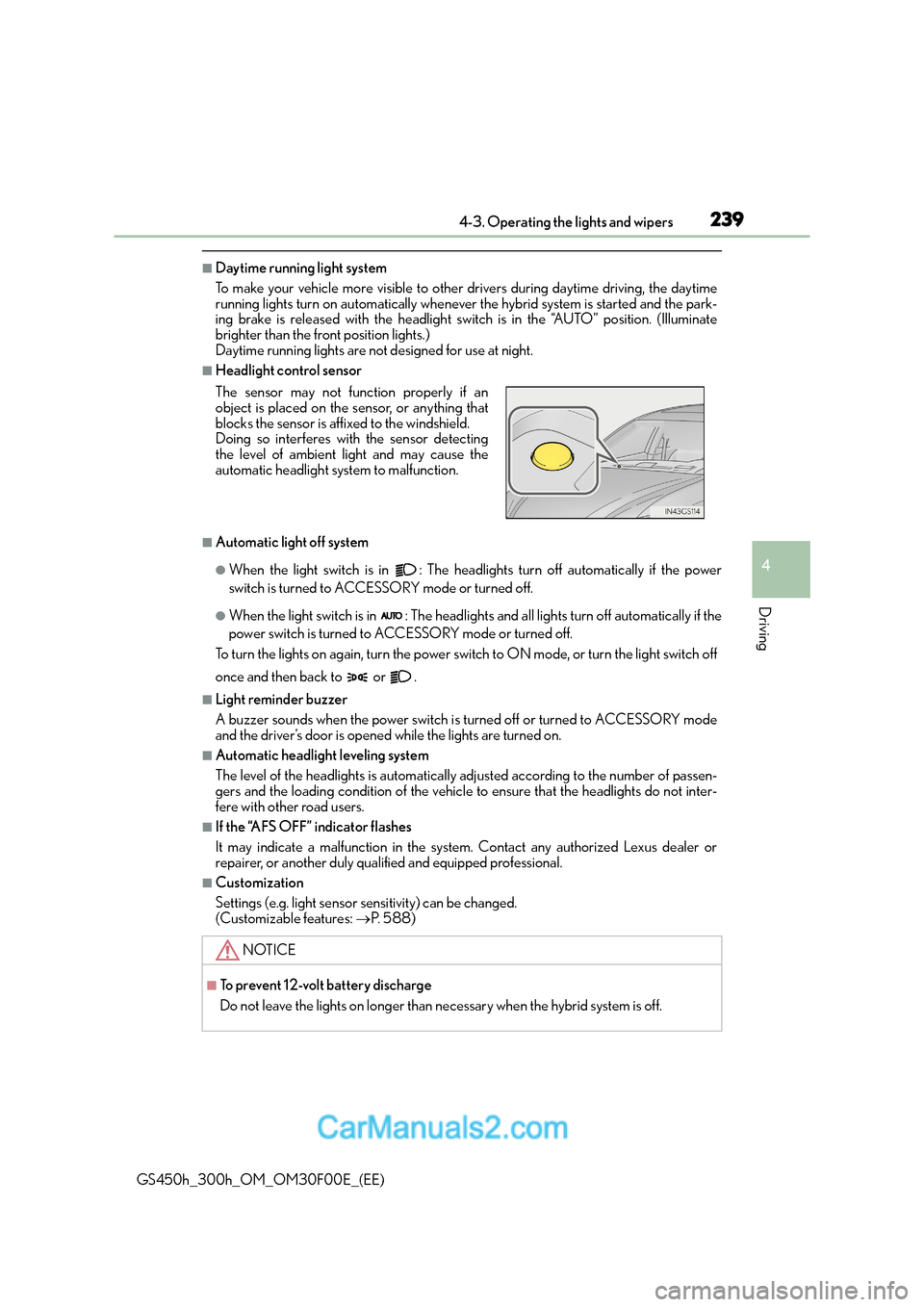
■Headlight control sensor
■Automatic light off system
●When the light switch is in : The headlights turn off automatically if the power
switch is turned to ACCESSORY mode or turned off.
●When the light switch is in : The headlights and all lights turn off automatically if the
power switch is turned to ACCESSORY mode or turned off.
To turn the lights on again, turn the power swit ch to ON mode, or turn the light switch off
once and then back to or .
■Light reminder buzzer
A buzzer sounds when the power switch is turned off or turned to ACCESSORY mode
and the driver’s door is opened while the lights are turned on.
■Automatic headlight leveling system
The level of the headlights is automatically adjusted according to the number of passen-
gers and the loading condition of the vehicle to ensure that the headlights do not inter-
fere with other road users.
■If the “AFS OFF” indicator flashes
It may indicate a malfunction in the system. Contact any authorized Lexus dealer or
repairer, or another duly qualified and equipped professional.
■Customization
Settings (e.g. light sensor se nsitivity) can be changed.
(Customizable features: →P. 5 8 8 )
The sensor may not function properly if an
object is placed on the sensor, or anything that
blocks the sensor is affixed to the windshield.
Doing so interferes with the sensor detecting
the level of ambient light and may cause the
automatic headlight system to malfunction.
NOTICE
■To prevent 12-volt battery discharge
Do not leave the lights on longer than necessary when the hybrid system is off.
Page 244 of 620
2444-3. Operating the lights and wipers
GS450h_300h_OM_OM30F00E_(EE)
●In the situations shown below, the system may not be able to accurately detect sur-
rounding brightness levels. This may cause the low beams to remain on or the high
beams to cause problems for pedestrians, vehicles ahead or other parties. In these
cases, manually switch between the high and low beams.
• In bad weather (rain, snow, fog, sandstorms etc.)
• The windshield is obscured by fog, mist, ice, dirt etc.
• The windshield is cracked or damaged.
• The camera sensor is deformed or dirty.
• The camera sensor temperature is extremely high.
• Surrounding brightness levels are equal to those of headlights, tail lights or fog lights.
• Vehicles ahead have headlights that are either switched off, dirty, are changing color, or have are not aimed properly.
• The vehicle is hit by water, snow, dust, etc. from a preceding vehicle.
• When driving through an area of intermittently changing brightness and darkness.
• When frequently and repeatedly driving ascending/descending roads, or roads with rough, bumpy or uneven surfaces (such as stone-paved roads, gravel tracks etc.).
• When frequently and repeatedly taking curves or driving on a winding road.
• There is a highly reflective object ahead of the vehicle, such as a sign or a mirror.
• The back of a vehicle ahead is highly reflective, such as a container on a truck.
• The vehicle’s headlights are damaged or dirty.
• The vehicle is listing or tilting, due to a flat tire, a trailer being towed etc.
• The high beam and low beam are repeatedly being switched between in an abnor- mal manner.
• The driver believes that the high beam may be causing problems or distress to other
drivers or pedestrians nearby.
■Warning message
Warning messages are used to indicate a system malfunction or to inform the driver
of the need for caution. ( →P. 4 8 2 )
■Customization
Some functions can be customized. ( →P. 5 8 1 )
Page 248 of 620
2484-3. Operating the lights and wipers
GS450h_300h_OM_OM30F00E_(EE)
●In the situations shown below, the system may not be able to accurately detect sur-
rounding brightness levels. This may cause the low beams to remain on or the high
beams to cause problems for pedestrians, vehicles ahead or other parties. In these
cases, manually switch between the high and low beams.
• In bad weather (rain, snow, fog, sandstorms etc.)
• The windshield is obscured by fog, mist, ice, dirt etc.
• The windshield is cracked or damaged.
• The inside rear view mirror or camera sensor is deformed or dirty.
• The camera sensor temperature is extremely high.
• Surrounding brightness levels are equal to those of headlights, tail lights or fog lights.
• Vehicles ahead have headlights that are either switched off, dirty, are changing color, or have are not aimed properly.
• When driving through an area of intermittently changing brightness and darkness.
• When frequently and repeatedly driving ascending/descending roads, or roads with rough, bumpy or uneven surfaces (such as stone-paved roads, gravel tracks etc.).
• When frequently and repeatedly taking curves or driving on a winding road.
• There is a highly reflective object ahead of the vehicle, such as a sign or a mirror.
• The back of a vehicle ahead is highly reflective, such as a container on a truck.
• The vehicle’s headlights are damaged or dirty.
• The vehicle is listing or tilting, due to a flat tire, a trailer being towed etc.
• The high beam and low beam are repeatedly being switched between in an abnor-
mal manner.
• The driver believes that the high beam may be causing problems or distress to other drivers or pedestrians nearby.
• When going through the Straits of Dover.
■Warning message
Warning messages are used to indicate a system malfunction or to inform the driver of
the need for caution. ( →P. 4 8 2 )
Page 261 of 620
2614-5. Using the driving support systems
4
Driving
GS450h_300h_OM_OM30F00E_(EE)
The pre-crash safety system is equipped with a sophisticated computer that will
record certain data, such as: • Accelerator status
•Brake status
• Vehicle speed
• Operation status of the pre-crash safety system functions
• Information (such as the distance and relative speed between your vehicle
and the vehicle ahead or other objects)
The pre-crash safety system does not record conversations, sounds or pictures.
●Data usage
Lexus may use the data recorded in this computer to diagnose malfunctions,
conduct research and development, and improve quality.
Lexus will not disclose the recorded data to a third party except: • With the consent of the vehicle owner or with the consent of the lessee if
the vehicle is leased
• In response to an official request by the police, a court of law or a govern-
ment agency
• For use by Lexus in a lawsuit
• For research purposes where the data is not tied to a specific vehicle or vehicle owner
Vehicle data recording
Page 263 of 620
2634-5. Using the driving support systems
4
Driving
GS450h_300h_OM_OM30F00E_(EE)
WA R N I N G
■To avoid malfunction of the radar sensor
Observe the following precautions.
Otherwise, the radar sensor may not operate properly, possibly leading to an accident
resulting in death or serious injury.
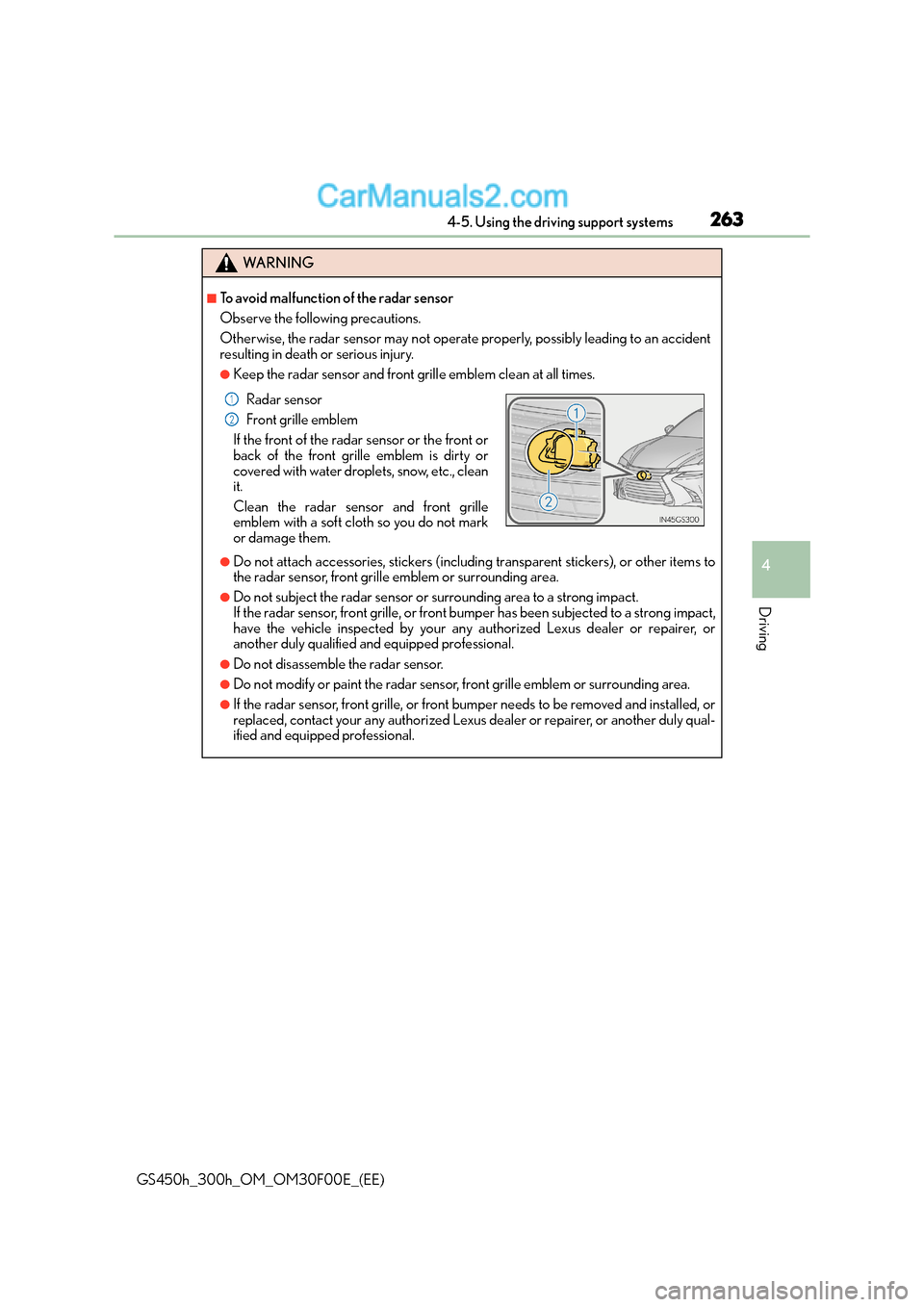
●Keep the radar sensor and front grille emblem clean at all times.
●Do not attach accessories, stickers (including transparent stickers), or other items to
the radar sensor, front grille emblem or surrounding area.
●Do not subject the radar sensor or surrounding area to a strong impact.
If the radar sensor, front grille, or front bump er has been subjected to a strong impact,
have the vehicle inspected by your any authorized Lexus dealer or repairer, or
another duly qualified and equipped professional.
●Do not disassemble the radar sensor.
●Do not modify or paint the radar sensor, front grille emblem or surrounding area.
●If the radar sensor, front grille, or front bumper needs to be removed and installed, or
replaced, contact your any authorized Lexus dealer or repairer, or another duly qual-
ified and equipped professional.
Radar sensor
Front grille emblem
If the front of the radar sensor or the front or
back of the front grille emblem is dirty or
covered with water droplets, snow, etc., clean
it.
Clean the radar sensor and front grille
emblem with a soft cloth so you do not mark
or damage them.1
2
Page 264 of 620
2644-5. Using the driving support systems
GS450h_300h_OM_OM30F00E_(EE)
WA R N I N G
■To avoid malfunction of the camera sensor
Observe the following precautions.
Otherwise, the camera sensor may not operate properly, possibly leading to an acci-
dent resulting in death or serious injury.
●Keep the windshield clean at all times.
• If the windshield is dirty or covered with an oily film, water droplets, snow, etc.,
clear the windshield.
• If a glass coating agent is applied to the windshield, it will still be necessary to use the windshield wipers to remove water drop lets from the area of the windshield in
front of the camera sensor.
• If the inner side of the windshield where th e camera sensor is installed is dirty, con-
tact any authorized Lexus dealer or repairer, or another duly qualified and
equipped professional.
●If the part of the windshield in front of the camera sensor is fogged up or covered with
condensation or ice, use the windshield defogger to remove the fog, condensation or
ice. ( →P. 3 7 2 )
●If water droplets cannot be properly remove d from the area of the windshield in front
of the camera sensor by the windshield wipers, replace the wiper insert or wiper
blade.
If the wiper inserts or wiper blades need to be replaced, contact any authorized
Lexus dealer or repairer, or another duly qualified and equipped professional.
●Do not attach window tinting to the windshield.
●Replace the windshield if it is damaged or cracked.
If the windshield needs to be replaced, contact any authorized Lexus dealer or
repairer, or another duly qualified and equipped professional.
●Do not get the camera sensor wet.
●Do not allow bright lights to shine into the camera sensor.
●Do not dirty or damage the camera sensor.
When cleaning the inside of the windshield, do not allow glass cleaner to contact the
lens. Also, do not touch the lens.
If the lens is dirty or damaged, contact any authorized Lexus dealer or repairer, or
another duly qualified and equipped professional.
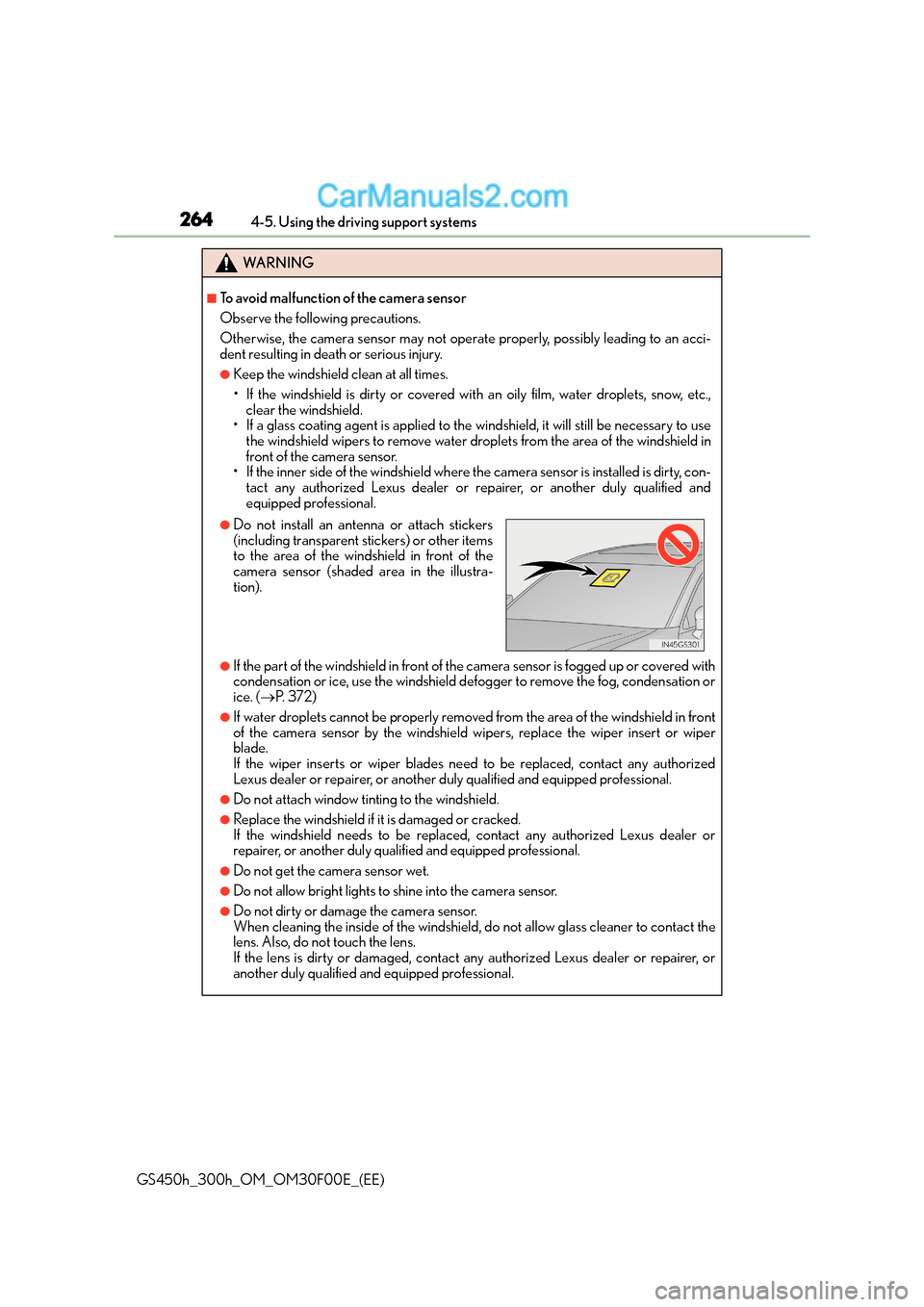
●Do not install an antenna or attach stickers
(including transparent stickers) or other items
to the area of the windshield in front of the
camera sensor (shaded area in the illustra-
tion).