Malfunction Lexus GS300h 2016 Service Manual
[x] Cancel search | Manufacturer: LEXUS, Model Year: 2016, Model line: GS300h, Model: Lexus GS300h 2016Pages: 620
Page 301 of 620
3014-5. Using the driving support systems
4
Driving
GS450h_300h_OM_OM30F00E_(EE)
In the following situations, the RSA system alerts the driver using a warning dis-
play.
●When the vehicle speed exceeds the speed warning threshold applied to the
speed limit of the sign displayed on the multi-information display, the sign
color becomes inverted.
●If it is detected that your vehicle is overtaking when a no overtaking sign is dis-
played on the multi-information display, the sign flashes.
●When the RSA system recognizes a no-entry sign and detects that the vehicle
has entered a no-entry area based on the map information of the navigation
system, the no-entry sign flashes.
■Automatic turn-off of RSA sign display
One or more signs automatically turn off in the following situations.
●A new sign is not recognized for a certain distance.
●The road changes due to a left or right turn, etc.
■Conditions in which the function may not operate or detect correctly
In the following situations, RSA does not op erate normally and may not recognize signs,
display the incorrect sign, etc. However, this does not indicate a malfunction.
●The camera sensor is misaligned due to a st rong impact being applied to the sensor,
etc.
●Dirt, snow, stickers, etc., are on the windshield near the camera sensor.
●In inclement weather such as heavy rain, fog, snow or sand storms
●Light from an oncoming vehicle, the sun, etc., enters the camera sensor.
●The sign is dirty, faded, tilted or bent, and if an electronic sign, the contrast is poor.
●All or part of the sign is hidden by the leaves of a tree, a pole, etc.
●The sign is only visible to the camera sensor for a short amount of time.
●The driving scene (turning, lane change, etc.) is judged incorrectly.
●Even if it is a sign not appropriate for the currently traveled lane, such a sign exists
directly after a freeway branches, or in an adjacent lane just before merging.
●Stickers are attached to the rear of the preceding vehicle.
●A sign resembling a system compatible sign is recognized.
●The vehicle is driven in a country with a different direction of traffic.
●Side road speed signs may be detected and displayed (if positioned in sight of the cam-
era sensor) while the vehicle is traveling on the main road.
●Roundabout exit road speed signs may be detected and displayed (if positioned in sight
of the camera sensor) while traveling on a roundabout.
Warning display
Page 312 of 620
3124-5. Using the driving support systems
GS450h_300h_OM_OM30F00E_(EE)
■Dynamic radar cruise control with full-speed range can be set when
●The shift lever is in D or range 4 or higher of S has been selected.
●Range 4 or higher of D has been selected by using the paddle shift switch.
●Vehicle speed is above approximately 50 km/h (30 mph).
However, when a preceding vehicle is detected, the dynamic radar cruise control with
full-speed range can be set even if the vehicle speed is at or below approximately
50 km/h (30 mph).
■Accelerating after setting the vehicle speed
The vehicle can accelerate by operating the accelerator pedal. After accelerating, the
set speed resumes. However, during vehicle-to-vehicle distance control mode, the vehi-
cle speed may decrease below the set speed in order to maintain the distance to the pre-
ceding vehicle.
■Automatic cancelation of vehicle-to-vehicle distance control mode
Vehicle-to-vehicle distance control mode is automatically canceled in the following situ-
ations.
●Actual vehicle speed falls below approximately 40 km/h (25 mph) when there are no
vehicles ahead.
●The preceding vehicle leaves the lane when your vehicle is following at a vehicle speed
below approximately 40 km/h (25 mph). Otherwise, the sensor can not properly
detect the vehicle.
●VSC is activated.
●TRC is activated for a period of time.
●When the VSC or TRC system is turned off by pressing the VSC OFF switch.
●When snow mode is set.
●The sensor cannot detect correctly because it is covered in some way.
●Pre-crash braking is activated.
●The parking brake is operated.
●The vehicle is stopped by syst em control on a steep incline.
●The following are detected when the vehicle has been stopped by system control:
• The driver is not wearing a seat belt.
• The driver’s door is opened.
• The vehicle has been stopped for about 3 minutes
If vehicle-to-vehicle distance control mode is automatically canceled for any other rea-
son, there may be a malfunction in the system. Contact any authorized Lexus dealer or
repairer, or another duly qualified and equipped professional.
Page 313 of 620
3134-5. Using the driving support systems
4
Driving
GS450h_300h_OM_OM30F00E_(EE)
■Automatic cancelation of constant speed control mode
Constant speed control mode is automatically canceled in the following situations:
●Actual vehicle speed is more than approximately 16 km/h (10 mph) below the set vehi-
cle speed.
●Actual vehicle speed falls below approximately 40 km/h (25 mph).
●VSC is activated.
●TRC is activated for a period of time.
●When the VSC or TRC system is turned off by pressing the VSC OFF switch.
●Pre-crash braking is activated.
If constant speed control mode is automatically canceled for any other reason, there may
be a malfunction in the system. Contact any authorized Lexus dealer or repairer, or
another duly qualified and equipped professional.
■Warning messages and buzzers for dynamic radar cruise control with full-speed range
Warning messages and buzzers are used to in dicate a system malfunction or to inform
the driver of the need for caution while driv ing. If a warning message is shown on the
multi-information display, read the message and follow the instructions. ( →P. 4 8 2 )
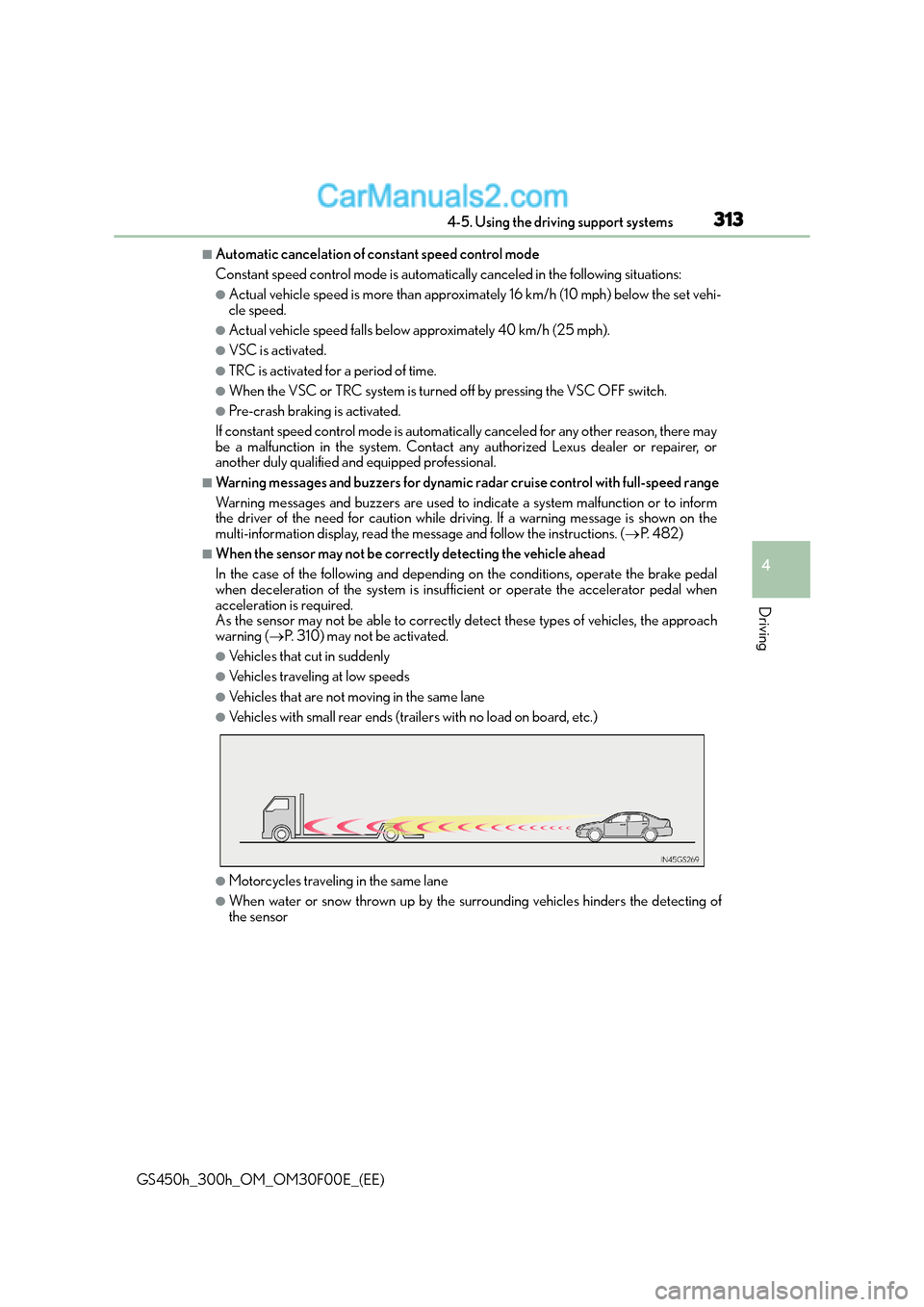
■When the sensor may not be correctly detecting the vehicle ahead
In the case of the following and depending on the conditions, operate the brake pedal
when deceleration of the system is insufficient or operate the accelerator pedal when
acceleration is required.
As the sensor may not be able to correctly detect these types of vehicles, the approach
warning ( →P. 310) may not be activated.
●Vehicles that cut in suddenly
●Vehicles traveling at low speeds
●Vehicles that are not moving in the same lane
●Vehicles with small rear ends (traile rs with no load on board, etc.)
●Motorcycles traveling in the same lane
●When water or snow thrown up by the surrounding vehicles hinders the detecting of
the sensor
Page 324 of 620
3244-5. Using the driving support systems
GS450h_300h_OM_OM30F00E_(EE)
■Dynamic radar cruise control can be set when
●The shift lever is in D or range 4 or higher of S has been selected.
●Range 4 or higher of D has been selected by using the paddle shift switch.
●Vehicle speed is above approximately 50 km/h (30 mph).
■Accelerating after setting the vehicle speed
The vehicle can accelerate by operating the accelerator pedal. After accelerating, the
set speed resumes. However, during vehicle-to-vehicle distance control mode, the vehi-
cle speed may decrease below the set speed in order to maintain the distance to the pre-
ceding vehicle.
■Automatic cancelation of vehicle-to-vehicle distance control mode
Vehicle-to-vehicle distance control mode is automatically canceled in the following situ-
ations.
●Actual vehicle speed falls below approximately 40 km/h (25 mph).
●VSC is activated.
●TRC is activated for a period of time.
●When the VSC or TRC system is turned off by pressing the VSC OFF switch.
●When snow mode is set.
●The sensor cannot detect correctly because it is covered in some way.
●Pre-crash braking is activated.
If vehicle-to-vehicle distance control mode is automatically canceled for any other rea-
son, there may be a malfunction in the system. Contact any authorized Lexus dealer or
repairer, or another duly qualified and equipped professional.
■Automatic cancelation of constant speed control mode
Constant speed control mode is automatica lly canceled in the following situations:
●Actual vehicle speed is more than approximately 16 km/h (10 mph) below the set vehi-
cle speed.
●Actual vehicle speed falls below approximately 40 km/h (25 mph).
●VSC is activated.
●TRC is activated for a period of time.
●When the VSC or TRC system is turned off by pressing the VSC OFF switch.
●Pre-crash braking is activated.
If constant speed control mode is automatically canceled for any other reason, there may
be a malfunction in the system. Contact any authorized Lexus dealer or repairer, or
another duly qualified and equipped professional.
■Warning messages and buzzers for dynamic radar cruise control
Warning messages and buzzers are used to in dicate a system malfunction or to inform
the driver of the need for caution while driv ing. If a warning message is shown on the
multi-information display, read the message and follow the instructions. ( →P. 4 8 2 )
Page 329 of 620
3294-5. Using the driving support systems
4
Driving
GS450h_300h_OM_OM30F00E_(EE)
■Automatic cruise control cancelation
Cruise control will stop maintaining the vehicle speed in any of the following situations.
●Actual vehicle speed falls more than approximately 16 km/h (10 mph) below the preset
vehicle speed.
At this time, the memorized set speed is not retained.
●Actual vehicle speed is below approximately 40 km/h (25 mph).
●VSC is activated.
●TRC is activated for a period of time.
●When the VSC or TRC system is turned off by pressing the VSC OFF switch.
■If the warning message for the cruise control is shown on the multi-information display
Press the “ON/OFF” button once to deactivate the system, and then press the button
again to reactivate the system.
If the cruise control speed cannot be set or if the cruise control cancels immediately after
being activated, there may be a malfunction in the cruise control system. Have the vehi-
cle inspected by any authorized Lexus dealer or repairer, or another duly qualified and
equipped professional.
WA R N I N G
■To avoid operating the cruise control by mistake
Switch the cruise control off using the “ON/OFF” button when not in use.
■Situations unsuitable for cruise control
Do not use cruise control in any of the following situations.
Doing so may result in loss of control and could cause an accident resulting in death or
serious injury.
●In heavy traffic
●On roads with sharp bends
●On winding roads
●On slippery roads, such as those covered with rain, ice or snow
●On steep hills
Vehicle speed may exceed the set sp eed when driving down a steep hill.
●When your vehicle is towing a trailer or during emergency towing
Page 334 of 620
3344-5. Using the driving support systems
GS450h_300h_OM_OM30F00E_(EE)
■The outside rear view mirror indicators visibility
When under strong sunlight, the outside rear view mirror indicator may be difficult to
see.
■Rear Crossing Traffic Alert buzzer hearing
Rear Crossing Traffic Alert function may be difficult to hear over loud noises such as high
audio volume.
■When there is a malfunction in the Blind Spot Monitor
If a system malfunction is detected due to any of the following reasons, warning mes-
sages will be displayed: ( →P. 4 8 2 )
●There is a malfunction with the sensors
●The sensors have become dirty
●The outside temperature is extremely high or low
●The sensor voltage has become abnormal
■Switching the Blind Spot Monitor function and Rear Crossing Traffic Alert function on
and off
Settings can be changed from on the multi-information display (→P. 111).
Press or on the meter control switch and select “BSM”.
Each time on the meter control switch is pressed, the function switches between
“On” and “Off”.
■Certification for the Blind Spot Monitor
1
2
Page 338 of 620
3384-5. Using the driving support systems
GS450h_300h_OM_OM30F00E_(EE)
WA R N I N G
■Handling the radar sensor
●Keep the sensor and its surrounding area on the bumper clean at all times.
●Do not subject the sensor or surrounding area on the bumper to a strong impact. If
the sensor moves even slightly off position, the system may malfunction and vehicles
that enter the detection area may not be detected. If the sensor or surrounding area is
subject to a strong impact, always have the area inspected by any authorized Lexus
dealer or repairer, or another duly qualified and equipped professional.
●Do not disassemble the sensor.
●Do not attach accessories or stickers to the sensor or surrounding area on the
bumper.
●Do not modify the sensor or surrounding area on the bumper.
●Do not paint the sensor or surrounding area on the bumper.
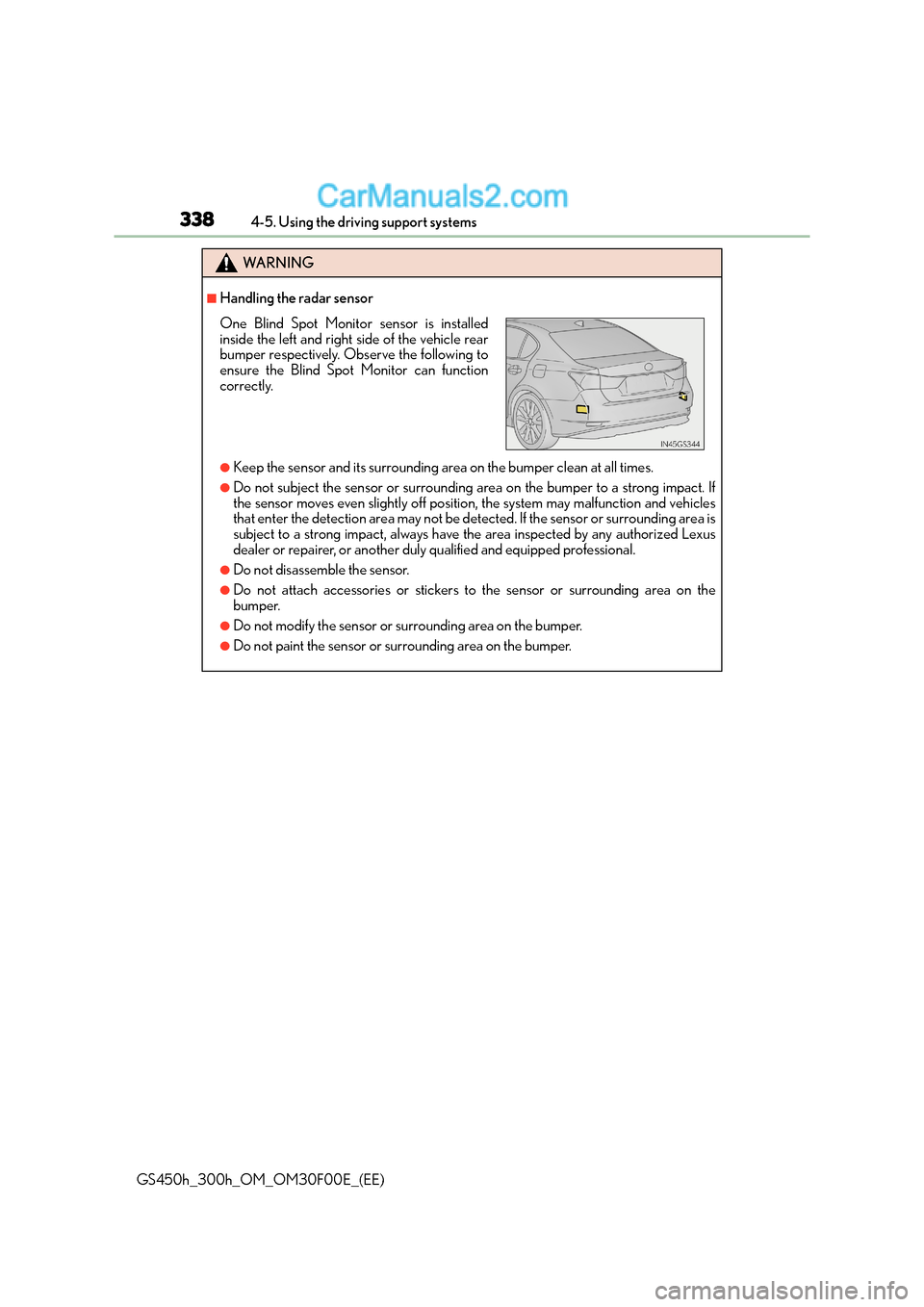
One Blind Spot Monitor sensor is installed
inside the left and right side of the vehicle rear
bumper respectively. Observe the following to
ensure the Blind Spot Monitor can function
correctly.
Page 348 of 620
3484-5. Using the driving support systems
GS450h_300h_OM_OM30F00E_(EE)
■Sounds and vibrations caused by the ABS, brake assist, VSC, Hill-start assist control,
TRC and VGRS systems
Any of the following conditions may occur when the above systems are operating. None
of these indicates that a malfunction has occurred.
●Vibrations may be felt through the vehicle body and steering.
●A motor sound may be heard after the vehicle comes to a stop.
■ECB operation sound
ECB operating sound may be heard in the following cases, but it does not indicate that a
malfunction has occurred.
●Operating sound heard from the engine compartment when the brake pedal is oper-
ated.
●Motor sounds of the brake system heard from the front part of the vehicle when the
driver’s door is opened.
●Operating sound heard from the engine compartment when one or two minutes
passed after the stop of the hybrid system.
■EPS, VGRS and DRS operation sound
When the steering wheel is operated, a motor sound (whirring sound) may be heard.
This does not indicate a malfunction.
■Automatic reactivation of TRC and VSC systems
After turning the TRC and VSC systems off, the systems will be automatically re-enabled
in the following situations:
●When the power switch is turned off
●If only the TRC system is turned off, the TRC will turn on when vehicle speed increases
If both TRC and VSC systems are turned off, automatic re-enabling will not occur when
vehicle speed increases.
■Reduced effectiveness of the EPS system
The effectiveness of the EPS system is reduced to prevent the system from overheating
when there is frequent steering input over an extended period of time. The steering
wheel may feel heavy as a result. Should this occur, refrain from excessive steering input
or stop the vehicle and turn the hybrid system off. The EPS system should return to nor-
mal within 10 minutes.
■Operating conditions of hill-start assist control
When the following four conditions are met, the hill-start assist control will operate;
●The shift lever is in a position other than N or P (when starting off forward/backward on
an upward incline).
●The vehicle is stopped.
●The accelerator pedal is not depressed.
●The parking brake is not engaged.
Page 350 of 620
3504-5. Using the driving support systems
GS450h_300h_OM_OM30F00E_(EE)
WA R N I N G
■When the VSC is activated
The slip indicator light flashes. Always drive carefully. Reckless driving may cause an
accident. Exercise particular care when the indicator light flashes.
■When the TRC/VSC systems are turned off
Be especially careful and drive at a speed appropriate to the road conditions. As these
are the systems to help ensure vehicle stability and driving force, do not turn the TRC/
VSC systems off unless necessary.
■Replacing tires
Make sure that all tires are of the specif ied size, brand, tread pattern and total load
capacity. In addition, make sure that the tires are inflated to the recommended tire infla-
tion pressure level.
The ABS, TRC and VSC systems will not function correctly if different tires are installed
on the vehicle.
Contact any authorized Lexus dealer or repairer, or another duly qualified and
equipped professional for further information when replacing tires or wheels.
■Handling of tires and the suspension
Using tires with any kind of problem or modi fying the suspension will affect the driving
assist systems, and may cause a system to malfunction.
Page 376 of 620
3765-2. Using the air conditioning system and defogger
GS450h_300h_OM_OM30F00E_(EE)
■nanoe *1 system (if equipped)
Your vehicle incorporates a nanoe device, which is considered a biocidal product. The
nanoe device generates charged water particles from the ambient air and these purify
the air in the cabin by suppressing bacteria.
The nanoe device is considered a biocidal produc t in the EU according to the interpre-
tation of Regulation (EU) No 528/2012.
Active substances: Charged water particles (nano) containing hydroxyl radicals, gener-
ated from ambient air
nanoe helps to provide purified air by emitting electrically charged water particles
through the front center vent on the driver’s side
*2.
●When the fan is turned on an d “nanoe” on the option control screen is selected, the
nanoe system is activated.
●When the fan is operated in the following conditions, system performance will be maxi-
mized. If the following conditions are not met, performance will be limited.
• The , or air outlets are being used.
• The front center vent on driver’s side is open.
●When nanoe is generated, a small amount of ozone is emitted and may be faintly
smelled in some situations. However, this is approximately the same as the amount that
already exists in nature, such as in forests, and it has no affect on the human body.
●A slight noise may be heard during op eration. This is not a malfunction.
*1:nanoe and the nanoe mark are trademarks of Panasonic Corporation.
*2: According to temperature and humidity conditions, fan speed and direction of the
air flow, the nanoe system may not operate at full capacity.
■Air conditioning filter
→ P. 4 4 9
■Customization
Settings (e.g. exhaust gas sensor sensitivity) can be changed.
(Customizable features: →P. 5 8 1 )