brake light Lexus GS300h 2017 User Guide
[x] Cancel search | Manufacturer: LEXUS, Model Year: 2017, Model line: GS300h, Model: Lexus GS300h 2017Pages: 600, PDF Size: 58.17 MB
Page 204 of 600
2044-1. Before driving
GS450h_300h_OM_OM30F92E_(EE)
WARNING
Observe the following precautions.
Failure to do so may result in death or serious injury.
■When driving on slippery road surfaces
●Sudden braking, acceleration and steering may cause tire slippage and reduce your
ability to control the vehicle.
●Sudden acceleration, engine braking due to shifting, or changes in engine speed
could cause the vehicle to skid, resulting in an accident.
●After driving through a puddle, lightly depress the brake pedal to make sure that the
brakes are functioning properly. Wet brake pads may prevent the brakes from func-
tioning properly. If the brakes on only one side are wet and not functioning properly,
steering control may be affected.
■When shifting the shift lever
●Do not let the vehicle roll backward while the shift lever is in a driving position, or roll
forward while the shift lever is in R.
Doing so may result in an accident or damage to the vehicle.
●Do not shift the shift lever to P while the vehicle is moving.
Doing so can damage the transmission and may result in a loss of vehicle control.
●Do not shift the shift lever to R while the vehicle is moving forward.
Doing so can damage the transmission and may result in a loss of vehicle control.
●Do not shift the shift lever to a driving position while the vehicle is moving backward.
Doing so can damage the transmission and may result in a loss of vehicle control.
●Shifting the shift lever to N while the vehicle is moving will disengage the hybrid sys-
tem. Engine braking is not available with the hybrid system disengaged.
●Be careful not to shift the shift lever with the accelerator pedal depressed. Shifting the
shift lever to any position other than P or N may lead to unexpected rapid accelera-
tion of the vehicle that may cause an accident and result in death or s erious injury.
■If you hear a squealing or scraping noise (brake pad wear indicators)
Have the brake pads checked and replaced by any authorized Lexus retailer or Lexus
authorized repairer, or any reliable repairer as soon as possible.
Rotor damage may result if the pads are not replaced when needed.
Front and rear*
brakes: Moderate levels of brake pad and disc wear allow enhanced
braking power. As a result, the discs may wear more quickly than conventional brake
discs. Therefore, when replacing the brake pads, Lexus recommends that you also
have the thickness of the discs measured.
It is dangerous to drive the vehicle when th e wear limits of the brake pads and/or those
of the brake discs are exceeded.
* : Except for Reunion, Canary Islands, Russi a, Ukraine, Israel, Turkey, Kazakhstan,
Georgia
Page 205 of 600
205
4-1. Before driving
4
Driving
GS450h_300h_OM_OM30F92E_(EE)
WARNING
Observe the following precautions.
Failure to do so may result in death or serious injury.
■When the vehicle is stopped
●Do not depress the accelerator pedal unnecessarily.
If the shift lever is any position other than P or N, the vehicle may accelerate suddenly
and unexpectedly, causing an accident.
●In order to prevent accidents due to the vehicle rolling away, always keep depressing
the brake pedal while stopped with the “READY” indicator is illuminated, and apply
the parking brake as necessary.
●If the vehicle is stopped on an incline, in order to prevent accidents caused by the
vehicle rolling forward or backward, alwa ys depress the brake pedal and securely
apply the parking brake as needed.
●Avoid revving or racing the engine.
Running the engine at high speed while the vehicle is stopped may cause the exhaust
system to overheat, which could result in a fire if combustible material is nearby.
■When the vehicle is parked
●Do not leave glasses, cigarette lighters, spray cans, or soft drink cans in the vehicle
when it is in the sun.
Doing so may result in the following:
Page 214 of 600
2144-1. Before driving
GS450h_300h_OM_OM30F92E_(EE) Your vehicle will handle differently when towing a trailer
. In order to avoid acci-
dent, death or serious injury, keep the following in mind when towing:
■Checking connections between trailer and lights
Stop the vehicle and check the operation of the connection between the
trailer and lights after driving for a brief period as well as before starting off.
■Practicing driving with a coupled trailer ●Get the feel for turning, stopping an d reversing with the trailer coupled by
practicing in an area with no or light traffic.
● When reversing with a coupled trailer, hold the section of the steering
wheel nearest to you and rotate clockwise to turn the trailer left or counter-
clockwise to turn it right. Always rotate a little at a time to prevent steerin g
error. Have someone guide you when reversing to lessen the risk of an
accident.
■Increasing vehicle-to-vehicle distance
At a speed of 10 km/h (6 mph), the distance to the vehicle runni ng ahead of
you should be equivalent to or greater than the combined length of your v ehi-
cle and trailer. Avoid sudden braking that may cause skidding. Otherwise, the
vehicle may spin out of control. This is especially true when driving on wet or
slippery road surfaces.
■Sudden acceleration/steering input/cornering
Executing sharp turns when towing may result in the trailer colliding with your
vehicle. Decelerate well in advance when approaching turns and take them
slowly and carefully to avoid sudden braking.
■Important points regarding turning
The wheels of the trailer will travel closer to the inside of the curve than the
wheels of the vehicle. To make allowance for this, take the turns wider than you
would normally do.
■Important points regarding stability
Vehicle movement resulting from uneven road surfaces and strong cross-
winds will affect handling. The vehicle may also be rocked by passing buses or
large trucks. Frequently check behind when moving alongside such vehicles.
As soon as such vehicle movement occurs, immediately start to decelerate
smoothly by slowly applying the brakes. Always steer the vehicle straight
ahead while braking.
Guidance
Page 232 of 600
2324-2. Driving procedures
GS450h_300h_OM_OM30F92E_(EE)
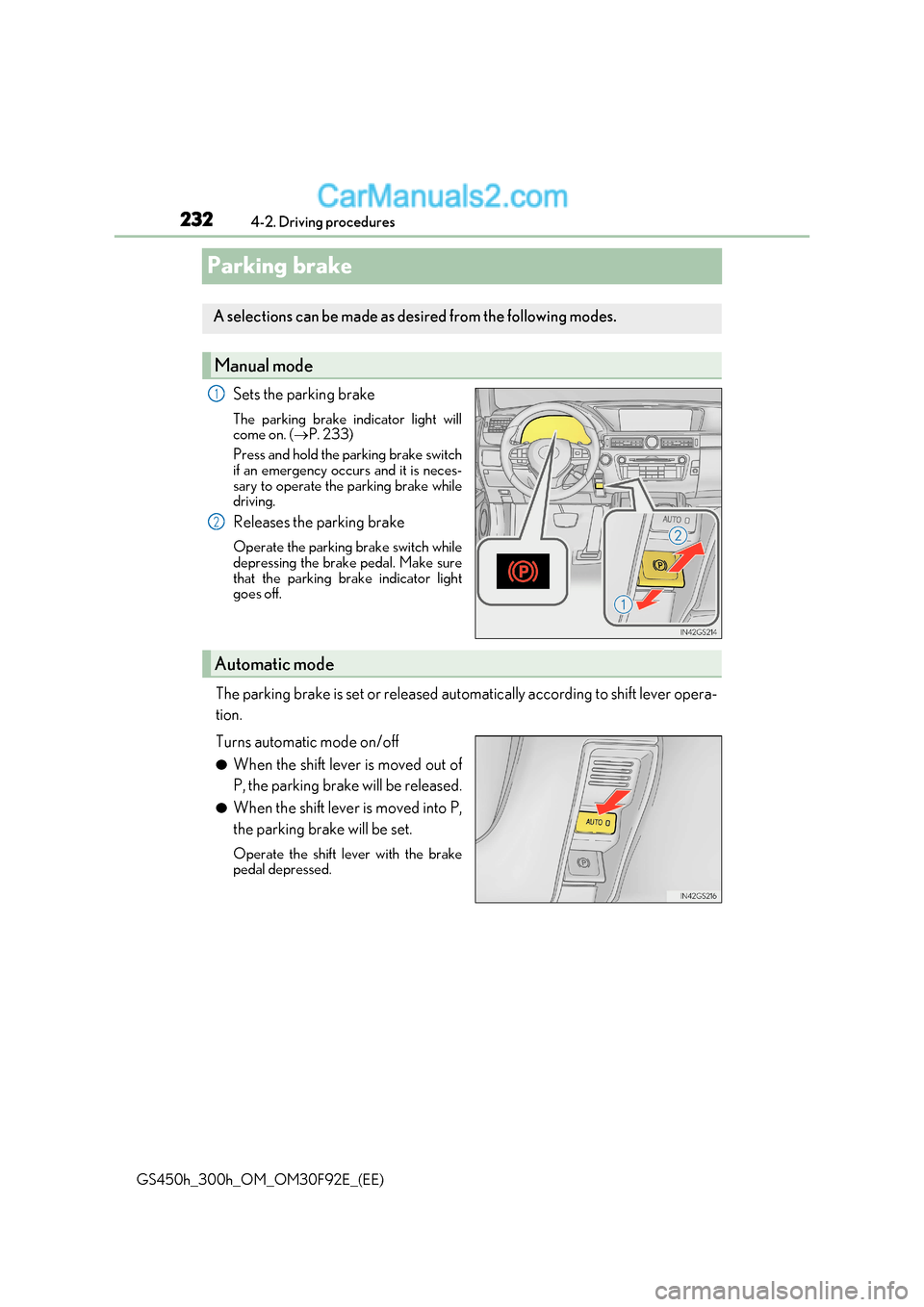
Parking brake
Sets the parking brake
The parking brake indicator light will
come on. ( P. 233)
Press and hold the parking brake switch
if an emergency occurs and it is neces-
sary to operate the parking brake while
driving.
Releases the parking brake
Operate the parking brake switch while
depressing the brake pedal. Make sure
that the parking brake indicator light
goes off.
The parking brake is set or released automatically according to shift lever oper a-
tion.
Turns automatic mode on/off ● When the shift lever is moved out of
P, the parking brake will be released.
● When the shift lever is moved into P,
the parking brake will be set.
Operate the shift lever with the brake
pedal depressed.
A selections can be made as desired from the following modes.
Manual mode
1
2
Automatic mode
Page 233 of 600

233
4-2. Driving procedures
4
Driving
GS450h_300h_OM_OM30F92E_(EE)
■Parking brake operation
●When the power switch is not in ON mode, the parking brake cannot be released using
the parking brake switch.
●When the power switch is not in ON mode, automatic mode (automatic brake setting
and releasing) is not available.
●If the parking brake is operated repeatedly over a short period of time, the system may
restrict operation to prevent overheating. If this happens, refrain from operating the
parking brake. Normal operation wi ll return after about 1 minute.
●Vehicles with towing package: In situations such as when parking while towing a trailer,
the maximum amount of braking force can be used by pressing the parking brake
switch with the parking brake already set.
●Vehicles without towing package: In situations such as when parking on a steep slope *,
the maximum amount of braking force can be used by pressing the parking brake
switch with the parking brake already set.
* : Use wheel chocks when parking on a steep slope.
■Parking brake operation sound
When the parking brake operates, a motor sound (whirring sound) may be heard. This
does not indicate a malfunction.
■Parking brake indicator light
●Depending on the power switch mode, the parking brake indicator light will come on
and stay on as described below:
ON mode: Comes on until the parking brake is released.
Not in ON mode: Stays on for approximately 15 seconds.
●When the power switch is turned off with th e parking brake set, the parking brake indi-
cator light will stay on for about 15 seco nds. This does not indicate a malfunction.
■When there is a malfunction in the system
Warning lights and/or warning message will turn on or flash. ( P. 462, 466)
Depending on the condition, the park ing brake indicator light may flash.
■Parking the vehicle P. 200
■Parking brake engaged warning buzzer P. 472
■Usage in winter time P. 334
Page 235 of 600
235
4
4-2. Driving procedures
Driving
GS450h_300h_OM_OM30F92E_(EE)
Brake Hold
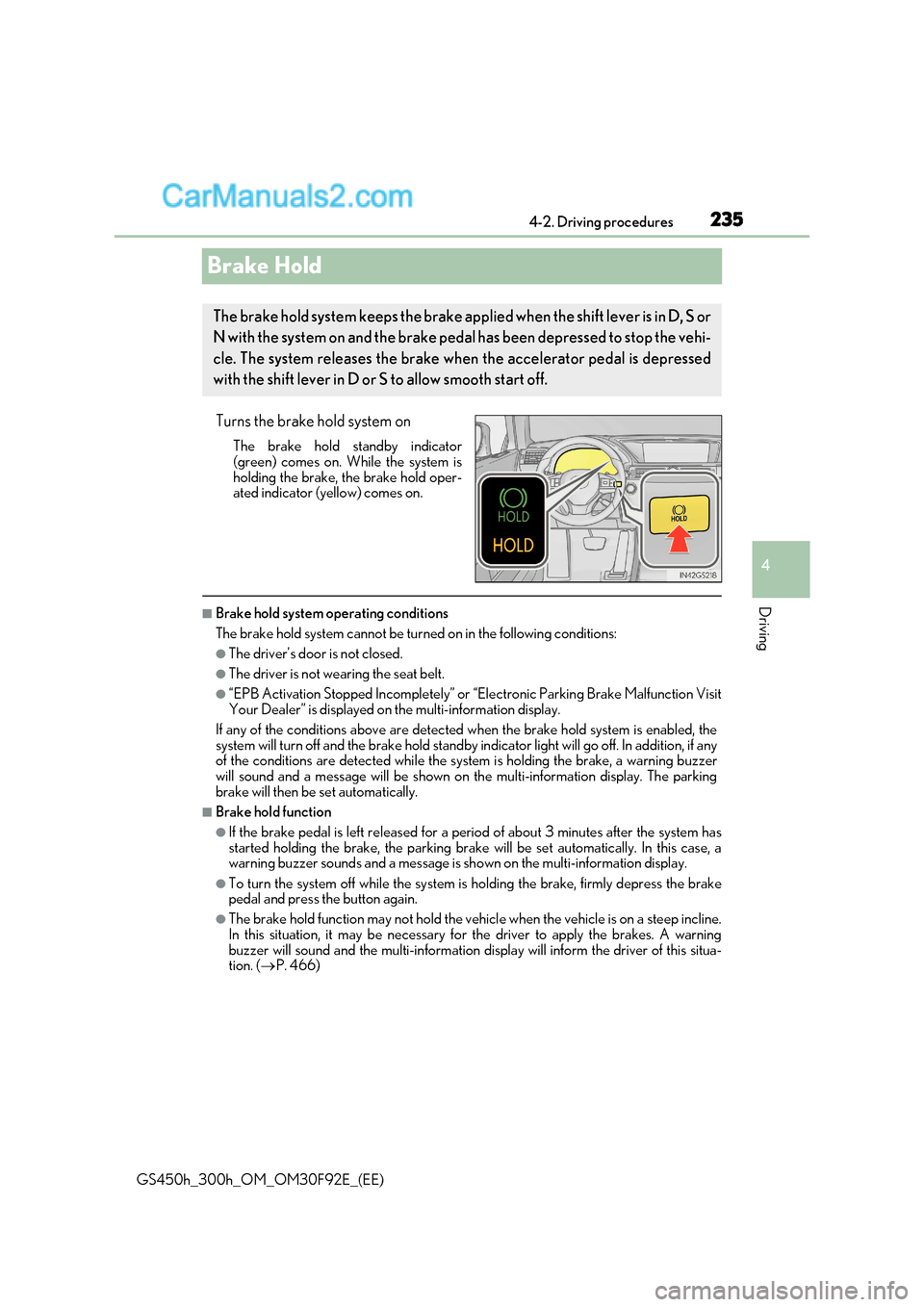
Turns the brake hold system onThe brake hold standby indicator
(green) comes on. While the system is
holding the brake, the brake hold oper-
ated indicator (yellow) comes on.
■Brake hold system operating conditions
The brake hold system cannot be turn ed on in the following conditions:
●The driver’s door is not closed.
●The driver is not wearing the seat belt.
●“EPB Activation Stopped Incompletely” or “Electronic Parking Brake Malfunction Visit
Your Dealer” is displayed on the multi-information display.
If any of the conditions above are detected when the brake hold system is enabled, the
system will turn off and the brake hold standby indicator light will go off. In addition, if any
of the conditions are detected while the sy stem is holding the brake, a warning buzzer
will sound and a message will be shown on th e multi-information display. The parking
brake will then be set automatically.
■Brake hold function
●If the brake pedal is left released for a pe riod of about 3 minutes after the system has
started holding the brake, th e parking brake will be set automatically. In this case, a
warning buzzer sounds and a message is shown on the multi-information display.
●To turn the system off while the system is holding the brake, firmly depress the brake
pedal and press the button again.
●The brake hold function may not hold the vehicle when the vehicle is on a steep incline.
In this situation, it may be necessary for the driver to apply the brakes. A warning
buzzer will sound and the multi-information disp lay will inform the driver of this situa-
tion. ( P. 466)
The brake hold system keeps the brake appl ied when the shift lever is in D, S or
N with the system on and the brake peda l has been depressed to stop the vehi-
cle. The system releases the brake when the accelerator pedal is depressed
with the shift lever in D or S to allow smooth start off.
Page 236 of 600
2364-2. Driving procedures
GS450h_300h_OM_OM30F92E_(EE)
■When the parking brake is set automatically while the system is holding the brakes
The parking brake will not be released auto matically. Perform one of the following proce-
dures to release the parking brake and conf irm that the parking brake indicator light
turns off. ( P. 232)
●With the brake pedal depressed, operate the parking brake switch.
●Fasten your seat belt, check that the shift leve r is in either D or R and slowly depress the
accelerator pedal.
■Warning message and buzzers
Warning messages and buzzers are used to indicate a system malfunction or to inform
the driver of the need for caution. ( P. 466)
WARNING
■When the vehicle is on a steep incline
When using the brake hold system on a steep incline exercise caution. The brake hold
function may not hold the vehicle in such a situation.
■When stopped on a slippery road
The system cannot stop the vehicle when the gripping ability of the tires has been
exceeded. Do not use the system when stopped on a slippery road.
NOTICE
■When parking the vehicle
The brake hold system is not designed fo r use when parking the vehicle for a long
period of time. Turning the power switch o ff while the system is holding the brake may
release the brake, which would cause the vehicle to move. When operating the power
switch, depress the brake pedal, set the pa rking brake and shift the shift lever to P.
Page 240 of 600
2404-3. Operating the lights and wipers
GS450h_300h_OM_OM30F92E_(EE)
■Daytime running light system
To make your vehicle more visible to other drivers during daytime driving, the daytime
running lights turn on automatically whenever the hybrid system is started and the park-
ing brake is released with the headlight sw itch is in the “AUTO” position. (Illuminate
brighter than the front position lights.)
Daytime running lights are not designed for use at night.
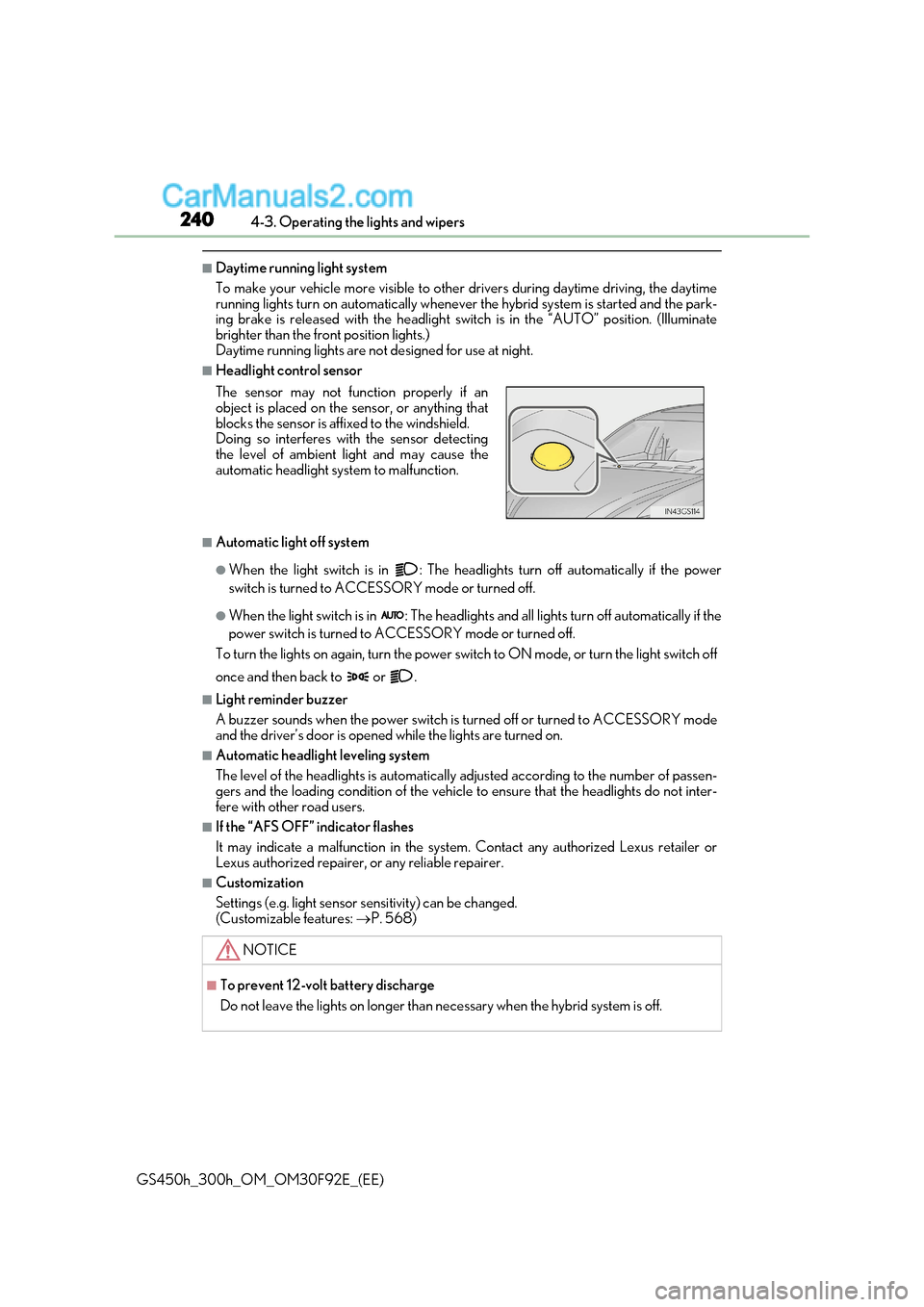
■Headlight control sensor
■Automatic light off system
●When the light switch is in : The headlig hts turn off automatically if the power
switch is turned to ACCESSORY mode or turned off.
●When the light switch is in : The headlights and all lights turn off automatically if the
power switch is turned to ACCESSORY mode or turned off.
To turn the lights on again, turn the power switch to ON mode, or turn the light switch off
once and then back to or .
■Light reminder buzzer
A buzzer sounds when the power switch is turned off or turned to ACCE SSORY mode
and the driver’s door is opened while the lights are turned on.
■Automatic headlight leveling system
The level of the headlights is automatically adjusted according to the number of passen-
gers and the loading condition of the vehicle to ensure that the headlights do not inter-
fere with other road users.
■If the “AFS OFF” indicator flashes
It may indicate a malfunction in the system. Contact any authorized Lexus retailer or
Lexus authorized repairer, or any reliable repairer.
■Customization
Settings (e.g. light sensor se nsitivity) can be changed.
(Customizable features: P. 568)
The sensor may not function properly if an
object is placed on the sensor, or anything that
blocks the sensor is affixed to the windshield.
Doing so interferes with the sensor detecting
the level of ambient light and may cause the
automatic headlight system to malfunction.
NOTICE
■To prevent 12-volt battery discharge
Do not leave the lights on longer than ne
cessary when the hybrid system is off.
Page 299 of 600
299
4-5. Using the driving support systems
4
Driving
GS450h_300h_OM_OM30F92E_(EE) This mode employs a radar sensor to detect the presence of vehicles up to
approximately 100 m (328 ft.) ahead, determines the current vehicle-to-vehicle
following distance, and operates to maintain a suitable following distance from
the vehicle ahead.
Note that vehicle-to-vehicle distance will close in when traveling on long downhill
slopes.
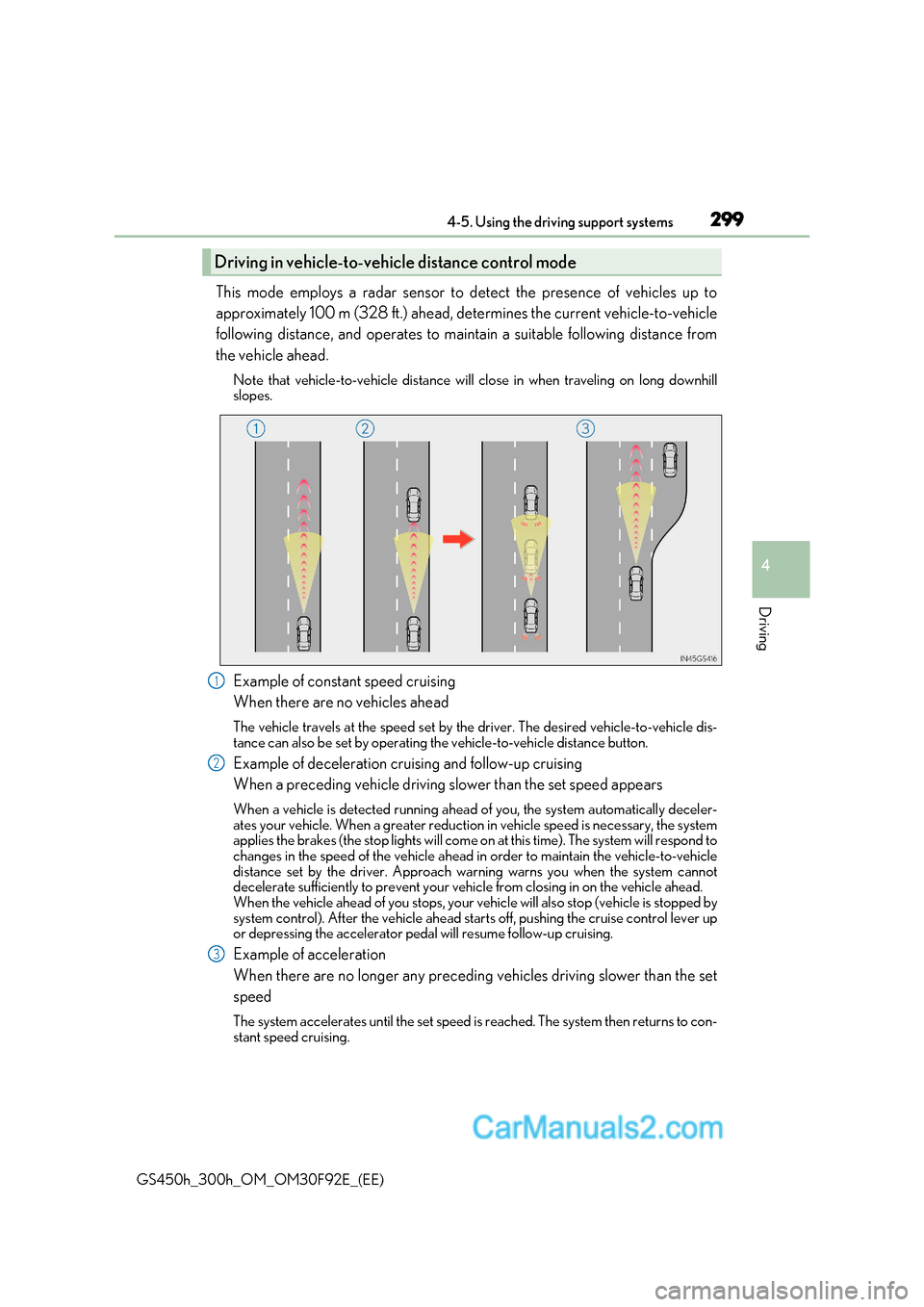
Example of constant speed cruising
When there are no vehicles ahead
The vehicle travels at the speed set by the driver. The desired vehicle-to-vehicle dis-
tance can also be set by operating the vehicle-to-vehicle distance button.
Example of deceleration cruising and follow-up cruising
When a preceding vehicle driving slower than the set speed appears
When a vehicle is detected running ahead of you, the system automatically deceler-
ates your vehicle. When a greater reduction in vehicle speed is necessary, the system
applies the brakes (the stop lights will come on at this time). The system will respond to
changes in the speed of the vehicle ahead in order to maintain the vehicle-to-vehicle
distance set by the driver. Approach wa rning warns you when the system cannot
decelerate sufficiently to prevent your vehicle from closing in on the vehicle ahead.
When the vehicle ahead of you stops, your ve hicle will also stop (vehicle is stopped by
system control). After the vehicle ahead starts off, pushing the cruise control lever up
or depressing the accelerator pedal will resume follow-up cruising.
Example of acceleration
When there are no longer any preceding vehicles driving slower than the set
speed
The system accelerates until the set speed is reached. The system then returns to con-
stant speed cruising.
Driving in vehicl e-to-vehicle distance control mode
1
2
3
Page 325 of 600
325
4-5. Using the driving support systems
4
Driving
GS450h_300h_OM_OM30F92E_(EE)
◆DRS (Dynamic Rear Steering) (if equipped)
Contributes to the turning characteristics and responsiveness of the vehicle
by slightly adjusting the rear wheel angle of the vehicle in accordance with
steering wheel movement
◆Hill-start assist control
Helps to prevent the vehicle from rolling backward when starting on an
incline.
◆EPS (Electric Power Steering)
Employs an electric motor to reduce the amount of effort needed to turn the
steering wheel
◆AVS (Adaptive Variable Susp ension system) (if equipped)
By independently controlling the damp ing force of the shock absorbers for
each of the 4 wheels according to the road and driving conditions, this system
helps riding comfort with a high level of stability, and helps good vehicle pos-
ture
When SPORT S+ mode is selected by the driving mode select switch, the
damping force is suitable for sporty driving ( P. 312)
◆LDH (Lexus Dynamic Handling system) (if equipped)
Provides independent control of the VGRS, DRS and EPS. Contributes to
turning characteristics at low speeds, responsiveness at medium speeds and
safety at high speeds by controlling the steering angle of the front and rear
wheels in accordance with the steering wheel operation and vehicle speed
◆VDIM (Vehicle Dynamics Integrated Management)
Provides integrated control of the ABS, brake assist, TRC, VSC, hill-start
assist control, EPS, VGRS (if equipped) and DRS (if equipped) systems
Helps to maintain vehicle stability when swerving on slippery road surfaces by
controlling the brakes, hybrid system output, steering assist, steering ratio and
rear wheel angle
◆Emergency brake signal
When the brakes are applie d suddenly, the stop lights automatically flash to
alert the vehicle behind