reset Lexus GS300h 2017 User Guide
[x] Cancel search | Manufacturer: LEXUS, Model Year: 2017, Model line: GS300h, Model: Lexus GS300h 2017Pages: 600, PDF Size: 58.17 MB
Page 129 of 600
129
2. Instrument cluster
2
Instrument cluster
GS450h_300h_OM_OM30F92E_(EE) Press the “MENU” button on the Remote Touch, then select on the “Menu”
screen.
■Trip information
If the “Energy monitor” or “Past record” screen is displayed, select “Trip
infor-
mation”.
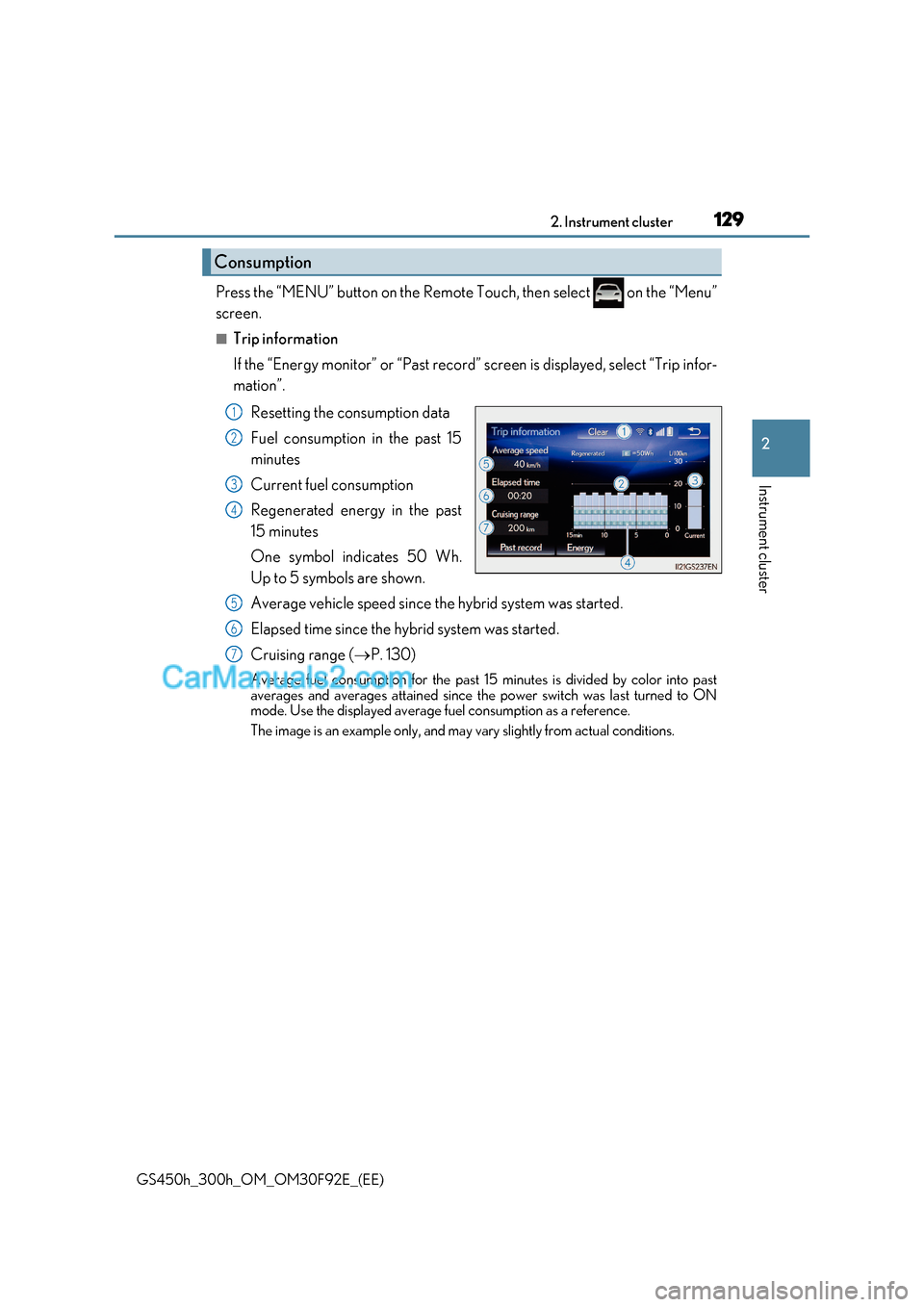
Resetting the consumption data
Fuel consumption in the past 15
minutes
Current fuel consumption
Regenerated energy in the past
15 minutes
One symbol indicates 50 Wh.
Up to 5 symbols are shown.
Average vehicle speed since the hybrid system was started.
Elapsed time since the hybrid system was started.
Cruising range ( P. 130)
Average fuel consumption for the past 15 minutes is divided by color into past
averages and averages attained since the power switch was last turned to ON
mode. Use the displayed average fuel consumption as a reference.
The image is an example only, and may vary slightly from actual conditions.
Consumption
1
2
3
4
5
6
7
Page 130 of 600
1302. Instrument cluster
GS450h_300h_OM_OM30F92E_(EE)
■Past record
If the “Energy monitor” or “Trip informat ion” screen is displayed, select “Past
record”.
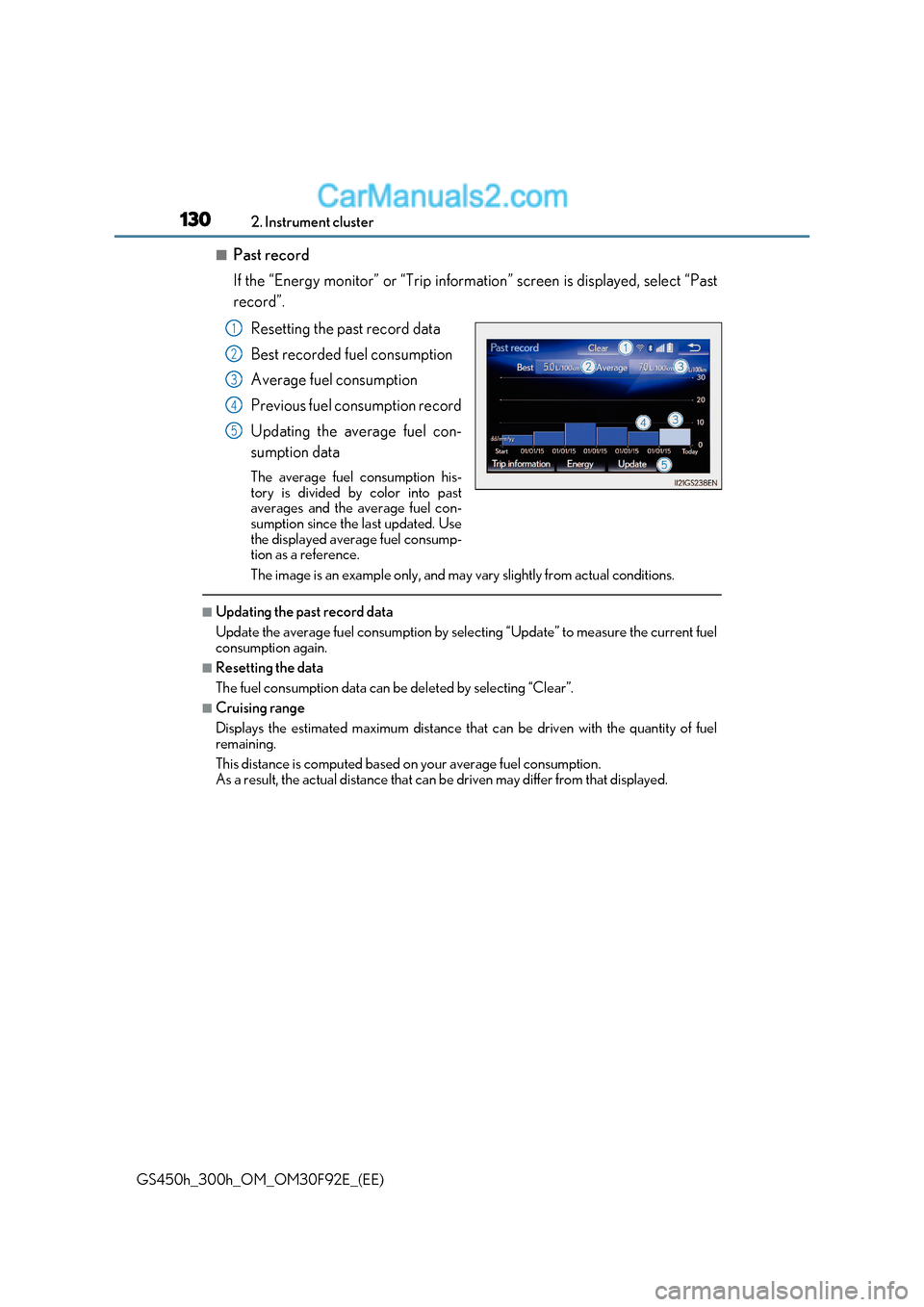
Resetting the past record data
Best recorded fuel consumption
Average fuel consumption
Previous fuel consumption record
Updating the average fuel con-
sumption data
The average fuel consumption his-
tory is divided by color into past
averages and the average fuel con-
sumption since the last updated. Use
the displayed average fuel consump-
tion as a reference.
The image is an example only, and may vary slightly from actual conditions.
■Updating the past record data
Update the average fuel consumption by selecting “Update” to measure the current fuel
consumption again.
■Resetting the data
The fuel consumption data can be deleted by selecting “Clear”.
■Cruising range
Displays the estimated maximum distance that can be driven with the quantity of fuel remaining.
This distance is computed based on your average fuel consumption.
As a result, the actual distance that can be driven may differ from that displayed.
1
2
3
4
5
Page 179 of 600
179
3-3. Adjusting the seats
3
Operation of each component
GS450h_300h_OM_OM30F92E_(EE)
■Operation of the power easy access system
When exiting the vehicle, the power easy access system may not op erate if the seat is
already close to the rearmost position, etc.
■Customization
The seat movement amount settings of the power easy access system can be custom-
ized. (Customizable features: P. 561)
Your preferred driving position (the position of the driver’s seat, steering wheel,
outside rear view mirrors and HUD [head-up display] [if equipped]) can be
recorded and recalled by pressing a button.
Three different driving positions can be recorded into memory.
■Recording procedure
Check that the shift lever is in P.
Turn the power switch to ON mode.
Adjust the driver’s seat, steering wheel, outside rear view mirrors and HUD
(head-up display) (if equipped) to the desired positions.
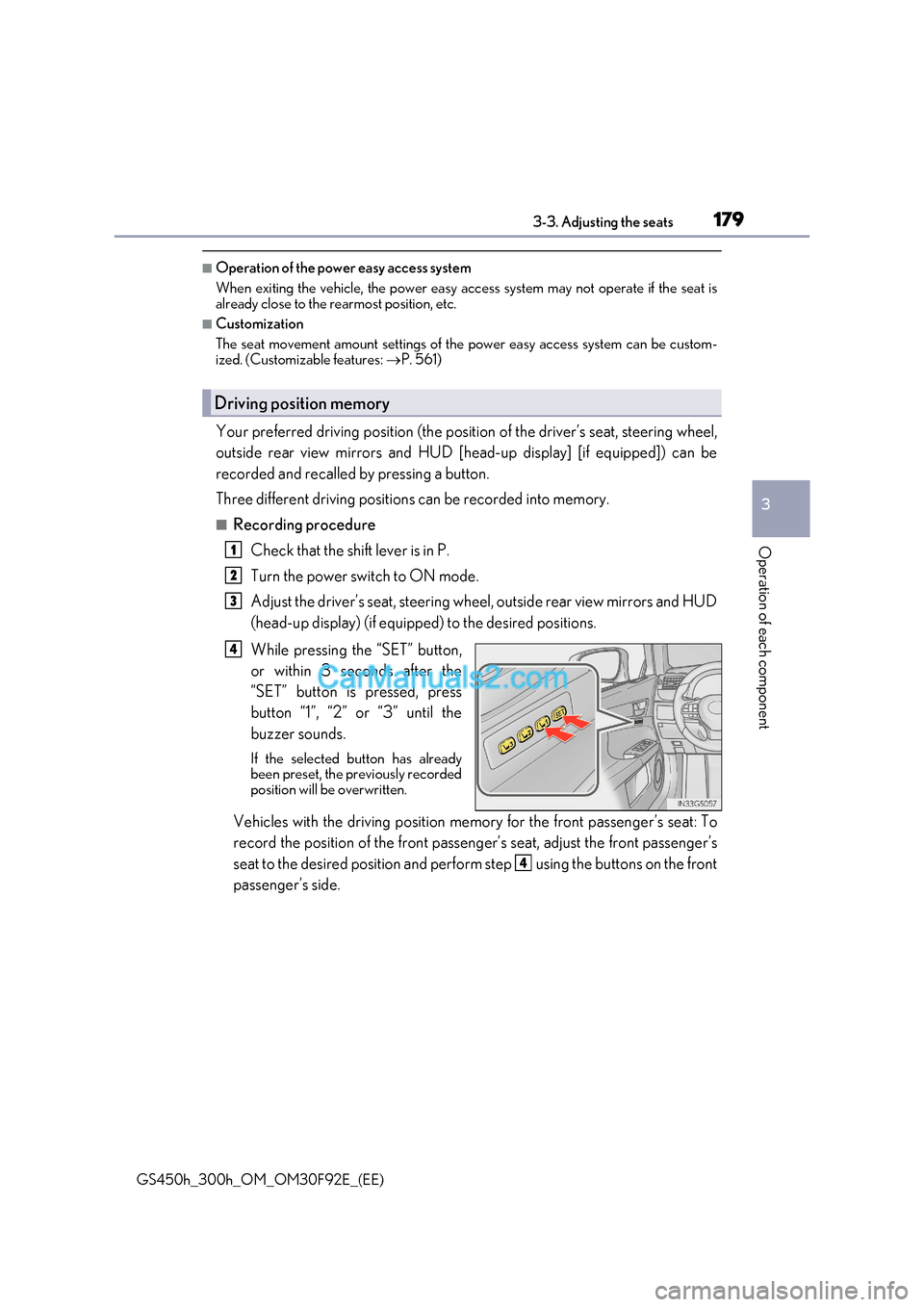
While pressing the “SET” button,
or within 3 seconds after the
“SET” button is pressed, press
button “1”, “2” or “3” until the
buzzer sounds.
If the selected button has already
been preset, the previously recorded
position will be overwritten.
Vehicles with the driving position memory for the front passenger’s seat: To
record the position of the front passeng er’s seat, adjust the front passenger’s
seat to the desired position and perfor m step using the buttons on the front
passenger’s side.
Driving position memory
1
2
3
4
4
Page 310 of 600
3104-5. Using the driving support systems
GS450h_300h_OM_OM30F92E_(EE)
■Automatic cruise control cancelation
Cruise control will stop maintaining the vehicl e speed in any of the following situations.
●Actual vehicle speed falls more than approximately 16 km/h (10 mph) below the preset
vehicle speed.
At this time, the memorized set speed is not retained.
●Actual vehicle speed is below approximately 40 km/h (25 mph).
●VSC is activated.
●TRC is activated for a period of time.
●When the VSC or TRC system is turned off by pressing the VSC OFF switch.
■If the warning message for the cruise control is shown on the multi-information display
Press the “ON/OFF” button once to deactivate the system, and then press the button
again to reactivate the system.
If the cruise control speed cannot be set or if the cruise control cancels immediately after
being activated, there may be a malfunction in the cruise control system. Have the vehi-
cle inspected by any authorized Lexus retaile r or Lexus authorized repairer, or any reli-
able repairer.
WARNING
■To avoid operating the cruise control by mistake
Switch the cruise control off using the “ON/OFF” button when not in use.
■Situations unsuitable for cruise control
Do not use cruise control in any of the following situations.
Doing so may result in loss of control and could cause an accident resulting in death or
serious injury.
●In heavy traffic
●On roads with sharp bends
●On winding roads
●On slippery roads, such as those covered with rain, ice or snow
●On steep hills
Vehicle speed may exceed the set sp eed when driving down a steep hill.
●When your vehicle is towing a trailer or during emergency towing
Page 408 of 600
4086-3. Do-it-yourself maintenance
GS450h_300h_OM_OM30F92E_(EE)
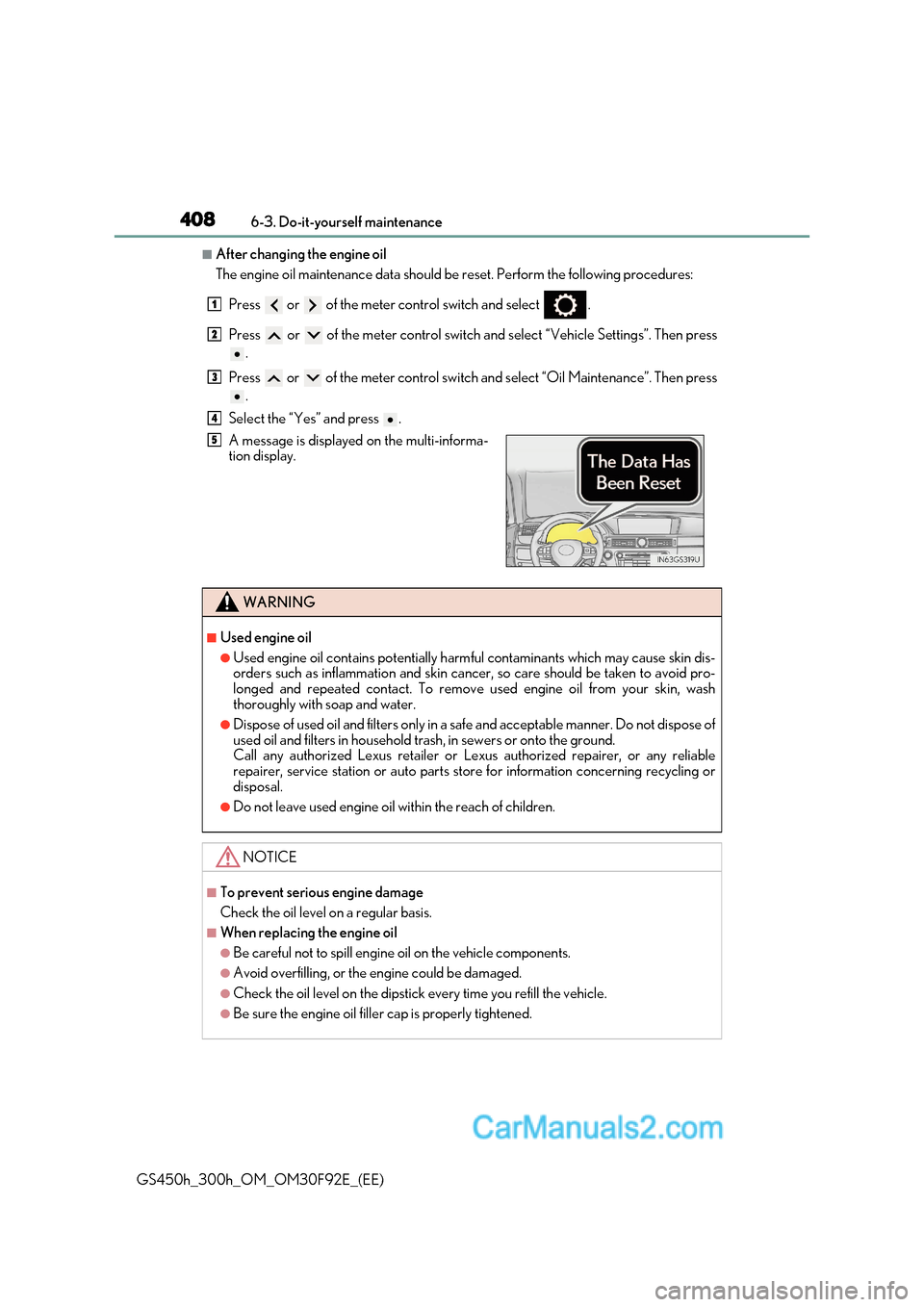
■After changing the engine oil
The engine oil maintenance data should be reset. Perform the following procedures:
Press or of the meter control switch and select .
Press or of the meter control switch an d select “Vehicle Settings”. Then press
.
Press or of the meter control switch and select “Oil Maintenance”. Then press
.
Select the “Yes” and press .
A message is displayed on the multi-informa-
tion display.
WARNING
■Used engine oil
●Used engine oil contains potentially harm ful contaminants which may cause skin dis-
orders such as inflammation and skin cancer, so care should be taken to avoid pro-
longed and repeated contact. To remove used engine oil from your skin, wash
thoroughly with soap and water.
●Dispose of used oil and filters only in a safe and acceptable manner. Do not dispose of
used oil and filters in household trash, in sewers or onto the ground.
Call any authorized Lexus retailer or Le xus authorized repairer, or any reliable
repairer, service station or auto parts st ore for information concerning recycling or
disposal.
●Do not leave used engine oil within the reach of children.
NOTICE
■To prevent serious engine damage
Check the oil level on a regular basis.
■When replacing the engine oil
●Be careful not to spill engine oil on the vehicle components.
●Avoid overfilling, or the engine could be damaged.
●Check the oil level on the dipstick every time you refill the vehicle.
●Be sure the engine oil filler cap is properly tightened.
1
2
3
4
5
Page 487 of 600
487
7-2. Steps to take in an emergency
7
When trouble arises
GS450h_300h_OM_OM30F92E_(EE)
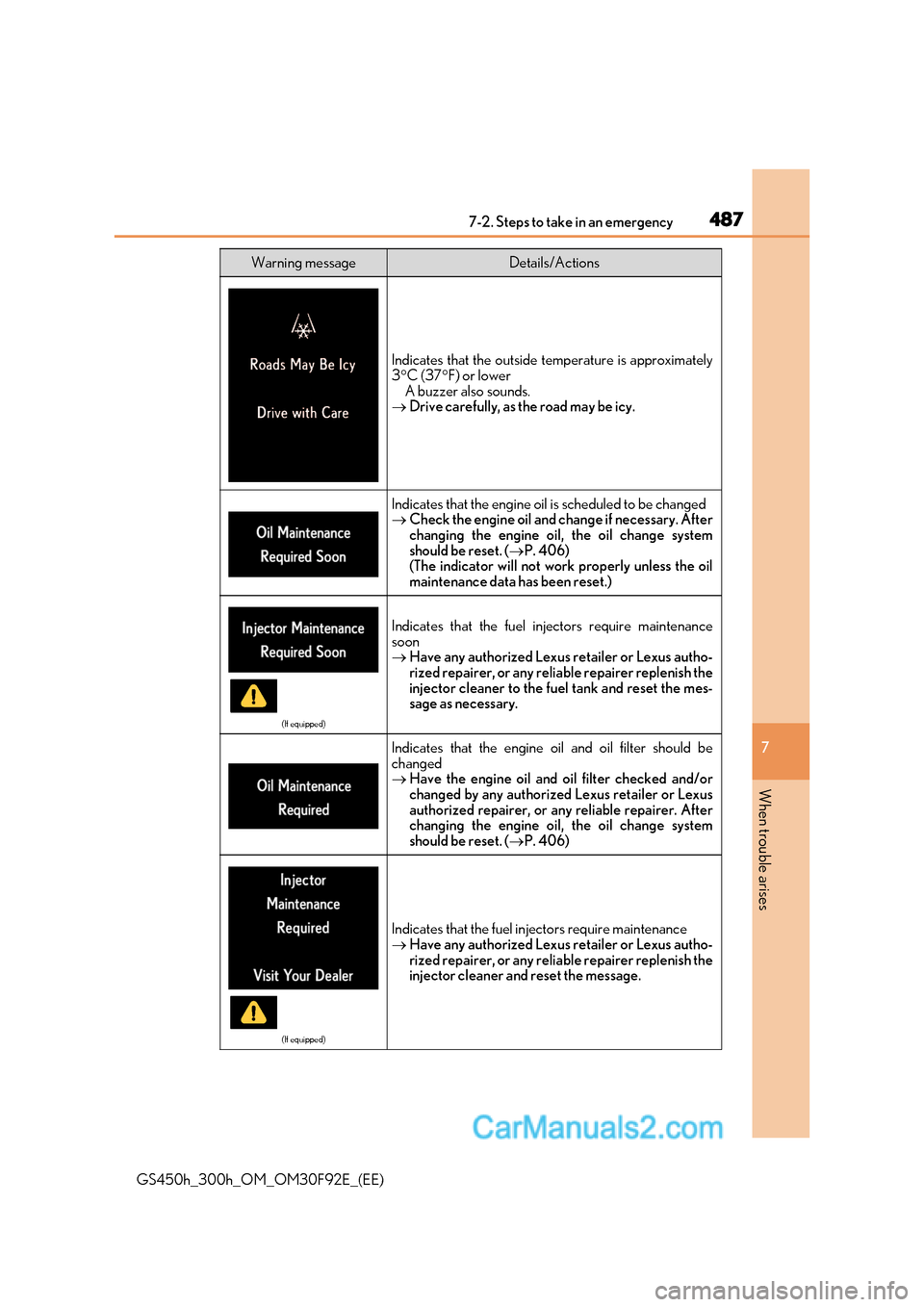
Indicates that the outside temperature is approximately 3 C (37 F) or lower
A buzzer also sounds.
Drive carefully, as the road may be icy.
Indicates that the engine oil is scheduled to be changed
Check the engine oil and change if necessary. After
changing the engine oil, the oil change system
should be reset. ( P. 406)
(The indicator will not work properly unless the oil
maintenance data has been reset.)
(If equipped)
Indicates that the fuel in jectors require maintenance
soon Have any authorized Lexus retailer or Lexus autho-
rized repairer, or any reliable repairer replenish the
injector cleaner to the fuel tank and reset the mes-
sage as necessary.
Indicates that the engine oil and oil filter should be
changedHave the engine oil and oil filter checked and/or
changed by any authorized Lexus retailer or Lexus
authorized repairer, or any reliable repairer. After
changing the engine oil, the oil change system
should be reset. ( P. 406)
(If equipped)
Indicates that the fuel injectors require maintenance Have any authorized Lexus retailer or Lexus autho-
rized repairer, or any reliable repairer replenish the
injector cleaner and reset the message.
Warning messageDetails/Actions
Page 562 of 600
5628-2. Customization
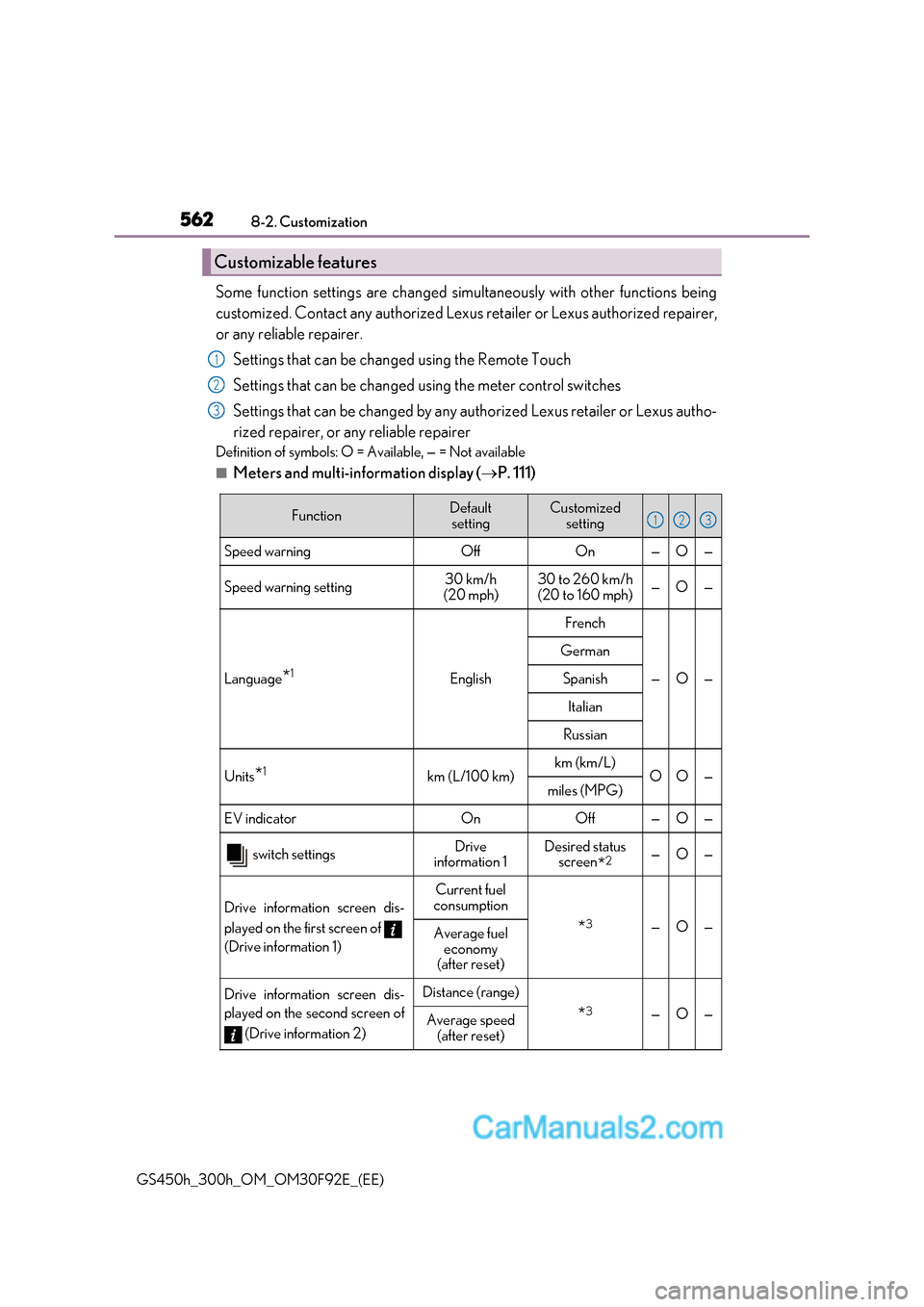
GS450h_300h_OM_OM30F92E_(EE) Some function settings are changed simu
ltaneously with other functions being
customized. Contact any authorized Lexus retailer or Lexus authorized repairer,
or any reliable repairer.
Settings that can be changed using the Remote Touch
Settings that can be changed using the meter control switches
Settings that can be changed by any authorized Lexus retailer or Lexus autho-
rized repairer, or any reliable repairer
Definition of symbols: O = Available, — = Not available
■Meters and multi-information display ( P. 111)
Customizable features
1
2
3
FunctionDefault
settingCustomized setting
Speed warning Off On — O —
Speed warning setting 30 km/h
(20 mph) 30 to 260 km/h
(20 to 160 mph) —O—
Language
*1English
French
—O—
German
Spanish
Italian
Russian
Units
*1km (L/100 km)km (km/L)OO—miles (MPG)
EV indicator On Off — O —
switch settingsDrive
information 1Desired status screen *2—O—
Drive information screen dis-
played on the first screen of
(Drive information 1)
Current fuel
consumption
* 3—O—Average fuel
economy
(after reset)
Drive information screen dis-
played on the second screen of
(Drive information 2)Distance (range)
*3—O—Average speed
(after reset)
123
Page 563 of 600
563
8
8-2. Customization
Vehicle specifications
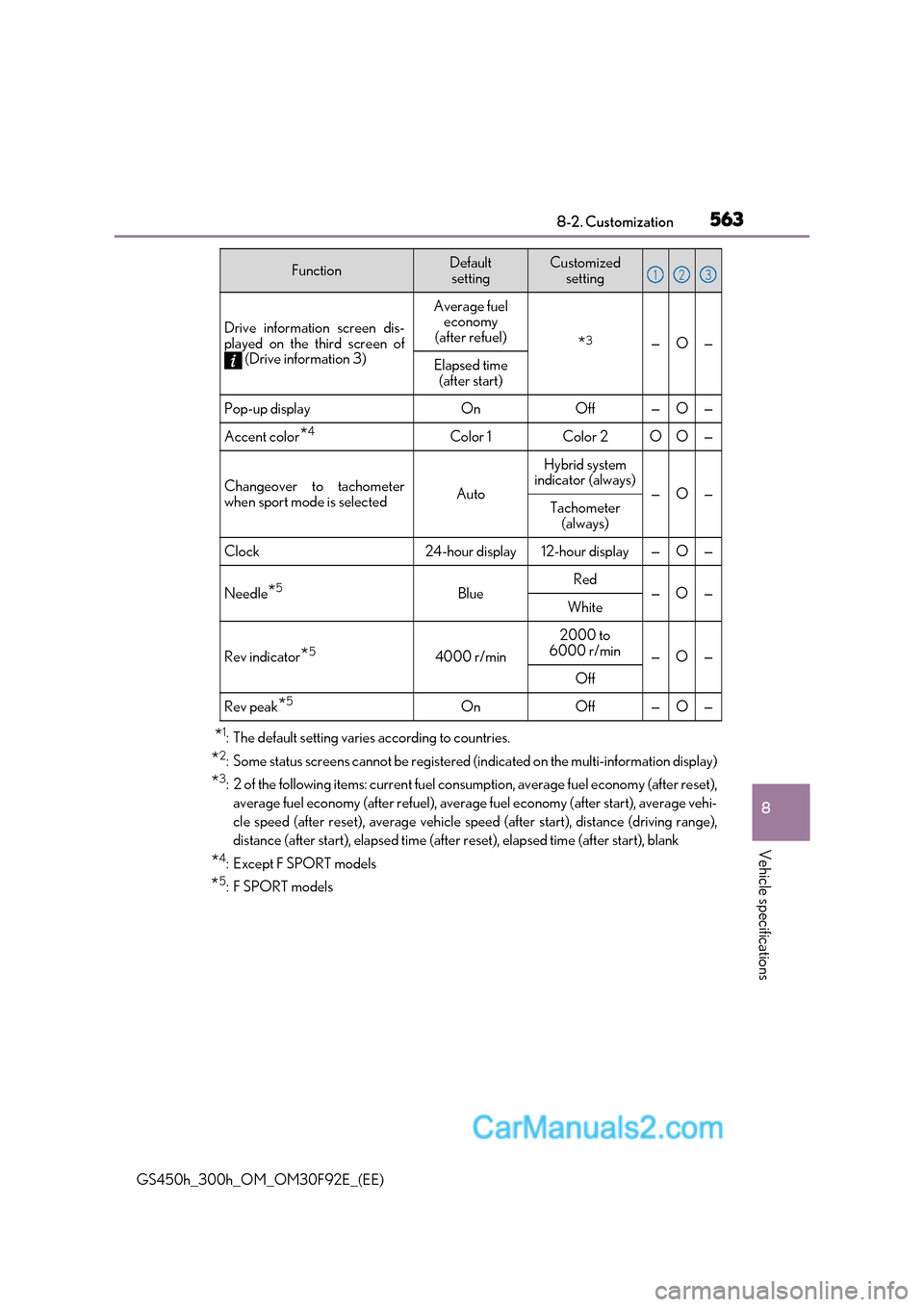
GS450h_300h_OM_OM30F92E_(EE)*
1
: The default setting varies according to countries.
* 2
: Some status screens cannot be registered (indicated on the multi-information display)
* 3
: 2 of the following items: current fuel cons umption, average fuel economy (after reset),
average fuel economy (after refuel), average fuel economy (after start), average vehi-
cle speed (after reset), average vehicle speed (after start), distance (driving range),
distance (after start), elapsed time (after reset), elapsed time (after start), blank
* 4
:Except F SPORT models
* 5
:F SPORT models
Drive information screen dis-
played on the third screen of
(Drive information 3)
Average fuel economy
(after refuel)
* 3—O—
Elapsed time
(after start)
Pop-up displayOnOff—O—
Accent color *4Color 1Color 2OO—
Changeover to tachometer
when sport mode is selected Auto
Hybrid system
indicator (always)
—O—Tachometer
(always)
Clock 24-hour display 12-hour display
—O—
Needle *5
BlueRed
—O—
White
Rev indicator *5
4000 r/min2000 to
6000 r/min —O—
Off
Rev peak *5
OnOff—O—
FunctionDefault
settingCustomized setting123