remote control Lexus GS300h 2017 Owner's Guide
[x] Cancel search | Manufacturer: LEXUS, Model Year: 2017, Model line: GS300h, Model: Lexus GS300h 2017Pages: 600, PDF Size: 58.17 MB
Page 195 of 600
195
3-5. Opening, closing the windows and moon roof
3
Operation of each component
GS450h_300h_OM_OM30F92E_(EE)
WARNING
Observe the following precautions.
Failure to do so may result in death or serious injury.
■Closing the windows
●The driver is responsible for all the power window operations, including the operation
for the passengers. In order to prevent acci dental operation, especially by a child, do
not let a child operate the power windows. It is possible for children and other passen-
gers to have body parts caught in the power window. Also, when riding with a child, it
is recommended to use the window lock switch. ( P. 193)
●Check to make sure that all passengers do not have any part of their body in a posi-
tion where it could be caught wh en a window is being operated.
●When using the wireless remote control or mechanical key and operating the power
windows, operate the power window after checking to make sure that there is no pos-
sibility of any passenger having any of thei r body parts caught in the window. Also do
not let a child operate window by the wireless remote control or mechanical key. It is
possible for children and other passengers to get caught in the power window.
●When exiting the vehicle, turn the power switch off, carry the key and exit the vehicle
along with the child. There may be accidental operation, due to mischief, etc., that
may possibly lead to an accident.
■Jam protection function
●Never use any part of your body to intent ionally activate the jam protection function.
●The jam protection function may not work if something gets jammed just before the
window is fully closed. Be careful not to ge t any part of your body jammed in the win-
dow.
■Catch protection function
●Never use any part of your body or clothing to intentionally activate the catch protec-
tion function.
●The catch protection function may not work if something gets caught just before the
window is fully opened. Be careful not to get any part of your body or clothing caught
in the window.
Page 197 of 600
197
3-5. Opening, closing the windows and moon roof
3
Operation of each component
GS450h_300h_OM_OM30F92E_(EE)
■Jam protection function
If an object is detected between the moon r oof and the frame while the moon roof is clos-
ing or tilting down, trav el is stopped and the moon roof opens slightly.
■Sunshade
The sunshade can be opened and closed manually. However, the sunshade will open
automatically when the moon roof is opened.
■Door lock linked moon roof operation
●The moon roof can be opened and closed using the mechanical key. * ( P. 527)
●The moon roof can be opened and closed using the wireless remote control. *
( P. 139)
* : These settings must be customized at an y authorized Lexus retailer or Lexus autho-
rized repairer, or any reliable repairer.
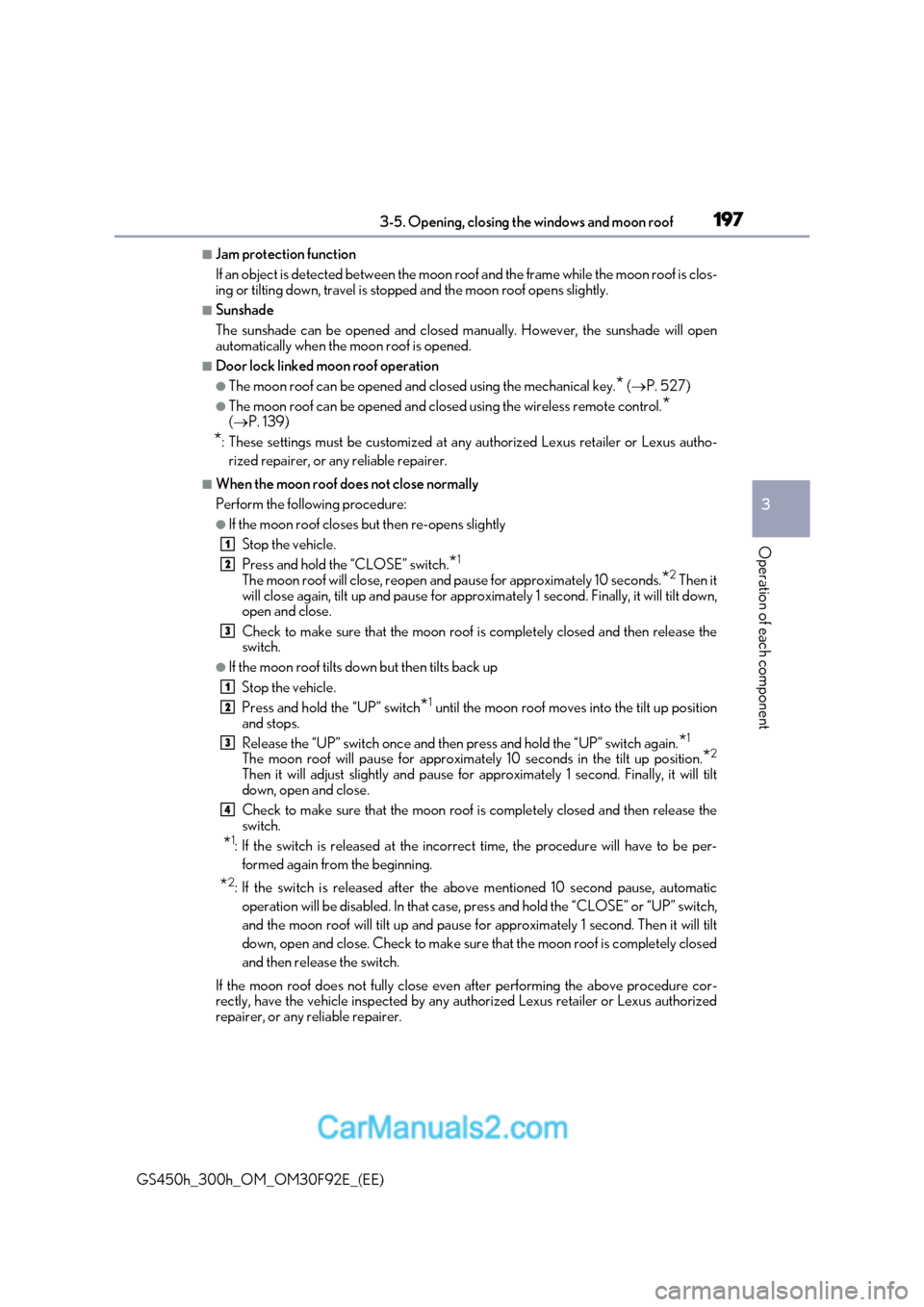
■When the moon roof does not close normally
Perform the following procedure:
●If the moon roof closes but then re-opens slightly
Stop the vehicle.
Press and hold the “CLOSE” switch. *1
The moon roof will close, reopen an d pause for approximately 10 seconds. *2
Then it
will close again, tilt up and pause for approx imately 1 second. Finally, it will tilt down,
open and close.
Check to make sure that the moon roof is completely closed and then release the switch.
●If the moon roof tilts do wn but then tilts back up
Stop the vehicle.
Press and hold the “UP” switch *1
until the moon roof moves into the tilt up position
and stops.
Release the “UP” switch once and then press and hold the “UP” switch again. *1
The moon roof will pause for approximatel y 10 seconds in the tilt up position.*2
Then it will adjust slightly and pause fo r approximately 1 second. Finally, it will tilt
down, open and close.
Check to make sure that the moon roof is completely closed and then release the switch.
* 1
: If the switch is released at the incorrec t time, the procedure will have to be per-
formed again from the beginning.
* 2
: If the switch is released after the above mentioned 10 second pause, automatic
operation will be disabled. In that case, pr ess and hold the “CLOSE” or “UP” switch,
and the moon roof will tilt up and pause fo r approximately 1 second. Then it will tilt
down, open and close. Check to make sure that the moon roof is completely closed
and then release the switch.
If the moon roof does not fully close even after performing the above procedure cor-
rectly, have the vehicle inspected by any au thorized Lexus retailer or Lexus authorized
repairer, or any reliable repairer.
1
2
3
1
2
3
4
Page 198 of 600
1983-5. Opening, closing the windows and moon roof
GS450h_300h_OM_OM30F92E_(EE)
■Moon roof open warning buzzer
The buzzer sounds and a message is shown on the multi-information display in the instru-
ment cluster when the power switch is turned off and the driver’s door is opened with the
moon roof open.
■Customization
Settings (e.g. linked door lock operation) can be changed.
(Customizable features: P. 561)
WARNING
Observe the following precautions.
Failure to do so may cause death or serious injury.
■Opening the moon roof
●Do not allow any passengers to put their hands or heads outside the vehicle while it is
moving.
●Do not sit on top of the moon roof.
■Closing the moon roof
●The driver is responsible for moon roof opening and closing operations.
In order to prevent accidental operation, especially by a child, do not let a child oper-
ate the moon roof. It is possible for childre n and other passengers to have body parts
caught in the moon roof.
●Check to make sure that all passengers do not have any part of their body in a posi-
tion where it could be caught when the moon roof is being operated.
●When using the wireless remote control or mechanical key and operating the moon
roof, operate the moon roof after checking to make sure that there is no possibility of
any passenger having any of their body parts caught in the moon roof. Also, do not let
a child operate moon roof by the wireless remo te control or mechanical key. It is pos-
sible for children and other passengers to get caught in the moon roof.
●When exiting the vehicle, turn the power switch off, carry the key and exit the vehicle
along with the child. There may be accidental operation, due to mischief, etc., that
may possibly lead to an accident.
■Jam protection function
●Never use any part of your body to intent ionally activate the jam protection function.
●The jam protection function may not work if something gets caught just before the
moon roof fully closes.
Page 343 of 600
343
5-1. Remote Touch screen
5
Interior features
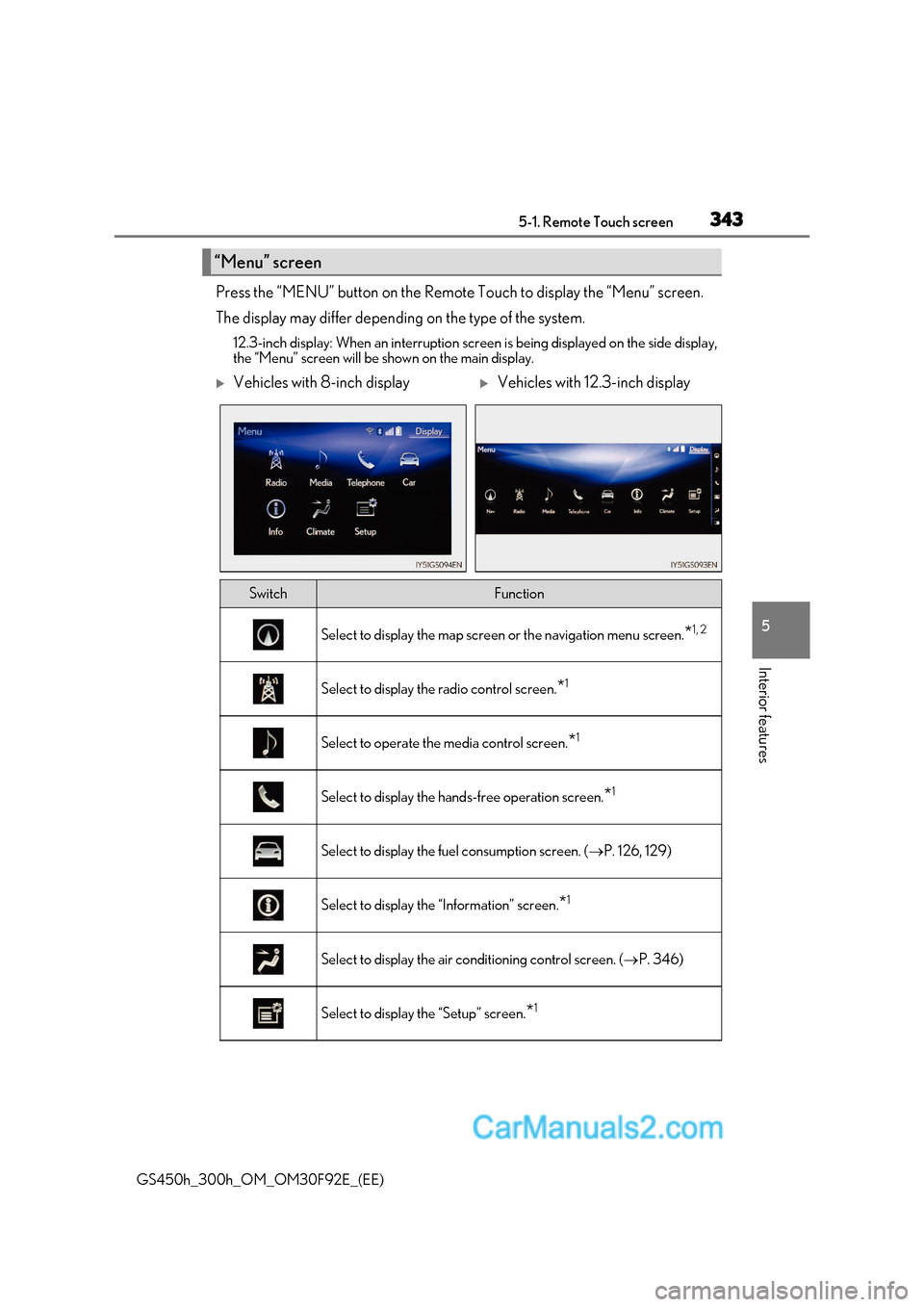
GS450h_300h_OM_OM30F92E_(EE) Press the “MENU” button on the Remote Touch to display the “Menu” screen.
The display may differ depending on the type of the system.
12.3-inch display: When an interruption scr een is being displayed on the side display,
the “Menu” screen will be shown on the main display.
“Menu” screen
Vehicles with 8-inch displayVehicles with 12.3-inch display
SwitchFunction
Select to display the map screen or the navigation menu screen.*1, 2
Select to display the radio control screen.
*1
Select to operate the media control screen.
*1
Select to display the hand
s-free operation screen.*1
Select to display the fuel consumption screen. (
P. 126, 129)
Select to display the “Information” screen. *1
Select to display the air conditioning control screen. (
P. 346)
Select to display the “Setup” screen. *1
Page 344 of 600
3445-1. Remote Touch screen
GS450h_300h_OM_OM30F92E_(EE) *
1
: Refer to the “NAVIGATION AND MULTIMEDIA SYSTEM OWNER’S MANUAL”.
* 2
: If equipped
■Full screen display
The following functions can be displayed full screen:
* : Refer to the “NAVIGATION AND MULTIMEDIA SYSTEM OWNER’S MAN-
UAL”.
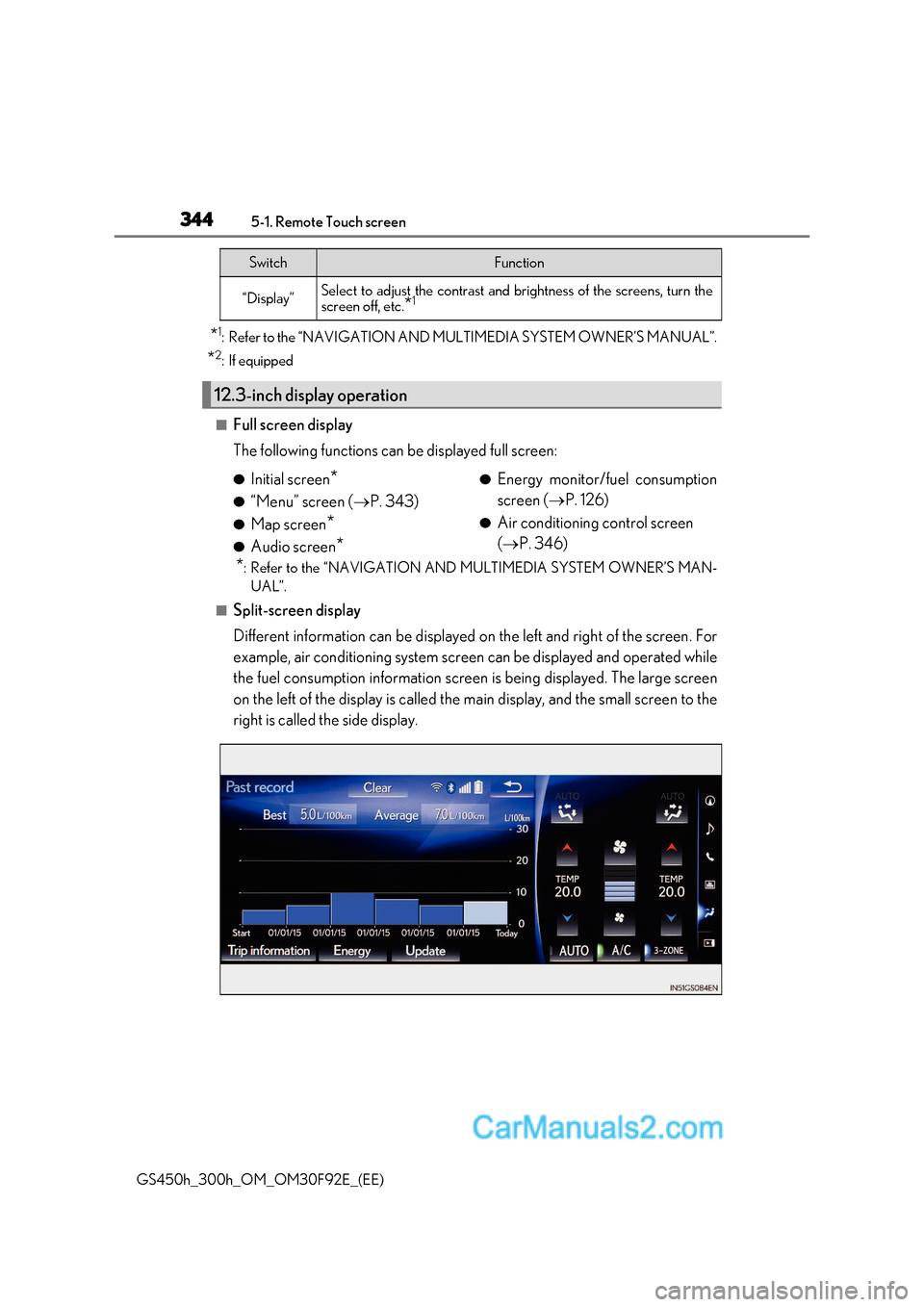
■Split-screen display
Different information can be displayed on the left and right of the screen. For
example, air conditioning system screen can be displayed and operated while
the fuel consumption information screen is being displayed. The large screen
on the left of the display is called the main display, and the small screen to the
right is called the side display.
“Display”Select to adjust the contrast and brightness of the screens, turn the
screen off, etc. *1
12.3-inch display operation
SwitchFunction
●
Initial screen *
● “Menu” screen ( P. 343)
● Map screen *
● Audio screen * ●
Energy monitor/fuel consumption
screen ( P. 126)
● Air conditioning control screen ( P. 346)
Page 346 of 600
3465-2. Using the air conditioning system and defogger
GS450h_300h_OM_OM30F92E_(EE)
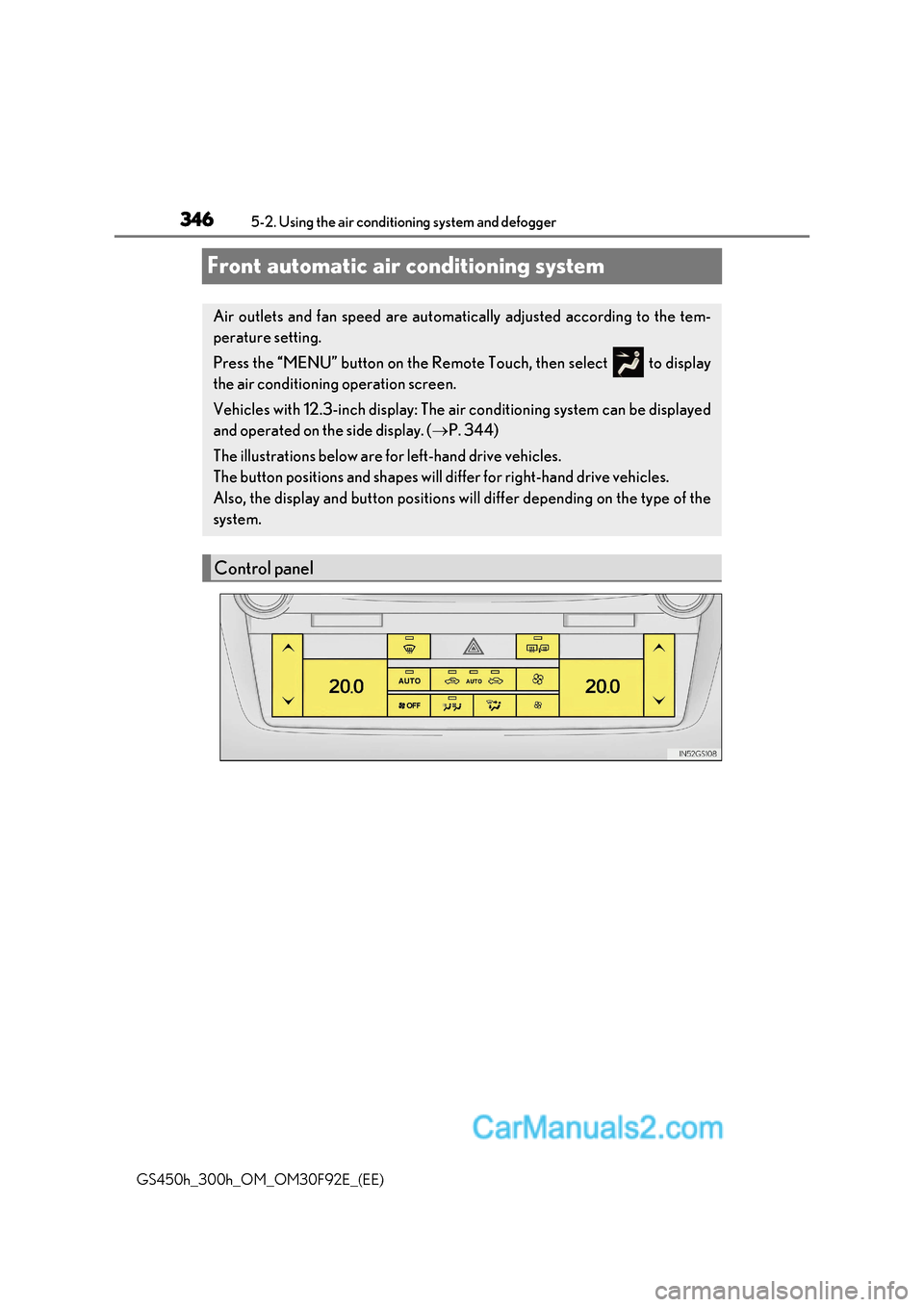
Front automatic air conditioning system
Air outlets and fan speed are automatically adjusted according to the tem-
perature setting.
Press the “MENU” button on the Remote Touch, then select to display
the air conditioning operation screen.
Vehicles with 12.3-inch display: The air conditioning system can be displayed
and operated on the side display. ( P. 344)
The illustrations below are for left-hand drive vehicles.
The button positions and shapes will di ffer for right-hand drive vehicles.
Also, the display and button positions will differ depending on the type of the
system.
Control panel
Page 348 of 600
3485-2. Using the air conditio ning system and defogger
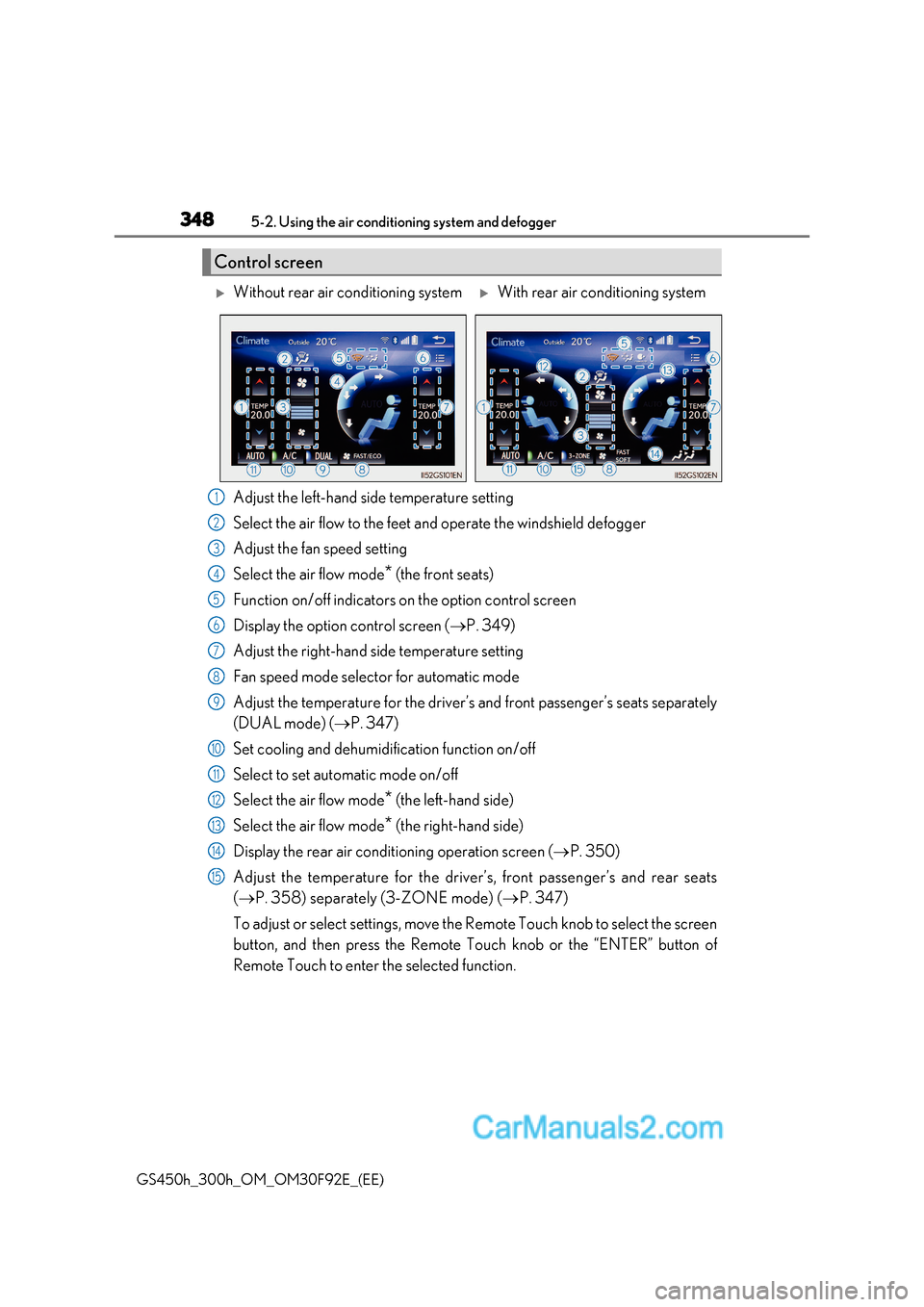
GS450h_300h_OM_OM30F92E_(EE)Adjust the left-hand side temperature setting
Select the air flow to the feet and operate the windshield defogger
Adjust the fan speed setting
Select the air flow mode
* (the front seats)
Function on/off indicators on the option control screen
Display the option control screen ( P. 349)
Adjust the right-hand side temperature setting
Fan speed mode selector for automatic mode
Adjust the temperature for the driver’s and front passenger’s seats separately
(DUAL mode) ( P. 347)
Set cooling and dehumidification function on/off
Select to set automatic mode on/off
Select the air flow mode *
(the left-hand side)
Select the air flow mode * (the right-hand side)
Display the rear air conditioning operation screen ( P. 350)
Adjust the temperature for the driver’s, front passenger’s and rear seats ( P. 358) separately (3-ZONE mode) ( P. 347)
To adjust or select settings, move the Remote Touch knob to select the screen
button, and then press the Remote Touch knob or the “ENTER” button of
Remote Touch to enter the selected function.
Control screen
Without rear air conditioning systemWith rear air conditioning system
1
2
3
4
5
6
7
8
9
10
11
12
13
14
15
Page 365 of 600
365
5-2. Using the air conditioning system and defogger
5
Interior features
GS450h_300h_OM_OM30F92E_(EE)
■Automatic operation during S-FLOW mode
The front seat heater and ventilator or the rear seat heater may automatically turn off
when S-FLOW mode is turned on during automatic mode. ( P. 347)
■Button lock function (vehicle s with rear control panel)
To prevent inadvertent operation, some bu ttons on the rear armrest can be locked.
( P. 360)
■When the switch is disabled (v ehicles with rear control panel)
When the rear control panel switch cannot be operated even though the button lock
function is released, check whether the sw itch is disabled due to selecting on
Remote Touch screen. ( P. 353)
■Rear control panel illumination off function (vehicles with rear control panel)
Control panel illumination on the rear armrest can be turned off. ( P. 360)
■Customization
The automatic operation of the front seat heaters (without seat ventilators) and the auto-
matic mode settings for the front seat heaters and ventilators or the rear seat heaters can
be changed. (Customizable features: P. 572)
Page 413 of 600
413
6-3. Do-it-yourself maintenance
6
Maintenance and care
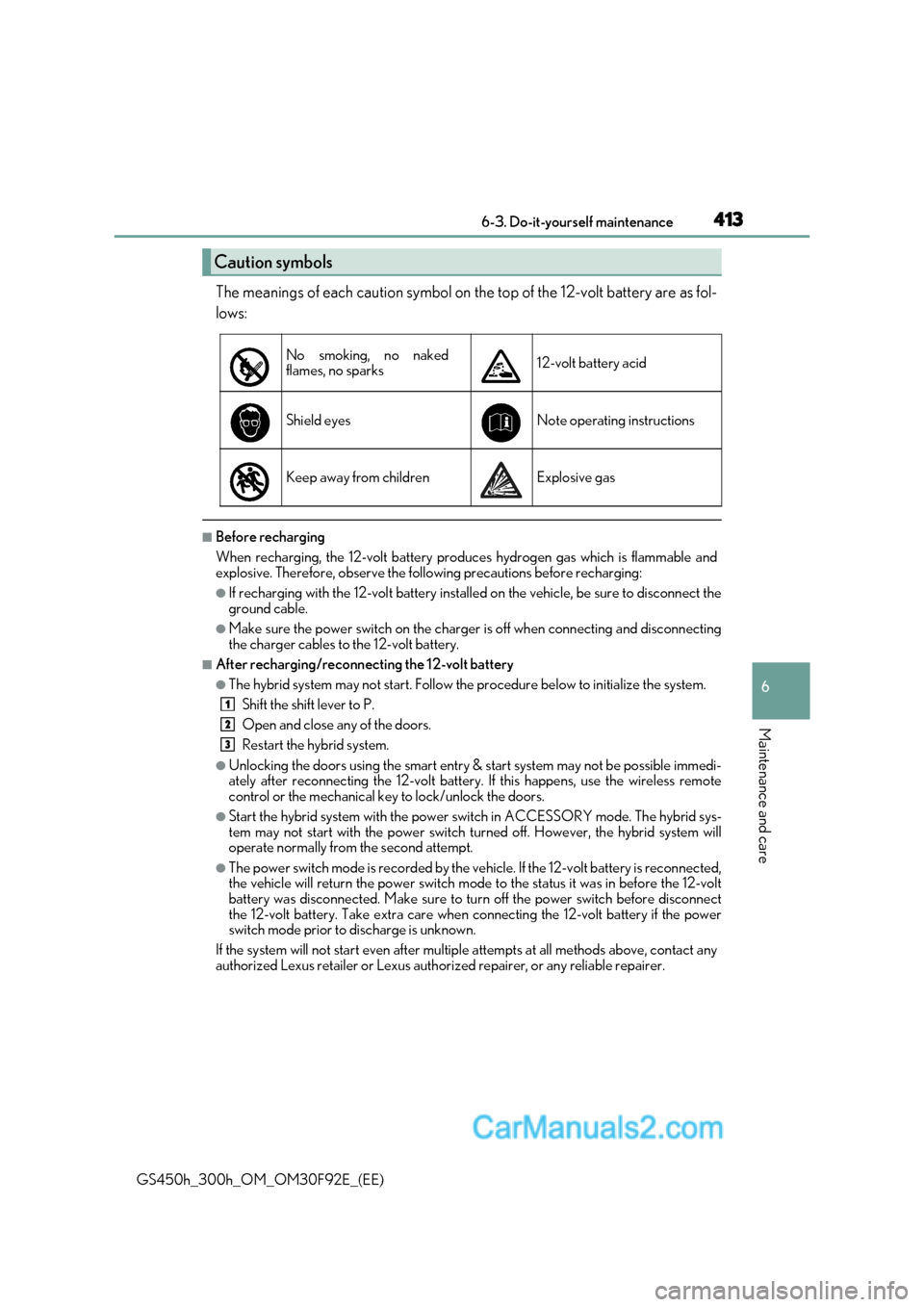
GS450h_300h_OM_OM30F92E_(EE) The meanings of each caution symbol on the top of the 12-volt battery are as fol-
lows:
■Before recharging
When recharging, the 12-volt battery produces hydrogen gas which is flammable and
explosive. Therefore, observe the following precautions before recharging:
●If recharging with the 12-volt battery installed on the vehicle, be sure to disconnect the
ground cable.
●Make sure the power switch on the charger is off when connecting and disconnecting
the charger cables to the 12-volt battery.
■After recharging/reconnecting the 12-volt battery
●The hybrid system may not start. Follow the procedure below to initialize the system.
Shift the shift lever to P.
Open and close any of the doors.
Restart the hybrid system.
●Unlocking the doors using the smart entry & start system may not be possible immedi-
ately after reconnecting the 12-volt battery. If this happens, use the wireless remote
control or the mechanical key to lock/unlock the doors.
●Start the hybrid system with the power switch in ACCESSORY mode. The hybrid sys-
tem may not start with the power switch turned off. However, the hybrid system will
operate normally from the second attempt.
●The power switch mode is recorded by the vehicle. If the 12-volt battery is reconnected,
the vehicle will return the power switch mode to the status it was in before the 12-volt
battery was disconnected. Make sure to tu rn off the power switch before disconnect
the 12-volt battery. Take extra care when connecting the 12-volt battery if the power
switch mode prior to discharge is unknown.
If the system will not start even after multiple attempts at all methods above, contact any
authorized Lexus retailer or Lexus author ized repairer, or any reliable repairer.
Caution symbols
No smoking, no naked
flames, no sparks12-volt battery acid
Shield eyesNote operating instructions
Keep away from childrenExplosive gas
1
2
3
Page 436 of 600
4366-3. Do-it-yourself maintenance
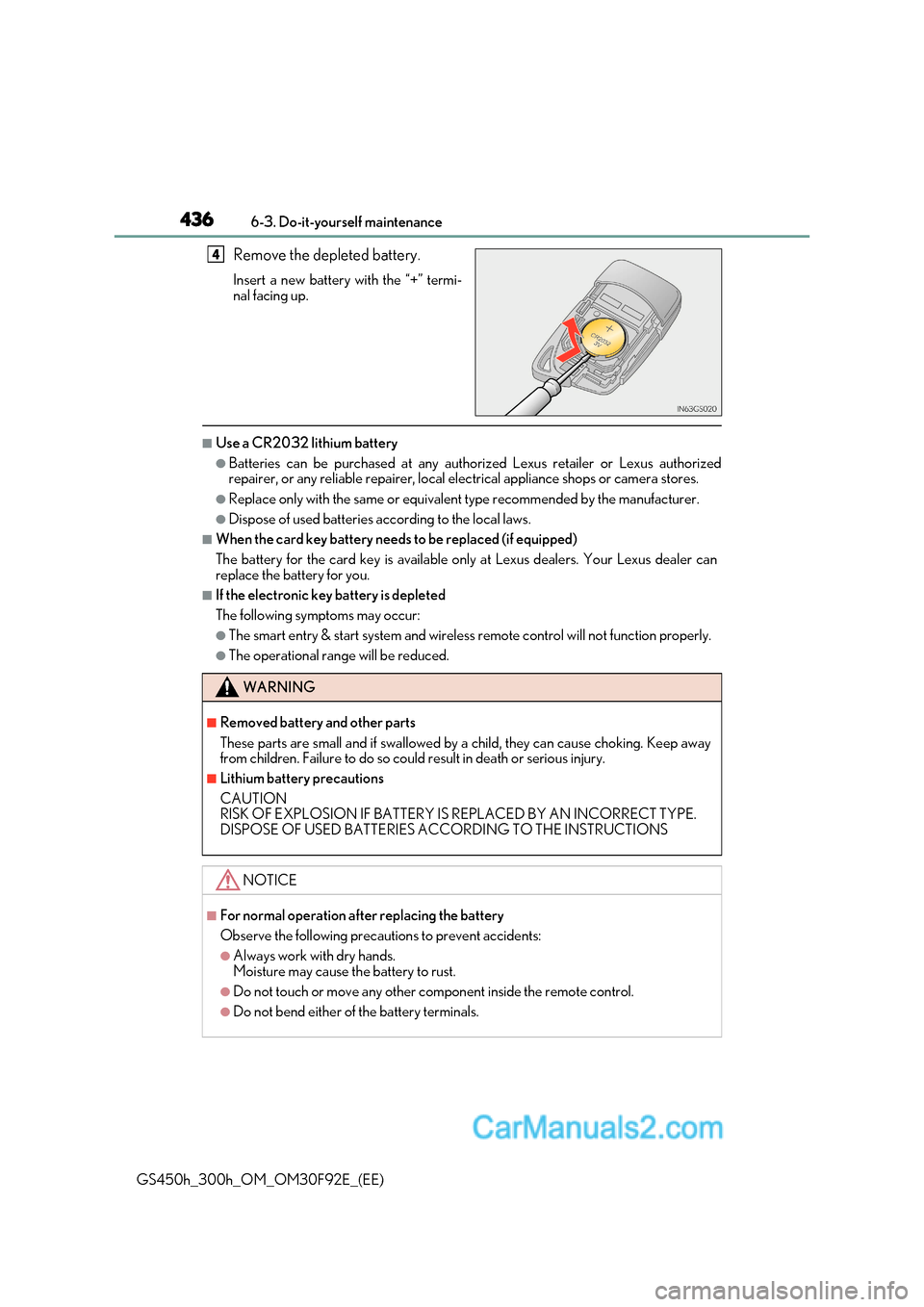
GS450h_300h_OM_OM30F92E_(EE) Remove the depleted battery.
Insert a new battery with the “+” termi-
nal facing up.
■Use a CR2032 lithium battery
●Batteries can be purchased at any authorized Lexus retailer or Lexus authorized
repairer, or any reliable repairer, local el
ectrical appliance shops or camera stores.
●Replace only with the same or equivalent type recommended by the manufacturer.
●Dispose of used batteries according to the local laws.
■When the card key battery needs to be replaced (if equipped)
The battery for the card key is available only at Lexus dealers. Your Lexus dealer can
replace the battery for you.
■If the electronic key battery is depleted
The following symptoms may occur:
●The smart entry & start system and wireless remote control will not function properly.
●The operational range will be reduced.
4
WARNING
■Removed battery and other parts
These parts are small and if swallowed by a child, they can cause choking. Keep away
from children. Failure to do so could result in death or serious injury.
■Lithium battery precautions
CAUTION
RISK OF EXPLOSION IF BATTERY IS REPLACED BY AN INCORRECT TYPE.
DISPOSE OF USED BATTERIES ACCORDING TO THE INSTRUCTIONS
NOTICE
■For normal operation after replacing the battery
Observe the following precautions to prevent accidents:
●Always work with dry hands.
Moisture may cause the battery to rust.
●Do not touch or move any other component inside the remote control.
●Do not bend either of the battery terminals.