key battery Lexus GS300h 2017 Owner's Manual
[x] Cancel search | Manufacturer: LEXUS, Model Year: 2017, Model line: GS300h, Model: Lexus GS300h 2017Pages: 600, PDF Size: 58.17 MB
Page 5 of 600
5
1 8
7
6
5
4
3
2
GS450h_300h_OM_OM30F92E_(EE) 6-3. Do-it-yourself maintenance
Do-it-yourself service precautions ................................399
Hood ................................................ 401
Positioning a floor jack.............402
Engine compartment............... 403
12-volt battery............................... 412
Tires .................................................. 416
Tire inflation pressure...............429
Wheels............................................. 431
Air conditioning filter................433
Electronic key battery ..............435
Checking and replacing fuses .............................................. 437
Light bulbs ..................................... 442
7-1. Essential information Emergency flashers...................452
If your vehicle has to be stopped in an
emergency.................................453 7-2. Steps to take in an
emergency
If your vehicle needs to be towed ................................454
If you think something is wrong .......................................459
If a warning light turns on or a warning buzzer
sounds..........................................460
If a warning message is displayed................................. 466
If you have a flat tire (vehicles with spare tire) ..... 498
If you have a flat tire (vehicles without spare
tire) ............................................... 509
If the hybrid system will not start................................523
If the parking brake cannot be released.................525
If the electronic key does not operate properly ............. 527
If the 12-volt battery is discharged ................................ 530
If your vehicle overheats .........535
If the vehicle becomes stuck.............................................. 542
7When trouble arises
Page 93 of 600
93
1-3. Theft deterrent system
1
GS450h_300h_OM_OM30F92E_(EE)
For safety and security
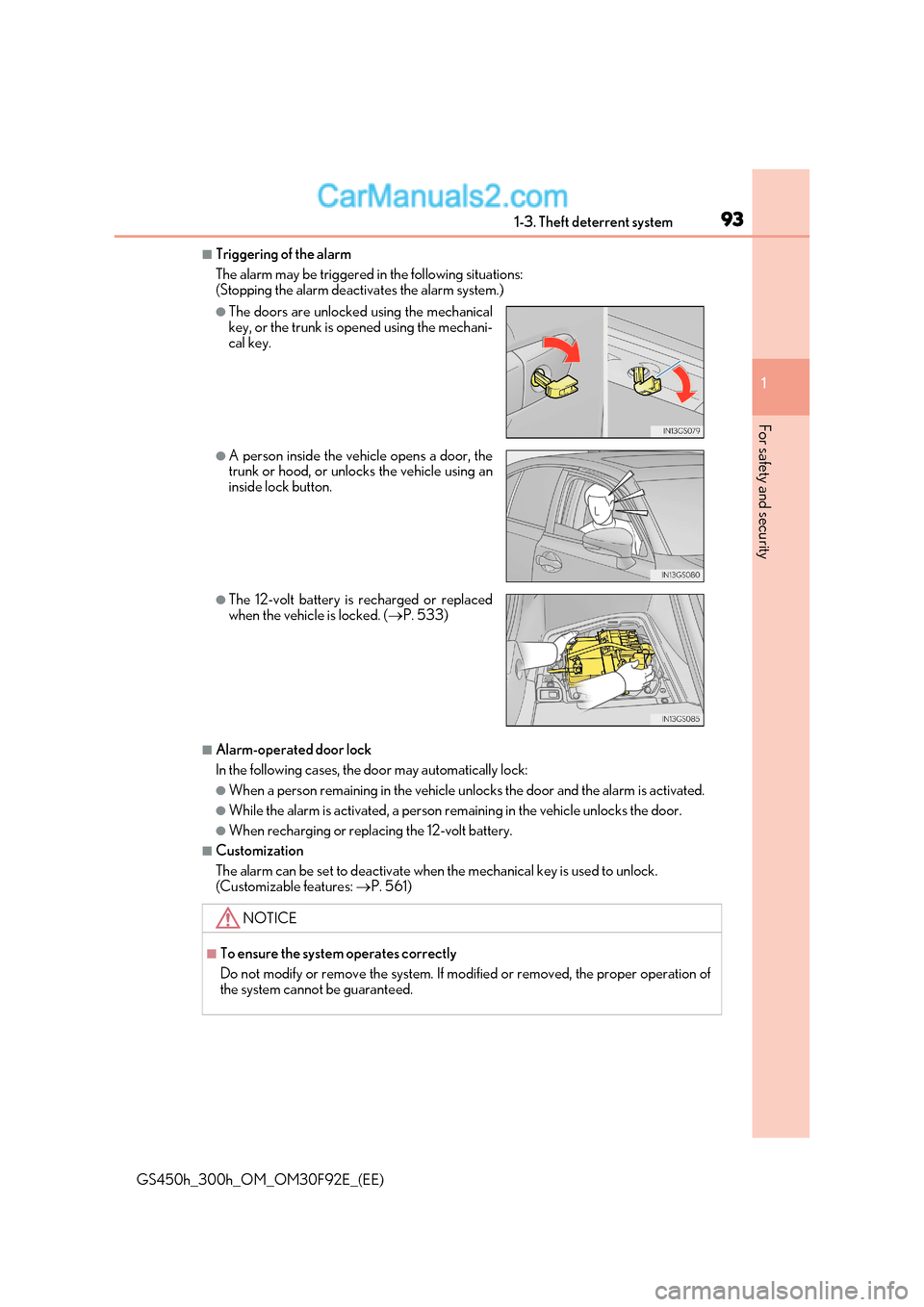
■Triggering of the alarm
The alarm may be triggered in the following situations:
(Stopping the alarm deactivates the alarm system.)
■Alarm-operated door lock
In the following cases, the door may automatically lock:
●When a person remain ing in the vehicle unlocks the d oor and the alarm is activated.
●While the alarm is activated, a person re maining in the vehicle unlocks the door.
●When recharging or replacing the 12-volt battery.
■Customization
The alarm can be set to deactivate when the mechanical key is used to unlock.
(Customizable features: P. 561)
●The doors are unlocked using the mechanical
key, or the trunk is opened using the mechani-
cal key.
●A person inside the vehicle opens a door, the
trunk or hood, or unlocks the vehicle using an
inside lock button.
●The 12-volt battery is recharged or replaced
when the vehicle is locked. ( P. 533)
NOTICE
■To ensure the system operates correctly
Do not modify or remove the system. If mo dified or removed, the proper operation of
the system cannot be guaranteed.
Page 135 of 600
135
3-1. Key information
3
Operation of each component
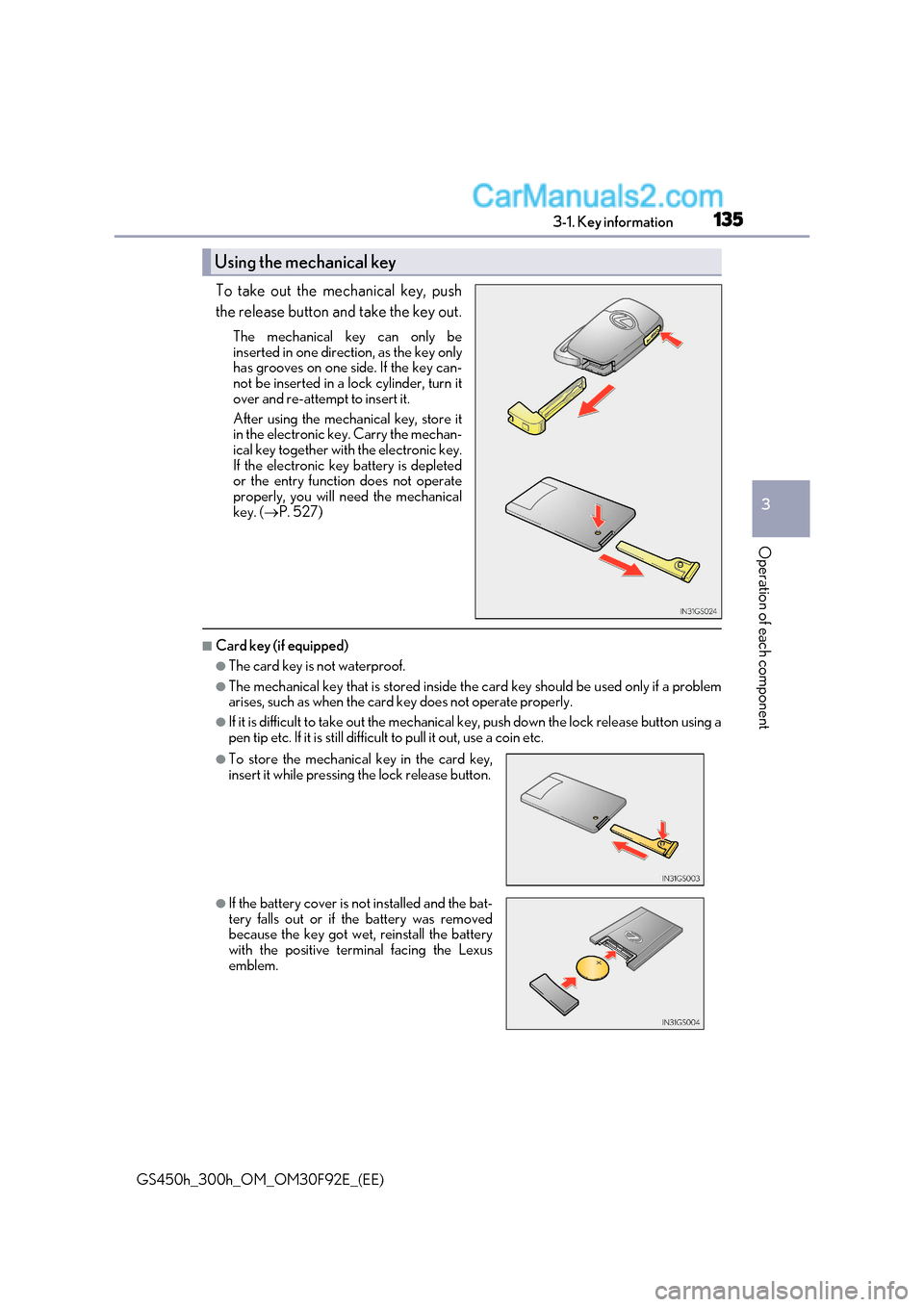
GS450h_300h_OM_OM30F92E_(EE) To take out the mechanical key, push
the release button and take the key out.
The mechanical key can only be
inserted in one direction, as the key only
has grooves on one si de. If the key can-
not be inserted in a lock cylinder, turn it
over and re-attempt to insert it.
After using the mechanical key, store it
in the electronic key. Carry the mechan-
ical key together with the electronic key.
If the electronic key battery is depleted
or the entry function does not operate
properly, you will need the mechanical
key. ( P. 527)
■Card key (if equipped)
●The card key is not waterproof.
●The mechanical key that is stored inside th e card key should be used only if a problem
arises, such as when the card key does not operate properly.
●If it is difficult to take out the mechanical key, push down the lock release button using a
pen tip etc. If it is still difficu lt to pull it out, use a coin etc.
Using the mechanical key
●To store the mechanical key in the card key,
insert it while pressing the lock release button.
●If the battery cover is not installed and the bat-
tery falls out or if the battery was removed
because the key got wet, reinstall the battery
with the positive terminal facing the Lexus
emblem.
Page 136 of 600
1363-1. Key information
GS450h_300h_OM_OM30F92E_(EE)
■When required to leave the vehicl e’s key with a parking attendant
Turn the trunk opener main switch off and lock the glove box as circumstances demand. ( P. 148, 370)
Remove the mechanical key for your own use and provide the attendant with the elec-
tronic key only.
■If you lose your mechanical keys
New genuine mechanical keys can be made by any authorized Lexus retailer or Lexus
authorized repairer, or any reliable repairer using the other mechanical key and the key
number stamped on your key number plate. K eep the plate in a safe place such as your
wallet, not in the vehicle.
■When riding in an aircraft
When bringing an electronic key onto an aircraft, make sure you do not press any but-
tons on the electronic key while inside the ai rcraft cabin. If you are carrying an electronic
key in your bag etc., ensure that the buttons are not likely to be pressed accidentally.
Pressing a button may cause the electronic key to emit radio waves that could interfere
with the operation of the aircraft.
■Electronic key battery depletion
●The standard battery life is 1 to 2 years. (The card key battery life is about a year and a
half.)
●If the battery becomes low, an alarm will sound in the cabin when the hybrid system
stops. ( P. 496)
●As the electronic key always receives ra dio waves, the battery will become depleted
even if the electronic key is not used. The following symptoms indicate that the elec-
tronic key battery may be depleted. Replace the battery when necessary. ( P. 435)
Page 138 of 600
1383-1. Key information
GS450h_300h_OM_OM30F92E_(EE)
NOTICE
■Handling the card key (if equipped)
●Do not apply excess force when inserting the mechanical key into th e card key. Doing
so may damage the card key.
●If the battery or card key terminals get wet, the battery may corrode.
If the key is dropped into water, or if drinking water etc. is spilled on the key, immedi-
ately remove the battery cover and wipe the battery and terminals. (To remove the
battery cover, lightly grasp and pull it.) If the battery is corroded, have any authorized
Lexus retailer or Lexus authorized repairer , or any reliable repairer replace the bat-
tery.
●Do not crush the battery cover or use a screwdriver to remove the battery cover.
Forcibly removing the battery co ver may bend or damage the key.
●If the battery cover is frequently removed, the battery cover may beco me loose.
●When installing the battery, make sure to check the direction of the battery.
Installing the battery in the wrong direction may cause the battery to deplete rapidly.
●The surface of the card key may be damaged, or its coating may peel off in the follow-
ing situations:
Page 140 of 600
1403-2. Opening, closing and locking the doors and trunk
GS450h_300h_OM_OM30F92E_(EE)
■Operation signals
The emergency flashers flash to indicate that the doors have been locked/unlocked.
(Locked: once; Unlocked: twice)
■Security feature
If a door is not opened within approximately 30 seconds after the vehicle is unlocked, the
security feature automatically locks the vehicle again.
■Welcome light illumination control
The front position, tail and license plate lights automatically turn on at night when the
doors are unlocked using the entry function or wireless remote control if the light switch
is in the “AUTO” position.
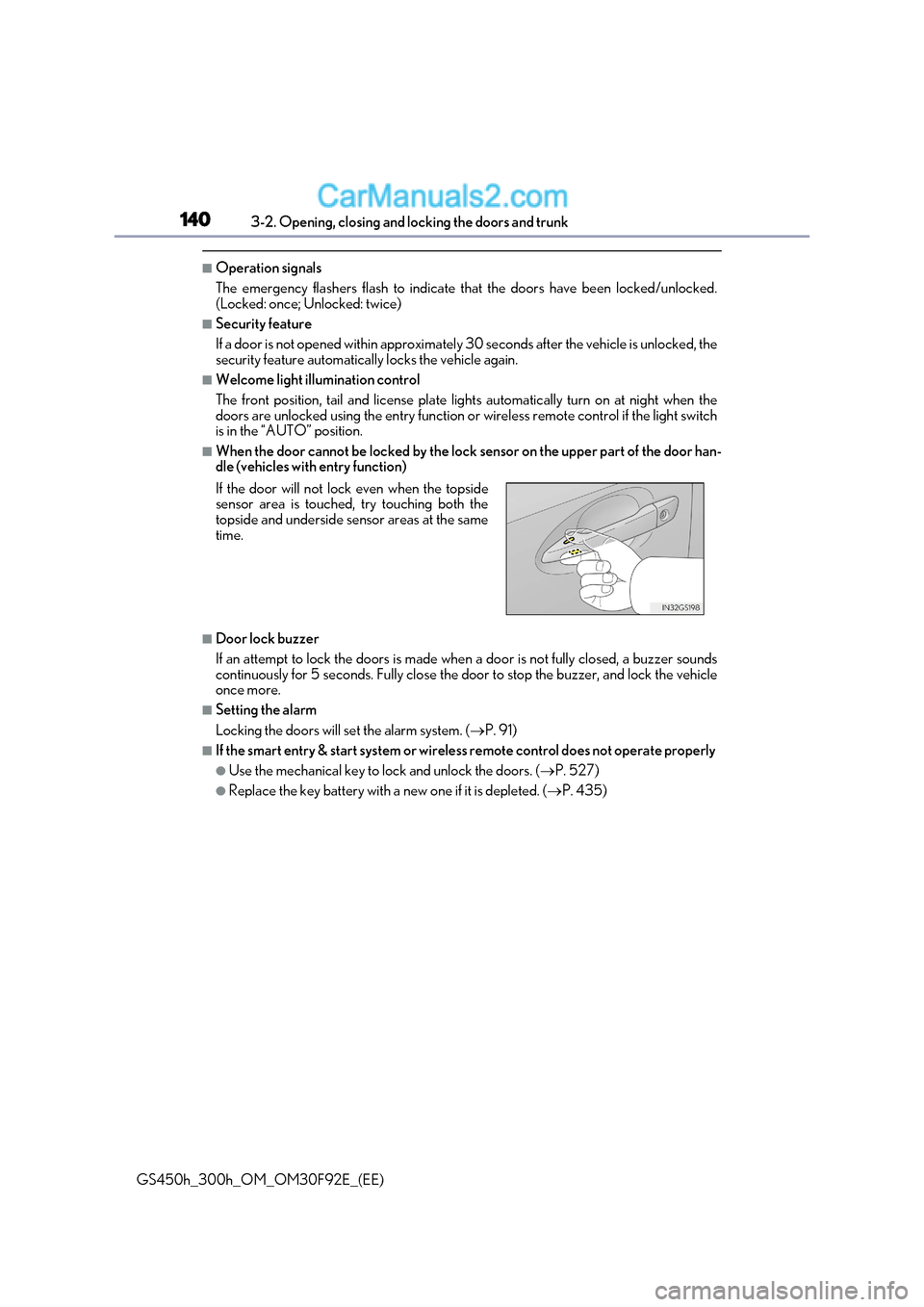
■When the door cannot be locked by the lock sensor on the upper part of the door han-
dle (vehicles with entry function)
■Door lock buzzer
If an attempt to lock the doors is made when a door is not fully closed, a buzzer sounds
continuously for 5 seconds. Fully close the door to stop the buzzer, and lock the vehicle once more.
■Setting the alarm
Locking the doors will set the alarm system. ( P. 91)
■If the smart entry & start system or wireless remote control does not operate properly
●Use the mechanical key to lock and unlock the doors. ( P. 527)
●Replace the key battery with a new one if it is depleted. (P. 435)
If the door will not lock even when the topside
sensor area is touched, try touching both the
topside and underside sensor areas at the same
time.
Page 149 of 600
149
3-2. Opening, closing and locking the doors and trunk
3
Operation of each component
GS450h_300h_OM_OM30F92E_(EE)
■Jam protection function (vehicles with power trunk lid)
While the trunk lid is closing automatically, the trunk lid will stop closing and open if
something gets caught.
■If the smart entry & start system or wireless remote control does not operate properly
●Use the mechanical key to open the trunk. ( P. 527)
●Replace the key battery with a new one if it is depleted. (P. 435)
■When leaving a key to the vehicle with a parking attendant P. 136
■Customization
The trunk unlocking operation can be changed.
(Customizable features: P. 566)
WARNING
Observe the following precautions.
Failure to do so may result in death or serious injury.
■Before driving
●Make sure that the trunk lid is fully closed. If the trunk lid is not fully closed, it may
open unexpectedly while driv ing and hit near-by objects or luggage in the trunk may
be thrown out, causing an accident.
●Do not allow children to play in the trunk.
If a child is accidentally locked in the trunk, they could suffer from heat exhaustion,
suffocation or other injuries.
●Do not allow a child to open or close the trunk lid.
Doing so may cause the trunk lid to open unexpectedly, or cause the child’s hands,
head, or neck to be caught by the closing trunk lid.
■Important points while driving
Never let anyone sit in the trunk. In the event of sudden braking or a collision, they a re
susceptible to death or serious injury.
Page 154 of 600
1543-2. Opening, closing and locking the doors and trunk
GS450h_300h_OM_OM30F92E_(EE)
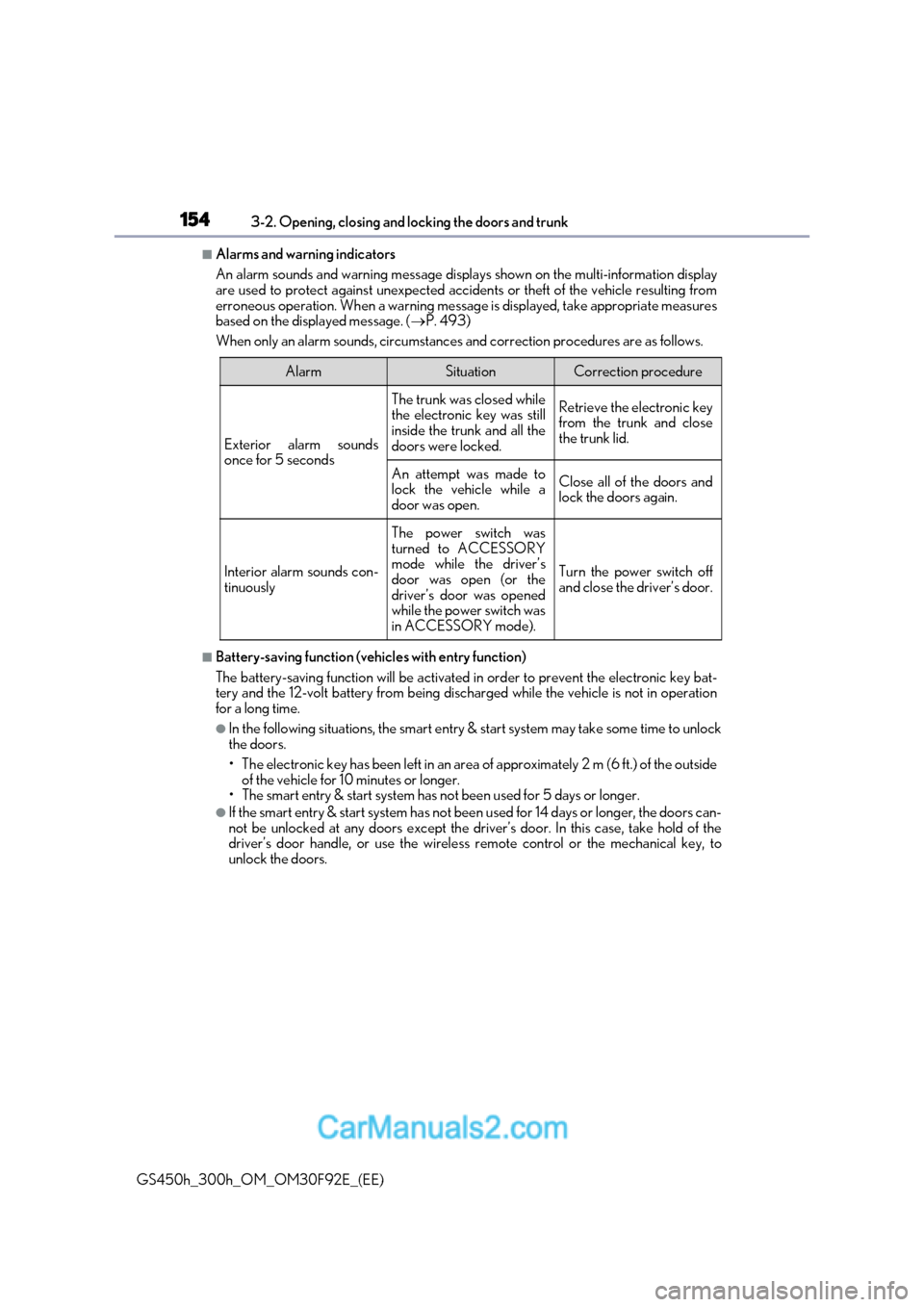
■Alarms and warning indicators
An alarm sounds and warning message displa ys shown on the multi-information display
are used to protect against unexpected accidents or theft of the vehicle resulting from
erroneous operation. When a warning message is displayed, take appropriate measures
based on the displayed message. ( P. 493)
When only an alarm sounds, circumstances and correction procedures are as follows.
■Battery-saving function (vehicles with entry function)
The battery-saving function will be activated in order to prevent the electronic key bat-
tery and the 12-volt battery from being discharged while the vehicle is not in operation
for a long time.
●In the following situations, the smart entry & start system may take some time to unlock
the doors.
Page 155 of 600
155
3-2. Opening, closing and locking the doors and trunk
3
Operation of each component
GS450h_300h_OM_OM30F92E_(EE)
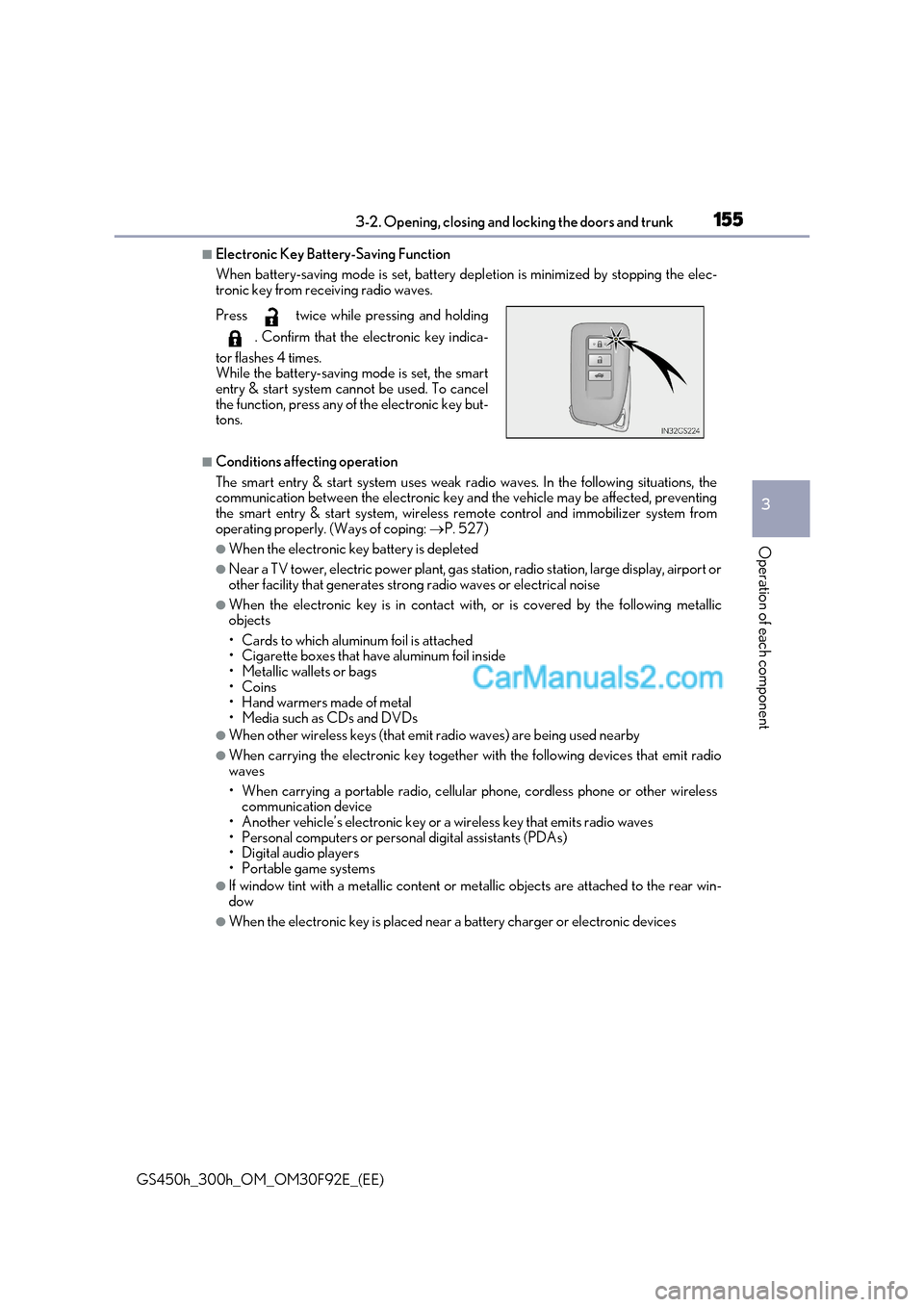
■Electronic Key Battery-Saving Function
When battery-saving mode is set, battery de pletion is minimized by stopping the elec-
tronic key from receiving radio waves.
■Conditions affecting operation
The smart entry & start system uses weak ra dio waves. In the following situations, the
communication between the electronic key and the vehicle may be affected, preventing
the smart entry & start system, wireless re mote control and immobilizer system from
operating properly. (Ways of coping: P. 527)
●When the electronic key battery is depleted
●Near a TV tower, electric power plant, gas st ation, radio station, large display, airport or
other facility that gene rates strong radio waves or electrical noise
●When the electronic key is in contact wi th, or is covered by the following metallic
objects
Page 194 of 600
1943-5. Opening, closing the windows and moon roof
GS450h_300h_OM_OM30F92E_(EE)
■When the window cannot be opened or closed
When the jam protection function or catch protection function operates unusually and
the door window cannot be opened or closed , perform the following operations with the
power window switch of that door.
●Stop the vehicle. With the power switch in ON mode, within 4 seco nds of the jam pro-
tection function or catch protection function activating, continuously operate the
power window switch in the one-touch clos ing direction or one-touch opening direc-
tion so that the door window can be opened and closed.
●If the door window cannot be opened and closed even when performing the above
operations, perform the following procedure for function initialization.
Turn the power switch to ON mode.
Pull and hold the power window switch in the one-touch closing direction and com-
pletely close the door window.
Release the power window switch for a mo ment, resume pulling the switch in the
one-touch closing direction, and hold it there for approximately 6 seconds or more.
Press and hold the power window switch in the one-touch opening direc tion. After
the door window is completely opened, cont inue holding the switch for an additional
1 second or more.
Release the power window switch for a moment, resume pushing the switch in the
one-touch opening direction, and hold it there for approximately 4 seconds or
more.
Pull and hold the power window switch in the one-touch closing direction again.
After the door window is completely closed, continue holding the switch for a fur-
ther 1 second or more.
If you release the switch while the window is moving, start again from the beginning.
If the window reverses and cannot be fully closed or opened, have the vehicle inspected
by any authorized Lexus retailer or Lexus auth orized repairer, or any reliable repairer.
■Door lock linked window operation
●The power windows can be opened and closed using the mechanical key. * ( P. 527)
●The power windows can be opened and closed using the wireless remote control. *
( P. 139)
* : These settings must be customized at an y authorized Lexus retailer or Lexus autho-
rized repairer, or any reliable repairer.
■When the 12-volt battery is disconnected
The window lock switch is disabled. If ne cessary, press the window lock switch after
reconnecting the 12-volt battery.
■Power windows open warning buzzer
The buzzer sounds and a message is shown on the multi-information display in the instru-
ment cluster when the power switch is turned off and the driver’s door is opened with the
power windows open.
■Customization
Settings (e.g. linked door lock operation) can be changed.
(Customizable features: P. 561)
1
2
3
4
5
6