light Lexus GS300h 2017 Owner's Guide
[x] Cancel search | Manufacturer: LEXUS, Model Year: 2017, Model line: GS300h, Model: Lexus GS300h 2017Pages: 600, PDF Size: 58.17 MB
Page 103 of 600
103
2. Instrument cluster
2
Instrument cluster
GS450h_300h_OM_OM30F92E_(EE) *
1
: Refer to “NAVIGATION AND MULTIMEDIA SYSTEM OWNER’S MANUAL”
* 2
: These lights turn on when the power switch is turned to ON mo de to indicate that a
system check is being perfor med. They will turn off after the “READY” indicator turns
on. There may be a malfunction in a system if a light does not come on, or turn off.
Have the vehicle inspected by any author ized Lexus retailer or Lexus authorized
repairer, or any reliable repairer.
* 3
: These lights turn on when the power switch is turned to ON mo de to indicate that a
system check is being performed. They will turn off after the hybrid system is on, or
after a few seconds. There may be a malfunct ion in a system if the lights do not come
on, or turn off. Have the vehicle inspected by any authorized Lexus retailer or Lexus
authorized repairer, or any reliable repairer.
* 4
: This light illuminates on the Center panel.
* 5
: The light flashes to indicate that the system is operating.
* 6
: When the outside temperature is approximately 3 C (37 F) or lower, the indicator
will flash for approximately 10 seconds, then stay on.
* 7
: The light turns on when the system is turned off.
* 8
: In order to confirm operation, the BSM outside rear view mirror indicators illuminate
in the following situations:
Page 107 of 600
107
2. Instrument cluster
2
Instrument cluster
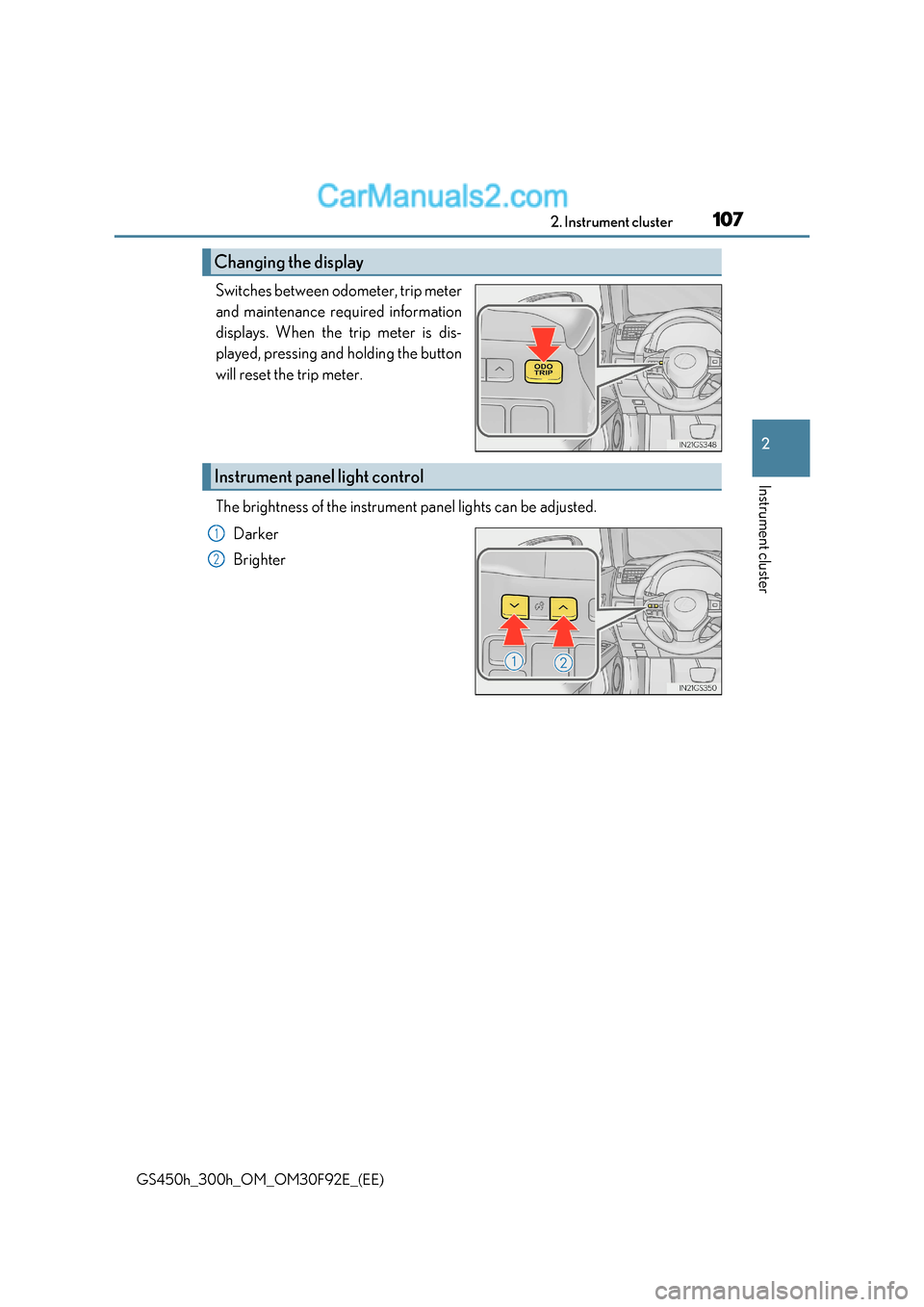
GS450h_300h_OM_OM30F92E_(EE) Switches between odometer, trip meter
and maintenance required information
displays. When the trip meter is dis-
played, pressing and holding the button
will reset the trip meter.
The brightness of the instrument panel lights can be adjusted.
Darker
Brighter
Changing the display
Instrument panel light control
1
2
Page 108 of 600
1082. Instrument cluster
GS450h_300h_OM_OM30F92E_(EE)
■The meters and display illuminate when
The power switch is in ON mode.
■Instrument panel brightness adjustment
The instrument panel brightness levels when th e tail lights are on and off can be adjusted
individually. However, when the surroundings ar e bright (daytime, etc.), turning on the tail
lights will not change the in strument panel brightness.
■Limitation of brightness adjustment
The brightness of the instrument panel lights is automatically adjusted based on the light
sensor detecting how bright the surroundings are. However, if the instrument panel
brightness has been manually set to either the brightest or darkest setting, the automatic
adjustment will not be performed.
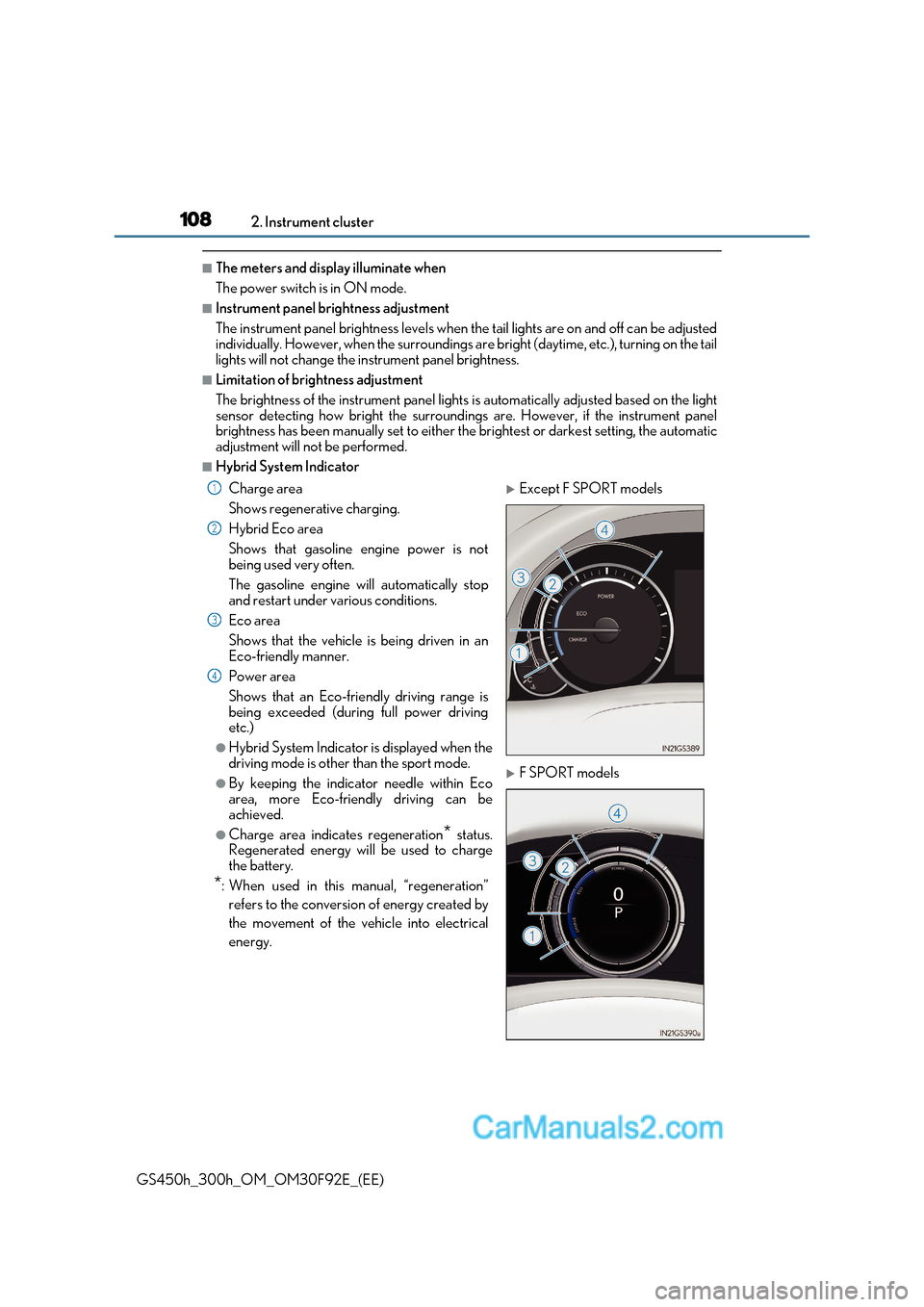
■Hybrid System Indicator
Charge area
Shows regenerative charging.
Hybrid Eco area
Shows that gasoline engine power is not
being used very often.
The gasoline engine will automatically stop
and restart under various conditions.
Eco area
Shows that the vehicle is being driven in an
Eco-friendly manner.
Power area
Shows that an Eco-friendly driving range is
being exceeded (during full power driving
etc.)
●Hybrid System Indicator is displayed when the
driving mode is other than the sport mode.
●By keeping the indicator needle within Eco
area, more Eco-friendly driving can be
achieved.
●Charge area indicates regeneration * status.
Regenerated energy will be used to charge
the battery.
* : When used in this manual, “regeneration”
refers to the conversion of energy created by
the movement of the vehicle into electrical
energy.
Except F SPORT models
F SPORT models
1
2
3
4
Page 115 of 600
115
2. Instrument cluster
2
Instrument cluster
GS450h_300h_OM_OM30F92E_(EE)
■Display off
A blank screen is displayed
* 1
: Displayed when the item is set in “Drive Info 1”, “Drive Info 2” or “Drive Info 3”.
( P. 562)
* 2
: The function can be reset by pressing the of the meter control sw itches for longer
than 1 second when the item to reset is displayed.
If there is more than one item that can be reset, the item selection screen will appear.
The settings of the following items can be changed, refer to P. 561 For functions that can be enabled or disabled, the function switches between on and
off each time is pressed.
■ (Lane-Keeping Assist) (if equipped) ( P. 282)
■ (Pre-Crash Safety system) (if equipped) ( P. 270)
■ (Adaptive Front-lighting System) (if equipped) ( P. 239)
■ (Blind Spot Monitor) (if equipped) ( P. 314)
■
Select to turn the speed warning on and off, or to change the speed at which
the speed warning is displayed.
■ (Road Sign Assi st) (if equipped) ( P. 291)
■
Select to set the display mode of the clock.
■
● Oil Maintenance ( P. 408)
● TPMS (Tire pressure warning system) (if equipped) ( P. 418)
Settings display
Page 128 of 600
1282. Instrument cluster
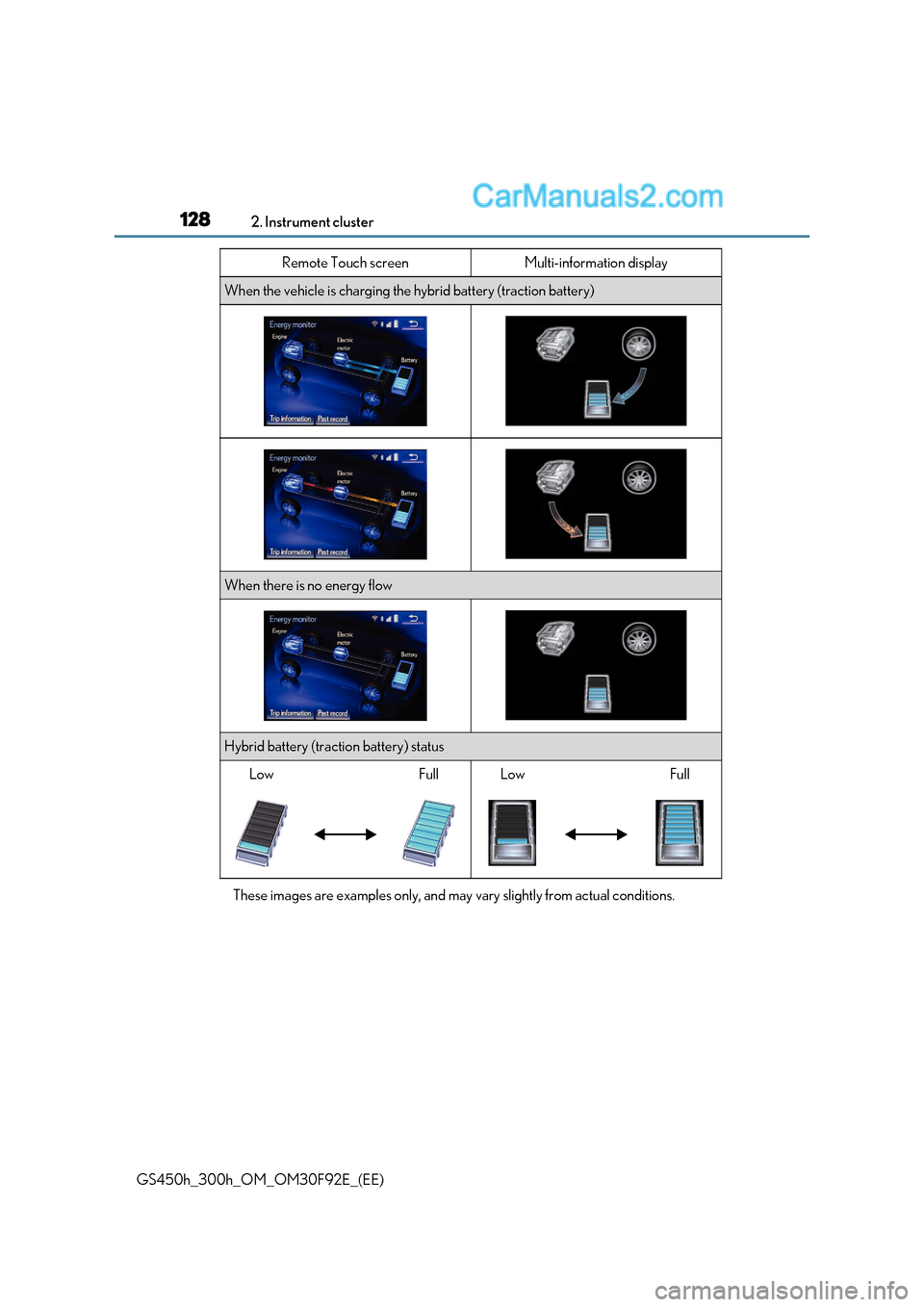
GS450h_300h_OM_OM30F92E_(EE) These images are examples only, and may
vary slightly from actual conditions.
When the vehicle is charging the hybrid battery (traction battery)
When there is no energy flow
Hybrid battery (traction battery) status
LowFullLowFull
Remote Touch screenMulti-information display
Page 129 of 600
129
2. Instrument cluster
2
Instrument cluster
GS450h_300h_OM_OM30F92E_(EE) Press the “MENU” button on the Remote Touch, then select on the “Menu”
screen.
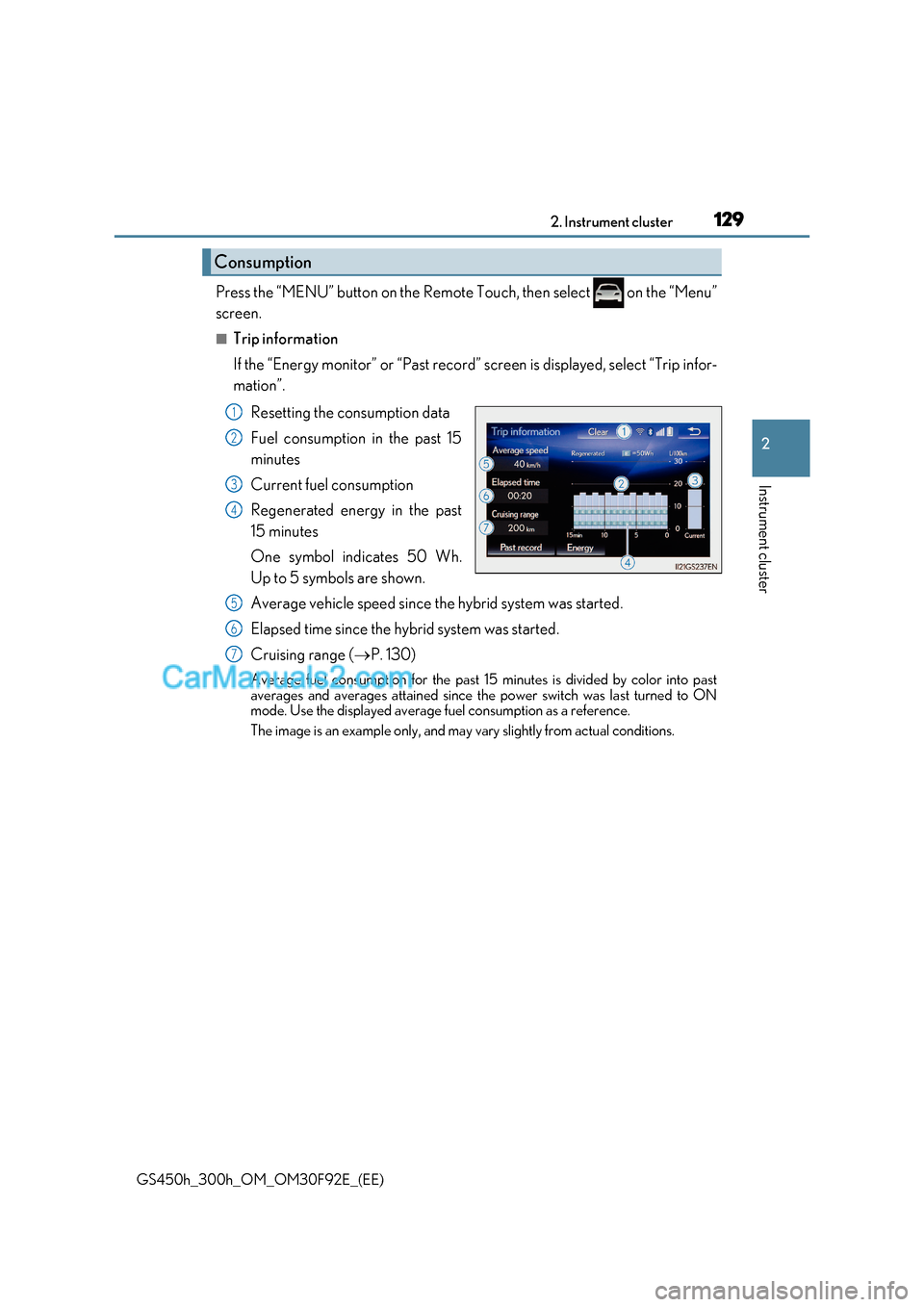
■Trip information
If the “Energy monitor” or “Past record” screen is displayed, select “Trip
infor-
mation”.
Resetting the consumption data
Fuel consumption in the past 15
minutes
Current fuel consumption
Regenerated energy in the past
15 minutes
One symbol indicates 50 Wh.
Up to 5 symbols are shown.
Average vehicle speed since the hybrid system was started.
Elapsed time since the hybrid system was started.
Cruising range ( P. 130)
Average fuel consumption for the past 15 minutes is divided by color into past
averages and averages attained since the power switch was last turned to ON
mode. Use the displayed average fuel consumption as a reference.
The image is an example only, and may vary slightly from actual conditions.
Consumption
1
2
3
4
5
6
7
Page 130 of 600
1302. Instrument cluster
GS450h_300h_OM_OM30F92E_(EE)
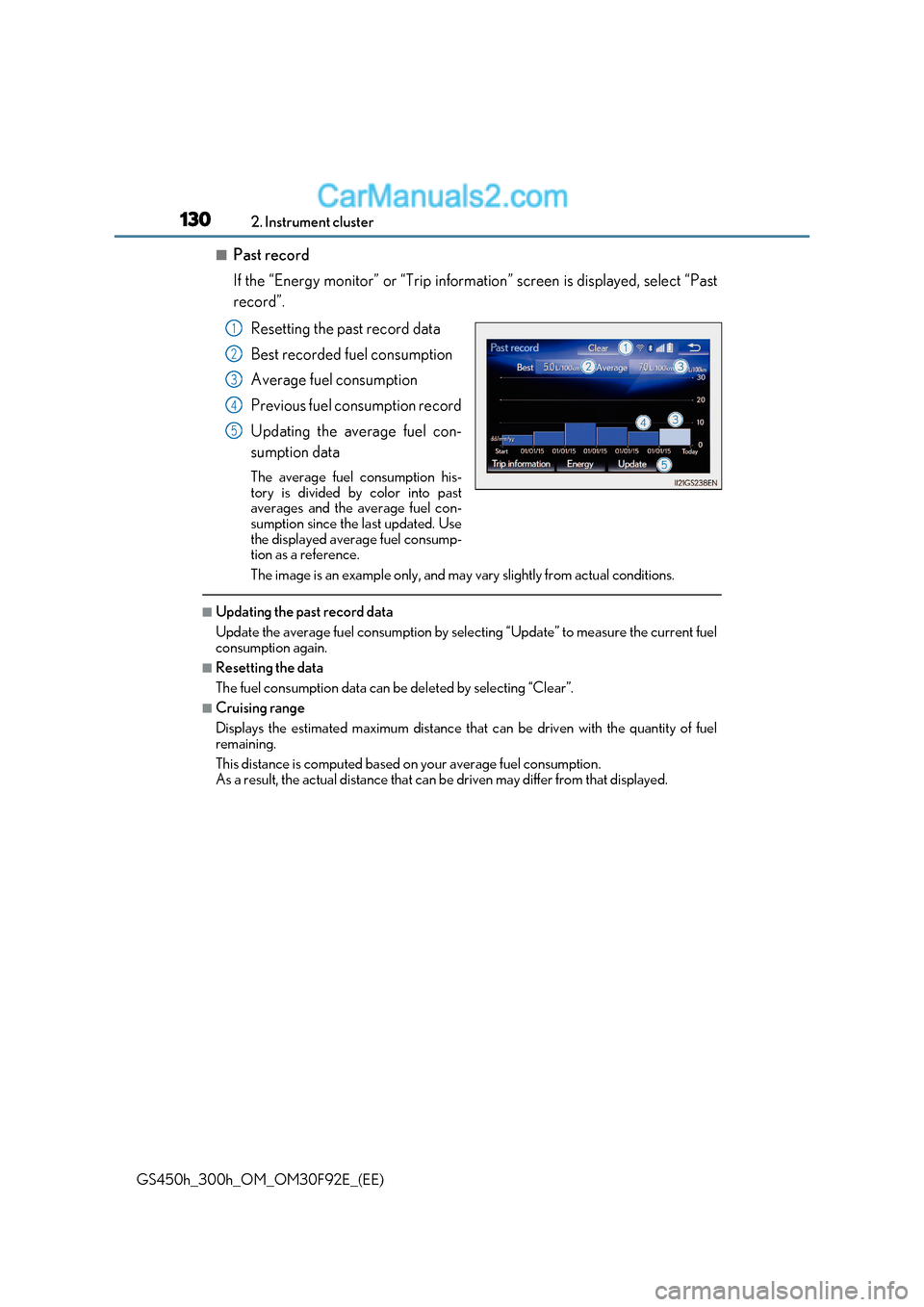
■Past record
If the “Energy monitor” or “Trip informat ion” screen is displayed, select “Past
record”.
Resetting the past record data
Best recorded fuel consumption
Average fuel consumption
Previous fuel consumption record
Updating the average fuel con-
sumption data
The average fuel consumption his-
tory is divided by color into past
averages and the average fuel con-
sumption since the last updated. Use
the displayed average fuel consump-
tion as a reference.
The image is an example only, and may vary slightly from actual conditions.
■Updating the past record data
Update the average fuel consumption by selecting “Update” to measure the current fuel
consumption again.
■Resetting the data
The fuel consumption data can be deleted by selecting “Clear”.
■Cruising range
Displays the estimated maximum distance that can be driven with the quantity of fuel remaining.
This distance is computed based on your average fuel consumption.
As a result, the actual distance that can be driven may differ from that displayed.
1
2
3
4
5
Page 132 of 600
1322. Instrument cluster
GS450h_300h_OM_OM30F92E_(EE)
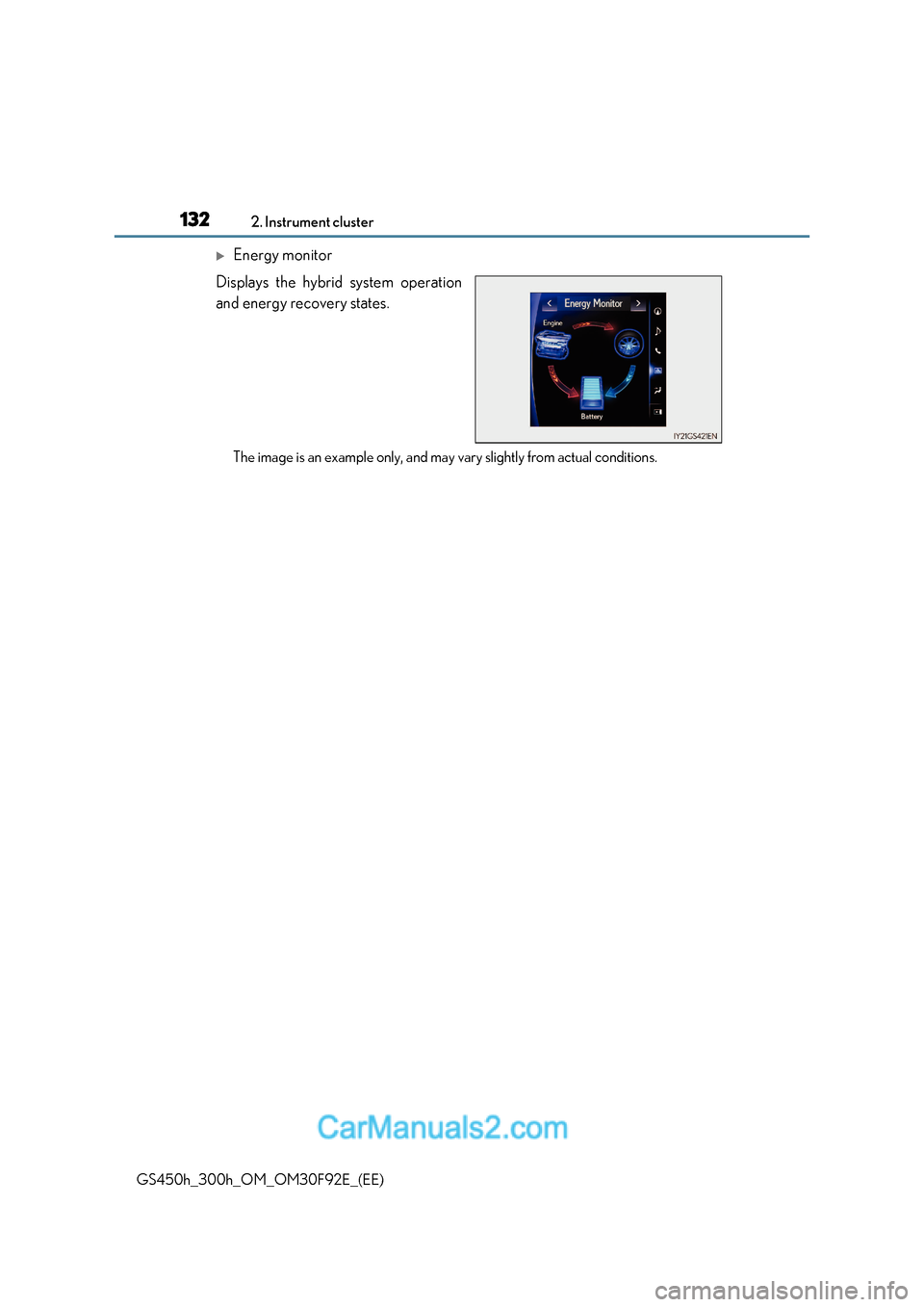
Energy monitor
Displays the hybrid system operation
and energy recovery states.
The image is an example only, and may vary slightly from actual conditions.
Page 138 of 600
1383-1. Key information
GS450h_300h_OM_OM30F92E_(EE)
NOTICE
■Handling the card key (if equipped)
●Do not apply excess force when inserting the mechanical key into th e card key. Doing
so may damage the card key.
●If the battery or card key terminals get wet, the battery may corrode.
If the key is dropped into water, or if drinking water etc. is spilled on the key, immedi-
ately remove the battery cover and wipe the battery and terminals. (To remove the
battery cover, lightly grasp and pull it.) If the battery is corroded, have any authorized
Lexus retailer or Lexus authorized repairer , or any reliable repairer replace the bat-
tery.
●Do not crush the battery cover or use a screwdriver to remove the battery cover.
Forcibly removing the battery co ver may bend or damage the key.
●If the battery cover is frequently removed, the battery cover may beco me loose.
●When installing the battery, make sure to check the direction of the battery.
Installing the battery in the wrong direction may cause the battery to deplete rapidly.
●The surface of the card key may be damaged, or its coating may peel off in the follow-
ing situations:
Page 140 of 600
1403-2. Opening, closing and locking the doors and trunk
GS450h_300h_OM_OM30F92E_(EE)
■Operation signals
The emergency flashers flash to indicate that the doors have been locked/unlocked.
(Locked: once; Unlocked: twice)
■Security feature
If a door is not opened within approximately 30 seconds after the vehicle is unlocked, the
security feature automatically locks the vehicle again.
■Welcome light illumination control
The front position, tail and license plate lights automatically turn on at night when the
doors are unlocked using the entry function or wireless remote control if the light switch
is in the “AUTO” position.
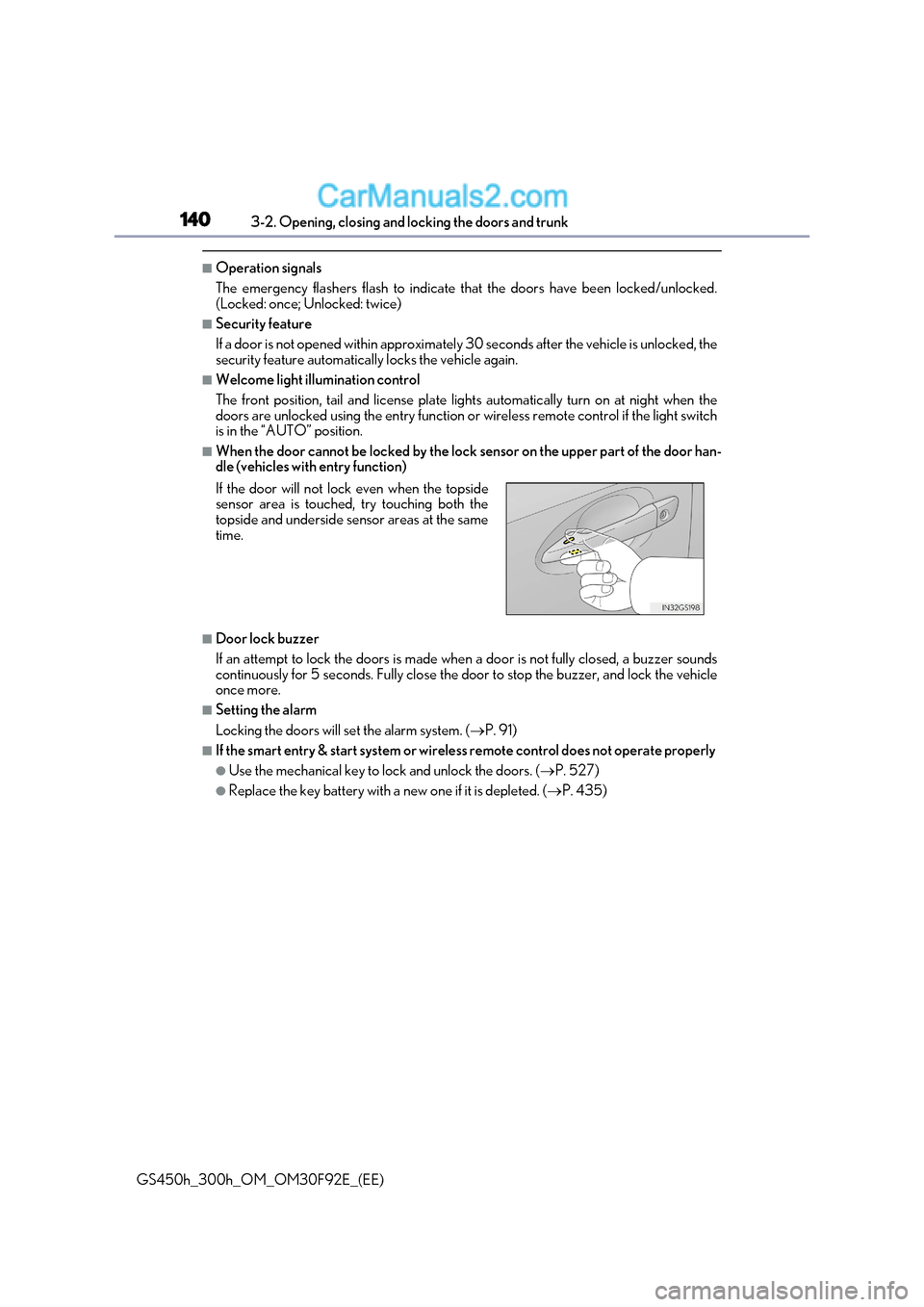
■When the door cannot be locked by the lock sensor on the upper part of the door han-
dle (vehicles with entry function)
■Door lock buzzer
If an attempt to lock the doors is made when a door is not fully closed, a buzzer sounds
continuously for 5 seconds. Fully close the door to stop the buzzer, and lock the vehicle once more.
■Setting the alarm
Locking the doors will set the alarm system. ( P. 91)
■If the smart entry & start system or wireless remote control does not operate properly
●Use the mechanical key to lock and unlock the doors. ( P. 527)
●Replace the key battery with a new one if it is depleted. (P. 435)
If the door will not lock even when the topside
sensor area is touched, try touching both the
topside and underside sensor areas at the same
time.