audio Lexus GS300h 2017 Owner's Manual
[x] Cancel search | Manufacturer: LEXUS, Model Year: 2017, Model line: GS300h, Model: Lexus GS300h 2017Pages: 600, PDF Size: 58.17 MB
Page 17 of 600
17
Pictorial index
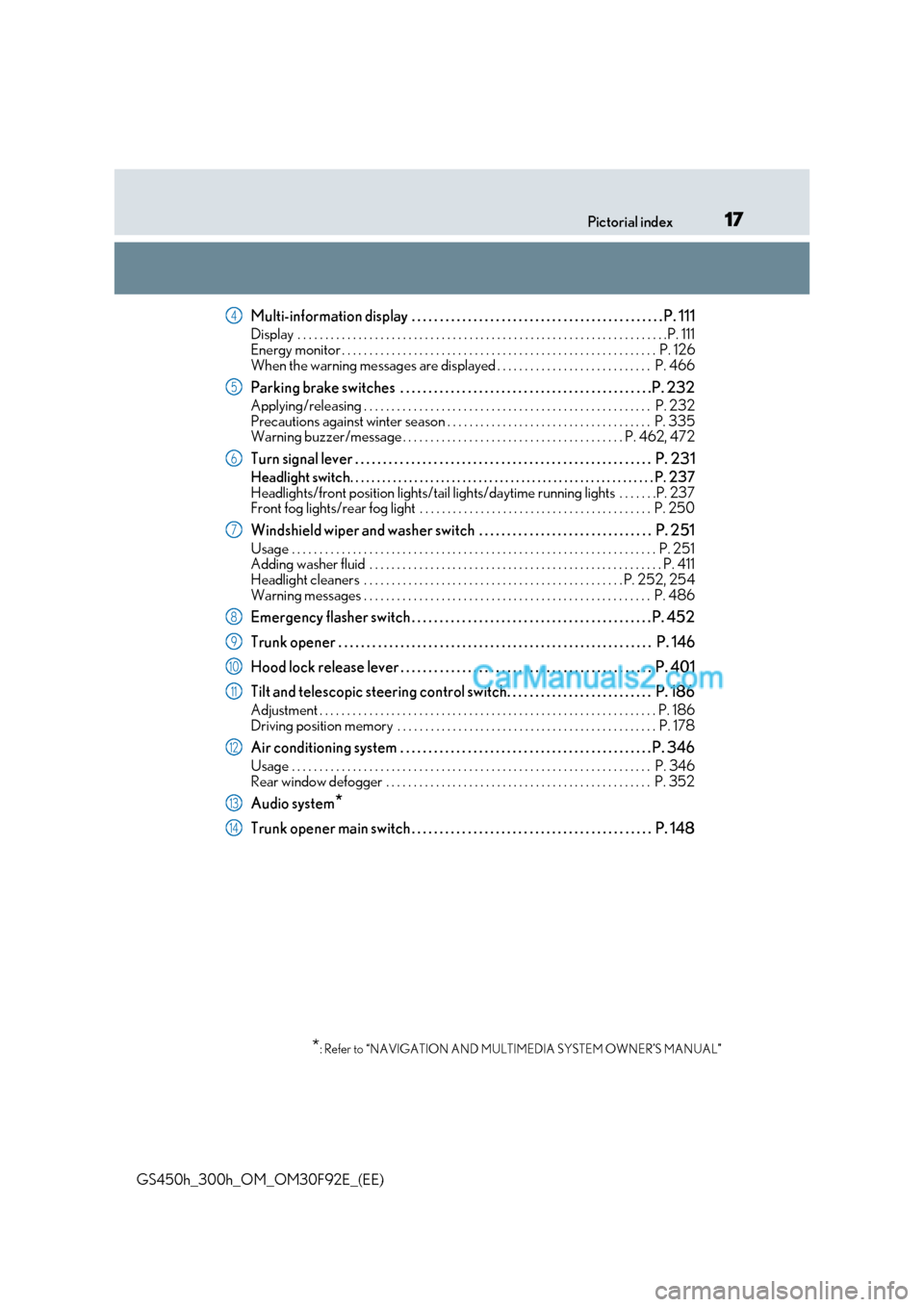
GS450h_300h_OM_OM30F92E_(EE) Multi-information display . . . . . . . . . . . . . . . . . . . . . . . . . . . . . . . . . . . . . . . . . . . . . P. 111
Display . . . . . . . . . . . . . . . . . . . . . . . . . . . . . . . . . . . . . . . . . . . . . . . . . . . . . . . . . . . .
. . . . . . .P. 111
Energy monitor . . . . . . . . . . . . . . . . . . . . . . . . . . . . . . . . . . . . . . . . . . . . . . . . . . . . . . . . . P. 126
When the warning messages are displayed . . . . . . . . . . . . . . . . . . . . . . . . . . . . P. 466
Parking brake switches . . . . . . . . . . . . . . . . . . . . . . . . . . . . . . . . . . . . . . . . . . . . .P. 232
Applying/releasing . . . . . . . . . . . . . . . . . . . . . . . . . . . . . . . . . . . . . . . . . . . . . . . . . . . . P. 23 2
Precautions against winter season . . . . . . . . . . . . . . . . . . . . . . . . . . . . . . . . . . . . . P. 335
Warning buzzer/message . . . . . . . . . . . . . . . . . . . . . . . . . . . . . . . . . . . . . . . . P. 462, 472
Turn signal lever . . . . . . . . . . . . . . . . . . . . . . . . . . . . . . . . . . . . . . . . . . . . . . . . . . . . . P. 231
Headlight switch. . . . . . . . . . . . . . . . . . . . . . . . . . . . . . . . . . . . . . . . . . . . . . . . . . . . . . . . .P. 237
Headlights/front position lights/tail lights/ daytime running lights . . . . . . .P. 237
Front fog lights/rear fog light . . . . . . . . . . . . . . . . . . . . . . . . . . . . . . . . . . . . . . . . . . P. 250
Windshield wiper and washer switch . . . . . . . . . . . . . . . . . . . . . . . . . . . . . . . P. 251
Usage . . . . . . . . . . . . . . . . . . . . . . . . . . . . . . . . . . . . . . . . . . . . . . . . . . . . . . . . . . . . . . . . . . P. 251
Adding washer fluid . . . . . . . . . . . . . . . . . . . . . . . . . . . . . . . . . . . . . . . . . . . . . . . . . . . . . P. 411
Headlight cleaners . . . . . . . . . . . . . . . . . . . . . . . . . . . . . . . . . . . . . . . . . . . . . . . P. 252, 254
Warning messages . . . . . . . . . . . . . . . . . . . . . . . . . . . . . . . . . . . . . . . . . . . . . . . . . . . . P. 486
Emergency flasher switch . . . . . . . . . . . . . . . . . . . . . . . . . . . . . . . . . . . . . . . . . . . P. 452
Trunk opener . . . . . . . . . . . . . . . . . . . . . . . . . . . . . . . . . . . . . . . . . . . . . . . . . . . . . . . . P. 146
Hood lock release lever . . . . . . . . . . . . . . . . . . . . . . . . . . . . . . . . . . . . . . . . . . . . . P. 401
Tilt and telescopic steering control switch. . . . . . . . . . . . . . . . . . . . . . . . . . P. 186
Adjustment . . . . . . . . . . . . . . . . . . . . . . . . . . . . . . . . . . . . . . . . . . . . . . . . . . . . . . . . . . . . . P. 186
Driving position memory . . . . . . . . . . . . . . . . . . . . . . . . . . . . . . . . . . . . . . . . . . . . . . . P. 178
Air conditioning system . . . . . . . . . . . . . . . . . . . . . . . . . . . . . . . . . . . . . . . . . . . . . P. 346
Usage . . . . . . . . . . . . . . . . . . . . . . . . . . . . . . . . . . . . . . . . . . . . . . . . . . . . . . . . . . . . . . . . . P. 346
Rear window defogger . . . . . . . . . . . . . . . . . . . . . . . . . . . . . . . . . . . . . . . . . . . . . . . . P. 352
Audio system *
Trunk opener main switch . . . . . . . . . . . . . . . . . . . . . . . . . . . . . . . . . . . . . . . . . . . P. 148
*: Refer to “NAVIGATION AND MULTIMEDIA SYSTEM OWNER’S MANUAL”
4
5
6
7
8
9
10
11
12
13
14
Page 20 of 600
20Pictorial index
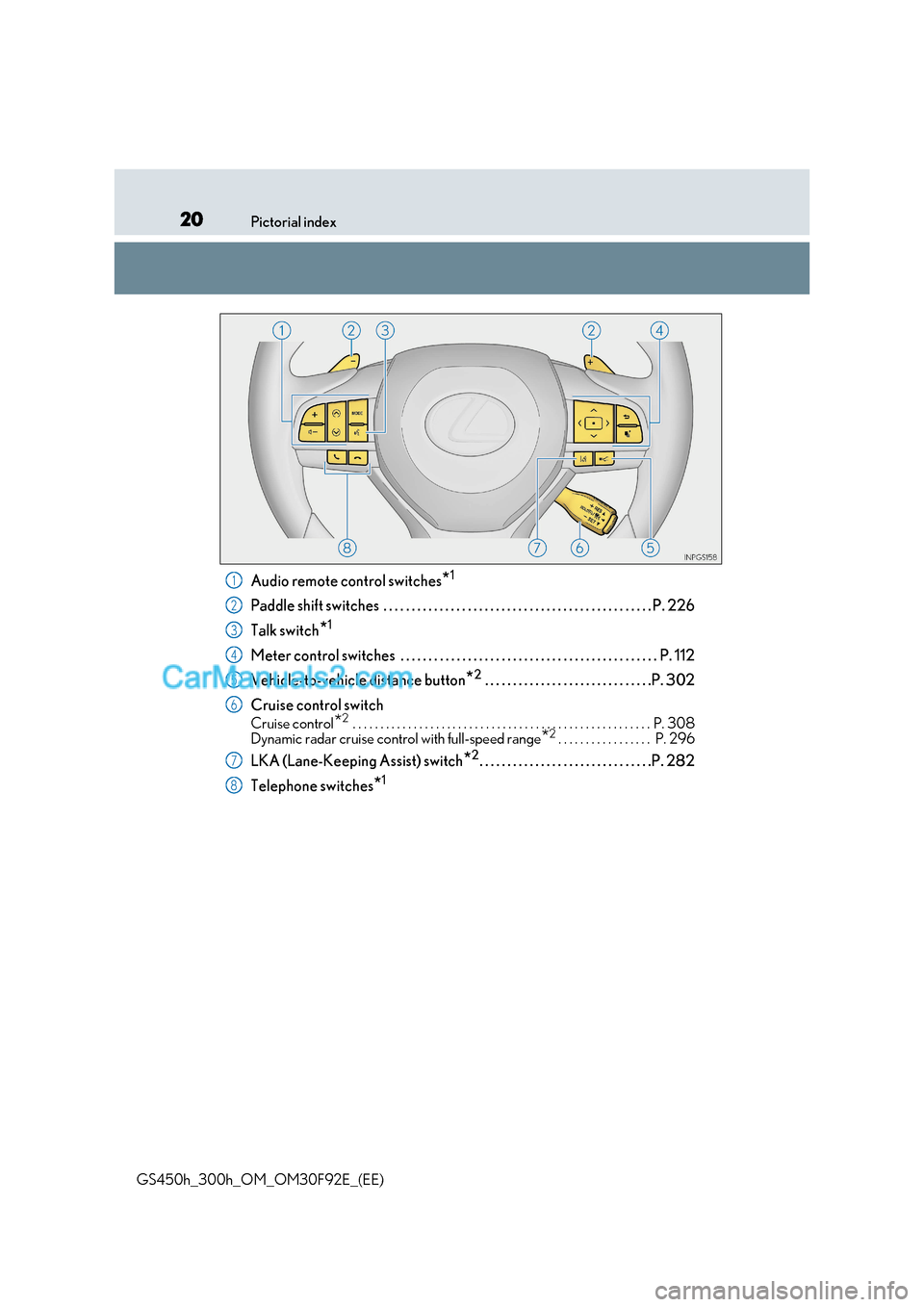
GS450h_300h_OM_OM30F92E_(EE) Audio remote control switches
*1
Paddle shift switches . . . . . . . . . . . . . . . . . . . . . . . . . . . . . . . . . . . . . . . . . . . . . . . . P. 226
Talk switch *1
Meter control switches . . . . . . . . . . . . . . . . . . . . . . . . . . . . . . . . . . . . . . . . . . . . . . P. 112
Vehicle-to-vehicle distance button *2
. . . . . . . . . . . . . . . . . . . . . . . . . . . . . .P. 302
Cruise control switch
Cruise control *2
. . . . . . . . . . . . . . . . . . . . . . . . . . . . . . . . . . . . . . . . . . . . . . . . . . . . . . P. 308
Dynamic radar cruise cont rol with full-speed range*2
. . . . . . . . . . . . . . . . . P. 296
LKA (Lane-Keeping Assist) switch *2
. . . . . . . . . . . . . . . . . . . . . . . . . . . . . . .P. 282
Telephone switches *1
1
2
3
4
5
6
7
8
Page 25 of 600
25
Pictorial index
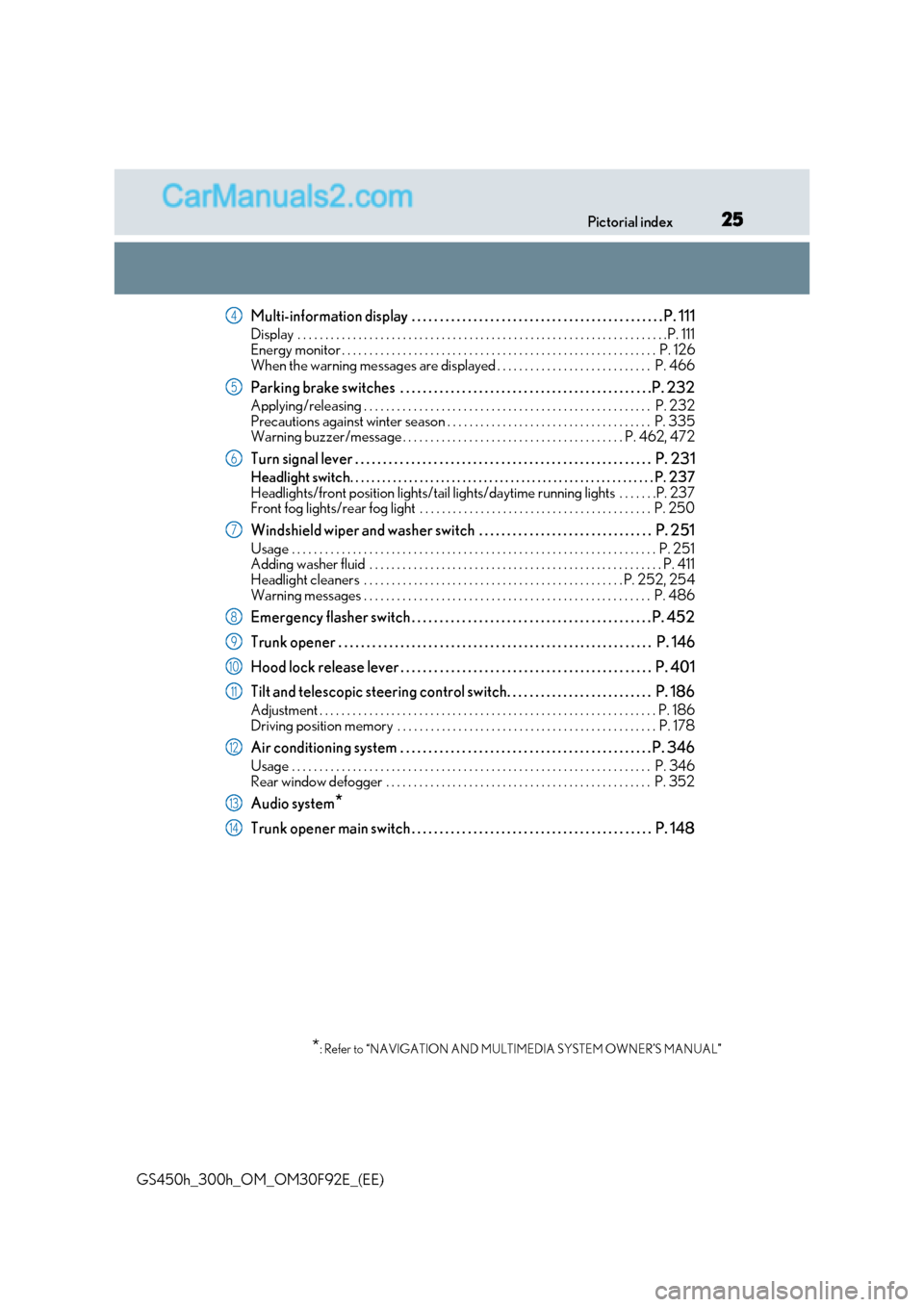
GS450h_300h_OM_OM30F92E_(EE) Multi-information display . . . . . . . . . . . . . . . . . . . . . . . . . . . . . . . . . . . . . . . . . . . . . P. 111
Display . . . . . . . . . . . . . . . . . . . . . . . . . . . . . . . . . . . . . . . . . . . . . . . . . . . . . . . . . . . .
. . . . . . .P. 111
Energy monitor . . . . . . . . . . . . . . . . . . . . . . . . . . . . . . . . . . . . . . . . . . . . . . . . . . . . . . . . . P. 126
When the warning messages are displayed . . . . . . . . . . . . . . . . . . . . . . . . . . . . P. 466
Parking brake switches . . . . . . . . . . . . . . . . . . . . . . . . . . . . . . . . . . . . . . . . . . . . .P. 232
Applying/releasing . . . . . . . . . . . . . . . . . . . . . . . . . . . . . . . . . . . . . . . . . . . . . . . . . . . . P. 23 2
Precautions against winter season . . . . . . . . . . . . . . . . . . . . . . . . . . . . . . . . . . . . . P. 335
Warning buzzer/message . . . . . . . . . . . . . . . . . . . . . . . . . . . . . . . . . . . . . . . . P. 462, 472
Turn signal lever . . . . . . . . . . . . . . . . . . . . . . . . . . . . . . . . . . . . . . . . . . . . . . . . . . . . . P. 231
Headlight switch. . . . . . . . . . . . . . . . . . . . . . . . . . . . . . . . . . . . . . . . . . . . . . . . . . . . . . . . .P. 237
Headlights/front position lights/tail lights/ daytime running lights . . . . . . .P. 237
Front fog lights/rear fog light . . . . . . . . . . . . . . . . . . . . . . . . . . . . . . . . . . . . . . . . . . P. 250
Windshield wiper and washer switch . . . . . . . . . . . . . . . . . . . . . . . . . . . . . . . P. 251
Usage . . . . . . . . . . . . . . . . . . . . . . . . . . . . . . . . . . . . . . . . . . . . . . . . . . . . . . . . . . . . . . . . . . P. 251
Adding washer fluid . . . . . . . . . . . . . . . . . . . . . . . . . . . . . . . . . . . . . . . . . . . . . . . . . . . . . P. 411
Headlight cleaners . . . . . . . . . . . . . . . . . . . . . . . . . . . . . . . . . . . . . . . . . . . . . . . P. 252, 254
Warning messages . . . . . . . . . . . . . . . . . . . . . . . . . . . . . . . . . . . . . . . . . . . . . . . . . . . . P. 486
Emergency flasher switch . . . . . . . . . . . . . . . . . . . . . . . . . . . . . . . . . . . . . . . . . . . P. 452
Trunk opener . . . . . . . . . . . . . . . . . . . . . . . . . . . . . . . . . . . . . . . . . . . . . . . . . . . . . . . . P. 146
Hood lock release lever . . . . . . . . . . . . . . . . . . . . . . . . . . . . . . . . . . . . . . . . . . . . . P. 401
Tilt and telescopic steering control switch. . . . . . . . . . . . . . . . . . . . . . . . . . P. 186
Adjustment . . . . . . . . . . . . . . . . . . . . . . . . . . . . . . . . . . . . . . . . . . . . . . . . . . . . . . . . . . . . . P. 186
Driving position memory . . . . . . . . . . . . . . . . . . . . . . . . . . . . . . . . . . . . . . . . . . . . . . . P. 178
Air conditioning system . . . . . . . . . . . . . . . . . . . . . . . . . . . . . . . . . . . . . . . . . . . . . P. 346
Usage . . . . . . . . . . . . . . . . . . . . . . . . . . . . . . . . . . . . . . . . . . . . . . . . . . . . . . . . . . . . . . . . . P. 346
Rear window defogger . . . . . . . . . . . . . . . . . . . . . . . . . . . . . . . . . . . . . . . . . . . . . . . . P. 352
Audio system *
Trunk opener main switch . . . . . . . . . . . . . . . . . . . . . . . . . . . . . . . . . . . . . . . . . . . P. 148
*: Refer to “NAVIGATION AND MULTIMEDIA SYSTEM OWNER’S MANUAL”
4
5
6
7
8
9
10
11
12
13
14
Page 28 of 600
28Pictorial index
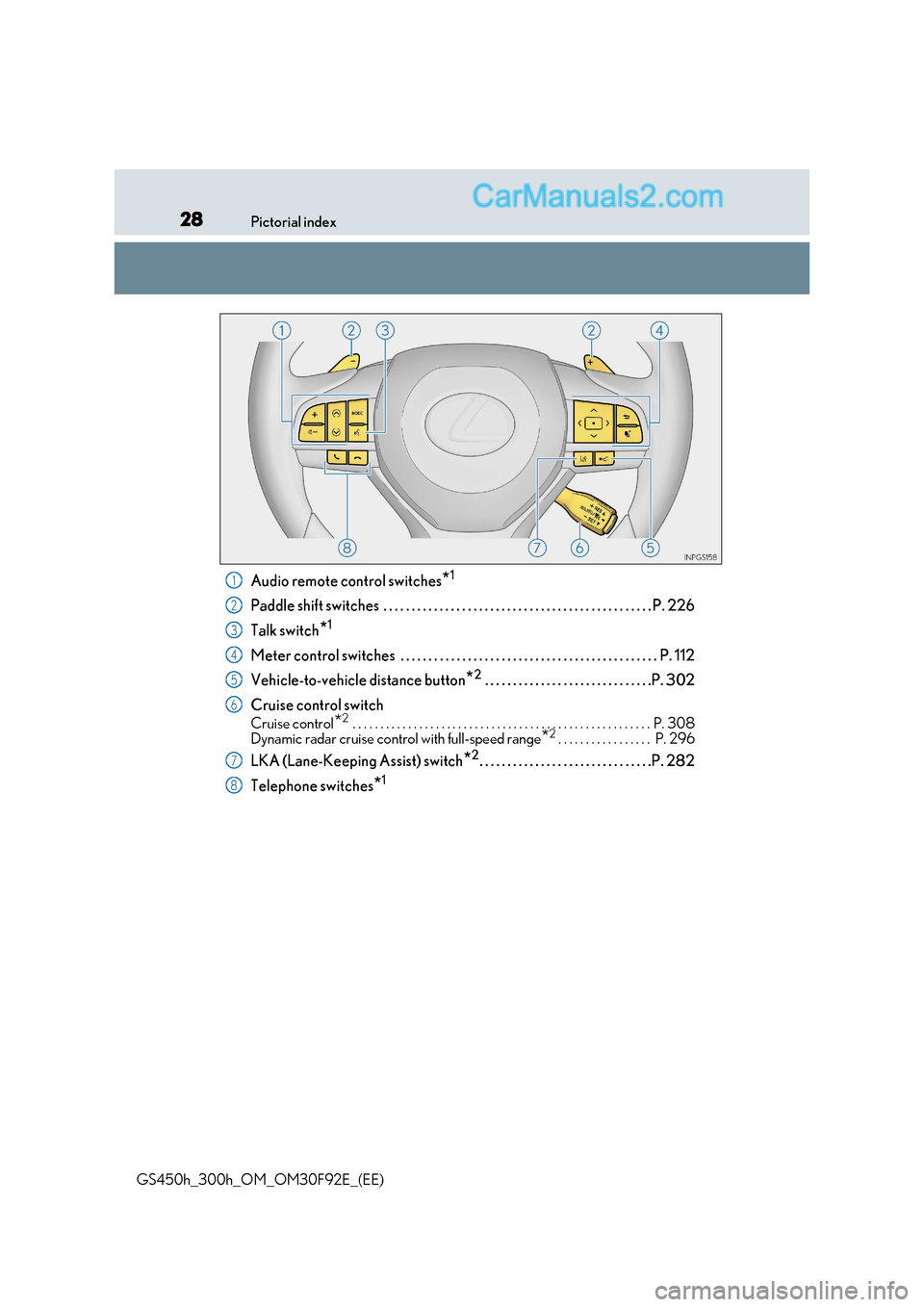
GS450h_300h_OM_OM30F92E_(EE) Audio remote control switches
*1
Paddle shift switches . . . . . . . . . . . . . . . . . . . . . . . . . . . . . . . . . . . . . . . . . . . . . . . . P. 226
Talk switch *1
Meter control switches . . . . . . . . . . . . . . . . . . . . . . . . . . . . . . . . . . . . . . . . . . . . . . P. 112
Vehicle-to-vehicle distance button *2
. . . . . . . . . . . . . . . . . . . . . . . . . . . . . .P. 302
Cruise control switch
Cruise control *2
. . . . . . . . . . . . . . . . . . . . . . . . . . . . . . . . . . . . . . . . . . . . . . . . . . . . . . P. 308
Dynamic radar cruise cont rol with full-speed range*2
. . . . . . . . . . . . . . . . . P. 296
LKA (Lane-Keeping Assist) switch *2
. . . . . . . . . . . . . . . . . . . . . . . . . . . . . . .P. 282
Telephone switches *1
1
2
3
4
5
6
7
8
Page 120 of 600
1202. Instrument cluster
GS450h_300h_OM_OM30F92E_(EE) ●
Vehicle speed
● Hybrid System Indicator ( P. 123)
● Tachometer
● Shift position and shift range
Displays the selected shift position or selected shift range ( P. 224)
● Road signs recognized by the RS A (Road Sign Assist) (if equipped)
( P. 291)
● Audio display *
Displays audio information for approximat ely 3 seconds when the audio system is
operated
● Route guidance display (vehicles with navigation system) ( P. 123)
When approaching an intersection while the navigation system is giving route guid-
ance, an arrow will automatically be displa yed to indicate the direction of travel.
● Lane departure warning display (LKA [Lane-Keeping Assist])
(if equipped) ( P. 467)
● Approach warning display (dynamic radar cruise control with full-speed
range) (if equipped) ( P. 467)
● Pre-crash warning message (PCS [Pre-Crash Safety system])
(if equipped) ( P. 466)
* : The default setting is off
Head-up display contents
Page 121 of 600
121
2. Instrument cluster
2
Instrument cluster
GS450h_300h_OM_OM30F92E_(EE)
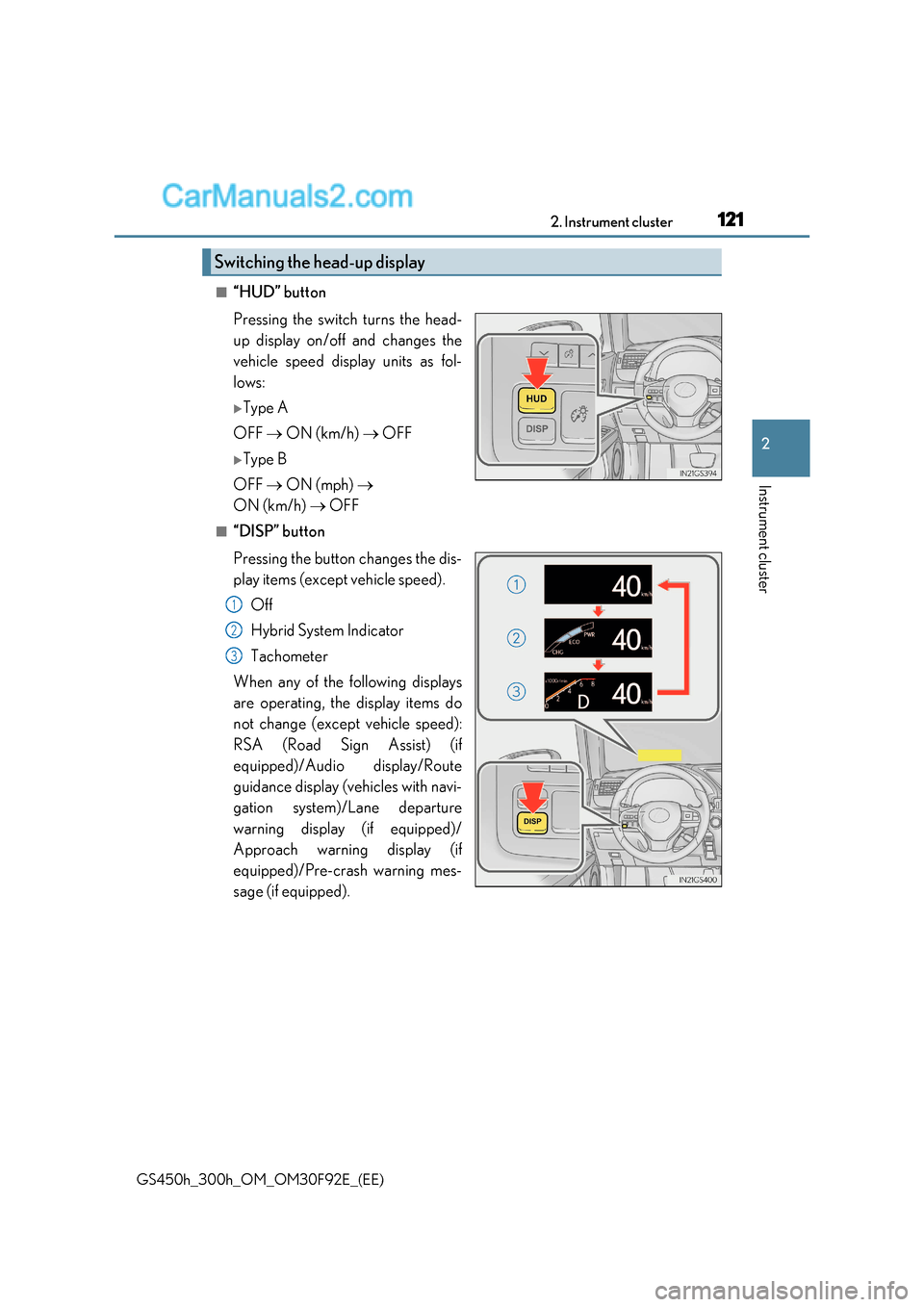
■“HUD” button
Pressing the switch turns the head-
up display on/off and changes the
vehicle speed display units as fol-
lows:
Type A
OFF ON (km/h) OFF
Type B
OFF ON (mph)
ON (km/h) OFF
■“DISP” button
Pressing the button changes the dis-
play items (except vehicle speed).
Off
Hybrid System Indicator
Tachometer
When any of the following displays
are operating, the display items do
not change (except vehicle speed):
RSA (Road Sign Assist) (if
equipped)/Audio display/Route
guidance display (vehicles with navi-
gation system)/Lane departure
warning display (if equipped)/
Approach warning display (if
equipped)/Pre-crash warning mes-
sage (if equipped).
Switching the head-up display
1
2
3
Page 124 of 600
1242. Instrument cluster
GS450h_300h_OM_OM30F92E_(EE) Display of the following screens can be switched on or off. ●
Audio display
● Route guidance display (vehicles with navigation system)
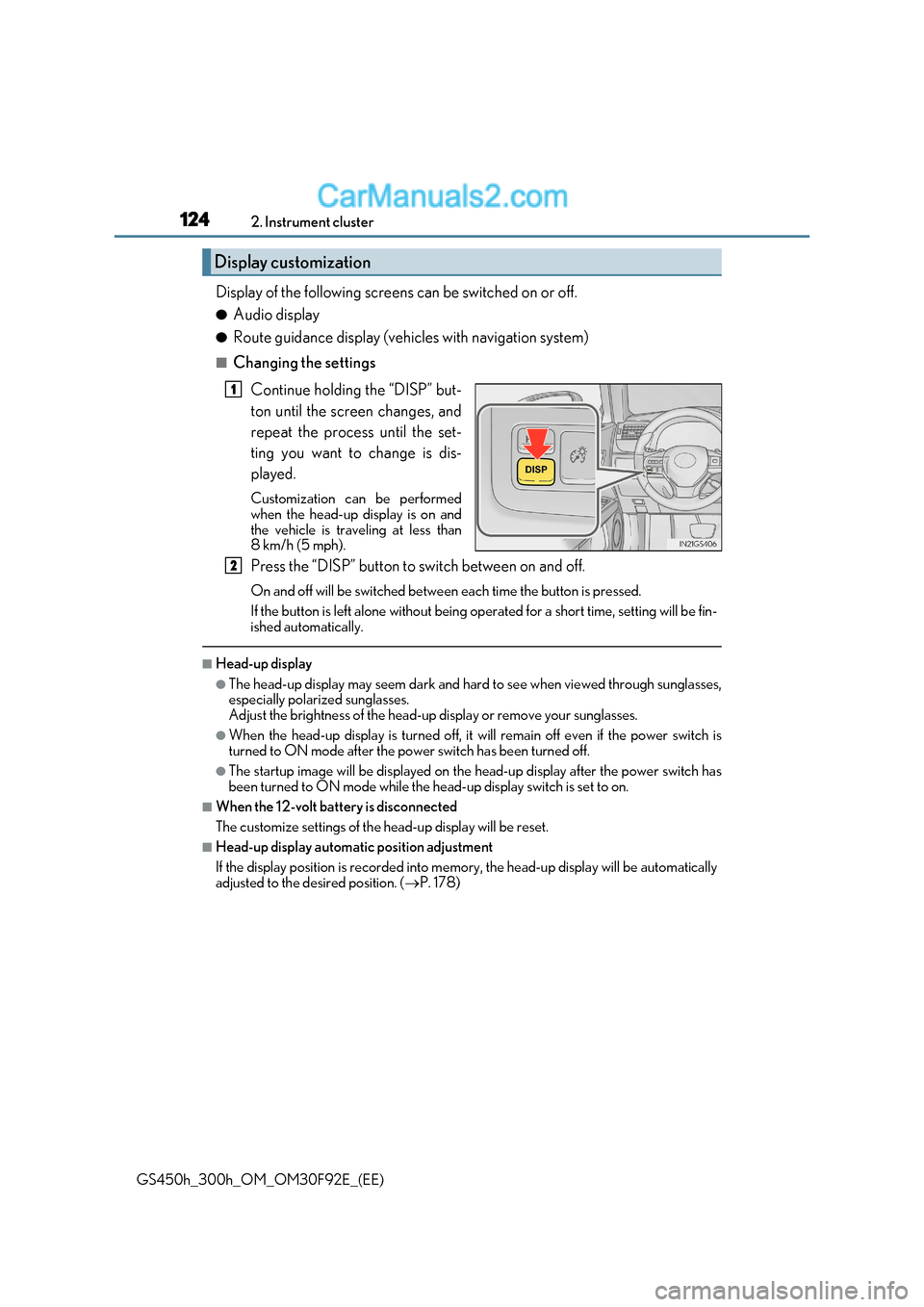
■Changing the settings
Continue holding the “DISP” but-
ton until the screen changes, and
repeat the process until the set-
ting you want to change is dis-
played.
Customization can be performed
when the head-up display is on and
the vehicle is traveling at less than
8 km/h (5 mph).
Press the “DISP” button to switch between on and off.
On and off will be switched between each time the button is pressed.
If the button is left alone without being operated for a short time, setting will be fin-
ished automatically.
■Head-up display
●The head-up display may seem dark and hard to see when viewed through sunglasses,
especially polarized sunglasses.
Adjust the brightness of the head-up display or remove your sunglasses.
●When the head-up display is turned off, it will remain off even if the power switch is
turned to ON mode after the power switch has been turned off.
●The startup image will be displayed on the head-up display after the power switch has
been turned to ON mode while the head-up display switch is set to on.
■When the 12-volt battery is disconnected
The customize settings of the head-up display will be reset.
■Head-up display automatic position adjustment
If the display position is recorded into me mory, the head-up display will be automatically
adjusted to the desired position. ( P. 178)
Display customization
1
2
Page 137 of 600
137
3-1. Key information
3
Operation of each component
GS450h_300h_OM_OM30F92E_(EE)
NOTICE
■To prevent key damage
●Do not drop the keys, subject them to strong shocks or bend them.
●Do not expose the keys to high temp eratures for long periods of time.
●Do not get the keys wet or wash them in an ultrasonic washer etc.
●Do not attach metallic or magnetic materials to the keys or place the keys close to
such materials.
●Do not disassemble the keys.
●Do not attach a sticker or anything else to the surface of the electronic key.
●Do not place the keys near objects that produce magnetic fields, such as TVs, audio
systems and induction cookers.
●Do not place the keys near medical electrical equipment such as low-frequency ther-
apy equipment or microwave therapy equipment, and do not receive medical atten-
tion with the keys on your person.
■Carrying the electronic key on your person
Carry the electronic key 10 cm (3.9 in.) or more away from electr ic appliances that are
turned on. Radio waves emitted from electric appliances wit hin 10 cm (3.9 in.) of the
electronic key may interfere with the key, causing the key to not function properly.
■In case of a smart entry & start system malfunction or other key-related problems
Take your vehicle with all the electronic keys provided with your vehicle, including the
card key, to any authorized Lexus retailer or Lexus authoriz ed repairer, or any reliable
repairer.
■When an electronic key is lost
If the electronic key remains lost, the risk of vehicle theft increases significantly. Visit
any authorized Lexus retailer or Lexus auth orized repairer, or any reliable repairer
immediately with all remaining electronic ke ys and the card key that was provided with
your vehicle.
Page 218 of 600
2184-2. Driving procedures
GS450h_300h_OM_OM30F92E_(EE) Stop the vehicle completely.
Set the parking brake (
P. 232), and shift the shift lever to P.
Press the power switch.
Release the brake pedal and check that “POWER ON” on the multi-informa-
tion display is off.
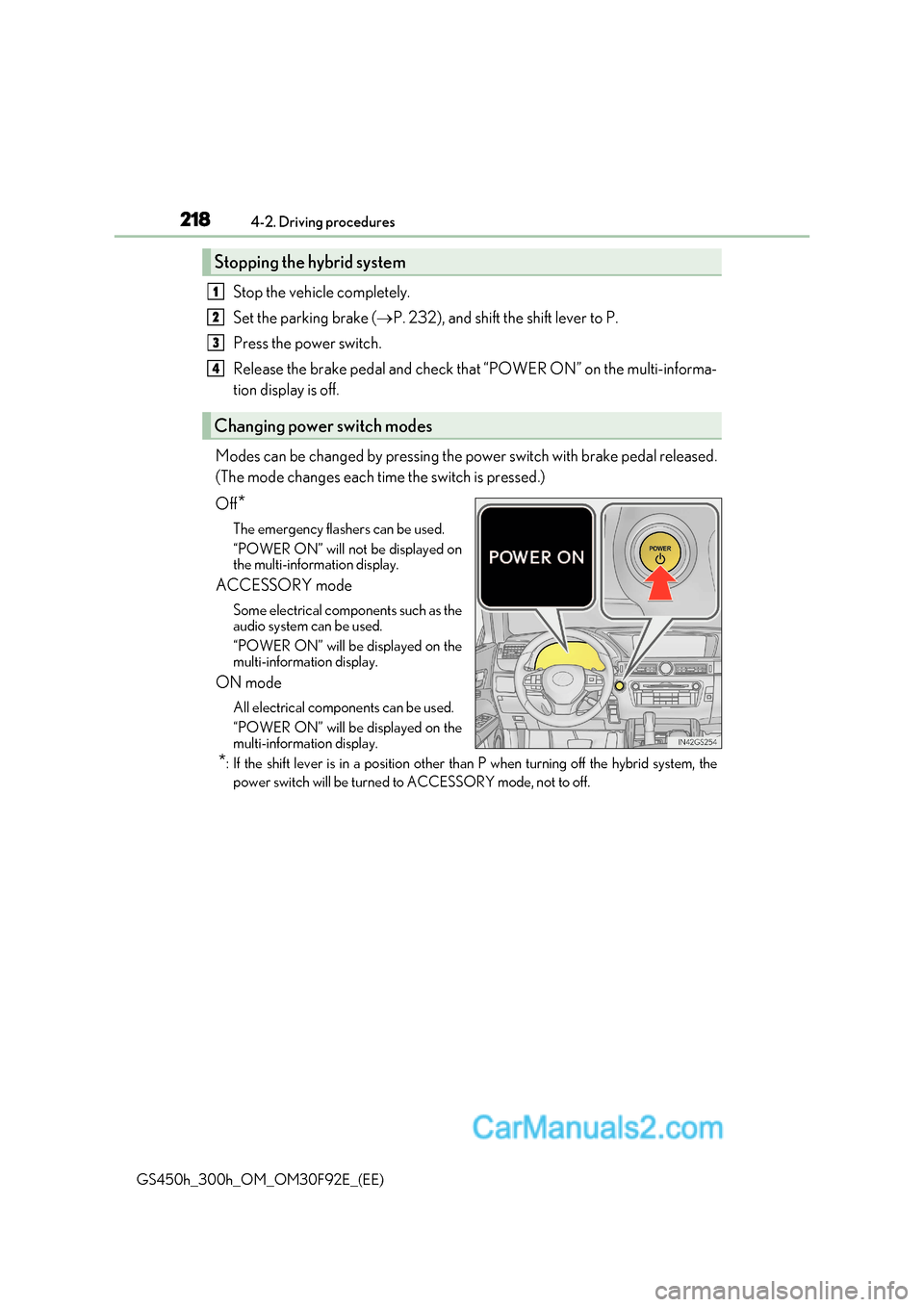
Modes can be changed by pressing the power switch with brake pedal released.
(The mode changes each time the switch is pressed.) Off *
The emergency flashers can be used.
“POWER ON” will not be displayed on
the multi-information display.
ACCESSORY mode
Some electrical components such as the
audio system can be used.
“POWER ON” will be displayed on the
multi-information display.
ON mode
All electrical components can be used.
“POWER ON” will be displayed on the
multi-information display.
* : If the shift lever is in a position other than P when turning off the hybrid system, the
power switch will be turned to ACCESSORY mode, not to off.
Stopping the hybrid system
Changing power switch modes
1
2
3
4
Page 315 of 600
315
4-5. Using the driving support systems
4
Driving
GS450h_300h_OM_OM30F92E_(EE)
■The outside rear view mirror indicators visibility
When under strong sunlight, the outside rear view mirror indicator may be difficult to
see.
■Rear Crossing Traffic Alert buzzer hearing
Rear Crossing Traffic Alert function may be difficult to hear over loud noises such as high
audio volume.
■When there is a malfunction in the Blind Spot Monitor
If a system malfunction is detected due to any of the following reasons, warning mes-
sages will be displayed: ( P. 466)
●There is a malfunction with the sensors
●The sensors have become dirty
●The outside temperature is extremely high or low
●The sensor voltage has become abnormal
■Switching the Blind Spot Monitor function and Rear Crossing Traffic Alert function on
and off
Settings can be changed from on the multi-information display (P. 111).
Press or on the meter control switch and select “BSM”.
Each time on the meter control switch is pressed, the function switches between
“On” and “Off”.
■Certification for the Blind Spot Monitor
1
2